WAP500 Product Family
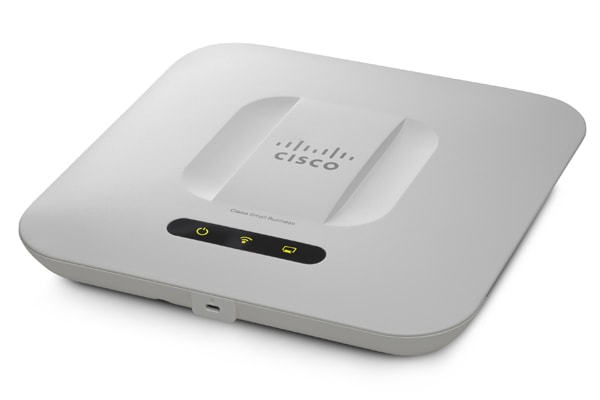
Get high-performance, highly secure connectivity
Deliver business-class, high-capacity wireless LAN and guest access services that are highly secure and reliable, without a controller. Easy to deploy and use, these access points offer 802.11ac and 802.11n wireless connectivity for indoor and outdoor environments. Get exceptional performance and coverage for mobile devices and bandwidth-heavy applications.
-
Design
-
New to Cisco Business: How to Download and Upgrade Firmware on any Device
-
Get to Know the WAP581 Wireless-AC/N Dual Radio Access Point with 2.5GbE LAN
-
Frequently Asked Questions About Management Frame Protection (MFP)
-
Getting Started on the WAP581 Wireless-AC/N Dual Radio Access Point with 2.5GbE LAN
-
Get to Know the WAP571E Wireless-ACN Dual Radio Outdoor Access Point
-
Get to Know WAP571 Wireless-AC/N Premium Dual Radio Access Point with PoE
Install and Upgrade
Configure
-
Configure Guest Web Portal Locale Table on the WAP125 or WAP581
-
Increase Customer Engagement by Configuring Purple on WAP 571/571E Devices
-
Configuring Social Media Authentication on WAP571 and WAP571E Devices
-
Configure Packet Capture to Optimize Performance on a Wireless Access Point
-
Add a Wireless Network to an Existing Wired Network using a Wireless Access Point (WAP)
-
Configure Wireless Distribution System (WDS) on the WAP571 or WAP571E Access Point
Maintain and Operate
Troubleshoot and Alerts
-
Using Wireshark on a Cisco Business WAP for Packet Analysis: Upload File
-
Flash No Longer Supported for Spectrum Analyzer WAP571 and WAP581
-
Using Wireshark on a Cisco Business WAP for Packet Analysis: Stream Directly to Wireshark
-
Verify Power over Ethernet (PoE) Power Source Standard on the WAP571 or WAP571E Access Point
-
-
Design
Cisco Tech Talk: Discover The New Features on the Cisco WAP125 and WAP581
This video will walk you through the new features on the WAP125 and WAP581 Wireless Access Points. These new features include support for Social Media Login, CloudShark and Umbrella. For additional information, visit the Cisco WAP Product Page: http://cs.co/9001ErSmP.
Cisco Tech Talk: EOS and EOL Announcements for Beginners | Understand Product Lifecycle & Support
In this Cisco Tech Talk, we break down the basics of End of Sale (EOS) and End of Life (EOL) announcements for beginners. Learn how to interpret these important product lifecycle milestones and how they impact your network planning, upgrades, and support decisions.
Cisco Tech Talk: Fast Roaming on WAP125 and WAP581
Fast roaming, also known as IEEE 802.11r or Fast BSS Transition (FT), allows a client device to roam quickly in environments implementing the WPA2 Enterprise security, by ensuring that the client device does not need to re-authenticate to the RADIUS server every time it roams from one access point to another.
Cisco Tech Talk: RV345P and WAP581
Take a quick look at the Cisco RV345P and WAP581, the ultimate office solution for your small business. To learn more, visit the Cisco Small Business Support Community: http://cs.co/6000DEvpg.
Cisco Tech Talk: The WAP581
See an overview of the Cisco WAP581 Wireless-AC Dual Radio Wave 2 Access Point with 2.5GbE LAN. To learn more, visit the Cisco Small Business WAP581 support page: http://cs.co/6004DEvKQ.
Cisco Tech Talk: Tracking Cisco Business EOS/EOL Announcements Easily
In this Cisco Tech Talk, learn how to access and interpret Cisco’s End of Sale (EOS) and End of Life (EOL) announcements for business-class products.
Compare Cisco Business Wireless Primary AP Models | CBW Access Point Buying Guide
In this Cisco Tech Talk, we compare Cisco Business Wireless (CBW) primary access point models to help you choose the right one for your small or medium business.
Understanding IP Addresses on Cisco Business Wireless Primary APs
In this edition of Cisco Tech Talk, we explain the purpose of the two different IP addresses on a Cisco Business Wireless (CBW) Primary Access Point.
Configuration
Cisco Business Wireless Access Point Groups | Simplify Wireless Network Management
In this Cisco Tech Talk, we explore how to configure and manage Access Point (AP) Groups using Cisco Business Wireless solutions.
Cisco Tech Talk: Advanced Radio Settings on Wireless Access Points
Instructions on configuring Advanced Radio Settings for smooth communications and optimal performance in Multiple Wireless Access Point Environments. To learn more, visit http://cs.co/nr030818a.
Cisco Tech Talk: Configuring Client Filter Lists on WAP125 and WAP581
Learn how to configure Client Filter Lists on Cisco Wireless Access Points. For additional support information, visit the Cisco Small Business Support Community: http://cs.co/9009DApPv.
Cisco Tech Talk: Configuring Policy Maps on WAP125 and WAP581
Learn how to configure policy maps on Cisco WAP125 and WAP581 Wireless Access Points. For additional support information, visit the Cisco Small Business Support Community: http://cs.co/9009DAEjP.
Cisco Tech Talk: How to Use Social Media for Wireless Access Points (WAP)
Cisco Wireless Access points can use third party credentials from social media to authenticate network users. Learn how to set up third party social media authentication here. For additional support visit http://cs.co/9001E5J1S.
Cisco Tech Talk: Managing User Accounts on WAP581
In this edition of Tech Talks, we’ll show how to manage user accounts on the Cisco WAP581 Wireless-AC Dual Radio Wave 2 Access Point.
Cisco Tech Talk: Securing a Business Network Using Umbrella and Cisco Small Business Access Points
Cisco Umbrella is a cloud security platform that provides the first line of defense against threats on the internet. Learn more about how it can protect your wireless network from malicious malware or ransomware here. For additional support information, visit http://cs.co/9009EdHyT.
Cisco Tech Talk: Setting up Captive Portal on Cisco Small Business Wireless Access Points
Learn how to set up Captive Portal on Cisco Small Business Wireless Access Points. For additional support information, visit the Cisco Small Business Support Community: http://cs.co/9003ErnFz.
How to Configure CBW RADIUS for AP Login | Secure Your Wireless Network
In this Cisco Tech Talk, learn how to configure RADIUS authentication for Access Point (AP) login on Cisco Business Wireless (CBW) devices. This step-by-step tutorial will guide you through securing your wireless network by ensuring only authorized devices can connect, providing enterprise-grade security.
How to Configure SSID on Cisco Business Wireless Access Points | Step-by-Step Setup
In this Cisco Tech Talk, learn how to configure an SSID on Cisco Business Wireless Access Points for optimal network performance. This video walks you through the configuration process, ensuring a seamless wireless network setup.
How to Configure WDS on Cisco WAP125 & WAP581 Access Points
In this video, we show you how to configure Wireless Distribution System (WDS) on Cisco WAP125 and WAP581 access points. Learn how WDS can help extend the coverage of your wireless network by allowing access points to wirelessly communicate with each other.
Maintain & Operate
Cisco Business Wireless Primary AP Tools | Manage and Monitor Your Network with Ease
In this Cisco Tech Talk, we explore the built-in tools available on Cisco Business Wireless (CBW) primary access points.
Cisco Tech Talk: Getting to Know Cisco Business Wireless Access Points & What's in the box
Introducing the basic features and what is included in every box.
 Feedback