350 Product Family
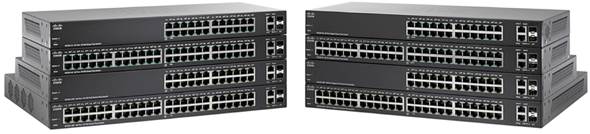
The Cisco 350 Series, part of the Cisco Small Business line of network solutions, is a portfolio of affordable managed switches that provides a reliable foundation for your business network. These switches deliver the features you need to improve the availability of your critical business applications, protect your sensitive information, and optimize your network bandwidth to deliver information and applications more effectively. Easy to set up and use, the Cisco 350 Series provides the ideal combination of affordability and capabilities for small businesses and helps you create a more efficient, better-connected workforce.
Compare SF350 Models Compare SG350 Models
-
Design
Install and Upgrade
Maintain and Operate
Troubleshoot and Alerts
-
Smartport Best Practices for Sx250, Sx350, SG350X, and Sx550X Series Switches
-
Troubleshoot Smartports on your Sx250, Sx350, SG350X, or Sx550X Series Switch
-
Configure Log Aggregation Settings on an Sx350 Series Managed Switch
-
Generate Tech-Support Information on an Sx350 Series Managed Switch Using the Web-based Utility
-
Design
Cisco Tech Talk: EOS and EOL Announcements for Beginners | Understand Product Lifecycle & Support
In this Cisco Tech Talk, we break down the basics of End of Sale (EOS) and End of Life (EOL) announcements for beginners. Learn how to interpret these important product lifecycle milestones and how they impact your network planning, upgrades, and support decisions.
Cisco Tech Talk: Introducing mGig on Cisco SMB 350 Series Switches For Best-In-Class Performance
This video introduces you to Multigigabit (mGig) on Cisco Small Business SG350 series switches. For more support help, visit http://cs.co/nr0920f.
Cisco Tech Talk: Switch MGig Overview
Cisco’snew 350 and 550 series switches delverblazing-fast connectivity while providing PoE power using existing cable.They are an easy-to-deploy,budget-friendly solution that allows you to increase yournetwork speed and bandwidth—while providing as much as five times the performance.
Cisco Tech Talk: Tracking Cisco Business EOS/EOL Announcements Easily
In this Cisco Tech Talk, learn how to access and interpret Cisco’s End of Sale (EOS) and End of Life (EOL) announcements for business-class products.
Cisco Tech Talk: What Is Layer 3 Switching on SG350 and SG550 Series Switches
Simply put, Layer 3 switches are super-fast routers that do Layer 3 forwarding in hardware, such as switches. Learn about Layer 3 Switching on SG350 and SG550 Series switches here. For additional support visit http://cs.co/9005EFHM1
Cisco Tech Talk: What is Switch Stacking
Some network switches have the ability to be connected to other switches and operate together as a single unit. These configurations are called stacks, and they are useful for quickly increasing the capacity of your network. Learn how to here. For additional information visit http://cs.co/9006E0xiM
Configuration
Cisco Tech Talk: Configuring Auto-Voice VLAN on SG350 and SG550 Series Switches
AutoVoice VLAN is responsible formaintainingvoice VLAN, but it depends on Auto SmartPort to maintain the voice VLAN port memberships.Learn about how to configure AutoVoice VLAN on SG350 or 550 series switches here.
Cisco Tech Talk: Configuring DHCP Pools in Multi-LAN Environments
This video provides assistance in configuring DHCP pools in multi-LAN environments. For more support help, visit http://cs.co/nr0920c.
Cisco Tech Talk: Configuring LLDP on Cisco SMB Switches
This video helps you understand and configure the Link Layer Discovery Protocol (LLDP) on Cisco small business switches. For more support help, visit http://cs.co/nr0920e.
Cisco Tech Talk: Configuring Policy-Based Routing on Cisco SMB Switch
Learn how to configure Policy-Based Routing on Cisco SMB Switch. Policy-based Routing (PBR) provides a means for routing selected packets to a next hop address based on packet fields, using ACLs for classification. PBR lessens reliance on routes derived from routing protocols.
Cisco Tech Talk: Configuring Secure Shell User Authentication Settings on Cisco SMB Switches
Learn how to configure Secure Shell user-authentication settings on a Cisco small business switch. For more support help, visit http://cs.co/nr0920d.
Cisco Tech Talk: Configuring Spanning Tree Protocol (STP) Settings
Learn how to configure the Spanning Tree Protocol on Cisco switches. For more support help, visit http://cs.co/nr0920b.
Cisco Tech Talk: Configuring Switch Port Analyzers (SPAN and RSPAN) on Cisco Switch
Learn how to configure SPAN and RSPAN on SG350 and SG550 Switches. SPAN (and RSPAN) which is sometimes called port mirroring or port monitoring, selects network traffic for analysis by a network analyzer. The network analyzer can be a Cisco SwitchProbe device or other Remote Monitoring (RMON) probes.
Cisco Tech Talk: Multicast Forwarding on Cisco SMB Switch
Multicast forwarding enables one-to-many information dissemination. Multicast applications are useful for dissemination of information to multiple clients, where clients do not require reception of the entire content.
Cisco Tech Talk: Optimize IGMP Snooping: Simplified Multicast Traffic Setup on Cisco SG350 Switches!
Learn how to configure IGMP Snooping and optimize multicast traffic forwarding on Cisco Small Business 350 Series Switches in this comprehensive tutorial.
How to Block Inter-VLAN Communication on Cisco 350 Series Switches
Learn how to block inter-VLAN communication on Cisco 350 Series switches using Access Control Lists (ACLs). In this Cisco Tech Talk, we provide a step-by-step guide on configuring access rules to restrict communication between VLANs, specifically VLAN 2 and VLAN 3.
How to Configure QoS Advanced Setup on Cisco SG350 and SG550 Switches | Tutorial
In this video, we walk you through how to configure QoS (Quality of Service) advanced settings on Cisco SG350 and SG550 switches. Learn how to prioritize network traffic, improve application performance, and optimize your network’s bandwidth utilization.
How to Manage VLANs on SG550 and SG350 Switches | Configuration Best Practices
In this video, we walk you through the process of managing VLANs on Cisco SG550 and SG350 switches. Learn how to configure, assign, and troubleshoot VLANs to ensure efficient network segmentation and improved traffic management.
 Feedback