Cisco Business 220 Series Switches - FAQ and TechTalk Videos
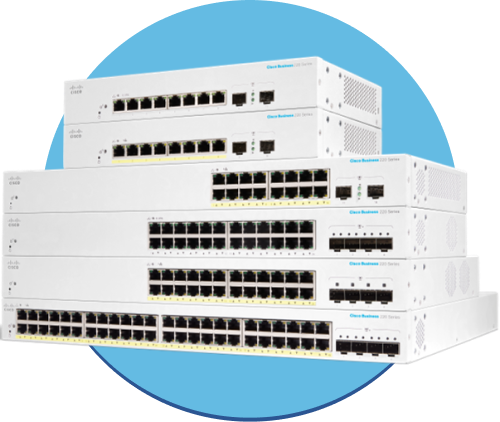
The Cisco CBS 220 Series Switches are the next generation of affordable smart switches that combine powerful network performance and reliability with a complete suite of network features that you need for a solid business network. These expandable Gigabit Ethernet switches, with Gigabit or 10-Gigabit uplinks, provide multiple management options, and rich security capabilities. With an easy-to-use web user interface and Power over Ethernet Plus capability, you can deploy and configure a complete business network in minutes.
|
|
|||
|
|
|
||
|
|
|
|
|
|
|
|||
|
|
|||
-
Install and Upgrade
Configure
-
Design
Cisco Business Switches (CBS) vs Catalyst 1200/1300 Series | Feature Comparison
In this Cisco Tech Talk, we compare the features and performance of Cisco CBS and Catalyst series switches. Learn about the differences between these two powerful switch families, including their capabilities, scalability, and ideal use cases for your network environment.
Cisco Business Switching FAQs | Answers to Common Setup and Configuration Questions
In this Cisco Tech Talk, we answer the most frequently asked questions about Cisco Business Switches. Whether you're deploying a CBS250 or CBS350 switch, this video walks you through key setup, troubleshooting, and configuration tips to get the most out of your small business network.
Cisco Tech Talk: Cisco Business Mobile App Overview
In this edition of Cisco Tech Talk, we’ll give you an overview of the Cisco Business Mobile App, the devices it supports, and its benefits.
Cisco Tech Talk: Cisco Business Switching Basics
In this edition of Cisco Tech Talk, I’ll go over the basics behind the CBS series switches.
Cisco Tech Talk: Decoding PIDs of Cisco Business Switches
In this edition of Cisco Tech Talk, I’ll explain Cisco Business Switch Product IDs (PIDs).
Cisco Tech Talk: Power over Ethernet (PoE) for Beginners
Setting up your office with devices like IP phones, wireless access points, and security cameras can get messy with all those cables and power sources. But what if you could simplify it all? In this edition of Cisco Tech Talk, we’ll explain the basics of Power over Ethernet (PoE).
How Direct Management Works for Cisco CBS220 Switches | Simplified Network Control
In this video, we explain how direct management works for Cisco CBS220 switches, providing a simplified and efficient way to manage your network devices.
Mastering MAC Address Tables on Cisco Business Switches | Improve Network Efficiency
In this Cisco Tech Talk, we dive into the importance of MAC address tables on Cisco Business Series switches and show you how to manage them effectively. Learn how to optimize network performance by understanding MAC address learning, aging, and troubleshooting techniques to ensure smooth network operations.
Install & Upgrade
How to Update Cisco Business Switch Firmware via CLI and TFTP | CBS Manual Upgrade Guide
In this Cisco Tech Talk, we walk you through how to manually update the firmware on Cisco Business Switches using CLI and a TFTP server. This method is ideal for environments where GUI access is limited or scripting and remote management are preferred.
How to Upgrade CBS Switch Firmware to the Latest Version | Easy Upgrade Guide
In this Cisco Tech Talk, we show you how to upgrade the firmware on a Cisco CBS switch to the latest version. This video guides you through the process of ensuring your CBS switches are running the most up-to-date software for maximum performance and security.
How to Upgrade Cisco Business Switch Firmware from Version 3.1 to 3.2
In this Cisco Tech Talk, we walk through how to update the firmware on Cisco Business Switches from version 3.1 to 3.2. Learn the step-by-step process to download the correct image, back up your configuration, and perform a safe and successful upgrade using the web UI or CLI.
Introducing the Cisco CBS220 Series Switches | Features & Setup Guide
In this Cisco Tech Talk, explore the Cisco CBS220 Series Switches and their key features for small to medium-sized businesses. Learn how to set up these switches to improve network performance and management.
Configuration
Blocking Multicast on Specific Ports with Cisco CBS Switch | Forbidden Configuration Options
In this video, we dive into the advanced Cisco CBS Switch configuration to block multicast traffic on specific ports using the Forbidden Configuration Option. Learn how to configure your CBS switch to restrict multicast traffic to only the necessary ports, improving network performance and security.
Configure RSPAN on Cisco Business Switches | Remote Traffic Monitoring Guide
In this Cisco Tech Talk, we show you how to configure Remote Switched Port Analyzer (RSPAN) on Cisco Business Switches. RSPAN enables you to mirror traffic from one switch to another across a VLAN, allowing centralized monitoring and analysis without physically connecting to the source switch.
Configure Static and Dynamic LAGs on Cisco CBS Switches | Link Aggregation Guide
In this Cisco Tech Talk, we explore how to configure both static and dynamic Link Aggregation Groups (LAGs) on Cisco CBS Series switches. Learn how to increase bandwidth, improve redundancy, and simplify management with aggregated links—using either manual setup or LACP.
Configure Voice VLAN with Auto Smartport on Cisco Business Switches | Plug-and-Play VoIP Setup
In this Cisco Tech Talk, we show you how to configure a Voice VLAN using Auto Smartport on Cisco Business Switches. This feature enables automatic detection and configuration of IP phones, allowing seamless voice traffic prioritization with minimal manual setup.
Create VLANs on Cisco Business Switches | Step-by-Step Network Segmentation Guide
In this Cisco Tech Talk, we walk you through how to create VLANs (Virtual LANs) on Cisco Business Switches. VLANs are essential for segmenting network traffic, improving security, and optimizing performance.
Enable Auto Voice VLAN on Cisco Business Switches | Simplify VoIP Deployment
In this Cisco Tech Talk, we show you how to enable and configure Auto Voice VLAN on Cisco Business Switches. This feature automatically detects and prioritizes IP phone traffic, making it easier to deploy VoIP solutions without complex manual VLAN setup.
How to Add and Remove Port Channels on Cisco CBS Switches via CLI
In this Cisco Tech Talk, we demonstrate how to add and remove port channels on Cisco CBS switches using the CLI (Command Line Interface). Learn the essential steps for configuring port channels to increase bandwidth and provide redundancy in your network.
How to Configure Access and Trunk Ports on Cisco CBS Switches via CLI
In this Cisco Tech Talk, we demonstrate how to configure access and trunk ports on Cisco CBS switches using the CLI (Command Line Interface). Learn how to assign VLANs to access and trunk ports for optimal network traffic management and segmentation.
How to Configure Automatic MDIX on CBS Switches | Simplify Your Network Setup
In this edition of Cisco Tech Talk, we explain Automatic Medium Dependent Interface Crossover (MDIX) and how to configure it on Cisco Business Series (CBS) switches. Learn how this feature automatically detects the correct cable type—whether straight-through or crossover—making network setup simpler and faster.
How to Configure LAG Settings via CLI on Cisco CBS Switches | Link Aggregation Tutorial
In this Cisco Tech Talk, we walk through how to configure Link Aggregation Group (LAG) settings using the Command-Line Interface (CLI) on Cisco Business Switches (CBS). LAG combines multiple physical links into a single logical connection, increasing bandwidth and providing redundancy for improved network performance.
How to Configure LLDP MED on CBS Switches | Enhance Network Visibility for Media Devices
In this edition of Cisco Tech Talk, learn how to configure Link Layer Discovery Protocol (LLDP) for Media End Devices (MED) on Cisco Business Series (CBS) switches.
How to Configure MAC Access Control Lists (MAC ACLs) on Cisco CBS Switches | Step-by-Step Tutorial
In this Cisco Tech Talk, we walk through how to configure MAC Access Control Lists (MAC ACLs) on Cisco Business Switches (CBS). MAC ACLs allow you to filter network traffic based on source and destination MAC addresses, offering an effective Layer 2 security solution for small business networks.
How to Configure Password Settings on CBS Switches via CLI | Secure Your Network
In this Cisco Tech Talk, learn how to configure password settings on Cisco Business Series (CBS) switches using the CLI. This video walks you through securing your network by properly setting up administrative and user passwords, ensuring only authorized users can access your switches.
How to Configure Port Authentication on Cisco Business Switches | Secure Your Network with CBD
In this Cisco Tech Talk, we’ll walk you through configuring port authentication on Cisco Business Switches using Cisco Business Dashboard (CBD). This feature provides an easy way to enhance your network’s security by ensuring that only authorized devices can connect to your network.
How to Configure RADIUS Authentication for Cisco Business Switch Login
In this Cisco Tech Talk, we guide you through the process of configuring RADIUS authentication for login access on Cisco Business Switches. Learn how to securely authenticate users, enforce network access policies, and improve overall network security.
How to Configure RADIUS Server on Cisco CBS Switch | Part 1
"In this Cisco Tech Talk (Part 1), we begin the process of configuring the RADIUS server for Cisco CBS Series Switches. This video covers the foundational steps to integrate RADIUS into your network, allowing you to centralize authentication, authorization, and accounting for network devices.
How to Configure RADIUS Server on Cisco CBS Switch | Part 2
In this Cisco Tech Talk (Part 2), we continue our guide on RADIUS server configuration for Cisco CBS Series Switches. Building on Part 1, this video dives deeper into the advanced configuration of the RADIUS server for network authentication and VLAN assignment.
How to Configure STP on a Cisco CBS Switch via CLI | Spanning Tree Setup Tutorial
In this Cisco Tech Talk, we show you how to configure Spanning Tree Protocol (STP) on a Cisco Business Switch (CBS) using the command-line interface (CLI).
How to Configure STP with Three or More CBS Switches | Ensure Network Stability
In this Cisco Tech Talk, we show you how to configure Spanning Tree Protocol (STP) with three or more Cisco Business Series (CBS) switches to ensure network stability and prevent loops. Learn how to set up and troubleshoot STP to create a resilient and efficient network topology.
How to Convert a Dynamic IP to Static on VLAN1 | Cisco CBS Switch Configuration Tutorial
In this Cisco Tech Talk, we show you how to convert a Cisco Business Switch (CBS) from using a dynamic IP address to a static IP on VLAN1. Assigning a static IP helps ensure reliable management access and consistent network configuration—especially in environments where DHCP may not be ideal.
How to Import Wildcard Certificates on Cisco Business Switches | Secure Web UI Access Guide
In this Cisco Tech Talk, we demonstrate how to import wildcard certificates onto Cisco Business Switches to enable secure HTTPS access through the web-based user interface. Learn the steps to generate a certificate signing request (CSR), import the signed certificate, and validate HTTPS functionality on your device.
How to Set Up LAGs on Cisco Business Switches: Expert Tips
In this Cisco Tech Talk, we share expert tips for setting up Link Aggregation Groups (LAGs) on Cisco Business Switches. Learn how to configure LAGs for increased bandwidth, redundancy, and efficient network performance.
How to Use SNMPv3 to Trigger Configuration Copies on Cisco CBS Switches | Walkthrough
In this Cisco Tech Talk, we demonstrate how to use SNMPv3 (Simple Network Management Protocol version 3) to trigger configuration copies on Cisco CBS switches. Learn how to configure SNMPv3 to securely manage your network devices and automate configuration backups for better network management.
Multicast Forwarding Using IGMP Snooping on CBS Switches | Optimize Network Traffic
In this Cisco Tech Talk, we walk you through the process of configuring IGMP snooping for multicast forwarding on Cisco Business Series (CBS) switches. Learn how IGMP snooping optimizes network performance by efficiently managing multicast traffic and reducing unnecessary bandwidth consumption in your network.
Smartports on Cisco Business Switches | Simplify Network Configuration and Security
In this Cisco Tech Talk, we explore how Smartports on Cisco Business Switches simplify network configuration by automatically applying the correct settings based on the type of device connected to the switch. Learn how to use Smartports to optimize network performance, enhance security, and streamline management.
VLAN Confiuration on Cisco Business Switches | Best Practices & Tips
In this edition of Cisco Tech Talk, I’ll walk you through VLAN configuration best practices on Cisco Business Switches. Proper VLAN setup is essential for optimizing network segmentation, improving performance, and enhancing security in small to mid-sized business environments.
Maintain & Operate
Accessing CBS Switch CLI with PuTTY | Step-by-Step Cisco Tech Talk
In this Cisco Tech Talk, learn how to access the CLI (Command Line Interface) of a CBS Switch using PuTTY. This video walks you through the steps to connect to your Cisco CBS Switch securely via SSH using the PuTTY terminal.
Common CLI Commands for Cisco Business Switches | Overview
In this video, we’ll provide an overview of the most common CLI commands used on Cisco Business Switches. Learn how to efficiently configure, monitor, and troubleshoot your Cisco Business switches using the Command Line Interface (CLI).
How to Access Cisco Business Switches Using Terminal | Easy CLI Management
In this Cisco Tech Talk, learn how to access the Command Line Interface (CLI) of Cisco Business switches using Terminal. This video guides you step-by-step through the process for efficient network management.
How to Access Cisco CBS Switches Using Terminal on Mac OS | Step-by-Step Guide
In this Cisco Tech Talk, learn how to access and configure Cisco CBS switches using Terminal on Mac OS. This video walks you through the necessary steps to ensure seamless management of your CBS switches directly from your Mac.
How to Access the Web UI of a Cisco Business Switch | Step-by-Step Network Setup
In this Cisco Tech Talk, we show you how to access the Web UI of a Cisco Business Switch from your local network. Whether you're a beginner or IT administrator, this walkthrough helps you quickly connect to the switch interface using an IP address—so you can configure settings, manage VLANs, monitor traffic, and more.
How to Backup and Update Cisco Business Switches | Keep Your Network Running Smoothly
In this Cisco Tech Talk, learn how to back up and update your Cisco Business Switches to ensure they are always up-to-date and protected. This video walks you through the process of saving configurations and applying the latest updates to maintain optimal network performance and security.
Troubleshooting
High CPU on CBS Switches Caused by SNMP Polling | Cisco Troubleshooting Guide
In this Cisco Tech Talk, we troubleshoot high CPU utilization issues on Cisco CBS switches related to excessive SNMP polling. Learn how to identify SNMP-related load, optimize polling intervals, and protect switch performance in real time.
How to Manually Reboot or Reset Cisco CBS Switches | Quick Troubleshooting Guide
In this Cisco Tech Talk, we walk you through the steps to manually reboot or reset a Cisco CBS Switch, ensuring a quick recovery from common network issues and improving your device's performance.
How to Troubleshoot CBS Switch Port Failure | Fix Common Connectivity Issues
In this Cisco Tech Talk, we guide you through troubleshooting CBS switch port failures. Learn how to quickly identify the root causes of connectivity issues and implement solutions to restore network functionality, ensuring minimal downtime for your Cisco Business Series switches.
 Feedback