Troubleshoot CW917X Wifi7 AP Join Issue with Catalyst 9800 WLC
Available Languages
Contents
Introduction
This document describes troubleshooting of WiFi7 AP Join failure across multiple phases.
Components Used
- 9800 series Wireless Controller
- Cisco IOS XE 17.18.03 version
- CW9172I
AP Bootup Issue
When a new WiFi7 AP is unboxed and fails to boot correctly, check the LED status and console bootup logs first. You can refer to the hardware installation guide of the specific AP model to check the LED status for various AP conditions: WiFi7 AP Installation Guide
- Verify the APs minimum power requirement (PoE class/wattage) and expected LED states against the APs data sheet to rule out a power issue: Cisco Wireless 9172 Series Access Points Data Sheet
- If power is sufficient, the AP boots successfully and loads Meraki OS as its primary/default image.
- For the first time till AP receives an IP address, In Meraki Mode, the AP is not visible via CDP; use LLDP instead to discover it on the network.
AP Unable to Acquire IP Address
If the AP fails to obtain an IP address, On the AP console, you can see the AP sitting in Day 0 offline-migration mode:
Run offline-migration-info at the <Meraki> console prompt to get current logs and status of the migration attempt.
<Meraki> offline-migration-info
| [2000-01-01 00:00:36.528] AP in day0 - offline migration
If the AP remains in this state:
- Verify the switchport configuration of uplink switch: it can be either access mode, or trunk mode with the AP management VLAN set as native.
- Collect a packet capture on the APs uplink switch port and inspect the DORA (Discover, Offer, Request, Ack) flow to confirm whether DHCP requests are reaching the server and offers are being returned. Here is an example of a successful DHCP transaction between the AP and the DHCP server:
 AP Uplink Capture: Successful DHCP Transaction (DORA) between the AP and the DHCP Server
AP Catalyst Mode Conversion Failure
The CW917x series Access Points (APs) utilize a different migration mechanism than older Catalyst 9100 series APs. To convert a CW917x AP to Catalyst mode, the process relies on specific network configurations, including DHCP options, DNS settings, and cloud reachability.
The AP first attempts the DHCP Option 43 method. If no value is configured or the IP is unreachable, it falls back to the DNS method. Here are the common issues that can disrupt this conversion process.
Issues with Fast Offline Migration
DHCP Option 43(0xF3) Migration Issues
- Invalid Option 43 Value: The AP does not receive a valid hex value (example, failing to start with the correct sub-option type like 0xF3).
<Meraki> offline-migration-info
| [2000-01-01 00:00:36.528] AP in day0 - offline migration
| [2000-01-01 00:06:54.265] [init] start offline migration detection (v1.1)
| [2000-01-01 00:07:59.65 ] [fast-offline-migration-delay] forcing DHCPv6 INFORMATION REQUEST
| [2000-01-01 00:08:04.112] [fast-offline-migration][v4] no fast offline migration by DHCP
| [2000-01-01 00:08:04.113] [fast-offline-migration][v6] no fast offline migration by DHCP
| [2000-01-01 00:08:04.113] [fast-offline-migration] waiting for 420sec before taking any migration decision
- ICMP Failure: The AP first attempt to reach to resolved IP received from DHCP Server Option 43 (0xF3). If there is no ICMP reachability to the resolved IP, AP fail to switch to Catalyst mode.
<Meraki> offline-migration-info
| [2000-01-01 00:00:48.388] AP in day0 - offline migration
| [2000-01-01 00:02:59.526] [init] start offline migration detection (v1.2)
| [2000-01-01 00:04:00.774] [fast-offline-migration-delay] forcing DHCPv6 INFORMATION REQUEST
| [2000-01-01 00:04:10.799] [fast-offline-migration][v4][icmp] DHCP: WLC 10.127.197.201 is unreachable >> Here 10.127.197.201 is IP of Switch present in Network
| [2000-01-01 00:04:15.906] [fast-offline-migration][v4][capwap] DHCP: WLC 10.127.197.201 is down
| [2000-01-01 00:04:15.906] [fast-offline-migration][v4] no fast offline migration by DHCP
| [2000-01-01 00:04:15.906] [fast-offline-migration][v6] no fast offline migration by DHCP
 AP Uplink Capture: No ICMP Reachability to Resolved IP

Note:
AP always perform ICMP reachability test followed by CAPWAP reachability.
ICMP reachability mechanism can be used when there is no WLC present in your network.
If an Access Point (AP) obtains the Wireless LAN Controller (WLC) IP address via DHCP option 43 (0xF3) and CAPWAP traffic from the AP to the WLC IP is not reachable, but ICMP reachability to the WLC IP is available, the AP can still switch to Catalyst Mode.
If an Access Point (AP) obtains the Wireless LAN Controller (WLC) IP address running in unsupported version via DHCP option 43 (0xF3) but ICMP reachability to the WLC IP is available, the AP can still switch to Catalyst Mode. However it not be able to join the WLC.
Here is a successful migration with ICMP reachability:
<Meraki> offline-migration-info
| [2000-01-01 00:00:49.2 ] AP in day0 - offline migration
| [2000-01-01 00:03:00.367] [init] start offline migration detection (v1.2)
| [2000-01-01 00:04:03.34 ] [fast-offline-migration-delay] forcing DHCPv6 INFORMATION REQUEST
| [2000-01-01 00:04:08.56 ] [fast-offline-migration][v4][icmp] DHCP: WLC 10.127.197.201 is reachable
| [2000-01-01 00:04:08.56 ] [fast-offline-migration][DHCP][IPv4] migrate to Catalyst
 AP Uplink Capture: Successful Fast Migration of AP to Catalyst mode via ICMP Reachability
- Unsupported WLC Software Release: The responding WLC is running a software version older than Cisco IOS XE 17.15.1 (or the minimum supported release for the AP), causing the Catalyst mode switch to fail.
<Meraki> offline-migration-info
| [2000-01-01 00:00:36.600] AP in day0 - offline migration
| [2000-01-01 00:02:49.984] [init] start offline migration detection (v1.1)
| [2000-01-01 00:03:53.950] [fast-offline-migration-delay] forcing DHCPv6 INFORMATION REQUEST
| [2000-01-01 00:04:03.966] [fast-offline-migration][v4][icmp] DHCP: WLC 10.127.197.196 is unreachable
| [2000-01-01 00:04:04.42 ] [fast-offline-migration][v4][capwap] DHCP: WLC 10.127.197.196 is unsupported - version 17.12.4.22
| [2000-01-01 00:04:04.42 ] [fast-offline-migration][v4] no fast offline migration by DHCP
| [2000-01-01 00:04:04.43 ] [fast-offline-migration][v6] no fast offline migration by DHCP
| [2000-01-01 00:04:04.43 ] [fast-offline-migration][v4] missing DNS config (server and/or domain)
| [2000-01-01 00:04:04.43 ] [fast-offline-migration][v6] missing DNS config (server and/or domain)
| [2000-01-01 00:04:04.43 ] [fast-offline-migration] waiting for 420sec before taking any migration decision
DNS Migration Issues
If the Access Point (AP) cannot complete fast offline migration using DHCP, it attempt the DNS method. Initially, the AP verifies whether it has received a valid domain name (option 15) and DNS server IP address (option 6) from the DHCP server. Using this information, the AP tries to resolve the hostname cisco-automigrate.<domain>. If this resolution is successful, the AP proceeds to migrate to Catalyst Mode.
- Missing DHCP Options: The AP fails to receive a valid domain name (DHCP Option 15) or DNS server IP (DHCP Option 6) from the DHCP server.
<Meraki> offline-migration-info
| [2000-01-01 00:00:48.565] AP in day0 - offline migration
| [2000-01-01 00:02:59.840] [init] start offline migration detection (v1.2)
| [2026-06-24 11:11:58.392] [fast-offline-migration-delay] forcing DHCPv6 INFORMATION REQUEST
| [2026-06-24 11:12:03.438] [fast-offline-migration][v4] no fast offline migration by DHCP
| [2026-06-24 11:12:03.438] [fast-offline-migration][v6] no fast offline migration by DHCP
| [2026-06-24 11:12:03.529] [fast-offline-migration][v4] missing DNS config (server and/or domain) >> DNS Option Missing in DHCP Response
| [2026-06-24 11:12:03.529] [fast-offline-migration][v6] missing DNS config (server and/or domain)
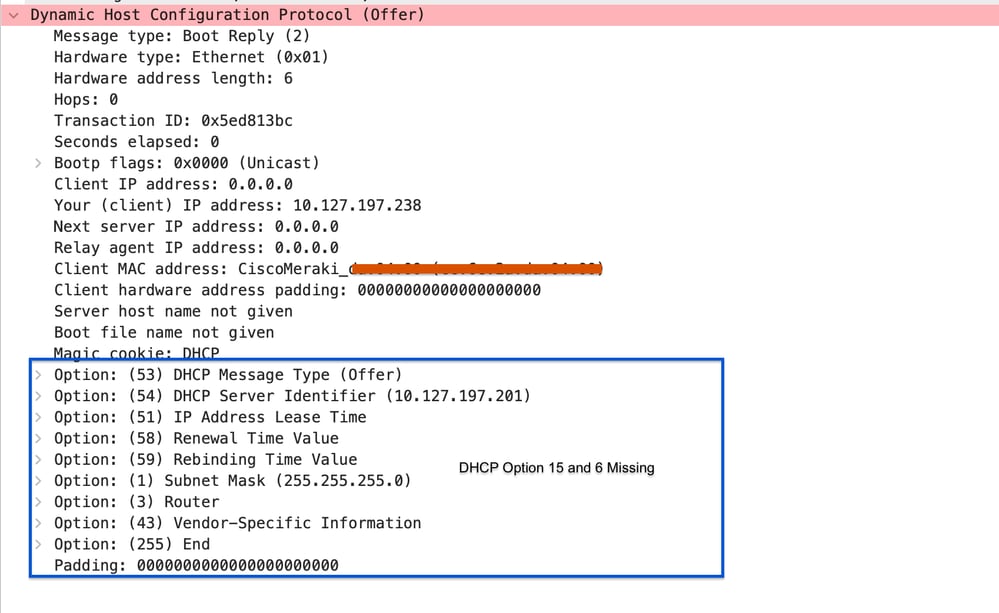 AP Uplink Capture: DNS Server and Domain Name Missing on DHCP Response
- Resolution Failure: The DNS server is unable to resolve the FQDN cisco-automigrate.<your-domain>.
<Meraki> offline-migration-info
| [2000-01-01 00:00:48.565] AP in day0 - offline migration
| [2000-01-01 00:02:59.840] [init] start offline migration detection (v1.2)
| [2026-06-24 11:11:58.392] [fast-offline-migration-delay] forcing DHCPv6 INFORMATION REQUEST
| [2026-06-24 11:12:03.438] [fast-offline-migration][v4] no fast offline migration by DHCP
| [2026-06-24 11:12:03.438] [fast-offline-migration][v6] no fast offline migration by DHCP
| [2026-06-24 11:12:03.529] [fast-offline-migration][v4] no fast offline migration by DNS >> It received a DNS server and domain but unable to resolve the hostname
| [2026-06-24 11:12:03.529] [fast-offline-migration][v6] missing DNS config (server and/or domain)
| [2026-06-24 11:12:03.529] [fast-offline-migration] waiting for 420sec before taking any migration decision
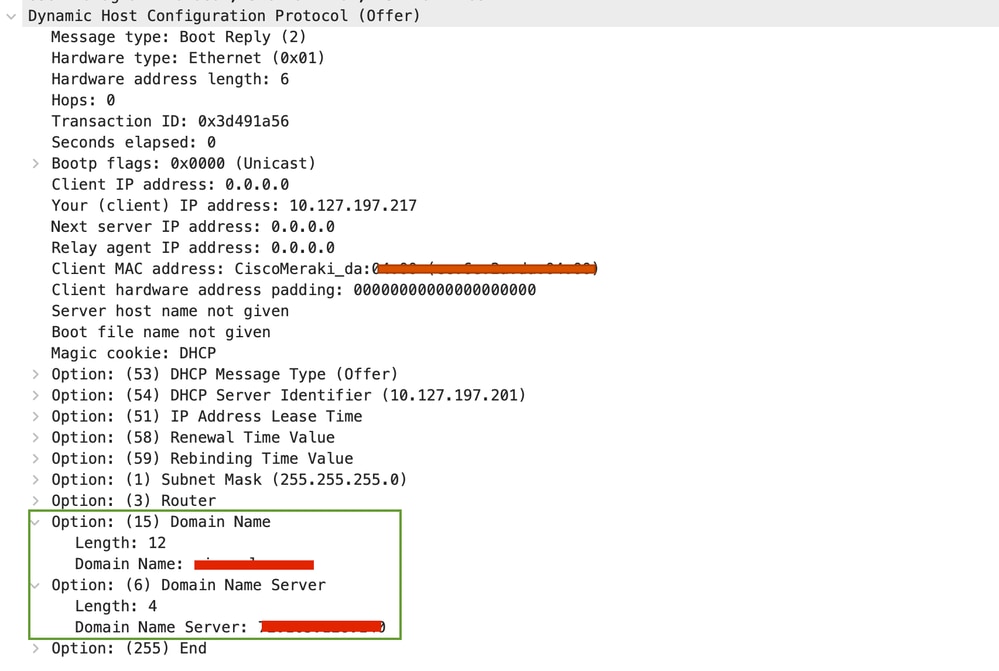 AP Uplink Capture : Valid DNS Server and Domain Name Present on DHCP Response
 AP Uplink Capture: Resolution Failure for Hostname
- Unreachable Resolved IP: The AP successfully resolves cisco-automigrate.<your-domain>, but has no ICMP reachability to the resulting IP address.
<Meraki> offline-migration-info
| [2000-01-01 00:01:58.622] [init] start offline migration detection
| [2000-01-01 00:03:05.252] [fast-offline-migration-delay] forcing DHCPv6 INFORMATION REQUEST
| [2000-01-01 00:04:05.156] [fast-offline-migration][v4] no fast offline migration by DHCP
| [2000-01-01 00:04:15.290] [fast-offline-migration][v6] no fast offline migration by DHCP
| [2000-01-01 00:04:20.271] [fast-offline-migration][v4][icmp] DNS automigrate: WLC 10.27.XX.XX is not alive >> No ICMP reachability to hostname resolved IP
Issues with Offline Migration
If an AP fails the fast offline migration, it attempt to connect to the Meraki Cloud to check if it has been added to a Meraki network for approximately the next 7 minutes. If, during this period the AP maintains communication with the Meraki Cloud and is added to a network, it can switch to Meraki mode.
However, if after 7 minutes the AP still cannot reach the Meraki Cloud or is not added to a network, and it is not configured with a static IP address, it renew its IP address via DHCP. At this stage, the AP enters the Offline Migration phase. In Offline Migration, the AP uses DHCP, DNS, and Layer 2 Discovery methods to locate the Wireless LAN Controller (WLC) details on the network and then switches to Catalyst mode. Various issues can be encountered during the offline migration process
DHCP Option 43 Migration Issues
- After the IP refresh, the AP checks if it received a DHCP opt 43 with 0xF1, receive a valid WLC IP, CAPWAP reachability and response from supported version, you can encounter these errors:
!! No valid WLC IP recievd on DHCP Option 43 0xF1 !!

| [2000-01-01 00:14:19.658][fast-offline-migration] waiting for 0min before taking any migration decision
| [2000-01-01 00:15:07.101] [offline-migration] forcing DHCP renew
| [2000-01-01 00:15:07.102] [offline-migration] forcing DHCPv6 INFORMATION REQUEST
| [2000-01-01 00:15:12.150] [offline-migration] migration decision
| [2000-01-01 00:15:12.150] [offline-migration][v4] no WLC IP in DHCP option 43 >> No valid WLC IPv4 received
| [2000-01-01 00:15:12.150] [offline-migration][v4] missing DNS config (server and/or domain)
| [2000-01-01 00:15:12.151] [offline-migration][v6] no WLC IP in DHCP option 52 >> No valid WLC IPv4 received
| [2000-01-01 00:15:12.151] [offline-migration][v6] missing DNS config (server and/or domain)

!! No CAPWAP reachability to recieved IP !!
| [2000-01-01 00:10:50.713] [offline-migration] migration decision
| [2000-01-01 00:10:50.713] [offline-migration][v4] WLC IP present in DHCP option 43
| [2000-01-01 00:10:55.759] [offline-migration][v4][capwap] DHCP: WLC 10.127.197.196 is down

!! WLC IP received on DHCP option is running on unsupported release !!

| [2000-01-01 00:39:44.529] [fast-offline-migration] waiting for 48sec before taking any migration decision
| [2000-01-01 00:40:35.585] [offline-migration] forcing DHCP renew
| [2000-01-01 00:40:35.586] [offline-migration] forcing DHCPv6 INFORMATION REQUEST
| [2000-01-01 00:40:41.592] [offline-migration] migration decision
| [2000-01-01 00:40:41.593] [offline-migration][v4] WLC IP present in DHCP option 43
| [2000-01-01 00:40:41.675] [offline-migration][v4][capwap] DHCP: WLC 10.127.197.196 is unsupported - version 17.12.4.22
| [2000-01-01 00:40:41.675] [offline-migration][v4] missing DNS config (server and/or domain)
| [2000-01-01 00:40:41.675] [offline-migration][v6] no WLC IP in DHCP option 52
| [2000-01-01 00:40:41.675] [offline-migration][v6] missing DNS config (server and/or domain)
When offline migration fails using the DHCP option, the access point (AP) attempts the DNS option by extracting the domain name and DNS server information from the DHCP reply. This process can result with the error:
DNS Resolution Failures
!! No valid DNS server or domain name received in DHCP reply !!

| [2000-01-01 00:14:19.658][fast-offline-migration] waiting for 0min before taking any migration decision
| [2000-01-01 00:15:07.101] [offline-migration] forcing DHCP renew
| [2000-01-01 00:15:07.102] [offline-migration] forcing DHCPv6 INFORMATION REQUEST
| [2000-01-01 00:15:12.150] [offline-migration] migration decision
| [2000-01-01 00:15:12.150] [offline-migration][v4] no WLC IP in DHCP option 43
| [2000-01-01 00:15:12.150] [offline-migration][v4] missing DNS config (server and/or domain)
| [2000-01-01 00:15:12.151] [offline-migration][v6] no WLC IP in DHCP option 52
| [2000-01-01 00:15:12.151] [offline-migration][v6] missing DNS config (server and/or domain)

!! Unable to resolve the hostname cisco-capwap-controller.<domain> !!
| [2026-06-24 11:19:12.395] [offline-migration] migration decision
| [2026-06-24 11:19:12.395] [offline-migration][v4] no WLC IP in DHCP option 43
| [2026-06-24 11:19:12.479] [offline-migration][v4] no WLC IP resolved by DNS
| [2026-06-24 11:19:12.527] [offline-migration][v4] no PnP IP resolved by DNS

!! No CAPWAP reachability or unsupported version !!

| [2000-01-01 00:15:07.102] [offline-migration] forcing DHCPv6 INFORMATION REQUEST
| [2000-01-01 00:15:12.150] [offline-migration] migration decision
| [2000-01-01 00:15:12.150] [offline-migration][v4] no WLC IP in DHCP option 43
| [2000-01-01 00:15:12.150] [offline-migration][v4] WLC IP resolved by DNS: 10.127.197.233
| [2000-01-01 00:15:12.151] [offline-migration][v4][capwap] DNS: WLC 172.16.30.10 is not valid/ unsupported version 17.12.4.22
Fallback to Layer 2 CAPWAP Discovery
If both DHCP and DNS methods fail, the AP broadcasts a Layer 2 CAPWAP discovery request. Common errors include:
- No response to broadcast CAPWAP discovery
| [2000-01-01 00:23:37.901] [offline-migration] forcing DHCPv6 INFORMATION REQUEST
For this Ensure that automatic CAPWAP onboarding is enabled on the Wireless Controller (WLC) to accept both unicast and broadcast discovery requests. Note: This setting is disabled by default and it can reject any CAPWAP Discovery Request coming specifically from Global Use APs in Day-0 mode. Enable this setting in the default AP join profile. This profile is used when the AP initially joins the controller
| [2000-01-01 00:23:42.949] [offline-migration] migration decision
| [2000-01-01 00:23:42.949] [offline-migration][v4] no WLC IP in DHCP option 43
| [2000-01-01 00:23:42.949] [offline-migration][v4] missing DNS config (server and/or domain)
| [2000-01-01 00:23:42.950] [offline-migration][v6] no WLC IP in DHCP option 52
| [2000-01-01 00:23:42.950] [offline-migration][v6] missing DNS config (server and/or domain)
| [2000-01-01 00:23:48.22 ] [offline-migration][v4][capwap-l2] 0 WLC(s) detected (unsupported)
| [2000-01-01 00:23:53.66 ] [offline-migration][v6][capwap-l2] 0 WLC(s) detected (unsupported)
| [2000-01-01 00:23:53.66 ] [offline-migration] no migration & not claimed => restart detection
CW9800(config)#ap profile default-ap-profile
CW9800(config-ap-profile)#capwap-discovery onboarding ?
all        Configure automatic CAPWAP onboarding from Meraki based on both unicast and broadcast discovery request
unicast Configure automatic CAPWAP onboarding from Meraki based on unicast discovery request only - Successful response but unsupported version — The WLC responded is not running on 17.15.02 or later release:
| [2000-01-01 00:15:07.101] [offline-migration] forcing DHCP renew
| [2000-01-01 00:15:07.102] [offline-migration] forcing DHCPv6 INFORMATION REQUEST
| [2000-01-01 00:15:12.150] [offline-migration] migration decision
| [2000-01-01 00:15:12.150] [offline-migration][v4] no WLC IP in DHCP option 43
| [2000-01-01 00:15:12.150] [offline-migration][v4] missing DNS config (server and/or domain)
| [2000-01-01 00:15:12.151] [offline-migration][v6] no WLC IP in DHCP option 52
| [2000-01-01 00:15:12.151] [offline-migration][v6] missing DNS config (server and/or domain)
| [2000-01-01 00:15:17.193] [offline-migration][v4][capwap-l2] 1 WLC(s) detected (unsupported)
| [2000-01-01 00:15:17.283] [offline-migration][v4][capwap-l2] - unsupported - 10.127.197.196 - 17.12.4.22
AP Fails to Complete Joining Phase
Once the AP successfully converts to CATALYST mode, it uses the same joining procedure as other Catalyst APs to connect to the 9800 Wireless LAN Controller. Issues can arise at three stages:
- CAPWAP discovery phase
- DTLS tunnel establishment phase
- Join phase
Apply the same troubleshooting approach by referring to
Understand the AP Join Process with the Catalyst 9800 WLC.
AP Regulatory Domain Resolution Failure
CW917x series AP does not come with a predefined regulatory domain. The country code cannot be manually configured on CW917x series APs through the Controller. Instead, the AP automatically determines the country code using multiple methods like proximity detection (RF and CDP/LLDP), GPS/GNSS, and the RAF file on the WLC.
AP Support on Country on Respective version
Before troubleshooting the regulatory domain, verify that the specific CW917x series AP model is supported in the country you want to configure on your 9800 Controller version. If the country is not supported, both radios remains down.
You can verify the Country-to-Channel mapping from the Technical Reference for your specific AP model and WLC version from Access Point Feature Matrix and confirm if the support of particular country is available in specific Controller Version for CW917x series AP.
Additionally you can check the document that outlines the regulatory phase for each country for the CW917x APs fromCisco CW917x Wi-Fi 7 Access Point Country Codes and Phases
Once you verify that your country is supported on the WLC version for the CW917x series Access Point, check if the AP can resolve its regulatory domain using one of the supported methods. If the AP does not resolve the regulatory domain, you can see the AP status:
WLC#show ap summary
Number of APs: 2

CC = Country Code
RD = Regulatory Domain

AP Name      Slots       AP Model         Ethernet MAC        Radio MAC      CC    RD    IP Address      State       Location
---------------------------------------------------------------------------------------------------------------------------------------------------------------------
LAB-9136       4       C9136I-ROW        aaaa.bbbb.cccc      aaaa.bbbb.cccc  IN    -RW  10.127.197.153  Registered   Bangalore
LAB-CW9172     3        CW9172H          aaaa.bbbb.cccc      aaaa.bbbb.cccc  --    -UN  10.127.197.152  Registered   default location
WLC#show ap config general | in AP_NAME| Country
Cisco AP Name : AP_NAME
Regulatory Domain Allowed by Country : 802.11bg:-A^ 802.11a:-DN^ 802.11 6GHz:
AP Country Code : - >> No Country Code resolved
Using Proximity
Wi-Fi 7 APs in worldwide mode can resolve the country code from existing legacy APs or Wi-Fi 7 APs connected to the same WLC on the floor, or from APs discovered as CDP/LLDP neighbors. Proximity-based discovery can use either RF-based detection or CDP/LLDP neighbor detection. If the Wi-Fi 7 AP cannot discover the neighboring AP via proximity, you can see the error:
[*06/28/2026 15:24:36.7773] Sending proximity_request payload
[*06/28/2026 15:24:36.7787] SinglePID Proximity resolution: Country Code not available
[*06/28/2026 15:24:36.7795] SinglePID Regulatory Blob resolution: Country Code not available
[*06/28/2026 15:25:35.8011] Sending proximity_request payload
[*06/28/2026 15:25:35.8025] SinglePID Proximity resolution: Country Code not available
[*06/28/2026 15:25:35.8031] SinglePID Regulatory Blob resolution: Country Code not available
RF-Based
For this method to work, place the AP with resolved country code and Wi-Fi 7 AP regulatory domain nearby so they can exchange neighbor discovery packets. This AP must be connected to the same WLC with its country code already resolved. These packets are exchanged using the 2.4GHz radio, so ensure the 2.4GHz radio is enabled on the target AP (the one from which you want the country code to be resolved).
CDP/LLDP Based
The CDP/LLDP-based discovery mechanism is used when a fully functional AP with a resolved country code and a Wi-Fi 7 AP in worldwide mode (without a country code) are connected to the same switch and the same WLC.
To use this method, ensure the following:
- Both APs are connected to the same switch.
- Both APs are connected to the same WLC.
- One AP has a resolved country code and is actively serving clients.
- The Wi-Fi 7 AP is in worldwide mode and requires a country code.
Note: CDP/LLDP-based discovery is supported starting from Cisco IOS XE versions 17.15.4 and 17.18.1. Verify your WLC is running one of these supported versions or later.
Using RAF File
If the Proximity method cannot resolve the regulatory domain, you can use the RAF (Regulatory domain Authorization File) from the Meraki dashboard as an alternative. To do this:
- Claim the Wi-Fi 7 AP using a cloud AP and add it to your network. Note that the AP does not need to have network connectivity to the Meraki dashboard to be added.
- Configure the required country code for the AP in the network where the AP was claimed.
- Download the regulatory domain file from the controller and upload it. The file must contain the APs serial number, MAC address, and country code.
!! Verify the data on RAF File !!
WLC#show ap regulatory activation all
Regulatory Activation file Meta-data
------------------------------------
Date Created : 06/30/2026 08:12:41
Created By : shchoube@cisco.com
Device count : 2
Organization Id : 1780642

AP MAC             Serial Number       Country code
----------------------------------------------------
 AP1_MAC            AP1_SN                   IN
AP2_MAC AP2_SN US - When adding new APs to the same controller that require different country codes, place them in separate networks in Meraki Dashboard. This ensures their individual country code settings do not override each other.
AP Non-Compliant Due to License Issue
Once an AP joins with the correct country code, it can still report a compliance issue if it is not licensed. Wi-Fi 7 APs undergo a compliance check and require Cisco Wireless (CW) licenses. In contrast, earlier non-Wi-Fi 7 APs use AIR licenses and do not require a compliance check.
WLC#show ap summary license
For AIR licenses, per AP tracking of license state is unavailable. Please use "show license summary" to find status of AIR subscriptions
Policy allowed state means device is deemed compliant due to a policy downloaded from licensing authority, please check installed policy

AP Name AP Model    AP MAC     License Type  License State   Non Compliance Reason
------------------------------------------------------------------------------------------------------------------------------
AP1     CW9172H  xxxx.xxxx.xxxx   CW         Non Compliant     Never Licensed
AP2     CW9176I  xxxx.xxxx.xxxx   CW         Non Compliant     Never License

WLC#show license summary
Account Information:
Smart Account: <none>
Virtual Account: <none>
License Usage:
License Entitlement Tag Count Status
-----------------------------------------------------------------------------
cisco-wireless-advan... (CNS_CW_A) 2 IN USE

!! Check the current level of license configured on WLc for WiFi7AP !!
WLC#show version | in License Level
License Level: adventerprise
AIR License Level: AIR Network Essentials addon AIR DNA Essentials
Next reload AIR License Level: AIR Network Essentials addon AIR DNA Essentials
Cisco Wireless License Level: Cisco Wireless Advantage
Next reload Cisco Wireless License Level: Cisco Wireless Advantage
For this issue, please ensure the correct licensing level is configured on 9800 WLC to be used for Wifi7 APs. Wifi7 APs require CW licenses:
1. Cisco Wireless Essentials
2. Cisco Wireless Advantage
If APs are not licensed troubleshoot the smart licensing issues on 9800 WLC from Configure and Troubleshoot Smart Licensing on Catalyst 9800
Log Collection
Logs From WLC
- Enable term exec prompt timestamp to have time reference for all the commands.
- Show Commands:
- show ap summary | i Number of APs
- sh log | i AP Event:
- show ap uptime
- show ap cdp neighbor
- show wireless stats ap history
- show wireless stats ap discovery
- show wireless stats ap join summary
- show wireless certification config
- show wireless management trustpoint
- show wireless dtls connections
- show logging profile wireless start last X days filter mac <radio-or-ethernet-AP-mac>
- show ap regulatory activation all
- show ap config general
- show tech-support wireless
- Radio Active Trace:
- debug wireless AP_MAC {aaaa.bbbb.cccc } {monitor-time} {N seconds} !! Setting time allows us to enable traces for up to 24 days .
- no debug wireless AP_MAC {aaaa.bbbb.cccc} !! To disable the debugging
WLC generates a debug trace file with Client_info, command to check for debug trace file generated dir bootflash: | i debug !!
Warning: The conditional debugging enables debug-level logging which in turn increases the volume of the logs generated. Leaving this running reduces how far back in time you can view logs from. So, it is recommended to always disable debugging at the end of the troubleshooting session.
-
In order to disable all debugging, run these commands:
# clear platform condition all !!
# undebug all !!
Via GUI:Step 1. Navigate to Troubleshooting > Radioactive Trace.
Step 2. Click Add and enter AP MAC Address
Step 3. When you are ready to start the radioactive tracing, click Start. Once started, debug logging is written to disk about any control plane processing related to the tracked MAC addresses.
Step 4. When you reproduce the issue you want to troubleshoot, click Stop.
Step 5. For each MAC address debugged, you can generate a log file collating all the logs pertaining to that MAC address by clicking Generate.
Step 6. Choose how long back you want your collated log file to go and click Apply to Device.
Step 7. You can now download the file by clicking the small icon next to the file name. This file is present in the boot flash drive of the controller and can also be copied out of the box through CLI.
- Embedded Packet capture filtered by AP IP address ACL:
!! Create an ACL !!
ip access-list extended CAP-FILTER
permit ip host <AP_IP> any
permit ip any host <AP_IP>
!! Configure packet capture !!
monitor capture MYCAP interface Po1 both
monitor capture MYCAP buffer circular size 100
monitor capture MYCAP access-list CAP-FILTER monitor capture MYCAP match any/ipv4/ipv6.MAC !!
monitor capture MYCAP start !!
!!Reproduce
monitor capture MYCAP stop
monitor capture MYCAP export flash:|tftp:|http:.../filename.pcap
Logs From AP
AP in Meraki Mode
- offline-migration-info to get current logs and status of the migration attempt.
AP in Catalyst Mode
- show tech !! Collect show tech to have all config details and radio stats for the AP.
- show dtls connection !! Check certificates, ports and ciphers, versions for DTLS
- terminal monitor and logging console if SSH access to enable console logging and display of logs
- Basic debugs
- debug capwap client event
- debug capwap client error
- debug dtls client error
- debug dtls client event
- Advanced debugs
- debug capwap client keepalive
- debug capwap client pmtu
- debug capwap client payload
- debug capwap client details
Logs from AP Connected Uplink Switch
- Embedded Packet capture on AP connected Port
-
monitor capture mycap interface <AP_Connected_Port> both
-
monitor capture mycap match any
- monitor capture buffer size 50
-
monitor capture mycap file location flash:mycap.pcap
- monitor capture mycap start/stop
-
show monitor capture file flash:mycap.pcap
-
- Switched Port Analyzer (SPAN Capture)
- monitor session 1 source interface <AP_Connected_Port>
- monitor session 1 destination interface x/x/x encapsulation replicate >>>>>> --- The Port with the PC connected with wireshark running.
Note: If a third-party switch is used, collect a port SPAN or equivalent packet capture on the uplink switch port.
Related Information
Revision History
| Revision | Publish Date | Comments |
|---|---|---|
1.0 |
01-Jul-2026
|
Initial Release |

 Feedback
Contact Cisco
- Open a Support Case

- (Requires a Cisco Service Contract)