Wi-Fi Cell Sizing and Overlapping with Mobile Clients in 5 GHz
Available Languages
Contents
Introduction
Some older Cisco Wi-Fi access point models supported dual 5 GHz radios, but with the secondary radio operating as a "micro cell". This article explains why micro cells may provide poor client experience, and provides overall guidance as to how to size 5 GHz cells.
Executive Summary
This note covers some considerations regarding the sizing and overlap of Wi-Fi cells in 5GHz. The context is an indoor enterprise network, with the following characteristics:
- A fairly dense access point installation, with at least one AP every 2000 square feet
- Wi-Fi 5, 6 or 7 access points with internal antennas, with multiple radios, and with the option of dual 5GHz radios, such as
- APs with one dedicated 5GHz radio, plus an “XOR” radio that can operate in either 2.4 or 5GHz (such as 3800s or 9120s)
- APs with one dedicated 2.4GHz radio, plus a 5GHz radio that can operate as either a single 8SS serving radio, or two separate 4SS 5GHz radios (9130, 9136)
- A not overly dense client population (i.e. not more than 10 clients per AP radio), with clients that may move quickly through the coverage area
- For example, a hospital, university, or enterprise with sales people, executives on the move
- Not, for example, an arena, or a call center, with densely packed workstations
- The most important client devices are all 5GHz capable – so 2.4GHz operation, with its limited capacity and high interference level, is not in play
In such an environment, I believe that overall client satisfaction will be best served by adhering to the following design principles:
- Make sure that all of the APs’ 5GHz radios are transmitting at approximately the same power as the key clients
- Make sure that you have, throughout the coverage area, at least two 5GHz cells that provide -67dBm coverage downstream and up
Therefore, 5GHz Micro-cells should be avoided; dual-5GHz APs that only support Macro-Micro operation should be configured as single-5GHz APs.
Specifically, the following AP models support only Macro-Micro cells in dual 5GHz:
- AP2802I/AP3802I/AP4800/C9120AXI, with Slot 0 radio in 5GHz
- C9130AXI, C9136I, with 5GHz radio in dual-5GHz mode (i.e. Slot 2 is operational as 4x4 5GHz)
The following AP models support Macro-Macro cells in dual 5GHz:
- AP2802E/AP3802E/AP3802P/C9120AXE/C9120AXP/C9130AXE
- CW9166I/CW9166D1/CW9176I/CW9176D1/CW9177I/CW9177D/CW9177E/CW9178I/CW9179F
In more detail, here is the thinking behind these principles, and here are some factors to take into account when implementing
Why should APs transmit at about the same power as the clients?
Bearing in mind here that the typical Wi-Fi client transmits at about 13-14 dBm, this principle indicates the APs’ transmit power should be in that range. Vocera recommends that, to optimize coverage for their badges - which are deployed for clinical patient care - the APs be configured with a minimum power level of 12 dBm, and a maximum of 17 dBm.
Why not have the APs blast at full power (say, 21 dBm?)
Certainly in a cellular network, the cell towers transmit at much greater power level than the clients do. But a Wi-Fi network is different:
- A cellular network tells the clients where to roam. In Wi-Fi, it’s (largely) the clients’ decision
- For example, Apple macOS clients will not choose to roam, till their RSSI from the current BSSID drops below -75 dBm. Let's say that the AP is transmitting at 21 dBm, and the client at 13 dBm. Then the client won't roam till its uplink signal has dropped below -83 dBm, causing poor uplink performance.
- A cellular network provides much worse uplink performance than downlink performance. In enterprise Wi-Fi networks, we need strong uplinks
- Laptops will likely perform backup operations over Wi-Fi; in medical applications, the clients may need to transmit large images
Why not have the APs transmit at very low power levels (say, 0 to 2 dbm?)
- Assuming that there is excellent AP density, such that, even with such tiny AP TX power levels, this may provide good coverage and capacity, and can work well with a dense population of stationary clients (such as a call center)
- But, with actively moving clients, running real time media applications such as voice calling or Microsoft Teams, these “microcells” may serve as an attractive nuisance for such a client, yielding a choppy user experience
- Consider a microcell as is delivered by a dual 5GHz, internal antenna AP:
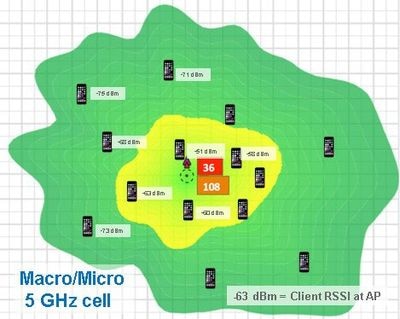
- A client near the AP may scan the microcell radio as a good candidate … and then briskly walk out of range of that radio. Then, when the client needs to roam, it may pick the microcell BSSID – only to suffer a failed roam, and perhaps a multi second audio/video gap, as the client performs a panic scan
- Understand that even a client that is optimally designed for active scanning, may have entries in its scan list that are at 5 seconds old. Within 5 seconds, a lot can happen – a client can move around a hallway corner, close a metal door, etc.
How to get your Cisco Wi-Fi network to achieve the above design goals?
Given the above assumptions about the AP and client density, then:
- Do not use micro cells! These are the "secondary" 5 GHz radios in internal antenna AP models (prior to the CW916x/CW917x) APs
- With dual 5GHz radios in such APs, the secondary radio is constrained to operate at minimum power – typically 0 – 2 dBm microcells.
- On APs with XOR radios (2802I, 3802I, 4800, 9120AXI), do not put the Slot 0 radio into 5GHz (nor allow FRA to do that). Leave it in 2.4GHz, or (if there are excessive 2.4GHz radios, as is likely in any deployment with good 5GHz coverage), disable Slot 0, or set it into monitor mode.
- On C9130I/C9136I, with a dual 5GHz radio option (Slot 1 and secondary Slot 2), either configure the 5GHz for 8SS operation (if capacity is a concern), or set Slot 2 into monitor mode.
- Dual 5GHz is not a problem with external antenna APs, as the antennas can be physically separated, to support full power on both channels. Nor is it a problem with the CW916x/CW917x dual-5GHz models, as they support full power in both radios.
- Do not allow TPC to set 5GHz power levels too low
- By default, RRM uses TPCv1 (non channel aware) in 5GHz. Note that this algorithm is optimized for 2.4GHz, with its three-channel plan. Consequently, it will push 5GHz power levels down on the assumption that each radio’s third closest neighbor is a co-channel interferer. But in fact, 5GHz networks will normally have at least 8 non-overlapping channels, perhaps as many as 20.
- Thus, by default, RRM will cause the 5GHz radios to provide insufficient channel overlap, reducing redundancy and capacity, and may generate micro (or “mini”) cells, impairing roaming
- This can be addressed by enabling Channel Aware mode in 5GHz – which should cause TPC to reduce AP TX power as needed, only to avoid actual co-channel interference
- It's best also to configure RF profiles to constrain the radios with a narrow band of power levels, say 12 to 17 dBm (as is recommended by Vocera.)
- By default, RRM uses TPCv1 (non channel aware) in 5GHz. Note that this algorithm is optimized for 2.4GHz, with its three-channel plan. Consequently, it will push 5GHz power levels down on the assumption that each radio’s third closest neighbor is a co-channel interferer. But in fact, 5GHz networks will normally have at least 8 non-overlapping channels, perhaps as many as 20.
Concerns
The recommendations given above will likely give rise to some concerns:
Won’t the boosted TX power cause co-channel interference (CCI)?
By putting a power floor of 12 or 14 dBm on the 5GHz radios – might this not cause CCI, with multiple radios on the same channel? That is indeed a possibility; here are some factors to consider:
- If using a 5 GHz plan with at least 8 non-overlapping channels (this could be with 20MHz wide, with only the non-DFS UNII-1 and UNII-3 channels, or 40MHz wide, across 16 or more 20MHz channels), it's unlikely that you'll see excessive CCI, as long as you have no more than one AP per 1000 square feet.
- Do monitor the network for CCI – i.e. look at the APs’ “strongest neighbor on same channel” (using WCAE - Wireless Config Analyzer Express). In general, you want to see this below -80 dBm for most APs
- Also: monitor the network for channel utilization (CU) during peak load times. Note that CCI is a problem only if CU is a problem! If the great majority of APs see under 10% CU at peak load time, then CCI is not a concern – in fact the benefits of CCI (better coverage) outweigh the costs (CU).
- Again, the recommendations above are for a not overly dense client population – i.e. one where you will generally have under ten clients per AP, not dozens.
By disabling dual micro/macro 5GHz radios, aren’t we giving up major functionality?
It is true, for the XOR radio models (3802I, 9120AXI), if you have a very large population of stationary 5GHz clients, you may suffer from capacity challenges – and, in such deployments, it may make sense to enable dual 5GHz.
With C9130AXI/C9136Is, if capacity is a concern, setting the 5GHz radio to 8SS mode will address the capacity challenge. With 11ac/11ax/11be clients (as are now prevalent), the 8SS radio can handle multiple clients simultaneously, with OFDMA and MU-MIMO.
One more reason not to use dual 5GHz: deployments with 9 or more SSIDs
There is one more reason to avoid dual 5GHz radios: deployments with 9 or more SSIDs. In such deployments, the same BSSID will be active on both 5GHz radios – but with different SSIDs. This may cause clients to be severely confused, resulting in connectivity problems. Any deployment with more than 8 SSIDs should only have one 5GHz radio enabled per AP. (See Cisco Bug ID CSCwu17469  .)
.)
Cisco Access Points That Support Dual 5GHz (Through Wi-Fi 7)
Here is a listing of Cisco AP models that support dual 5GHz (up through the Wi-Fi 7 portfolio). Microcell radios are highlighted in red.
| AP model |
Slot 0 Radio |
Slot 1 Radio |
Slot 2 Radio |
Comments |
| AP2802I, AP3802I, AP4800, C9120AXI |
XOR: 2.4GHz full power, 5GHz microcell |
5GHz full power |
- |
Dual 5GHz radios require 100MHz separation |
| AP2802E, AP3802E, AP3802P, C9120AXE, C9120AXP |
XOR: 2.4GHz full power, 5GHz full power |
5GHz full power |
- |
Dual 5GHz radios require 100MHz separation |
| C9130AXI |
2.4GHz full power |
5GHz full power 4x4 or 8x8 |
5GHz microcell (only if Slot 1 is 4x4) |
100MHz separation |
| C9130AXE |
2.4GHz full power |
5GHz full power, 4x4 or 8x8 |
5GHz full power (only if Slot 1 is 4x4) |
100MHz separation |
| C9136I |
2.4GHz full power |
5GHz full power, 4x4 or 8x8 |
5GHz microcell (only if Slot 1 is 4x4; 17.13+) |
Slot 3 is 6GHz; 100MHz separation for dual 5GHz |
| CW9166I, CW9166D1 |
2.4GHz full power |
5GHz full power |
6GHz/5GHz XOR; full power in 5GHz |
If Slot 2 is 5GHz, Slot 1 is band-locked to Low Band (LB), and Slot 2 is band-locked to High Band (HB) |
| CW9176I, CW9176D1 |
XOR: 2.4GHz full, 5GHz full power |
5GHz full power |
6GHz |
If Slot 0 is 5GHz, it's band-locked to LB, and Slot 1 is band-locked to HB |
| CW9177I/D/E |
2.4GHz full power |
5GHz full power |
6GHz/5GHz XOR; full power in 5GHz |
If Slot 2 is 5GHz, Slot 1 is band-locked to Low Band (LB), and Slot 2 is band-locked to High Band (HB) |
| CW9178I |
2.4GHz full power |
5GHz full power |
5GHz full power |
If Slot 2 is enabled, it's band-locked to HB, and Slot 1 is band-locked to LB. (Slot 3 is dedicated 6GHz) |
| CW9179F |
2.4GHz full power |
5GHz full power |
5GHz full power |
If Slot 2 is enabled, it's band-locked to LB, and Slot 1 is band-locked to HB. (Slot 3 is dedicated 6GHz) |
Notes:
- Microcell will be 0 to 2 dBm, depending on channel, AP radio, AP domain. (Prior to the commit of Cisco bug ID CSCwa20681 in 17.3.5/17.6.3/17.8.1, the microcell radio could be as low as -3dBm.)
- Low Band (LB) 5GHz is UNII-1+UNII-2 (i.e. channels 36 through 64). High Band (HB) 5GHz is UNII-2 Extended+UNII-3 (i.e. channels 100 and above).
Revision History
| Revision | Publish Date | Comments |
|---|---|---|
1.0 |
15-Sep-2026
|
Initial Release |

 Feedback
Contact Cisco
- Open a Support Case

- (Requires a Cisco Service Contract)
This Document Applies to These Products
- 5500 Series Wireless Controllers
- 8500 Series Wireless Controllers
- Aironet 2800 Series Access Points
- Aironet 3800 Series Access Points
- Aironet 4800 Access Points
- Catalyst 9100 Access Points
- Catalyst 9120AX Series Access Points
- Catalyst 9130AX Series Access Points
- Catalyst 9136 Series Access Points
- Catalyst 9166 Series Access Points
- Catalyst 9800 Series Wireless Controllers
- Catalyst 9800 Wireless Controllers for Cloud
- Embedded Wireless Controller on Catalyst Access Points
- Mobility Express for Aironet Access Points
- Virtual Wireless Controller
- Wireless 9176 Series Access Points
- Wireless 9178 Series Access Points
- Wireless 9179 Series Access Points
- Wireless LAN Controller Software