Standardize Wired 802.1X AP Authentication with IBNS 2.0 and Interface Templates
Available Languages
Contents
Introduction
This document describes 802.1X configuration using IBNS 2.0 interface templates.
Problem Statement
Using IEEE 802.1X for port security is a common best practice. Besides improving network security, it also simplifies switch deployments by allowing a standardized access port configuration across the network.
This guide describes how a single, standardized switchport configuration can be used for both end devices and Cisco Access Points (APs). While every switchport initially operates as a standard access port and performs IEEE 802.1X authentication, an authenticated AP can require a different operational mode depending on its deployment scenario.
In particular, APs operating in FlexConnect Local Switching mode must operate on a trunk port because client traffic from multiple SSIDs is bridged locally. As a result, the switch interface must dynamically transition from an access port to a trunk port after successful authentication.
Access ports connecting infrastructure devices rather than simple end devices often require interface configurations that differ from the default access port behavior.
Consequently, the switch interface configuration must be modified dynamically during the authentication process. Over the years, several approaches have been used to achieve this behavior, including Auto SmartPorts and Embedded Event Manager (EEM) applets. Today, the recommended solution is IBNS 2.0 [1] in combination with interface templates, which provides a scalable and consistent method for dynamically changing the interface configuration after successful authentication.
Approach
For a functioning setup, there must be various components configured properly namely
- Radius Server (Identity Service Engine)
- Switch
- Access Point / Wireless LAN Controller
As there are existing documentations (see references at the end), we focus on a particular scenario in this document and reference existing documentation as supporting material.
Requirements
Cisco recommends that you have knowledge of these topics:
- Wireless Lan Controller (WLC) and Lightweight APs (LAP)
- 802.1x on Cisco switches and ISE
- Extensible Authentication Protocol (EAP)
- Remote Authentication Dial-In User Service (RADIUS)
Components Used
The information in this document is based on these software and hardware versions:
- Cisco C9350 - IOS XE 26.1.1a
- Cisco C9800-40 WLC - IOS XE 26.1.1
- ISE version 3.5 Patch 1
- AP CW917x, CW916x
The information in this document was created from the devices in a specific lab environment. All of the devices used in this document started with a cleared (default) configuration. If your network is live, ensure that you understand the potential impact of any command.
Configuration is also documented in https://netascode.cisco.com data models for Switching and ISE on GitHub https://github.com/CiscoSE/nac-wired_802.1X_ap-ibns2.0_config to replicate the setup easily.
Configuration
Network Diagram
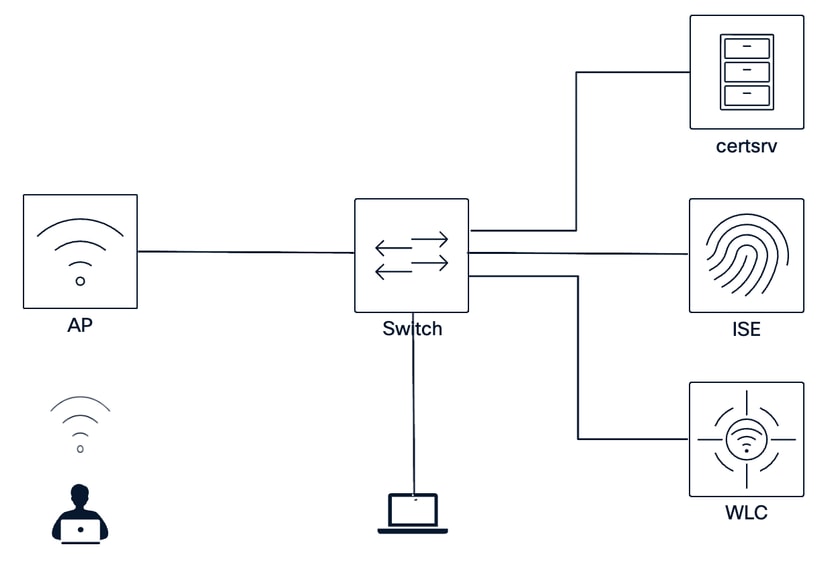
Sample Setup
For our purpose, we focus on a single scenario and provide configuration snippets and step-by-step guidance. As there are different variations along the way, we point them out and reference existing documentation for this purpose.
Scenario covered in this guide:
- AP wired Dot1X with EAP-FAST authentication
- Dot1X credentials provisioned through C9800 WLC
- AP in Flex Connect Local Switching mode
In this design, the switchport initially uses a common closed-mode 802.1X configuration with MAB fallback. During first onboarding, the AP potentially does not yet have 802.1X credentials, so ISE can authorize the AP through MAB with limited access sufficient to reach the WLC or Catalyst Center. After credentials or certificates are provisioned, the AP performs wired 802.1X authentication. ISE then returns an authorization result that applies to the AP_FLEX_TRUNK interface template, converting the port to the required FlexConnect trunk configuration.
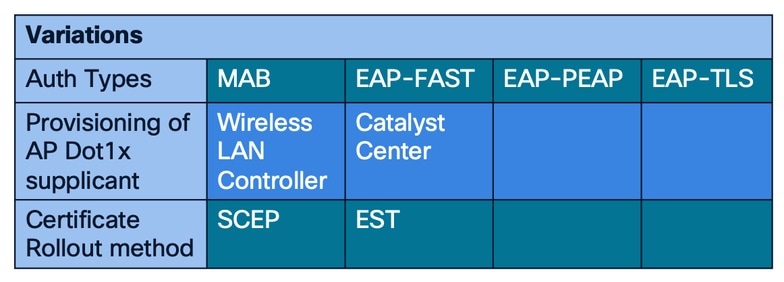
Table 1: Additional variations and options in an overview
AP configuration
To use wired Dot1x authentication in combination with your AP, you must roll out credentials and/or certificates depending on the selected authentication method to the APs first.
Cisco Catalyst AP Dot1x supplicant in general supports either EAP-FAST, EAP-PEAP or EAP-TLS. Additionally, MAB could be also an option, especially as APs need to gather in a first place the credentials or certificates to be able to execute EAP type authentication.
- MAB:
- No AP side setup required
- Managing of hardware MAC addresses requires tooling
- Can be easily spoofed
- Allows common port configuration
- EAP-FAST:
- Username/Password based
- Easy to rollout
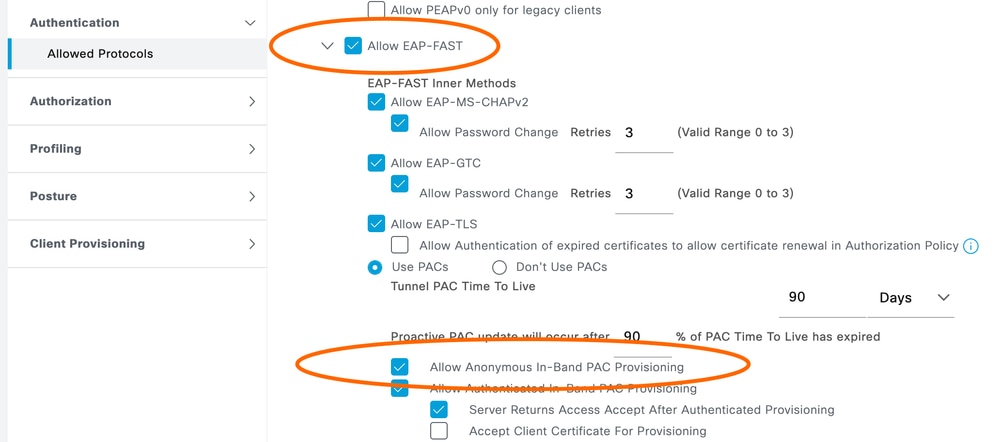
- Requires anonymous in-band PAC provisioning enabled on ISE
- EAP-PEAP:
- Username/Password based
- Requires certificates for server validation
- Certificate renewal needs to be planned accordingly
- EAP-TLS:
- Certificate based
- Certificate renewal needs to be planned accordingly
To configure the AP wired Dot1X supplicant there are two approaches for this, either through the Wireless LAN Controller or Catalyst Center which are described here. Before going into these details, the type of authentication you are going to use must be selected beforehand.
Setup wired Dot1X through Cisco 9800 Wireless LAN controller
If you have selected a certificate-based authentication (EAP-PEAP or EAP-TLS [1]) you need to decide as a next step the approach on how you are planning to issue Locally significant AP certificates (LSC), either through SCEP [2] or EST [3].
When using EAP-FAST like in our scenario, it is sufficient to generate an AP join profile, where you enter the Dot1X user and password, bind that Join profile to a Site-Tag and assign it to the APs.
GUI Configuration
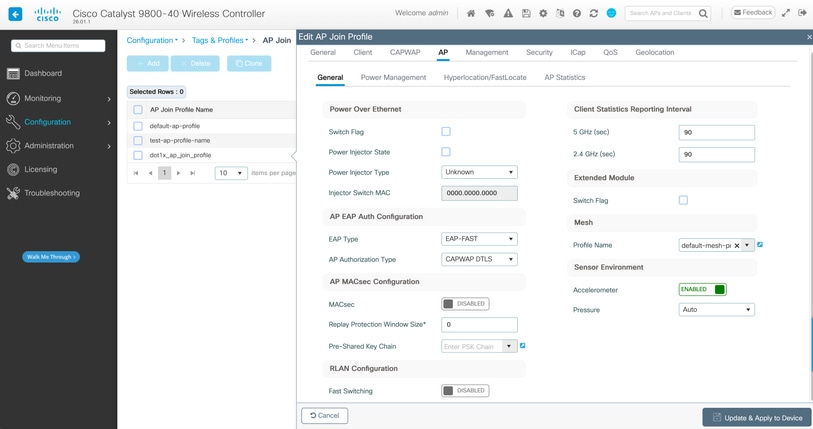
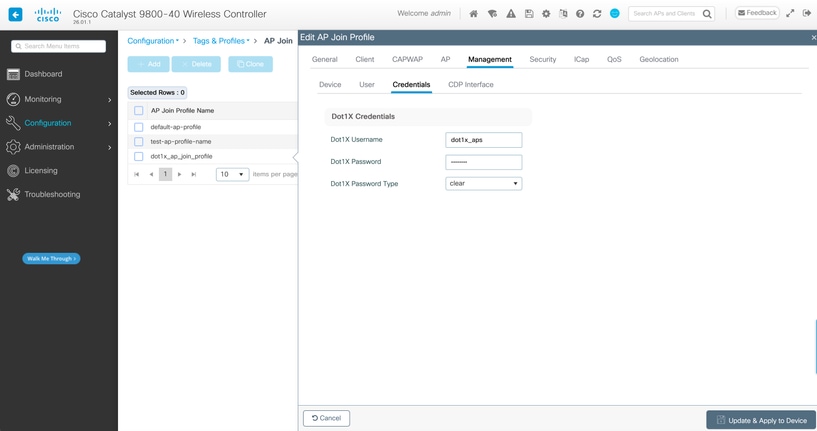
CLI Configuration
ap profile dot1x_ap_join_profile
 country DE
description dot1x_ap_join_profile
 dot1x eap-type eap-fast
 dot1x username <DOT1X_USER> password 0 <DOT1X_PASSWORD>
Setup wired Dot1X through Catalyst Center Plug and Play
For PnP [4] to work, Catalyst Center needs to be integrated with ISE. This is required partially because of the Certificates that are required to be able to do Server validation from AP side for EAP Authentication with ISE. For the device side certificate, APs get a certificate issued by Catalyst Center CA that is either by default its own built in or if configured by a SubCA / SCEP of the respective CA.
The setup process through PnP allows the provisioning of Certificates and/or Credentials before the device joins the WLCs.
Switch configuration
Besides the authentication being a security mechanism, it is also a way to standardize switchport configurations. Therefore, these parts describe the elements required to achieve this. This is a sample configuration and must be reviewed and adapted to your setup. In general, this configuration allows Dot1x and fallback MAB with proper handling of dead Radius scenarios, reauthentication and so on.
Global Radius Attributes:
!
radius-server attribute 6 on-for-login-auth
radius-server attribute 6 support-multiple
radius-server attribute 8 include-in-access-req
radius-server attribute 25 access-request include
radius-server attribute 31 mac format ietf upper-case
radius-server attribute 31 send nas-port-detail mac-only
radius-server dead-criteria time 5 tries 3
radius-server deadtime 3
!
ip radius source-interface <RADIUS-SOURCE-INTERFACE>
!
Radius Server Group:
!
radius server client-radius-server01
 address ipv4 <ISE01-PSN-IP> auth-port 1812 acct-port 1813
 timeout 10
 retransmit 1
 automate-tester username dummy ignore-acct-port probe-on key 6 <RADIUS-SECRET>
!
!
aaa group server radius client-radius-group
 server name client-radius-server01
 ip radius source-interface <RADIUS-SOURCE-INTERFACE>
!
AAA Config:
!
aaa new-model
aaa session-id common
!
aaa authentication dot1x default group client-radius-group
aaa authorization network default group client-radius-group
aaa accounting Identity default start-stop group client-radius-group
aaa accounting update newinfo periodic 2880
!
aaa server radius dynamic-author
 client <ISE01-PSN-IP> server-key 6 <RADIUS-SECRET>
!
IBNS2.0 Class-map and service-template:
!
service-template DEFAULT_CRITICAL_VOICE_TEMPLATE
 voice vlan
service-template DEFAULT_CRITICAL_DATA_TEMPLATE
service-template CRITICAL_AUTH_VLAN
 vlan <CRITICAL-AUTH-VLAN>
!
class-map type control subscriber match-all AAA_SVR_DOWN_AUTHD_HOST
 match authorization-status authorized
 match result-type aaa-timeout
!
class-map type control subscriber match-all AAA_SVR_DOWN_UNAUTHD_HOST
 match authorization-status unauthorized
 match result-type aaa-timeout
!
class-map type control subscriber match-all DOT1X
 match method dot1x
!
class-map type control subscriber match-all DOT1X_FAILED
 match method dot1x
 match result-type method dot1x authoritative
!
class-map type control subscriber match-all DOT1X_MEDIUM_PRIO
 match authorizing-method-priority gt 20
!
class-map type control subscriber match-all DOT1X_NO_RESP
 match method dot1x
 match result-type method dot1x agent-not-found
!
class-map type control subscriber match-all DOT1X_TIMEOUT
 match method dot1x
 match result-type method dot1x method-timeout
!
class-map type control subscriber match-any IN_CRITICAL_AUTH
 match activated-service-template CRITICAL_AUTH_VLAN
 match activated-service-template DEFAULT_CRITICAL_VOICE_TEMPLATE
!
class-map type control subscriber match-all MAB
 match method mab
!
class-map type control subscriber match-all MAB_FAILED
 match method mab
 match result-type method mab authoritative
!
class-map type control subscriber match-none NOT_IN_CRITICAL_AUTH
 match activated-service-template CRITICAL_AUTH_VLAN
 match activated-service-template DEFAULT_CRITICAL_VOICE_TEMPLATE
!
IBNS 2.0 Service Policy:
!
policy-map type control subscriber WiredDot1xClosedAuth_1X_MAB
 event inactivity-timeout match-all
  10 class always do-until-failure
   10 clear-session
 event session-started match-all
  10 class always do-until-failure
   10 authenticate using dot1x retries 2 retry-time 0 priority 10
 event agent-found match-all
  10 class always do-until-failure
   10 terminate mab
   20 authenticate using dot1x priority 20
 event aaa-available match-all
  10 class IN_CRITICAL_AUTH do-until-failure
   10 clear-session
  20 class NOT_IN_CRITICAL_AUTH do-until-failure
   10 resume reauthentication
 event authentication-failure match-first
  10 class DOT1X_FAILED do-until-failure
   10 terminate dot1x
   20 authenticate using mab priority 20
  20 class AAA_SVR_DOWN_UNAUTHD_HOST do-until-failure
   10 activate service-template CRITICAL_AUTH_VLAN
   20 activate service-template DEFAULT_CRITICAL_VOICE_TEMPLATE
   30 authorize
   40 pause reauthentication
  30 class AAA_SVR_DOWN_AUTHD_HOST do-until-failure
   10 pause reauthentication
   20 authorize
  40 class DOT1X_NO_RESP do-until-failure
  10 terminate dot1x
  20 authenticate using mab priority 20
 50 class MAB_FAILED do-until-failure
  10 terminate mab
  20 authentication-restart 60
 60 class DOT1X_TIMEOUT do-until-failure
  10 authenticate using mab priority 20
 70 class always do-until-failure
  10 terminate dot1x
  20 terminate mab
  30 authentication-restart 60
!
Interface Templates:
!
template AP_FLEX_TRUNK
 dot1x pae authenticator
 dot1x timeout supp-timeout 7
 dot1x max-req 3
 switchport trunk native vlan <TRUNK-NATIVE-VLAN>
 switchport trunk allowed vlan <TRUNK-ALLOWED-VLANS>
 switchport mode trunk
 mab
 access-session host-mode multi-host peer
 access-session closed
 access-session port-control auto
 authentication periodic
 authentication timer reauthenticate server
 service-policy type control subscriber WiredDot1xClosedAuth_1X_MAB
!
template DEFAULT-ACCESS-PORT
 dot1x pae authenticator
 dot1x timeout supp-timeout 7
 dot1x max-req 3
 switchport mode access
 mab
 access-session host-mode multi-domain
 access-session closed
 access-session port-control auto
 authentication periodic
 authentication timer reauthenticate server
 service-policy type control subscriber WiredDot1xClosedAuth_1X_MAB
!
Interface Configuration:
!
interface TenGigabitEthernet1/0/1
 switchport access vlan <DEFAULT-ACCESS-VLAN>
 switchport mode access
 dot1x timeout tx-period 7
 dot1x max-reauth-req 3
 source template DEFAULT-ACCESS-PORT
 spanning-tree portfast
 spanning-tree bpduguard enable
!
Global Mandatory:
!
dot1x system-auth-control
!
access-session interface-template sticky timer 60
!

Note: When using a CW9178, the AP presents two MAC addresses during authentication. To prevent the switchport from entering the err-disabled state, the port must initially be configured for host-mode multi-auth. After successful 802.1X authentication, it is recommended to dynamically change the port configuration to host-mode multi-host.
Identity Services Engine configuration
Finally, also the RADIUS server needs to be configured to allow authentication. For wired Dot1x there is an extensive guide [5], so we focus only on the relevant parts in this case.
- Add the switch as a Network Access Device:
> Administration > Network Ressources > Network Devices > Add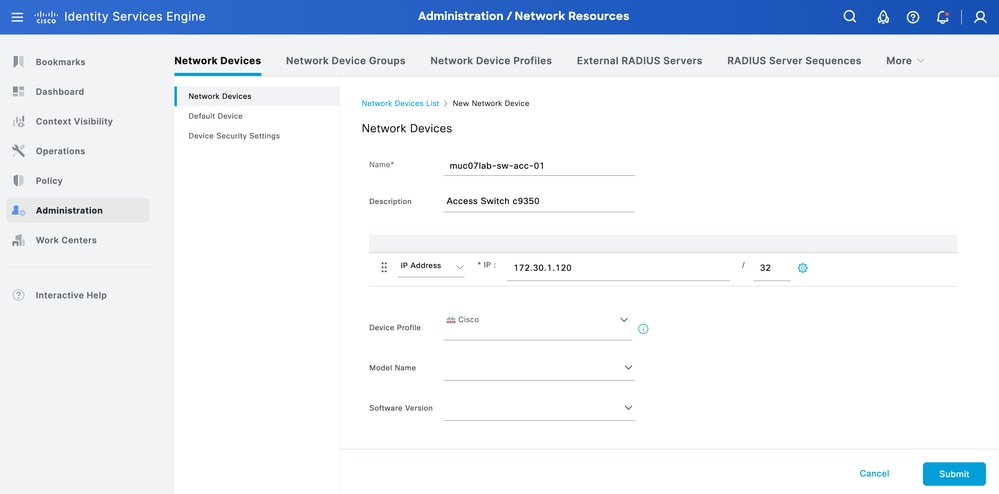
- Enable EAP protocol that you are using:
> Policy > Policy Elements > Results > Authentication > Allowed Protocols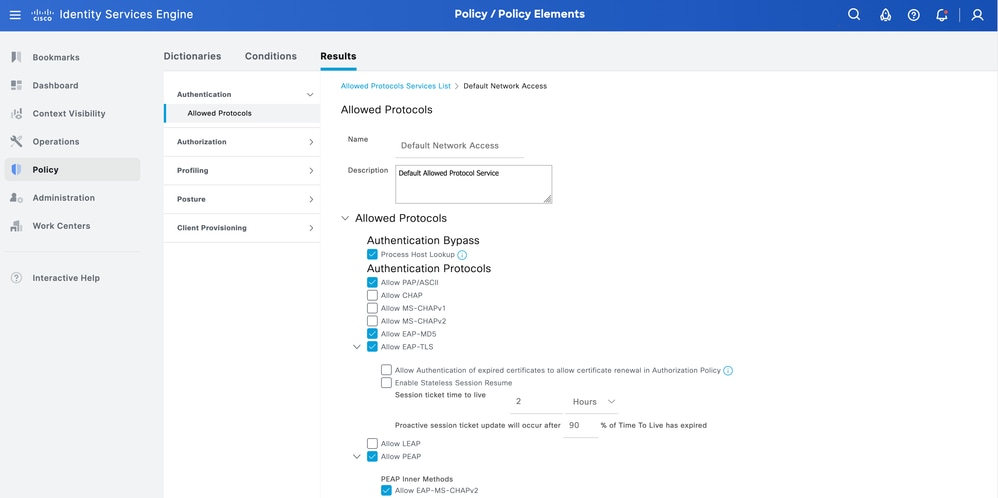
- For our scenario, as we are using EAP-FAST, bear in mind that "Anonymous In-band PAC Provisioning" must be enabled:
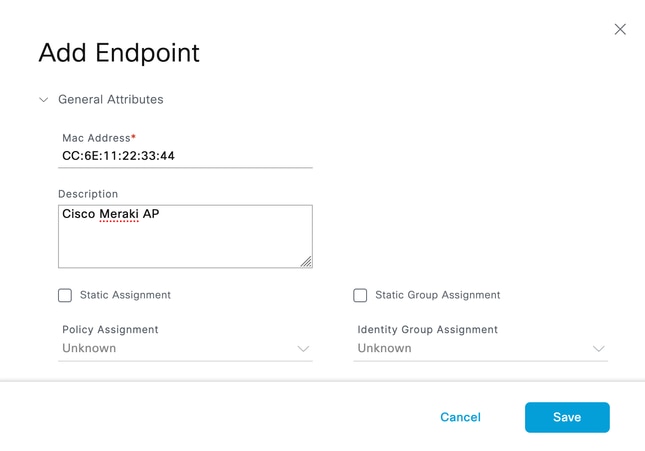
- Add Identities
> Work Centers > Network Access > Identities- For successful operation, the process typically consists of two steps. Initially, the AP has no credentials and therefore cannot respond to EAP authentication. As a result, the switch port must first authenticate the AP using MAB. This can be based on a generic authorization policy, a location-based policy, or device profiling. Regardless of the policy used, the initial MAB authentication must succeed to allow the AP to obtain its credentials, either from the WLC via CAPWAP or from Cisco Catalyst Center through Plug and Play (PnP).
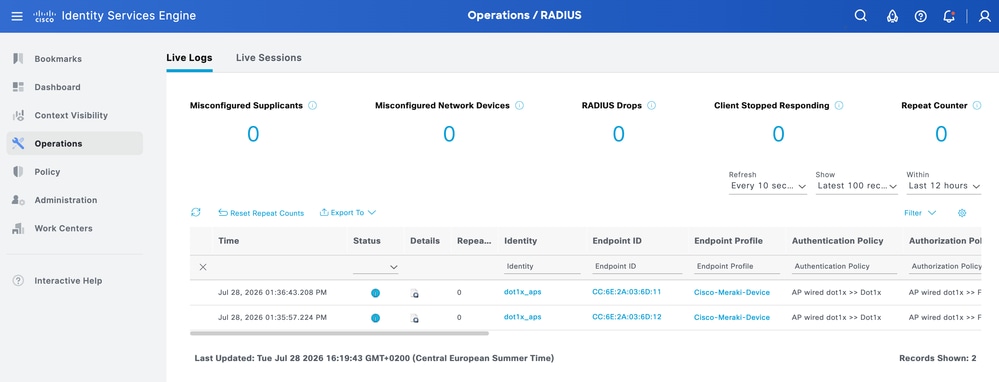
- After the AP has gathered the credentials/certificate, the AP wired Dot1X supplicant responds to EAPoL and Dot1X is the subsequent method for authentication enabling AP for full access.
In our scenario, we need to add a Username/Password: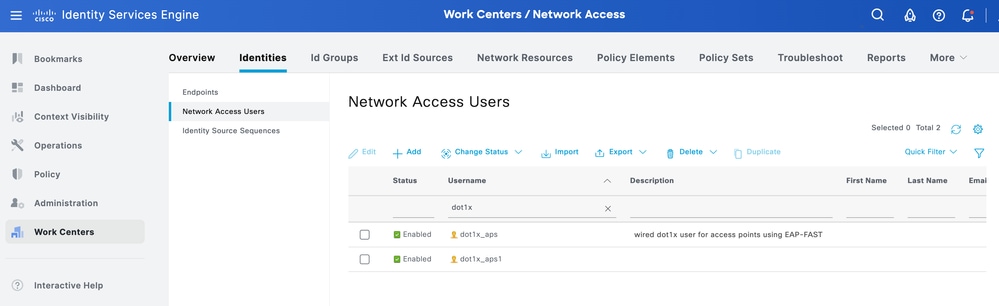
- For successful operation, the process typically consists of two steps. Initially, the AP has no credentials and therefore cannot respond to EAP authentication. As a result, the switch port must first authenticate the AP using MAB. This can be based on a generic authorization policy, a location-based policy, or device profiling. Regardless of the policy used, the initial MAB authentication must succeed to allow the AP to obtain its credentials, either from the WLC via CAPWAP or from Cisco Catalyst Center through Plug and Play (PnP).
- Create Authorization Profile
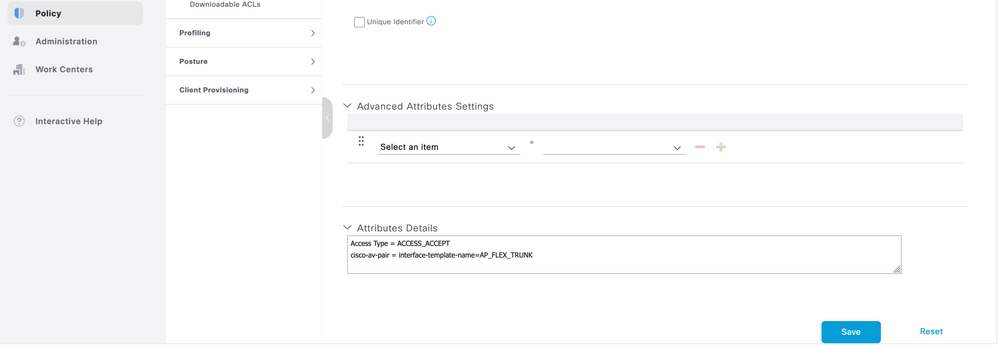
The Authorization Profile responds with the required av-pair. In our case, as we are dynamically modifying the switchport, the interface-template needs to be configured:
> Policy > Policy Elements > Results > Authorization > Authorization Profiles
Name: FLEX_AP_TRUNK
Access Type: ACCESS_ACCEPT
Interface Template: AP_FLEX_TRUNK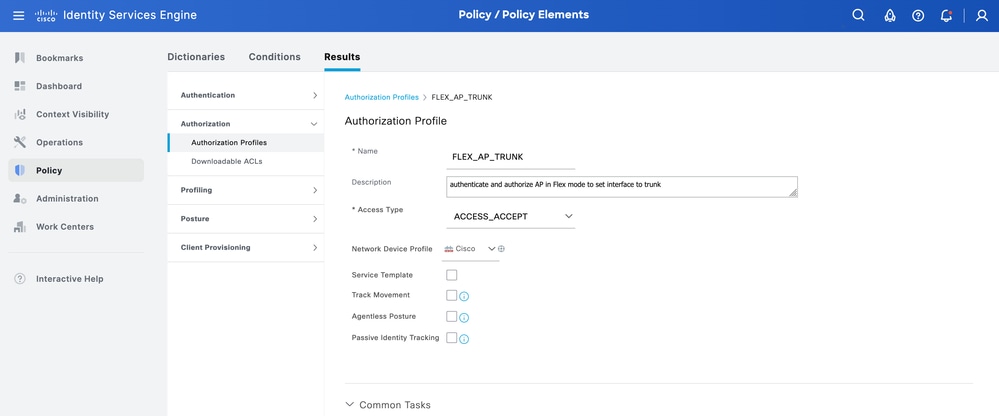

- Create Authorization Policy
Create an Authentication Policy that allows MAB as well as wired Dot1X and looks up the Endpoint/User in the proper Identity Store.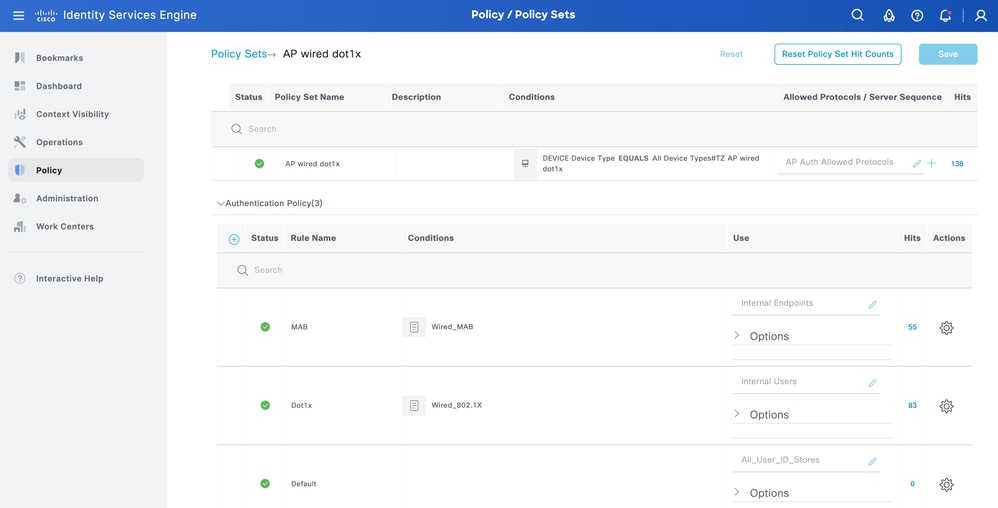
Put a limited Access Authorization Result, depending on your needs for MAB, and a Full AP Access including the referenced interface-template av-pair for Dot1x: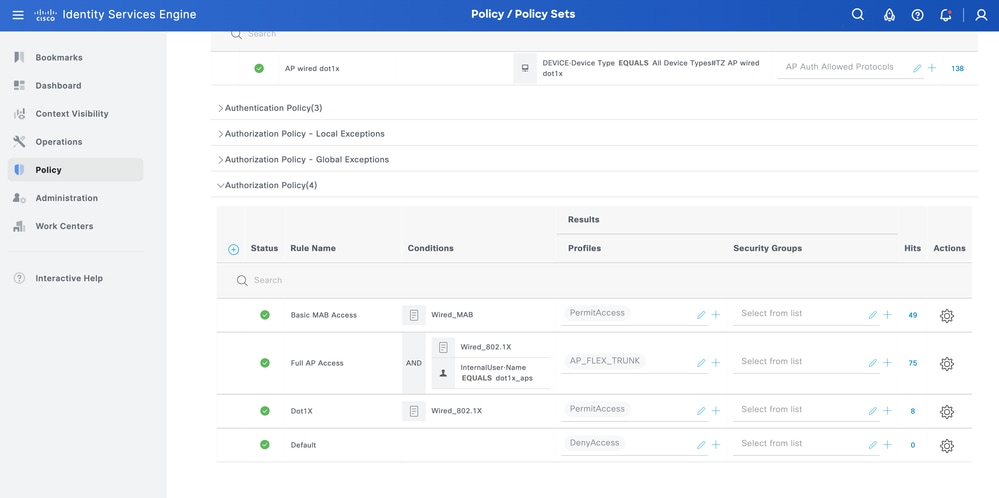
Verify
Once this configuration has been put in place, connect the AP to the switch. As a prerequisite it is expected that the default network settings, in our case a DHCP pool in the Access VLAN with Option 43 pointing to the WLC and CAPWAP communication is possible for the AP to the WLC.
AP commands
show ap authentication status
show crypto
show crypto pki trustpool
Switch commands
show access-session
show aaa servers
show access-session interface <INTERFACE> details
show template interface binding target <INTERFACE>
show derived-config interface <INTERFACE>

Sample output:
!
C9350-02-R11#show access-session interface te1/0/1
Interface MAC Address Method Domain Status Fg Session ID
--------------------------------------------------------------------------------------------
Te1/0/1 6cef.1122.3344 dot1x DATA Auth 09FE1FAC000000948FF60A2F
ISE
List of Acronyms
| Acronym | Expansion |
| AAA | authentication, authorization, and accounting |
| AP | access point |
| AuthC | authentication |
| AuthZ | Authorization |
| CA | certification authority |
| CISP | Client Information Signaling Protocol |
| Dot1x | IEEE 802.1X |
| EAP | Extensible Authentication Protocol |
| EST | Enrollment over Secure Transport |
| FAST | Flexible Authentication via Secure Tunneling |
| IBNS | Identity Based Networking Services |
| ISE | Identity Services Engine |
| MAB | MAC Authentication Bypass |
| NAD | Network Access Device |
| PEAP | Protected Extensible Authentication Protocol |
| SCEP | Simple Certificate Enrollment Protocol |
| TLS | Transport Layer Security |
| WLC | Wireless LAN Controller |
References
[1] Configure 802.1X on APs for PEAP or EAP-TLS with LSC
[2] Configure SCEP for Locally Significant Certificate Provisioning on 9800 WLC
[3] Cisco Wireless EST On-Prem Deployment Guide
[4] Secure AP onboarding- An Introduction to Enhanced Network Security
[5] ISE Secure Wired Access Prescriptive Deployment Guide
[6] Config Guide section for LSC
[7] Configure 802.1X Supplicant for Access Points with 9800 Controller
[8] Secure a Flexconnect AP Switchport with Dot1x
[12] Using IBNS 2.0 and interface templates for a default switchport config
Revision History
| Revision | Publish Date | Comments |
|---|---|---|
1.0 |
03-Aug-2026
|
Initial Release |

 Feedback
Contact Cisco
- Open a Support Case

- (Requires a Cisco Service Contract)