Enable SDWAN Controllers Certificate Renewal via Manual Method

Available Languages
Introduction
This document describes the steps to renew the SD-WAN certificate on the controllers through Cisco or manually.
Available Methods
There are four different options available for the Controller Certificate Authorization.
- Cisco (Recommended) - Semi-automated process that uses the Cisco Plug and Play (PnP) portal to sign the CSR generated by the vManage to automatically download and installs them.
- Manual - Manual certificate sign through Cisco PnP.
- Symantec - Manual third-party certificate sign through Symantec/Digicert.
- Enterprise Root Certificate - Manual certificate sign through a private Root Certificate Authority (CA).
This document describes only the steps for the Cisco (Recommended) and Manual methods.

Caution: The certificates covered in this document are not related to the Web Certificate for vManage.
Requirements
- A PC/Laptop.
- A Netadmin account for the vManage GUI and for for each controller (vManage, vSmart, and vBond).
- Access to the CA Server.
- For Cisco (recommended) or Manual, a valid account/password for the PnP Portal.
- For Cisco (recommended), the vManage must have internet access.
- All the Controllers need a valid NTP server and/or all of them need to have the correct date and time.
- Communication between the vBond and vSmart to the vManage.

Note: The certificate install in the vManage would not impact your control plane or data plane. For the certificate in the vSmart, the control connections can be affected. The control plane continue to work due to the OMP graceful timer. To perform a certificate change, you must schedule a maintenance window for the activity.
Renewal Process
This is a high-level procedure:
- Identify the Controller Certificate Authorization option in use on the vManage GUI.
- Generate a new CSR through the vManage GUI.
- Create a new Certificate.
- Download the Certificate.
- Install the Certificate.
Cisco (Recommended)
- Navigate to vManage > Administration > Settings > Certificate Authority Server.
- Verify the correct option is selected.
- Select the duration of the certificate.

2. Scroll down to Smart Account Credentials and introduce the valid User/Password. The credentials must have access to the Smart Account where the SD-WAN overlay is configured, as shown in the image.

3. Navigate to vManage > Configuration > Certificates > Controllers.
- Select the ellipsis (...) on the controller (vBond, vSmart or vManage).
- Select Generate CSR.

4. 5 - 20 minutes is required for the process to finish.
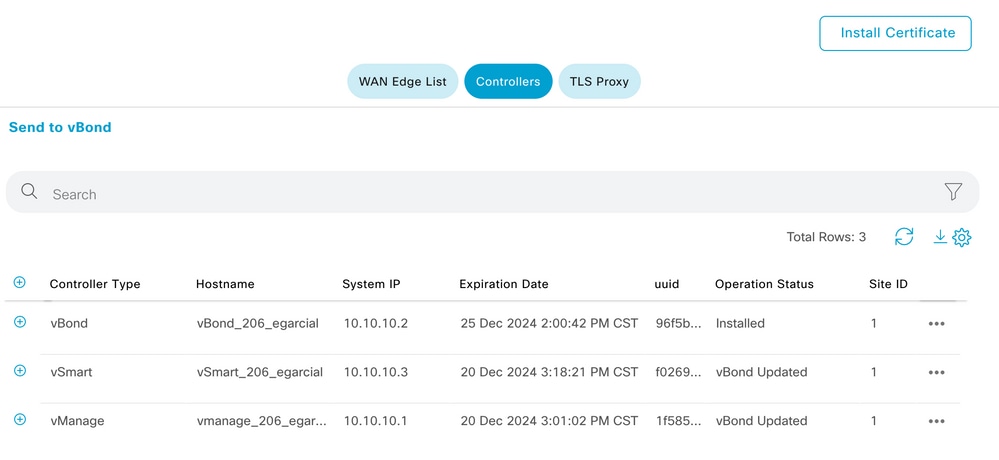
Verify the installation was correct in the GUI vManage > Configuration > Certificates > Controllers.
Manual (PnP)
1. Navigate to vManage > Administration > Settings > Certificate Authority Server.
- Verify the correct option is selected.
2. Navigate to vManage > Configuration > Certificates > Controllers.
- Select the ellipsis (...) on the controller (vBond, vSmart or vManage).
- Select Generate CSR.
- Copy and save all text in a temporally file.
3. Access the PnP portal, select your SD-WAN overlay, and navigate to certificates, as shown in the image.

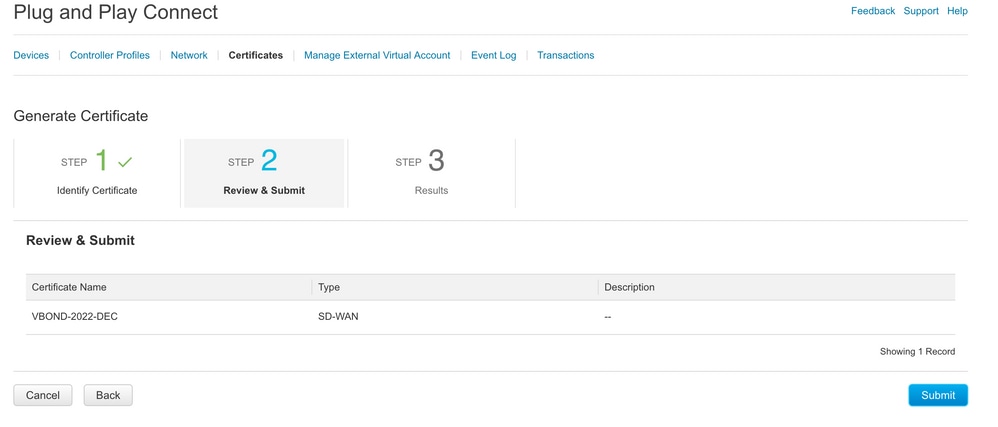
4. In the Certificates section, click Generate a new certificate and enter all information.
- On Certificate Signing Request, enter the CSR generated on Step 2.

5. Click Submit and Done.
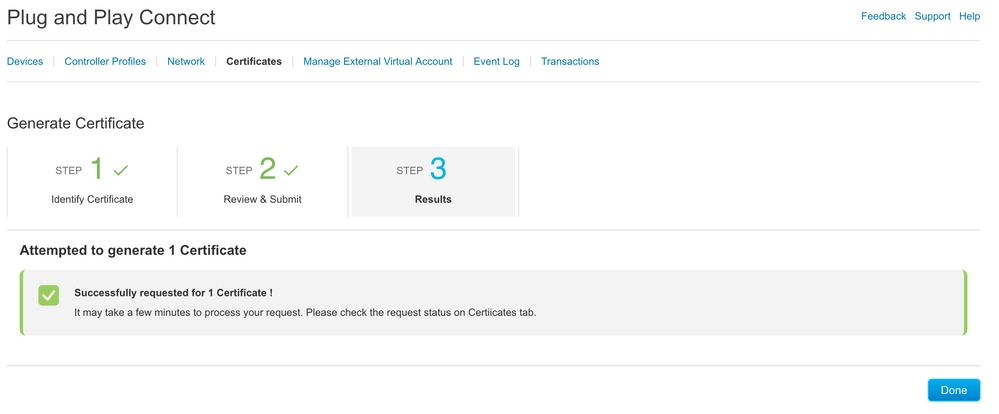
6. After a few minutes, the certificate is ready to download.
- Download the certificate file.
- Access the vManage GUI.
- Select install certificate under vManage > Certificate > Controllers.
- Select the certificate in the pop-up window.


7. The certificate is now installed.

Common Problems
Time Mismatch
Cisco Cloud hosted controllers have a NTP server configured. If the NTP is not present due to a configuration change, the controllers can have different times and this can interfere with the certificate installation or CSR generation. Ensure the controllers have the same time.
Cannot Establish Connection
The SD-WAN controllers must be reachable via the interface configured under VPN0. Verify there is Layer 3 and Layer 4 communication. You can check the logs of the controller via console for more details about the problem.
Revision History
| Revision | Publish Date | Comments |
|---|---|---|
2.0 |
24-Jun-2026
|
Updated Introduction Section, grammar, spelling, spacing, alt text, sentence structure, and CCW alerts. |
1.0 |
27-Apr-2023
|
Initial Release |
 Feedback