Navigate Client EKU Sunset with Expressway x15.5

Available Languages
Introduction
This document describes navigating the client EKU sunset with Cisco Expressway x15.5.
Background Information
Digital certificates are electronic credentials issued by trusted Certificate Authorities (CAs) that secure communication between servers and clients by ensuring authentication, data integrity, and confidentiality. These certificates contain Extended Key Usage (EKU) fields that define their purpose:
- Server Authentication EKU (id-kp-serverAuth is used when a server presents its certificate to prove identity.
- Client Authentication EKU (id-kp-clientAuth) is used in mutual TLS (mTLS) connections where both parties authenticate each other.
Traditionally, a single certificate could contain both Server and Client Authentication EKUs, allowing it to serve dual purposes. This is particularly important for products like Cisco Expressway that act as both server and client in different connection scenarios.
Problem Definition
Chrome Root Program Policy Change
Effective June 2026, the Chrome Root Program Policy restricts Root Certificate Authority (CA) certificates included in the Chrome Root Store, phasing out multi-purpose roots to align all public-key infrastructure (PKI) hierarchies to serve only TLS server authentication use cases.
Key Policy Requirements
- Public Root CAs must assert Extended Key Usage (EKU) ONLY for Server Authentication (id-kp-serverAuth).
- Including Client Authentication EKU in these certificates is prohibited.
- No more mixed-use root CAs for public server TLS certificates.
- Enforcement Timeline: June 2026
Public CA Response Timeline
- October 2025: Many public CAs (DigiCert, Sectigo, SSL) began issuing server-only certificates by default.
- May 2026: Public CA servers stop issuing Client Authentication EKU certifications
- June 2026: Chrome Root Program Policy becomes fully effective

Note: This policy applies only to certificates issued by public CAs. Private PKI and self-signed certificates are not affected by this policy.
If you are interested in reading about impact of sunsetting of client EKU on Expressways, refer to Prepare Expressway for Client Auth EKU Sunset in Public CA Certificates.
Expressway Release x15.5 with Solution
Expressway x15.5
Expressway x15.5 comes with a proposed fix for a problem which arises due to sunsetting of client EKU by all public certificate authorities. This is a global problem and affects all vendors/deployments who choose to use public PKI certificates.
x15.4, a release prior, had a CLI command switch which allowed admin to upload Server EKU only certificate (no client EKU present) on Expressway E.
xConfiguration XCP TLS Certificate CVS EnableServerEkuUpload: On
Note: This command is deprecated on x15.5.
X15.5 Certificate Store Addition
x15.5 has two certificate stores:
1. Server certificate store
2. Client certificate store
Expressways (single Nic or dual Nic): Both Expressway interfaces are able to use 2 certificate stores on an as-needed basis.
Example:
- When expressway acts as a client during TLS handshake, client certificate is presented.
- When expressway acts as server during TLS handshake, server certificate is presented.
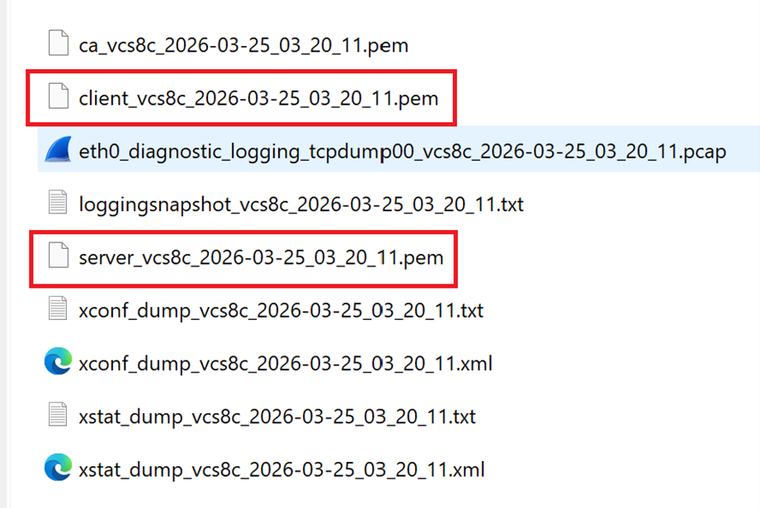
Note: Both certificate stores (Client and Server) use same Trusted CA library. Ensure that the CA who signed server and client certificates are uploaded correctly on the Trust store. Diagnostic logs now include server certificate and client certificate in PEM file format.
Upgrade from X15.4 or Prior Version to X15.5
When an upgrade is performed, the server certificate from x15.4 or prior version, the Expressway server certificate store is copied to client certificate store on x15.5. Client and server certificate stores on x15.5 have same certificate.
Example with Screenshots
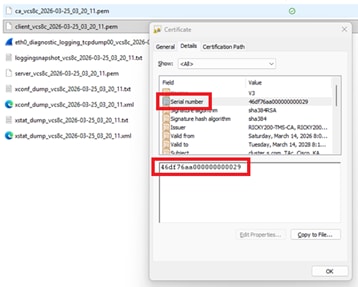
Expressway server on 15.4, current server certificate Serial Number 46:df:76:aa:00:00:00:00:00:29
Certificate:
Version: 3 (0x2)
Serial Number:
46:df:76:aa:00:00:00:00:00:29
Validity
Not Before: Mar 14 02:37:40 2026 GMT
Not After : Mar 14 02:47:40 2028 GMT
Subject: C = IN, ST = KA, L = KA, O = Cisco, OU = TAc, CN = cluster.s.com
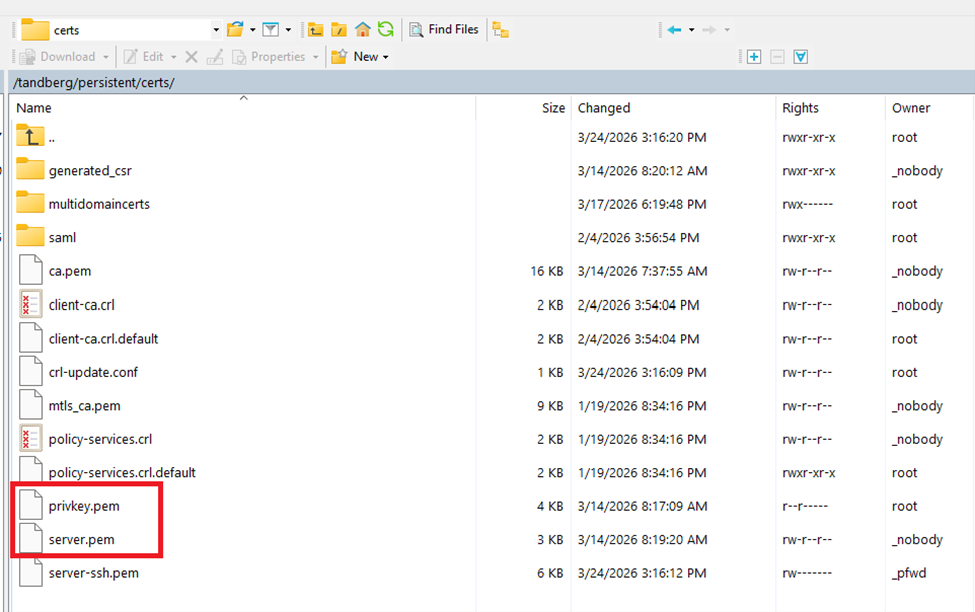
Expressway file system persistent/cert directory on x15.4:
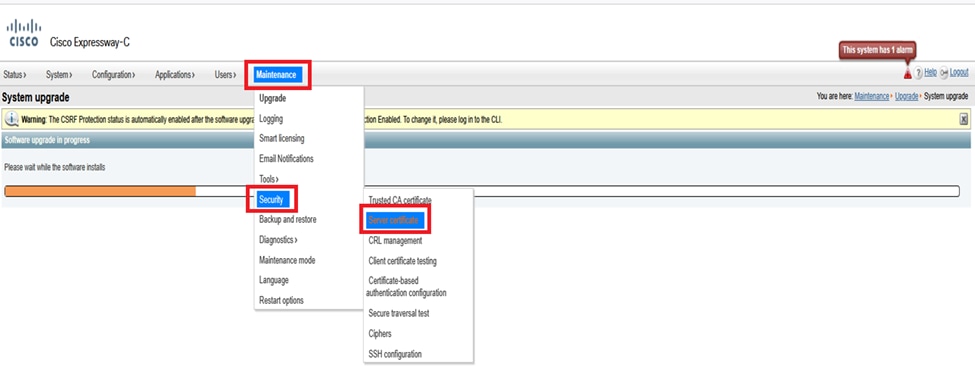
Expressway menu (Maintenance > Security > Server certificate) on x15.4 (only server certificate field present):
After Successful Upgrade to x15.5
Here, you see 2 certificate options under Maintenance > Security > client certificate and server certificates. After upgrading to x15.5, both the Server and Client certificate portals on web admin shows the same certificate because the server certificate from x15.4 was copied to the client certificate store on x15.5.
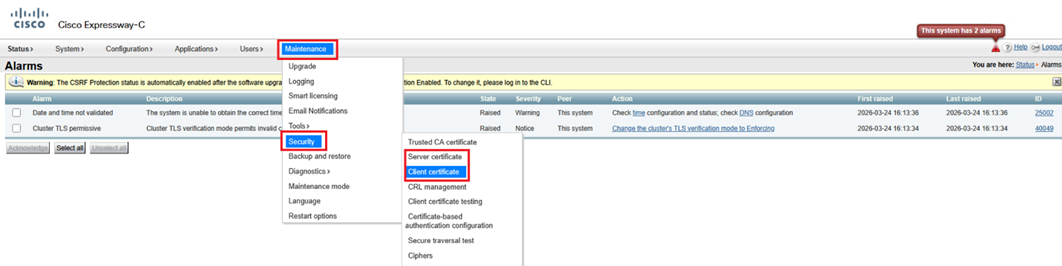
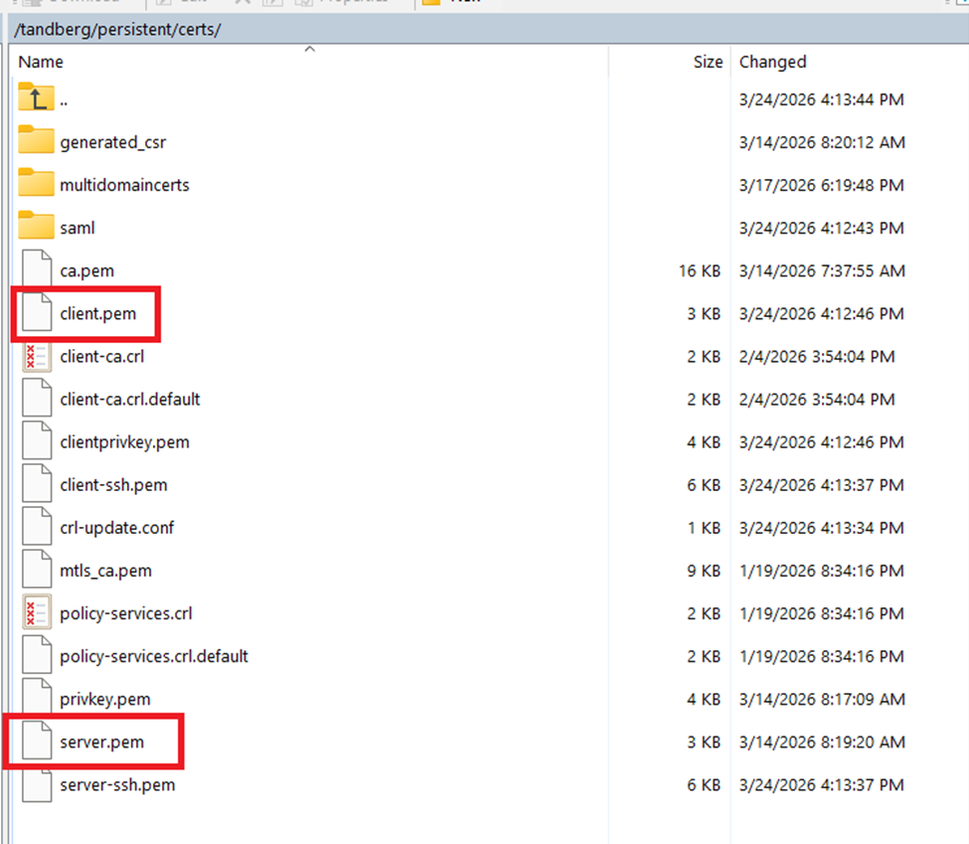
Post-upgrade to x15.5 existing certificate and private key has been copied to the client certificate store.
Expressway file system persistent/cert directory on x15.5:
X15.5 EKU Check During TLS Handshake
On x15.5, a new CLI command has been introduced to check Extended key usage (EKU) during TLS handshake. Default value is “ON.” The command set is valid on Expressway Core and Edge.
The command set triggers a check for all INBOUND SIP TLS connections into Expressway. (inbound client hellos/certificate presented). When turned “ON,” this checks whether or not the presented certificate by the TLS initiator contains client EKU in certificate. IF turned OFF, the check is bypassed; however, the server EKU is checked if it is present on certificate.
xconfiguration SIP TLS Certificate ExtendedKeyUsage Checking Mode: ON/OFF:
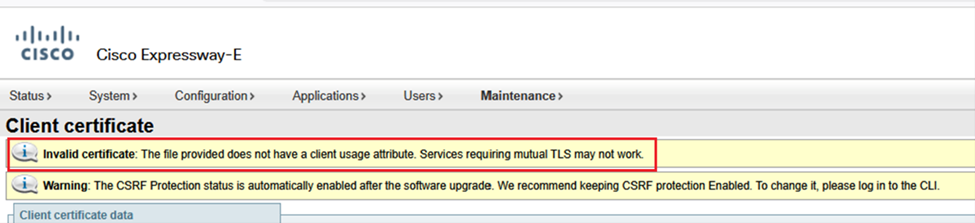
Note: If you generate a client certificate, signing a CSR which does not contain client EKU (an example of public CA signed certificate), you are not able to upload this certificate manually on the client certificate store. So, you need to ensure that certificates generated by signing a CSR always contain the client EKU (a private CA can be used to insert the client EKU).

Tip: This error becomes evident when you attempt to upload a CSR signed certificate, which is missing the client EKU, from client certificate store.
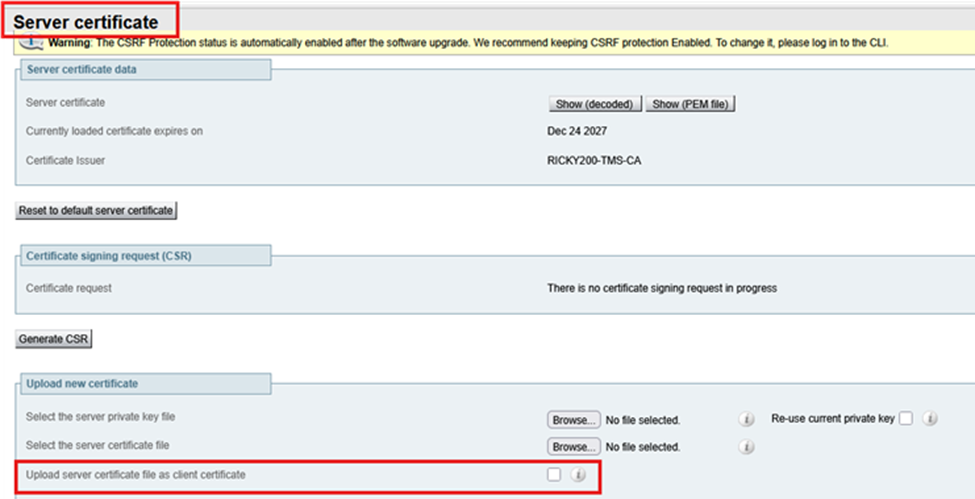
However, if you choose to upload a certificate which has a server EKU only (no client EKU) via server certificate store and select Upload server certificate file as client certificate, the certificate is copied to the client certificate store. Admins who do not want to use a private CA signed certificate on Expressway-Edge can choose to copy the server EKU only from the server certificate store to the client certificate store.
Multiple Certificate Stores, Multiple Deployment Scenarios
Since now there are two certificate stores on Expressway, there are multiple scenarios of certificate stores.
Condition 1: Upgrade
When Expressway is upgraded from x15.4 or prior to x15.5, this condition is true. Existing certificates from x15.4 version are copied into two (2) certificate stores. On the x15.5 client and server, te certificates are the same.

Condition 2: When the Admin Installs New Certificate on x15.5 (Existing Certs Expired)
CA 1 = Internal CA
CA 2 = Public CA
In the Figure shown next, Expressway Core has a client certificate with server EKU only signed by CA 2 (Public CA) and a server certificate with server EKU only signed by CA 2 (Public CA). Similarly, Expressway E has a client certificate with the server EKU signed by CA2 (public CA) and a server certificate with server EKU only signed by CA 2 (Public CA).
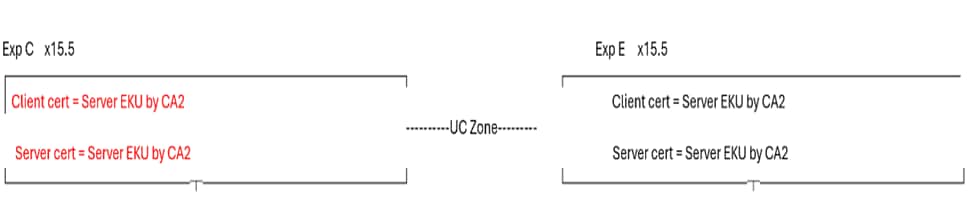
If the Expressway core server certificate does not have a client EKU, Unified communications traversal zone, MRA, the WebRTC proxy does not work. Ensure that the Expressway Core server certificate has a client EKU. This is a common use case where users choose to sign all certificates from public CA. Since public CA does not include Client EKU in certificates, the Unified communications traversal zone does become active.
To make UC zone active, a quick fix is to turn off the EKU check on Expressway E. This brings up the UC zone. However, SSH tunnels stay inactive. As of today, the SSH tunnel communication on 2222 requires validation of the client EKU.
MRA client login and WebRTC proxy functions do not function. You could have to resort to private CA.
Test Case 1
- When EKU check is “ON” on Expressway E
- When Client and Server certificate on Expressway core has Server EKU only
- UC zone status is FAILED
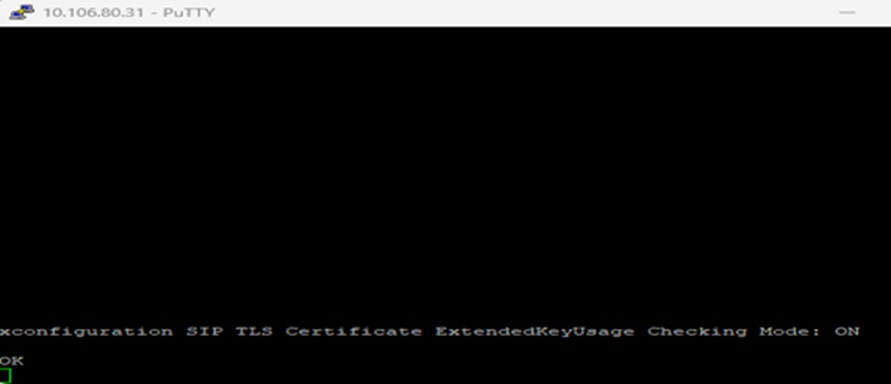
On Expressway-Edge ExtendedKeyUsage Check ON.
xconfiguration SIP TLS Certificate ExtendedKeyUsage Checking Mode: On:
Unified communication zone failure:

Expressway E logs show where 10.106.80.16 = Expressway Core, 10.106.80.31 = Expressway Edge:

Test Case 2
- When EKU check is OFF on Expressway E
- When Client and Server certificate on Expressway Core has server only EKU
- UC zone status is ACTIVE
Turn OFF EKU check on Expressway E.
xconfiguration SIP TLS Certificate ExtendedKeyUsage Checking Mode: Off

Unified communication zone Active:

However, ssh tunnels still failed:

Expressway event logs:

Condition 2.1: Success Case
CA 1 = Internal CA
CA 2 = Public CA
- Where Expressway core client certificate is signed by CA 1 (internal CA) and includes, Client/Server EKU both.
- Expressway core server certificate is signed by CA 2 public CA and includes Server EKU only.
- Expressway Edge Server certificate is signed by CA 2 public CA and includes Server EKU only.
- Expressway Edge client certificate is signed by CA 2 public CA and includes Server EKU only.

This condition is a success case. Irrespective of whether the EKU check mode is ON/OFF, the Unified Communication zone and SSH tunnel both become active. MRA clients work.
It does not matter whether the Expressway Edge EKU check is OFF or ON. The Expressway core client certificate contains client EKU:


SSH Tunnels on Expressway core Active:

SSH Tunnels on Expressway Edge Active:

Unified Communication MRA Zone status Active:

- Expressway-Core client certificate has Server EKU and Client EKU.
- Expressway Core Server certificate has Server EKU only.
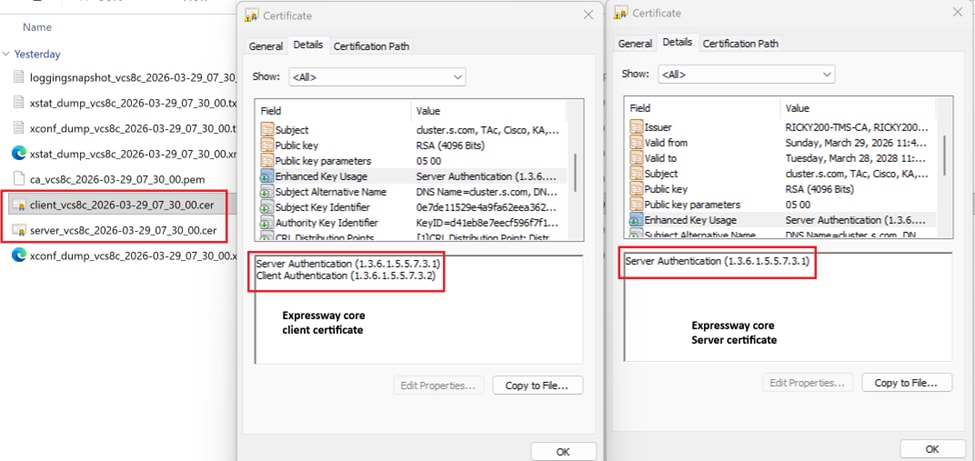
MRA Client logs in and registered:
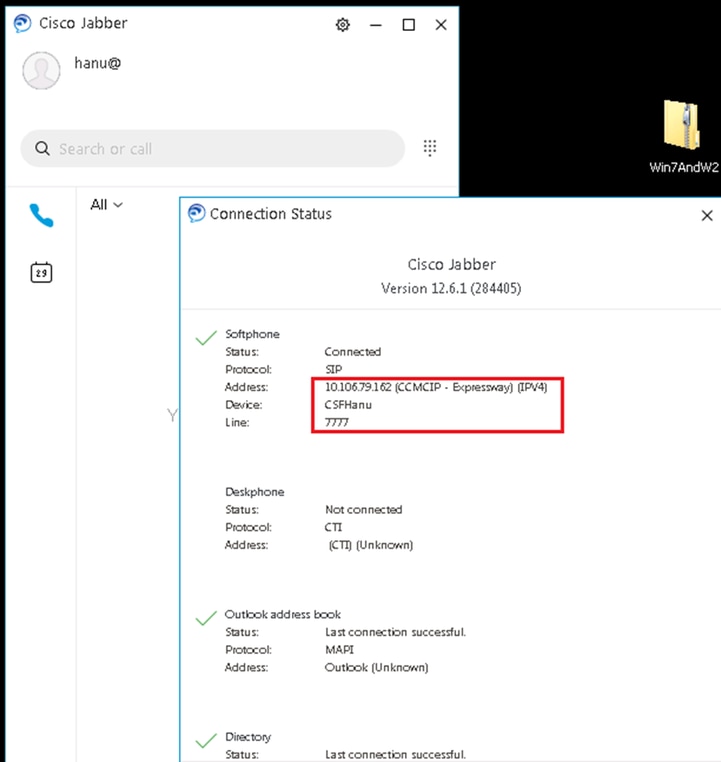
Note: Compare and take note of EKUs present in certificates for MRA and WebRTC proxy to work. It is a comparison of working and non-working deployment.
Condition 3: Signs all Certificates with Private CA
CA 1 = Internal CA
CA 2 = Public CA

In condition 3, all certificates are signed by internal CA (CA1) .
- When Expressway-E sends out a TLS connection, CA 1 root/intermediate need to be exchanged with far-end entity. If far-end does not have capability or does not allow private CA certificate to be uploaded, TLS connection is unsuccessful.
- MRA clients get certificates to accept pop ups if the private certificate is not in the OS trust store.
Condition 4: Expressway Edge has Public Certificates with Server EKU Only

In Condition 4, the Expressway core client and server certificates are (CA1) internal CA signed and have both client and server EKU present. The Expressway E server certificate is public CA signed and has server EKU only. Server certificate is copied to client certificate store choosing Upload server certificate file as client certificate.
In Condition 4, when TLS connection is made to far-end, if Expressway -E sends a TLS client hello, far-end has to disable client EKU check (as client certificate does not have client auth EKU) else TLS connection is unsuccessful.
There can be many more conditions or scenarios in the field based on user deployment and use cases and all cannot be covered due to my limited stream of thought. However, points to remember are:
- # IF Expressway becomes a client during TLS handshake, the client certificate is presented to peers.
- #IF Expressway becomes Server during TLS handshake; the server certificate is presented to peer.
This reasoning has been established with these tests cases.
Scenario 1
For this scenario, Expressway presents client certificate during the MTLS handshake with Webex.
A video call to Webex meeting:
Sample call flow Jabber -à CUCM -à Exp Core --à Exp Edge --à Webex
10.106.80.31= Expressway Edge
163.129.37.33 = Webex
2026-03-24T11:54:26.106+00:00 smartslave tvcs: UTCTime="2026-03-24 11:54:26,106" Module="network.sip" Level="DEBUG": Action="Sent" Local-ip="10.106.80.31" Local-port="25002" Dst-ip="163.129.37.33" Dst-port="5061"
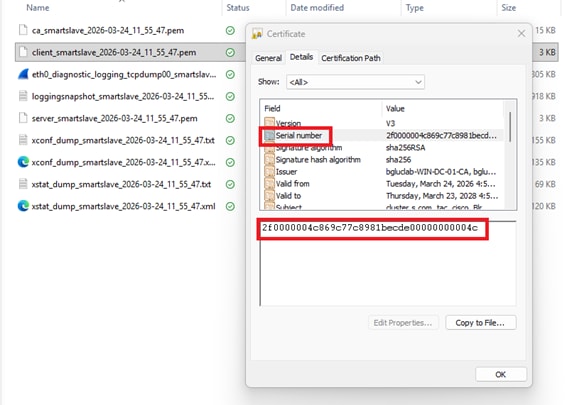
Expressway Edge has Client certificate with this serial number (2f0000004c869c77c8981becde00000000004c).
Expressway Edge sends out client hello to ‘Webex during TLS negotiation, then sends out client certificate.
Serial number 2f0000004c869c77c8981becde00000000004c:
1. Expressway Edge sends out client hello (pkt= 13699) to ‘Webex during mTLS negotiation.
2. Webex sends a server hello to Expressway Edge (pkt=13701).
3. Webex sends its certificate to Expressway Edge (pkt=13711).
4. Webex requests Expressway edge certificate “CertificateRequest ” (pkt=13715).
5. Expressway Edge sends its certificate to Webex (pkt=13718).
(screenshot)
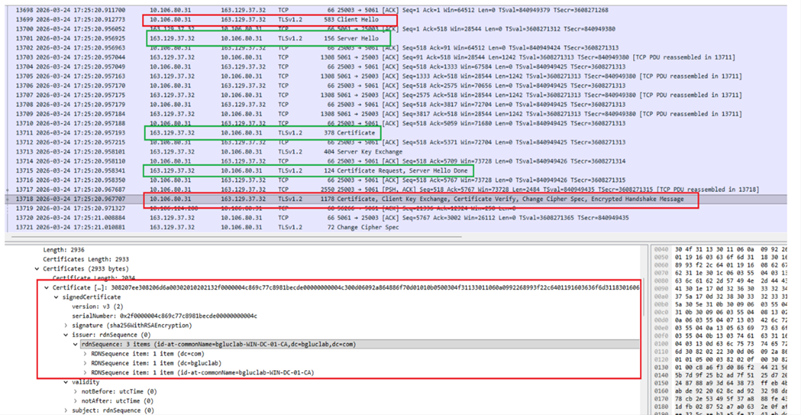
Client certificate from Expressway Edge:
Scenario 2
Expressway becomes a server entity during the mTLS handshake and presents its server certificate:
Where Expressway presents Server certificate, Expressway has a secure Neighbor zone over 5061 with verify name ON.
Secure neighbor zone between Expressway node x15.5 and Expressway node x8.11.4:
10.106.80.15 (x8.11.4) sends a client hello to 10.106.80.16 (x15.5) (pkt=736)

10.106.80.16 sends a server hello to 10.106.80.15 (pkt=738)

10.106.80.16 (x15.5) presents its server cert during TLS handshake (pkt=742) and requests client’s certificate ie 10.106.80.15 (x8.11.4)

10.106.80.15 (x8.11.4) sends client certificate (pkt=744)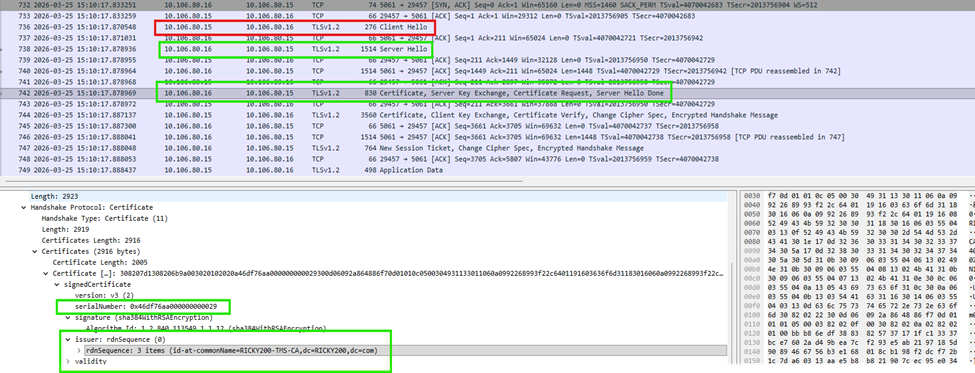
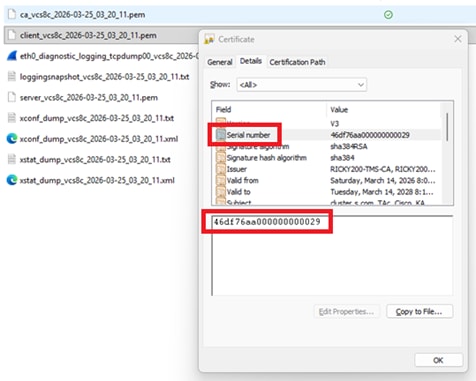
This screenshot shows server certificate as serial number matches:
Test case 3: MRA Client is provisioned for login and the workflow includes traffic server certificate verification between Expressway Core and CUCM.
10.106.80.16 = Expressway Core x15.5
10.106.80.38 = CUCM
- Exp C 16 sends a client hello on 6972 TFTP.
- Exp C 16 sends a client certificate during the TLS handshake.
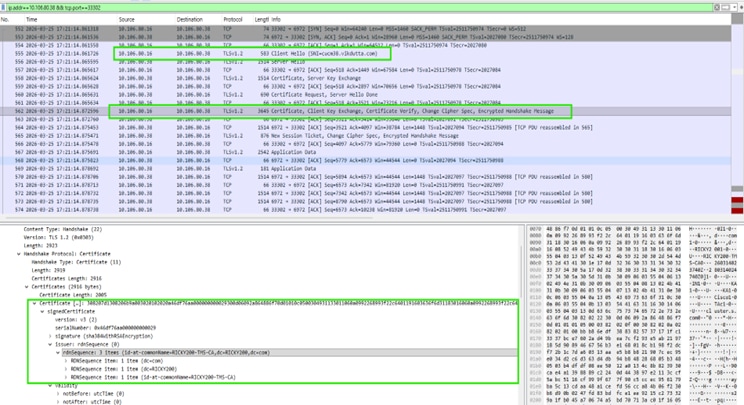
Expressway core client certificate:
Revision History
| Revision | Publish Date | Comments |
|---|---|---|
1.0 |
15-Apr-2026
|
Initial Release |
 Feedback