DHCP Snooping Interactions with GIADDR and Option 82 on CAT9000
Available Languages
Contents
Introduction
This document describes the DHCP snooping interactions with GIADDR and option 82 on CAT9000.
Prerequisites
Requirements
Cisco recommends that you have knowledge of these topics:
- Cisco IOS® XE proficiency in configuration and operational commands.
- Familiarity with the Cisco Catalyst 9000 series switch hardware and architecture.
- A solid understanding of DHCP protocol operations and DHCP snooping mechanisms.
- A conceptual understanding of DHCP option 82 and the role of the relay agent.
Components Used
The information in this document is based on these software and hardware versions:
- Core/Distribution switch:Cisco Catalyst 9600X series
- Access switch:Cisco Catalyst 9300 series
- DHCP client:End-host device
- DHCP server:Centralized network service provider
Background Information
This document explores various configurations of DHCP snooping on Core/Distribution switches, integrated with DHCP option 82 implementations on Access switches. Through practical configuration examples and analysis of corresponding packet captures, this guide illustrates the interaction between these features within a Cisco Catalyst 9000 series environment.
Network Diagram
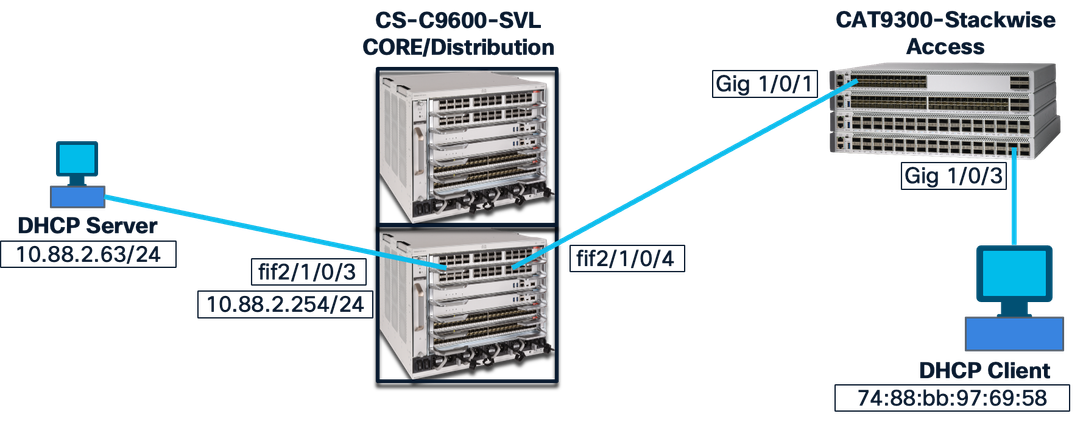
Test Cases
Core Switch DHCP Snooping Enabled
Access Switch Option 82 Disabled
Core switch:
!
int fif2/1/0/4   ——> Downlink to Access Switch
ip dhcp snooping trust
!
ip dhcp snooping vlan 1-2048
ip dhcp snooping
!
Access switch:
!
int gig1/0/1  —> uplink to Core
ip dhcp snooping trust
switchport mode trunk
!
ip dhcp snooping vlan 1-1400
no ip dhcp snooping information option
ip dhcp snooping
!
int gig1/0/3  —---> End device connected port
switchport mode access
switchport access vlan 287
!
Result:
Successful.
End device gets the IP address without an issue.
Explanation:
Access switch option 82 is disabled and it sends the packet to the core without option 82. Core switch option 82 is enabled by default and it adds the option 82 with IP address of the relay agent in the packet and sends it to the DHCP server.
Packet on link between Client and Access switch:
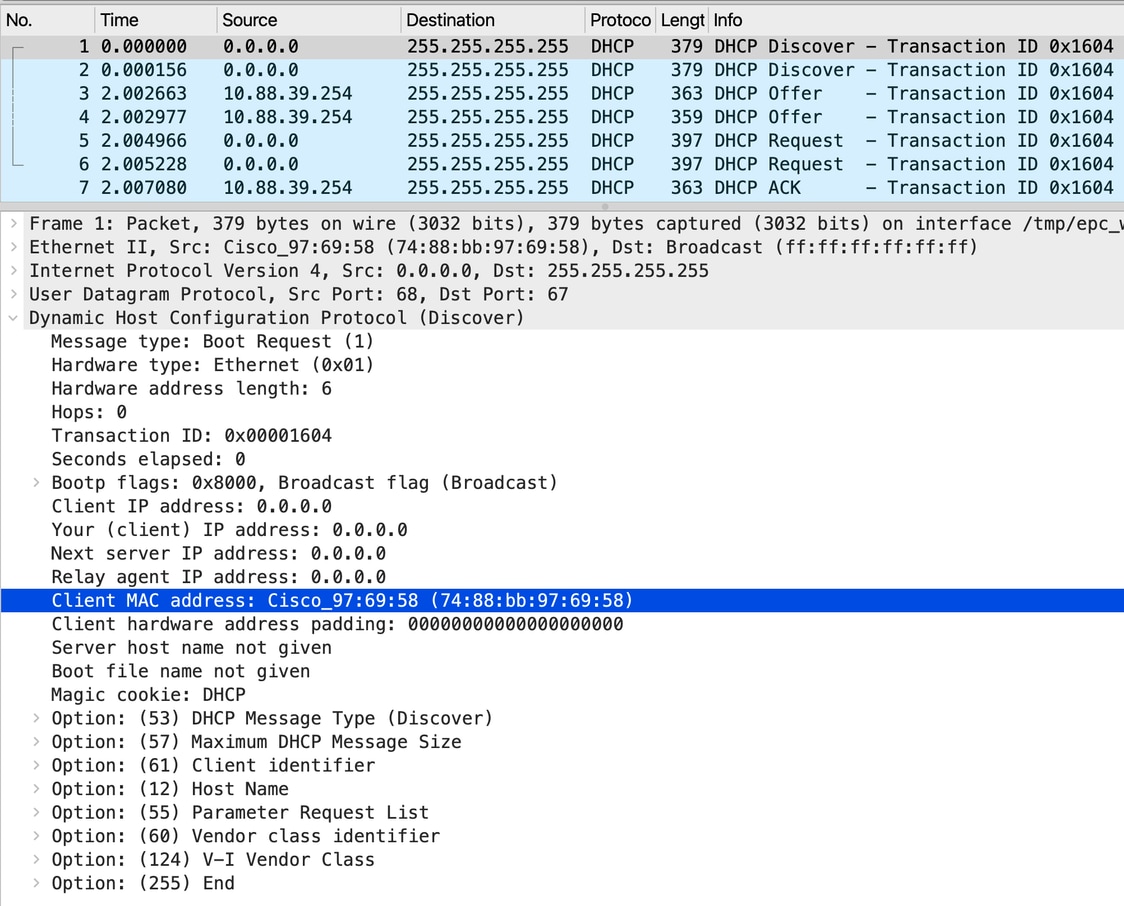

Note: The packet captures are taken multiple times and at multiple capture points for the same client; so ignore the transaction id.
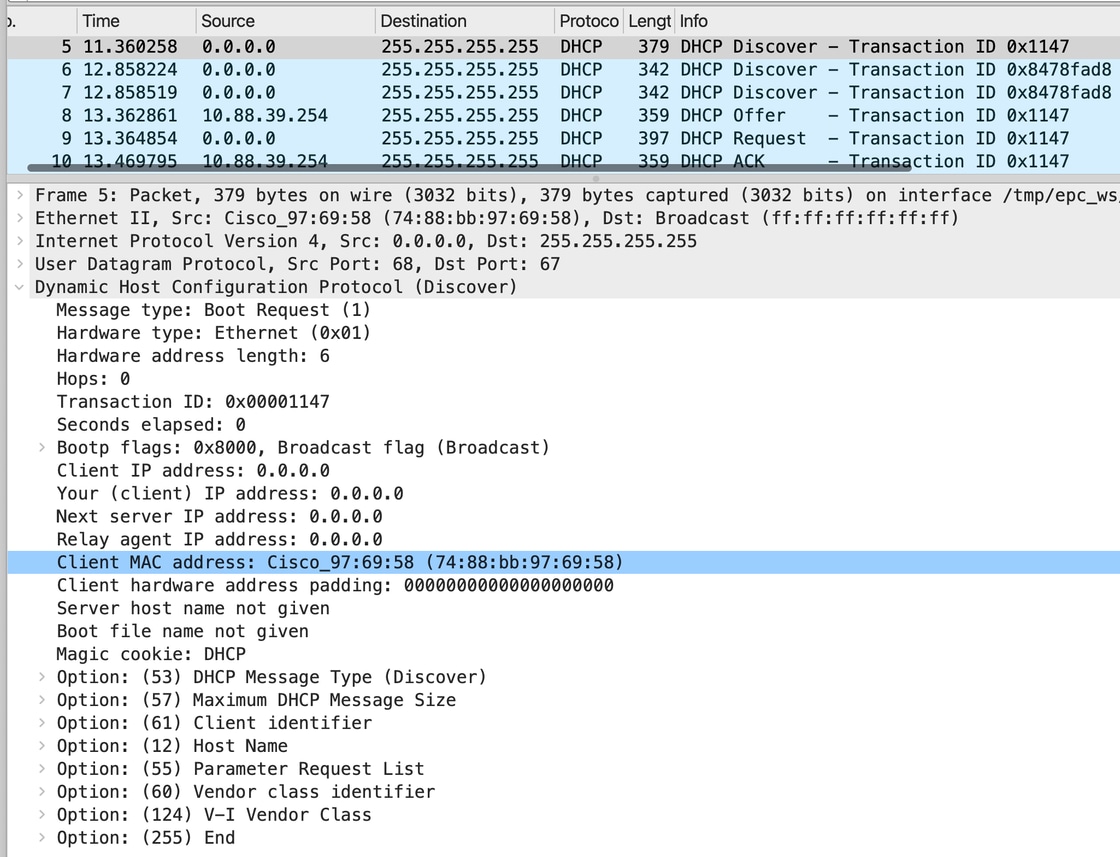
Packet on link between Access switch and Distribution/Core switch:
The access switch does not have snooping information option insertion, so the same packet coming from client is being forwarded to the distirubution switch.
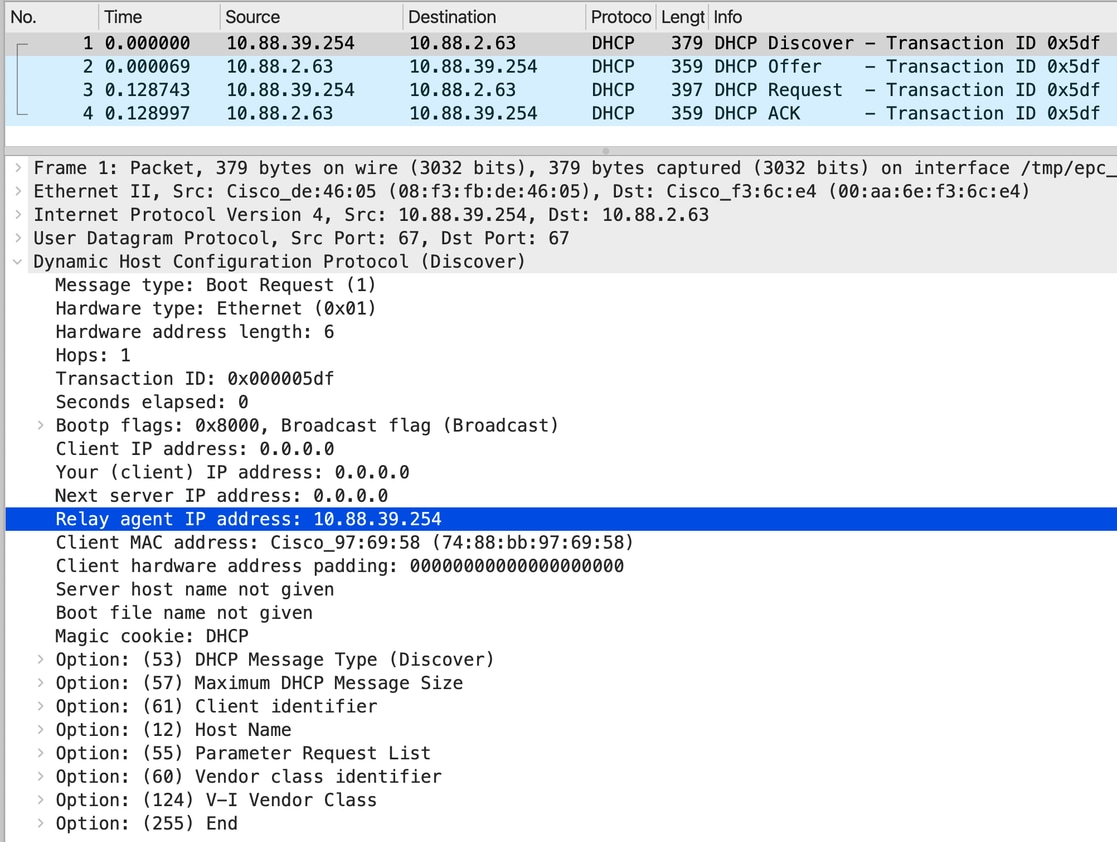
Packet between CORE switch and the DHCP server:
As the DHCP snooping is enabled and relay configured, the CORE switch unicasting the packet to the DHCP server 10.88.2.63 with relay agent IP is inserted as its own IP.
Access Switch Option 82 Enabled
Core switch:
!
int fif2/1/0/4  ——> Downlink to Access Switch
ip dhcp snooping trust
!
ip dhcp snooping vlan 1-2048
ip dhcp snooping
!
Access switch:
!
int gig1/0/1 —> uplink to Core
ip dhcp snooping trust
switchport mode trunk
!
ip dhcp snooping vlan 1-1400
ip dhcp snooping information option
ip dhcp snooping
!
int gig1/0/3
switchport mode access
switchport access vlan 287
!
Result:
Successful.
End device gets the IP address without an issue.
Explanation:
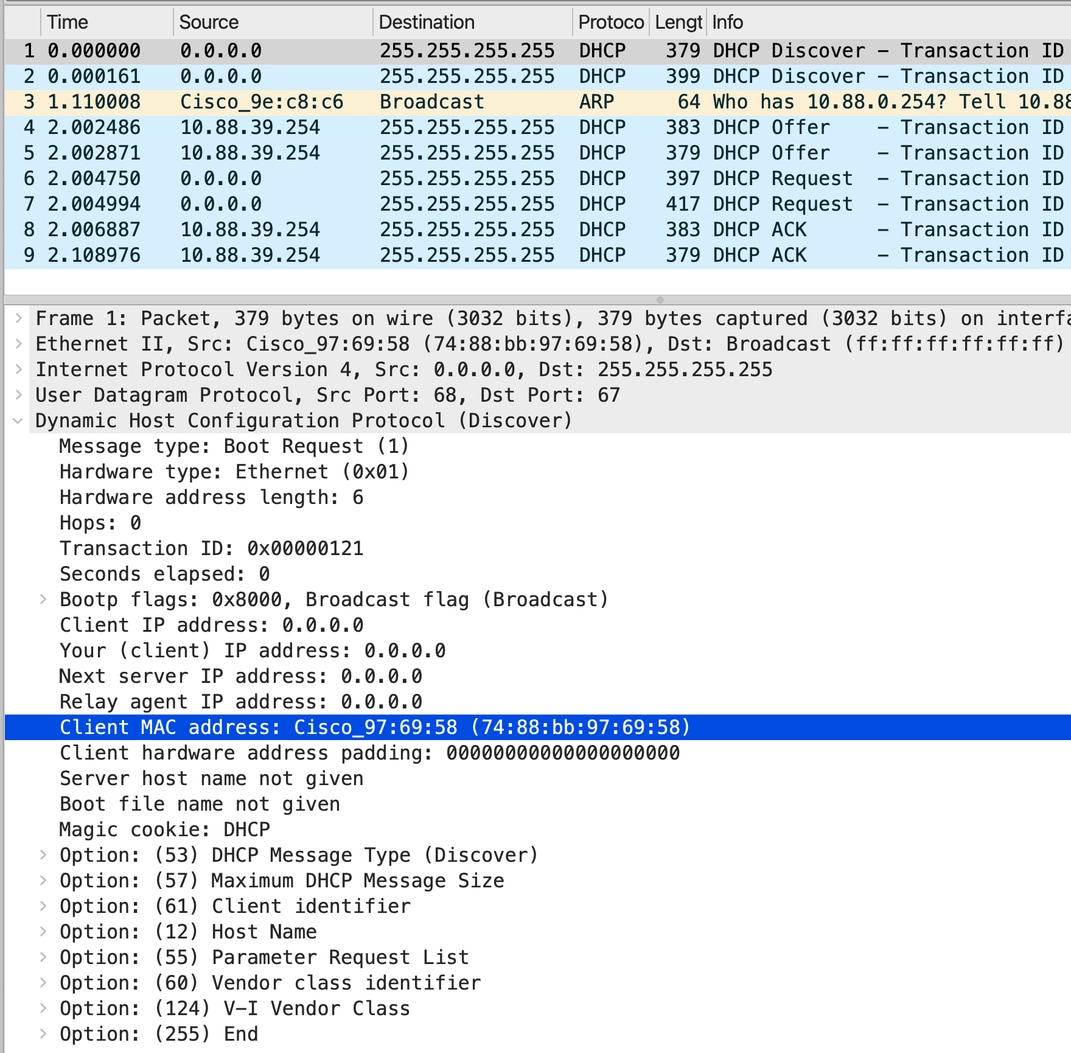
Access switch option 82 is enabled but this switch does not have the SVI created and it sends the packet to the core without option 82. Core switch option 82 is enabled by default and it adds the option 82 with IP address of the relay agent in the packet and sends it to the DHCP server.
Packet from client to the Access switch:
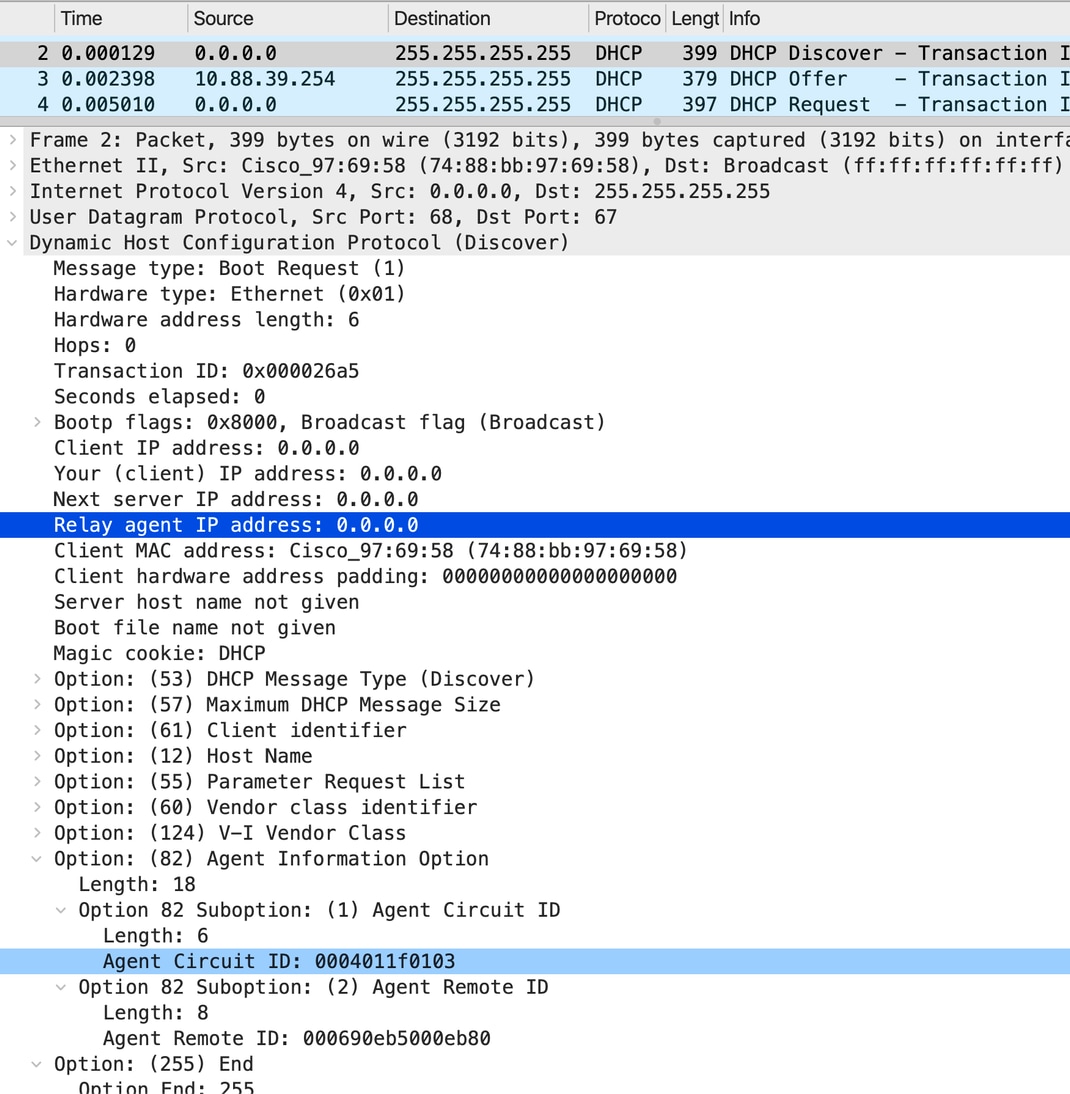
The packet from Access switch to the CORE/Distribution switch:
As 'ip dhcp snooping information option' is enabled by default on the Access switch, Access switch inserts option 82 with relay IP as 0.0.0.0.
As per DHCP snooping world, this is a rogue packet and must be dropped by the CORE switch. But as CORE switch has the interface trusted, the packet will get processed to relay towards DHCP server.
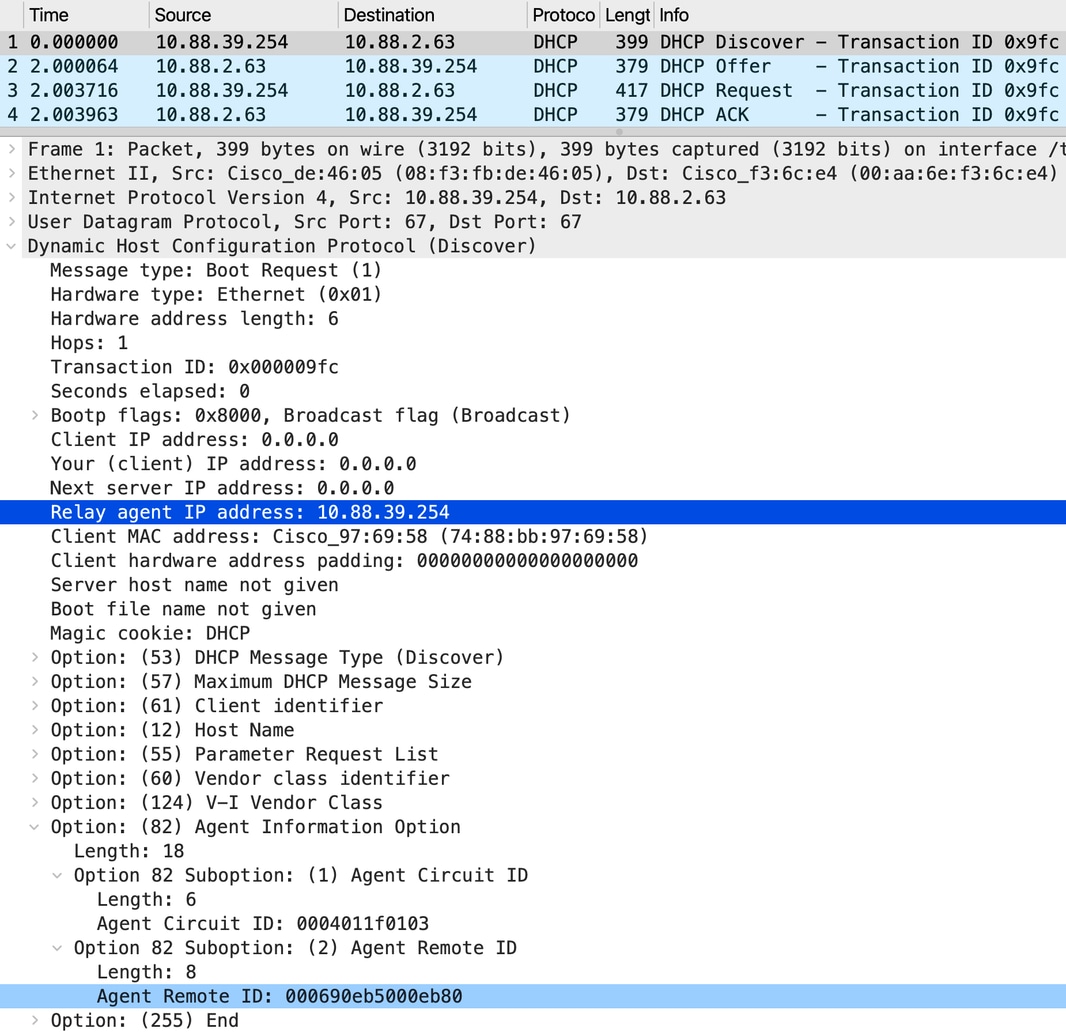
Packet between CORE switch and the DHCP server:
As the downlink intertface is trusted, CORE switch replaces the relay agent from 0.0.0.0 to 10.88.39.254 and sends it to uplink.
Further the DORA process completes legitimate and the client gets the IP address.
Core Switch DHCP Snooping Disabled
Access Switch Option 82 Enabled
Core switch:
!
Int fif2/1/0/4   ——> Downlink to Access Switch
no Ip dhcp snooping trust
!
no ip dhcp snooping vlan 1-2048

no ip dhcp snooping
!
Access switch:
!
int gig1/0/1 —> uplink to Core
ip dhcp snooping trust
switchport mode trunk
!
ip dhcp snooping vlan 1-1400
ip dhcp snooping information option
ip dhcp snooping
!
int gig1/0/3
switchport mode access
switchport access vlan 287
!
Result:
Failure.
End device does not get the IP address.
Explanation:
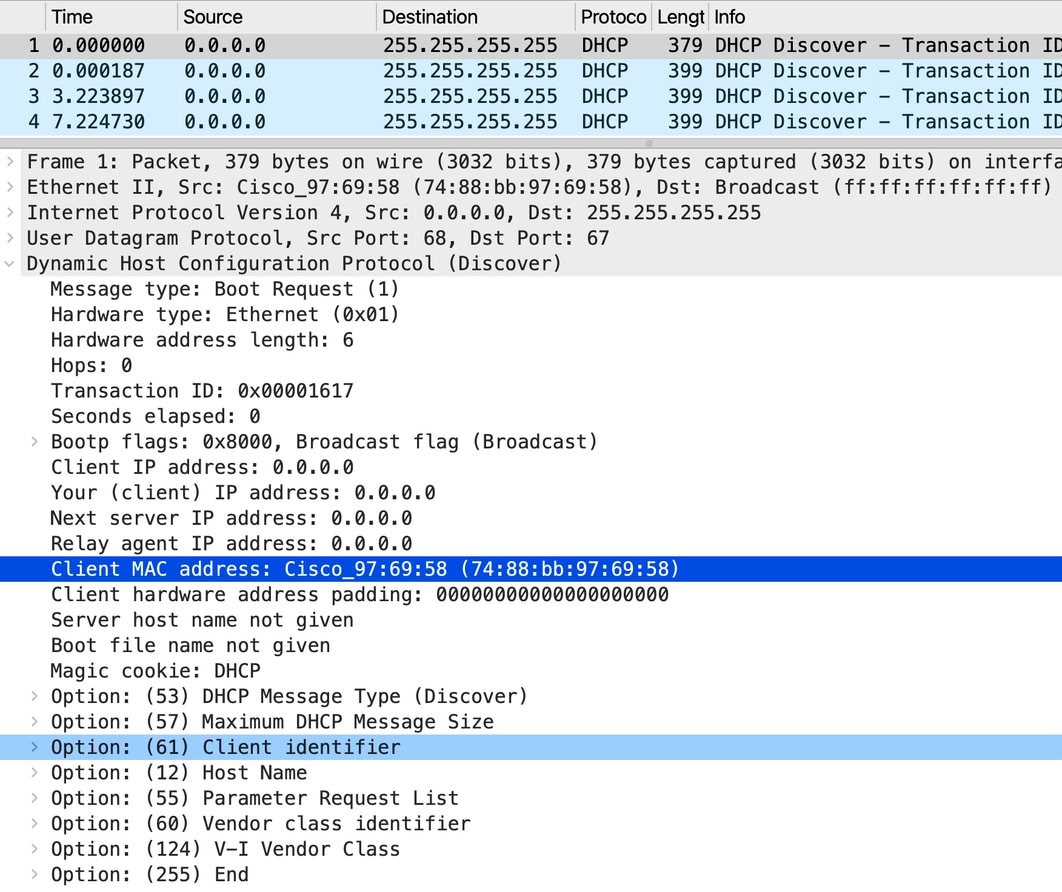
Access switch option 82 is enabled but this switch does not have either SVI or Relay agent. So it sends the packet to the CORE with option 82 and Relay IP as 0.0.0.0. As DHCP snooping is disabled on the CORE switch; verification, editing, and insertion of option 82 is disabled there. So CORE switch fails to add the relay and drops the packet.
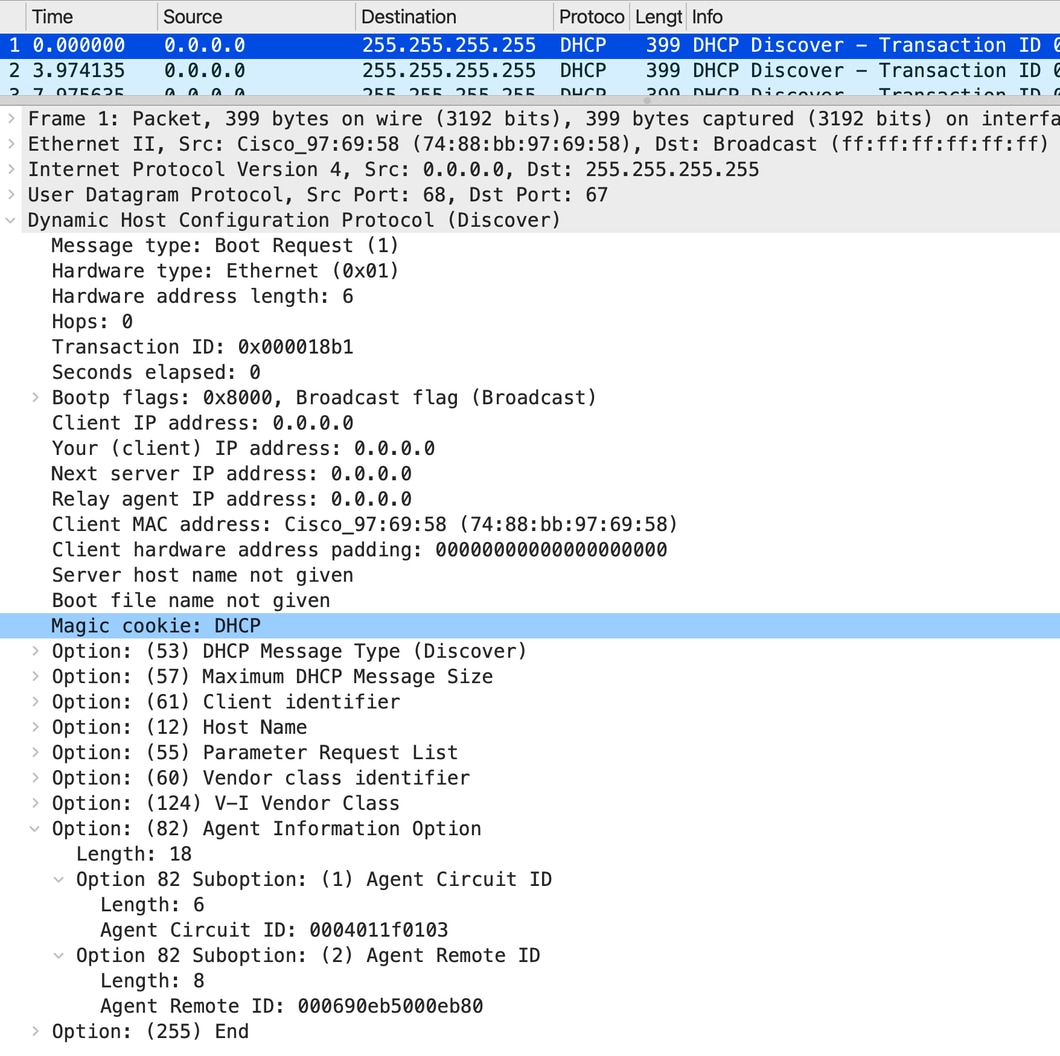
Client DHCP discovers packet coming from client and going to Access switch:
Packet flow from Access switch to CORE/Distribution switch:
• The Access switch has the command ip dhcp snooping information option enabled, which causes it to insert option 82 into DHCP packets. In this case, the relay agent IP address in option 82 is set to 0.0.0.0.
• The Access switch operates purely at Layer 2 for vLAN 287.
• From the CORE switch perspective, the packet with option 82 inserted by the Access switch is considered illegitimate. However, since the downlink interface on the CORE switch is configured as trusted, the CORE switch processes the packet instead of dropping it at the interface level.
• The CORE switch has DHCP snooping disabled, so it does not forward packets containing option 82.
CORE switch behavior with DHCP discover packets:
- The CORE switch attempts to unicast the DHCP discover packet to the configured helper address 10.88.2.63.
- In order to do this, the CORE switch must set the relay IP address (GIADDR) in the DHCP packet.
- Since option 82 is already present with data inserted by the Access switch, the CORE switch must verify option 82 before setting the relay IP.
- Since DHCP snooping is disabled on the CORE switch, it cannot verify option 82.
- Due to this inability to verify and modify option 82, the CORE switch has no choice but to drop the DHCP discover packet.
The discover packet will not be relayed from CORE switch towards the DHCP server.
Debugs on CORE switch for non-working scenario:
DHCPD: Reload workspace interface Vlan287 tableid 0.
DHCPD: tableid for 10.88.39.254 on Vlan287 is 0
DHCPD: client's VPN is .
DHCPD: No option 125
DHCPD: Option 124: Vendor Class Information
DHCPD: Enterprise ID: 9
DHCPD: Vendor-class-data-len: 13
DHCPD: Data: 43~~~~~58
DHCPD: inconsistent relay information.
DHCPD: relay information option exists, but giaddr is zero.
Access Switch Option 82 Disabled
Core switch:
!
int fif2/1/0/4   ——> Downlink to Access Switch
no ip dhcp snooping trust
!
no ip dhcp snooping vlan 1-2048
no ip dhcp snooping
!
Access switch:
!
int gig1/0/1  —> uplink to Core
ip dhcp snooping trust
switchport mode trunk
!
ip dhcp snooping vlan 1-1400
no ip dhcp snooping information option
ip dhcp snooping
!
int gig1/0/3
switchport mode access
switchport access vlan 287
!
Result:
Successful.
End device gets the IP address.
Observation:
Access switch option 82 is disabled and it sends the packet to the core without option 82 and CORE switch has the SVI present with Relay configured. The CORE switch adds the Relay agents IP address to the packet and sends it to the DHCP server.
Client DHCP discovers packet hitting Access switch:
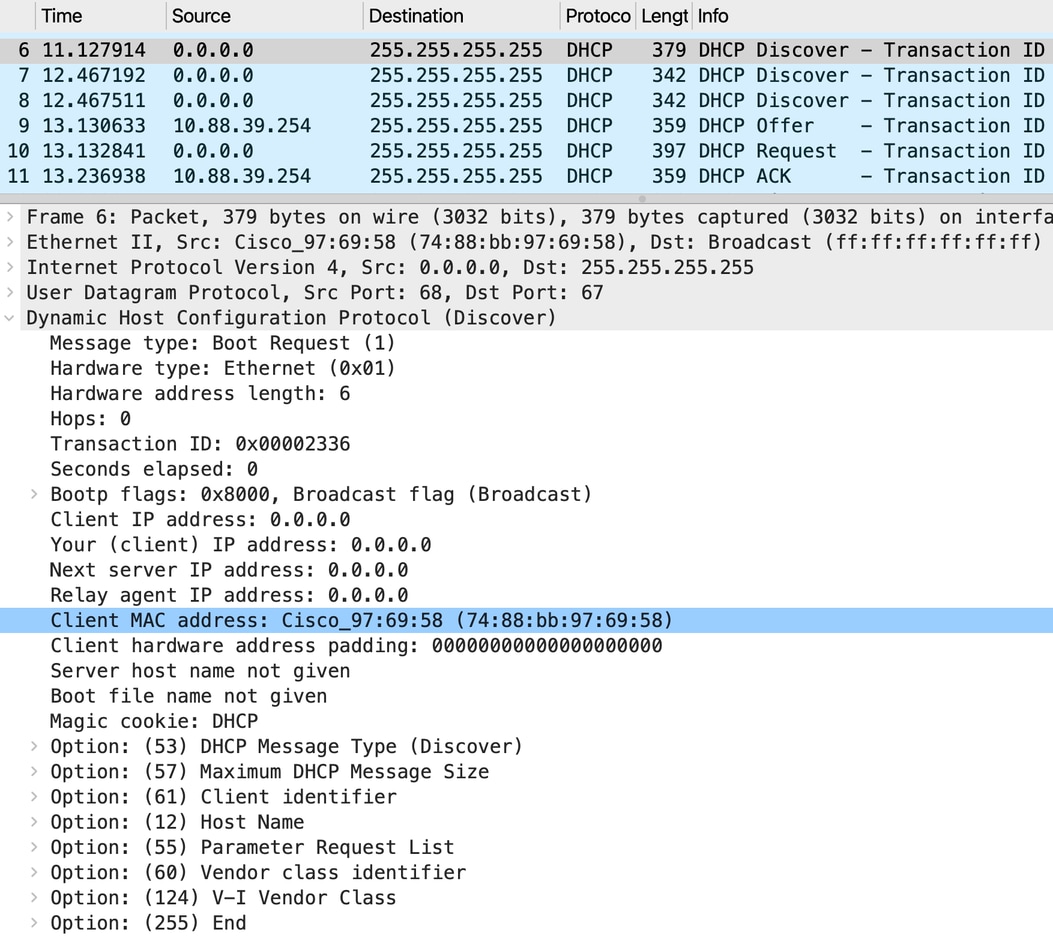
Packet to CORE switch from Access switch:
As option 82 insertion is disabled on the Access switch, Access switch will forward the broadcast packet as it is on the uplink trunk.
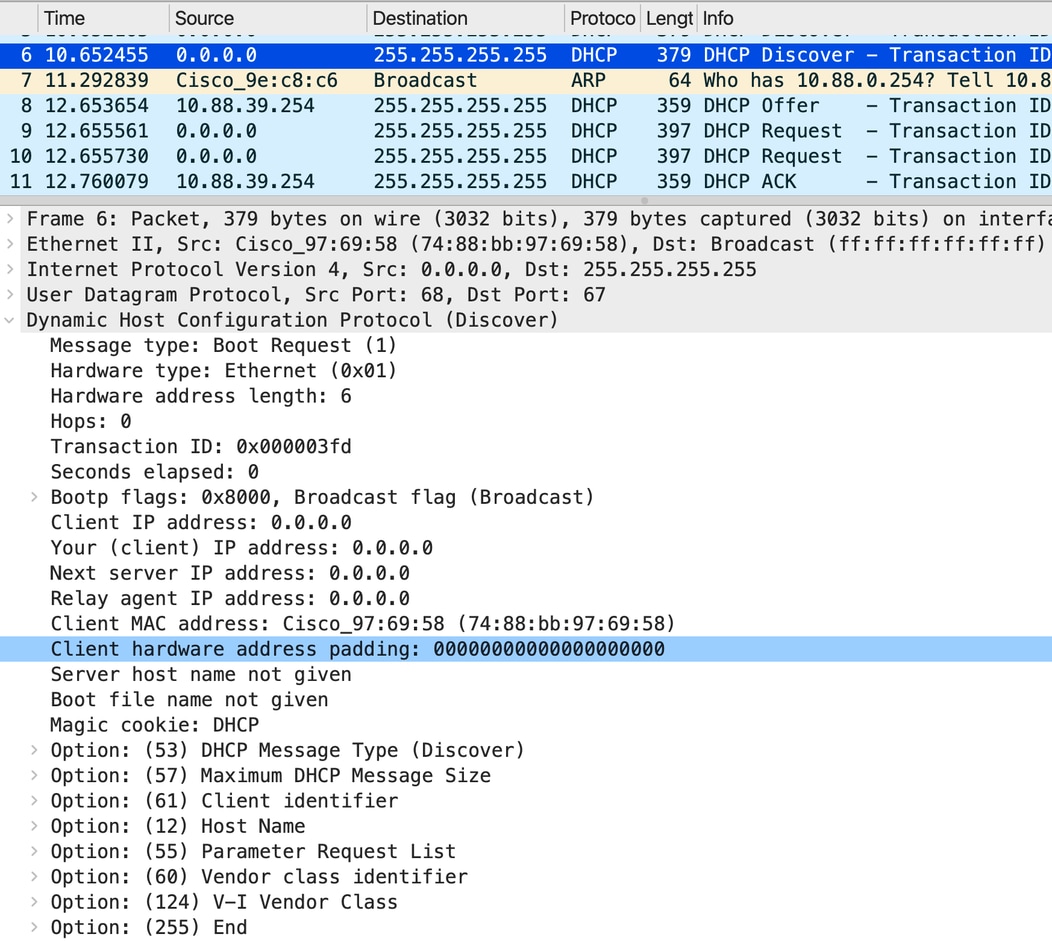
Packet relayed by CORE switch towards the DHCP server:
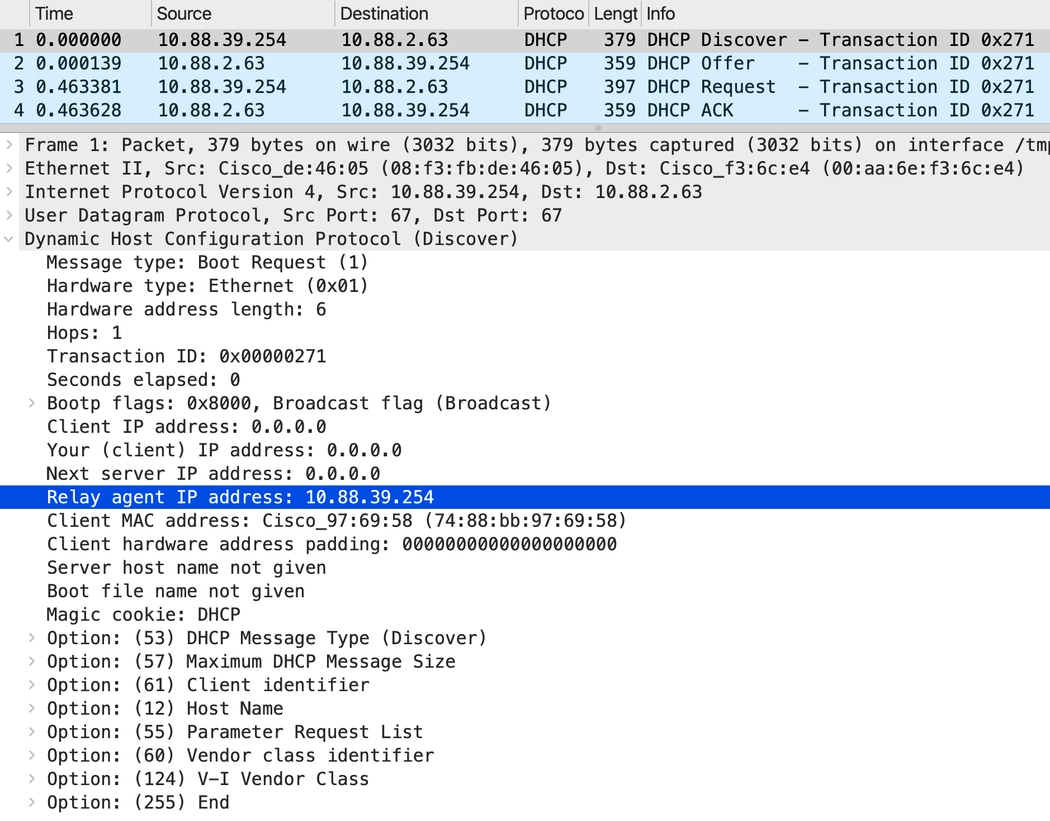
Debugs on CORE switch:
Option 82 not present
DHCPD: Reload workspace interface Vlan287 tableid 0.
DHCPD: tableid for 10.88.39.254 on Vlan287 is 0
DHCPD: client's VPN is .
DHCPD: No option 125
DHCPD: No option 124
DHCPD: FSM state change INVALID
DHCPD: Workspace state changed from INIT to INVALID
DHCPD: Finding a relay for client ~~~~ on interface Vlan287.
DHCPD : Locating relay for Subnet 10.88.39.254
DHCPD: there is no pool for 10.88.39.254.
DHCPD: Looking up binding using address 10.88.39.254
DHCPD: setting giaddr to 10.88.39.254
In this case, the client receives the IP address.
Summary
- DHCP snooping must be enabled for the switch to insert, remove, or validate DHCP option 82 information.
- When DHCP snooping is disabled, the switch does not perform the option 82 insertion or removal functions.
- The option 82 processing, including dropping or allowing packets with option 82, depends on DHCP snooping being enabled and configured.
Revision History
| Revision | Publish Date | Comments |
|---|---|---|
1.0 |
18-May-2026
|
Initial Release |

 Feedback
Contact Cisco
- Open a Support Case

- (Requires a Cisco Service Contract)