Understand ACI Fabric Power-Down and Power-Up Procedure
Available Languages
Introduction
This document describes powering down all devices in an ACI fabric for power maintenance or a physical move, then powering up the fabric.
Overview
A high-level process is documented in Cisco APIC System Management Configuration Guide and expanded in the next sections:
- These steps apply to a fabric that is part of a Multi-Pod deployment, a Multi-Site deployment, or both
- These steps do not apply when only part of a pod in a Multi-Pod deployment is being powered down.
Power Down the Fabric Using the GUI
Step 1
1. Confirm that the fabric is fully fit before taking any action. Do not proceed if the cluster is not healthy.
apic1# show controller
Fabric Name          : Fabric-A
Operational Size     : 3
Cluster Size         : 3
Time Difference      : 2450
Fabric Security Mode : STRICT

 ID    Pod   Address          In-Band IPv4     In-Band IPv6               OOB IPv4         OOB IPv6                        Version             Flags  Serial Number     Health
 ----  ----  ---------------  ---------------  -------------------------  ---------------  ------------------------------  ------------------  -----  ----------------  ------------------
 1*    1     10.0.0.1         0.0.0.0          fd00::1                    10.1.1.11        fd00:1::11                      6.2(3g)             crva-  SAL1234AB01       fully-fit
 2     1     10.0.0.2         0.0.0.0          fd00::2                    10.1.1.12        fd00:1::12                      6.2(3g)             crva-  SAL1234AB02       fully-fit
 3     1     10.0.0.3         0.0.0.0          fd00::3                    10.1.1.13        fd00:1::13                      6.2(3g)             crva-  SAL1234AB03       fully-fit

Flags - c:Commissioned | r:Registered | v:Valid Certificate | a:Approved | f/s:Failover fail/success
(*)Current (~)Standby (+)AS
apic1# avread
Cluster:
-------------------------------------------------------------------------
operSize                3
clusterSize             3
fabricDomainName        Fabric-A
version                 apic-6.2(3g)
discoveryMode           STRICT
drrMode                 OFF
kafkaMode               OFF
autoUpgradeMode         OFF
standbyType             warm
optimalLeaders          yes

APICs:
-------------------------------------------------------------------------
                    APIC 1                  APIC 2                  APIC 3
version           6.2(3g)                 6.2(3g)                 6.2(3g)
address           10.0.0.1                10.0.0.2                10.0.0.3
oobAddress        10.1.1.11/24            10.1.1.12/24            10.1.1.13/24
oobAddressV6      fd00:1::11/64           fd00:1::12/64           fd00:1::13/64
routableAddress   0.0.0.0                 0.0.0.0                 0.0.0.0
tepAddress        10.0.0.0/16             10.0.0.0/16             10.0.0.0/16
podId             1                       1                       1
chassisId         11111111-.-11111111     22222222-.-22222222     33333333-.-33333333
cntrlSbst_serial  (APPROVED,SAL1234AB01)  (APPROVED,SAL1234AB02)  (APPROVED,SAL1234AB03)
active            YES                     YES                     YES
flags             cra-                    cra-                    cra-
capabilities      [1,2,3]-N               [1,2]-N                 [1,2,3]-N
health            255                     255                     255
2. Confirm that Cisco Integrated Management Controller (CIMC) access to all APICs is available and working.
3. Confirm that console access to all switches is available and working. If the APICs and switches are being moved to a new location and have new IP addresses and console connections, only CIMC access to the APICs must be validated before the move.
Step 2
Take a configuration snapshot with AES encryption before the power-down. Use this snapshot only in the rare, worst-case scenario that requires a fabric rebuild:
- Video: Cisco APIC Configuration Export with AES Encryption
- Config Guide: Controller Configuration Backup, Restore, and Rollback
Step 3
Run the pre-upgrade script.
Although the system is not being upgraded, the pre-upgrade script can be used as a health-check tool in order to identify faults or issues that must be addressed.
Issues such as VLAN overlap require attention because a power cycle can result in an indeterminate configuration push.
For more information, see the Pre-Upgrade Checklists.
Step 4
This step consists of shutting down all APICs except one of the Apics used for the shutdown activity.
- Log in to an APIC say apic-1.
- From the menu bar, choose System > Controllers.
- Choose an APIC. In the Navigation pane, choose Controllers > APIC Name say apic-2
- Right-click the APIC (apic-2) and choose Shutdown.
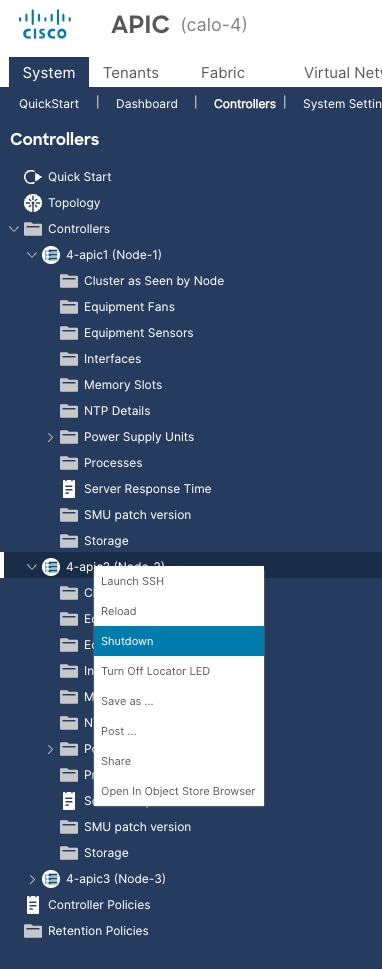
5. Repeat the APIC selection and shutdown steps for all other APICs except apic-1.
Step 5 consists of shutting down apic-1.
Step 5
Shut down the last APIC apic-1 using the CIMC GUI. This is because this servet is in read-only mode and does not process a shutdown request through the APIC GUI.
- Log in to the CIMC GUI of the last APIC.
- In the Navigation pane, click the Chassis menu.
- From the Chassis menu, choose Summary.
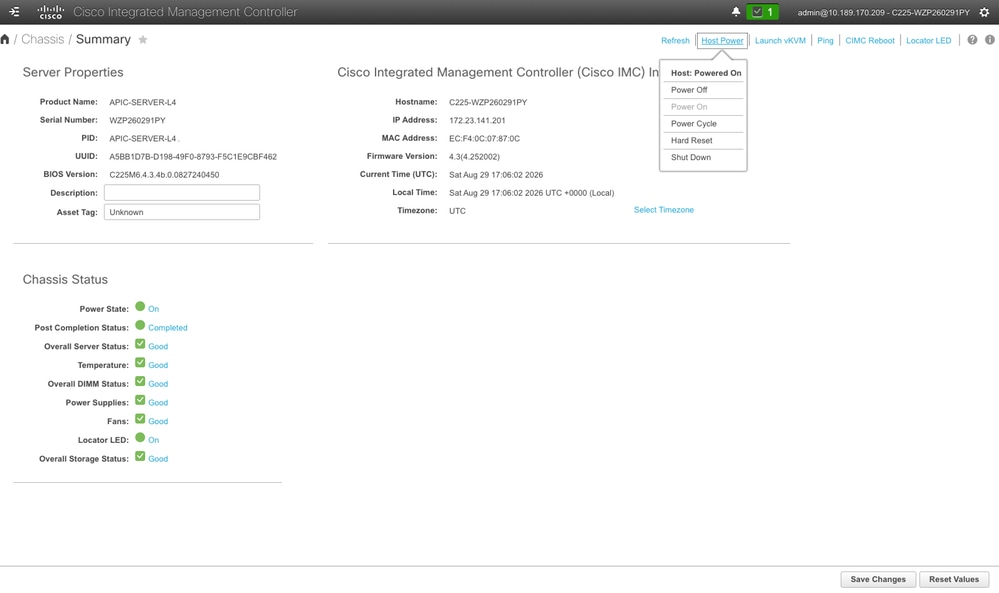
- From the toolbar above the work pane, choose Host Power > Shut Down.
On M1-M4/L1-L4, click Host Power in the toolbar at the top right of any page and choose Shut Down.
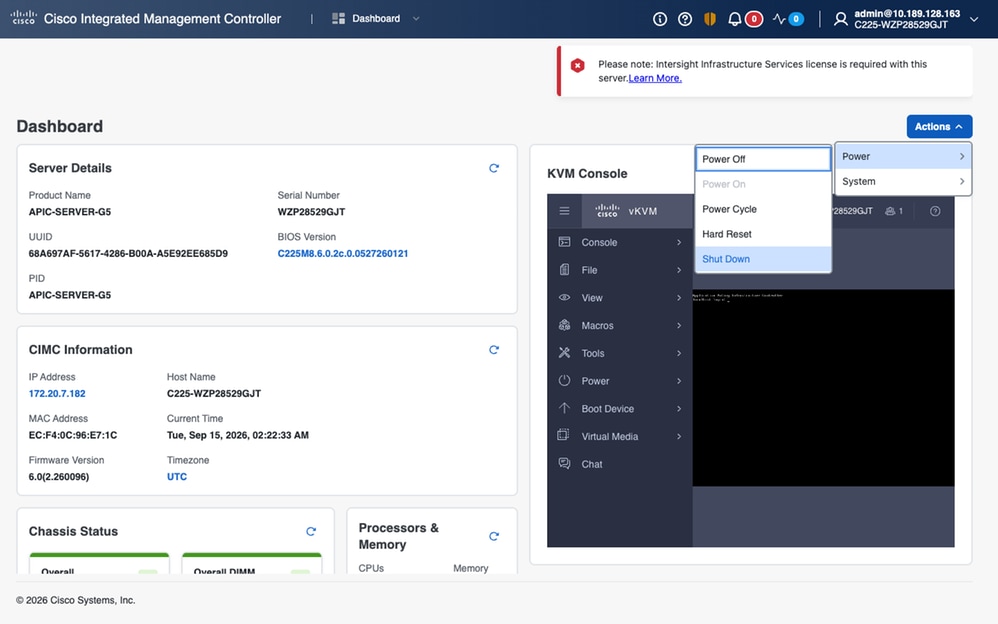
On APIC-SERVER-G5, there is no Host Power menu. Access the same actions from Actions in the upper-right corner, and then open the Power submenu.
Step 6
After you shut down all APICs, power down the switches by turning off their power supplies.
Power Up the Fabric Using the GUI
This procedure powers up the fabric through the Cisco Integrated Management Controller (IMC) GUI.
Step 1
Power on the APICs through the CIMC GUI.
- Log in to the CIMC GUI of an APIC.
- In the Navigation pane, click the Chassis menu.
- From the Chassis menu, choose Summary.
- Power on the server through CIMC. On M1–M4/L1–L4 appliances, choose Host Power > Power On. On APIC-SERVER-G5 appliances, choose Actions > Power.
- Repeat these steps for all APICs.
Step 2
Power on the leaf switches that are connected directly to the APICs.
Step 3
Power on the spine switches approximately one minute after you power on the leaf switches.
Step 4
Power on the remaining leaf switches in the fabric.
Step 5
Confirm that the fabric is fully fit before taking any action.
apic1# show controller
Fabric Name          : Fabric-A
Operational Size     : 3
Cluster Size         : 3
Time Difference      : 2450
Fabric Security Mode : STRICT

 ID    Pod   Address          In-Band IPv4     In-Band IPv6               OOB IPv4         OOB IPv6                        Version             Flags  Serial Number     Health
 ----  ----  ---------------  ---------------  -------------------------  ---------------  ------------------------------  ------------------  -----  ----------------  ------------------
 1*    1     10.0.0.1         0.0.0.0          fd00::1                    10.1.1.11        fd00:1::11                      6.2(3g)             crva-  SAL1234AB01       fully-fit
 2     1     10.0.0.2         0.0.0.0          fd00::2                    10.1.1.12        fd00:1::12                      6.2(3g)             crva-  SAL1234AB02       fully-fit
 3     1     10.0.0.3         0.0.0.0          fd00::3                    10.1.1.13        fd00:1::13                      6.2(3g)             crva-  SAL1234AB03       fully-fit

Flags - c:Commissioned | r:Registered | v:Valid Certificate | a:Approved | f/s:Failover fail/success
(*)Current (~)Standby (+)AS
apic1# avread
Cluster:
-------------------------------------------------------------------------
operSize                3
clusterSize             3
fabricDomainName        Fabric-A
version                 apic-6.2(3g)
discoveryMode           STRICT
drrMode                 OFF
kafkaMode               OFF
autoUpgradeMode         OFF
standbyType             warm
optimalLeaders          yes

APICs:
-------------------------------------------------------------------------
                    APIC 1                  APIC 2                  APIC 3
version           6.2(3g)                 6.2(3g)                 6.2(3g)
address           10.0.0.1                10.0.0.2                10.0.0.3
oobAddress        10.1.1.11/24            10.1.1.12/24            10.1.1.13/24
oobAddressV6      fd00:1::11/64           fd00:1::12/64           fd00:1::13/64
routableAddress   0.0.0.0                 0.0.0.0                 0.0.0.0
tepAddress        10.0.0.0/16             10.0.0.0/16             10.0.0.0/16
podId             1                       1                       1
chassisId         11111111-.-11111111     22222222-.-22222222     33333333-.-33333333
cntrlSbst_serial  (APPROVED,SAL1234AB01)  (APPROVED,SAL1234AB02)  (APPROVED,SAL1234AB03)
active            YES                     YES                     YES
flags             cra-                    cra-                    cra-
capabilities      [1,2,3]-N               [1,2]-N                 [1,2,3]-N
health            255                     255                     255
Revision History
| Revision | Publish Date | Comments |
|---|---|---|
1.0 |
16-Oct-2026
|
Initial Release |

 Feedback
Contact Cisco
- Open a Support Case

- (Requires a Cisco Service Contract)