Configure the ACI Device Connector for Intersight Connectivity
Available Languages
Contents
Introduction
This document describes the steps required to enable a Device Connector for Intersight connectivity of an ACI Fabric.
Background Information
Intersight connectivity is established with a Device Connector. An ACI Fabric has 2 Device Connector options for Intersight connectivity:
| Device Connector Location |
How is it installed? |
Notes |
| APIC |
As of 6.1(2)+, the Device Connector is embedded within APIC software |
Before ACI 6.1(2), this required the Nexus Insights Cloud Connector (NICC) App |
| Nexus Dashboard |
Nexus Dashboard Insights (NDI) |
Previously named Nexus Insights |
Connectivity Benefits
Intersight connectivity provides these features and benefits:
- Automated TechSupport Collection on SR open via Rapid Problem Resolution (RPR)
- Pre-upload Techsupports to Intersight via TAC Assist
- Proactive ACI SR Creation based on Fault Telelemetry via Proactive ACI Engagements
Quick Start Videos
APIC via Nexus Insights Cloud Connector
ND via Nexus Dashboard Insights
Prerequisites
APIC
Minimum recommended APIC version: 4.2(3j).
- The APIC Device connector must be able to properly resolve svc.intersight.com.
- Validate via APIC cli: nslookup svc.intersight.com
- The APIC Device connector must be allowed outbound communication on HTTPs port 443.
- Validate via APIC CLI: curl https://svc.intersight.com
- If a proxy is required, then it must be configured within the APIC System Settings.
- Navigate to System > System Settings > Proxy Policy and validate it.
Nexus Dashboard
Minimum recommended ND version: 2.1.2.
- The Device connector must be able to properly resolve svc.intersight.com.
- Validate via ND CLI as rescue-user: nslookup svc.intersight.com
- The Device connector must be allowed outbound communication on HTTPS port 443.
- Validate via ND CLI as rescue-user: curl https://svc.intersight.com
- If a proxy is required, then it must be configured within the Cluster Proxy Configuration.
- Validate at: Nexus Dashboard > Admin Console > Infrastructure > Cluster Configuration and edit Proxy Configuration.
- ND must have an ACI Site added.
- Navigate to Nexus Dashboard > Admin Console > Sites and validate it.
- Navigate to Nexus Dashboard > Admin Console > Sites and validate it.
Intersight
- An Intersight.com account is required to claim the device.
Setup Device Connector
APIC - built-in on 6.1(2)+
- Validate the Device connector Settings.
- Navigate to System > System Settings > Intersight Connectivity.
- Click the Settings gear to ensure the Device Connector is enabled.
- Access Mode and auto-update can be modified, though it is generally not recommended.
- Close Settings to get back to Device Connector Page.
- Take note of the Device ID and Claim Code.
- Claim the device within Intersight.com
- Intersight requires the Device ID and Claim Code noted in Step 4.
APIC - via the NICC App for pre-6.1(2)
- Download the latest version1 of the Nexus Insights Cloud Connector app from the Cisco DC App Center.
- Upgrade the Nexus Insights Cloud Connector app.
- Navigate to Apps > Installed Apps
- Click the Upgrade button within the NICC App panel.
- Upload the latest version.
- Validate NICC Data Collection Setup.
- Open the NICC app.
- Click the Gear Icon to re-run the app setup.
- Edit configuration of Data Collection Setup.
- Check off all Pods to be collected, then submit.
- Validate the Device connector Settings.
- Navigate to System > System Settings > Intersight.
- Click the Settings gear to ensure the Device Connector is enabled.
- Access Mode and auto-update can be modified, though it is generally not recommended.
- Close Settings to get back to Device Connector Page.
- Take note of the Device ID and Claim Code.
- Claim the device within Intersight.com
- Intersight requires the Device ID and Claim Code noted in Step 4.
1NICC version 2.2.8.6 and up includes the log4j fix.
Nexus Dashboard - via Nexus Dashboard Insights (NDI)
- Enable/Install the latest version2 of Nexus Dashboard Insights from the Cisco DC App Center
- Validate if all fabric nodes are visible/discovered correctly in Nexus Dashboards Insights.
- Navigate to Nexus Dashboard > Admin Console > Services. Open Nexus Dashboard Insights and navigate to Nodes.
- Scroll through the right pane to verify all expected nodes are discovered.
- Nodes not shown in this view are not accessible for intersight-related activities and features.
- Validate Device Connector Settings.
- Navigate to Nexus Dashboard > Admin Console > Infrastructure > Intersight
- Click the Settings gear to ensure the Device Connector is enabled.
- Access Mode and Auto Update can be modified, though it is generally not recommended.
- Take a note of the Device ID and Claim Code.
- Claim the device within intersight.com
- Intersight requires the Device ID and Claim Code noted in Step 3.
2NDI version 6.0.2 and up includes the log4j fix.
Claim the device within intersight.com
To claim a new target, do the following:
-
Log into Intersight with the Account Administrator, Device Administrator, or Device Technician privileges.
-
From the Service Selector drop-down list, select System.
-
Navigate to .
-
Choose Available for Claiming and select the target type you want to claim. Click Start.
-
Enter the required details and click Claim to complete the claiming process.
Disable Device Connector
APIC - via the UI
To disable the Device Connector, the "Device Connector" knob can be switched to the OFF position.
Navigate to System Settings > Nexus Cloud and Intersight Connectivity > Settings to find the 'Device Connector' knob which can be switched to the OFF Position.
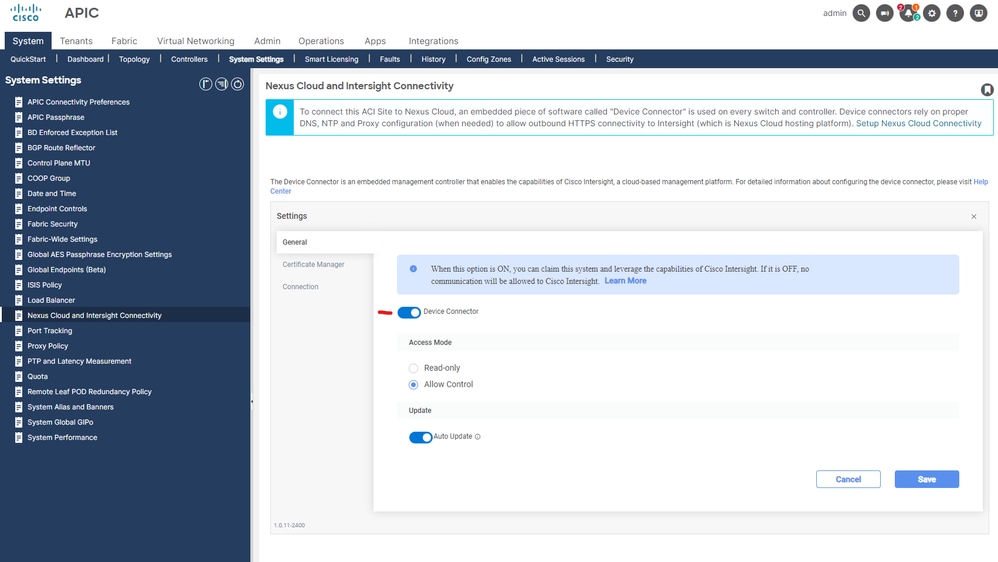 Intersight Connection Settings
Nexus Dashboard - via the UI
To disable the Device Connector, the "Device Connector" knob can be switched to the OFF position.
Navigate to Admin Console > Admin > INtersight to find the 'Device Connector' knob which can be switched to the OFF Position.
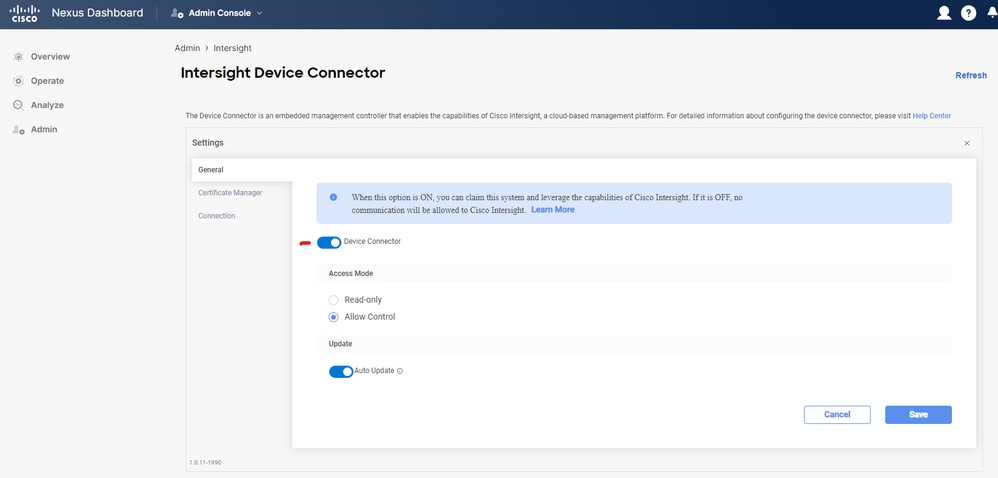 ND Intersight Settings
Additional Information
Cisco Intersight
Cisco Intersight is a management platform delivered as a service with embedded analytics for your Cisco and 3rd party IT infrastructure. This platform offers an intelligent level of management that enables IT organizations to analyze, simplify, and automate their environments in more advanced ways than the prior generations of tools. For more information and FAQs, please visit https://intersight.com/help/home.
Device Connector
The Device Connector embedded on the APIC is used to connect an ACI Fabric to Intersight. The Device Connector provides a secure way for the connected devices to send information and receive control instructions from the Cisco Intersight portal. On APIC reboot, the Device Connector starts by default and attempts to connect to Intersight.
Nexus Insights Cloud Connector App
On a Cisco APIC, the NICC App is used to provide the TAC Assist functionality. TAC Assist provides a method for users to generate tech support across multiple devices, then upload them into the Intersight Cloud. A TAC engineer can then pull those Tech Supports for analysis via a Service Request. Additionally, it enables a TAC Engineer to trigger on-demand tech support against ACI Nodes. Read on at the Cisco Nexus Insights Cloud Connector User Guide.
Connected TAC
Connecting and claiming an APIC to Intersight (Direct or via Nexus Dashboard) enables Connected TAC functionality. This includes, but is not limited to, the ability for TAC to pull Techsupports directly into an open Service Request as well as Proactive ACI Engagements based on ACI Fault Telemetry.
Revision History
| Revision | Publish Date | Comments |
|---|---|---|
7.0 |
20-Aug-2026
|
Added callouts that as of 6.1(2), the App infra was removed and the Device Connector is embedded directly within APIC software. |
6.0 |
04-Aug-2025
|
Updated EMEA Region Note in the 'Prerequisites - Intersight' section and added a "Connected TAC" topic in the "Additional Information" section |
5.0 |
27-Sep-2024
|
Added EMEA Region Note in 'Prerequisites - Intersight' section |
4.0 |
03-Apr-2024
|
Added "Disable Device Connector" Section |
3.0 |
25-Aug-2023
|
Corrected Videos and added 6.0(2) note requiring completed Management VRF DNS Label configuration for certain Switch Telemetry to be sent |
2.0 |
05-Oct-2022
|
Corrected Videos |
1.0 |
27-May-2022
|
Initial Release |

 Feedback
Contact Cisco
- Open a Support Case

- (Requires a Cisco Service Contract)