How to Open a Cisco Support Case for CBD or CBD-Lite
Available Languages
Objective
The objective of this article is to show the steps involved in opening a case for Cisco Business Dashboard (CBD) or CBD-Lite related issues.
Applicable Devices
- CBD
- CBD-Lite
Introduction
If you are running into issues with CBD or CBD-Lite affecting management of your network, you must submit a case through the Cisco Support Case Manager.
Open a Support Case in Cisco Support Case Manager
Step 1
Navigate to the Support Case Manager webpage.

Step 2
Under Bypass Entitlement, select Warranty.

Step 3
In the Serial Number field, enter a serial number from one of the switches or other hardware that you're managing with CBD. Click Next.

Step 4
Select Ask a Question / Warranty (S4) and enter a case Title and Description that includes "Cisco Business Dashboard".

Step 5
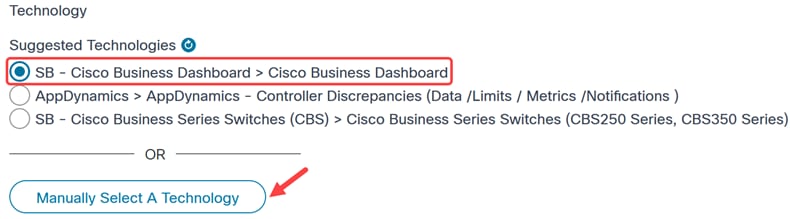
Under Suggested Technologies, select SB - Cisco Business Dashboard > Cisco Business Dashboard. Alternatively, you can click on Manually Select a Technology to select CBD directly.
Step 6
Choose the appropriate Problem Area, Contact Information and Preference, and other details.

Step 7
Click Submit to open the case.

Conclusion
It is as simple as that to open a support case using the serial number of a hardware that you're managing with CBD.
Revision History
| Revision | Publish Date | Comments |
|---|---|---|
1.0 |
23-Jun-2026
|
Initial Release |
 Feedback
Contact Cisco
- Open a Support Case

- (Requires a Cisco Service Contract)