Introduction
This document describes the NVIDIA AI Enterprise Software (NVAIE) Suite as well as the comprehensive support benefits available when deployed on Cisco Unified Computing System (UCS) Platforms. This document also describes how to engage both Cisco and NVIDIA support for optimal deployment and operational assistance.
Background Information
As artificial intelligence and machine learning workloads become mission-critical for enterprise operations, organizations require not only powerful infrastructure but also enterprise-grade software and support. NVIDIA AI Enterprise Software provides a comprehensive, secure, and supported AI platform optimized for deployment on Cisco UCS infrastructure.
This document describes:
- What NVIDIA AI Enterprise Software entails
- The Support Benefits of Licensing the NVAIE Software Suite
- How to properly engage support channels for NVAIE on Cisco UCS
NVIDIA AI Enterprise Software Overview
What is NVIDIA AI Enterprise?
NVIDIA AI Enterprise (NVAIE) is a comprehensive software suite that provides enterprise-grade security, stability, manageability, and support for AI workloads running within virtualized and cloud-native environments. It is optimized and certified to run on leading enterprise platforms, including Cisco UCS.
Key Components
AI Frameworks and Tools:
- NVIDIA AI Workflows - Pre-built, end-to-end workflows for common AI applications
- NVIDIA TAO Toolkit - Transfer learning toolkit for computer vision, conversational AI, and more
- NVIDIA Riva - SDK for building speech AI applications
- NVIDIA Morpheus - Cybersecurity AI framework
- NVIDIA Metropolis - Vision AI platform for intelligent video analytics
- NVIDIA Clara - Healthcare AI application framework
Infrastructure Software:
- NVIDIA vGPU Software - GPU virtualization technology (licensed separately or included with NVAIE)
- NVIDIA GPU Operator - Kubernetes operator for GPU management
- NVIDIA Network Operator - Manages NVIDIA networking resources in Kubernetes
- NVIDIA Container Toolkit - Tools for building and running GPU-accelerated containers
AI Development Stack:
- Optimized AI frameworks (TensorFlow, PyTorch, JAX, and so on)
- NVIDIA RAPIDS for data science
- NVIDIA Triton Inference Server for production AI deployment
- NVIDIA TensorRT for optimized inference
- NVIDIA cuDNN, cuBLAS, and CUDA libraries
Management and Security:
- NVIDIA Base Command Manager Essentials - Infrastructure management for AI
- NVIDIA License System - Centralized license management
- Security patches and long-term support (LTS) versions
Deployment Models
- Virtualized Environments - VMware vSphere, Red Hat Virtualization, NVIDIA Virtual GPU
- Bare Metal - Direct deployment on physical servers
- Cloud-Native - Kubernetes and containerized deployments
- Hybrid and Multi-Cloud - Consistent AI platform across environments
Support Benefits with NVIDIA AI Enterprise License
Comprehensive Enterprise Support
By licensing NVIDIA AI Enterprise, you receive significant support benefits that extend beyond basic GPU Driver Access.
- Production-Grade Software Support
- Software Updates and Patches - Regular security updates, bug fixes, and feature enhancements
- Long-Term Support Releases - Stable LTS versions with extended support windows (up to 2 years)

Note: Nvidia Support Levels (Basic vs 24x7) is based off the specific license purchased as outlined Here
|
|
|
| Service Component |
Standard |
24x7 |
| Technical Support Access |
Local Business Hours |
24 Hours, 7 Days a Week |
| Severity 1 Initial Response Times |
4 Business Hours |
1 Hour |
| Severity 2 Initial Response Times |
4 Business Hours |
2 Hours |
| Severity 3 Initial Response Times |
1 Business Day |
4 Business Hours |
| Severity 4 Initial Response Times |
2 Business Days |
1 Business Day |
| Access to Customer Portal |
24x7 |
24x7 |
| Web |
24x7 |
24x7 |
| Phone |
Local Business Hours |
24x7 |
- Technical Expertise and Guidance
- AI Deployment Assistance - Help with architecture design and best practices
- Performance Optimization - Guidance on tuning AI workloads for maximum performance
- Framework Support - Assistance with TensorFlow, PyTorch, and other AI frameworks included in the suite
- Container and Kubernetes Support - Help with cloud-native AI deployments
- Knowledge Base Access - Comprehensive documentation, guides, and troubleshooting resources
- Licensing and Access Benefits
- Verified and Validated Software - Enterprise-tested and certified releases
- License Portability - Flexibility to move licenses across infrastructure
- Centralized License Management - NVIDIA License System for managing deployments
- Subscription Model - Annual or multi-year licensing options
- Software Download Access - Official download portal for all NVAIE components
- Security and Compliance
- Security Patches - Timely vulnerability remediation
- CVE Tracking - Proactive notification of security issues
- Compliance Documentation - Support for regulatory requirements
- Secure Software Supply Chain - Verified and signed software components
Support Coverage
|
Feature
|
NVIDIA AI Enterprise
|
|
GPU Driver Access
|
✓
|
|
Basic Documentation
|
✓
|
|
Community Forums
|
✓
|
|
AI Software Suite
|
✓
|
|
Enterprise Support (24/7)
|
✓
|
|
SLA Response Times
|
✓
|
|
Security Patches
|
✓
|
|
Long-Term Support
|
✓
|
|
Production Certification
|
✓
|
|
Technical Account Management
|
Optional Add-on
|
|
AI Workflow Access
|
✓
|
|
Management Tools
|
✓
|
Ordering Information
Cisco UCS with NVIDIA AI Enterprise
Step 1: Select Cisco UCS Hardware
Choose appropriate Cisco UCS platform and NVIDIA GPU configuration:
Example Configurations:
- UCS C885A M8 with NVIDIA HGX H200 GPUs
- UCS C845A M8 with NVIDIA RTXP6000 GPUs
- UCS C880A M8 with NVIDIA HGX B300 GPUs
- UCS C240 M7 with NVIDIA L40S GPUs
- UCS X-Series with NVIDIA H100 GPUs for modular deployments
Note: Each NVIDIA H200 NVL, H100 PCIe, and H100 NVL GPU comes with a five-year NVIDIA Enterprise subscription, which includes NVIDIA AI Enterprise. Software activation is required. You are required to activate the license and open a software support case with NVIDIA if required.
Click Here for additional details.
For example, UCS C845A M8, UCSX-210C-M8, UCS C240 M7 with NVIDIA H200 GPUs include five-year NVIDIA Enterprise subscription.
Step 2: NVIDIA AI Enterprise License
NVIDIA AI Enterprise licenses are sold separately and can be purchased through:
- Cisco Commerce - Bundled with Cisco UCS purchases
Note: The NVIDIA License can also be purchased outside of Cisco.
License Types:
- NVAIE- Standard - Standard annual subscription (per GPU socket or per user)
- NVAIE- Educational - Educational annual subscription (per GPU socket or per user)
- NVAIE-vGPU - Combined NVAIE + vGPU license
For further details, please visit The NVIDIA Ordering Guide
Note: For specific part numbers and pricing, contact your Cisco Account Team or NVIDIA sales representative.
Step 3: Support Options
Ensure you have:
- Cisco UCS Support Contract – Cisco Support (Standard, Enhanced, Signature)
- NVIDIA AI Enterprise Subscription - Includes NVIDIA support
Reference Configuration
Example order for AI infrastructure:
- Hardware: UCS C885A M8 with NVIDIA H200 GPUs (8x H200)
- Software: NVIDIA AI Enterprise (8 GPU licenses)
- Support:
- Cisco Support - Enhanced for UCS hardware
- NVIDIA AI Enterprise subscription (includes 24/7 support)
- Services: Optional professional services for deployment
For detailed ordering guides, refer to:
How to Engage Support
Support Model Overview
NVIDIA AI Enterprise on Cisco UCS adheres to a Tiered Support Model which includes a clear demarcation between hardware and software support:
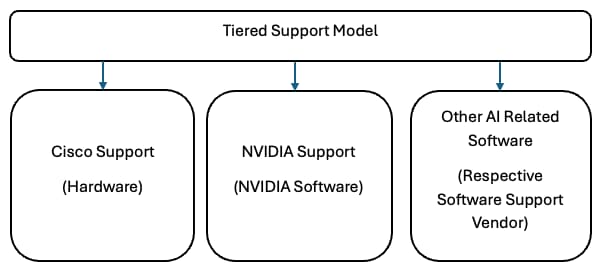
Note: For NVIDIA software issues, you must create a support case directly with NVIDIA. If required, please also include Cisco Support for joint troubleshooting efforts.
When to Contact Cisco Support
- Hardware Issues:
- Cisco UCS server failures or errors
- Hardware diagnostics and replacement
- Firmware updates for UCS components
- UCS Manager or Intersight configuration issues
- Physical GPU installation or detection problems
- Network connectivity problems with UCS infrastructure
- Cisco Software:
- UCS Manager or Cisco Intersight issues
- Cisco network configuration for AI infrastructure
How to Open a Cisco Support Case:
- Visit: Cisco Worldwide Support Contacts
- Call Cisco Support Directly (24/7 hotline)
- Use Cisco Support Case Manager
- Contact through Cisco Intersight (for cloud-connected devices)
Information Required Prior to Support Case creation:
- Cisco UCS model and serial number
- Service contract number
- Detailed problem description
- Tech support files (show tech-support)
- GPU inventory and configuration details
When to Contact NVIDIA Support
NVIDIA AI Enterprise Software:
- AI framework installation or configuration issues
- NVIDIA AI workflow questions
- Triton Inference Server deployment
- NVIDIA vGPU software issues
- GPU Operator or Network Operator problems
- Container runtime issues with NVIDIA Container Toolkit
- License activation or management
- Performance tuning for AI workloads
- Software bugs or feature requests
- Security vulnerability questions
Driver and Software Issues:
- NVIDIA driver installation or compatibility
- CUDA toolkit problems
- cuDNN or TensorRT issues
- GPU utilization or performance problems
How to Open a Case:
- Visit the NVIDIA Enterprise Support Portal
- Log in with your NVIDIA Enterprise account
- Select "Create Case" and provide:
- NVIDIA AI Enterprise license information
- Server and GPU details
- Software versions
- Detailed issue description
- Logs and diagnostic output
Support Portal Access:
- Requires active NVIDIA AI Enterprise subscription
- Account setup during license provisioning
- Access to knowledge base, downloads, and case management
Support for Other AI Related Software
Adhere to the support procedures provided by the applicable AI Software/App Vendor
The information in this document was created from the devices in a specific lab environment. All of the devices used in this document started with a cleared (default) configuration. If your network is live, ensure that you understand the potential impact of any command.

 Feedback