Configure Firewall Threat Defense Modular Policy Framework
Available Languages
Contents
Introduction
This document describes the Firewall Threat Defense (FTD) Modular Policy Framework (MPF)
Prerequisites
Requirements
There are not specific requirements for this document.
Components Used
The information in this document is based on these software and hardware versions:
- Cisco Secure Firewall 3130 Threat Defense Version 10.0.0 (Build 140)
- Firewall Management Center (FMC) Version 10.0.0 (Build 140)
The information in this document was created from the devices in a specific lab environment. All of the devices used in this document started with a cleared (default) configuration. If your network is live, ensure that you understand the potential impact of any command.
Background Information
FTD Data Plane Overview
FTD is a unified software image that consists of 2 main engines:
- Datapath (also known as LINA)
- Snort engine
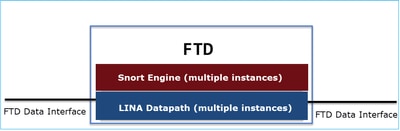
The LINA Datapath and the Snort Engine are the main parts of the FTD’s Data Plane.
MPF Ingredients
MPF uses these components:
- class-map matches the interesting traffic.
- policy-map applies actions to the interesting traffic matched by the class-map.
- service-policy applies the policy-map globally (on all interfaces) or on a specific interface.
Feature Directionality
Regarding feature directionality, consult the ASA configuration guide:
The features related to the FTD are highlighted:

Configure
Topology

The default MPF configuration (10.0.0):
firewall# show run policy-map
!
!
policy-map type inspect dns preset_dns_map
 parameters
  message-length maximum client auto
  message-length maximum 512
  no tcp-inspection
policy-map type inspect ip-options UM_STATIC_IP_OPTIONS_MAP
 parameters
  eool action allow
  nop action allow
  router-alert action allow
policy-map global_policy
 class inspection_default
  inspect dns preset_dns_map
  inspect ftp
  inspect h323 h225
  inspect h323 ras
  inspect rsh
  inspect rtsp
  inspect sqlnet
  inspect skinny
  inspect sunrpc
  inspect sip
  inspect netbios
  inspect tftp
  inspect icmp
  inspect icmp error
  inspect ip-options UM_STATIC_IP_OPTIONS_MAP
 class class_snmp
  inspect snmp
 class class-default
  set connection advanced-options UM_STATIC_TCP_MAP

firewall# show run class-map
!
class-map inspection_default
 match default-inspection-traffic
class-map class_snmp
 match port udp eq 4161
!
firewall# show run service-policy
service-policy global_policy global
Task 1. Disable SIP inspection globally on FTD
The requirement in this task is to disable SIP inspection in the FTD LINA engine. One reason can be a policy requirement or a software defect related to SIP that affects transit traffic.
Solution
Before disabling SIP inspection first confirm that it s applied to transit traffic:
firewall# packet-tracer input INSIDE udp 172.16.1.1 5060 172.16.3.1 5060
...
Phase: 8
Type: INSPECT
Subtype: inspect-sip
Result: ALLOW
Elapsed time: 34788 ns
Config:
class-map inspection_default
 match default-inspection-traffic
policy-map global_policy
 class inspection_default
  inspect sip
service-policy global_policy global
Additional Information:
...
Result:
input-interface: INSIDE(vrfid:0)
input-status: up
input-line-status: up
output-interface: OUTSIDE1(vrfid:0)
output-status: up
output-line-status: up
Action: allow
Time Taken: 326018 ns
There are 2 ways to globally disable SIP inspection:
Solution 1: Disable SIP from FTD CLISH CLI
> configure inspection sip disable
Building configuration...
Cryptochecksum: ef7528dc 7338986d 6714a3a2 4770528e

7818 bytes copied in 0.250 secs
[OK]
Verification
> show running-config policy-map | include sip

>
Solution 2: Disable SIP using FlexConfig
On FMC navigate to Devices > FlexConfig and create a FlexConfig object:

policy-map global_policy
 class inspection_default
  no inspect sip
Apply the FlexConfig policy and select Preview Config in order to preview it:

Finally, Deploy the policy.
Verification
firewall# show run policy-map | include sip
firewall#
Note – You need to clear the existing SIP connection from LINA connection table so that the connections are re-established without SIP inspection. You can use this command in order to verify the existing SIP connections:
firewall# show conn port 5060
Task 2. Disable SIP inspection for specific hosts
In this task the requirement is to disable SIP inspection for traffic between these networks:
- SRC: 172.16.1.0/24
- DST: 172.16.3.0/24
One reason to do this can be a software defect related to SIP that affects transit traffic
Solution
Use FlexConfig.
Step 1
Navigate to Objects > Access List > Extended and create an extended access list that matches the interesting traffic. You have to use the Block action since the goal to exclude the specific traffic. Additionally, add an Allow rule to match the rest of the traffic:
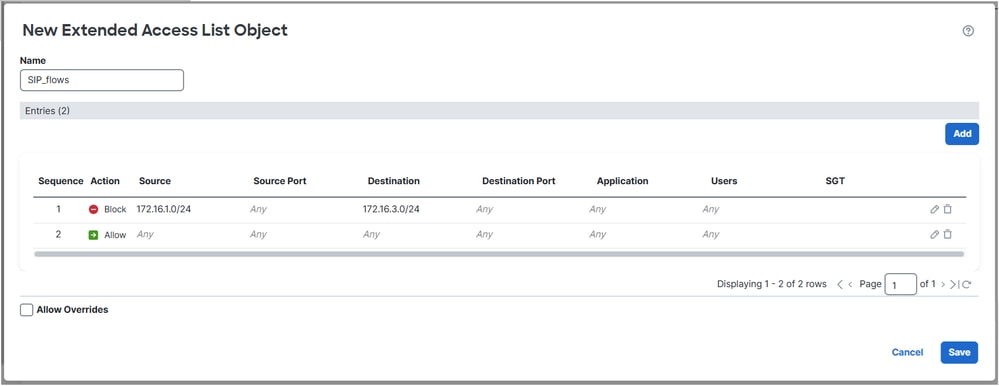

Step 2
Create a FlexConfig object with a class-map that matches the SIP Access Control List (ACL) and apply it into the global_policy:
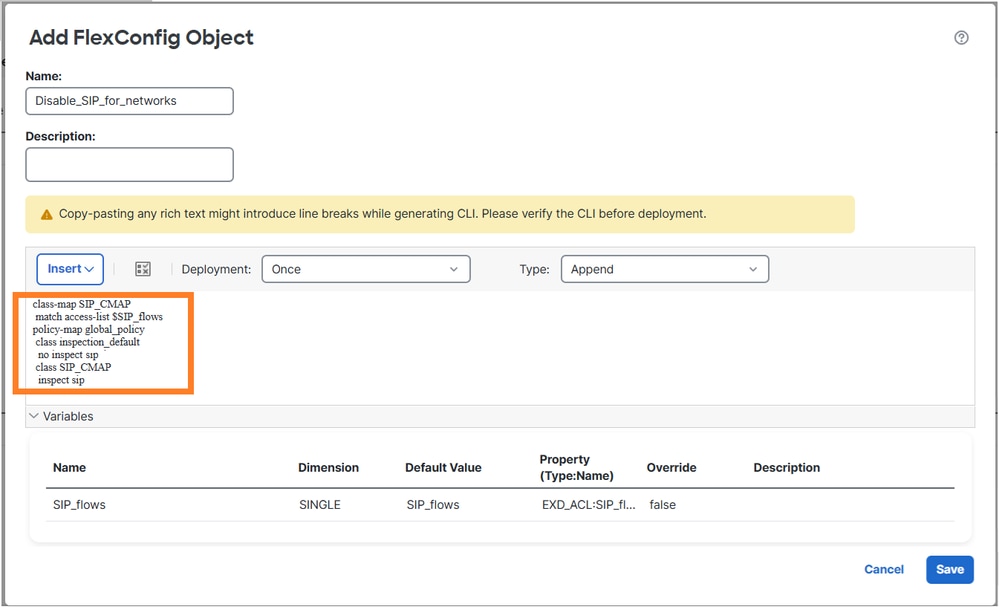
The configured FlexConfig object:
class-map SIP_CMAP
 match access-list $SIP_flows
policy-map global_policy
 class inspection_default
  no inspect sip
 class SIP_CMAP
  inspect sip
Note
When configuring the permit ACL try to be as specific as possible (for example, put protocol ports) to avoid any potential CPU impact. The example in this task does not specify protocol ports and can be avoided in production.
Verification 1
firewall# show run policy-map | begin global
policy-map global_policy
 class inspection_default
  inspect dns preset_dns_map
  inspect ftp
  inspect h323 h225
  inspect h323 ras
  inspect rsh
  inspect rtsp
  inspect sqlnet
  inspect skinny
  inspect sunrpc
  inspect netbios
  inspect tftp
  inspect icmp
  inspect icmp error
  inspect ip-options UM_STATIC_IP_OPTIONS_MAP
 class class_snmp
  inspect snmp
 class SIP_CMAP
  inspect sip
 class class-default
  set connection advanced-options UM_STATIC_TCP_MAP

firewall# show run class-map
!
class-map SIP_CMAP
 match access-list SIP_flows
class-map inspection_default
 match default-inspection-traffic
class-map class_snmp
 match port udp eq 4161

firepower# show run access-list SIP_flows
access-list SIP_flows extended deny object-group ProxySG_ExtendedACL_150323855735 172.16.1.0 255.255.255.0 172.16.3.0 255.255.255.0
access-list SIP_flows extended permit object-group ProxySG_ExtendedACL_150323855739 any any

firepower# show access-list SIP_flows
access-list SIP_flows; 4 elements; name hash: 0xb2b7de4d
access-list SIP_flows line 1 extended deny object-group ProxySG_ExtendedACL_150323855735 172.16.1.0 255.255.255.0 172.16.3.0 255.255.255.0 (hitcnt=0) 0x7202f94c
access-list SIP_flows line 1 extended deny tcp 172.16.1.0 255.255.255.0 172.16.3.0 255.255.255.0 eq sip (hitcnt=0) 0xbe390e61
access-list SIP_flows line 1 extended deny udp 172.16.1.0 255.255.255.0 172.16.3.0 255.255.255.0 eq sip (hitcnt=0) 0x107eddd0
access-list SIP_flows line 2 extended permit object-group ProxySG_ExtendedACL_150323855739 any any (hitcnt=0) 0x2075af04
access-list SIP_flows line 2 extended permit tcp any any eq sip (hitcnt=0) 0x60e34fab
access-list SIP_flows line 2 extended permit udp any any eq sip (hitcnt=0) 0xdae62994
Verification 2
Traffic that is not inspected by SIP inspection has deny=true:
firewall# packet-tracer input INSIDE udp 172.16.1.1 5060 172.16.3.1 5060 detail | begin INSPECT
Type: INSPECT
Subtype: inspect-sip
Result: ALLOW
Elapsed time: 37910 ns
Config:
class-map SIP_CMAP
 match access-list SIP_flows
policy-map global_policy
 class SIP_CMAP
  inspect sip
service-policy global_policy global
Additional Information:
 Forward Flow based lookup yields rule:
 in id=0x14af42cfa810, priority=70, domain=inspect-sip, deny=true
       hits=1, user_data=0x000014af4570bea0, cs_id=0x0, use_real_addr, flags=0x0, protocol=0
       src ip/id=172.16.1.0, mask=255.255.255.0, port=0, tag=any
       dst ip/id=172.16.3.0, mask=255.255.255.0, port=5060, tag=any,
       dscp=0x0, input_ifc=INSIDE(vrfid:0), output_ifc=any
...
Traffic that is inspected by SIP inspection has deny=false:
firewall# packet-tracer input INSIDE udp 172.16.2.1 5060 172.16.3.1 5060 detail | begin INSPECT
Type: INSPECT
Subtype: inspect-sip
Result: ALLOW
Elapsed time: 34788 ns
Config:
class-map SIP_CMAP
 match access-list SIP_flows
policy-map global_policy
 class SIP_CMAP
  inspect sip
service-policy global_policy global
Additional Information:
 Forward Flow based lookup yields rule:
 in id=0x14af459099d0, priority=70, domain=inspect-sip, deny=false
       hits=1, user_data=0x000014af4570bea0, cs_id=0x0, use_real_addr, flags=0x0, protocol=0
       src ip/id=0.0.0.0, mask=0.0.0.0, port=0, tag=any
       dst ip/id=0.0.0.0, mask=0.0.0.0, port=5060, tag=any,
...
Verification 3
The "sip" inspect counter increases when a packet is inspected by the firewall:
firewall# show service-policy inspect sip

Global policy:
  Service-policy: global_policy
    Class-map: inspection_default
    Class-map: class_snmp
    Class-map: SIP_CMAP
      Inspect: sip , packet 2, lock fail 0, drop 0, reset-drop 0, 5-min-pkt-rate 0 pkts/sec, v6-fail-close 0 sctp-drop-override 0
               tcp-proxy: bytes in buffer 0, bytes dropped 0
...
firewall# packet-tracer input INSIDE udp 172.16.2.1 5060 172.16.3.1 5060

firewall#show service-policy inspect sip

Global policy:
  Service-policy: global_policy
    Class-map: inspection_default
    Class-map: class_snmp
    Class-map: SIP_CMAP
      Inspect: sip , packet 3, lock fail 0, drop 0, reset-drop 0, 5-min-pkt-rate 0 pkts/sec, v6-fail-close 0 sctp-drop-override 0
               tcp-proxy: bytes in buffer 0, bytes dropped 0
...
Task 3. Configure TCP State Bypass for specific hosts
In this task the requirement is to enable TCP state bypass for traffic between these networks:
- SRC: 172.16.2.0/24
- DST: 172.16.3.0/24
In general, it is not recommended to use TCP state bypass, but it can be used as a temporary workaround for handling asymmetric flows.
Solution 1
Step 1
Create an extended ACL that matches the interesting traffic:

Step 2
Edit the Access Control Policy (ACP) assigned to the FTD, select the Advanced Settings tab and edit the Threat Defense Service Policy. Select Add Rule and Next.
Step 3
Select the extended ACL:

Step 4
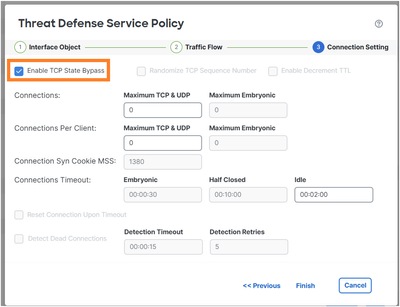
Step 5
Select Finish, OK, Save and Deploy.
The result:
firewall# show run policy-map global_policy
!
policy-map global_policy
 class inspection_default
  inspect dns preset_dns_map
  inspect ftp
  inspect h323 h225
  inspect h323 ras
  inspect rsh
  inspect rtsp
  inspect sqlnet
  inspect skinny
  inspect sunrpc
  inspect netbios
  inspect tftp
  inspect icmp
  inspect icmp error
  inspect ip-options UM_STATIC_IP_OPTIONS_MAP
 class class_map_TCP_Bypass
  set connection random-sequence-number disable
  set connection advanced-options tcp-state-bypass
 class class_snmp
  inspect snmp
 class class-default
  set connection advanced-options UM_STATIC_TCP_MAP
Note: In previous FMC releases like 6.x you can use FlexConfig to configure TCP state bypass. In newer versions this is not supported:

Verification
firewall# packet-tracer input INSIDE tcp 172.16.2.1 1111 172.16.3.1 80 detail | begin CONN
Type: CONN-SETTINGS
Subtype:
Result: ALLOW
Elapsed time: 334 ns
Config:
class-map class_map_TCP_Bypass
 match access-list TCP_Bypass
policy-map global_policy
 class class_map_TCP_Bypass
  set connection conn-max 0 embryonic-conn-max 0 random-sequence-number disable syn-cookie-mss 1380
  set connection advanced-options tcp-state-bypass
service-policy global_policy global
Additional Information:
 Forward Flow based lookup yields rule:
 in id=0x14af45906b70, priority=7, domain=conn-set, deny=false
       hits=1, user_data=0x000014af45906df0, cs_id=0x0, use_real_addr, flags=0x0, protocol=0
       src ip/id=172.16.2.0, mask=255.255.255.0, port=0, tag=any
       dst ip/id=172.16.3.0, mask=255.255.255.0, port=0, tag=any,
       dscp=0x0, input_ifc=INSIDE(vrfid:0), output_ifc=any
...
Task 4. Traceroute output modification
Prerequisite
Configure static NAT on FTD so that IP 172.16.1.1 located behind INSIDE interface appears as 198.51.100.200 on OUTSIDE1 hosts:
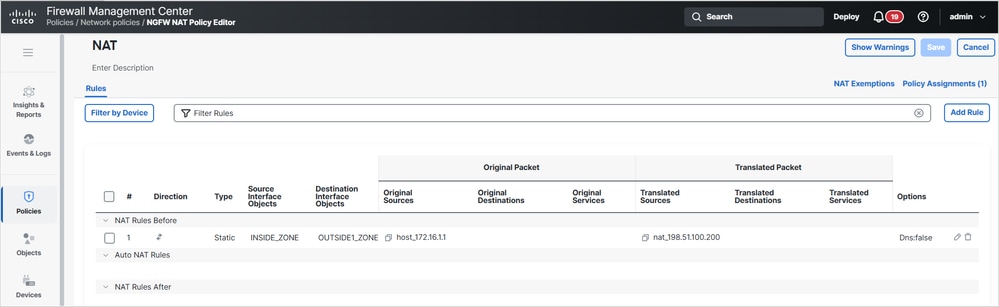
Then, run a traceroute from ISP1 to 198.51.100.200 (host 172.16.1.1):
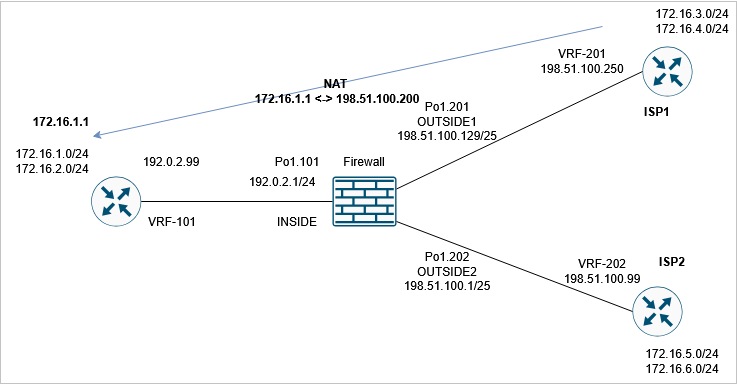
router1# traceroute vrf VRF-201 198.51.100.200
Type escape sequence to abort.
Tracing the route to 198.51.100.200
VRF info: (vrf in name/id, vrf out name/id)
  1 192.0.2.99 1 msec 1 msec *
Requirement
Modify the FTD configuration so that the traceroute matches this output:
router1# traceroute vrf VRF-201 198.51.100.200
Type escape sequence to abort.
Tracing the route to 198.51.100.200
VRF info: (vrf in name/id, vrf out name/id)
  1 198.51.100.129 1 msec 1 msec *
  2 198.51.100.200 1 msec 2 msec *
Solution
The solution includes two configuration steps:
1. Decrement the TTL:
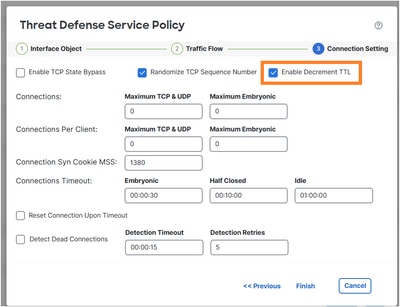
After this change, the traceroute reveals the firewall hop:
router1# traceroute vrf VRF-201 198.51.100.200
Type escape sequence to abort.
Tracing the route to 198.51.100.200
VRF info: (vrf in name/id, vrf out name/id)
 1 198.51.100.129 1 msec 1 msec *
  2 192.0.2.99 1 msec 1 msec *
2. Disable ICMP Error inspection:

policy-map global_policy
 class inspection_default
   no inspect icmp error
Verification
The traceroute shows the translated NAT IP address of the remote host and the FTD interface IP address:
router1# traceroute vrf VRF-201 198.51.100.200
Type escape sequence to abort.
Tracing the route to 198.51.100.200
VRF info: (vrf in name/id, vrf out name/id)
  1 198.51.100.129 1 msec 1 msec *
  2 198.51.100.200 1 msec 2 msec *
Task 5. Set connection timeouts
Requirement
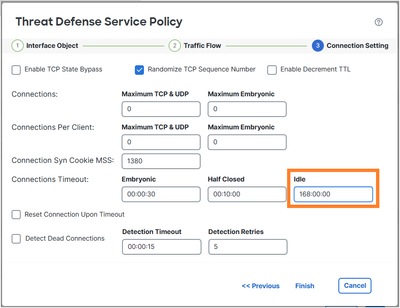
Change the timeout to 1 week for this flow:
- Protocol: TCP
- SRC: 172.16.1.1
- DST: 172.16.5.1
Solution
To set timeout per flow you need to use Service Policy.
Step 1
Navigate to Objects > Access List and create an extended ACL that matches the interesting traffic:
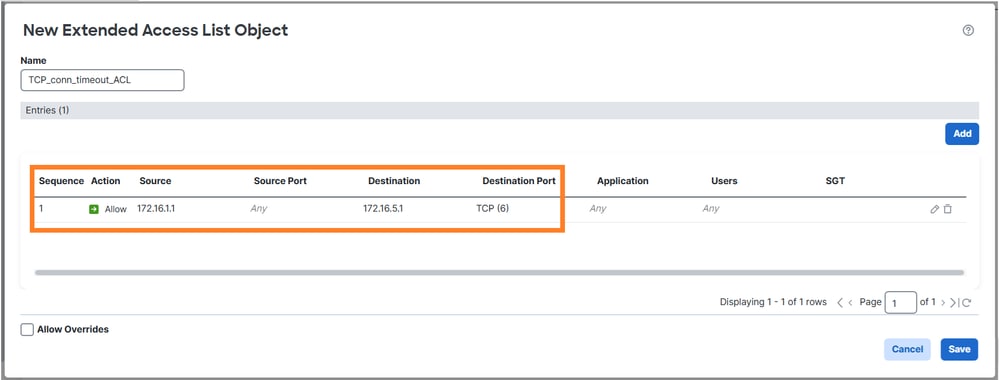
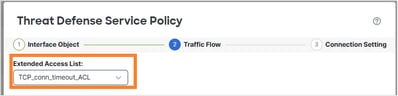
Step 2
Configure an MPF policy that uses the ACL that was created in step 1:
Set the connection idle timeout:
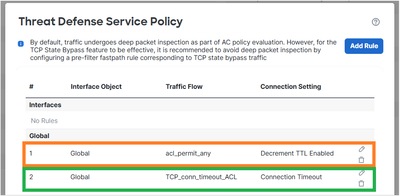
Remove the rule from the previous task since it overlaps with the new requirement:
Verification
The deployed policy-map configuration:
policy-map global_policy
 class inspection_default
  inspect dns preset_dns_map
  inspect ftp
  inspect h323 h225
  inspect h323 ras
  inspect rsh
  inspect rtsp
  inspect sqlnet
  inspect skinny
  inspect sunrpc
  inspect netbios
  inspect tftp
  inspect icmp
  inspect ip-options UM_STATIC_IP_OPTIONS_MAP
  inspect sip
 class class_map_TCP_conn_timeout_ACL
  set connection timeout idle 168:00:00
 class class_snmp
  inspect snmp
 class class-default
  set connection advanced-options UM_STATIC_TCP_MAP
Initiate a new TCP connection from 172.16.1.1 to 172.16.5.1 and check the connection table of the FTD:
firewall# show conn long address 172.16.5.1
...
TCP OUTSIDE2: 172.16.5.1/23 (172.16.5.1/23) INSIDE: 172.16.1.1/29389 (172.16.1.1/29389), flags UIoN1N7, idle 5s, uptime 7s, timeout 7D0h, bytes 349, flow id 72, Snort id 6, rule id 268439559, Rx-RingNum 27, Internal-Data0/1
Initiator: 172.16.1.1, Responder: 172.16.5.1
Connection lookup keyid: 890
Task 6. BGP Authentication through FTD
Prerequisite
Configure a BGP session through the FTD. The BGP session nees to use authentication.
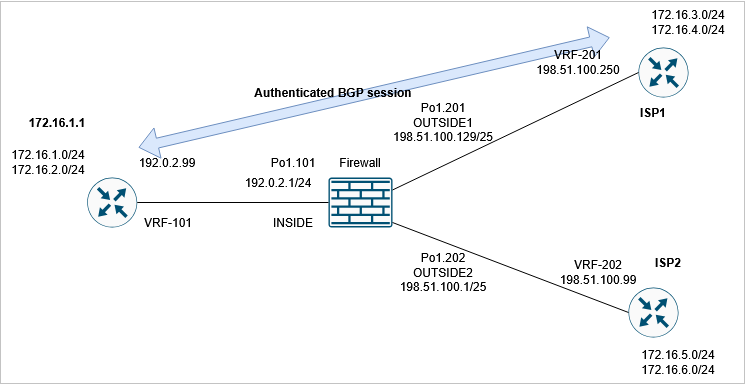
Verification
With the default FTD configuration, the BGP session is not established. On the router you can see:
router1#
*May 21 07:51:23.595: %TCP-6-BADAUTH: Invalid MD5 digest from 192.0.2.99(24591) to 198.51.100.250(179) tableid - 3
*May 21 07:51:25.595: %TCP-6-BADAUTH: Invalid MD5 digest from 192.0.2.99(24591) to 198.51.100.250(179) tableid - 3
*May 21 07:51:29.595: %TCP-6-BADAUTH: Invalid MD5 digest from 192.0.2.99(24591) to 198.51.100.250(179) tableid - 3
On the FTD you see that both sides fail to establish the BGP TCP connection (the connection flags denote that only TCP SYN packets are being received):
firewall# show conn port 179
3 in use, 16 most used
Inspect Snort:
        preserve-connection: 2 enabled, 0 in effect, 15 most enabled, 0 most in effect

TCP OUTSIDE1 198.51.100.250:41090 INSIDE 192.0.2.99:179, idle 0:00:00, bytes 0, flags aA N1
TCP OUTSIDE1 198.51.100.250:179 INSIDE 192.0.2.99:53629, idle 0:00:02, bytes 0, flags aA N1
Solution
To allow an authenticated BGP session through the FTD these 2 conditions must to be met:
- TCP MD5 (option 19) must be allowed through the FTD.
- TCP sequence number randomization must be disabled.
TCP MD5 option is allowed by default:

firewall# show run all tcp-map
!
tcp-map UM_STATIC_TCP_MAP
  no check-retransmission
  no checksum-verification
  exceed-mss allow
  queue-limit 0 timeout 4
  reserved-bits allow
  syn-data allow
  synack-data drop
  invalid-ack drop
  seq-past-window drop
  tcp-options range 6 7 allow
  tcp-options range 9 18 allow
  tcp-options range 20 255 allow
  tcp-options selective-ack allow
  tcp-options timestamp allow
  tcp-options window-scale allow
  tcp-options mss allow
  tcp-options md5 allow
  ttl-evasion-protection
  urgent-flag allow
  window-variation allow-connection
Globally disable TCP Initial Sequence Number (ISN) randomization:
> configure tcp-randomization disable
Building configuration...
Cryptochecksum: f8ac5587 7ccc635e bff886a1 bcab820c

8284 bytes copied in 0.260 secs
[OK]
>
or (the preferred method) you create an extended access list that matches the BGP connection:
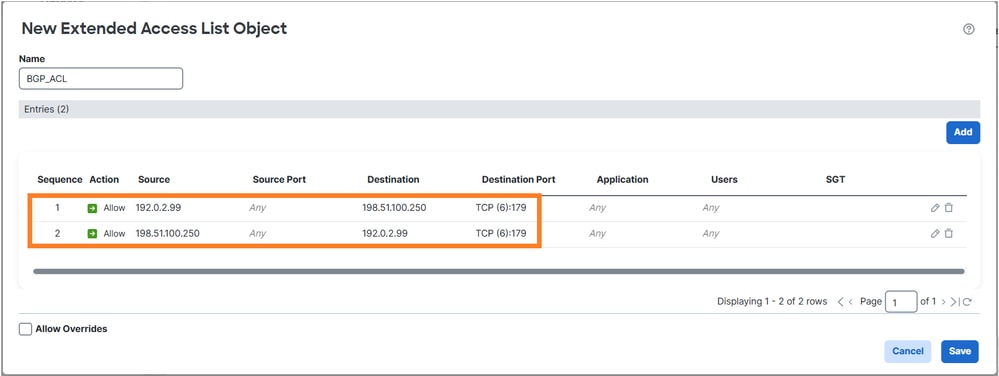
and disable the TCP sequence number randomization using the Threat Defense Service Policy:

Verification
The deployed policy-map configuration:
policy-map global_policy
 class inspection_default
  inspect dns preset_dns_map
  inspect ftp
  inspect h323 h225
  inspect h323 ras
  inspect rsh
  inspect rtsp
  inspect sqlnet
  inspect skinny
  inspect sunrpc
  inspect netbios
  inspect tftp
  inspect icmp
  inspect ip-options UM_STATIC_IP_OPTIONS_MAP
  inspect sip
 class class_map_BGP_ACL
  set connection random-sequence-number disable
 class class_snmp
  inspect snmp
 class class-default
  set connection advanced-options UM_STATIC_TCP_MAP
The BGP session is established through FTD:
firewall# show conn long port 179
...
TCP OUTSIDE1: 198.51.100.250/49863 (198.51.100.250/49863) INSIDE: 192.0.2.99/179 (192.0.2.99/179), flags UIO N1N7, idle 44s, uptime 1m40s, timeout 1h0m, bytes 274, flow id 111, Snort id 3, rule id 268439559, Rx-RingNum 29, Internal-Data0/1
  Initiator: 198.51.100.250, Responder: 192.0.2.99
  Connection lookup keyid: 83487134
Task 7. Dead Connection Detection (DCD)
Requirement
Configure DCD on FTD for TCP traffic destined to host 172.16.3.1.
Solution
DCD is documented at:
1. Navigate to Objects > Access-List and create an access-list that matches the interesting traffic.
2. Edit the ACP assigned to your firewall, navigate to Advanced options and select Threat Defense Service Policy to enable DCD:
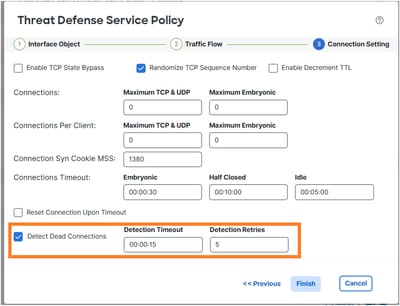
The deployed configuration:
access-list DCD_ACL extended permit object-group ProxySG_ExtendedACL_81604390279 any host 172.16.3.1
!
class-map class_map_DCD_ACL
 match access-list DCD_ACL
policy-map global_policy
 class class_map_DCD_ACL
  set connection timeout dcd
How it works
Configure FTD captures to see the backend operation:
firewall# capture CAPI interface INSIDE match tcp host 172.16.3.1 any
firewall# capture CAPO interface OUTSIDE1 match tcp host 172.16.3.1 any
Establish a TCP connection through the firewall:
firewall# show conn long address 172.16.3.1 | begin 172.16.3.1
TCP OUTSIDE1: 172.16.3.1/23 (172.16.3.1/23) INSIDE: 192.0.2.99/23241 (192.0.2.99/23241), flags UIO N1N7, idle 1m18s, uptime 1m22s, timeout 5m0s, bytes 129, flow id 127, Snort id 4, rule id 268439559, Rx-RingNum 13, Internal-Data0/1
  Initiator: 192.0.2.99, Responder: 172.16.3.1
  DCD probes sent: Initiator 0, Responder 0 Connection lookup keyid: 76292550
Initially, there are no DCD packets shown in the firewall captures:
firewall# show capture
capture CAPI type raw-data interface INSIDE [Capturing - 0 bytes]
  match tcp host 172.16.3.1 any
capture CAPO type raw-data interface OUTSIDE1 [Capturing - 0 bytes]
  match tcp host 172.16.3.1 any
When an idle connection reaches the idle timeout, the FTD sends spoofed TCP ACK messages to the source and destination:
firewall# show conn long address 172.16.3.1 | begin 172.16.3.1
TCP OUTSIDE1: 172.16.3.1/23 (172.16.3.1/23) INSIDE: 192.0.2.99/23241 (192.0.2.99/23241), flags UIO N1N7, idle 4m59s, uptime 5m3s, timeout 5m0s, bytes 129, flow id 127, Snort id 4, rule id 268439559, Rx-RingNum 13, Internal-Data0/1
  Initiator: 192.0.2.99, Responder: 172.16.3.1
  DCD probes sent: Initiator 0, Responder 0 Connection lookup keyid: 76292550

firewall# show conn long address 172.16.3.1 | begin 172.16.3.1
TCP OUTSIDE1: 172.16.3.1/23 (172.16.3.1/23) INSIDE: 192.0.2.99/23241 (192.0.2.99/23241), flags UIO N1N7, idle 0s, uptime 5m3s, timeout 15s, bytes 129, flow id 127, Snort id 4, rule id 268439559, Rx-RingNum 13, Internal-Data0/1
  Initiator: 192.0.2.99, Responder: 172.16.3.1
  DCD probes sent: Initiator 1, Responder 0 Connection lookup keyid: 76292550

firewall# show conn long address 172.16.3.1 | begin 172.16.3.1
TCP OUTSIDE1: 172.16.3.1/23 (172.16.3.1/23) INSIDE: 192.0.2.99/23241 (192.0.2.99/23241), flags UIO N1N7, idle 0s, uptime 5m4s, timeout 5m0s, bytes 129, flow id 127, Snort id 4, rule id 268439559, Rx-RingNum 13, Internal-Data0/1
  Initiator: 192.0.2.99, Responder: 172.16.3.1
  DCD probes sent: Initiator 1, Responder 1 Connection lookup keyid: 76292550
If both reply, it resets the idle timer:
firewall# show capture CAPI

3 packets captured

1: 09:01:30.433952 802.1Q vlan#101 P0 172.16.3.1.23 > 192.0.2.99.23241: . ack 3271882019 win 32757
2: 09:01:30.434334 802.1Q vlan#101 P0 192.0.2.99.23241 > 172.16.3.1.23: . ack 1746306341 win 32746
3: 09:01:30.955654 802.1Q vlan#101 P0 172.16.3.1.23 > 192.0.2.99.23241: . ack 3271882019 win 32757
3 packets shown
firewall# show capture CAPO

3 packets captured

1: 09:01:30.434364 802.1Q vlan#201 P0 192.0.2.99.23241 > 172.16.3.1.23: . ack 111661490 win 32746
2: 09:01:30.955288 802.1Q vlan#201 P0 192.0.2.99.23241 > 172.16.3.1.23: . ack 111661490 win 32746
3: 09:01:30.955639 802.1Q vlan#201 P0 172.16.3.1.23 > 192.0.2.99.23241: . ack 3875469573 win 32757
3 packets shown

firewall# show conn long address 172.16.3.1 | begin 172.16.3.1
TCP OUTSIDE1: 172.16.3.1/23 (172.16.3.1/23) INSIDE: 192.0.2.99/23241 (192.0.2.99/23241), flags UIO N1N7, idle 1m29s, uptime 6m33s, timeout 5m0s, bytes 129, flow id 127, Snort id 4, rule id 268439559, Rx-RingNum 13, Internal-Data0/1
  Initiator: 192.0.2.99, Responder: 172.16.3.1
  DCD probes sent: Initiator 1, Responder 1 Connection lookup keyid: 76292550

Note: DCD does not work on offloaded connections ('o' flag).
Related Information
Revision History
| Revision | Publish Date | Comments |
|---|---|---|
1.0 |
22-May-2026
|
Initial Release |

 Feedback
Contact Cisco
- Open a Support Case

- (Requires a Cisco Service Contract)