Mitigate Password Spray Attacks on Remote VPN Secure Firewall
Available Languages
Contents
Introduction
This document describes recommendations to consider against password-spray attacks aimed at Remote Access VPN services in Secure Firewall.
Background Information
Password spray attacks are a type of brute-force attack where an attacker tries to gain unauthorized access to multiple user accounts by systematically using a few commonly used passwords across many accounts. Successful password spray attacks can lead to unauthorized access to sensitive information, data breaches, and potential compromises of network integrity
Moreover, these attacks, even when unsuccessful in their attempt to gain access, can consume computational resources from the Secure Firewall and prevent valid users from connecting to the remote access VPN services.
Observed Behaviors
When your Secure Firewall is targeted by password-spray attacks in Remote Access VPN services, you can identify these attacks by monitoring syslogs and running specific show commands. The most common behaviors to look for include:
Unusual Amount of Rejected Authentication Requests
The VPN headend Cisco Secure Firewall ASA or FTD shows symptoms of password-spray attacks with an unusual rate of rejected authentication attempts.
The best way to detect this is by looking at the syslog. Look for an unusual number of any of the next ASA syslog IDs:
- %ASA-6-113015
%ASA-6-113015: AAA user authentication Rejected : reason = User was not found : local database : user = admin : user IP = x.x.x.x
- %ASA-6-113005
%ASA-6-113005: AAA user authentication Rejected : reason = Unspecified : server = x.x.x.x : user = ***** : user IP = x.x.x.x
- %ASA-6-716039
%ASA-6-716039: Group <DfltGrpPolicy> User <admin> IP <x.x.x.x> Authentication: rejected, Session Type: WebVPN.
The username is always hidden until the no logging hide username command is configured on the ASA.
To verify, log in to the ASA or FTD Command Line Interface (CLI) and run the show aaa-server command. Investigate for an unusual number of attempted and rejected authentication requests to any of the configured AAA servers:
ciscoasa# show aaa-server

Server Group: LDAP-SERVER - - - - - >>>> Sprays against external server
Server Protocol: ldap
Server Hostname: ldap-server.example.com
Server Address: 10.10.10.10
Server port: 636
Server status: ACTIVE, Last transaction at unknown
Number of pending requests 0
Average round trip time 0ms
Number of authentication requests 2228536 - - - - - >>>> Unusual increments
Number of authorization requests 0
Number of accounting requests 0
Number of retransmissions 0
Number of accepts 1312
Number of rejects 2225363 - - - - - >>>> Unusual increments / Unusual rejection rate
Number of challenges 0
Number of malformed responses 0
Number of bad authenticators 0
Number of timeouts 1
Number of unrecognized responses 0
Recommendations
Consider and apply the recommendations described:
1. Enable Logging
Logging is a crucial part of cybersecurity that involves recording events happening within a system. The absence of detailed logs leaves gaps in understanding and hindering a clear analysis of the attack method. It is recommended that you enable logging to a remote syslog server for improved correlation and auditing of network and security incidents across various network devices.
For information on how to configure logging, refer to these platform-specific guides:
Cisco ASA Software:
- Secure ASA Firewall Guide
- Cisco Secure Firewall ASA Series General Operations CLI Configuration CLI Logging Guide
Cisco FTD Software:
- Configure Logging on FTD via Firewall Management Center (FMC)
- Configure Syslog section in the Platform Settings chapter of the Cisco Secure Firewall Management Center Device Configuration Guide
- Configure and Verify Syslog in Firepower Device Manager
- Configuring System Logging Settings section in the System Settings chapter of the Cisco Firepower Threat Defense Configuration Guide for Firepower Device Manager
2. Configure Threat Detection Features or Hardening Measures for Remote Access VPN
To help mitigate the impact and reduce the likelihood of occurrence of these brute-force attacks on your RAVPN connections, you can review and apply the next configuration options:
Option 1 (Recommended): Configure Threat Detection for Remote Access VPN Services
Threat detection features for remote access VPN services help prevent DoS (Denial of Service) attacks from IPv4 addresses by automatically blocking the host (IP Address) that exceeds the configured thresholds to prevent further attempts until you manually remove the shun of the IP address. There are separate services available for these types of attacks:
- Repeated failed authentication attempts to remote access VPN services (brute-force username/password scanning attacks).
- Client initiation attacks where the attacker starts, but does not complete the connection attempts to a remote access VPN headend repeated times from a single host.
- Connection attempts to invalid remote access VPN services when attackers try to connect to specific built-in tunnel groups intended solely for the internal functioning of the device. Legitimate endpoints must never attempt to connect to these tunnel groups.
These threat detection features are currently supported in the Cisco Secure Firewall versions listed next:
ASA Software:
- 9.16 version train -> supported from 9.16(4)67 and newer versions within this specific train.
- 9.17 version train -> supported from 9.17(1)45 and newer versions within this specific train.
- 9.18 version train -> supported from 9.18(4)40 and newer versions within this specific train.
- 9.19 version train -> supported from 9.19(1).37 and newer versions within this specific train.
- 9.20 version train -> supported from 9.20(3) and newer versions within this specific train.
- 9.22 version train -> supported from 9.22(1.1) and any newer versions.
FTD Software:
- 7.0 version train -> supported from 7.0.6.3 and newer versions within this specific train.
- 7.2 version train -> supported from 7.2.9 and newer version within this specific train.
- 7.4 version train -> supported from 7.4.2.1 and newer version within this specific train.
- 7.6 version train -> supported from 7.6.0 and any newer versions.
For full details and configuration assistance, refer to the documentation guides:
- Configuration on Secure Firewall ASA: Configure Threat Detection for Remote Access VPN on Secure Firewall ASA
- Configuration on Secure Firewall FTD Managed by FMC: Configure Threat Detection for Remote Access VPN Services on Secure Firewall Management Center
- Configuration on Secure Firewall FTD Managed by FDM: Configure Threat Detection for Remote Access VPN Services on Secure Firewall Device Manager
Option 2: Apply Hardening Measures for Remote Access VPN
If the threat detection features for Remote Access VPN services are not supported in your Secure Firewall version, implement hardening measures to lower the risk of impact from these attacks:
- Disable AAA Authentication in the DefaultWEBVPN and DefaultRAGroup Connection Profiles (step-by-step:ASA|FTD Managed by FMC).
- Disable Secure Firewall Posture (Hostscan) from the DefaultWEBVPNGroup and DefaultRAGroup (step-by-step: ASA|FTD Managed by FMC).
- Disable Group-aliases and Enable Group-URLs in the rest of the connection profiles (step-by-step: ASA|FTD Managed by FMC).
For further details, refer to the Implement Hardening Measures for Secure Client AnyConnect VPN Guide.
Related Behaviors
Users can experience the inability to establish VPN connections with Cisco Secure Client (AnyConnect) when Firewall Posture (HostScan) is enabled on Secure Firewall. It can intermittently encounter an error message that states, "Unable to complete connection. Cisco Secure Desktop not installed on the client."
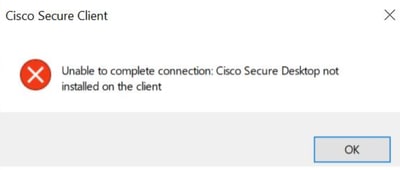
This behavior is a consequence of the successful exploitation of the vulnerability CVE-2024-20481 described next.
Cisco bug ID CSCwj45822:
This vulnerability arises from resource exhaustion due to password-spray attacks where attackers send numerous VPN authentication requests to the target device. Successful exploitation can lead to a Denial of Service for the RAVPN service. A key symptom of this exploit is when users intermittently encounter the "Unable to complete connection. Cisco Secure Desktop not installed on the client." error message when they attempt to establish a RAVPN connection using Cisco Secure Client.
To fix this vulnerability, it is necessary to upgrade to the software versions listed in the security advisory. Additionally, it is recommended you enable threat-detection features for Remote Access VPN after your Secure Firewall is upgraded to these versions to protect against DoS attacks aimed at RAVPN services.
Refer to the Cisco ASA and FTD Software Remote Access VPN Brute Force Denial of Service Vulnerability security advisory for full details.
Additional Information
- Cisco Firepower Threat Defense Forensic Investigation Procedures for First Responders
- Cisco Talos Threat Advisory
For additional assistance, contact Cisco TAC. A valid support contract is required: Cisco Worldwide Support Contacts.
Revision History
| Revision | Publish Date | Comments |
|---|---|---|
8.0 |
01-Jul-2026
|
Updated article title, introduction, spelling, spacing, alt text, CCW alerts, and URLs. |
7.0 |
26-Oct-2024
|
Updated the "Related Behaviors" section to add a recent vulnerability related to this document. |
6.0 |
20-Sep-2024
|
Updated the supported versions of Threat Detection features for Remote Access VPN. |
5.0 |
06-Sep-2024
|
Added the "Configure Threat Detection for Remote Access VPN" recommendation. |
4.0 |
22-Apr-2024
|
Updated the "Background Information" and "Recommendations" sections. |
3.0 |
15-Apr-2024
|
Linked Cisco bug ID CSCwj45822, added the "Hostscan Token Exhaustion" subsection, added the "Additional Hardening Implementations for RAVPN" section |
2.0 |
01-Apr-2024
|
Updated the document title, renamed the "IoCs" section to "Unusual Patterns Observed" and added more details under the "recommendations" section. |
1.0 |
26-Mar-2024
|
Initial Release |

 Feedback
Contact Cisco
- Open a Support Case

- (Requires a Cisco Service Contract)