Understand and Troubleshoot ISE Replications
Available Languages
Contents
Introduction
This document describes Replication and its troubleshooting in Cisco Identity Services Engine® (ISE).
Prerequisites
Requirements
Cisco recommends that you have knowledge of Cisco Identity Services Engine® (ISE).
Components Used
The information in this document is based on these hardware and software versions.
- Cisco Identity Services Engine 3.4 and higher versions.
The information in this document was created from the devices in a specific lab environment. All of the devices used in this document started with a cleared (default) configuration. If your network is live, ensure that you understand the potential impact of any command.
Replication in Cisco ISE
Replication in ISE is the process of synchronizing configuration and operational data across multiple nodes in a deployment to keep them consistent.
Primary Administration Node is responsible for replicating the changes that were made in the deployment to all the other (secondary) nodes in the deployment.
Cisco ISE uses JGroups, a reliable group communication framework, as part of its replication architecture. JGroups enables the nodes in an ISE deployment to communicate with each other and exchange replication data. It provides the messaging framework that helps deliver configuration and database updates between nodes while maintaining synchronization across the deployment.
-
JGroups is a communication framework used by Cisco ISE for replication; it does not store the replicated data itself.
-
Not all data within Cisco ISE is replicated through JGroups. Different services use different communication mechanisms based on the type of data being transferred.
-
If replication is temporarily interrupted, some Cisco ISE services can continue to operate using locally available data until synchronization is restored.
Examples of Data Transfer Methods
| Data |
Communication Method |
| Configuration and replication messages |
JGroups |
| Support bundle collection |
HTTPS API (TCP port 443) |
| Debug configuration |
HTTPS API (TCP port 443) |
| Live Logs and Reports |
RabbitMQ or UDP, depending on the deployment configuration |
Key Prerequisites and Validation Checks for Cisco ISE Replication
-
DNS Resolution: Forward and reverse DNS lookups must successfully resolve for all Cisco ISE nodes participating in the deployment. Proper DNS resolution is required for node communication and replication operations.
-
NTP Synchronization: All Cisco ISE nodes must be synchronized to a reliable NTP source to maintain consistent system time across the deployment. Time synchronization is essential for replication and certificate validation.
-
Certificates: The Admin certificate installed on each Cisco ISE node must be valid and trusted. Replication processes rely on the Admin certificate for secure communication between nodes.
-
Port Requirements: Network connectivity must allow communication over the ports required for replication and inter-node services:
| Service |
Protocol / Port |
| HTTPS (SOAP) |
TCP/443 |
| Data Synchronization and Replication (JGroups) |
TCP/12001 |
| Administrative Access |
TCP/8443 |
| ISE Messaging Service (SSL) |
TCP/8671 |
| Profiler Endpoint Ownership Synchronization |
TCP/6379 |
-
Network Reachability: Network connectivity between Cisco ISE nodes must be stable, and latency must not exceed 300 ms. Verifying latency and packet loss between nodes helps ensure reliable replication.
-
Queue Link Status: Cisco ISE Messaging Certificates are used to secure inter-node communication over TCP port 8671. Invalid or corrupted messaging certificates can result in queue link errors and replication failures. In such scenarios, the ISE Root CA certificate or ISE Messaging Certificates must be regenerated as appropriate.
-
ISE Stunnel Service:The Cisco ISE Stunnel service operates in distributed deployments and facilitates secure communication between nodes. The service must be running on all applicable nodes to support replication. The service status can be verified from the Cisco ISE CLI using the command:
show tech-support | include stunnel - ISE Patch and Version:The Primary Administration Node and the joining node (standalone node) must have the same version and patch level for node registration and sync up to work seamlessly.
Phases of Replication in Cisco ISE
Replication in Cisco ISE consists of three distinct phases that work together to establish and maintain synchronization across all nodes in the deployment. Each phase serves a specific purpose, beginning with node onboarding, followed by the initial database synchronization, and finally the continuous exchange of incremental updates to keep all nodes synchronized.
- Node Registration
- Full Sync Up
- Incremental Sync Up
Understand Node Registration in Cisco ISE
Node registration is the process through which a Cisco ISE node joins an existing deployment and establishes communication with the Primary Administration Node (PAN).
During node registration:
Step 1: The joining node (standalone node) initiates communication with the Primary Administration Node.
Step 2: Mutual Certificate validation is performed using the Cisco ISE Admin Certificate.
Step 3: DNS resolution, NTP synchronization, Network Reachability and required port accessibility are validated as part of the communication process.
Step 4: The Primary Admin Node verifies the standalone node / joining node is running a compatible Cisco ISE version and patch level.
Step 5: Deployment information, node roles, and trust relationships are exchanged.
Step 6: Database replication services are initialized and prepared for synchronization.
Successful completion of node registration establishes the node as a trusted member of the deployment and allows replication processes to begin.
Key Characteristics
-
Occurs when a new node is added to the deployment.
-
Establishes trust and communication channels.
-
Does not immediately transfer the complete configuration database.
-
Serves as a prerequisite for subsequent synchronization operations.
Refer to Understand Node Registration Process in Cisco ISE for detailed explanation of the node registration process.
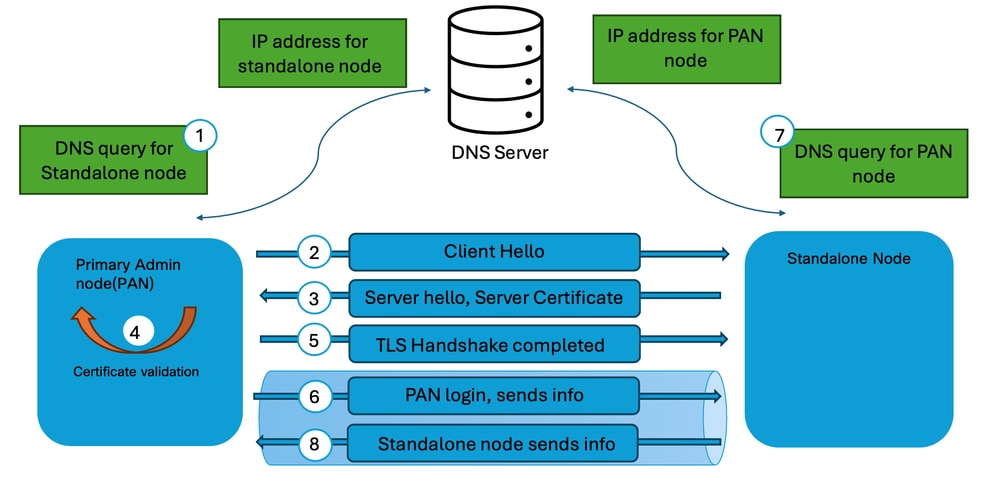 Node Registration Process

Note: The node being added to the deployment must be a standalone node. Additionally, the Primary Administration Node (PAN) must have the Primary Administration role enabled in the deployment to allow node registration in Cisco ISE.
Understand Full Sync Up in Cisco ISE
Full synchronization is a complete database replication process in which the entire configuration database is transferred from the Primary PAN to another node. Full synchronization does not transfer only modified records. Instead, the entire configuration dataset is rebuilt on the receiving node.
A full synchronization can occur in scenarios such as:
- Initial synchronization after node registration.
- Recovery from replication failures.
- Significant database inconsistencies.
- Rejoining a node to the deployment.
- Manual synchronization initiated through Cisco TAC troubleshooting procedures.
- Internal replication mechanisms determining that incremental synchronization can no longer restore database consistency.
During full synchronization:
Step 1: The Primary Administration Node prepares a complete database snapshot.
Step 2: Configuration data is packaged in the .dmp file and transmitted to the receiving node.
Step 3: Existing replicated data on the receiving node is validated and updated.
Step 4: The entire configuration database is rebuilt to match the Primary Admin node.
Step 5: Replication status is verified upon completion.
Because a full synchronization involves significantly more data than an incremental synchronization, it requires additional processing time and network resources.
Characteristics of Full Synchronization
- Transfers the complete configuration database.
- Consumes more bandwidth and system resources.
- Takes longer than incremental synchronization.
- Restores database consistency when discrepancies are detected.
- Typically occurs less frequently than incremental synchronization.
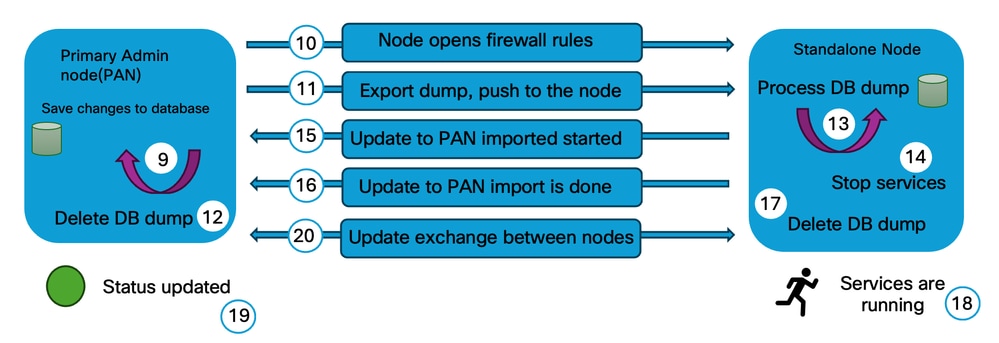 Full Sync Process
Understand Incremental Sync Up in Cisco ISE
Incremental synchronization is the ongoing replication mechanism used by Cisco ISE to distribute configuration changes after nodes have successfully joined the deployment. When an administrator makes a configuration change on the PAN, Cisco ISE does not transfer the entire database. Instead, only the modified records are replicated to the subscriber nodes.
Examples of changes replicated through incremental synchronization include:
-
Policy modifications
-
Network device additions or updates
-
Endpoint group changes
-
Authorization profile updates
-
Certificate-related configuration changes
-
Identity source configuration updates
The incremental synchronization process operates continuously and is designed to maintain consistency across all nodes while minimizing bandwidth utilization and replication overhead.
Benefits of Incremental Synchronization
-
Reduces replication traffic.
-
Minimizes synchronization time.
-
Allows rapid propagation of configuration changes.
-
Maintains near real-time consistency across the deployment.
Replication Workflow
Step 1: Configuration change occurs on the Primary Administration Node.
Step 2: Change is written to the Primary Administration Node database.
Step 3: Replication services identity the modified records.
Step 4: Primary Administration Node writes the new events / changes into a transaction table.
Step 5: Separate threads from PAN publish the information / changes to the secondary nodes in the deployment.
Step 6: Secondary nodes in the deployment receive the changes from Primary Administration Node.
Step 7: Secondary nodes in the deployment apply the changes received from Primary Administration Node.
Step 8: Replication status is updated upon successful completion.
Under normal operating conditions, most replication activity in Cisco ISE occurs through incremental synchronization.
Note: If a secondary node identifies missing replication messages, it initiates a request to the Primary Administration Node (PAN) to retrieve the missing messages and maintain synchronization
Replication Sequence Overview and Sync Status
The overall replication workflow in a Cisco ISE deployment can be summarized as follows:
1. Node Registration: Establishes trust and adds the node to the deployment.
2. Initial Full Synchronization: Transfers the complete configuration database to the newly registered node.
3. Incremental Synchronization: Continuously propagates configuration changes throughout normal operation.
4. Full Synchronization (When required): Rebuilds database consistency if replication issues or database mismatches are detected.
This phased approach enables Cisco ISE to maintain a consistent configuration database across all nodes while optimizing network utilization and replication performance.
Sync Status
The synchronization status displayed for each node indicates its current replication and connectivity state:
- Green – The node is synchronized with the deployment, and replication is functioning normally.
- Yellow – The node is out of synchronization, node registration has failed, or cluster connectivity has been lost (the node has not been reachable by the cluster for the past five minutes).
- Red – The node is physically unreachable and cannot be contacted through network connectivity checks (for example, ICMP ping and HTTPS).
Note: If replication does not occur properly, you can perform manual synchronization to the secondary nodes with the Primary Administration node by logging into the Primary Administration Node, navigate to Administration > System > Deployment > select the node, and click Sync up.
Endpoint Replication
Endpoint Replication is the process by which ISE synchronizes endpoint database information across all Policy Service Nodes (PSNs) and the Primary Administration Node (PAN) to maintain a consistent view of endpoint identity throughout the deployment.
-
Cisco ISE maintains a centralized endpoint database that stores information about devices connecting to the network. This information includes both statically configured endpoints and dynamically learned endpoints through authentication, profiling, posture assessment, or integration with external identity sources.
-
When endpoint information is created or modified, Cisco ISE replicates the changes to other nodes in the deployment. This synchronization enables every Policy Service Node to evaluate authentication and authorization requests using the same endpoint information, regardless of which PSN processes the request.
-
Endpoint replication is handled automatically by Cisco ISE and forms part of the overall database replication mechanism. Administrators are not required to manually initiate endpoint synchronization during normal operations.
How Endpoint Replication Works
-
Endpoint Update: An endpoint is created or updated through authentication, profiling, posture, or manual configuration.
-
Change Detection: Cisco ISE detects the endpoint change and prepares it for replication.
-
Replication: The updated endpoint information is replicated to the other nodes in the deployment using the ISE replication framework.
-
Database Synchronization: The secondary nodes update their local endpoint database with the replicated information.
-
Consistent Policy Enforcement: Once synchronization is complete, all Policy Service Nodes use the same endpoint information for authentication and authorization decisions.
From Cisco ISE Release 3.3, dynamically discovered endpoints are not automatically replicated to all nodes. This feature can be enabled or disabled from Endpoint Replication window. Navigate to Administration > System > Settings > Endpoint Replication, enable or disable as per the requirement.
Note: It is important to distinguish endpoint replication from session replication. Endpoint replication synchronizes persistent endpoint database records (such as MAC addresses, endpoint groups, and profiling information), whereas session replication synchronizes runtime session information to support policy enforcement and operational continuity. These mechanisms operate independently and serve different functions within the Cisco ISE architecture.
Common Node Replication Issues
Scenario 1: Node Registration Failed Because of DNS Resolution Failure
Node registration failed with the error reason as "hostname cannot be resolved.Please check your DNS configuration".
Steps to verify
- Ensure the valid DNS server is configured in the Primary Administration Node and Standalone node. Verify the DNS server configuration by using the command show running-config | include name-server
- Validate the forward and reverse DNS resolution in the Primary Administration Node and Standalone Node by using the command nslookup FQDN of the node for forward DNS lookup and nslookup ip address of the node for reverse DNS lookup.
- Validate the DNS server reachability from the Primary Administration Node and Standalone node by using the command ping DNS server IP from the CLI of the ISE nodes.
Scenario 2: Node Registration Failed Because of Admin Certificate Expiry
Node registration failed with the error reason as "Error loading certificates. Node not reachable at this time. Try again later".
Steps to verify
- Validate the admin certificates of the Primary Administration Node and the Standalone node to ensure the validity and certificate status. Navigate to Administration > System > Certificates, select the node and verify the validity and status of the Admin certificate.
- If the Admin certificate has expired, replace or renew the certificate and ensure that the Admin usage is assigned.
Scenario 3: Node Registration Failed Because of Version Mismatch
Node registration failed with the error reason as "version/patch details mismatch".
Steps to verify
- Validate the software version along with the patch of the Primary Admin node and Standalone Node by using the command show version to ensure the version details match.
Components for Debug Logs
These are the common components that are to be set in debug mode to isolate and troubleshoot replication in Cisco ISE.
- Replication-Deployment (replication.log and ise-psc.log)
- Replication-JGroup (replication.log and ise-psc.log)
- Replication Tracker (tracking.log)
- hibernate (hibernate.log)
- JMS (replication.log)
- ca-service (caservice.log)
- admin-ca (ise-psc.log)
Reference
- Troubleshoot and Enable Debugs on ISE
- ISE- Queue Link Error
- Cisco Identity Services Engine Administrator Guide, Release 3.4
- Cisco Identity Services Engine Administrator Guide, Release 3.5
Revision History
| Revision | Publish Date | Comments |
|---|---|---|
1.0 |
07-Jul-2026
|
Initial Release |

 Feedback
Contact Cisco
- Open a Support Case

- (Requires a Cisco Service Contract)