Troubleshoot and Enable Debugs on ISE
Available Languages
Contents
Introduction
This document describes how to troubleshoot and debug to enable when a specific issue occurs on Identity Service Engine (ISE).
Debug Log Configuration
ISE generates logs based on the configuration of the log level set for different types of features. Use these instructions to change those settings to set the log to debug level.
- For ISE 2.x versions, navigate to
Administration > System > Logging > Debug log configuration: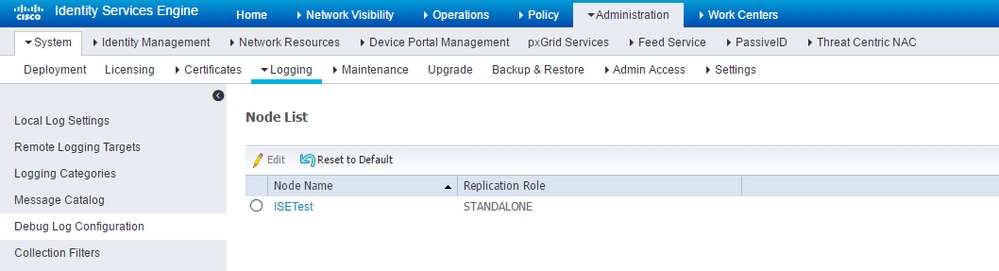
For ISE versions 3.x, navigate toOperations > Troubleshoot > Debug Wizard > Debug Log Configuration:
2. Choose the node which is affected/or causes the issue and clickEdit.
3. A list of various log attributes come up as shown in the image.
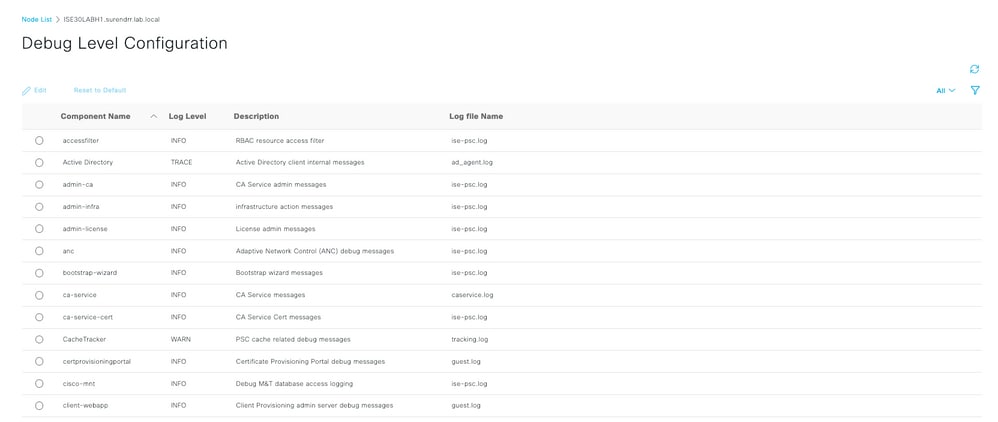
The list in the preceding image is not complete, but this is the place where the log level of certain services can be enabled.
All the log configurations for any feature described here can be set from this location. This section is referred to as the debugs page in related documentation.
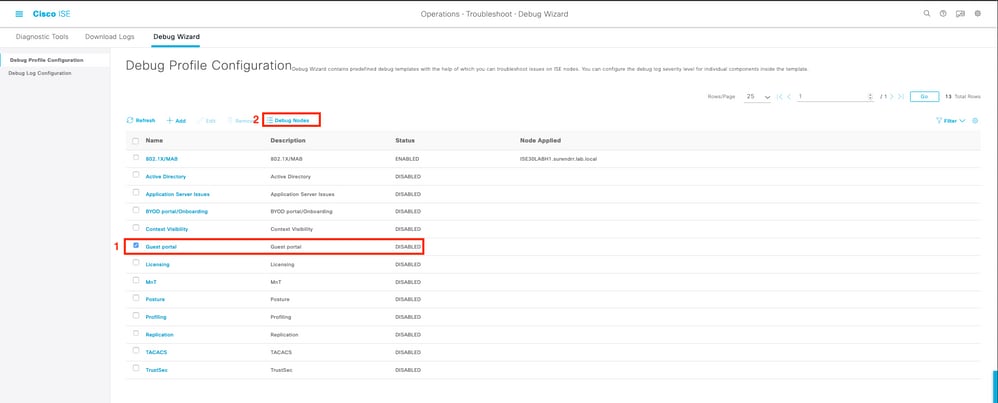
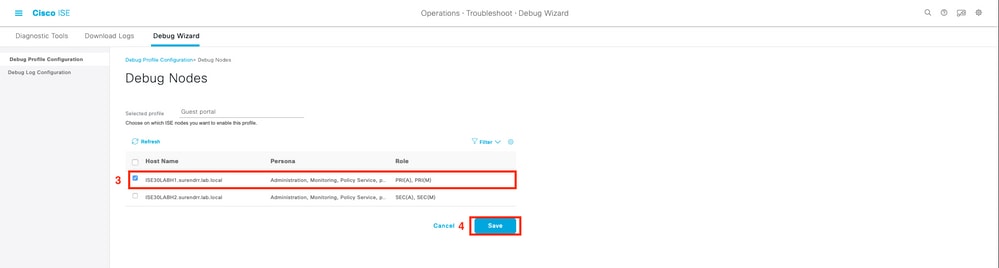
Alternatively for ISE 3. x versions, one can choose to enable debugs by feature as well at Operations > Troubleshoot > Debug Wizard > Debug Profile Configuration and choose the node to apply those debugs as shown here:
4. After the appropriate debugs are enabled (which are given for specific issues in the next sections), reproduce/recreate the issue.
5. Record the timestamps at which the issue is reproduced.
6. Record the endpoint ID (MAC Addresses) or IP Addresses of the clients that were tested.
7. Set the log levels to their defaults as you choose the attribute and click Reset to Default.
8. Navigate to Operations > Troubleshoot > Download logs. Choose the node on which the logs must be collected.
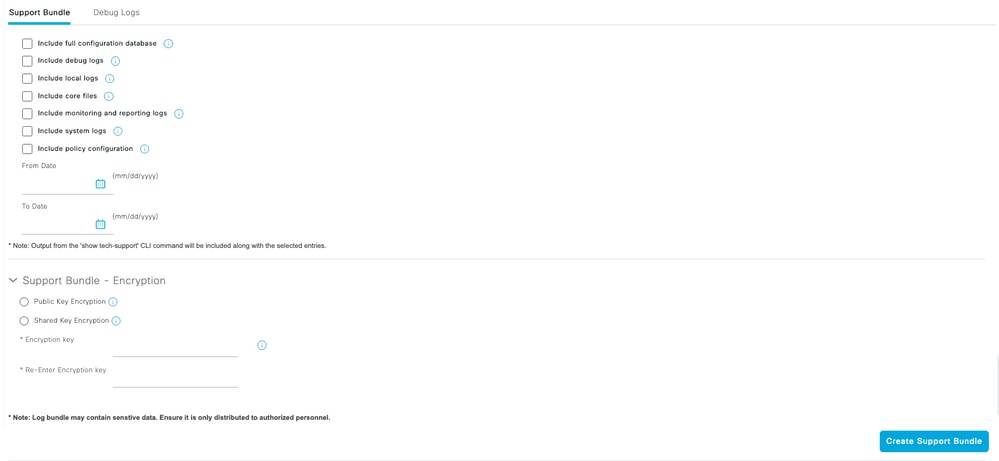
9. The support bundle can be found under Operations > Troubleshoot > Download Logs > (select the node on which the issue was reproduced/seen).
10. These options are used to generate the file:
[ ] Include full configuration database.
[x] Include debug logs.
[x] Include local logs.
[ ] Include core files.
[x] Include monitor- and report logs.
[x] Include system logs.
Set the encryption key to <Encryption key of choice>.
Choose the (time range) days on which the issue is recreated/seen.
11. In order to collect the support bundle, click the download button.
Problem: Profiling
Attributes to be set to debug level:
- profiler (profiler.log)
- runtime-AAA (prrt-server.log)
- nsf (ise-psc.log)
- nsf-session (ise.psc.log)
Problem: Licensing
Attributes to be set to debug level:
- License (ise-psc.log)
- admin-license (ise-psc.log)
Problem: Posture
Attributes to be set to debug level:
- posture (ise-psc.log)
- portal (guest.log)
- provisioning (ise-psc.log)
- runtime-AAA (prrt-server.log)
- nsf (ise-psc.log)
- nsf-session (ise-psc.log)
- swiss (ise-psc.log)
- client-webapp (guest.log)
Problem: Guest Portal
Attributes to be set to debug level:
- guestaccess (guest.log)
- guest-admin (guest.log)
- guest-access-admin (guest.log)
- profiler (profiler.log)
- runtime-AAA (prrt-server.log)
- saml (guest.log) (enable this only if saml is in use)
- nsf (guest.log)
- nsf-session (guest.log)
Problem: dot1x/mab
Attributes to be set to debug level:
- runtime-AAA (prrt-server.log)
- nsf (ise-psc.log)
- nsf-session (ise-psc.log)
Problem: Replication
Attributes to be set to debug level:
- Replication-Deployment (replication.log and ise-psc.log)
- Replication-JGroup (replication.log and ise-psc.log)
- Replication Tracker (tracking.log)
- hibernate (hibernate.log)
- JMS (replication.log)
Problem: SAML-Related Issues
Attributes to be set to debug level:
- opensaml (ise-psc.log)
- saml (ise-psc.log)
Problem: Application Server Issues
Attributes to be set to debug level:
- org-apache (appserver/catalina.out)
- org-apache-cxf (appserver/catalina.out)
- org-apache-digester (appserver/catalina.out)
Problem: Sponsor Portal
Attributes to be set to debug level:
- sponsorportal (ise-psc.log)
- portal (guest.log)
- runtime-AAA (prrt-server.log)
- nsf (ise-psc.log)
- nsf-session (ise-psc.log)
Problem: BYOD portal/Onboarding
Attributes to be set to debug level:
- client (guest.log)
- client-webapp (guest.log)
- scep (ise-psc.log)
- ca-service (ise-psc.log)
- admin-ca (ise-psc.log)
- runtime-AAA (prrt-server.log)
- nsf (ise-psc.log)
- nsf-session (ise-psc.log)
- profiler (profiler.log)
Problem: MDM
Attributes to be set to TRACE level:
- portal (guest.log)
- mdmportal (ise-psc.log)
- external-mdm (ise-psc.log)
- runtime-AAA (prrt-server.log)
- nsf (ise-psc.log)
- nsf-session (ise-psc.log)
Problem: Certificate Provisioning Portal
Attributes to be set to debug level:
- ca-service (caservice.log)
- admin-ca (ise-psc.log)
- clientprovisioningportal (ise-psc.log)
- portal (guest.log)
Problem: My Devices Portal
Attributes to be set to debug level:
- portal (guest.log)
- mydevices (ise-psc.log)
- profiler (profiler.log)
Problem: TrustSec
Attributes to be set to debug level:
- sxp (sxp_appserver/sxp.log)
- sgtbinding (sxp_appserver/sxp.log)
- runtime-AAA (prrt-server.log)
- nsf (ise-psc.log)
- nsf-session (ise-psc.log)
Problem: Vulnerability Assessment and Trust Centric NAC
Attributes to be set to debug level:
- va-runtime (varuntime.log)
- va-service (varuntime.log and vaaggregation.log)
- TC-NAC (ise-psc.log)
- anc (ise-psc.log)
Problem: ODBC Identity Store Related Issues
Attributes to be set to debug level:
- odbc-id-store (prrt-management.log and prrt-server.log)
Problem: RBAC Issues
Attributes to be set to debug level:
- accessfilter (ise-psc.log)
Problem: pxGrid
Attributes to be set to TRACE level:
- pxgrid (pxgrid-server.log)
- infrastructure (ise-psc.log)
- ers (ise-psc.log)
Problem: Log/Reports
Attributes to be set to debug level:
- cpm-mnt (ise-psc.log)
- report (report.log)
- cisco-mnt (ise-psc.log)
- runtime-logging (prrt-server.log)
- collector (collector.log)
Problem: Active Directory
Attributes to be set to TRACE level:
- Active Directory (ad_agent.log)
- identity-store-AD (ad_agent.log)
- runtime-AAA (prrt-server.log)
- nsf (ise-psc.log)
- nsf-session (ise-psc.log)
Problem: PassiveID
Attributes to be set to debug level:
- PassiveID (passiveid*)
- runtime-AAA (prrt-server.log)
- Active Directory (ad)_agent.log)
- collector (collector.log) (On PassiveID,MnT nodes and on active pxGrid node if sessions are published.)
- pxGrid (pxgrid/) (On secondary MnT and active pxGrid node if the sessions are published.)
Problem: REST Services
Attributes to be set to debug level:
- ers (ise-psc.log)
Problem: TACACS
Attributes to be set to debug level:
- runtime-AAA (prrt-server.log)
Problem: Wireless Setup
Attributes to be set to debug level:
- wirelesssetuphelper (/wifisetup)
Problem: Context Visibility
Attributes to be set to debug level:
- vcs (ise-elasticsearch.log/vcs.log)
- vcs-db (ise-elasticsearch.log/vcs.log)
Problem: RabbitMQ Messaging
- ise-messaging (ise-messaging/)
Problem: Light Session Directory
- Light-Session-Directory (lsd.log)
Problem: SSE Connector/Smart Call Home
- sse-connector (connector.log)
Problem: UDN
- UDN (udn.log)
Problem: Endpoint Scripts
- endpoint-script (ise-psc.log)
LDAP
- runtime-aaa (prrt-server.log)
Debugs Required to Troubleshoot more Generic Issues
Problem: Portal Issues
Attributes to be set to debug level:
- portal (guest.log)
- portal-session-manager (guest.log)
- portal-web-action (guest.log)
- previewportal (preview section in every portal configuration page) (guest.log)
Problem: Policy and Rules Evaluation Issues
Attributes to be set to debug level:
- RuleEngine-Policy-IDGroups (ise-psc.log)
- RuleEngine-Attributes (ise-psc.log)
- Policy-Engine (ise-psc.log)
- epm-pdp (ise-psc.log)
- epm-pip (ise-psc.log)
Problem: PAN failover
- Infrastructure (ise-psc.log)
- PanFailover (ise-psc.log)
Problem: IP Access Restriction
- Infrastructure (ise-psc.log)
- Admin-infra (ise-psc.log)
- NSF (ise-psc.log)
Problem: REST Store
- Rest-id-store (rest-id-store.log)
Revision History
| Revision | Publish Date | Comments |
|---|---|---|
5.0 |
22-Apr-2026
|
Updated Alt Text, and Formatting. |
4.0 |
19-Nov-2024
|
Updated Alt Text, Grammar, and Formatting. |
3.0 |
11-Sep-2023
|
Recertification. |
2.0 |
01-Aug-2022
|
Machine translation masking, style, format. |
1.0 |
04-Jan-2018
|
Initial Release |

 Feedback
Contact Cisco
- Open a Support Case

- (Requires a Cisco Service Contract)