Configure and Understand SNMP Traps to Monitor ISE
Available Languages
Introduction
This document describes how to configure and understand Simple Network Management Protocol (SNMP) traps in order to monitor the Cisco ISE.
Prerequisites
Requirements
Cisco recommends that you have the knowledge of these topics:
- SNMP
- Basic Linux
- Identity Services Engine (ISE)
Components Used
The information in this document is based on these software and hardware versions:
- RHEL 7 Server
- Cisco ISE, Release 3.1
The information in this document was created from the devices in a specific lab environment. All of the devices used in this document started with a cleared (default) configuration. If your network is live, ensure that you understand the potential impact of any command.
Background Information
SNMP traps are UDP messages sent from an SNMP-enabled device to a remote MIB Server. ISE can be configured to send traps to an SNMP server to monitor and troubleshoot. This document aims to familiarize some of the basic checks to isolate issues and understand the limitations of ISE traps.
Configuration
ISE supports SNMP v1, v2, and v3. Check if SNMP is enabled on the ISE CLI and the rest of the configuration.
For example, SNMP v3:
sotumu24/admin# conf t
Enter configuration commands, one per line.  End with CNTL/Z.
sotumu24/admin(config)# snmp-server enable
sotumu24/admin(config)# snmp-server trap dskThresholdLimit "75"
sotumu24/admin(config)# snmp-server community SNMP$tring ro
sotumu24/admin(config)# snmp-server user SNMPUSER v3 plain authpasswd privpasswd
ise7/admin(config)#snmp-server user snmpuser224 v3 sha224 plain authpasswd privpasswd
ise7/admin(config)#snmp-server user snmpuser256 v3 sha256 plain authpasswd privpasswd
ise7/admin(config)#snmp-server user snmpuser512 v3 sha512 plain authpasswd privpasswd


sotumu24/admin(config)# snmp-server host 10.127.197.81 version 3 SNMPUSER 0x474b49494c49464e474943 plain authpasswd privpasswd

>> The SNMP server might require the engineID if version 3 is being used and it can be dervied from the output of the command here :

sotumu24/admin# show snmp-server engineID
Local SNMP EngineID: GKIILIFNGIC

>> This is the same as ISE Serial number, need not be configured.

sotumu24/admin# sh udi

SPID: ISE-VM-K9
VPID: V01
Serial: GKIILIFNGIC
Ports and Reachability
The remote server must reach the ISE to query traps, if required. Ensure that ISE allows the SNMP server in the IP access (if configured).
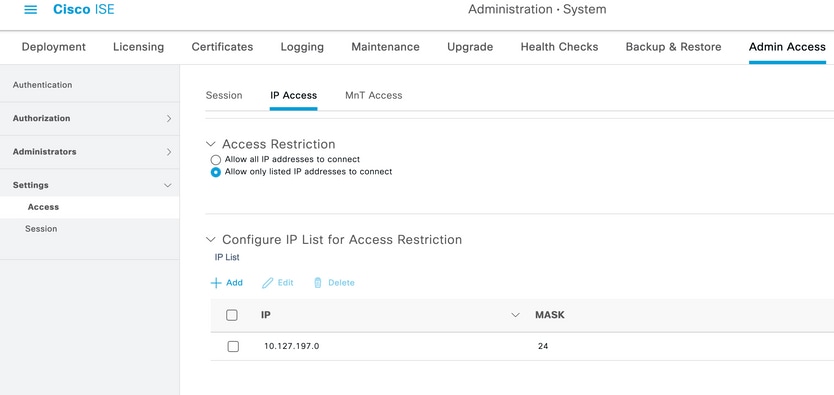
Check if port 161 is open on ISE CLI:
sotumu24/admin# sh ports | in 161
     udp: 0.0.0.0:25087, 0.0.0.0:161
--
     tcp: 169.254.0.228:49, 10.127.197.81:49, 169.254.0.228:50, 10.127.197.81:50
, 169.254.0.228:51, 10.127.197.81:51, 169.254.0.228:52, 10.127.197.81:52, 127.0.
0.1:8888, 10.127.197.81:8443, :::443, 10.127.197.81:8444, 10.127.197.81:8445, ::
:9085, 10.127.197.81:8446, :::19231, :::9090, 127.0.0.1:2020, :::9060, :::9061,
:::8905, :::8009, :::5514, :::9002, :::1099, :::8910, :::61616, :::80, :::9080
Logs
If the SNMP service daemon is stuck or cannot restart, the errors are seen in the messages log file:
2020-04-27T12:28:45.326652+05:30 sotumu24 su: (to oracle) root on none
2020-04-27T12:29:48.391712+05:30 sotumu24 snmpd[81079]: Received TERM or STOP signal...  shutting down...
2020-04-27T12:29:48.590240+05:30 sotumu24 snmpd[47597]: NET-SNMP version 5.7.2
2020-04-27T12:30:29.319929+05:30 sotumu24 rsyslogd: [origin software="rsyslogd" swVersion="7.4.7" x-pid="20126" x-info="http://www.rsyslog.com"] rsyslogd was HUPed
Traps and Queries
Generic SNMP traps generated by default in Cisco ISE:
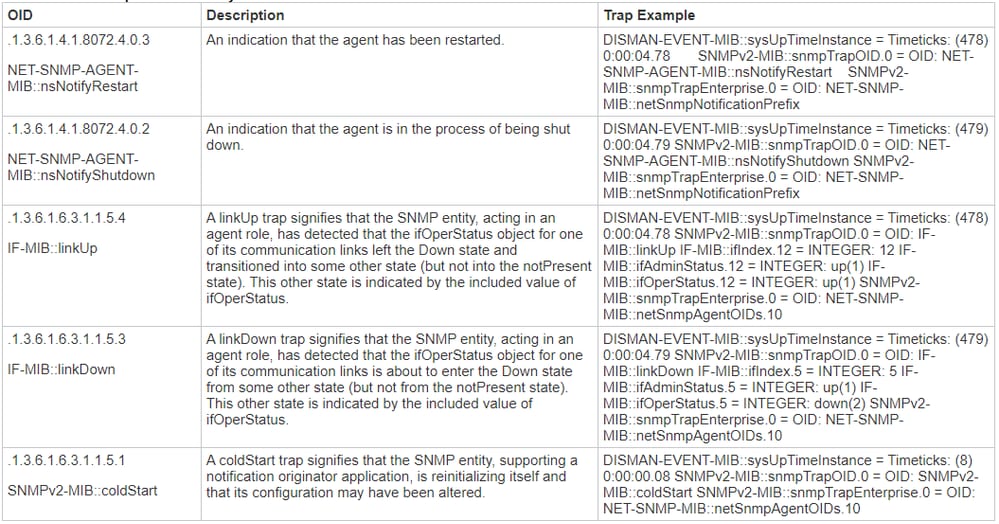
ISE does not have any MIB for process status or disk utilization. Cisco ISE uses OID HOST-RESOURCES-MIB::hrSWRunName for SNMP traps and snmp walk or snmp get command to query the process status or disk utilization, and cannot be used in ISE.
For more information, refer to the SNMP Traps to Monitor Cisco ISE section in the Cisco Identity Services Engine Administrator Guide, Release 3.1.
In the lab, the SNMP Trap was set to trigger when the disk utilization crosses the threshold limit of 75: sotumu24/admin(config)# snmp-server trap dskThresholdLimit "75".
The data for this trap is collected from the outputs shown next.
Run these commands on an external LINUX box or SNMP Server console:
Linux/admin# snmpwalk -v 3 -l authPriv -u SNMPUSER -a sha -x AES -A "authpasswd" -X "privpasswd" 10.127.197.217 dskPercent >> Gives the percentage of disk utilized. Also works with – hrStorageSize.

UCD-SNMP-MIB::dskPercent.1 = INTEGER: 11
UCD-SNMP-MIB::dskPercent.6 = INTEGER: 0
UCD-SNMP-MIB::dskPercent.8 = INTEGER: 0
UCD-SNMP-MIB::dskPercent.9 = INTEGER: 0
UCD-SNMP-MIB::dskPercent.29 = INTEGER: 0
UCD-SNMP-MIB::dskPercent.30 = INTEGER: 23
UCD-SNMP-MIB::dskPercent.31 = INTEGER: 2
UCD-SNMP-MIB::dskPercent.32 = INTEGER: 5
UCD-SNMP-MIB::dskPercent.33 = INTEGER: 0
UCD-SNMP-MIB::dskPercent.34 = INTEGER: 0
UCD-SNMP-MIB::dskPercent.35 = INTEGER: 0
UCD-SNMP-MIB::dskPercent.36 = INTEGER: 0
UCD-SNMP-MIB::dskPercent.37 = INTEGER: 5
UCD-SNMP-MIB::dskPercent.39 = INTEGER: 0
UCD-SNMP-MIB::dskPercent.41 = INTEGER: 0
UCD-SNMP-MIB::dskPercent.42 = INTEGER: 0
UCD-SNMP-MIB::dskPercent.43 = INTEGER: 0
UCD-SNMP-MIB::dskPercent.44 = INTEGER: 0

Linux/admin# snmpwalk -v 3 -l authPriv -u SNMPUSER -a sha -x AES -A "authpasswd" -X "privpasswd" 10.127.197.217 dskPath >> Gives the list of disk path(s). Also works with – hrStorageDescr.

UCD-SNMP-MIB::dskPath.1 = STRING: /
UCD-SNMP-MIB::dskPath.6 = STRING: /dev/shm
UCD-SNMP-MIB::dskPath.8 = STRING: /run
UCD-SNMP-MIB::dskPath.9 = STRING: /sys/fs/cgroup
UCD-SNMP-MIB::dskPath.29 = STRING: /tmp
UCD-SNMP-MIB::dskPath.30 = STRING: /boot
UCD-SNMP-MIB::dskPath.31 = STRING: /storedconfig
UCD-SNMP-MIB::dskPath.32 = STRING: /opt
UCD-SNMP-MIB::dskPath.33 = STRING: /localdisk
UCD-SNMP-MIB::dskPath.34 = STRING: /run/user/440
UCD-SNMP-MIB::dskPath.35 = STRING: /run/user/301
UCD-SNMP-MIB::dskPath.36 = STRING: /run/user/321
UCD-SNMP-MIB::dskPath.37 = STRING: /opt/docker/runtime/overlay
UCD-SNMP-MIB::dskPath.39 = STRING: /opt/docker/runtime/containers/ae1cef55c92ba90ae6c848bd74c9277c2fb52a48ab781455ec9b1149e4634d2c/shm
UCD-SNMP-MIB::dskPath.41 = STRING: /run/user/0
UCD-SNMP-MIB::dskPath.42 = STRING: /run/user/304
UCD-SNMP-MIB::dskPath.43 = STRING: /run/user/303
UCD-SNMP-MIB::dskPath.44 = STRING: /run/user/322
From these outputs, the disk utilization is calculated when the value reaches 75. An SNMP Trap is sent to the configured SNMP-sever HOST. There is no MIB Resource to calculate and display the disk utilization directly.
Further, the MIB process hrSWRunName is used to collect this information (per the ISE Admin Guide).
A textual description of this running piece of software includes the manufacturer, revision, and the name it is commonly known. If this software was installed locally, this must be the same string used in the hrSWInstalledName that corresponds. The services taken into consideration are app-server, rsyslog, redis-server, ad-connector, mnt-collector, mnt-processor, ca-server est-server, and elasticsearch.
MIB Resources
The ISE application is hosted on RHEL OS (Linux). However, as mentioned in the ISE admin guide, ISE uses Host Resources MIB to gather SNMP Trap information. This document has a list of Host Resources MIB that can be queried:
From the document, it can be inferred there are no direct queries that can calculate and display the values of CPU, Memory, or Disk utilization. However, the data that is used to calculate the outputs are present in these tables:
- hrSWRunPerf Table
- hrDiskStorage Table
- Scalars Table
Additional Pointers on Memory and Disk Utilization
Used Memory
To calculate the used memory, use:
mem_used = kb_main_total - kb_main_free - kb_main_cached - kb_main_buffers;
kb_main_cached = kb_page_cache + kb_slab_reclaimable;
Free Memory
There is a slight difference between the values collected in the SNMP Server and the ISE CLI root-bash. Memory utilization has a difference in the values due to slab, which is not accounted for in the SNMP, and it shows the total value.
Free memory is a small amount of memory not currently used and causes this difference. This is the wasted part of the memory the system is unable to utilize. ISE is hosted on a Linux OS and uses all physical memory not needed by current programs as a file cache for efficiency. However, if programs require physical memory, the kernel reallocates the file cache memory to the former. Hence, the memory used by the file cache is free but unused until it is needed by a program.
Refer to free memory explanation
Disk Utilization
Similarly, up to 5% of the file system is reserved for the root user to reduce file fragmentation. This output is not seen in df, which is expected to see a small difference in the percentage calculated in the root bash and subsequently the CLI output. The SNMP query does not consider this reserved disk space and calculates the output based on the values displayed in the table.
For more information, refer to the difference in df output and df output reserved disk space.
Related Information
Revision History
| Revision | Publish Date | Comments |
|---|---|---|
5.0 |
31-Jul-2026
|
Updated spelling, grammar, inserted horizontal lines to separate sections for readability. |
4.0 |
07-Mar-2025
|
Updated Grammar and Formatting. |
3.0 |
15-May-2024
|
Recertification |
1.0 |
12-May-2020
|
Initial Release |

 Feedback
Contact Cisco
- Open a Support Case

- (Requires a Cisco Service Contract)