Report Spam, Misclassified, Viral Email Messages
Available Languages
Contents
Introduction
This document describes reporting Spam, Misclassified, Viral, or additional emails to Cisco for support or examination.
Types of Email Messages Submissions
Spam, Ham, and marketing email messages are:
- Spam: Irrelevant or inappropriate email message(s) to a recipient.
- Ham: An email message that is not Spam. Or, non-spam, good mail.
- Marketing: Directly marketing a commercial email message.
Cisco accepts submissions for any email that is classified incorrectly:
- false-negative (missed Spam)
- false-positive (or Ham)
- false-negative marketing messages
- false-positive marketing messages
- phish-suspected messages, phish-positive messages
- virus-suspected, virus-positive messages
Why Report Emails to Cisco
Missed or incorrectly marked email messages reported to Cisco help with content confirmation, overall efficacy, and associated rules and scores. Once you have reported an email to Cisco, you can also view additional observables and embedded attachments via the Email Status Portal.
Email Status Portal
With a valid CCO ID, you can log in to Talos Intelligence - Email Submissions. The Email Status Portal is a tool to view the status of your email submissions to Cisco. Cisco encourages submissions of spam/phish that bypassed current detection content and Ham, desirable email that was incorrectly filtered out, to improve overall efficacy. The Email Status Portal provides a way to track the status of these submissions. You can monitor your submissions, and Domain Administrators or Domain Viewers can monitor all submissions from your domain(s).
How To Report Email Messages to Cisco
Supported methods are:
- Cisco Secure Email Submission Add-In
- Supports Outlook (Windows, Mac, and Web)
- Cisco Email Security Plug-In
- Supports Outlook (Windows only)
- Direct email submission from the end-user

Caution: The maximum file size for message submission is 10MB. This also includes bulk submissions; the total size of the submission email and the message attachments must not exceed 10MB.
Cisco Secure Email Submission Add-in
The Cisco Secure Email Submission Add-in supports Microsoft Outlook for Windows, Mac, and Web. Please see Supported Configurations for Cisco Secure Email Encryption Service Add-In and Cisco Secure Email Submission Add-in in the Compatibility Matrix for Cisco Secure Email Encryption Service to ensure compatibility for your version of Outlook.
Please see Cisco Secure Email Submission Add-in for download and install documentation.
Cisco Email Security Plug-in
The Cisco Email Security Plug-in supports only Microsoft Outlook on Windows. Please see Supported Configurations for Cisco Email Reporting Plug-in in the Compatibility Matrix for Cisco Secure Email Encryption Service to ensure compatibility for your version of Outlook.
Direct Email Submission
Please review the instructions for your email client provided to attach the email as an RFC 822 Multipurpose Internet Mail Extension (MIME)-encoded attachment. If one of the examples does not reflect your email client, please refer directly to your email client user guide or product support, and confirm that the email client supports Forwarding as Attachment.
Please send emails submissions to the appropriate email address:
| The end-user considers the email message spam or the subject line contains [SUSPECTED SPAM]. |
|
| The end-user DOES NOT consider the email message as Spam. The subject line contains [SUSPECTED SPAM], or the subject line includes additional tags. |
|
| The end-user considers the email message to be or contain marketing content or graymail, or the subject line includes [MARKETING], [SOCIAL NETWORK], or [BULK]. |
|
| The end-user DOES NOT consider the email message to be marketing or graymail, or the subject line contains [MARKETING], [SOCIAL NETWORK], or [BULK]. |
|
| The email message appears to be a phish (designed to acquire user name(s), passwords, credit card info, or other personally identifiable information), or the email message contains malware attachments (likewise, designed to acquire user name(s) or passwords.) The subject line is prepended as [SUSPECTED SPAM], [Possible $threat_category Fraud], or similar. |
|
| The end-user considers the email message or an attachment as viral, or the subject line contains [WARNING: VIRUS DETECTED]. |
Not all subject lines contain additional text and tags. For your settings, please consult your Cisco Secure Email Gateway or Cloud Gateway configuration for Anti-spam, Anti-virus, Graymail, and Outbreak Filters, or contact your email administrator with any concerns.
Example of tagged subject lines:

You can submit an email directly from:
- Microsoft Outlook
- Microsoft Outlook Web App, Microsoft Office 365
- Microsoft Outlook 2011 and Microsoft Outlook 2016 for Mac (OS X, macOS)
- Mail (OS X, macOS)
- Mozilla Thunderbird
- Mobile Platforms (iPhone, Android, or other)
Microsoft Outlook
- The preferred submission method from Microsoft Outlook is to use the Cisco Secure Email Submission Add-in.
-
Submit messages to Cisco for unsolicited and unwanted emails, such as Spam, viruses, and phish.
-
The Not Spam button can quickly reclassify legitimate email messages marked as Spam.
Microsoft Outlook Web App, Microsoft Office 365
- Open your mailbox in Microsoft Outlook Web App.
- Select the message that you want to submit.
- Click New mail at the top left.
- Drag the message and drop it as an attachment to the new message.
- Send the email message to the respective address provided in this document.
Microsoft Outlook 2011 and Microsoft Outlook 2016 for Mac (OS X, macOS)
- Select the message in the message pane.
- Click the Attachment button.
- Forward the message to the respective address provided in this document.
Mail (OS X, macOS)
- Right-click the email message itself and choose Forward as Attachment.
- Forward the email message to the respective address provided in this document.
Mozilla Thunderbird
- Right-click the email message itself and choose Forward As > Attachment.
- Forward the email message to the respective address provided in this document.
Mobile Platforms (iPhone, Android, or other)
- If your mobile platform does not have a method to forward the original email as an attachment, submit it once you have access to one of the other methods provided.
How To Verify Submissions to Cisco
Direct Email Submission
Cisco does not provide a confirmation email or notice of receipt for email submissions. Instead, please view your submissions via the Email Status Portal hosted on Talosintelligence.com.
Email Status Portal
Please validate your submissions from the Email Status Portal. After you log in, you are provided a list of all your submissions within the date/time range specified.
Example:
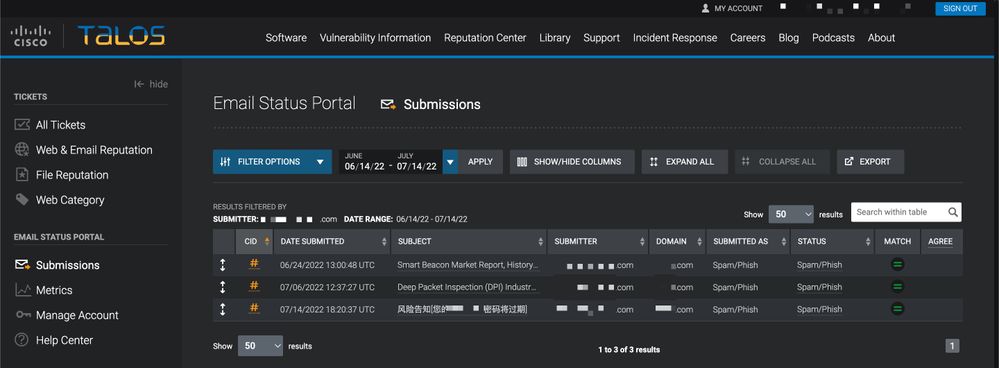
If you click the unique CID #, you can see further details associated with the reported email.
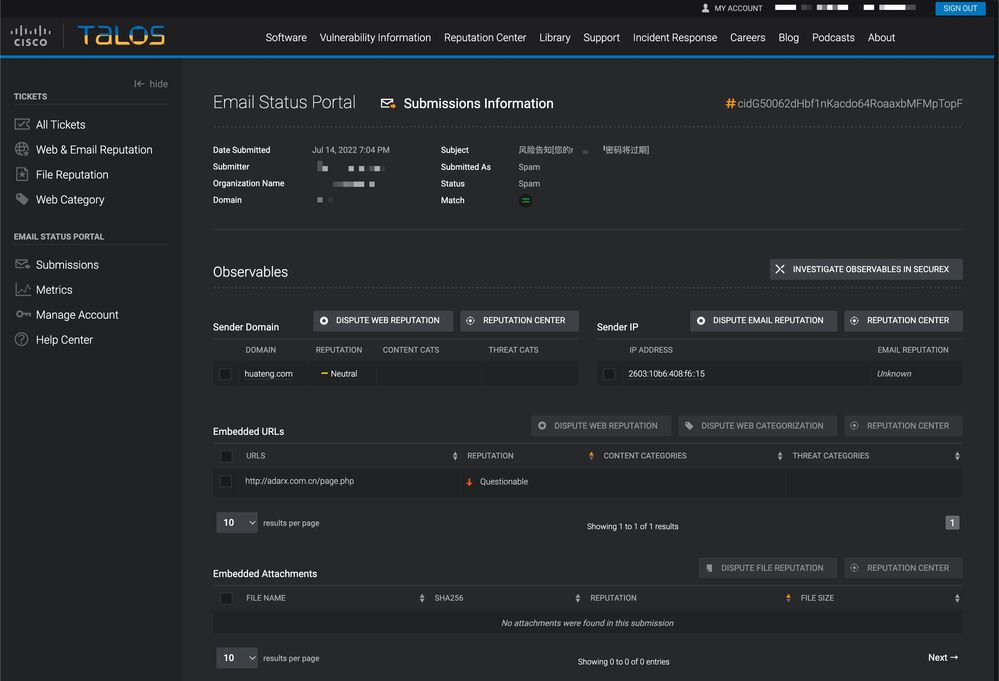
You are presented with Sender Domain, Sender IP, Embedded URLs, and Embedded Attachments associated with the reported email. You can take further action with Dispute Web Reputation, Dispute Email Reputation, and Dispute File Reputation.
Each nested information row shows a maximum of 5 observables of embedded URLs and embedded attachments. If an email submission has more observables, a user can click Go to Email Submission Detail Page to see the complete list of extracted observables.
You can look up further reputation details of a single observable with the desired observable and then click the Reputation Center button.
You can also investigate multiple observables via SecureX. This dashboard combines reputation data from the full suite of Cisco Secure products based on your Cisco product portfolio. You can select up to 20 observables from a single submission to investigate in SecureX at a time with the Investigate observables in SecureX button.
Users can file a single Reputation Dispute (web, email, or file) or apply disputes in bulk for one or more of each observable on a submission. URLs and Domains can also have Web Categorization Disputes filed against them.
For more information on the Email Status Portal: Talos Intelligence Tickets Email Submission Help
Additional Information
Cisco Secure Email Gateway Documentation
- Cisco Secure Email Gateway Release Notes
- Cisco Secure Email Gateway User Guide
- Cisco Secure Email CLI Reference Guide
- API Programming Guides for Cisco Secure Email Gateway
- Open Source Used in Cisco Secure Email Gateway
- Cisco Content Security Virtual Appliance Installation Guide(includes Virtual Cloud Gateway)
Cisco Secure Email Cloud Gateway Documentation
Cisco Secure Email and Web Manager Documentation
- Cisco Secure Email and Web Manager Release Notes and Compatibility Matrix
- Cisco Secure Email and Web Manager User Guide
- API Programming Guides for Cisco Secure Email and Web Manager
- Cisco Content Security Virtual Appliance Installation Guide(includes Virtual Email and Web Manager)
Cisco Secure Product Documentation
Revision History
| Revision | Publish Date | Comments |
|---|---|---|
4.0 |
04-May-2026
|
Updated SEO, Article Description, Alt Text, and Formatting. |
3.0 |
14-Nov-2023
|
Updated with correct content, structure, proofreading, and MDF tags. |
2.0 |
14-Jul-2022
|
Updated with preferred reporting method via the Cisco Secure Email Submission Add-in. |
1.0 |
22-Feb-2019
|
Initial Release |

 Feedback
Contact Cisco
- Open a Support Case

- (Requires a Cisco Service Contract)