Configure Layer 3 TLOC Extension
Available Languages
Introduction
This document describes how to configure TLOC-Extension Layer 3 (L3) on a Software-Defined Wide Area Network (SD-WAN).
Prerequisites
Requirements
Cisco recommends that you have knowledge of these topics:
- Templates
- TLOC-Extension
- Routing Protocols
- SD-WAN General Overview
Components Used
The information in this document is based on these software and hardware versions:
- vBond Version 20.7.2
- vSmart Version 20.7.2
- vManage Version 20.7.2
- Cisco vManage Release 20.7.x or later
- Integrated Service Routers (ISR)4451/K9 Version 17.7.2
The information in this document was created from the devices in a specific lab environment. All of the devices used in this document started with a cleared (default) configuration. If your network is live, ensure that you understand the potential impact of any command.
Background Information
The TLOC extension allows a WAN Edge router to:
- Communicate over the WAN transport (connected to the adjacent WAN Edge router) through a TLOC-extension interface.
- Extend the TLOC to have redundancy on the transport side.
There are two ways to configure the TLOC Extension:
Via L2
- Connect another SD-WAN router at the same physical site.
Via L3
- Requires a router with L3 capabilities used to configure any routing protocol.
- Connects between SD-WAN devices and non SD-WAN devices.
- Must be via GRE tunnel to extend the TLOC.
Configure
Network Diagram
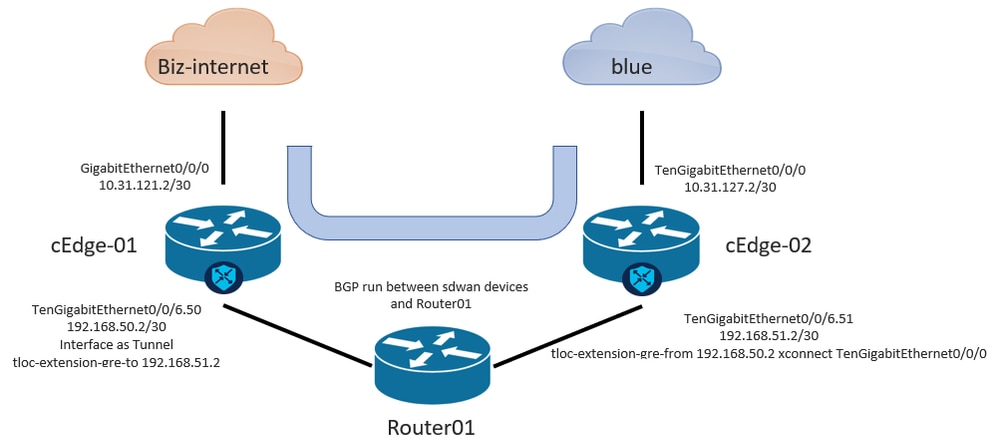
Configure TLOC Extension L3 from vManage GUI

Note: Must configure a routing protocol to communicate between SD-WAN devices with a non SW-WAN device. In this example, BGP is configured.
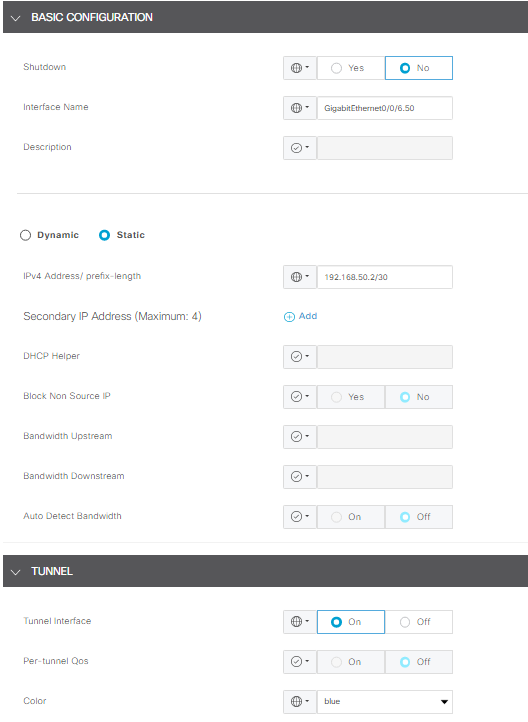
Step 1. Configuration on cEdge-01
- Configure the Interface for TLOC-L3 connection and assign it to tunnel interface.
- In vManage GUI, Navigate to Configuration > Templates > Feature Template > Select Device > VPN Interface Ethernet.
- Configure basic configuration of the Interface, assign an IP address; in this example, interface GigabitEthernet0/0/6.50.
- Navigate to the Tunnel section and turn it on. Use the same color the other SD-WAN device used as the local color, in this example, blue.
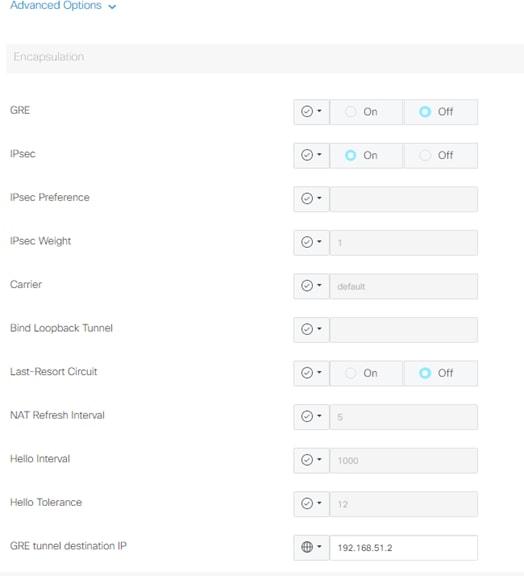
2. Enable the TLOC extension statement from the device that receives the TLOC.
- Navigate to Tunnel > Advance Option > GRE Tunnel destination IP.
Note: The IP address must be the interface address assigned to the other SD-WAN device used for L3 connection. An example is the IP address on cEdge-02 of interface TengigabitEthernet0/0/6.51.
3. Enable TLOC extension statement from where the device gets the TLOC.
- Navigate to Tunnel > Advance Option > GRE Tunnel destination IP.
4. The IP address must be the interface assigned to the other SD-WAN device, which is used for the L3 connection. In this case, the IP address on cEdge-02 of interface TenGigabitEthernet0/0/6.51.
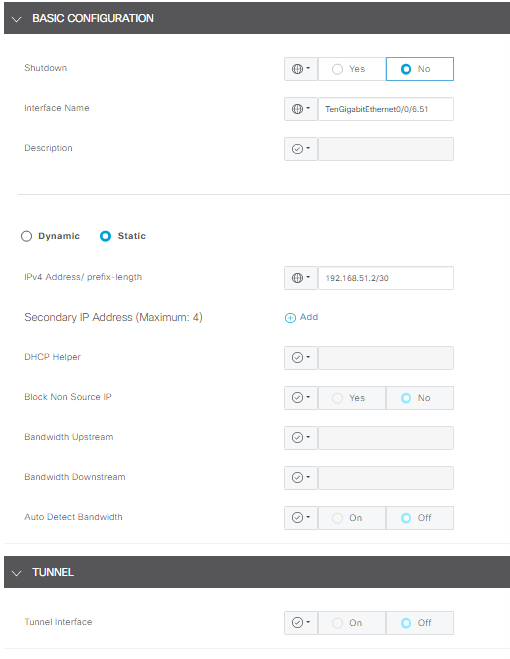
Step 2. Configuration on cEdge-02
1. In the vManage GUI, navigate to Configuration > Templates > Feature Template > Select Device > VPN Interface Ethernet.
Note: In this interface, Tunnel must be OFF.
- Configure basic configuration of the Interface.
- Assign an IP address (TenGigabitEthernet0/0/6.51 in this case).
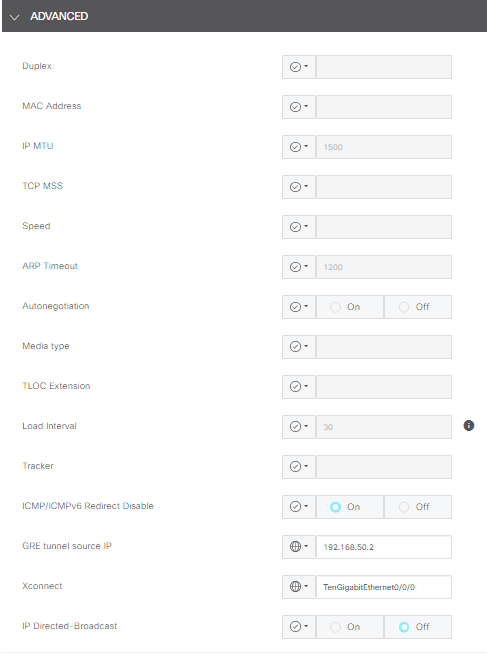
2. Navigate to the Advance section and complete the information for GRE tunnel source IP.
Note:
- The IP address must be the interface address assigned to the other SD-WAN device used for L3 connection.
- xconnect must be the WAN interface used to send traffic over the extended TLOC.
An example is the IP address on cEdge-02 of interface TengigabitEthernet0/0/6.51.
Configure TlOC Extension L3 from CLI
In this section, you can check how the configuration looks on CLI after the template push.
Configuration on cEdge-01:
cEdge-01#show sdwan running-config
system
 system-ip             <system_ip>
 site-id               <site_id>
 organization-name     <organization_name>
 vbond <vbond>
!
hostname cEdge-01
!
ip route 0.0.0.0 0.0.0.0 10.31.121.1
interface GigabitEthernet0/0/0
 no shutdown
 ip address 10.31.121.2 255.255.255.252
exit
interface GigabitEthernet0/0/6
 no shutdown
 ip mtu 1504
 mtu 1504
 negotiation auto
exit
interface GigabitEthernet0/0/6.50
 no shutdown
 encapsulation dot1Q 50
 ip address 192.168.50.2 255.255.255.252
exit
interface Loopback100
 no shutdown
 ip address 10.10.10.10 255.255.255.255
exit
interface Tunnel0
 no shutdown
 ip unnumbered GigabitEthernet0/0/0
 tunnel source GigabitEthernet0/0/0
 tunnel mode sdwan
exit
interface Tunnel10101012
 no shutdown
 ip unnumbered GigabitEthernet0/0/6.50
 no ip redirects
 ipv6 unnumbered GigabitEthernet0/0/6.50
 no ipv6 redirects
 tunnel source GigabitEthernet0/0/6.50
 tunnel mode sdwan
exit
router bgp 65001
 bgp log-neighbor-changes
 bgp router-id 10.10.10.10
 neighbor 192.168.50.1 remote-as 65003
 address-family ipv4 unicast
  neighbor 192.168.50.1 activate
  network 192.168.50.0 mask 255.255.255.252
  exit-address-family
 !
sdwan
 interface GigabitEthernet0/0/0
  tunnel-interface
   encapsulation ipsec
   color biz-internet
   allow-service all
  exit
 exit
 interface GigabitEthernet0/0/6.50
  tunnel-interface
   encapsulation ipsec
   color blue
   tloc-extension-gre-to 192.168.51.2
  exit
exit
cEdge-01#
Configuration on cEdge-02:
cEdge-02#show sdwan running-config
system
 system-ip             <system_ip>
 site-id               <site_id>
 organization-name     <organization_name>
 vbond <vbond>
!
hostname cEdge-02
!
ip route 0.0.0.0 0.0.0.0 10.31.127.1
ip nat inside source list nat-dia-vpn-hop-access-list interface TenGigabitEthernet0/0/0 overload
interface TenGigabitEthernet0/0/0
 no shutdown
 ip address 10.31.127.2 255.255.255.252
 ip nat outside
exit
interface TenGigabitEthernet0/0/6
 no shutdown
 mtu 1504
exit
interface TenGigabitEthernet0/0/6.51
 no shutdown
 encapsulation dot1Q 51
 ip address 192.168.51.2 255.255.255.252
exit
interface Loopback200
 no shutdown
 ip address 10.200.200.200 255.255.255.255
exit
interface Tunnel0
 no shutdown
 ip unnumbered TenGigabitEthernet0/0/0
 ipv6 unnumbered TenGigabitEthernet0/0/0
 tunnel source TenGigabitEthernet0/0/0
 tunnel mode sdwan
exit
router bgp 65002
 bgp log-neighbor-changes
 bgp router-id 10.200.200.200
 neighbor 192.168.51.1 remote-as 65003
 address-family ipv4 unicast
  neighbor 192.168.51.1 activate
  network 192.168.51.0 mask 255.255.255.252
  exit-address-family
 !
sdwan
 interface TenGigabitEthernet0/0/0
  tunnel-interface
   encapsulation ipsec
   color blue
   allow-service all
   allow-service bgp
   allow-service dhcp
   allow-service dns
   allow-service icmp
   no allow-service sshd
   no allow-service netconf
   no allow-service ntp
   no allow-service ospf
   no allow-service stun
   allow-service https
   no allow-service snmp
   no allow-service bfd
  exit
 exit
 interface TenGigabitEthernet0/0/6.51
  tloc-extension-gre-from 192.168.50.2 xconnect TenGigabitEthernet0/0/0
 exit
cEdge-02#
Verify
Validation on cEdge-01:
cEdge-01 must create control connections with local TLOC (biz-internet) and TLOC Extension (blue).
cEdge-01L#show sdwan control connections
                                                                                       PEER                                          PEER                                          CONTROLLER
PEER    PEER PEER            SITE       DOMAIN PEER                                    PRIV  PEER                                    PUB                                           GROUP
TYPE    PROT SYSTEM IP       ID         ID     PRIVATE IP                              PORT  PUBLIC IP                               PORT  ORGANIZATION            LOCAL COLOR     PROXY STATE UPTIME      ID
----------------------------------------------------------------------------------------------------------------------------------------------------------------------------------------
vsmart  dtls                 10         1      192.168.21.34                           32953 172.18.121.106                          32953 CISCORTPLAB             biz-internet    No    up     3:00:16:15 0
vsmart  dtls                 10         1      192.168.21.34                           32953 172.18.121.106                          32953 CISCORTPLAB             blue            No    up     3:00:16:20 0
vbond   dtls                 0          0      172.18.121.105                          32853 172.18.121.105                          32853 CISCORTPLAB             biz-internet    -     up     3:00:16:22 0
vbond   dtls                 0          0      172.18.121.105                          32853 172.18.121.105                          32853 CISCORTPLAB             blue            -     up     3:00:16:24 0
vmanage dtls                 10         0      192.168.28.25                           32953 172.18.121.106                          44803 CISCORTPLAB             blue            No    up     3:00:16:18 0

cEdge-01#show sdwan control local-properties

                         PUBLIC          PUBLIC PRIVATE         PRIVATE                                 PRIVATE                              MAX   RESTRICT/           LAST         SPI TIME    NAT  VM
INTERFACE                IPv4            PORT   IPv4            IPv6                                    PORT    VS/VM COLOR            STATE CNTRL CONTROL/     LR/LB  CONNECTION   REMAINING   TYPE CON REG
                                                                                                                                                   STUN                                              PRF IDs
-------------------------------------------------------------------------------------------------------------------------------------------------------------------------------------------------------------
GigabitEthernet0/0/0          10.31.121.87    32853  10.31.121.87    ::                                      32853    1/0  biz-internet     up     2      no/yes/no   No/No  0:00:00:15   0:11:42:53  N    5  Default
GigabitEthernet0/0/6.50       10.31.127.62    5063   192.168.50.2    ::                                      32853    1/1  blue             up     2      no/yes/no   No/No  0:00:00:11   0:11:42:53  N    5  Default
Troubleshoot
If you have issues, refer to: Troubleshoot SD-WAN Control Connections
Revision History
| Revision | Publish Date | Comments |
|---|---|---|
4.0 |
13-Aug-2026
|
Updated spelling, grammar, inserted horizontal lines to separate sections for readability, fixed alt text. |
3.0 |
21-Jul-2025
|
Recertfication |
2.0 |
13-Jun-2024
|
Updated Alt Text and Formatting. |
1.0 |
03-Apr-2023
|
Initial Release |

 Feedback
Contact Cisco
- Open a Support Case

- (Requires a Cisco Service Contract)