Introduction
This document describes how to install HSEC license in the Catalyst 8300 Router in online mode.
Prerequisites
Knowledge in the these topics:
- Knowledge in Smart Licensing
- Knowledge in Cisco IOS® XE
- Knowledge in HSEC license. This license is also known as export control license.
Router prerequisites:
Background Information
There is an official guide at Configure Licenses and Throughput for Catalyst 8000 Series Physical Platforms , however it describes a mixture of licensing features among the different Catalyst 8000 router platforms.
This guide is focused solely for the 8300 running in Autonomous mode when the instance is directly connected to the Cisco Smart Software Manager (CSSM).
Components Used
In this article, use these elements:

Note: Ensure you have the software up to date to a stable golden star or recommended version.
The information in this document was created from the devices in a specific lab environment. All of the devices used in this document started with a cleared (default) configuration. If your network is live, ensure that you understand the potential impact of any command.
Concepts
Smart License Authorization Code (SLAC)
The Smart License Authorization Code is a code that needs to be installed into the device to be able to use the HSEC license.
This code needs to be requested by the device and installed on it. Afterwards, it allows you to configure higher throughput levels for encrypted traffic.
Refer to section Guidelines for using an HSECK9 license from official documentation guide at Configure Licenses and Throughput for Catalyst 8000 Series Physical Platforms.
More information at Chapter: Task Library for Smart Licensing Using Policy.
Cisco Software Smart Manager (CSSM)
This is the remote server entity in the cloud that manages the licenses.
The CSSM can be accessed at Cisco Software Central where legacy Smart Software Manager is accessible or you can access the updated web page version at Cisco License Central.
Steps
Step 1. Ensure Device has a Cisco DNA Boot Level
See Matrix Cisco DNA Software, SD-WAN and Routing Matrices to explore Cisco DNA boot levels and features.
Ensure your device has a boot level with the command show version:
Router#show version
<snip>
Technology Package License Information:

-----------------------------------------------------------------
Technology     Type         Technology-package Technology-package
                            Current            Next Reboot
-----------------------------------------------------------------
Smart License  Perpetual    network-advantage  network-advantage
Smart License  Subscription dna-advantage      dna-advantage
Step 2. Define Smart Transport and Default URL
Router(config)#license smart transport smart
Router(config)#license smart url default
Step 3. Define Proxy if Required
Router(config)#license smart proxy address <address>
Router(config)#license smart proxy port <port>
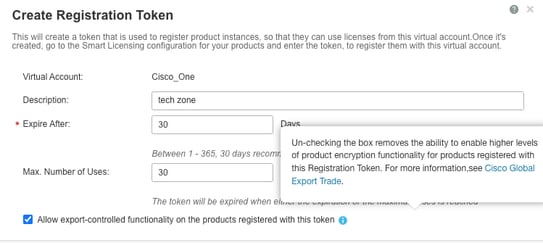
Step 4. Ensure Token Used for Registration Allowed Export Control Functionality
When device was registered to CSSM, ensure token that allows export control functionality was allowed, as illustrated in this screenshot:
Step 5. Configure the Token in the Device
Router#license smart trust idtoken <token> all force
You can see communication to CSSM restored in show log and trust code installed
*Dec  1 23:42:28.633: %SMART_LIC-5-COMM_RESTORED: Communications with Cisco Smart Software Manager (CSSM) restored
*Dec  1 23:42:28.656: %SMART_LIC-6-POLICY_INSTALL_SUCCESS: A new licensing policy was successfully installed
*Dec  1 23:42:28.720: %SMART_LIC-6-TRUST_INSTALL_SUCCESS: A new licensing trust code was successfully installed on P:C8300-1N1S-4T2X,S:<sn>.
Step 6. Verify Trust Code Installed and ACK Received with the show license status Command
Router#show license status
Utility:
  Status: DISABLED

Smart Licensing Using Policy:
  Status: ENABLED

Account Information:
  Smart Account: <SA name> As of Dec 01 23:41:50 2025 UTC
  Virtual Account: <VA name>

Data Privacy:
  Sending Hostname: yes
    Callhome hostname privacy: DISABLED
    Smart Licensing hostname privacy: DISABLED
  Version privacy: DISABLED

Transport:
  Type: Smart
  URL: https://smartreceiver.cisco.com/licservice/license
  Proxy:
    Address: <address>
    Port: <port>
    Username: <empty>
    Password: <empty>
  VRF: <empty>

Policy:
  Policy in use: Installed On Dec 01 23:42:28 2025 UTC
  Policy name: SLE Policy
  Reporting ACK required: yes (Customer Policy)
  Unenforced/Non-Export Perpetual Attributes:
    First report requirement (days): 30 (Customer Policy)
    Reporting frequency (days): 60 (Customer Policy)
    Report on change (days): 60 (Customer Policy)
  Unenforced/Non-Export Subscription Attributes:
    First report requirement (days): 120 (Customer Policy)
    Reporting frequency (days): 111 (Customer Policy)
    Report on change (days): 111 (Customer Policy)
  Enforced (Perpetual/Subscription) License Attributes:
    First report requirement (days): 30 (Customer Policy)
    Reporting frequency (days): 90 (Customer Policy)
    Report on change (days): 60 (Customer Policy)
  Export (Perpetual/Subscription) License Attributes:
    First report requirement (days): 30 (Customer Policy)
    Reporting frequency (days): 30 (Customer Policy)
    Report on change (days): 30 (Customer Policy)

Miscellaneous:
  Custom Id: <empty>

Usage Reporting:
  Last ACK received: Dec 01 23:48:00 2025 UTC<<<<<<<< ACK
  Next ACK deadline: Jan 30 23:48:00 2026 UTC
  Reporting push interval: 30  days
  Next ACK push check: <none>
  Next report push: Dec 31 23:43:03 2025 UTC
  Last report push: Dec 01 23:43:03 2025 UTC
  Last report file write: <none>

Trust Code Installed: Dec 01 23:42:28 2025 UTC<<<<<<<<<<

Device Telemetry Report Summary:
================================
Data Channel: AVAILABLE
Reports on disk: 1
Step 7. Verify Existing Authorization with the show license authorization Command
Show license authorization shows if authorization code for HSEC or Export control is already installed.
Note: Some devices have this Smart License Authorization Code (SLAC) already installed from factory , if it was included in the order.
Router#show license authorization
Last Data Push: <none>
Last File Export: <none>

Overall status:
  Active: PID:C8300-1N1S-4T2X,SN:<sn>
    Status: NOT INSTALLED

Purchased Licenses:
  No Purchase Information Available


Router#
If not installed, proceed with next step.
Step 8. Request the SLAC
If authorization code is not installed yet, request the SLAC code from the product instance, namely, the device.
To request SLAC, use the command license feature hseck9:
Router(config)#license feature hseck9
Afterwards, you can see SLAC code successfully imported:
Router(config)#
*Dec  1 23:55:06.978: %SMART_LIC-6-AUTHORIZATION_INSTALL_SUCCESS: A new licensing authorization code was successfully installed on PID:C8300-1N1S-4T2X,SN:<sn>
*Dec  1 23:55:07.004: %SMART_LIC-6-EXPORT_CONTROLLED: Usage of export controlled features is allowed for feature hseck9
Step 9. Verify Authorization
Once the SLAC has been requested, you can verify that you have properly installed the authorization code by running show license authorization:
Router#show license authorization
Last Data Push: Dec 01 23:55:06 2025 UTC via Smart
Last File Export: <none>

Overall status:
  Active: PID:C8300-1N1S-4T2X,SN:<sn>
    Status: SMART AUTHORIZATION INSTALLED on Dec 01 23:55:06 2025 UTC
    Last Confirmation code: <confirmation code>

Authorizations:
  Router US Export Lic. for DNA (DNA_HSEC):
    Description: U.S. Export Restriction Compliance license for DNA based Routers
    Total available count: 1
    Enforcement type: EXPORT RESTRICTED
    Term information:
      Active: PID:C8300-1N1S-4T2X,SN:<sn>
        Authorization type: SMART AUTHORIZATION INSTALLED
        License type: PERPETUAL
          Term Count: 1

Purchased Licenses:
  No Purchase Information Available


Router#
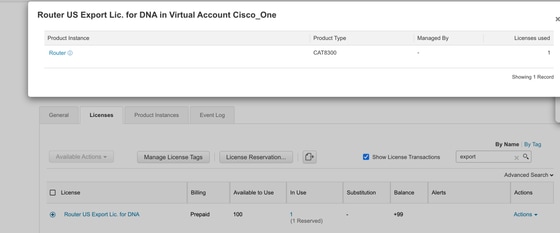
In portal, verify that license is consumed and reserved:
Change Throughput
After SLAC is installed successfully, change throughput accordingly:
Router(config)#platform hardware throughput crypto 2.5G
% These values don't take effect until the next reboot. Please save the configuration.
Router(config)#
*Dec  2 00:01:19.108: %CRYPTO_SL_TP_LEVELS-6-SAVE_CONFIG_AND_RELOAD: New throughput level not applied until reload; please save config
Router(config)#do wr
Building configuration...
[OK]
Router(config)#
*Dec  2 00:01:28.776: %SYS-6-PRIVCFG_ENCRYPT_SUCCESS: Successfully encrypted private config file
Router(config)#do reload
WARNING:
Boot variable either does not exist or buffer is too small
This may impact autoboot of the router. Proceed with caution
Do you wish to proceed with reload anyway[confirm]
Proceed with reload? [confirm]
Note: Non-encrypted traffic is unthrottled by default.
Verify current crypto throughput via the show platform hardware throughput crypto command:
Router#show platform hardware throughput crypto
Current configured crypto throughput level: 2.5G

 Feedback