Implement Performance License for Integrated Service Router 4000
Available Languages
Contents
Introduction
This document describes how to implement the Performance License on the Cisco Integrated Service Router 4000 (ISR4000) series routers.
Prerequisites
Requirements
There are no specific requirements for this document.
Components Used
The information in this document is based on these software and hardware versions:
- Cisco Integrated Service Router 4000 (ISR4000)
The information in this document was created from the devices in a specific lab environment. All of the devices used in this document started with a cleared (default) configuration. If your network is live, ensure that you understand the potential impact of any command.
Background Information
This document describes the implementation of the Performance License (also known as throughput license) on Cisco Integrated Service Router 4000 (ISR4000) series routers that run on Cisco IOS® XE software. Similar concepts apply to the Cloud Service Router 1000 Virtual (CSR1000v) platforms.
Performance License
ISR4000 series routers are based on the multicore Control, Data, and Services Plane CPUs and provide different performance levels that depend on the platform model.
The Performance License increases the maximum throughput the device can provide.
To determine the throughput:
- Maximum throughput: Run the show platform hardware throughput level command.
- Current throughput: Run the show platform hardware qfp active datapath utilization command.
Router#show platform hardware qfp active datapath utilization
  CPP 0: Subdev 0            5 secs        1 min        5 min       60 min
Input:  Priority (pps)            0            0            0            0
                 (bps)            0            0            0            0
    Non-Priority (pps)           54           59          142          295
                 (bps)        39728        51128       490672      1136960
           Total (pps)           54           59          142          295
                 (bps)        39728        51128       490672      1136960
Output: Priority (pps)            0            0            0            0
                 (bps)            0           64           72           72
    Non-Priority (pps)           14            6          100          255
                 (bps)        23200        14880       460904      1104712
           Total (pps)           14            6          100          255
                 (bps)        23200        14944       460976      1104784    << consumed throughput
Processing: Load (pct)            0            0            0            0
Data Plane Cores on ISR4000
To explain the concept of Performance License, it is worth illustrating the difference between various models of the ISR4000 in regard to their Data Plane architecture.
ISR4451 Data Plane
The ISR4451 can use up to nine Packet Processing Engine (PPE) cores for feature processing, encryption, and decryption including a single core for Input and Output (I/O) processing. Each PPE core can handle one packet at a time.
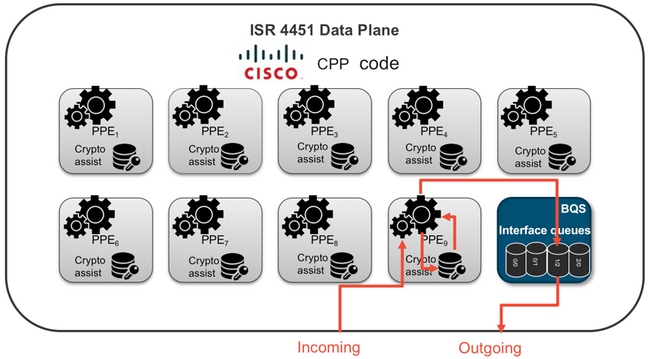
ISR4431 Data Plane
The ISR4431 has the same Data Plane architecture as the ISR4451, except it can use up to five PPE cores for feature processing, encryption, and decryption.
ISR4351 and ISR4331 Data Planes
The ISR4351 and ISR4331 Data Plane architecture consists of up to three PPE cores used for feature processing, and a single core for both I/O and crypto processing.
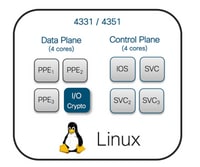
ISR4321 and ISR4221 Data Planes
The ISR4321 and ISR4221 have a single PPE core for feature processing, and another core for I/O and crypto processing.
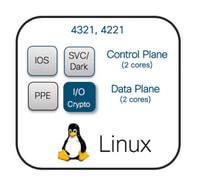
Performance License Comparison
Differences on each ISR4000 series routers before and after the Performance License is applied:
| No Performance License |
With Performance License |
|||
| Max throughput |
PPE Cores |
Max throughput |
PPE Cores |
|
| 4221 |
35 Mbps |
1 x PPE + 1 x I/O |
75 Mbps |
No change |
| 4321 |
50 Mbps |
1 x PPE + 1 x I/O |
100 Mbps |
No change |
| 4331 |
100 Mbps |
2 x PPE + 1 x I/O |
300 Mbps |
3 x PPE + 1 x I/O |
| 4351 |
200 Mbps |
2 x PPE + 1 x I/O |
400 Mbps |
3 x PPE + 1 x I/O |
| 4431 |
500 Mbps |
3 x PPE + 1 x I/O |
1 Gbps |
5 x PPE + 1 x I/O |
| 4451 |
1 Gbps |
5 x PPE + 1 x I/O |
2 Gbps |
9 x PPE + 1 x I/O |
| 4461 |
1.5 Gbps |
8 x PPE + 1 x I/O |
3 Gbps |
15 x PPE + 1 x I/O |
Configuration
Activate Performance License on ISR4000
Before the Performance License can be applied, one of several prerequisites must be met. These depend on the license model (Smart or Traditional).
Smart Licensing
Register the device to the Smart/Virtual Account and ensure the proper Performance License is provisioned to the account.
Right To Use (RTU) License
Accept the End User License Agreement (EULA) in the global configuration mode, license accept end user agreement. After the EULA is accepted, the demo or evaluation RTU Performance License is activated (the evaluation period expires after 60 days).
Traditional License
Copy the license file to the router flash and use the license install <flash:license-file> command to install it.
Configure the Throughput Level
Use the platform hardware throughput level command in global configuration mode to activate the Performance License.
Router(config)#platform hardware throughput level 300000
% Please write mem and reload
% The config will take effect on next reboot
When the Performance License is activated on the ISR400 routers:
- An additional Data Plane Core(s) for forwarding is activated (not applicable to ISR4221 nor ISR4321).
- The build-in Aggregate Shaper is adjusted to the licensed bandwidth.
The Aggregate Shaper functionality is implemented in the Data Plane CPU core dedicated to I/O operations.
Traffic Charged Against the Performance License
Traffic Charged Against The License
- All egress traffic sent to a physical interface (except management interface GigabitEthernet 0).
- Traffic through the UCS-E on the internal Service Module (logically it is an external device).
Traffic Not Charged Against The License
- Ingress traffic.
- Traffic punted to control plane.
- Traffic scheduled for virtual interfaces such as MFR and MLPPP (is charged once scheduled out on a physical member link).
- Traffic switched within a switch module or between modules over Multi Gigabit Fabric in the same VLAN (such traffic does not reach Data Plane cores).
When Traffic Exceeds the Licensed Throughput
A token bucket system (bit count) is implemented on the I/O Data Plane core to determine if the packets can be sent through an egress interface. Traffic shaping is applied when more bits are destined for external interfaces than the license allows for.
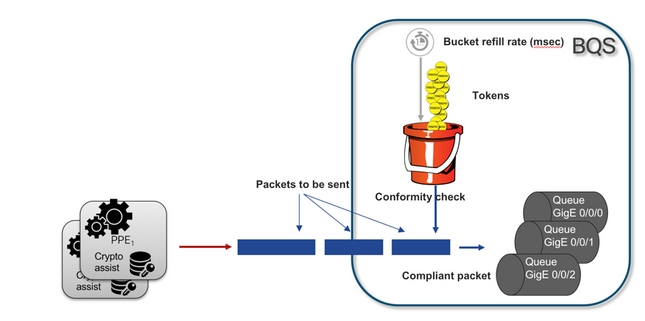
Packets can be sent as long as there are tokens in the bucket:
- No more tokens available: The packets are buffered.
- New tokens available in bucket: The buffered traffic is sent out in the hypothetical Hierarchical QoS Framework (HQF) representation, a separate shaper node is introduced over the external physical interfaces level.
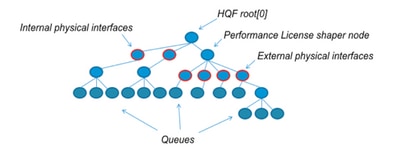
This pseudo-configuration uses Modular QoS CLI (MQC) in order to illustrate the general concept:
policy-map Data PlaneExternalInterfaces
    class GigabitEthernet0/0/0
        bandwidth remaining ratio 1
        service-policy <user defined>
    class GigabitEthernet0/0/1
        bandwidth remaining ratio 1
        service-policy <user defined>
     class Serial0/0/0
        bandwidth remaining ratio 1
        service-policy <user defined>

policy-map License
    shape average license_level
    service-policy Data PlaneExternalInterfaces

policy-map Root
    class external_traffic
       service-policy License
    class control_plane_traffic
        service-policy Punt

    class recycled_traffic
        service-policy Recycle
If the offered rate exceeds the licensed bandwidth:
- The scheduler queues packets and schedules interfaces with equal bandwidth remaining ratio.
- Some packets can be dropped due to queue limit exceeded.
- Latency and jitter can increase for non-LLQ traffic. Priority traffic is less affected because it has some limited credits to bypass the license temporarily.
- Due to oversubscription, all external interfaces are congested simultaneously; the risk of Out Of Resources (OOR) condition increases.
Through any period of oversubscription, the interfaces share the bandwidth equally, unless one has priority level traffic.
Verification
Licensed Bandwidth Exceeded Symptoms
Indicators of throughput limit:
- Total Egress traffic capped at licensed throughput in the output of show platform hardware qfp active datapath utilization:
Router#show platform hardware qfp active datapath utilization
  CPP 0: Subdev 0            5 secs        1 min        5 min       60 min
Input:  Priority (pps)            0            0            0            0
                 (bps)            0            0            0            0
    Non-Priority (pps)        18027        17536        17493        17740
                 (bps)    101806904       184352       195272       204816
           Total (pps)        18207        17536        17493        17740
                 (bps)    101806904       184352       195272       204816
Output: Priority (pps)            0            0            0            0
          (bps)            0            0            0            0
    Non-Priority (pps)        17916        17400        17361        17578
                 (bps)     99956512       198024       209024       218568
 Total (pps)        17916        17400        17361        17578
                 (bps)     99956512  97592394     98694332     94902000
Processing: Load (pct)            7            7            7            7
- Tail Drops reported on the Data Plane level in the output of show platform hardware qfp active statistics drop:
Router#show platform hardware qfp active statistics drop
-------------------------------------------------------------------------
Global Drop Stats                         Packets                  Octets
-------------------------------------------------------------------------
TailDrop                                    4395                  6634970
-
Evenly distributed buffers on interfaces in the output of show platform hardware qfp active feature lic-bw oversubscription:
Router#show platform hardware qfp active feature lic-bw oversubscription
Interface: GigabitEthernet0/0/0, QFP interface: 7

  Overall Traffic:
    enqueued   (bytes):           7188433, (packets):         75926   << signs of evenly distributed buffering on interfaces
tail_drops (bytes):                 0, (packets):             0
      total      (bytes):           7188433, (packets):         75926

Interface: GigabitEthernet0/0/1, QFP interface: 8

  Overall Traffic:
      enqueued   (bytes):       10492353355, (packets):     236972715   << signs of evenly distributed buffering on interfaces
      tail_drops (bytes):          18809589, (packets):         56020   << drops on busy interfaces
      total      (bytes):       10511162944, (packets):     237028735

Interface: GigabitEthernet0/0/2, QFP interface: 9

  Overall Traffic:
      enqueued   (bytes):           9544293, (packets):         57041   << signs of evenly distributed buffering on interfaces
      tail_drops (bytes):                 0, (packets):             0
      total      (bytes):           9544293, (packets):         57041
- Syslog message generated when the average throughput rate approaches or exceeds the licensed bandwidth.
%BW_LICENSE-4-THROUGHPUT_MAX_LEVEL: F0: cpp_ha: Average throughput rate approached the licensed bandwidth of 100000000 bps during 1 sampling periods in the last 24 hours, sampling period is 300 seconds
The alert threshold is configurable. The syslog message can be used as an indicator for the licensed bandwidth. To configure the threshold level and sample interval, use the set platform hardware throughput-monitor threshold [percentage] interval [seconds] command.
To display the throughput monitor settings, use the show platform hardware throughput-monitor parameters command:
Router#show platform hardware throughput-monitor parameters

Throughput monitor parameters
  Throughput monitor threshold: 90 percent
  Throughput monitor interval: 300 seconds
  Throughput monitor status: enabled
Boost Performance License
The ISR4000 platforms offer a boost performance license that allows for an unthrottled Cisco Express Forwarding (CEF) performance. The device must use Cisco IOS XE software version 16.7.1 or later. The aggregate shaper is disabled after the boost license is activated, as a result, the maximum throughput depends on the features used and it is no longer deterministic.
Activate Boost Performance License
Traditional Licenses
Installation:
- Upload the license file to the router flash.
- Install the license.
- Save the configuration.
- Reload the device to activate the Boost Performance license.
After the license installation, the Boost Performance is enabled automatically, and the platform hardware throughput level boost command is added to the configuration.
Use the show license command to see the license state.
Router#show license
<output ommitted>

Index 11 Feature: booster_performance
Period left: Life time
License Type: Permanent
License State: Active, In Use
License Count: Non-Counted
License Priority: Medium
Smart Licensing Previous Versions and 17.3.1
Installation:
- Ensure the correct Boost Performance license (specific to the ISR4000 model) is provisioned on the Virtual Account.
- Register the device to that Virtual Account.
- Use the platform hardware throughput level boost command in the global configuration mode.
- Save the configuration.
- Reload the device to activate the Boost Performance license.
Run the show license all command to view the license state:
Router#show license all
<output ommitted>

License Usage
==============

Boost Performance for ISR4431 (ISR_4431_BOOST):
  Description: Boost Performance for ISR4431
  Count: 1
  Version: 1.0
  Status: AUTHORIZED
Smart Licensing Newer Versions to 17.3.2
In Cisco IOS XE 17.3.2 and newer software versions, there is no concept of device registration with Smart Licensing portal (Smart/Virtual Account). Unenforced licenses are activated upon the configuration change, and later, the license usage is expected to be reported to Cisco per policy. For more information see the Smart Licensing Using Policy.
Additionally, in Cisco IOS XE 17.3.2 onwards, the Boost Performance license becomes a Right-To-Use (RTU) license. This means you do not need a prior authorization to activate this license.
Installation:
- Use the platform hardware throughput level boost command in global configuration mode.
- Save the configuration.
- Reload the device to activate the Boost Performance license.
Revision History
| Revision | Publish Date | Comments |
|---|---|---|
4.0 |
25-Jun-2026
|
Updated spacing, spelling, grammar, sentence structure. |
3.0 |
16-Aug-2023
|
Updated Title, Legal Disclaimer, Branding Requirements, Style Requirements and Formatting. |
2.0 |
13-Jul-2022
|
Edited and Republished. |
1.0 |
05-Jul-2021
|
Initial Release |

 Feedback
Contact Cisco
- Open a Support Case

- (Requires a Cisco Service Contract)