Steps for troubleshooting the connection issue between Splunk On-Call and Slack.
Available Languages
Applicability
Splunk On-CallDescription
When there is a breakage in the Splunk On-Call and Slack integration, and Slack is not sending alerts to Splunk On-Call, it is necessary to check the Slack Integration in Splunk On-Call.
Resolution
When Slack is not sending alerts to Splunk On-Call, it is necessary to check the connection in Splunk On-Call for Slack Integration.
Please follow the steps below to open the Slack integration in Splunk On-Call:
Splunk On-Call > Integrations > Slack
If you see the Connection Lost message as shown in the image below, you need to click on Update Credentials to re-enable the connection with Slack.
NOTE: In order to Update Credentials you must have Global Admin and Slack Admin permissions.
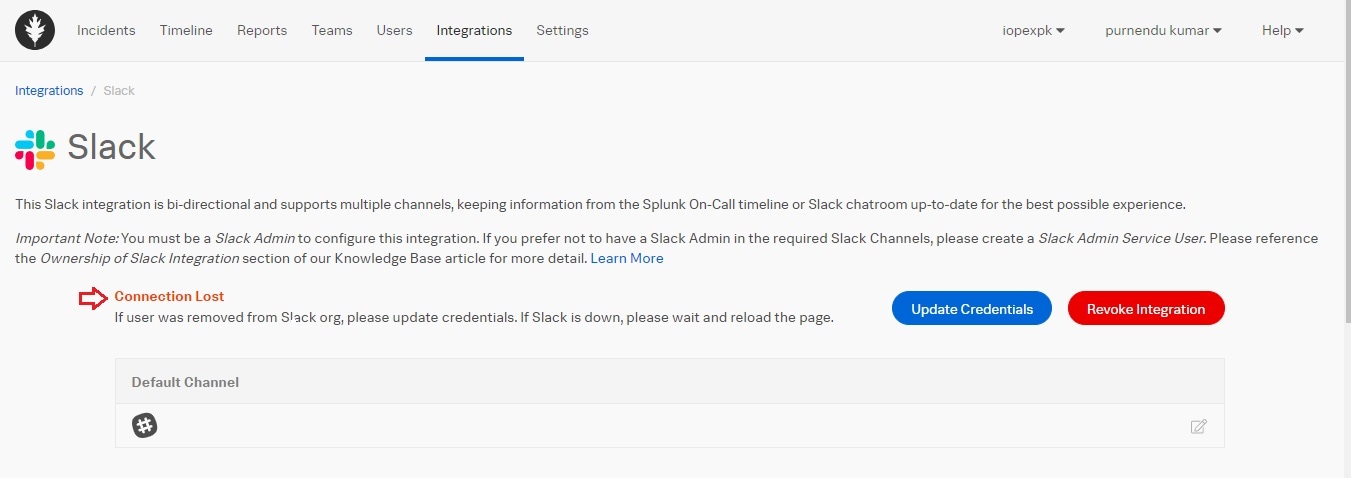
Once the issue is fixed, you can send a test alert from Slack to Splunk On-Call and check if everything works fine.
Revision History
| Revision | Publish Date | Comments |
|---|---|---|
1.0 |
30-Sep-2026
|
Initial Release |
 Feedback
