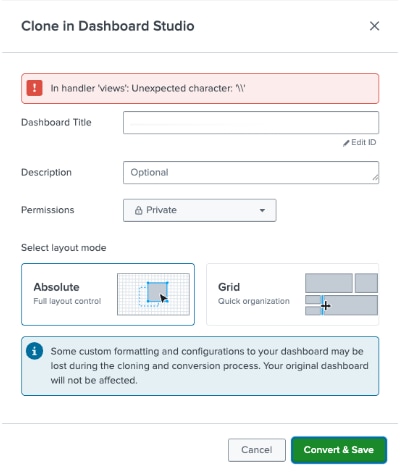
Error when cloning a Classic Dashboard to Dashboard Studio - "In handler 'views': Unexpected character: "
Available Languages
Applicability
Splunk Enterprise 9.3.1, 9.3.2, 9.3.3, 9.3.4, 9.4.1, 9.4.2Description
When converting a dashboard to Dashboard Studio using the Clone in Dashboard Studio option in Web UI, it fails with the error "In handler 'views': Unexpected character: "
The unexpected character will likely to be different and is based on the text in the XML of the classic dashboard.
For Example:
Investigation
To confirm the issue, run the following search:
index=_internal sourcetype=splunkd log_level=ERROR host=<splunk instance with dashboard> AdminManager status_code=500 Unexpected characterA ERROR similar to below will be returned in the Search results:
ERROR AdminManager [63637 TcpChannelThread] - URI="/en-GB/splunkd/__raw/servicesNS/d89109c/<app name>/data/ui/views?output_mode=json" generated an unexpected exception="Unexpected character: '\\\\'". Responding with status_code=500
Resolution
This is a known issue with the parsing of the XML in the dashboard when converting it to the Dashboard studio format (JSON).
| SPL-274278, SPL-268182 | Unable to clone a dashboard due to an error handler 'views': "Unexpected character in string: '\0A'" when a custom URL is used in Dashboard Studio. |
The fix will be released in Splunk 9.3.5 and 9.4.3
Revision History
| Revision | Publish Date | Comments |
|---|---|---|
1.0 |
30-Sep-2026
|
Initial Release |
 Feedback
Contact Cisco
- Open a Support Case

- (Requires a Cisco Service Contract)