"Cannot communicate with task server" error in DB connect UI, after upgrading splunk app for DB connect from any older version to v#3.16.
Available Languages
Applicability
Splunk Apps & Add-ons, Splunk app for DB connect v#3.16, Splunk EnterpriseDescription
After upgrading the splunk app for DB Connect from any older version to 3.16 version, an error message encounters on the UI for the DB Connect App - "Cannot communicate with task server, please check your settings".
The DB Connect server won't be initialized and errors are available in splunkd about the splunk_app_db_connect.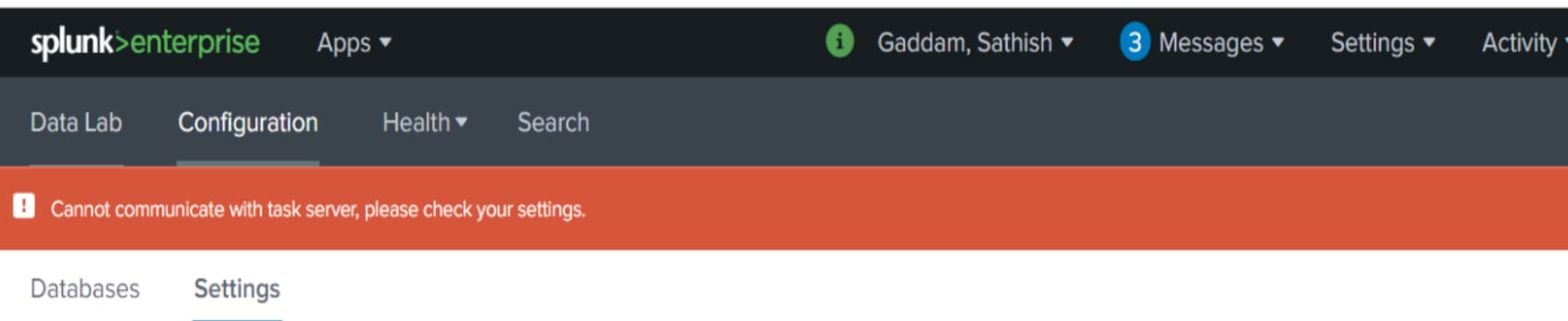
Investigation
Step 1: Check the KV store status by executing the below SPL command on the splunk instance where the Splunk app for DB connect is installed and configured and it should be in ready status
| rest splunk_server=local count=1 /services/server/info
| table kvStoreStatus
Step 2: Check the Java version by executing the below command to Ensure the Java version is compatible with the Splunk App for DB Connect version 3.16. Refer Splunk documents
1) java –version
2)echo $JAVA_HOME
3)alternatives --config java
Step 3: If all the above steps are correct, then run below SPL search below to check the internal logs
index=_internal sourcetype="dbx*" errorStep 4: Find the below error in the internal logs
ERROR ExecProcessor [14879 ExecProcessor] - message from “/opt/splunk/etc/apps/splunk_app_db_connect/linux_x86_64/bin/dbxquery.sh” action=dbxquery_server_start_failed error=java.lang.NullPointerException stack=java.base/java.util.Objects.requireNonNull(Objects.java:222)\\java.base/java.util.Optional.
<init>
(Optional.java:107)\\java.base/java.util.Optional.of(Optional.java:120)\\com.splunk.dbx.utils.SecurityFilesGenerator.getKeystorePassword(SecurityFilesGenerator.java:229)\\com.splunk.dbx.utils.SecurityFilesGenerator.getPlainKeystorePassword(SecurityFilesGenerator.java:213)\\com.splunk.DefaultServerStart.initialiseKeyManager(DefaultServerStart.java:93)\\com.splunk.dbx.command.DbxQueryServerStart.startServer(DbxQueryServerStart.java:62)\\com.splunk.DefaultServerStart.streamEvents(DefaultServerStart.java:60)\\com.splunk.modularinput.Script.run(Script.java:66)\\com.splunk.modularinput.Script.run(Script.java:44)\\com.splunk.dbx.command.DbxQueryServerStart.main(DbxQueryServerStart.java:28)\\
Such errors occurred most probably because of the race conditions during migration that happened while upgrading DB connect.
Resolution
Need to do fresh installations of the splunk app for DB connect v3.16 by following below steps
Proposed Steps:
- Back up the local directory of the existing Splunk App for the DB Connect package.
- Uninstall DB Connect using the below command
$SPLUNK_HOME/bin/splunk remove app splunk_app_db_connect - Restart splunk service
- Perform a fresh installation of the Splunk App for DB Connect version 3.16.
- Restart splunk service
- Verify that the task server is running after the fresh install.
- Restore the identities.conf, db_inputs.conf and db_connection.conf files from the older package's local folder to this freshly installed package's local directory.
- Restart splunk service
- Validate all configurations and data inputs after restoring the required files.
Revision History
| Revision | Publish Date | Comments |
|---|---|---|
1.0 |
30-Sep-2026
|
Initial Release |
 Feedback
Contact Cisco
- Open a Support Case

- (Requires a Cisco Service Contract)