Live capture is not working for Ingest Actions
Available Languages
Applicability
Splunk Enterprise 9.1+Description
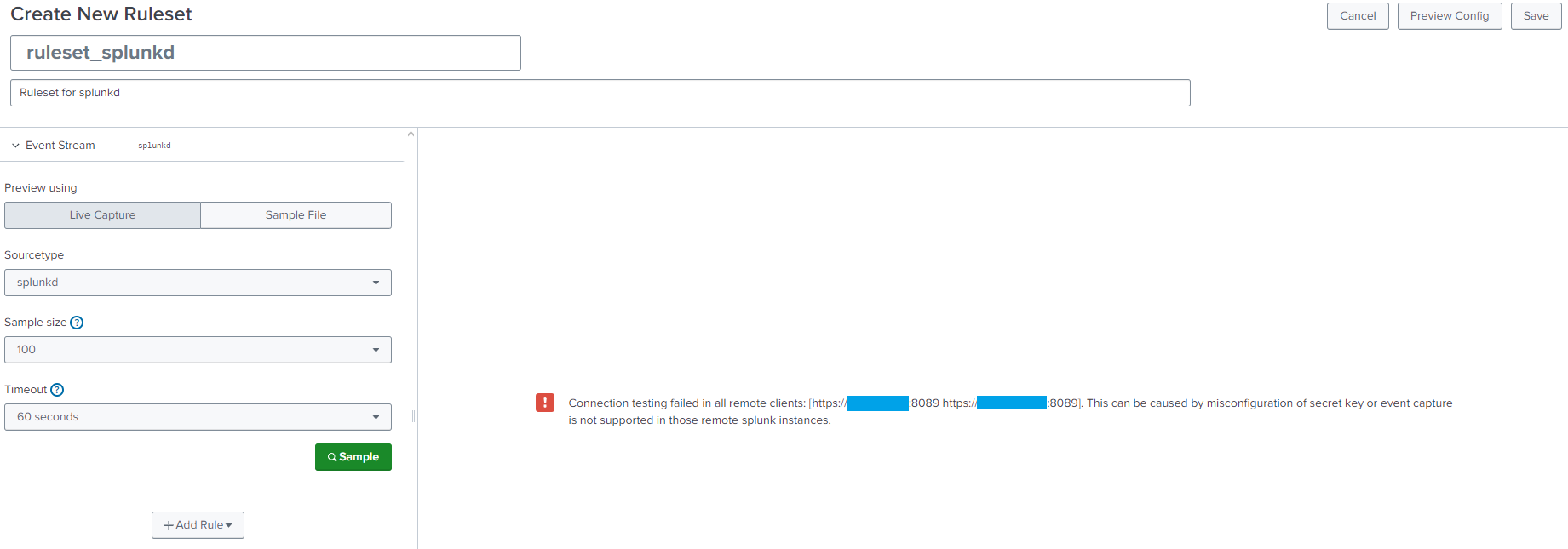
The following error comes up while data preview using Live capture for Ingest Actions on deployment server.
Connection testing failed in all remote clients: [https://xxx.xxx.xxx.xxx:8089 https://yyy.yyy.yyy.yyy:8089].
This can be caused by misconfiguration of secret key or event capture is not supported in those remote splunk instances.
Steps to use Live capture
- Settings > Ingest actions > Rulesets tab
- Click New Ruleset
- Provide a ruleset name and description
- Select Live Capture and set up Sourcetype, Sample size, Timeout, then click Sample
Investigation
Step 1
Checked heavy forwarders are showing up under Clients in Forwarder Management page.
Step 2
Confirmed pass4SymmKey under deployment stanza in server.conf matches between deployment server and heavy forwarders.
Step 3
Confirmed the Splunk version is 9.1.1 both on deployment server and heavy forwarders. (As Live capture is not documented for 9.0.x.)
Step 4
Checked if port 8089 is opened on heavy forwarders, and found out it was not opened.
curl -v telnet://the IP of heavy forwarder:8089Resolution
Port 8089 was not open on heavy forwarders.
Our document states that firewall needs to allow connections from the deployment server to its deployment clients.
When using live capture with deployment server, ensure the following conditions are met:Your firewall allows connections from the deployment server to its deployment clients.
The deployment server and deployment clients use the same pass4SymmKey in server.conf.
Related Links
Revision History
| Revision | Publish Date | Comments |
|---|---|---|
1.0 |
29-Sep-2026
|
Initial Release |
 Feedback
Contact Cisco
- Open a Support Case

- (Requires a Cisco Service Contract)