Ingest actions rule fails to apply
Available Languages
Applicability
Splunk CloudDescription
What is Ingest actions?
Ingest actions represents a number of capabilities related to pre-index event processing and data routing.
Ingest actions both directly at the Splunk platform indexing layer as well as at the intermediate forwarding layer when heavyweight forwarders are used. More topics about IA's architectures can be found here.
Ingest actions is applied to events based on what?
It is important to note that the scoping/application of Ingest Actions rulesets depends on the original sourcetype. If a transform has modified the original sourcetype, then rulesets must be scoped using the original sourcetype and not the resultant sourcetype from the transform.
What to expect if wrong sourcetype is used?
Wrong sourcetype used in IA's rule can result in masking, reacting, filtering, aumenting, or routing of raw data working in the preview panel but fails to apply during the actual ingestion.
What is the scope?
This article is for ingestion from UF -> Splunk cloud directly and rename setting is used during search time.
Investigation
1. Identify the name of the index which contains the events that IA should be applied.
2. Get the hosts sending events to the index.
| metasearch index=<index name> | stats count by index, sourcetype, host | fields - count3. Use the hosts obtained from the last search and plug them into the following SPL to make sure splunkhost is one of the indexers. If not, then the scenario is different and this article is not applicable.
index=_internal source=*metrics.log* hostname IN (xyz)
| dedup guid
| rename host AS splunkhost, hostname AS "clienthostname", sourceHost AS clientsourceHost, sourceIp AS clinetsourceIp, os AS clientos, fwdType AS clientfwdType, version AS clientversion
| table splunkhost, guid, clienthostname, clientsourceHost, clientsourceIp, clientos, clientfwdType, clientversion
Columns:
splunkhost: Name of the receiving server (indexers) that the client (log sender) connects to. This can be either indexers or heavy forwarders but the scope of this article only concerns if it is indexers.
guid: GUID of the client (log sender).
clienthostname: Hostname of the client (log sender).
clientSourceHost: Alternate name of the client (log sender). Most likely IP of the client.
clientsourceip: IP of the client (log sender).
clientos: OS of the client (log sender).
clientfwdType: Type of the client (log sender). Value is either UF or FULL.
clientversion: Splunk version of the client (log sender).
4. Identify the name of the IA's rule and validate what sourcetype is used by the rule.
5. Run the following SPL against the index identified in the previous step.
| tstats values(sourcetype) as Sourcetype latest(_time) as Time groupby index | convert ctime(Time)
| search index="<index name>"
tstats is executed based on fields encoded in the tsidx files so this is the sourcetype seen by the indexers during ingestion time. If the sourcetype displayed in the result is different from what is used in the IA's rule (Identified in step # 4), proceed to next step. If not, then the scenario is different and this article is not applicable.

6. Navigate to SplunkBot -> Find the search head of the stack -> Click on the burger icon -> Click on Config Explorer -> Fill in the following:
a. Config File: All
b. App(s) Filter: Choose the app having the IA issue
c. Stanza Filter: Type in the original sourcetype
7. If rename is returned by the Config Explorer AND if the value of rename is set to the sourcetype used in the IA's rule, then wrong sourcetype is used in the IA's rule. For example:
a. The IA's rule is set to target xmlwineventlog .
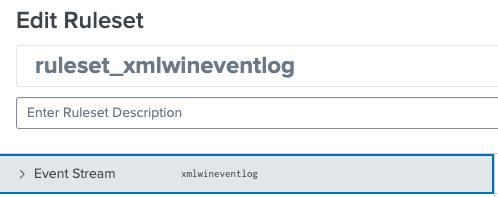
b. rename = xmlwineventlog is returned by Config Explorer.

Resolution
Update IA's rule to use the original sourcetype (Result of step 5) instead of the sourcetype after it is renamed (in search time). For example, the original sourcetype in the example above is XMLWinEventLog:Microsoft-Windows-PowerShell/Operational.
Revision History
| Revision | Publish Date | Comments |
|---|---|---|
1.0 |
29-Sep-2026
|
Initial Release |
 Feedback
Contact Cisco
- Open a Support Case

- (Requires a Cisco Service Contract)