Error while creating Authentication Token - "The user you are querying does not exist"
Available Languages
Applicability
Splunk CloudDescription
This issue is specific to OKTA SAML SSO when even a privileged user "sc_admin" is unable to create an Authentication Token in Splunk Web.
Here's a snip of error that is seen while creating the token in Settings > Tokens > New Token page: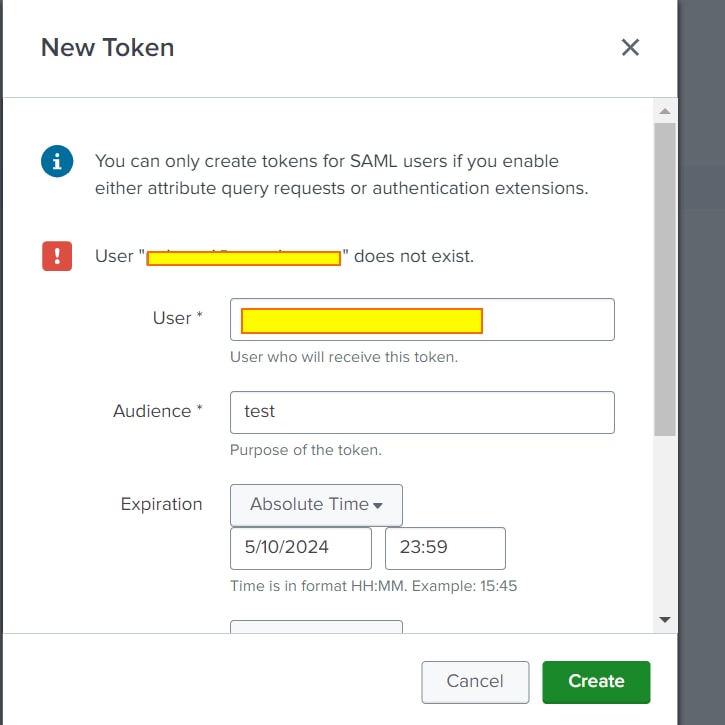
Also after the error message "user@example.com does not exist" was shown, the user could not login in within some minutes on their Splunk Cloud and had to re-authenticate with their OKTA.
Investigation
Below points should be validated to ensure all the necessary capabilities and configurations are set correctly.
- Ensure edit_tokens_own and edit_tokens_all capabilities are present for the account/user creating the token. (usually user role "sc_admin" have these capabilities by default)
- Confirm the arguments "apiKey" and "baseUrl" under the Authentication Extensions in SAML Configuration are set to the correct value.
- Try creating the token in Settings > Tokens > New Token page and observe if the errors pops up.
- Look for errors in splunkd.log w.r.t. component=AuthenticationProviderSAML
Example: index=_internal sourcetype=splunkd component=AuthenticationProviderSAML log_level=ERROR
2024-05-14 04:51:20.771 +0000 ERROR AuthenticationProviderSAML [3292779 TcpChannelThread] - Error message from function=getUserInfo() : The user you are querying (username=someuser@<masked>.com) does not exist
- Use the following SPL to check the Okta (SAML IdP) logs:
Example: index="_internal" source="*splunk_scripted_authentication_okta.log" log_level=ERROR *someuser@<masked>.com*
2024-05-14 04:51:20,771 - splunk_scripted_authentication_okta - ERROR - The user you are querying (username=someone@<masked>.com) does not exist
2024-05-14 04:51:20,771 - splunk_scripted_authentication_okta - ERROR - Failed to get user info for username=someone@<masked>.com with status=404 and response={"errorCode":"E0000007","errorSummary":"Not found: Resource not found: someone@<masked>.com (User)","errorLink":"E0000007","errorId":"oaeHlyogNuxSdiYvtJBk5do3Q","errorCauses":[]}
2024-05-14 04:51:19,909 - splunk_scripted_authentication_okta - INFO - Running getUserInfo() for username=someone@<masked>.com
Sometimes logs from source="*splunk_scripted_authentication_okta.log" are not available even if "getInfoUser" is enabled on the script functions, if the search does not return any results it is necessary to perform an additional step.
Go to Settings > Authentication Methods > SAML/Configure Splunk to use SAML > SAML Configuration > Authentication Extensions > Script Functions > Add "login" > Click save > Reload authentication configuration > Replicate the issue to generate logs.
Resolution
Considering the above errors, came across the fact that the Okta SAML needs to be informed that the authentication should be based on Email address as that the Splunk is sending from it's end. The script argument is set in the Okta script named SAML_script_okta.py that resides in $SPLUNK_HOME/etc/auth/scripts that indicates the SAML IdP as to which attribute the authentication is required to be done against.
In order to resolve this issue a script argument can be set in authentication extensions under SAML Configuration. This script argument can be passed to let OKTA SAML config know which values of user should be matched against SAML Config. The main script arguments for Okta config is baseURL and apiKey. 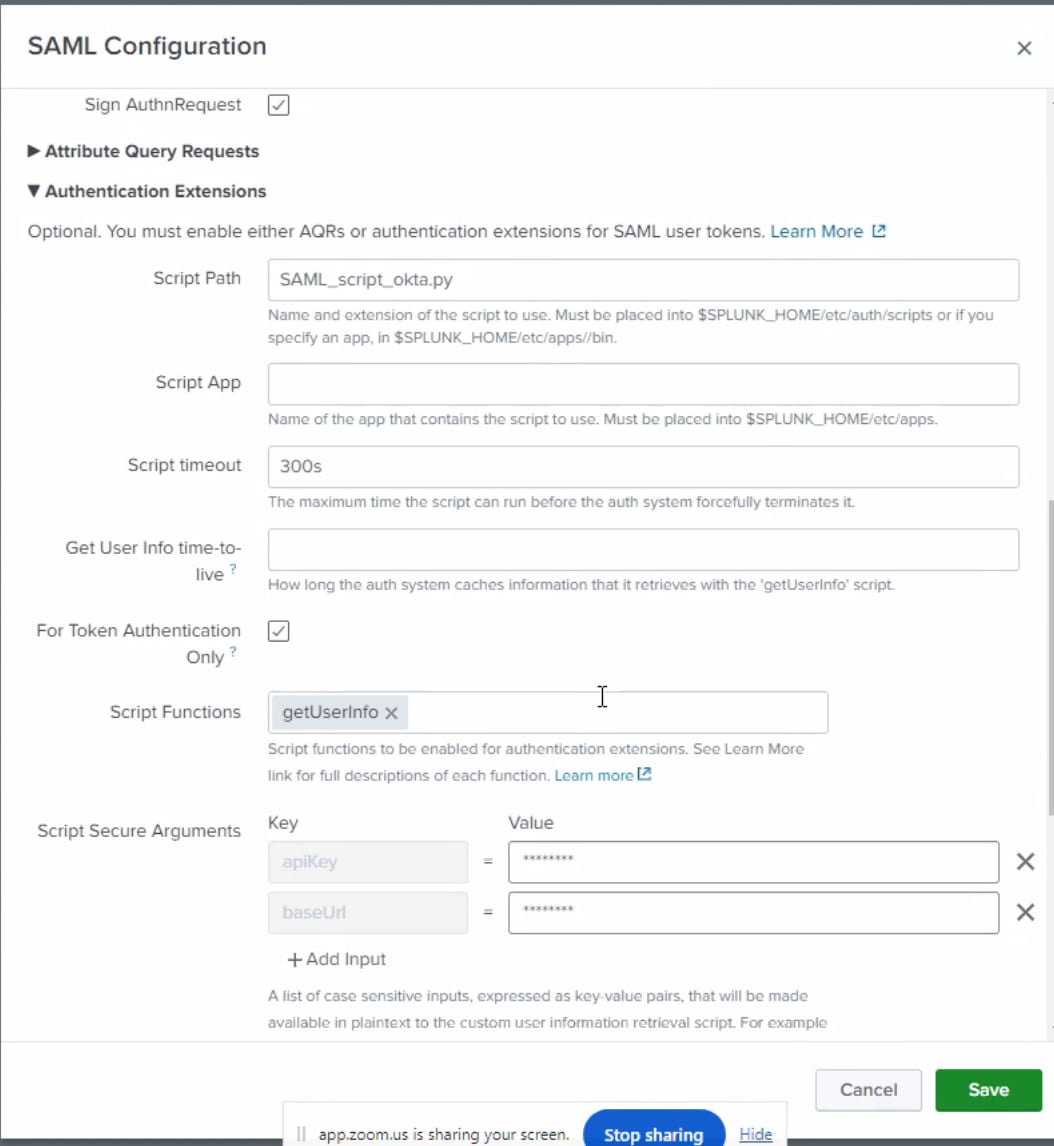
Therefore, an optional script argument should be added to indicate which field values should be considered while authenticating the user from Splunk against SAML, hence, the following argument was added in the Script Secure Arguments:
oktaUserSearch = profile.email
With that, the user can create the Authentication Token successfully.
Related Links
Create Authentication Tokens
Configure authentication extensions for the Okta identity provider in Splunk Web
Revision History
| Revision | Publish Date | Comments |
|---|---|---|
1.0 |
29-Sep-2026
|
Initial Release |
 Feedback
Contact Cisco
- Open a Support Case

- (Requires a Cisco Service Contract)
This Document Applies to These Products
Related Articles
- Azure JWT Tokens - user doesn't exist
- Unable to remove authentication token for deactivated user.
- Cannot create authentication token (JWToken) for a SAML user. That SAML user disappears from Splunk, after performing the action
- Azure AD - With authentication script enabled, creating JWT/Token caused users to be removed from cache