Azure AD - With authentication script enabled, creating JWT/Token caused users to be removed from cache
Available Languages
Applicability
Splunk CloudDescription
After enabling the authentication script on Splunk, sometimes users are randomly removed from the users list and also when the token is created on their accounts.Pre works:
- Identity Provider is Azure AD
- Authentication Extensions are configured and enabled per the documentation here.
- Either "For Token Authentication Only" is ticked or unticked (more on this below).
Symptoms:
- Creating Token for a specific user caused errors "User "user@email_domain" does not exist."
- If "For Token Authentication Only" is unticked, SAML users are removed from list randomly, causing messages of orphaned knowledge objects at times.
- If "For Token Authentication Only" is ticked, the SAML user that would be provisioned the token for will return the error above "does not exist" and will also be removed from the Users list until the next login.
- Azure AD emits anything other than GroupID/ObjectID, such as sAMAccountName or Application Group name on Azure.
- SAML group mapping does not contain any references to GroupID/ObjectID
An example of GroupID/ObjectID from Microsoft's Docs here:
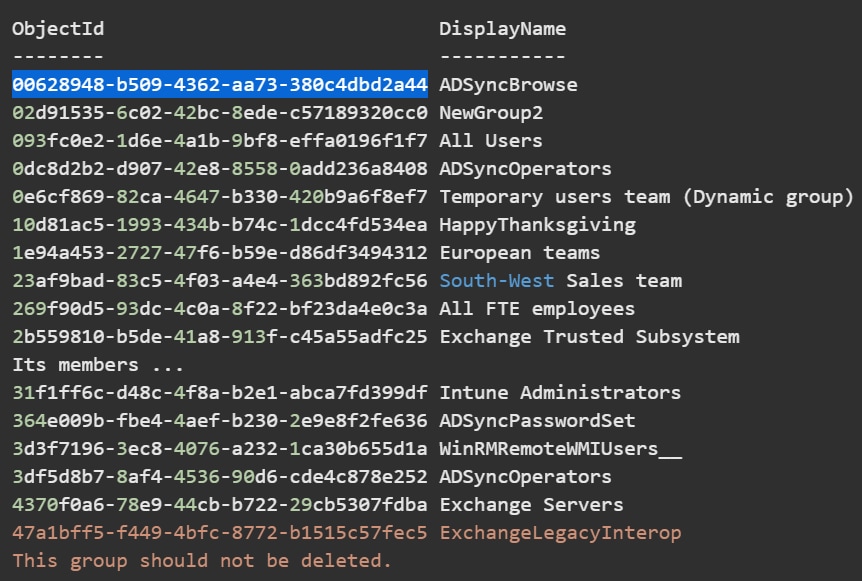
Here, ObjectId is emitted as Group Claims by Azure by default, otherwise, DisplayName would be emitted if the object is an ApplicationGroup or migrated sAMAccountName from ADFS.
Resolution
This is the default behaviour with Authentication Script for AzureAD (SAML_script_azure.py), where the get user info() and login() functions expect a GroupID that is mapped to the users Principal Name/Email/Real Name.
If anything other than GroupID is returned by the script, it will be logged on component UserManagerPro as the user does not exist:
09-03-2021 00:29:33.986 +0000 ERROR UserManagerPro [10831 TcpChannelThread] - Did not find any info for user=user@email_domainThe groupID that gets returned by the script will need to match up with one that is defined in SAML role mapping in splunk.The groupID that gets returned by the script will need to match up with one that is defined in SAML role mapping in Splunk, see screenshot below: 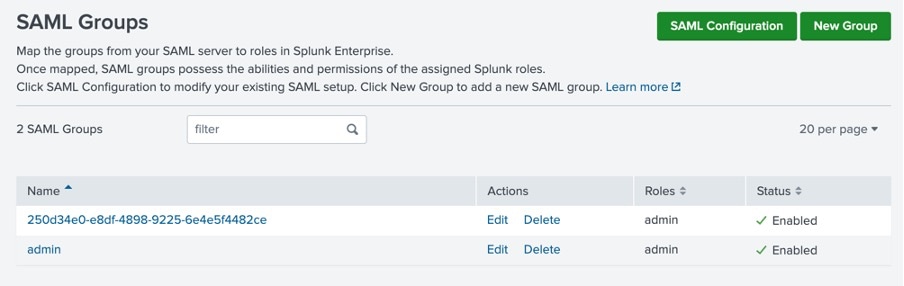
If GroupID/ObjectID, are returned it will look like the following ObjectId "00628948-b509-4362-aa73-380c4dbd2a44" as an example from Microsoft's Docs here, then make sure the objectID matches with SAML role mappings.
To view the groups being returned, run the following SPL:
index="_internal" source="*splunk_scripted_authentication_azure.log"If the returned groups are names e.g. “Admin”,”saml_user” etc then use groupAttribute properties in authentication extension (Configure authentication extensions for Microsoft Azure using Splunk Web )Token creation is what is needed for Splunk Secure gateway device enrollments (when a QR code is requested).
Related Links
Configure and activate authentication extensions to interface with Microsoft Azure
Revision History
| Revision | Publish Date | Comments |
|---|---|---|
1.0 |
29-Sep-2026
|
Initial Release |
 Feedback
Contact Cisco
- Open a Support Case

- (Requires a Cisco Service Contract)