SAML Configuration for Microsoft Azure AD does not Map Groups.
Available Languages
Applicability
Splunk CloudDescription
The SAML authentication is configured following the Splunk documentation:Configure SSO with Microsoft Azure AD or AD FS as your Identity Provider
However, the permissions did not map properly.
Investigation
The following error is observed when a user is trying to log in from Splunk Web UI:
'no valid role found in local mapping'
The mapping groups in Splunk Cloud don't match, the group name does not match with the ObjectId of the Azure AD group, Splunk mapping groups must be called with the Azure AD ObjectId of the group to be mapped in Splunk, for example, the following is expected:
Azure AD ObjectId of the group to be mapped: 99fvd7-fvddfv999-99999njhhb
Splunk mapping group name: 99fvd7-fvddfv999-99999njhhb
To validate the groups that a user has when logging in, turn debugging on for SAML in Splunk GUI:
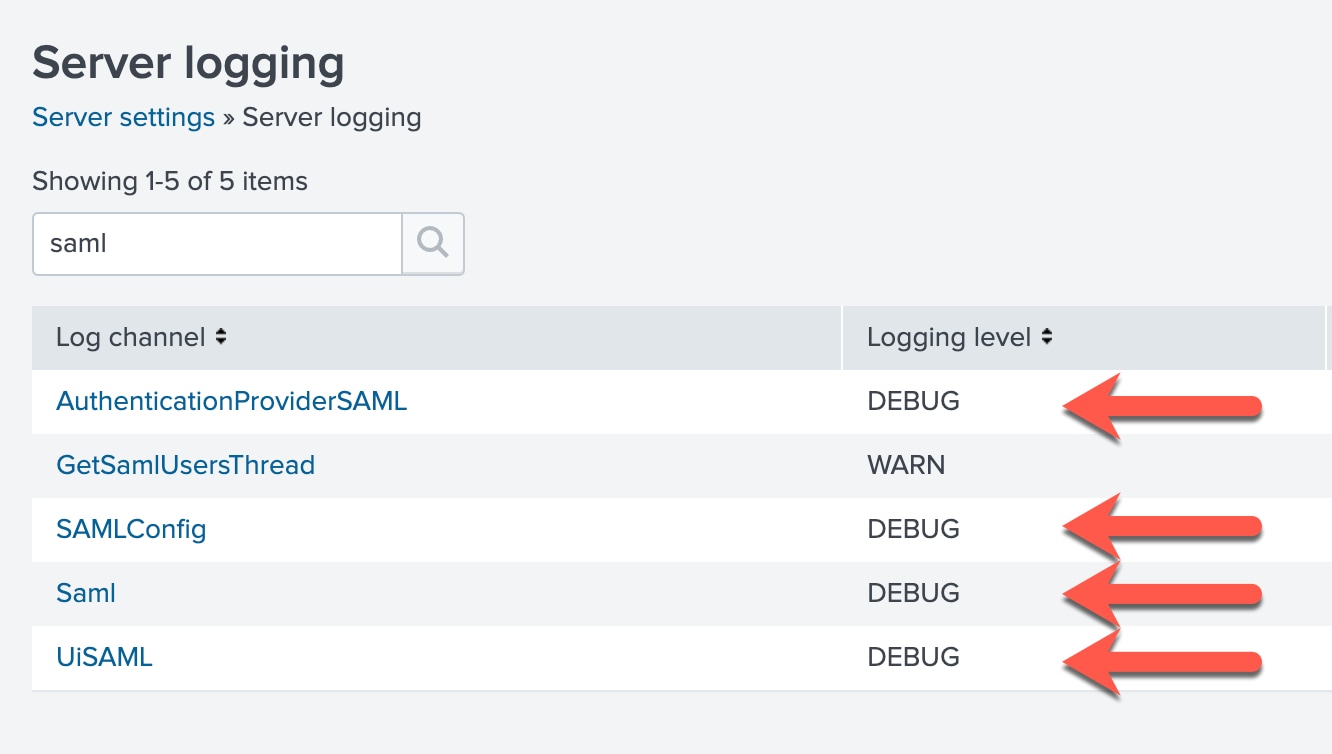
Then get the user to login again and run the following SPL to view the groups that are being returned:
index=_internal sourcetype=splunkd samlpFrom here you can see if the saml mappings in splunk match what is being returned by the IdP.
Resolution
In this scenario the existent mapping groups needed to be deleted and created again, so the configuration gets updated and match what is being returned by the IdP Azure AD group. As soon as the users from the mapped Azure AD group log in to Splunk Cloud the user appears in the authentication section, in Settings > Access Control > Users with SAML authentication type.
Related Links
Configure SSO with Microsoft Azure AD or AD FS as your Identity ProviderRevision History
| Revision | Publish Date | Comments |
|---|---|---|
1.0 |
28-Sep-2026
|
Initial Release |
 Feedback
Contact Cisco
- Open a Support Case

- (Requires a Cisco Service Contract)