JSON Log format events are not getting parsed as expected via Splunk Add-on for AWS.
Available Languages
Applicability
Splunk Add-on for AWS Splunk Cloud Splunk EnterpriseDescription
Upon manually uploading a JSON file with 'add data' option, the extractions works fine. The escaping has not been removed when it has been ingested into Splunk
Right format:
{"country":"FR","status_code":404,"experimental_confidence":48,"policy_id":"jjenWGDj|1","city":"-","isp":"Scaleway","sessionid":"-","condition_aggregates":[],"failed_login":"UNKNOWN","host":"XXXXXXXXX","server_ip":"XXXXXXXX","rule_info":[{"rule_id":"R113","weight":10,"hash_component":false,"experimental":true},{"rule_id":"R128","weight":10,"hash_component":false,"experimental":false},{"rule_id":"R133","weight":10,"hash_component":false,"experimental":false},{"rule_id":"R159","weight":4,"hash_component":false,"experimental":false},{"rule_id":"R166","weight":4,"hash_component":false,"experimental":false},{"rule_id":"R59","weight":10,"hash_component":false,"experimental":false}],"fingerprint":2568596236,"request_cookies":[],"client_ip":"51.15.202.158","user_agent":"Mozilla/5.0 (X11; Linux x86_64; rv:73.0) Gecko/20100101 Firefox/73.0","timestamp":"2024-04-11T06:49:40.997","transaction_id":"9e644deb4fdba452b30498a4affe0f43","method":"GET","successful_login":"UNKNOWN","request_body_len":0,"confidence":38,"mitigation_action":"add-header","uri":"/plus/flink.php","tags":[],"query_params":"dopost=save&c=cat /etc/passwd","organization":"Scaleway","request_headers":{"referer":"<?php \"system\"($c);die;/*ref","connection":"close","accept-encoding":"gzip"},"asn":12876,"username":"-"}
But when it gets ingested in to Splunk via Splunk Add-on for AWS.
{"country":"FR","status_code":404,"experimental_confidence":48,"policy_id":"jjenWGDj|1","city":"-","isp":"Scaleway","sessionid":"-","condition_aggregates":[],"failed_login":"UNKNOWN","host":"XXXXXXXXX","server_ip":"XXXXXX","rule_info":[{"rule_id":"R113","weight":10,"hash_component":false,"experimental":true},{"rule_id":"R128","weight":10,"hash_component":false,"experimental":false},{"rule_id":"R133","weight":10,"hash_component":false,"experimental":false},{"rule_id":"R159","weight":4,"hash_component":false,"experimental":false},{"rule_id":"R166","weight":4,"hash_component":false,"experimental":false},{"rule_id":"R59","weight":10,"hash_component":false,"experimental":false}],"fingerprint":2568596236,"request_cookies":[],"client_ip":"51.15.202.158","user_agent":"Mozilla/5.0 (X11; Linux x86_64; rv:73.0) Gecko/20100101 Firefox/73.0","timestamp":"2024-04-11T06:49:40.997","transaction_id":"9e644deb4fdba452b30498a4affe0f43","method":"GET","successful_login":"UNKNOWN","request_body_len":0,"confidence":38,"mitigation_action":"add-header","uri":"/plus/flink.php","tags":[],"query_params":"dopost=save&c=cat /etc/passwd","organization":"Scaleway","request_headers":{"referer":"<?php "system"($c);die;/*ref","connection":"close","accept-encoding":"gzip"},"asn":12876,"username":"-"}
The difference between the two log formats is that in the correct format, the backslash (\) is used, whereas in the incorrect format, it is replaced with a double quotation mark (").
Correct Format: \"system"\
Incorrect Format: "system"
Investigation
During investigation, it was observed that the extractions were coming from custom transformations created by the user. Below configurations were observed in the props.conf of the app created by the user.
[source::XXXXXXXXXXXXXXXXXXX]
CHARSET=UTF-8
SHOULD_LINEMERGE=false
disabled=false
SEDCMD-ceq_jsonfix1=s/^\"{/{/g
SEDCMD-ceq_jsonfix2=s/}\"$/}/g
SEDCMD-ceq_jsonfix3=s/\\"/"/g
LINE_BREAKER = ([\r\n]+)
MAX_TIMESTAMP_LOOKAHEAD = 13
SHOULD_LINEMERGE = false
TIME_FORMAT = %s%3N
TIME_PREFIX = "timestamp":
TZ = UTC
The regex utilized in the props.conf was identified as the root cause of the issue. Specifically, the line "SEDCMD-ceq_jsonfix3=s/\\"/"/g" within the provided props.conf was highlighted as problematic. In this particular regex, the backslash (\) was being replaced with a double quotation mark ("). A screenshot illustrating a comparison on regex101 was included for reference.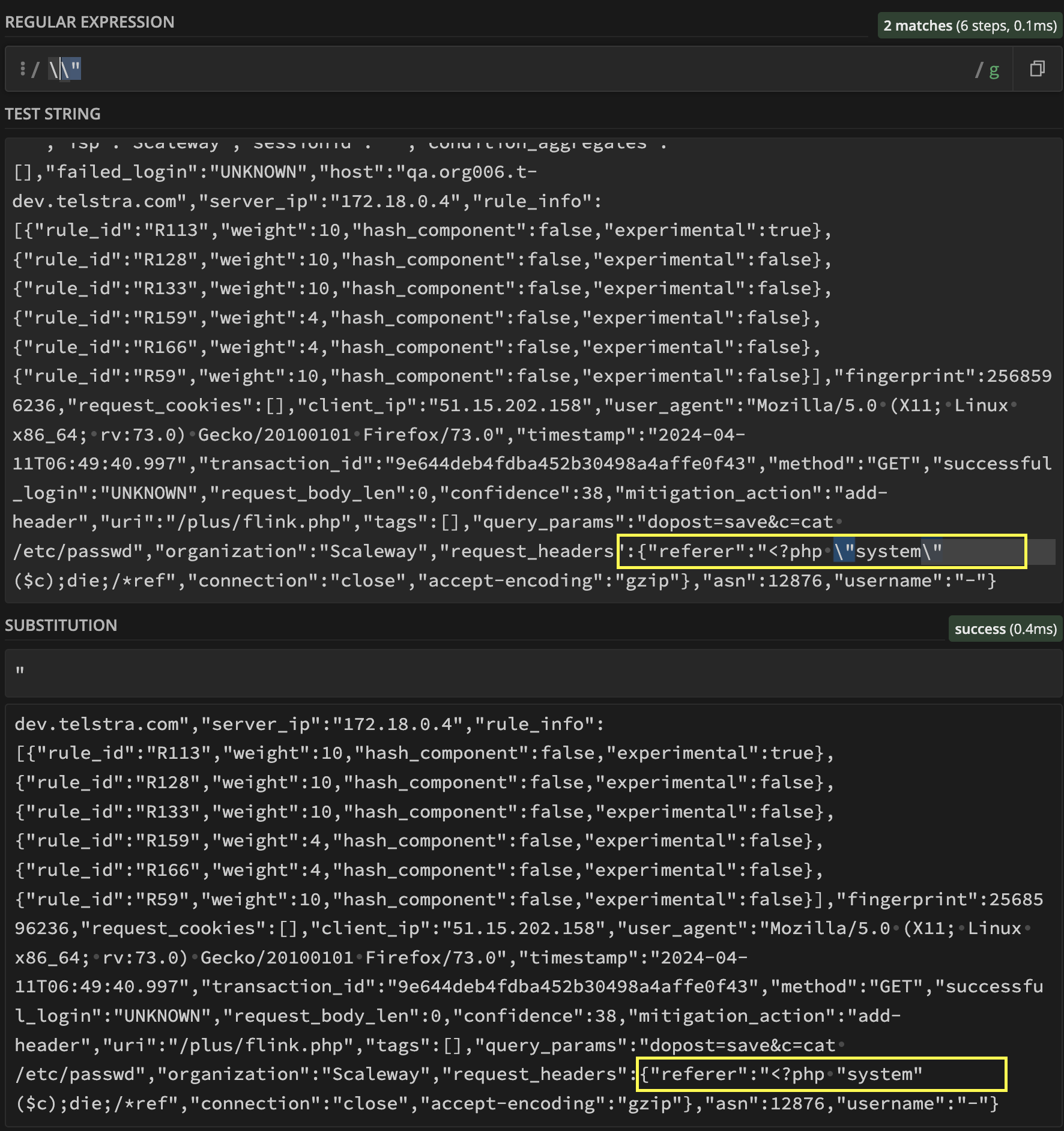
Resolution
To resolve this issue, it is advisable to correct the problematic regex or use default props and transforms that comes with Splunk Addon for AWS.
Related Links
Use regex101 to validated the regex.
Revision History
| Revision | Publish Date | Comments |
|---|---|---|
1.0 |
29-Sep-2026
|
Initial Release |
 Feedback
Contact Cisco
- Open a Support Case

- (Requires a Cisco Service Contract)
This Document Applies to These Products
Related Articles
- Logs are not getting ingested from S3 bucket via Splunk Add-on for AWS and getting Error as "UnicodeEncodeError: 'latin-1' codec can't encode character '\u0107'"
- The Splunk Add-on for AWS : Some event are missing for SQS-based-S3 input
- Splunk Add-on for Sysmon : Sysmon events are not getting ingested
- Billing and Report data not getting ingested using Splunk Add-On for AWS