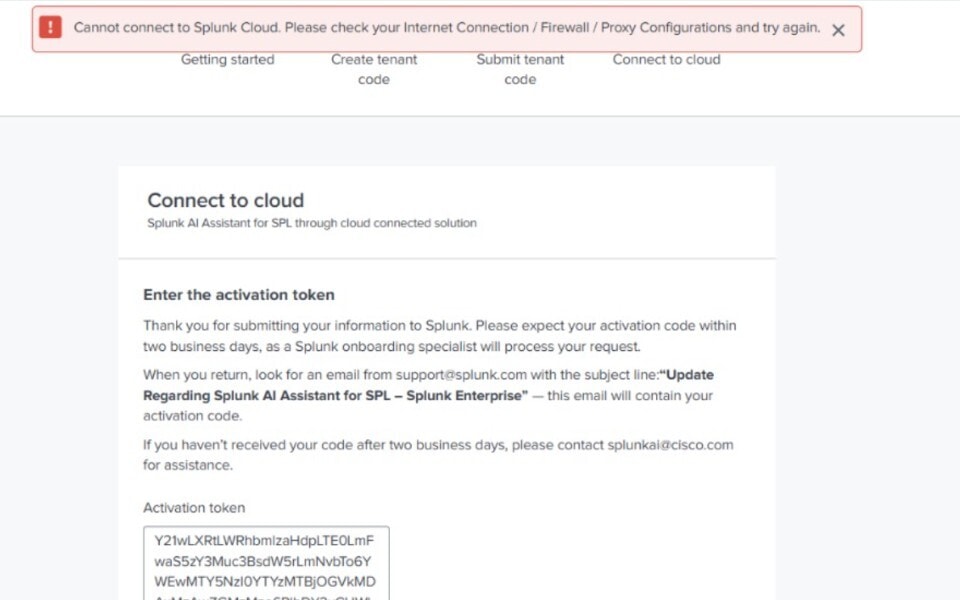
"Cannot connect to Splunk Cloud. Please check your Internet Connection / Firewall / Proxy Configurations and try again" error in Splunk AI Assistant
Available Languages
Applicability
Splunk Enterprise Splunk Cloud Splunk AI AssistantDescription
- When activating the Splunk AI Assistant app, the setup page displays the error “Cannot connect to Splunk Cloud. Please check your Internet Connection / Firewall / Proxy Configurations and try again” after submitting the activation token. This error indicates that the Splunk Enterprise instance is unable to reach Splunk Cloud Services (SCS). As a result, the activation process cannot complete successfully.
- This is typically seen in environments with restricted outbound connectivity, firewall blocks, or required proxy configurations. As a result, the Splunk AI Assistant activation process is unsuccessful.
Investigation
-
Verify outbound internet connectivity from the Splunk host using.
- Check firewall configurations to confirm that outbound HTTPS traffic was allowed to Splunk Cloud Services (SCS) endpoints and that no security rules were blocking the connections.
- Validate whether a proxy was required in the environment and reviewed the proxy settings configured in Splunk for accuracy (hostname, port, protocol, and credentials).
- Test connectivity to Splunk Cloud Services through the configured proxy to confirm proxy reachability and functionality.
- Review Splunk logs for connection failures, timeout errors, or SSL-related messages to confirm the issue was caused by network or connectivity restrictions rather than an application defect.
Resolution
- Confirm that the Splunk Enterprise instance has outbound internet connectivity and can reach external services.
- Update firewall rules to allow outbound HTTPS traffic to Splunk Cloud Services (SCS) endpoints on port 443.
- Configure proxy settings correctly in Splunk if a proxy is required, ensuring the proxy hostname, port, protocol, and credentials are accurate.Verify that the proxy server is running and reachable from the Splunk environment.
- Retry the Splunk AI Assistant activation after confirming connectivity, firewall, and proxy configurations are correct.
Revision History
| Revision | Publish Date | Comments |
|---|---|---|
1.0 |
01-Oct-2026
|
Initial Release |
 Feedback
Contact Cisco
- Open a Support Case

- (Requires a Cisco Service Contract)