Firewall Changes: IP Allow Lists in Splunk Cloud
Available Languages
Applicability
Splunk CloudDescription
IP address allowlist and port configurations for Splunk Cloud access.
IP allow lists are essential for controlling access to different components of Splunk Cloud Platform deployment. Splunk provides multiple ways to manage these lists, whether programmatically using APIs or through the Splunk Web interface.
The IP allow list management page is used for adding or removing subnets from IP allow lists for specified Splunk Cloud Platform features. It can be utilized to add or remove one or more IP subnets for multiple different features in a single page update. it is needed to click save to propagate any changes through the stack.
Investigation
Allow List Block
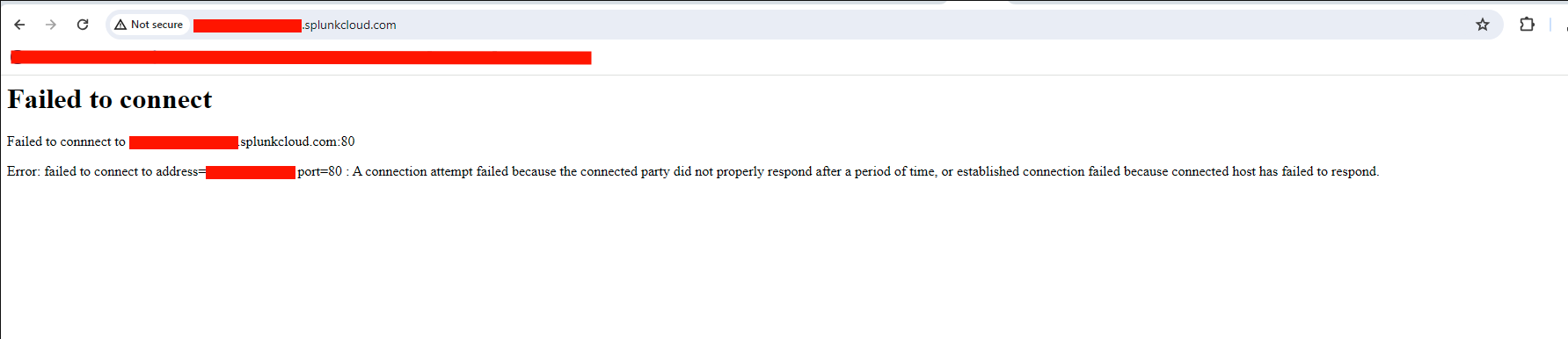
If there are connection errors when attempting to access the Splunk Cloud instance, this could be an indicator that the IP allow list on the search head does not include the Public IP that it is attempting to access the instance from.
For Example:
Failed to connect to <stack>.splunkcloud.com:80
Error: failed to connect to address=<ip>:port=80:A connection attempt failed because the connected party did not properly respond after a period of time, or established connection failed because connected host has failed to respond.
Requirements for Self Service
1. **Role Capabilities**: Ensure that the user role has the required capabilities to access the ACS API endpoint.
2. **Platform Version**: Splunk Cloud Platform version 8.0.2007 or higher is necessary for using these features.
3.On Splunk Web , Hold a role that has the edit_ip_allow_list capability, including inherited roles. The sc_admin role has this capability by default.
### Open IP Allow Lists
If specific IP addresses are not provided, the allow list can be set to 0.0.0.0/0, allowing open access. However, this must be accompanied by a written acknowledgment accepting the risks.
### Troubleshooting Authentication Errors
If encounter SAML authentication errors, ensure that the appropriate SAML IdP scripted authentication extension is enabled. This is necessary for SAML users to authenticate IP allow list operations correctly.
### Premium Search Heads
IP allow list management features are not available on Premium Search Heads like ES and ITSI. Use Ad Hoc Search Heads to manage allow lists for these environments.
Resolution
Option 1: Using ACS API
1. Preparing the Environment:
Download the ACS Open API 3.0 specification.
Create a JWT authentication token in Splunk Cloud Platform for ACS endpoint requests.
2. Adding Subnets:
Send an HTTP POST request to add new subnets to the IP allow list.
-Use a GET request to check the status of the changes.
3. Behavior and Limits:
AWS: Maximum of 230 IP subnets per allow list, with specific limits per feature.
GCP: Maximum of 200 IP subnets per feature.
Admin Manual: Admin Config Service (ACS) setup
Option 2: Using Splunk Web
1. Access:
Navigate to Settings > Server Settings > IP Allow List in Splunk Web.
Enable token authentication if not already enabled.
2. Adding Subnets:
Select the appropriate feature tab (e.g., "Search head UI access").
Enter the subnet using CIDR notation (e.g., XX.XX.XX.XX/X).
Click Save to apply changes.
Admin Manual: Configure IP allow lists
Detailed Instructions for Using Splunk Web UI
To add a subnet to an IP allow list:
- In Splunk Web, click Settings > Server settings > IP allow list.
- If token authentication is not enabled, click Go to tokens page and enable token authentication. Once token authentication is enabled, return to the IP allow list management page and refresh the page.
- Select the tab of the feature to grant access. For example, click the "HEC access for ingestion" tab to grant HEC access for ingestion.
- Click Add IP subnet.
- Enter the subnet using CIDR notation. For example XX.XX.XX.XX/X
- Optionally, click Add IP subnet to add more subnets.
- Click Save.
This saves all changes to the IP allow list management page since the last page update, including any subnets that have been added or removed, across all feature tabs.
Remove subnets from IP allow lists
To delete a subnet from an IP allow list:
- Select the tab for the feature from to revoke access.
- Click X to delete the existing subnet.
- Click Save.
This saves all changes to the IP allow list management page since the last page update, including any subnets that have been added or removed, across all feature tabs.
NOTE: cannot delete the final IP subnet on the allow list for a feature. This is a safety measure that prevents inadvertently revoking all access to a feature. To delete the final subnet on an IP allow list, must contact Splunk Support.
NOTE: Changes can take up to 15 mins or more to propagate through the system.
NOTE: Once an IP has been added, Splunk Cloud will only allow access from the specified IP addresses If they are incorrect then it will prevent access to the stack, for Cloud stacks a support ticket will be needed for Splunk to revert back to default i.e. blank to allow Search head UI access to all is one example where this needs to be blank.
Special Considerations
- For environments requiring stringent security protocols (e.g., GovCloud/FedRAMP), Splunk restricts IPs initially to prevent unauthorized access.
- Always verify provided addresses are in CIDR notation before making or submitting changes.
Conclusion
Effective management of IP allow lists is a critical aspect of maintaining a secure Splunk Cloud Platform deployment. Whether through the ACS API, Splunk Web or a Cloud Change Request, administrators have multiple options to ensure only authorized IP addresses can access specific features and components.
Related Links
Add subnets to IP allow listsRemove subnets from IP allow lists
Revision History
| Revision | Publish Date | Comments |
|---|---|---|
1.0 |
30-Sep-2026
|
Initial Release |
 Feedback
Contact Cisco
- Open a Support Case

- (Requires a Cisco Service Contract)