Understand STP Loop Guard and UDLD Features

Available Languages
Introduction
This document describes Spanning Tree Protocol features that are intended to improve the Layer 2 network stability.
Prerequisites
Requirements
This document assumes that the reader is familiar with the basic operation of Spanning Tree Protocol (STP).
Refer toUnderstand and Configure Spanning Tree Protocol (STP) on Catalyst Switches for more information.
Components Used
This document is based on Catalyst switches running Cisco IOS, however, the availability of the features described can depend on the software release used.
The information in this document was created from the devices in a specific lab environment. All of the devices used in this document started with a cleared (default) configuration. If your network is live, ensure that you understand the potential impact of any command.
Conventions
Refer toCisco Technical Tips Conventionsfor more information on document conventions.
Background Information
Spanning Tree Protocol (STP) resolves physically redundant topologies into loop-free, tree-like topologies. One issue with STP is that hardware failures can cause malfunctions, leading to forwarding loops (STP loops). These loops can cause significant network outages.
This document describes the STP loop guard feature that is intended to improve the stability of the Layer 2 networks. It also describes the Bridge Protocol Data Unit (BPDU) skew detection. BPDU skew detection is a diagnostic feature that generates syslog messages when BPDUs are not received in time.
Feature Availability
The STP loop guard feature was introduced in Cisco IOS® Software Release 12.1(12c) EW for Catalyst 4500 switches and Cisco IOS Software Release 12.1(11b) EX for Catalyst 6500.
STP Port Roles
Internally, STP assigns to each bridge (or switch) port a role that is based on configuration, topology, relative position of the port in the topology, and other considerations.
The port role defines the behavior of the port from the STP point of view. Based on the port role, the port either sends or receives STP BPDUs and forwards or blocks the data traffic.
This list provides a brief summary of each STP port role:
-
Designated — One designated port is elected per link (segment). The designated port is the port closest to the root bridge. This port sends BPDUs on the link (segment) and forwards traffic towards the root bridge. In an STP converged network, each designated port is in the STP forwarding state.
-
Root — The bridge can only have one root port. The root port is the port that leads to the root bridge. In an STP converged network, the root port is in the STP forwarding state.
-
Alternate — Alternate ports lead to the root bridge but are not root ports. The alternate ports maintain the STP blocking state.
-
Backup — This is a special case when two or more ports between the same switches are connected together, directly or through shared media. In this case, one port is designated, and the rest of the ports are blocked. The role for this port is backup.
STP Loop Guard
Feature Description
The STP loop guard feature provides additional protection against Layer 2 forwarding loops (STP loops). An STP loop is created when an STP blocking port in a redundant topology erroneously transitions to the forwarding state. This usually happens because one of the ports of a physically redundant topology (not necessarily the STP blocking port) no longer receives STP BPDUs. In its operation, STP relies on continuous reception or transmission of BPDUs based on the port role. The designated port transmits BPDUs, and the non-designated port receives BPDUs.
When one of the ports in a physically redundant topology no longer receives BPDUs, the STP conceives that the topology is loop free. Eventually, the blocking port from the alternate or backup port becomes designated and moves to a forwarding state (this situation creates a loop).
The loop guard feature creates additional checks. If BPDUs are not received on a non-designated port, and the loop guard is enabled, that port is moved into the STP loop-inconsistent blocking state, instead of the listening / learning / forwarding state. Without the loop guard feature, the port assumes the designated port role. The port moves to the STP forwarding state and creates a loop.
When the loop guard blocks an inconsistent port, this message is logged:
%SPANTREE-2-LOOPGUARD_BLOCK: Loop guard blocking port FastEthernet0/24 on VLAN0050.
Once the BPDU is received on a port in a loop-inconsistent STP state, the port transitions into another STP state. To the received BPDU, this means that the recovery is automatic, and intervention is not necessary. After recovery, this message is logged:
%SPANTREE-2-LOOPGUARD_UNBLOCK: Loop guard unblocking port FastEthernet0/24 on VLAN0050.
Consider this example to illustrate this behavior:
Switch A is the root switch. Switch C does not receive BPDUs from switch B due to unidirectional link failure on the link between Switch B and Switch C.
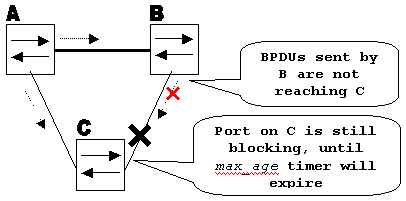 Unidirectional Link Failure
Without loop guard, the STP blocking port on Switch C transitions to the STP listening state when the max_age timer expires, and then transitions to the forwarding state two times the forward_delay time. This situation creates a loop.
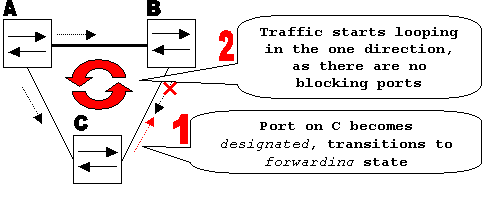 Loop is Created
With the loop guard enabled, the blocking port on Switch C transitions into the STP loop-inconsistent state when the max_age timer expires. A port in the STP loop-inconsistent state does not pass user traffic, so a loop is not created. The loop-inconsistent state is effectively equal to a blocking state.
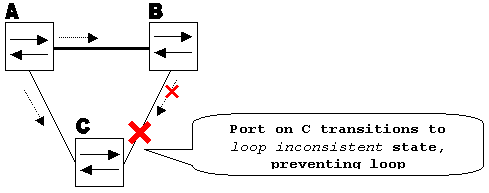 Loop Guard Enabled prevents Loop
Configuration Considerations
The loop guard feature is enabled on a per-port basis. However, as long as it blocks the port on the STP level, loop guard blocks inconsistent ports on a per-VLAN basis (because of per-VLAN STP).
That is, if BPDUs are not received on the trunk port for only one particular VLAN, only that VLAN is blocked (moved to the loop-inconsistent STP state). For the same reason, if enabled on an EtherChannel interface, the entire channel is blocked for a particular VLAN, not just one link (because EtherChannel is regarded as one logical port from the STP point of view).
On which ports is the loop guard enabled? The most obvious answer is on the blocking ports. However, this is not 100% correct. The loop guard must be enabled on the non-designated ports (more precisely, on the root and alternate ports) for all possible combinations of active topologies. As long as the loop guard is not a per-VLAN feature, the same (trunk) port can be designated for one VLAN and non-designated for the other.
The possible failover scenarios must also be considered.
Example
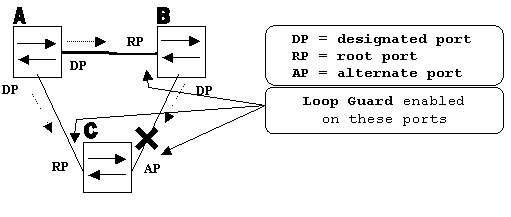 Ports with Loop Guard Enabled
By default, the loop guard is disabled and this command is used to enable the loop guard at the specified interface:
Router(config)#interface gigabitEthernet 1/1
Router(config-if)#spanning-tree guard loop
Loop guard can be enabled on all point-to-point links. The point-to-point link is detected by the duplex status of the link. If the duplex is full, the link is considered point-to-point. It is still possible to configure, or override global settings on a per-port basis.
Issue this command to enable loop guard globally:
Router(config)#spanning-tree loopguard default
Issue this command to disable loop guard on a per-interface basis:
Router(config-if)#no spanning-tree guard loop
Issue this command to globally disable loop guard:
Router(config)#no spanning-tree loopguard default
Issue this command to verify loop guard status:
Router#show spanning-tree summary
Switch is in pvst mode
Root bridge for: none
EtherChannel misconfig guard is enabled
Extended system ID           is disabled
Portfast Default             is disabled
PortFast BPDU Guard Default  is disabled
Portfast BPDU Filter Default is disabled
Loopguard Default            is enabled
UplinkFast                   is disabled
BackboneFast                 is disabled
Pathcost method used         is short

Name                   Blocking Listening Learning Forwarding STP Active
---------------------- -------- --------- -------- ---------- ----------
Total                        0         0        0          0          0
Loop Guard versus UDLD
Loop guard and Unidirectional Link Detection (UDLD) functionality overlap, partly in the sense that both protect against STP failures caused by unidirectional links. However, these two features differ in functionality and how they approach the problem.
This table describes loop guard and UDLD functionality:
| Functionality | Loop Guard | UDLD |
|---|---|---|
| Configuration | Per-port | Per-port |
| Action granularity | Per-VLAN | Per-port |
| Auto-recover | Yes | Yes, with err-disable timeout feature |
| Protection against STP failures caused by unidirectional links | Yes, when enabled on all root and alternate ports in redundant topology | Yes, when enabled on all links in redundant topology |
| Protection against STP failures caused by problems in the software (designated switch does not send BPDU) | Yes | No |
| Protection against incorrect wiring. | No | Yes |
Based on the various design considerations, you can choose either UDLD or the loop guard feature. In regard to STP, the most noticeable difference between the two features is the absence of protection in UDLD against STP failures caused by problems in software.
As a result, the designated switch does not send BPDUs. However, this type of failure is (by an order of magnitude) rarer than failures caused by unidirectional links. In return, UDLD can be more flexible in the case of unidirectional links on EtherChannel. In this case, UDLD disables only failed links, and the channel can remain functional with the links that remain. In such a failure, the loop guard puts it into loop-inconsistent state to block the whole channel.
Additionally, loop guard does not work on shared links or in situations where the link has been unidirectional since the link-up. In the last case, the port never receives BPDU and becomes designated. Because this behavior could be normal, this particular case is not covered by loop guard. UDLD provides protection against such a scenario. As described, the highest level of protection is provided when you enable UDLD and loop guard.
Interoperability of Loop Guard with Other STP Features
Root Guard
The root guard is mutually exclusive with the loop guard. The root guard is used on designated ports, and it does not allow the port to become non-designated. The loop guard works on non-designated ports and does not allow the port to become designated through the expiration of max_age. The root guard cannot be enabled on the same port as the loop guard. When the loop guard is configured on the port, it disables the root guard configured on the same port.
Uplink Fast and Backbone Fast
Both uplink fast and backbone fast are transparent to the loop guard. When max_age is skipped by backbone fast at the time of reconvergence, it does not trigger loop guard. For more information on uplink fast and backbone fast, refer to:
PortFast and BPDU Guard and Dynamic VLAN
Loop guard cannot be enabled on ports where portfast is enabled. Since BPDU guard works on portfast-enabled ports, some restrictions apply to BPDU guard. Loop guard cannot be enabled on dynamic VLAN ports since these ports have portfast enabled.
Shared Links
Loop guard must not be enabled on shared links. If you enable loop guard on shared links, traffic from hosts connected to shared segments can be blocked.
Multiple Spanning Tree (MST)
Loop guard functions correctly in the MST environment.
Related Information
- Enhance Spanning Tree Protocol (STP) with Root Guard
- Configure the UDLD Protocol Feature
- Using PortFast and Other Commands to Fix Workstation Startup Connectivity Delays
- Cisco Technical Support & Downloads
Revision History
| Revision | Publish Date | Comments |
|---|---|---|
3.0 |
01-Jun-2026
|
Updated spelling, grammar, sentence structure, spacing, etc. |
2.0 |
18-Dec-2023
|
Recertification |
1.0 |
14-Oct-2022
|
Initial Release |
 Feedback