Troubleshoot NAT on Cat8000 Platforms

Available Languages
Contents
Introduction
This document describes how to troubleshoot NAT Issues on Cat8000 platforms.
Prerequisites
Requirements
Cisco recommends that you have knowledge of these topics:
- Network Address Translations (NAT)
- Cisco IOS®
For more information on these topics, see:
- Configure Network Address Translation
- Understand the NAT Order of Operation
- Network Address Translation (NAT) Frequently Asked Questions
- Restrictions for Configuring NAT for IP Address Conservation
Components Used
The information in this document is based on Cisco IOS software.
The information in this document was created from the devices in a specific lab environment. All of the devices used in this document started with a cleared (default) configuration. If your network is live, ensure that you understand the potential impact of any command.
Network Diagram
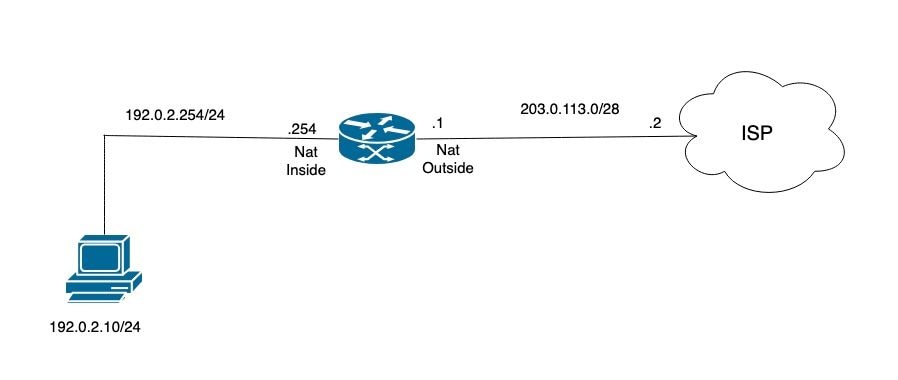 NAT Topology
NAT Exhaustion Pool Exhausted Case Study
This log message indicates that the device attempted to allocate an IP address for NAT, such as for a dynamic NAT or PAT translation, but the allocation was unsuccessful. This typically occurs when there are no available addresses or ports remaining in the configured NAT pool.
Common causes include:
• The NAT pool is exhausted (all available IP addresses or ports are in use).
• The NAT configuration does not have sufficient addresses or resources to accommodate the current translation requests.
%NAT-6-ADDR_ALLOC_FAILURE: Address allocation failed; pool 2 may be exhausted [2] port range: NA, non-PATable: NO, for ALG: NO, input intf: GigabitEthernet0/0/3, mapping-id: 1,
created by pkt: src_ip 192.0.2.13 dst_ip 192.x.x.40 src_port 0 dst_port 0 proto 1
Step 1. Verify the NAT pool to confirm the address translation range.
NAT_R1#show ip nat pool platform
Dump NAT pool config

ID: 2, Name: NAT_Pool, Type: Generic, Mask: 255.255.255.240
Flags: Unknown, Acct name:
Address range blocks: 1
Start: 203.0.113.3, End: 203.0.113.5
Last stats update: 07/31 13:08:43.708061785
Last refcount value: 3
Step 2. Verify the NAT translation table and determine the number of active translations currently present.
NAT_R1#show ip nat translations
Pro Inside global Inside local Outside local Outside global
--- 203.0.113.3 192.0.2.10 --- ---
--- 203.0.113.5 192.0.2.12 --- ---
--- 203.0.113.4 192.0.2.11 --- ---
icmp 203.0.113.5:0 192.0.2.12:0 198.51.100.30:0 198.51.100.30:0
icmp 203.0.113.3:0 192.0.2.10:0 198.51.100.10:0 198.51.100.10:0
icmp 203.0.113.4:0 192.0.2.11:0 198.51.100.20:0 198.51.100.20:0
Total number of translations: 6
Step 3. Verify whether drops appear in the NAT statistics. This result would indicate that incoming traffic requires translation but drops occur due to NAT allocation issues.
NAT_R1#show ip nat statistics
Total active translations: 6 (0 static, 6 dynamic; 3 extended)
Outside interfaces:
GigabitEthernet0/0/4
Inside interfaces:
GigabitEthernet0/0/3
Hits: 11094661606 Misses: 10
Reserved port setting disabled provisioned no
Expired translations: 1412
Dynamic mappings:
-- Inside Source
[Id: 2] access-list 1 pool NAT_Pool refcount 6 <---- Translations count
pool NAT_Pool: id 2, netmask 255.255.255.240
start 203.0.113.3 end 203.0.113.5
type generic, total addresses 3, allocated 3 (100%), misses 3559386331
nat-limit statistics:
max entry: max allowed 0, used 0, missed 0
In-to-out drops: 3559337007 Out-to-in drops: 0  <---- drops from in to out
Pool stats drop: 0 Mapping stats drop: 0
Port block alloc fail: 0
IP alias add fail: 0
Limit entry add fail: 0
NAT_R1#
Step 4. From the platform perspective, review the QFP datapath NAT statistics to determine whether these drops correspond to the observed issue.
NAT_R1#show platform hardware qfp active feature nat datapath stats

Counter                                                         Value
------------------------------------------------------------------------
number_of_session                                                 3
udp                                                               0
tcp                                                               0
icmp                                                              3
non_extended                                                      3
statics                                                           0
static_net                                                        0
entry_timeouts                                                    1
hits                                                         585149
misses                                                            0
cgn_dest_log_timeouts                                             0
ipv4_nat_alg_bind_pkts                                            0
ipv4_nat_alg_sd_not_found                                         0
ipv4_nat_alg_sd_tail_not_found                                    0
ipv4_nat_rx_pkt                                                 154
ipv4_nat_tx_pkt                                         18791285989
<snip>
ipv4_nat_non_natted_in2out_pkts                                 144
ipv4_nat_non_nated_out2in_pkts                                    0
<snip>
ipv4_nat_cfg_rcvd                                                 8
ipv4_nat_cfg_rsp                                                  9
Subcode#14 ADDR_ALLOC_FAIL                               5216959285
- number_of_session: Indicates the total number of active NAT sessions currently present in the QFP datapath. In this output, the value is 3, which confirms that three NAT sessions are active at the time of collection.
- icmp: Displays the number of active NAT sessions for ICMP traffic. A value of 3 indicates that all active NAT sessions in this output are ICMP sessions.
- non_extended: Indicates the number of NAT sessions classified by the platform as non-extended entries. In this output, the value is 3, which aligns with the three active ICMP sessions shown in the datapath.
- entry_timeouts: Indicates the number of NAT session entries that timed out and were removed from the datapath. A value of 1 confirms that one NAT entry expired.
- hits:A hit means the packet matched an existing session entry in the NAT session hash table. A value of 585149 indicates that packets matched an existing NAT session successfully.
- misses: Displays the number of NAT lookups that did not find a matching translation in the datapath. A value of 0 indicates that no lookup misses are recorded in this output.
- ipv4_nat_rx_pkt: Displays the number of IPv4 packets received by this NAT datapath accounting path. A value of 154 indicates that 154 packets were recorded by this internal receive counter.
- ipv4_nat_tx_pkt: Displays the number of IPv4 packets transmitted by this NAT datapath accounting path. A value of 18791285989 indicates a very large amount of packet forwarding activity through this internal transmit counter.
- ipv4_nat_non_natted_in2out_pkts: Indicates the number of IPv4 packets seen in the inside-to-outside direction that were not translated by NAT. A value of 144 confirms that 144 packets traversed this path without NAT being applied.
- ipv4_nat_non_nated_out2in_pkts: Indicates the number of IPv4 packets seen in the outside-to-inside direction that were not translated by NAT. A value of 0 indicates that no such packets are recorded in this snapshot.
- ipv4_nat_cfg_rcvd: Displays the number of NAT-related configuration messages received by the datapath. A value of 8 confirms that eight configuration messages were received.
- ipv4_nat_cfg_rsp: Displays the number of NAT-related configuration responses sent by the datapath. A value of 9 confirms that nine configuration responses were sent.
- Subcode#14 ADDR_ALLOC_FAIL: Displays the number of NAT datapath address allocation failures. A value of 5216959285 indicates that the datapath has recorded a very high number of allocation failures over time. This counter is highly relevant when investigating intermittent NAT translation issues and requires correlation with show ip nat statistics, show ip nat translations, and additional QFP NAT datapath outputs.
Step 5. Verify the current number of entries and compare between the maxhost_count and maxhost_himark values:
- maxhost_count: shows the current entries on the router.
- maxhost_himark: shows 7, this indicates that the limit was reached at some point.
NAT_R1#show platform hardware qfp active feature nat datapath limit
maxhost_limit 131072 maxhost_count 5 maxhost_fail 0 maxhost_himark 7
total limit entries 0 hash tbl 0x0 max entries 0 limit_chunk 0x0 allvrf limit 0
acl limit 0 acl count 0 acl fail 0 acl_id 0x0
Detailed information on this log provides a comprehensive description of the recorded events and operational status :
- maxhost_limit: Specifies the maximum number of NAT host entries supported by the platform. This value represents the upper limit of NAT sessions or translations that can be handled.
- maxhost_count: Indicates the current number of active NAT host entries or sessions in use.
- maxhost_fail: Displays the count of failed attempts to allocate a NAT host entry due to reaching the maximum limit. A value of zero indicates no allocation failures have occurred.
- maxhost_himark: Represents the high watermark, or peak number, of NAT host entries used since the last system reset or reboot.
- total limit entries: Shows the total number of NAT limit entries that are configured or enforced.
- hash tbl 0x0: Displays the memory address or pointer to the hash table used for NAT limit entries. A value of 0x0 indicates that no hash table is currently allocated.
- max entries: Specifies the maximum number of entries allowed in the NAT limit table. A zero value indicates that no limit is configured.
- limit_chunk 0x0: Indicates the pointer to a chunk of memory allocated for NAT limit entries. A value of 0x0 means no memory chunk is allocated.
- allvrf limit: Represents the NAT limit applied across all VRFs (Virtual Routing and Forwarding instances). A zero value indicates no global limit is set.
- acl limit: Specifies the limit on NAT entries imposed by Access Control Lists (ACLs). A zero value indicates no ACL-based limit is configured.
- acl count: Shows the current count of NAT entries associated with ACLs.
- acl fail: Displays the number of times NAT entries failed due to ACL limits.
- acl_id 0x0: Represents the identifier or pointer related to ACL configuration. A value of 0x0 indicates no ACL configuration is assigned.
Possible Cause
The number of usable addresses in the NAT pool ranges from 3 to 5. Issues occur when inactive translations remain in the NAT table, which prevents other traffic from translation. This behavior is expected, as the default NAT translation timeout is 24 hours. To resolve this issue, configure the ip nat translation timeout command to clear inactive translations after this action the NAT table needs to be clear.
NAT_R1(config)#ip nat translation timeout 10800
NAT_R1(config)#end
NAT_R1#clear ip nat translation *
NAT_R1#show ip nat translations
Pro Inside global Inside local Outside local Outside global
--- 203.0.113.5 192.0.2.11 --- ---
--- 203.0.113.4 192.0.2.10 --- ---
icmp 203.0.113.4:0 192.0.2.10:0 198.51.100.10:0 198.51.100.10:0
icmp 203.0.113.5:0 192.0.2.11:0 198.51.100.20:0 198.51.100.20:0
Total number of translations: 4
NAT Translates Non Natted IP Addresses Gatekeeper Issue Case Study
The NAT Gatekeeper feature is designed to enhance router performance by protecting the NAT engine from processing non-NAT flows. When non-NAT packets traverse a NAT-enabled interface, they typically undergo extensive lookups before NAT determines that translation is not required. This process is CPU intensive on the Quantum Flow Processor (QFP). The Gatekeeper mitigates this by maintaining a small cache of non-NAT flows, allowing these packets to bypass the NAT engine once identified, thereby reducing CPU load. Entries in the Gatekeeper cache time out relatively quickly, allowing flows to be re-evaluated by the NAT engine in case network conditions change and the flow can now be subject to NAT.
This mechanism helps optimize resource utilization and improves overall system efficiency when handling mixed NAT and non-NAT traffic on the same interface. The cache size for the Gatekeeper can be configured to accommodate the volume of non-NAT traffic, with default values based on the platform. Adjusting the cache size is recommended when significant non-NAT traffic is present on a NAT interface.
In summary, the NAT Gatekeeper:
• Protects the NAT engine from unnecessary processing of non-NAT flows.
• Maintains a cache of non-NAT flows to allow them to bypass NAT processing.
• Uses timeouts on cache entries to allow re-evaluation of flows.
• Helps reduce CPU utilization on the QFP.
• Supports configurable cache size to optimize performance based on traffic patterns.
Identify the Symptom
Typical symptoms include:
- Intermittent traffic drops
- Some hosts work while others fail
- NAT translations exist but traffic is dropped
- Application sessions reset unexpectedly
- Large-scale PAT deployments affected
- Gatekeeper counters increasing
Step 1. Verify NAT statistics during the failure window.
This step confirms:
- whether NAT is receiving matching traffic
- whether translations are being created
- whether misses increase during the issue
- whether the address pool or overload state is healthy
NAT_R1#show ip nat statistics
Total active translations: 29477 (736 static, 28741 dynamic; 28741 extended)
Outside interfaces:
GigabitEthernet1
Inside interfaces:
GigabitEthernet2, GigabitEthernet3
Hits: 32525856687 Misses: 293948584
Expired translations: 293549953
Dynamic mappings:
-- Inside Source
[Id: 1] route-map INTERNET_PAT interface GigabitEthernet1 refcount 25
nat-limit statistics:
max entry: max allowed 0, used 0, missed 0
In-to-out drops: 0 Out-to-in drops: 867
Pool stats drop: 0 Mapping stats drop: 0
Port block alloc fail: 0
IP alias add fail: 0
Limit entry add fail: 0

NAT_R1#show ip nat statistics | sec Misses
Hits: 32525856687 Misses: 293948584
NAT_R1#show ip nat statistics | sec Misses
Hits: 32527039444 Misses: 293952367
NAT_R1#show ip nat statistics | sec Misses
Hits: 32527308509 Misses: 293953221
NAT_R1#
The section provides a detailed explanation of the relevant information in the output.
- Total active translations: Indicates the total number of NAT entries currently installed in the translation table. In this output, there are 29,477 active translations.
- 736 static: Specifies the number of static NAT entries currently active. These are fixed mappings configured manually.
- 28741 dynamic: Specifies the number of dynamic NAT entries currently active. These entries were created automatically from traffic flows.
- 28741 extended: Indicates that all dynamic entries are extended translations, meaning they include Layer 4 information such as protocol and port numbers. This is typical for PAT traffic.
- Hits: Displays the number of packets that matched an existing NAT translation entry. A value of 32,525,856,687 indicates that NAT is actively processing a very large amount of traffic.
- Misses: Displays the number of packets that did not match an existing NAT translation entry at lookup time. In dynamic NAT/PAT, this commonly occurs on the first packet of a new flow before the translation is created. A value of 293,948,584 reflects a high number of new session lookups over time.
- In-to-out drops: Displays the number of packets dropped in the inside-to-outside direction during NAT processing. A value of 0 indicates no outbound NAT drops occurred.
- Out-to-in drops: Displays the number of packets dropped in the outside-to-inside direction during NAT processing. A value of 867 indicates that some inbound packets arrived without a valid matching translation or valid NAT state.
- Pool stats drop: Shows the number of drops related to NAT pool handling. A value of 0 indicates no pool-related drops occurred.
- Mapping stats drop: Shows the number of drops related to NAT mapping issues. A value of 0 indicates no mapping-related drops occurred.
- Port block alloc fail: Displays the number of failures to allocate PAT port blocks. A value of 0 indicates no port allocation failures occurred and there is no evidence of PAT port exhaustion.
- IP alias add fail: Shows the number of failures related to IP alias creation for NAT. A value of 0 indicates no alias-related failures occurred.
- Limit entry add fail: Displays the number of failures to add a NAT entry because of a limit restriction. A value of 0 confirms that no translation was blocked by NAT limit enforcement.
The NAT statistics show that the miss counter is increasing, but the increase occurs in the same pattern as normal dynamic NAT/PAT session creation.
During the observed interval:
Hits increased from 32,525,856,687 to 32,527,308,509
Increment: 1,451,822
Misses increased from 293,948,584 to 293,953,221
Increment: 4,637
This reflects approximately 313 additional hits for every 1 additional miss during the same period. In a dynamic NAT/PAT environment, a miss occurs when a packet arrives before a matching translation already exists in the table. Once the translation is created, subsequent packets for that flow are counted as hits. Based on that behavior, the observed increase in misses is consistent with ongoing session creation and normal translation churn.
Step 2. Verify that the translation exists in the NAT table. Filter the output for the exact affected flow, if applicable.
This step confirms whether the Route Processor (RP) NAT table contains a translation entry for the affected flow.
Healthy Result
The translation exists and reflects:
correct inside local
correct inside global
correct outside address
correct protocol and port mapping
If the Result is not Healthy
Interpretation:
No translation entry exists
Focus on NAT matching, ACL, route-map, or resource allocation.
Translation exists but traffic still fails
Move to the QFP verification step.
This is one of the most important branches in the workflow.
NAT_R1#show ip nat translations verbose
Pro Inside global Inside local Outside local Outside global
icmp 203.0.113.2:3157 192.0.2.2:3157 x.x.x.x:3157 x.x.x.x:3157
  create: 06/19/26 05:36:53, use: 06/19/26 05:36:53, timeout: 00:00:45
  RuleID : X
  Flags: unknown
  ALG Application Type: NA
  WLAN-Flags: unknown
  Mac-Address: 0000.0000.0000 Input-IDB: GigabitEthernet2
  entry-id: 0xe8a48090, use_count:1
  In_pkts: X In_bytes: 44, Out_pkts: X Out_bytes: X
  Output-IDB: GigabitEthernet1
- Protocol | icmp | The translation entry is for ICMP traffic: In ICMP entries, the value after the colon represents the ICMP identifier, not a TCP or UDP port.
- Inside global | 203.0.113.2:3157 | The translated source address seen on the outside network. 203.0.113.2 is the public NAT address used for this flow.
- Inside local | 192.0.2.2:3157 | The original source address of the inside host before translation.
- Outside local | x.x.x.x:3157 | The destination address as seen from the inside network.
- Outside global | x.x.x.x:3157 | The real destination address on the external network. This field matches the outside local value because no outside translation is applied.
- RuleID | X | The NAT rule that created this translation entry.
- Flags | unknown | Internal NAT flags associated with the entry. The CLI does not decode this value in the displayed output.
- ALG Application Type | NA | No Application Layer Gateway is associated with this ICMP translation.
- WLAN-Flags | unknown | Platform-specific WLAN-related flags. This field is not operationally relevant for this entry.
- MAC Address | 0000.0000.0000 | The MAC address field is not populated for this translation entry.
- Input-IDB | GigabitEthernet2 | The ingress interface where the original packet entered the router. This confirms the traffic originated from the inside on GigabitEthernet2.
- Entry ID | 0xe8a48090 | Internal identifier for the NAT translation entry in memory.
- Use count | Internal reference count for the translation entry.
- In packets | Number of packets counted in one direction for this translation.
- In bytes | Number of bytes counted in the same direction as In packets.
- Out packets | Number of packets counted in the opposite direction for this translation.
- Out bytes | Number of bytes counted in the same direction as Out packets.
- Output-IDB | GigabitEthernet1 | The egress interface used by the translated traffic. This confirms the translated packet exited through GigabitEthernet1.
Step 3. Verify the translation is programmed in QFP
This step confirms whether the translation visible in the RP is also programmed in the forwarding hardware path.
NAT_R1#show platform hardware qfp active feature nat datapath gateout
Gatekeeper on
<snip>
sip 192.0.2.35 dip x.x.x.x vrf 0 ts 0xcdd07450 idx 10268
sip 192.0.2.67 dip x.x.x.x vrf 0 ts 0xcdd072de idx 44104
sip 198.51.100.12 vrf 0 cnt 225 ts 0x1b393b5 idx 56738
sip 198.51.100.89 dip x.x.x.x vrf 0 ts 0xcdd071b2 idx 59429 <---------------- Affected Host
| 0xcdd07450 | Internal QFP timestamp/age value in hexadecimal.
| idx | 10268 | Internal gate table index.
| cnt | 225 | Internal activity/reference count for that gate object. Seen on some entry types.
| Entry 1 | sip 192.0.2.35 dip x.x.x.x vrf 0 ts 0xcdd07450 idx 10268 | Tuple-specific gate entry for source 192.0.2.35 toward destination x.x.x.x in VRF 0.
| Entry 2 | sip 192.0.2.67 dip x.x.x.x vrf 0 ts 0xcdd072de idx 44104 | Tuple-specific gate entry for source 192.0.2.67 toward multicast destination x.x.x.x in VRF 0.
| Entry 3 | sip 198.51.100.12 vrf 0 cnt 225 ts 0x1b393b5 idx 56738 | Source-host-oriented gate entry for 198.51.100.12 in VRF 0, with internal activity/reference count 225.
| Entry 4 | sip 198.51.100.89 dip x.x.x.x vrf 0 ts 0xcdd071b2 idx 59429 | Tuple-specific gate entry for source 198.51.100.89 toward destination x.x.x.x in VRF 0.
The output confirms that the NAT datapath gatekeeper function is enabled on the device. It also shows that the affected source address 198.51.100.89 is present in the QFP NAT gateout table as a tuple-specific entry associated with a destination flow in VRF 0.
This indicates that traffic sourced from 198.51.100.89 is reaching the NAT translation-creation path in the QFP datapath and is being tracked internally by the gatekeeper process. The ts and idx values are internal QFP references for that gateout entry.
This output does not confirm that a full NAT translation has been installed successfully for the affected flow. It only confirms the presence of internal gatekeeper state for that source/destination tuple.
For the reported intermittent behavior, the relevant observation is that 198.51.100.89 is visible in gateout during the issue window, which aligns the fault domain with the NAT datapath gatekeeper or translation-installation stage, rather than with a complete absence of traffic from the affected host.
Step 4. Check the NAT Gatekeeper statistics.
A rapid increase in cache misses indicates that non-NATed flows are not being added to the cache. This condition results in elevated Quantum Flow Processor (QFP) utilization.
NAT_R1#show platform hardware qfp active feature nat datapath gateout activity
Gatekeeper on
def mode Size 8192, Hits 448492109001, Miss 53295038401, Aged 149941327 Added 603614728 Active 1899
NAT_R1#show platform hardware qfp active feature nat datapath gateout activity
Gatekeeper on
def mode Size 8192, Hits 191540578459, Miss 3196566091, Aged 1365537 Added 9 Active 7
Step 5. Validate drops at QFP level.
Check for drop counters related to NAT
NAT_R1#show platform hardware qfp active statistics drop

Last clearing of QFP drops statistics : never

-------------------------------------------------------------------------
Global Drop Stats                                    Packets       Octets
-------------------------------------------------------------------------
NatIn2out                                                1701      174437
NatOut2in                                                4838      267167

NAT_R1#show platform hardware qfp active statistics drop

Last clearing of QFP drops statistics : never

-------------------------------------------------------------------------
Global Drop Stats                                   Packets        Octets
-------------------------------------------------------------------------
NatIn2out                                              8039        823998
NatOut2in                                             26427       1461299

NAT_R1#show platform hardware qfp active statistics drop

Last clearing of QFP drops statistics : never

-------------------------------------------------------------------------
Global Drop Stats                                  Packets         Octets
-------------------------------------------------------------------------
NatIn2out                                            12498        1281045
NatOut2in                                            41211        2278842
During the observed behavior, the NatIn2out and NatOut2in QFP drop counters increased continuously, indicating ongoing packet drops in both the inside-to-outside and outside-to-inside NAT translation paths.
Step 6. Validate with a Packet Capture the packets that are being affected.
A packet capture in this issue provides detailed visibility into the flow and processing of packets through the device, enabling identification of whether packets are being translated or bypassed by NAT, and helping to isolate the root cause of NAT Gatekeeper-related problems. This facilitates targeted troubleshooting and validation of configuration changes.
ip access-list extended TAC
permit ip host 198.51.100.89 <destination IP >
permit ip <destination IP > host 198.51.100.89
debug platform condition ipv4 access-list TAC both
debug platform packet packet 128 fia-trace circular
debug platform packet-trace copy packet both
debug platform condition start
debug platform condition stop

Note: This document does not provide an in-depth focus on packet capture. For detailed information on packet capture, please refer to this document:Datapath Packet Trace Feature - Packet Capture
Based on the packet capture analysis, it is observed that the affected hosts traffic is being dropped by the NAT process. Specifically, the captured packet does not match any existing NAT translation entries or the subnets defined in the access control lists (ACLs). This indicates that the packet is not subject to NAT translation or permitted by the configured ACLs, which can be the cause of the connectivity issue. Further investigation can focus on verifying NAT translation rules and ACL configurations to ensure the affected traffic is properly handled.
NAT_R1#show platform packet-trace packet 122 decode
Packet: 122 CBUG ID: 650
Summary
Input    : GigabitEthernet1
Output   : GigabitEthernet2
State    : FWD
Timestamp
Start    : 6725512391055 ns (07/01/2026 16:56:32.593082 UTC)
Stop     : 6725512441820 ns (07/01/2026 16:56:32.593133 UTC)
Path Trace
Feature  : IPV4(Input)
Input           : GigabitEthernet1
Output          : GigabitEthernet2
Source          : 198.51.100.89
Destination     : <remote Host>
Protocol        : 6 (TCP)
SrcPort         : 16130
DstPort         : 1560
<snip>
Feature : NAT
Direction    : OUT to IN
Action       : FWD
FWD-POINT    : GATEKEEPER_BLOCKED
VRF          : 2
Feature: IPV4_NAT_INPUT_FIA
Entry         : Input - 0x700140f0
Input         : GigabitEthernet1
Output        : <unknown>
Lapsed time   : 8970 ns
<snip>
Packet Copy In
<snip>
ARPA
Destination MAC       : aaaa.bbbb.cccc
Source MAC            : bbbb.bbbb.aaaa
<snip>
Packet Copy Out
<snip>>

Found the issue to be gatekeeper:
Feature: NAT
Direction     : IN to OUT
Action        : FWD
FWD-POINT     : GATEKEEPER_BLOCKED
Recommendations
Cisco recommends separating NATed and non-NATed traffic onto different interfaces or devices to prevent issues related to NAT Gatekeeper functionality. This separation helps avoid excessive processing caused by mixed traffic types on the same interface.
Additionally, Cisco advises upgrading to a Cisco release that includes enhancements to the NAT Gatekeeper feature. These enhancements enable caching of both source and destination IP addresses and allow the cache size to be configured. The cache size can be adjusted using the command in global configuration mode:
ip nat settings gatekeeper-size <value>
The value must be a power of two, and it is recommended to start with a size close to the default setting. After adjusting the cache size, monitor the cache hits and misses to ensure optimal performance and resource utilization.
Increasing the cache size can reduce the number of cache misses and improve NAT processing efficiency, but it also consumes additional memory on the Quantum Flow Processor (QFP). Therefore, adjustments can be made gradually with careful monitoring.
These recommendations aim to optimize NAT Gatekeeper performance and reduce potential issues caused by mixed NAT and non-NAT traffic flows.
Related Information
- Troubleshoot High QFP Utilization Due to NAT Gatekeeper Default Configuration
- Troubleshoot IOS NAT Intermittent Failure to Translate Packets
Revision History
| Revision | Publish Date | Comments |
|---|---|---|
3.0 |
06-Jul-2026
|
Initial Release - Update Needed and Republished |
1.0 |
12-Jun-2026
|
Initial Release |
 Feedback