Configure BGP Route Aggregation on IOS® XE

Available Languages
Introduction
This document describes how to configure BGP route aggregation with optional arguments.
Prerequisites
Requirements
Cisco recommends that you have knowledge of the topics listed:
- Border Gateway Protocol (BGP) Basic Operations
- Prefix Lists
- Route-Maps
Components Used
The information in this document is based on Cisco IOS XE software version 17.x.
The information in this document was created from the devices in a specific lab environment. All of the devices used in this document started with a cleared (default) configuration. If your network is live, ensure that you understand the potential impact of any command.
Information About BGP Route Aggregation
BGP route aggregation allows combining multiple specific routes into a single summarized route (aggregate route) to reduce routing table size and advertisement overhead.
Optional keywords include:
- as-set: Generates an AS set path attribute containing all AS numbers from the aggregated routes.
- summary-only: Advertises only the aggregate route and suppresses more specific routes.
- suppress-map <map-name>: Suppresses selected more specific routes based on a route map.
- advertise-map <map-name>: Advertises the aggregate route conditionally based on a route map.
- attribute-map <map-name>: Sets attributes on the aggregate route using a route map.
By default, the aggregate-address command only generates a summary address if there at least one more specific route present, without inheriting the AS Path.
Configure
Network Diagram
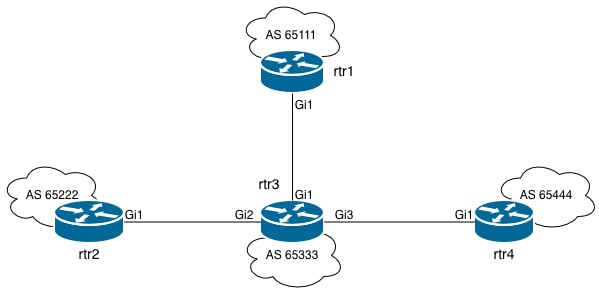
Configurations
This is rtr3 Initial configuration.
rtr3#show running-config | sec router bgp
router bgp 65333
bgp log-neighbor-changes
neighbor 10.13.13.1 remote-as 65111
neighbor 10.23.23.2 remote-as 65222
neighbor 10.34.34.4 remote-as 65444
This is the BGP table on rtr3.
rtr3#show ip bgp
BGP table version is 9, local router ID is 10.34.34.3
Status codes: s suppressed, d damped, h history, * valid, > best, i - internal,
r RIB-failure, S Stale, m multipath, b backup-path, f RT-Filter,
x best-external, a additional-path, c RIB-compressed,
t secondary path, L long-lived-stale,
Origin codes: i - IGP, e - EGP, ? - incomplete
RPKI validation codes: V valid, I invalid, N Not found

Network Next Hop Metric LocPrf Weight Path
*> 10.1.1.0/32 10.13.13.1 0 0 65111 i
*> 10.1.1.1/32 10.13.13.1 0 0 65111 i
*> 10.1.1.2/32 10.13.13.1 0 0 65111 i
*> 10.1.1.3/32 10.13.13.1 0 0 65111 i
*> 10.2.2.0/32 10.23.23.2 0 0 65222 i
*> 10.2.2.1/32 10.23.23.2 0 0 65222 i
*> 10.2.2.2/32 10.23.23.2 0 0 65222 i
*> 10.2.2.3/32 10.23.23.2 0 0 65222 i
Notice how rtr3 has all the specific prefixes coming from rtr1 (AS 65111) and rtr2 (AS 65222). rtr3 advertises these prefixes to rtr4 and adds the AS 65333 to the AS PATH attribute.
This is what rtr4 receives:
rtr4#show ip bgp
BGP table version is 9, local router ID is 10.34.34.3
Status codes: s suppressed, d damped, h history, * valid, > best, i - internal,
r RIB-failure, S Stale, m multipath, b backup-path, f RT-Filter,
x best-external, a additional-path, c RIB-compressed,
t secondary path, L long-lived-stale,
Origin codes: i - IGP, e - EGP, ? - incomplete
RPKI validation codes: V valid, I invalid, N Not found

Network Next Hop Metric LocPrf Weight Path
*> 10.1.1.0/32 10.34.34.3 0 65333 65111 i
*> 10.1.1.1/32 10.34.34.3 0 65333 65111 i
*> 10.1.1.2/32 10.34.34.3 0 65333 65111 i
*> 10.1.1.3/32 10.34.34.3 0 65333 65111 i
*> 10.2.2.0/32 10.34.34.3 0 65333 65222 i
*> 10.2.2.1/32 10.34.34.3 0 65333 65222 i
*> 10.2.2.2/32 10.34.34.3 0 65333 65222 i
*> 10.2.2.3/32 10.34.34.3 0 65333 65222 i
Example 1
Configure BGP to advertise only the aggregate address.
For the first practical example, you want rtr4 to receive only the prefix 10.0.0.0/8.
rtr3(config)#router bgp 65333
rtr3(config-router)#aggregate-address 10.0.0.0 255.0.0.0 summary-only
rtr3(config-router)#exit
rtr3(config)#
BGP table on rtr4 after creating the aggregate:
rtr4#show ip bgp
BGP table version is 18, local router ID is 10.34.34.3
Status codes: s suppressed, d damped, h history, * valid, > best, i - internal,
r RIB-failure, S Stale, m multipath, b backup-path, f RT-Filter,
x best-external, a additional-path, c RIB-compressed,
t secondary path, L long-lived-stale,
Origin codes: i - IGP, e - EGP, ? - incomplete
RPKI validation codes: V valid, I invalid, N Not found

Network Next Hop Metric LocPrf Weight Path
*> 10.0.0.0 10.34.34.3 0 0 65333 i
Notice how the AS Path is 65333 (the router originating the summary).
Example 2
For the second practical example, you are going to see how you can keep track of the original AS-PATH.
This is rtr3 configuration.
rtr3#configure terminal
rtr3(config)#router bgp 65333
rtr3(config-router)#aggregate-address 10.0.0.0 255.0.0.0 as-set summary-only
rtr3(config-router)#exit
This is the BGP table on rtr4.
rtr4#show ip bgp
BGP table version is 36, local router ID is 10.34.34.3
Status codes: s suppressed, d damped, h history, * valid, > best, i - internal,
r RIB-failure, S Stale, m multipath, b backup-path, f RT-Filter,
x best-external, a additional-path, c RIB-compressed,
t secondary path, L long-lived-stale,
Origin codes: i - IGP, e - EGP, ? - incomplete
RPKI validation codes: V valid, I invalid, N Not found

Network Next Hop Metric LocPrf Weight Path
*> 10.0.0.0 10.34.34.3 0 0 65333 {65111,65222} i
Notice how you have all the AS paths that rtr3 is aggregating.
Example 3
suppress BGP Prefixes using Route Maps.
For the third practical example, you are going to configure a route-map to filter prefixes coming from rtr1.
rtr3(config)#ip prefix-list suppress_rtr1 permit 10.1.1.0/24 le 32
rtr3(config)#route-map SUPPRESS-RTR1 permit 10
rtr3(config-route-map)#match ip address prefix-list suppress_rtr1
rtr3(config)#
rtr3(config)#router bgp 65333
rtr3(config-router)#aggregate-address 10.0.0.0 255.0.0.0 suppress-map SUPPRESS-RTR1
rtr3(config-router)#end
rtr3#
This is the BGP table on rtr3.
rtr3#show ip bgp
BGP table version is 114, local router ID is 10.34.34.3
Status codes: s suppressed, d damped, h history, * valid, > best, i - internal,
r RIB-failure, S Stale, m multipath, b backup-path, f RT-Filter,
x best-external, a additional-path, c RIB-compressed,
t secondary path, L long-lived-stale,
Origin codes: i - IGP, e - EGP, ? - incomplete
RPKI validation codes: V valid, I invalid, N Not found

Network Next Hop Metric LocPrf Weight Path
*> 10.0.0.0 0.0.0.0 32768 i
s> 10.1.1.0/32 10.13.13.1 0 0 65111 i
s> 10.1.1.1/32 10.13.13.1 0 0 65111 i
s> 10.1.1.2/32 10.13.13.1 0 0 65111 i
s> 10.1.1.3/32 10.13.13.1 0 0 65111 i
*> 10.2.2.0/32 10.23.23.2 0 0 65222 i
*> 10.2.2.1/32 10.23.23.2 0 0 65222 i
*> 10.2.2.2/32 10.23.23.2 0 0 65222 i
*> 10.2.2.3/32 10.23.23.2 0 0 65222 i
Notice how only the prefixes coming from rtr1 are being suppressed.
This is the BGP table on rtr4.
rtr4#show ip bgp
BGP table version is 114, local router ID is 10.34.34.3
Status codes: s suppressed, d damped, h history, * valid, > best, i - internal,
r RIB-failure, S Stale, m multipath, b backup-path, f RT-Filter,
x best-external, a additional-path, c RIB-compressed,
t secondary path, L long-lived-stale,
Origin codes: i - IGP, e - EGP, ? - incomplete
RPKI validation codes: V valid, I invalid, N Not found

Network Next Hop Metric LocPrf Weight Path
*> 10.0.0.0 10.34.34.3 0 0 65333 i
*> 10.2.2.0/32 10.34.34.3 0 65333 65222 i
*> 10.2.2.1/32 10.34.34.3 0 65333 65222 i
*> 10.2.2.2/32 10.34.34.3 0 65333 65222 i
*> 10.2.2.3/32 10.34.34.3 0 65333 65222 i
rtr4#
Example 4
Advertise a summary route only if a prefix within a range exists in the BGP table.
For the fourth example, you are going to use the same route-map configured previously, which suppresses all prefixes coming from rtr1.
rtr3(config)#router bgp 65333
rtr3(config-router)#aggregate-address 10.0.0.0 255.0.0.0 advertise-map SUPPRESS-RTR1 summary-only
The advertise-map sets a condition, the summary-only aggregate is generated only if any prefix within the 10.1.1.0/24 range exists in the BGP table.
This is the BGP table on rtr3.
rtr3#show ip bgp
BGP table version is 148, local router ID is 10.34.34.3
Status codes: s suppressed, d damped, h history, * valid, > best, i - internal,
r RIB-failure, S Stale, m multipath, b backup-path, f RT-Filter,
x best-external, a additional-path, c RIB-compressed,
t secondary path, L long-lived-stale,
Origin codes: i - IGP, e - EGP, ? - incomplete
RPKI validation codes: V valid, I invalid, N Not found

Network Next Hop Metric LocPrf Weight Path
*> 10.0.0.0 0.0.0.0 32768 i
s> 10.1.1.0/32 10.13.13.1 0 0 65111 i
s> 10.1.1.1/32 10.13.13.1 0 0 65111 i
s> 10.1.1.2/32 10.13.13.1 0 0 65111 i
s> 10.1.1.3/32 10.13.13.1 0 0 65111 i
s> 10.2.2.0/32 10.23.23.2 0 0 65222 i
s> 10.2.2.1/32 10.23.23.2 0 0 65222 i
s> 10.2.2.2/32 10.23.23.2 0 0 65222 i
s> 10.2.2.3/32 10.23.23.2 0 0 65222 i
Here is the output when there are no prefixes that match the route-map:
rtr3#show run | section router bgp
router bgp 65333
 aggregate-address 10.0.0.0 255.0.0.0 summary-only advertise-map SUPPRESS-RTR1
 neighbor 10.13.13.1 remote-as 65111
 neighbor 10.23.23.2 remote-as 65222
 neighbor 10.34.34.4 remote-as 65444
!

rtr3#show ip bgp
BGP table version is 31, local router ID is 10.34.34.3
Status codes: s suppressed, d damped, h history, * valid, > best, i - internal,
r RIB-failure, S Stale, m multipath, b backup-path, f RT-Filter,
x best-external, a additional-path, c RIB-compressed,
t secondary path, L long-lived-stale,
Origin codes: i - IGP, e - EGP, ? - incomplete
RPKI validation codes: V valid, I invalid, N Not found

Network Next Hop Metric LocPrf Weight Path
*> 10.2.2.0/32 10.23.23.2 0 0 65222 i
*> 10.2.2.1/32 10.23.23.2 0 0 65222 i
*> 10.2.2.2/32 10.23.23.2 0 0 65222 i
*> 10.2.2.3/32 10.23.23.2 0 0 65222 i
Notice that the prefixes coming from rtr2 are not being suppressed, nor aggregate-route being generated.
Example 5
Configure BGP attributes with Route Maps.
rtr3(config)#route-map BGP-ATTR permit 10
rtr3(config-route-map)#set community no-export
rtr3(config-route-map)#exit
rtr3(config)#router bgp 65333
rtr3(config-router)#aggregate-address 10.0.0.0 255.0.0.0 attribute-map BGP-ATTR summary-only
If you check to see the generated aggregate address, you notice it says not advertised to any peer. This is expected in this particular scenario because all the neighbors are external (eBGP) and you are setting the no-export well-known community. As a consequence of using summary-only argument, rtr4 does not receive any route.
This is the BGP table on rtr3
rtr3#show ip bgp 10.0.0.0
BGP routing table entry for 10.0.0.0/8, version 20
Paths: (1 available, best #1, table default, not advertised to EBGP peer)
Not advertised to any peer
Refresh Epoch 1
Local, (aggregated by 65333 10.34.34.3)
0.0.0.0 from 0.0.0.0 (10.34.34.3)
Origin IGP, localpref 100, weight 32768, valid, aggregated, local, atomic-aggregate, best
Community: no-export
rx pathid: 0, tx pathid: 0x0
Updated on Jun 12 2026 23:14:53 UTC
Verify
To verify if BGP route aggregation is working properly, you can check to see on the receiving router (rtr4 in this example) if you are receiving only what we want to see. For example, only the summary, summary along with all specific prefixes, summary and only some specific prefixes and so on. You can mainly use the commands below:
- show ip bgp
- show ip bgp route-map <map-name>
- show running-config | section router bgp
- debug ip bgp update
Refer to the troubleshooting scenarios for further details.
Troubleshoot
Scenario 1
Summary route is not received and specific prefixes are still seen.
rtr4#show ip bgp
BGP table version is 9, local router ID is 10.34.34.3
Status codes: s suppressed, d damped, h history, * valid, > best, i - internal,
r RIB-failure, S Stale, m multipath, b backup-path, f RT-Filter,
x best-external, a additional-path, c RIB-compressed,
t secondary path, L long-lived-stale,
Origin codes: i - IGP, e - EGP, ? - incomplete
RPKI validation codes: V valid, I invalid, N Not found

Network Next Hop Metric LocPrf Weight Path
*> 10.1.1.0/32 10.34.34.3 0 65333 65111 i
*> 10.1.1.1/32 10.34.34.3 0 65333 65111 i
*> 10.1.1.2/32 10.34.34.3 0 65333 65111 i
*> 10.1.1.3/32 10.34.34.3 0 65333 65111 i
*> 10.2.2.0/32 10.34.34.3 0 65333 65222 i
*> 10.2.2.1/32 10.34.34.3 0 65333 65222 i
*> 10.2.2.2/32 10.34.34.3 0 65333 65222 i
*> 10.2.2.3/32 10.34.34.3 0 65333 65222 i
Verify summary-only is configured as an argument to the aggregate-address and the subnet mask is correct.
This is rtr3 configuration.
rtr3(config)#router bgp 65333
rtr3(config-router)#aggregate-address 10.0.0.0 255.255.255.0 summary-only
rtr3(config-router)#exit
rtr3(config)#
In the example, summary-address is configured, but the subnet mask is not correct. Only prefixes in the 10.0.0.0/24 network fall into the aggregate, which breaks the rule for BGP route aggregation. All prefixes coming from rtr1 and rtr2, fall out of the summary range and if you check the BGP table on rtr3, suppression is not happening.
rtr3 - corrected configuration.
rtr3(config)#router bgp 65333
rtr3(config-router)#aggregate-address 10.0.0.0 255.0.0.0 summary-only
rtr3(config-router)#exit
rtr3(config)#
Look that the specific prefixes are now flagged as suppressed.
rtr3#show ip bgp
BGP table version is 18, local router ID is 10.34.34.3
Status codes: s suppressed, d damped, h history, * valid, > best, i - internal,
r RIB-failure, S Stale, m multipath, b backup-path, f RT-Filter,
x best-external, a additional-path, c RIB-compressed,
t secondary path, L long-lived-stale,
Origin codes: i - IGP, e - EGP, ? - incomplete
RPKI validation codes: V valid, I invalid, N Not found

Network Next Hop Metric LocPrf Weight Path
*> 10.0.0.0 0.0.0.0 32768 i
s> 10.1.1.0/32 10.13.13.1 0 0 65111 i
s> 10.1.1.1/32 10.13.13.1 0 0 65111 i
s> 10.1.1.2/32 10.13.13.1 0 0 65111 i
s> 10.1.1.3/32 10.13.13.1 0 0 65111 i
s> 10.2.2.0/32 10.23.23.2 0 0 65222 i
s> 10.2.2.1/32 10.23.23.2 0 0 65222 i
s> 10.2.2.2/32 10.23.23.2 0 0 65222 i
s> 10.2.2.3/32 10.23.23.2 0 0 65222 i
Scenario 2
Suppress Map is configured to suppress a range, but nothing is being suppressed.
Consider the BGP table on rtr3. You want to suppress all 10.2.2.0/24 prefixes, but after applying the configurations, it is not working.
rtr3#show ip bgp
BGP table version is 37, local router ID is 10.34.34.3
Status codes: s suppressed, d damped, h history, * valid, > best, i - internal,
r RIB-failure, S Stale, m multipath, b backup-path, f RT-Filter,
x best-external, a additional-path, c RIB-compressed,
t secondary path, L long-lived-stale,
Origin codes: i - IGP, e - EGP, ? - incomplete
RPKI validation codes: V valid, I invalid, N Not found

Network Next Hop Metric LocPrf Weight Path
*> 10.1.1.0/32 10.13.13.1 0 0 65111 i
*> 10.1.1.1/32 10.13.13.1 0 0 65111 i
*> 10.1.1.2/32 10.13.13.1 0 0 65111 i
*> 10.1.1.3/32 10.13.13.1 0 0 65111 i
*> 10.2.2.0/32 10.23.23.2 0 0 65222 i
*> 10.2.2.1/32 10.23.23.2 0 0 65222 i
*> 10.2.2.2/32 10.23.23.2 0 0 65222 i
*> 10.2.2.3/32 10.23.23.2 0 0 65222 i
Check to see the BGP configuration on rtr3.
rtr3#show run | section router bgp
router bgp 65333
 aggregate-address 10.0.0.0 255.0.0.0 suppress-map SUPPRESS-RTR2
 neighbor 10.13.13.1 remote-as 65111
 neighbor 10.23.23.2 remote-as 65222
 neighbor 10.34.34.4 remote-as 65444
rtr3#
Verify the configured route map.
rtr3#show route-map SUPPRESS-RTR2
route-map SUPPRESS-RTR2, permit, sequence 10
Match clauses:
ip address prefix-lists: suppress-rtr2
Set clauses:
Policy routing matches: 0 packets, 0 bytes
Check the configured prefix list.
rtr3#show ip prefix-list suppress-rtr2
ip prefix-list suppress-rtr2: 1 entries
seq 5 permit 10.2.2.0/24
rtr3#
The prefix list in the example matches exactly the 10.2.2.0 prefix, which is why the more specific prefixes are not being suppressed. You have to use the less than or equal to operator to match more specific prefixes.
Correct the configuration of the prefix list.
rtr3#configure terminal
rtr3(config)#no ip prefix-list suppress-rtr2
rtr3(config)#ip prefix-list suppress-rtr2 permit 10.2.2.0/24 le 32
rtr3(config)#end
rtr3#
This is rtr3 BGP table after the correct configuration of prefix-list suppress-rtr2.
rtr3#show ip bgp
BGP table version is 14, local router ID is 10.34.34.3
Status codes: s suppressed, d damped, h history, * valid, > best, i - internal,
r RIB-failure, S Stale, m multipath, b backup-path, f RT-Filter,
x best-external, a additional-path, c RIB-compressed,
t secondary path, L long-lived-stale,
Origin codes: i - IGP, e - EGP, ? - incomplete
RPKI validation codes: V valid, I invalid, N Not found

Network Next Hop Metric LocPrf Weight Path
*> 10.0.0.0 0.0.0.0 32768 i
*> 10.1.1.0/32 10.13.13.1 0 0 65111 i
*> 10.1.1.1/32 10.13.13.1 0 0 65111 i
*> 10.1.1.2/32 10.13.13.1 0 0 65111 i
*> 10.1.1.3/32 10.13.13.1 0 0 65111 i
s> 10.2.2.0/32 10.23.23.2 0 0 65222 i
s> 10.2.2.1/32 10.23.23.2 0 0 65222 i
s> 10.2.2.2/32 10.23.23.2 0 0 65222 i
s> 10.2.2.3/32 10.23.23.2 0 0 65222 i
You have learned how to use BGP optional arguments to configure aggregate routes, you have also been provided with two typical examples that can cause route aggregation to fail. These are the most common mistakes that can be found in configurations. If you are having problems to generate an aggregate route and unable to spot the problematic configuration, use the debug ip bgp update command to gather more specific details.
Revision History
| Revision | Publish Date | Comments |
|---|---|---|
1.0 |
22-Jun-2026
|
Initial Release |
 Feedback