Field Notice: FN74386 - Cisco IOS XR Software May Display False Fan Alarms and/or Outputs for PSU2KW Power Supplies - Software Upgrade Recommended
Available Languages
Notice
THIS FIELD NOTICE IS PROVIDED ON AN "AS IS" BASIS AND DOES NOT IMPLY ANY KIND OF GUARANTEE OR WARRANTY, INCLUDING THE WARRANTY OF MERCHANTABILITY. YOUR USE OF THE INFORMATION ON THE FIELD NOTICE OR MATERIALS LINKED FROM THE FIELD NOTICE IS AT YOUR OWN RISK. CISCO RESERVES THE RIGHT TO CHANGE OR UPDATE THIS FIELD NOTICE AT ANY TIME.
Products Affected
| Affected Product Name | Description | Comments |
|---|---|---|
| 8101-32FH | Cisco 8100 32x400G QSFPDD 1RU Fixed System w/o HBM | |
| 8201-24H8FH | Cisco 8201 1RU System w/ 8x400GE QSFP56-DD&24x100GE QSFP28 | |
| 8201-32FH | Cisco 8200 32x400G QSFPDD 1RU Fixed System w/HBM | |
| 8201-SYS | Cisco 8201 Chassis w/ 24x400GE QSFP56-DD&12x100GE QSFP28 | |
| 8202-32FH-M | Cisco 8200 2RU Chassis w/32x400G, XR SW, HBM & MACsec | |
| 8202-SYS | Cisco 8202 Chassis w/ 12x400GE QSFP56-DD&60x100GE QSFP28 | |
| 8212-48FH-M | Cisco 8212 2RU System w/ 48x400GE QSFP56-DD with MACsec | |
| PSU2KW-ACPI | 2000W AC Power Module with Port-side Air Intake |
Defect Information
| Defect ID | Headline |
| CSCwk03525 | New firmware binary for new PSU design |
| CSCwf08657 | Feature - New 2KW AC PSU support for 8000 fixed |
Problem Description
Cisco has added a new design for the listed product IDs (PIDs). There is a difference between power supply unit (PSU) designs. PSUs from with the new design use a single fan, whereas PSUs from the original design feature two fans.
Cisco IOS XR Software images from releases earlier than Release 24.4.1 do not differentiate between these hardware versions and expect two fans for all units, resulting in a field-programmable device (FPD) alarm for the fan and firmware upgrade limitations on new PSUs.
Note: Users can ignore the false alarms, output, or both caused by this issue, as there is no functional problem with the PSUs. The Workaround section of this Field Notice provides SMUs to correct the issue if users prefer not to see the false alarms, output, or both. Requesting an RMA for the PSU will not resolve either the false alarm or the false output issue.
Background
Cisco utilizes multiple designs for Cisco PSU2KW-ACPI Power Supplies. While they share the same PID, the internal fan configuration differs between the single and double fan designs.
In legacy software releases, the system attempts to poll a second fan that does not physically exist on the some of the PSUs.
Problem Symptom
Users will see either the following output or an alarm, depending on which Cisco IOS XR Software release is running on the device.
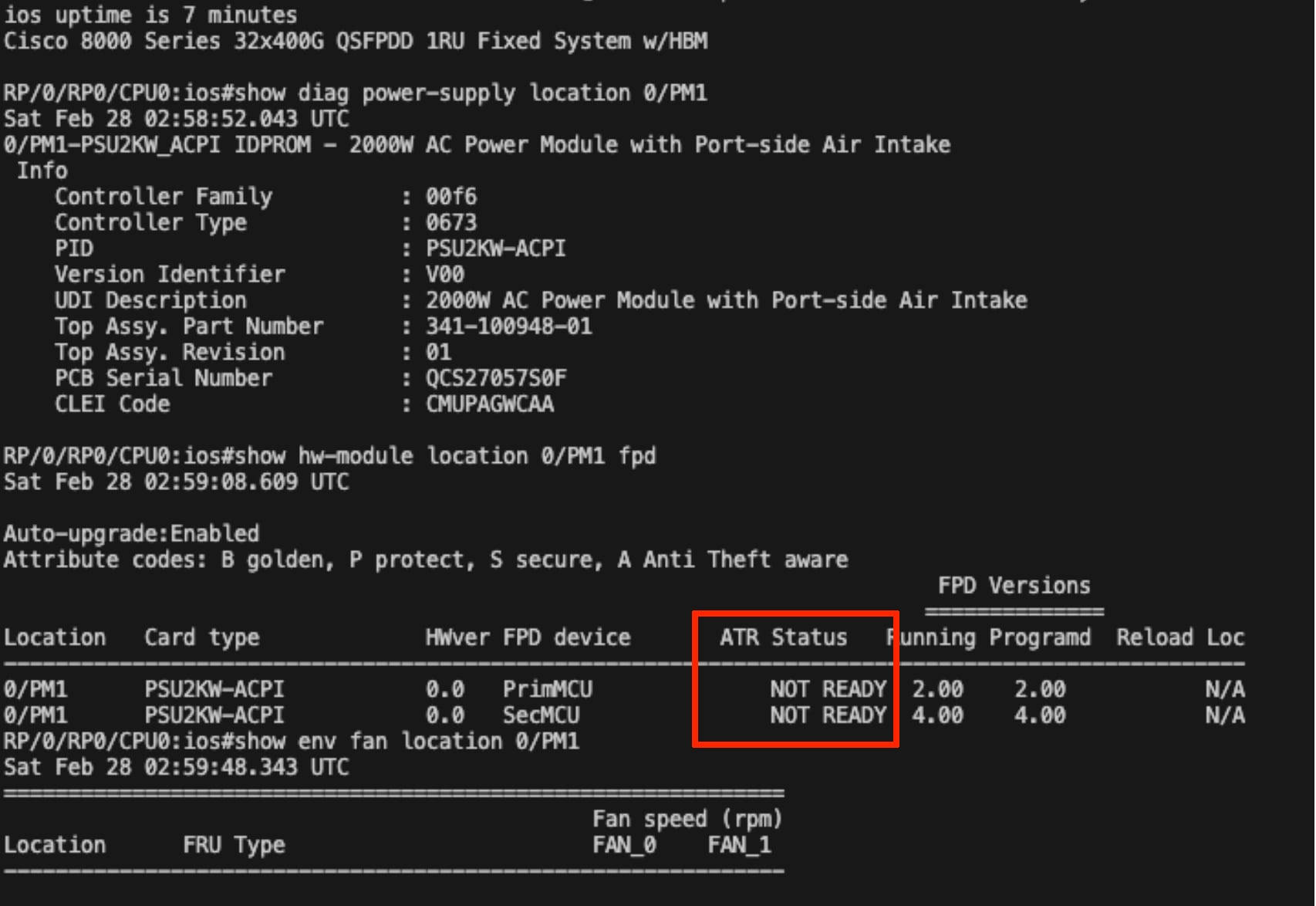
- For users who are running Cisco IOS XR Software Release 7.11.2, 7.10.2, or 7.9.2, there will be no alarm, but the system output will show NOT READY under ATR Status, as shown in the following example:
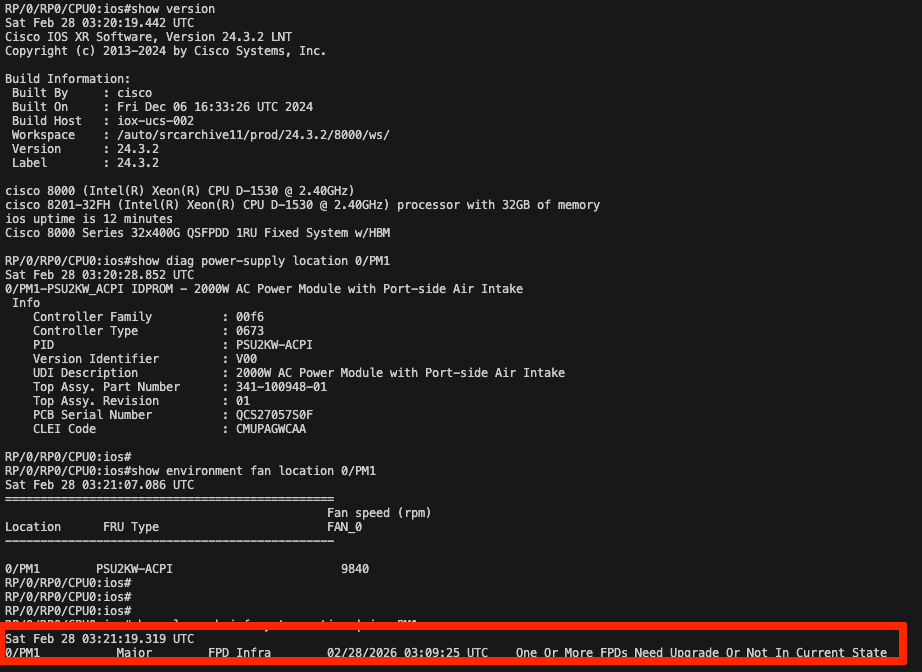
- For users who are running Cisco IOS XR Software Release 24.1.2 or 24.3.2, the system output will show the alarm, as shown in the following example:
Workaround/Solution
There are two options to fix this issue:
- Cisco IOS XR Software can be upgraded to Release 24.4.1 or later.
- The user may load the SMU for the individual release they are using, as shown in the following table.
|
Cisco IOS XR Software Release |
Platforms |
SMU Image Name and Link |
Reload or Hitless SMU |
| 7.9.2 |
8101-32FH, 8201-SYS, 8201-24H8FH, 8201-32FH, 8202-SYS, 8202-32FH-M, 8212-48FH-M
|
8000-7.9.2.CSCwf08657.tar | Reload |
| 7.10.2 | 8101-32FH, 8201-SYS, 8201-24H8FH, 8201-32FH, 8202-SYS, 8202-32FH-M, 8212-48FH-M | 8000-7.10.2.CSCwf08657.tar | Reload |
| 7.11.2 | 8101-32FH, 8201-SYS, 8201-24H8FH, 8201-32FH, 8202-SYS, 8202-32FH-M, 8212-48FH-M | 8000-7.11.2.CSCwk03525.tar | Hitless |
| 24.1.2 | 8101-32FH, 8201-SYS, 8201-24H8FH, 8201-32FH, 8202-SYS, 8202-32FH-M, 8212-48FH-M | 8000-24.1.2.CSCwk03525.tar | Hitless |
| 24.3.2 | 8101-32FH, 8201-SYS, 8201-24H8FH, 8201-32FH, 8202-SYS, 8202-32FH-M, 8212-48FH-M | 8000-24.3.2.CSCwk03525.tar | Hitless |
How to Identify Affected Products
Use show env fan and show hw fpd to verify the issue. The following output examples are for Cisco IOS XR Software releases earlier than 24.4.1.
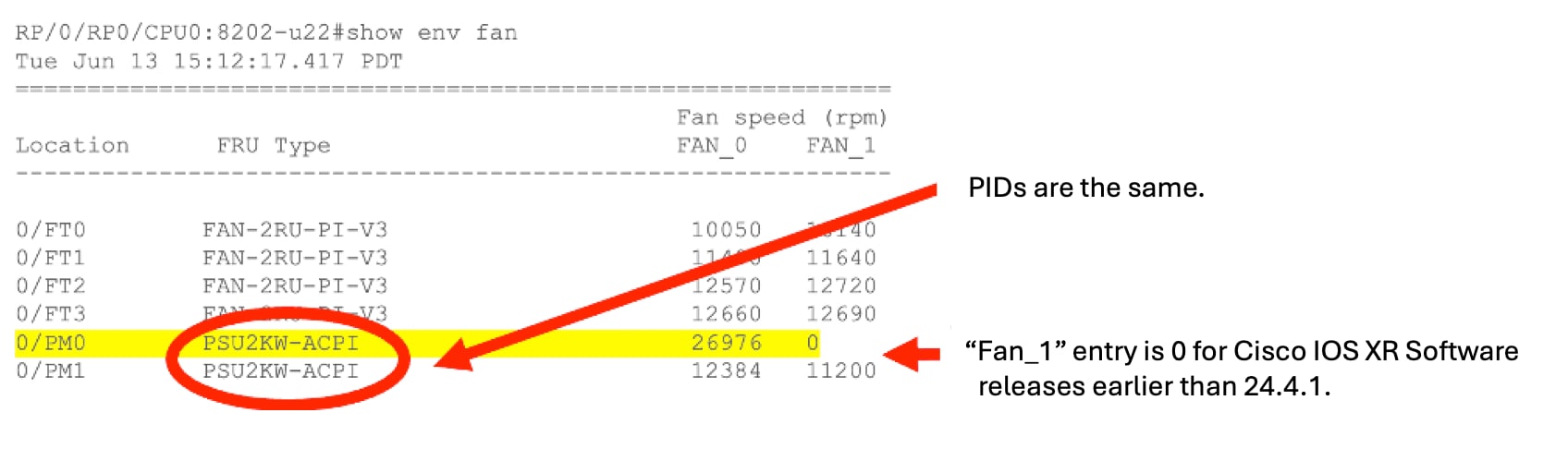
Sample output for the show env fan command
Run show env fan. The output for a PSU with a single-fan design will show FAN_1 with a speed of 0 rpm, triggering a system alarm or false output.
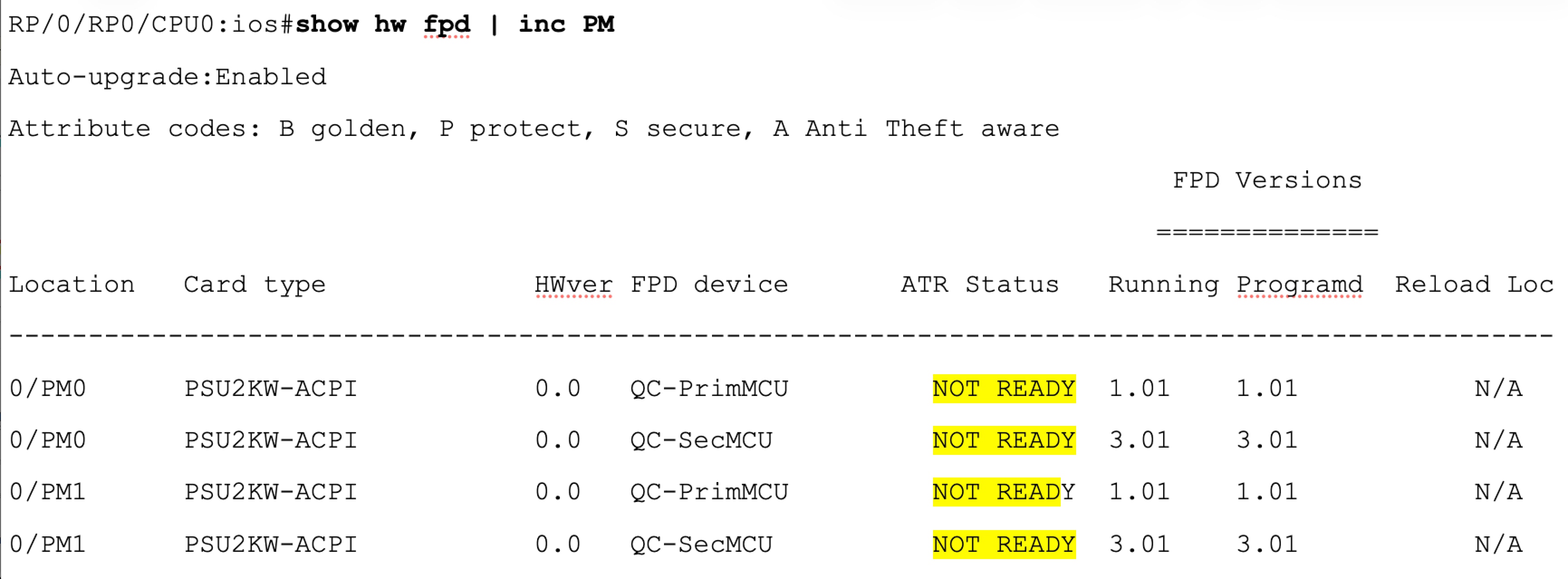
Sample output for the show hw fpd command
Run show hw fpd. The status for a single-fan PSU (typically PM0 or PM1) will display NOT READY, as shown in the following example:
Note: When the system is running Cisco IOS XR Software Release 24.4.1 or later or recommended SMUs are loaded, the FAN_1 entry is correctly omitted, and no alarm or false output is generated, as shown in the following example: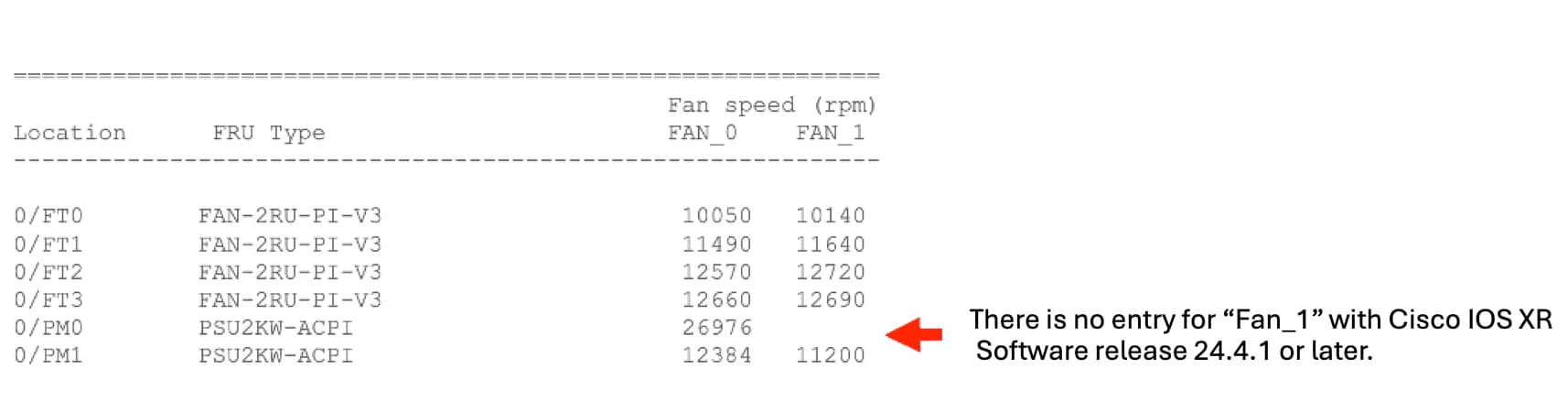
Revision History
| Version | Description | Section | Date |
| 1.0 | Initial Release | — | 2026-APR-01 |
For More Information
For further assistance or for more information about this field notice, contact the Cisco Technical Assistance Center (TAC) using one of the following methods:
Receive Email Notification About New Field Notices
To receive email updates about Field Notices (reliability and safety issues), Security Advisories (network security issues), and end-of-life announcements for specific Cisco products, set up a profile in My Notifications.
 Feedback
Unleash the Power of TAC's Virtual Assistance