Field Notice: FN74355 - Cisco UCS M7 or Cisco HCI M7 Host May Lock Up Due to Error-Correcting Code During Runtime - Software Upgrade Recommended
Available Languages
Notice
THIS FIELD NOTICE IS PROVIDED ON AN "AS IS" BASIS AND DOES NOT IMPLY ANY KIND OF GUARANTEE OR WARRANTY, INCLUDING THE WARRANTY OF MERCHANTABILITY. YOUR USE OF THE INFORMATION ON THE FIELD NOTICE OR MATERIALS LINKED FROM THE FIELD NOTICE IS AT YOUR OWN RISK. CISCO RESERVES THE RIGHT TO CHANGE OR UPDATE THIS FIELD NOTICE AT ANY TIME.
Products Affected
| Affected Software Product | Affected Release | Affected Release Number | Comments |
|---|---|---|---|
| Unified Computing System (UCS) Server Firmware | 4.3 | 4.3(6.250101), 4.3(6.250117) | |
| Unified Computing System (UCS) Server Firmware | 6.0 | 6.0(1.250127), 6.0(1.250131), 6.0(1.250174) | |
| Unified Computing System (UCS) Server Software Bundle | 4.3 | 4.3(6c), 4.3(6d) | |
| Unified Computing System (UCS) Server Software Bundle | 6.0 | 6.0(1b), 6.0(1c), 6.0(1d) |
Defect Information
| Defect ID | Headline |
| CSCws30219 | M7 Host Lockup Due to ECC during runtime. |
Problem Description
Cisco UCS M7 Server or Cisco Compute Hyperconverged (HCI) M7 Server can become unresponsive due to an incorrectly handled error-correcting code (ECC) error. This issue is only applicable to Intel-based platforms that are running the releases specified above.
The server will need to be rebooted to recover, although if another ECC occurs, the host can again become unresponsive.
Background
ECC memory errors are handled by BIOS using code that executes in System Management Mode (SMM). SMM is a special execution mode in the x86 architecture that operates independently of the operating system, which is unaware of its activity.
Under certain conditions, the BIOS code that is responsible for handling ECC errors may encounter an exception while executing in SMM.
When this occurs, the processor halts in SMM and cannot return to normal operation or respond to other interrupts, such as non-maskable interrupts (NMIs). As a result, the server becomes unresponsive.
Problem Symptom
The following Cisco UCS M7 Server models may become unresponsive if they are running BIOS Release 4.3.6b, 4.3.6c, 6.0.1a, or 6.0.1b and an ECC memory error occurs:
- UCSX-210C-M7
- UCSX-410C-M7
- UCSC-C220-M7
- UCSC-C240-M7
When this issue occurs, the server host becomes unresponsive. However, the Cisco Integrated Management Controller remains accessible, and the system can be reset remotely using management tools.
In some cases, such as with single-bit ECC errors, the errors may not be logged in the system event logs but can still cause the host to become unresponsive.
This is related to the DDR5 memory architecture, where the DIMM manages the error internally using on-die ECC. To recover, the host must be rebooted.
The server will remain operational until the next ECC error occurs.
Workaround/Solution
There is no workaround available for this issue on affected firmware releases.
To resolve this issue on a system that is running an affected firmware release, upgrade to the fixed release indicated in the following table:
| Cisco Product | Affected Release | First Fixed Release |
|---|---|---|
|
UCS Manager Server Firmware - B-Series Blade Server Software bundle
|
4.3(6c), 4.3(6d), 6,0(1b), 6.0(1c), 6.0(1d)
|
4.3(6e) 6.0(1e) |
|
UCS Manager Server Firmware - C-Series Rack Server Software bundle
|
4.3(6c), 4.3(6d), 6,0(1b), 6.0(1c), 6.0(1d) | 4.3(6e) 6.0(1e) |
| Intersight UCS X-Series Firmware bundle | 5.4(0.250048), 5.4(0.250106). 6.0(1.250120), 6.0(1.250122), 6.0(1.250162) | 5.4(0.260001) 6.0(1.250179) |
| Intersight UCS C-Series Firmware bundle | 4.3(6.250053), 4.3(6.250101), 4.3(6.250117), 6.0(1.250127), 6.0(1.250131), 6.0(1.250174) | 4.3(6.260003) 6.0(1.250192) |
| UCS C-Series Standalone Server Firmware bundle | 4.3(6.250053), 4.3(6.250101), 4.3(6.250117), 6.0(1.250127), 6.0(1.250131), 6.0(1.250174) | 4.3(6.260003) (C220M7) 4.3(6.260003) (C240M7) 6.0(1.250192) (C220M7) 6.0(1.250192) (C240M7) |
Download the latest release of Cisco UCS B-Series and C-Series bundles using the hyperlinks in the First Fixed Release column of the preceding table.
For information on upgrading using Cisco Intersight, see https://intersight.com/help/saas/resources/Upgrading_Server_Firmware_Using_Firmware_Policy.
How to Identify Affected Products
Identify Impacted Servers That Are Claimed in Cisco Intersight
Option 1
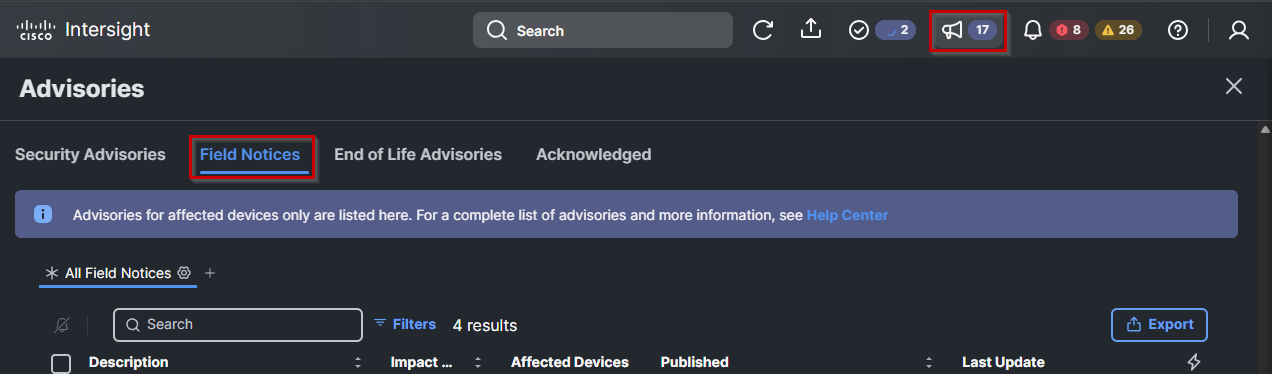
- Log in to Cisco Intersight.
- Click the Advisories icon (the loudspeaker icon located at the top right, near the Profile menu).
- In the Advisories window, click the Field Notices tab.
- Locate and select the Field Notice with the same name as this advisory.
- Go to the Affected Devices section to view and identify servers that are impacted by this issue.
Option 2
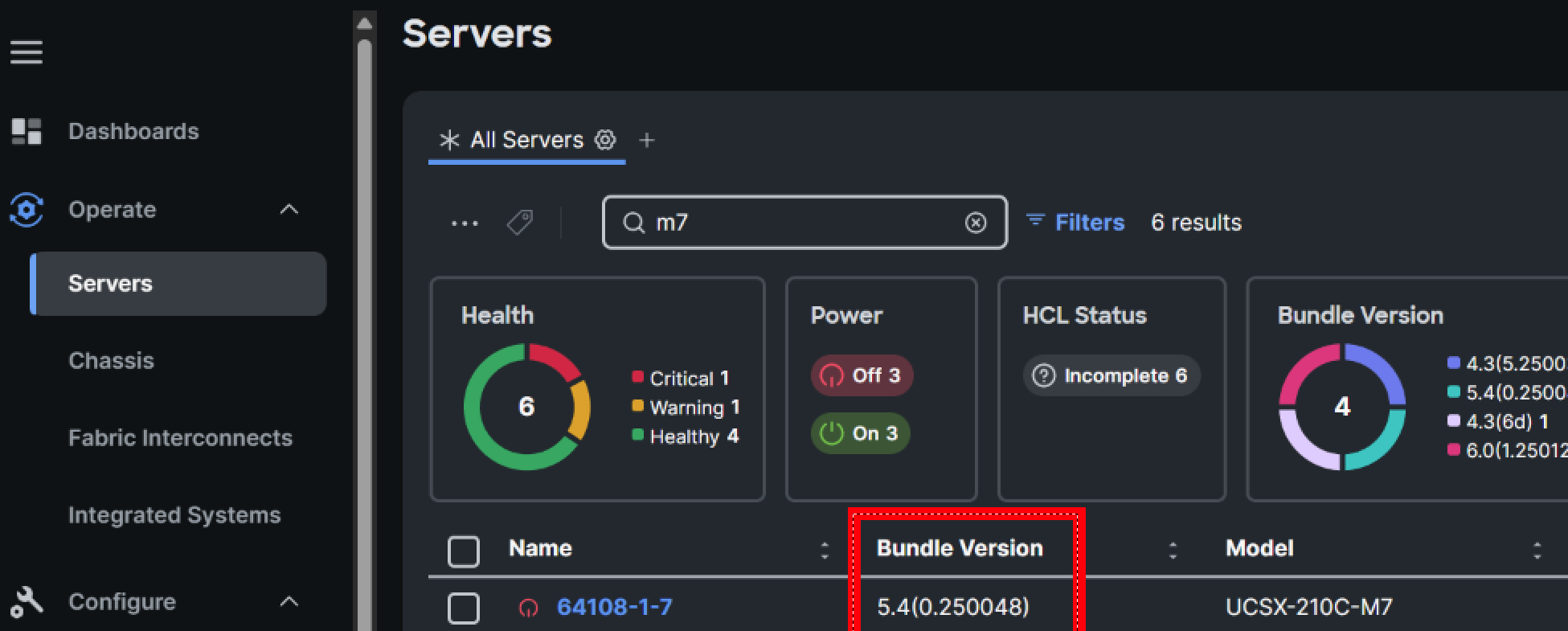
From the navigation bar in Cisco Intersight, go to the Operate section, then choose the Servers menu. To identify servers that may be impacted based on their firmware release, use the Filters option to search for affected Server Model and Bundle Version.
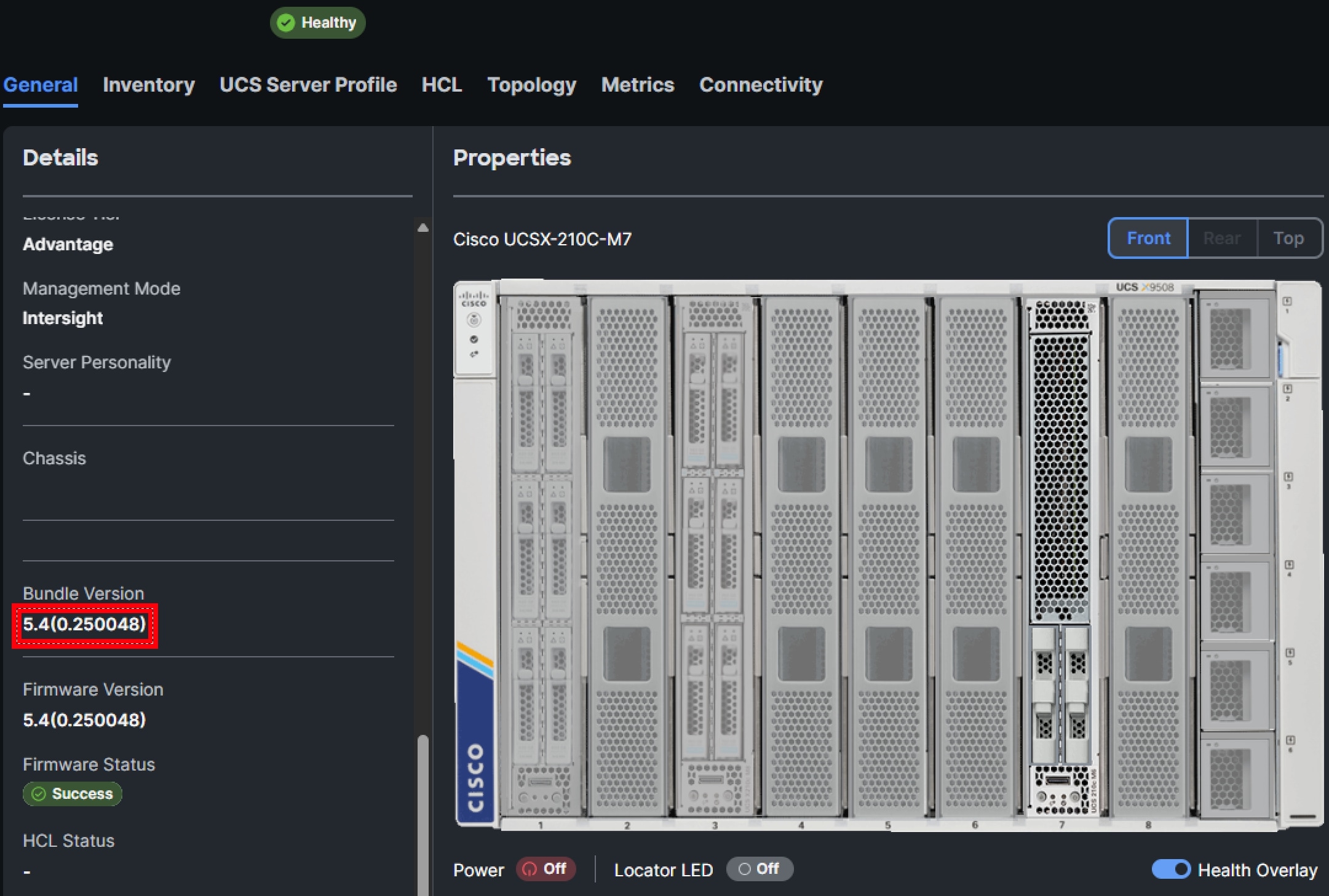
Click on a server, then scroll down in the left scroll window and search for Bundle Version to confirm there too.
Identify Impacted Servers Using UCS Manager
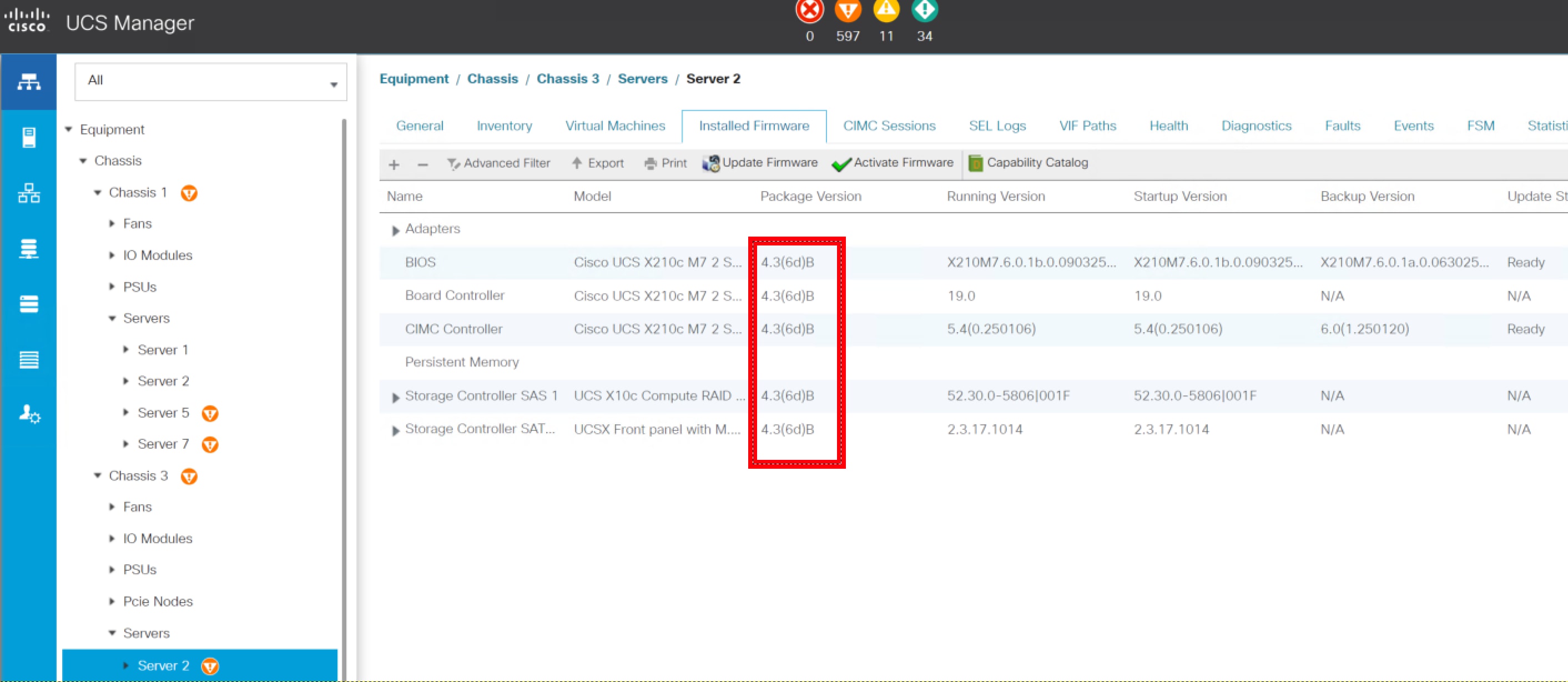
If using a host firmware policy:
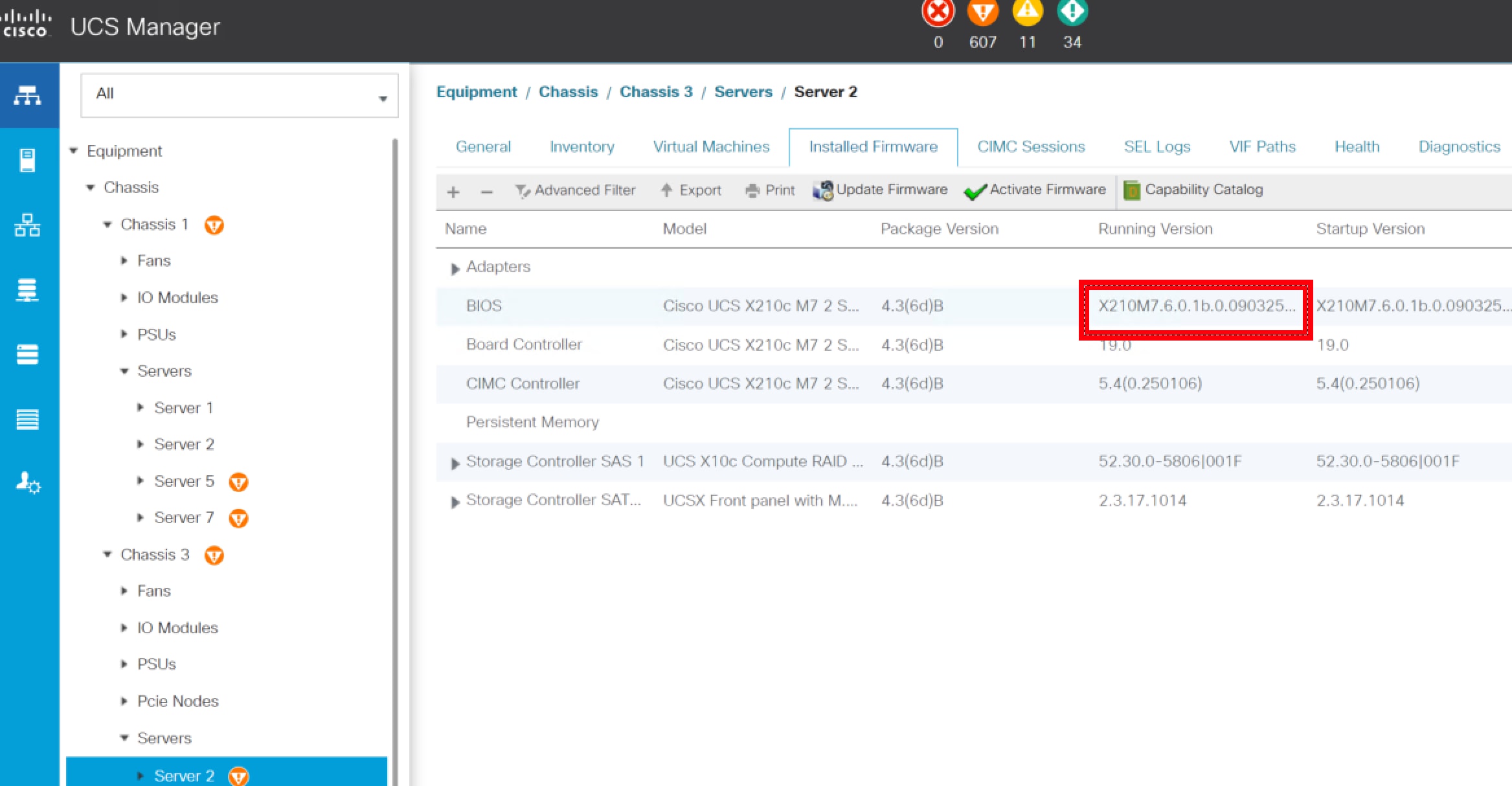
In the Equipment tab, choose Chassis > Servers > Server X. Click Installed Firmware. From there, check the package version for impact.
If not using a host firmware policy:
In the Equipment tab, choose Chassis > Servers > Server X. Click Installed Firmware. If the Running Version and Startup Version of BIOS are 4.3.6b, 4.3.6c, 6.0.1a, 6.0.1b then the server is on impacted firmware.
Identify Impacted Servers Using Standalone Cisco Integrated Management Controller
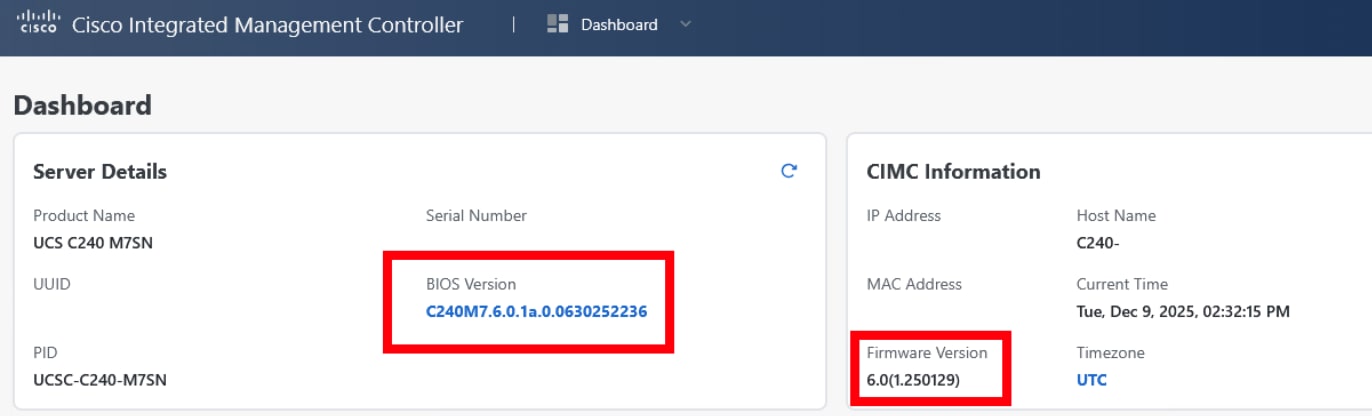
Upon login, on the Dashboard page, check the BIOS Version and Firmware Version. If the BIOS Version is 4.3.6b, 4.3.6c, 6.0.1a, or 6.0.1b or the Firmware Version is affected, the server could be impacted.
Revision History
| Version | Description | Section | Date |
| 1.1 | Added new first fixed releases for Release 4.3. | Workaround/Solution | 2026-JAN-23 |
| 1.0 | Initial Release | — | 2026-JAN-05 |
For More Information
For further assistance or for more information about this field notice, contact the Cisco Technical Assistance Center (TAC) using one of the following methods:
Receive Email Notification About New Field Notices
To receive email updates about Field Notices (reliability and safety issues), Security Advisories (network security issues), and end-of-life announcements for specific Cisco products, set up a profile in My Notifications.
 Feedback
Contact Cisco
- Open a Support Case

- (Requires a Cisco Service Contract)
This Document Applies to These Products
Unleash the Power of TAC's Virtual Assistance