Field Notice: FN74337 - Cisco 8202-32FH-M SUDI Authentication Failed/Serial Number Mismatch - Software Upgrade Recommended
Available Languages
Notice
THIS FIELD NOTICE IS PROVIDED ON AN "AS IS" BASIS AND DOES NOT IMPLY ANY KIND OF GUARANTEE OR WARRANTY, INCLUDING THE WARRANTY OF MERCHANTABILITY. YOUR USE OF THE INFORMATION ON THE FIELD NOTICE OR MATERIALS LINKED FROM THE FIELD NOTICE IS AT YOUR OWN RISK. CISCO RESERVES THE RIGHT TO CHANGE OR UPDATE THIS FIELD NOTICE AT ANY TIME.
Products Affected
| Affected Product Name | Description | Comments |
|---|---|---|
| 8202-32FH-M | Cisco 8200 2RU Chassis w/32x400G, XR SW, HBM & MACsec |
Defect Information
| Defect ID | Headline |
| CSCwr55284 | 8202-32FH-M: Syslog raised for SUDI Authentication failure for HW revision >=2.0 and XR release < 25.3.1 |
Problem Description
Cisco has found that the Ownership Voucher (OV) that is generated in the Cisco 8200 2RU Chassis model 8202-32FH-M is the serial number for the Route Processor (RP) rather than the serial number for the 8202-32FH-M fixed chassis. The OV is used only during boot up and is part of the SUDI authentication/Serial Number validation of Cisco hardware. In the new revision of the 8202-32FH-M, the OV is generated from the fixed chassis serial number. Customers who are using the new revision but running software older than Cisco IOS XR Software Release 25.3.1 will encounter a SUDI Authentication failed/Serial Number Mismatch notification, as shown in the How to Identify the Issue section of this Field Notice.
Note: This message will show only on a new revision of a 8202-32FH-M when running a release earlier than Cisco IOS XR Software Release 25.3.1. A Return Materials Authorization (RMA) will not fix this message.
Background
A single customer reported a SUDI Authentication failed/Serial Number Mismatch on a 8202-32FH-M in their lab. The error showed up in the CLI output. Cisco found this was due to an incorrect OV while performing a bootstrapping workflow.
Problem Symptom
If a customer is using the 2.0 Hardware ID along with Cisco IOS XR Software releases older than Release 25.3.1, then the following error message will show up on the console during the Cisco IOS XR Software boot up process during a reload.

This error has no functionality impact to the device.
Workaround/Solution
Solution
Note: An RMA of the device will not resolve this error.
Enabling either of the following two options will resolve the SUDI Authentication Failure/Serial Number Mismatch error:
- Upgrade to Cisco IOS XR Software Release 25.3.1 or later. IOS XR 25.3.1 is currently available on CCO.
- To fix a Cisco IOS XR Software release earlier than Release 25.3.1, install one of the SMUs listed in the table.
| Cisco IOS XR Software Release | Platform | SMU Image Name and Link | SMU Reload or Non-Reload |
|---|---|---|---|
| 7.10.2 | 8202-32FH-M | 8000-7.10.2.CSCwp66784.tar | Reload |
| 7.11.21 | 8202-32FH-M | 8000-7.11.21.CSCwp66784.tar | Reload |
| 24.2.21 | 8202-32FH-M | 8000-24.2.21.CSCwp66784.tar | Reload |
| 24.3.20 | 8202-32FH-M | 8000-24.3.20.CSCwp66784.tar | Reload |
| 24.3.30 | 8202-32FH-M | 8000-24.3.30.CSCwp66784.tar | Reload |
| 24.4.2 | 8202-32FH-M | 8000-24.4.2.CSCwp66784.tar | Reload |
| 25.1.2 | 8202-32FH-M | 8000-25.1.2.CSCwp66784.tar | Reload |
| 25.2.2 | 8202-32FH-M | 8000-25.2.2.CSCwp66784.tar | Reload |
| 25.2.21 | 8202-32FH-M | Future SMU release | Reload |
How to Identify Affected Products
The following error message will show up during the Cisco IOS XR Software boot up process and show up on the console during a reload:

Hardware ID and Cisco IOS XR Software Combinations
| Hardware Identifier | Cisco IOS XR Software Releases Earlier than 25.3.1 | Cisco IOS XR Software Releases 25.3.1 and Later |
|---|---|---|
| Old hardware identifier: 1.0 | No error. | No error. |
| New hardware identifier: 2.0 | SUDI Failure/SN Mismatch message will show up at Cisco IOS XR Software boot up process in the console (log level during every boot). | No error. |
Identify the Hardware Identifier using Router CLI
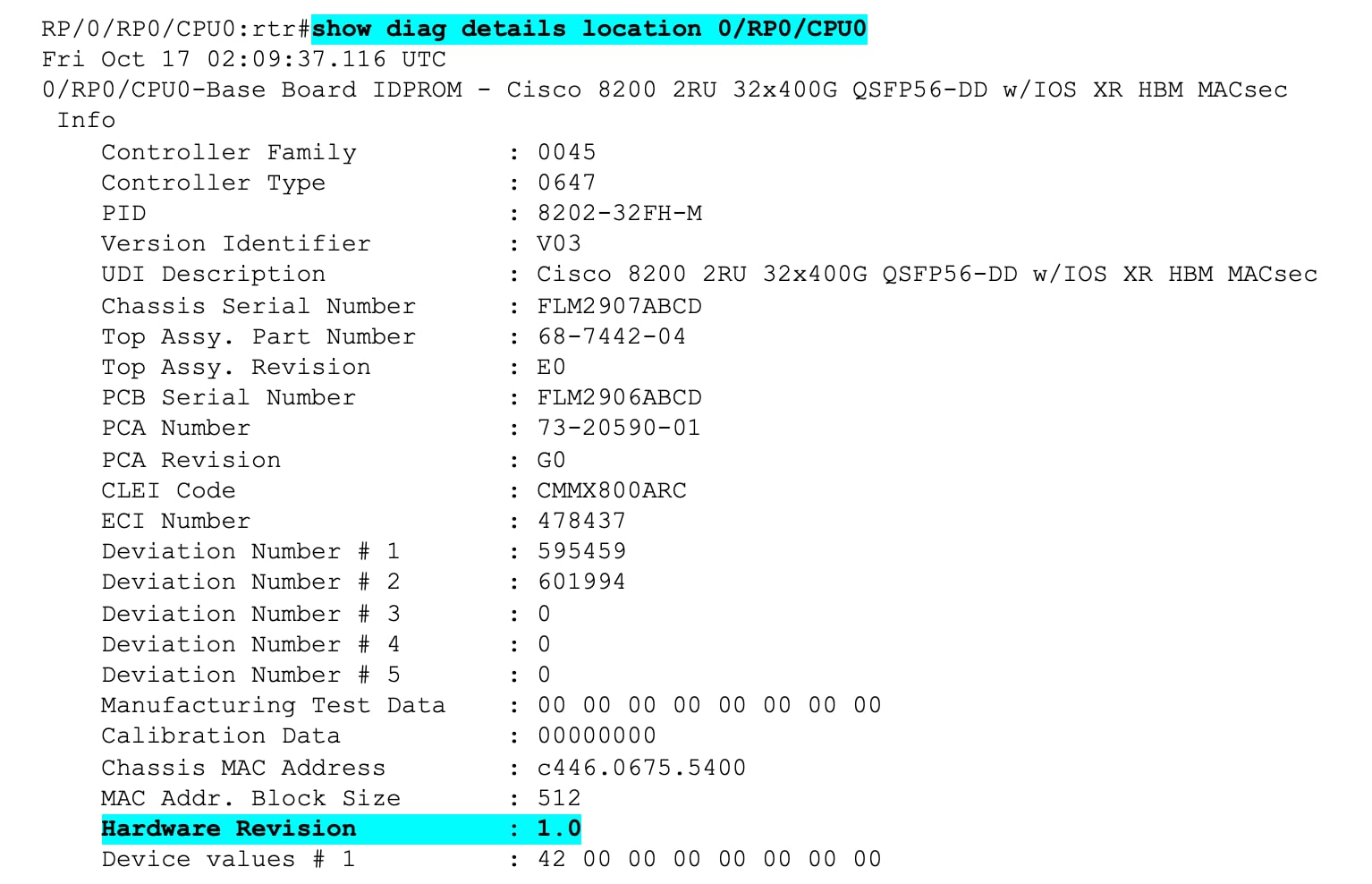
Use the show diag details location 0/RP0/CPU0 command, then view the Hardware Revision line to verify the new hardware revision. See the following output example to validate the hardware identifier.
Only units running hardware identifier 2.0 along with a Cisco IOS XR Software Release earlier than Release 25.3.1 will show the error. If the hardware identifier is 1.0, there will be no error.
Revision History
| Version | Description | Section | Date |
| 1.2 | Added more available SMUs. | Workaround/Solution | 2026-MAR-27 |
| 1.1 | Added SMU link for Release 7.10.2. | Workaround/Solution | 2026-FEB-05 |
| 1.0 | Initial Release | — | 2025-DEC-15 |
For More Information
For further assistance or for more information about this field notice, contact the Cisco Technical Assistance Center (TAC) using one of the following methods:
Receive Email Notification About New Field Notices
To receive email updates about Field Notices (reliability and safety issues), Security Advisories (network security issues), and end-of-life announcements for specific Cisco products, set up a profile in My Notifications.
 Feedback
Unleash the Power of TAC's Virtual Assistance