Introduction
This document describes how to valide a webhook in intersight.
Prerequisites
When Cisco Intersight sends a webhook to your application, it’s essentially sending an event (like a server alarm). But how do you know that the message actually came from Cisco and was not sent by someone else trying to trigger a fake action in your system?
To solve this, Intersight uses a Webhook Secret. Think of it like a seal on an envelope: if the seal is broken or looks different than expected, you do not trust the letter.
Setting the Secret
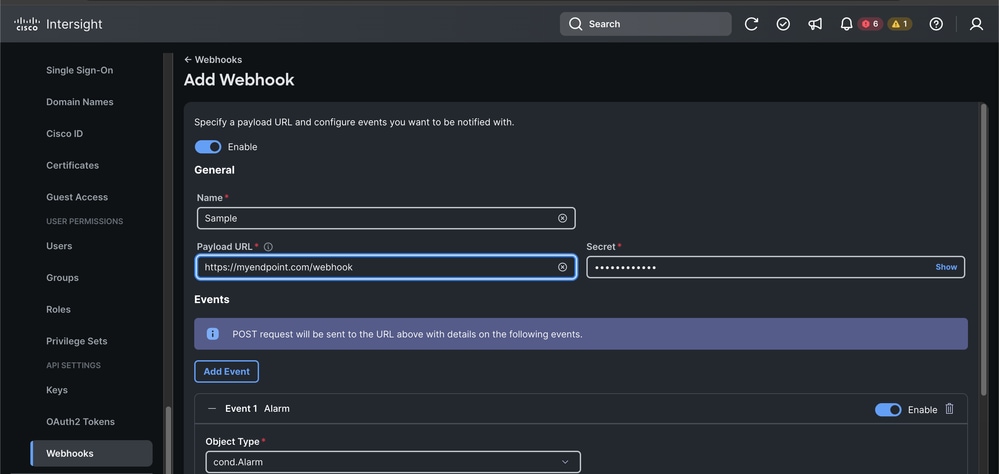
The first step is to configure the Webhook in Intersight and establish a Shared Secret.
- Log intoCisco Intersight.
- Navigate toSettings > Webhooks.
- When you create or edit a Webhook, you can see a field labeledSecret.
- Define this string yourself (for examplesecret). Once saved, Intersight uses this to sign every message it sends.
- Important:Save this secret in a secure manner and do not share it publicly.
The Validation Logic
Step 1: Verify the Seal (The Body Digest)
The first thing to check is if the message body was changed during its journey. We do this using a Hash (specifically SHA-256).
What is a Hash?
It is like a fingerprint. Even if you change one comma in a 10-page document, the fingerprint changes completely.
The Logic:
- Take theRaw Request Body(the JSON text exactly as it arrived).
- Run it through aSHA-256hashing function.
- Convert that binary fingerprint into a readable string usingBase64 Encoding.
- Compare your result to theDigestheader sent by Intersight.
- It must be like this:SHA-256=your_calculated_string.
Step 2: Prepare the Request Target
Intersight includes the destination of the message in its signature to prevent replay attacks (where someone steals a valid message and sends it to a different endpoint).
The Logic:Create a string that combines the HTTP method and the path.
Format:(request-target): post /your/endpoint/path
Step 3: Create the Signing String
Must be followed in strict order.
This is where most developers run into trouble. Intersight is extremely strict about the order, case-sensitivity, and formatting of the headers used for the signature. You must build a single block of text where each line is header-name: value.
The exact order required:
- (request-target) (From Step 2)
- host
- date
- digest (The full value of the Digest header from Step 1)
- content-type
- content-length
(request-target): post /api/webhook
host: myapp.example.com
date: Mon, 09 Mar 2026 12:50:29 GMT
digest: SHA-256=L6Y...
content-type: application/json
content-length: 542
Step 4: Generate the Signature (The HMAC)
Now you use the Secret Key (from the Intersight UI) to sign the string we just built. We use a method called HMAC-SHA256.
What is HMAC?
It is a way to sign a message using a secret key. Only someone with the same secret key can produce the same signature.
The Logic:
- Input:The Signing String from Step 3.
- Key:Your Webhook Secret.
- Process:Run the HMAC-SHA256 algorithm.
- Output:Take the resulting binary data andBase64 Encodeit.
Step 5: The Final Comparison
Intersight sends an Authorization header. You need to reconstruct what you expect that header to look like using the signature you just generated.
If your calculated string matches the Authorization header provided in the request, the message is authentic.
Important Considerations
- Clock Skew: Always check the dateheader. If the request is more than 5 minutes old compared to your server time, reject it to prevent replay attacks.
- Raw Body: Do not parse the JSON and then re-stringify it before validating the digest. Different libraries add different spacing, which will break the hash.
- Header Order: Intersight validates the signature based on the order defined in theheaders="..."section of theAuthorization header. Ensure your String to Sign matches that order exactly.
Verifiable Examples
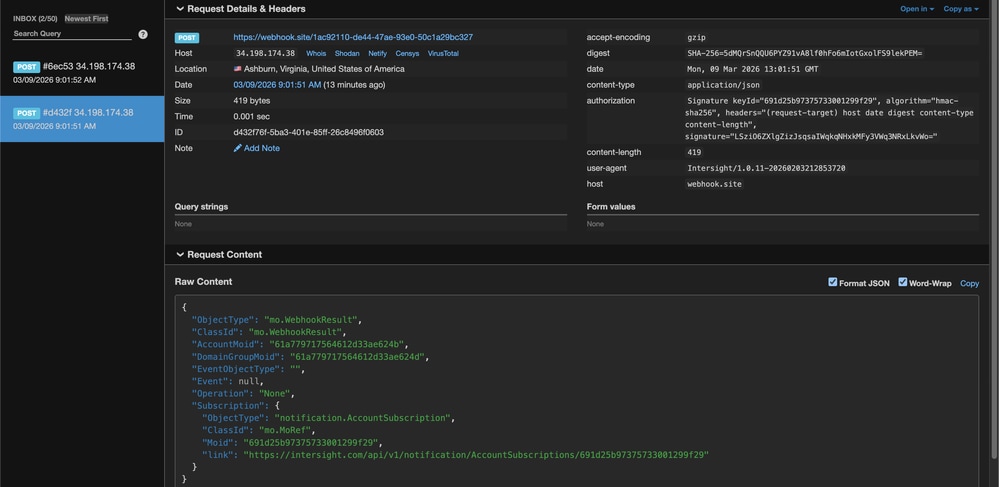
To help you test your code, here is an example based on a real webhook payload sent from Intersight.
Test Parameters
Secret:secret
Host:webhook.site
Path:/1ac92110-de44-47ae-93e0-50c1a29bc327
Mon, 09 Mar 2026 13:01:51 GMT
Content-Length:419
Payload:{"ObjectType":"mo.WebhookResult","ClassId":"mo.WebhookResult","AccountMoid":"61a779717564612d33ae624b","DomainGroupMoid":"61a779717564612d33ae624d","EventObjectType":"","Event":null,"Operation":"None","Subscription":{"ObjectType":"notification.AccountSubscription","ClassId":"mo.MoRef","Moid":"691d25b97375733001299f29","link":"https://intersight.com/api/v1/notification/AccountSubscriptions/691d25b97375733001299f29"}}
Expected Signature:LSziO6ZXlgZizJsqsaIWqkqNHxkMFy3VWq3NRxLkvWo=
Bash & OpenSSL Verification
#!/bin/bash

# 1. Setup the inputs
SECRET="secret"
EXPECTED_SIG="LSziO6ZXlgZizJsqsaIWqkqNHxkMFy3VWq3NRxLkvWo="
PAYLOAD='{"ObjectType":"mo.WebhookResult","ClassId":"mo.WebhookResult","AccountMoid":"61a779717564612d33ae624b","DomainGroupMoid":"61a779717564612d33ae624d","EventObjectType":"","Event":null,"Operation":"None","Subscription":{"ObjectType":"notification.AccountSubscription","ClassId":"mo.MoRef","Moid":"691d25b97375733001299f29","link":"https://intersight.com/api/v1/notification/AccountSubscriptions/691d25b97375733001299f29"}}'

# 2. Calculate the Body Digest
# We use echo -n to ensure no trailing newline is added to the payload
DIGEST=$(echo -n "$PAYLOAD" | openssl dgst -sha256 -binary | openssl base64)
FULL_DIGEST="SHA-256=$DIGEST"

# 3. Build the Signing String (Strict Order!)
# Note: The format must be exactly: header: value\n
SIGNING_STR="(request-target): post /1ac92110-de44-47ae-93e0-50c1a29bc327
host: webhook.site
date: Mon, 09 Mar 2026 13:01:51 GMT
digest: $FULL_DIGEST
content-type: application/json
content-length: 419"

# 4. Generate the HMAC-SHA256 Signature
CALCULATED_SIG=$(echo -n "$SIGNING_STR" | openssl dgst -sha256 -hmac "$SECRET" -binary | openssl base64)

# 5. Output the results for comparison
echo "--- Verification Results ---"
echo "Expected Signature:   $EXPECTED_SIG"
echo "Calculated Signature: $CALCULATED_SIG"

if [ "$EXPECTED_SIG" == "$CALCULATED_SIG" ]; then
    echo "SUCCESS: The signatures match!"
else
    echo "FAILURE: The signatures do not match."
fi
PowerShell Verification
# 1. Setup the inputs
$Secret = "secret"
$ExpectedDigest = "5dMQrSnQQU6PYZ91vA8lf0hFo6mIotGxolFS9lekPEM="
$ExpectedSig    = "LSziO6ZXlgZizJsqsaIWqkqNHxkMFy3VWq3NRxLkvWo="

$Payload = '{"ObjectType":"mo.WebhookResult","ClassId":"mo.WebhookResult","AccountMoid":"61a779717564612d33ae624b","DomainGroupMoid":"61a779717564612d33ae624d","EventObjectType":"","Event":null,"Operation":"None","Subscription":{"ObjectType":"notification.AccountSubscription","ClassId":"mo.MoRef","Moid":"691d25b97375733001299f29","link":"https://intersight.com/api/v1/notification/AccountSubscriptions/691d25b97375733001299f29"}}'

# 2. Calculate the Body Digest
$Sha256 = [System.Security.Cryptography.SHA256]::Create()
$PayloadBytes = [System.Text.Encoding]::UTF8.GetBytes($Payload)
$HashBytes = $Sha256.ComputeHash($PayloadBytes)
$CalculatedDigest = [Convert]::ToBase64String($HashBytes)

# 3. Build the Signing String (Strict Order!)
# Note: `n is the PowerShell newline character.
# The string must match the order in the Authorization header exactly.
$SigningStr = "(request-target): post /1ac92110-de44-47ae-93e0-50c1a29bc327`n" +
              "host: webhook.site`n" +
              "date: Mon, 09 Mar 2026 13:01:51 GMT`n" +
              "digest: SHA-256=$CalculatedDigest`n" +
              "content-type: application/json`n" +
              "content-length: 419"

# 4. Generate the HMAC-SHA256 Signature
$Hmac = New-Object System.Security.Cryptography.HMACSHA256
$Hmac.Key = [System.Text.Encoding]::UTF8.GetBytes($Secret)
$SigBytes = $Hmac.ComputeHash([System.Text.Encoding]::UTF8.GetBytes($SigningStr))
$CalculatedSig = [Convert]::ToBase64String($SigBytes)

# 5. Output the results for comparison
Write-Host "--- Verification Results ---" -ForegroundColor Cyan

Write-Host "Digest Match: " -NoNewline
if ($CalculatedDigest -eq $ExpectedDigest) {
    Write-Host "SUCCESS" -ForegroundColor Green
} else {
    Write-Host "FAILED" -ForegroundColor Red
}

Write-Host "Expected Signature:   $ExpectedSig"
Write-Host "Calculated Signature: $CalculatedSig"

if ($CalculatedSig -eq $ExpectedSig) {
    Write-Host "SUCCESS: The signatures match!" -ForegroundColor Green
} else {
    Write-Host "FAILURE: The signatures do not match." -ForegroundColor Red
}
Related Information

 Feedback