Configure Per-Device Configuration for Catalyst 9800 WLC in Catalyst Center
Available Languages
Contents
Introduction
This document describes how to use Per-Device Configuration in Catalyst Center to manage an existing Catalyst 9800 Wireless LAN Controller.
Prerequisites
Requirements
Cisco recommends that you have knowledge of these topics:
- Catalyst 9800 configuration model (wireless LAN (WLAN) profiles, policy profiles, and policy, site, and radio frequency (RF) tags)
- Cisco Catalyst Center inventory, site hierarchy, and device provisioning
Before you begin, ensure that:
- Catalyst Center runs Release 2.3.7.9 or later.
- The Catalyst 9800 runs Cisco IOS XE Release 17.12 or later.
- The Catalyst 9800 is in the Catalyst Center inventory (added through Discovery, manually, by comma-separated values (CSV) file import, or with the Prime Data Migration Tool) and its status is Managed.
- Network Configuration Protocol (NETCONF) is enabled on the Catalyst 9800 (netconf-yang, TCP port 830) and the NETCONF credentials are configured in Catalyst Center.
- The site hierarchy exists.
- The controller has not been provisioned with intent-based (network profile) provisioning. If it has, Per-Device Configuration opens in read-only mode.
Components Used
The information in this document is based on these software and hardware versions:
- Cisco Catalyst Center Release 3.2.3
- Cisco Catalyst 9800-CL Wireless Controller, Cisco IOS XE Release 17.18.4a
- Cisco access points in local mode 9178I
The information in this document was created from the devices in a specific lab environment. All of the devices used in this document started with a cleared (default) configuration. If your network is live, ensure that you understand the potential impact of any command.
Related Products
This document can also be used with these hardware and software versions:
- Cisco Catalyst Center Release 3.1.x. The configuration features are grouped under different menu names, as described in Configurable Areas.
- Catalyst 9800 Series Wireless LAN Controllers that run Cisco IOS XE Release 17.12 or later
Background Information
Catalyst Center traditionally manages wireless controllers with intent-based provisioning: you define the wireless design at the site level (service set identifiers (SSIDs), network profiles, RF profiles, and model configurations) and Catalyst Center generates and pushes the controller configuration. For controllers that already run a production configuration, this approach requires the configuration to be recreated or learned into the design.
In Catalyst Center Release 2.3.7.9, the Learn Device Configuration workflow was deprecated, and Per-Device Configuration for Catalyst 9800 Series Wireless LAN Controllers (WLCs) was introduced. Per-Device Configuration lets you create, edit, clone, and delete configuration objects on a single controller directly from Catalyst Center, in a way similar to the controller web interface. With it, Cisco Catalyst Center can manage an existing (brownfield) controller without moving its configuration to intent-based network profiles. The feature is disabled by default and is enabled per controller.
Per-Device Configuration versus Intent-Based Provisioning
| Per-Device Configuration |
Intent-based provisioning |
|
| Source of the configuration |
The objects that exist on the controller |
Site-level design (network profiles, network settings, model configurations) |
| Best fit |
Brownfield controllers, controller-specific settings |
Greenfield deployments, standardized multi-site designs |
| Redesign required |
No |
Yes, for existing controllers |
| Software-Defined Access (SD-Access) wireless |
Not supported |
Supported |
| Coexistence on the same controller |
Not supported. A controller provisioned with intent-based provisioning shows Per-Device Configuration in read-only mode |
- |
Configurable Areas
In Release 3.2.3, the Configuration tab of the device details window groups the controller features as shown in this table. The menu names are shown as they appear in the GUI. The available options depend on the Cisco IOS XE release that runs on the controller.
| Menu |
Features |
| SSID |
WLAN Profiles, Policy Profiles, Remote LAN Profiles, Remote LAN Policies, Policy Tags, 802.11be Profiles |
| RF |
RF Profiles, Radio Profiles, RF Tags, Multi BSSID Profiles, URWB Network Profile, RF Defaults |
| AP |
AP Join Profiles, Mesh, Power Profiles, Flex Profiles, Site Tags, Calendar Profiles |
| Tag Mapping |
AP Priming, Tag Mapping (tag priority, static, location-based, and rule-based mapping) |
| Security |
AAA, AAA Policy, ACL, EAP, URL Filters, Guest User, Web Auth, TrustSec, WPP, LSC, AP Certificate Policy |
| Global Wireless |
CleanAir, High Throughput, Media Parameters, ATF, Network Parameters, Global Parameters, RRM, Advanced, mDNS, Multicast, Location, Country, Cisco DNA Integration Settings, AP Policy, Wireless Geolocation |
| Services |
Local Policy, QoS, AVC, EoGRE, Media Stream, Guest LAN, Excluded Clients |
| Layer 2 |
VLAN, Interfaces, Discovery Protocols |
| Network Settings |
DNS, DHCP Pools, HTTP/HTTPS, SNMP, NTP |
| Layer 3 |
Routing |
| Administration |
Device, User Administration, AP Upgrade Configuration |
| Mobility |
Mobility |

Note: The menus were reorganized in Release 3.2.2. In Releases 2.3.7.x and 3.1.x, the same features are grouped under WLAN, RF, AP Join, Flex Profiles, Tags, Security, Global Radio, Global Wireless, Other, Layer 2, Network Settings, Layer 3, and Administration.
Feature History
| Catalyst Center release |
Change |
| 2.3.7.9 |
Per-Device Configuration introduced. Learn Device Configuration deprecated. |
| 2.3.7.11 |
802.11be enhancements for Cisco IOS XE 17.18.1 |
| 3.1.3 |
Additional parameters. Configure Access Points adds virtual LAN (VLAN) tag, Domain Name System (DNS), LAN port, and basic service set (BSS) color. Clone profiles across controllers. AP priming. Catalyst 9800-CL on Microsoft Azure. |
| 3.2.2 |
Menu reorganization. Cisco TrustSec (CTS) over HTTPS, SGT Exchange Protocol (SXP) over IPv6, MACsec. Support for Cisco IOS XE 17.18.2 and 26.1.1. Warnings for insecure options such as Lightweight Extensible Authentication Protocol (LEAP). |
Restrictions
- Per-Device Configuration and intent-based provisioning cannot be used together on the same controller.
- SD-Access (fabric) wireless is not supported.
- AI-Enhanced Radio Resource Management (RRM) is supported only with the Enable Without Device Provisioning option and supported only for assurance use case.
- Layer 3 static routes are supported without virtual routing and forwarding (VRF).
- In IPv6 deployments, Per-Device Configuration continues to support IPv4 configurations (Release 3.2.3).
- After Per-Device Configuration is enabled on a controller, it cannot be disabled. Configuration objects created with it can be edited or deleted at any time.
Configure
Network Diagram
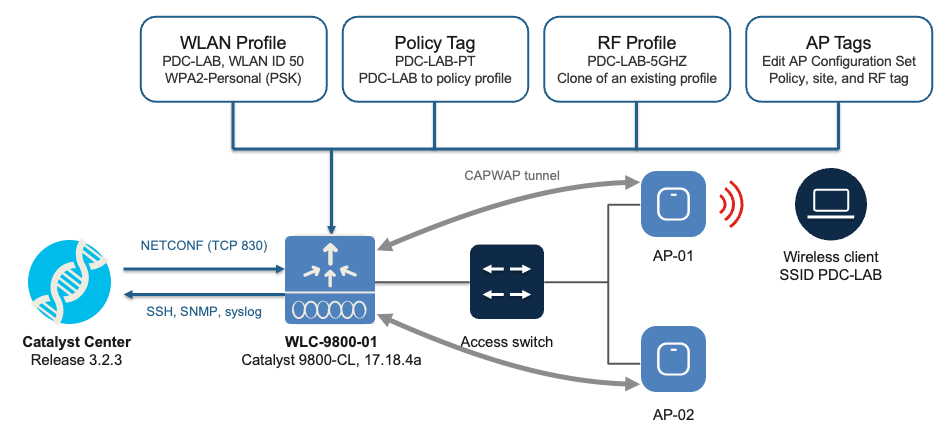
This image shows the topology used in this example. Catalyst Center manages the controller with NETCONF, and the access points join the controller with Control and Provisioning of Wireless Access Points (CAPWAP).
Configurations
In this example, the controller already runs WLANs, tags, and profiles, as in a brownfield deployment. Per-Device Configuration is used to add a WLAN, preview and deploy it, map it to a policy profile in a policy tag, clone an RF profile, and assign tags to the APs. Every change in Per-Device Configuration Uses the same Review and Provision, Preview, and Deploy flow, shown in detail in Step 5.
Step 1. Prepare the Catalyst 9800 for Catalyst Center
Catalyst Center uses NETCONF to read and write the controller configuration. Ensure NETCONF is enabled on the controller:
WLC# configure terminal
WLC(config)# netconf-yang
WLC(config)# end
Note: NETCONF requires aaa new-model and a privilege level 15 user that is authorized by the authentication, authorization, and accounting (AAA) method lists in use. On a production controller, do not change the existing AAA method lists without review, because that can affect administrator access.
Verify that the NETCONF processes run:
WLC# show platform software yang-management process
confd : Running
nesd : Running
syncfd : Running
ncsshd : Running
dmiauthd : Running
nginx : Running
ndbmand : Running
pubd : Running
gnmib : Not Running
Step 2. Assign the Controller to a Site and Resync
- Navigate to Provision > Inventory.
- Select the controller, and choose Actions > Provision > Assign Device to Site. Select the building that the controller serves and click Assign and wait until the controller shows Managed and Reachable.
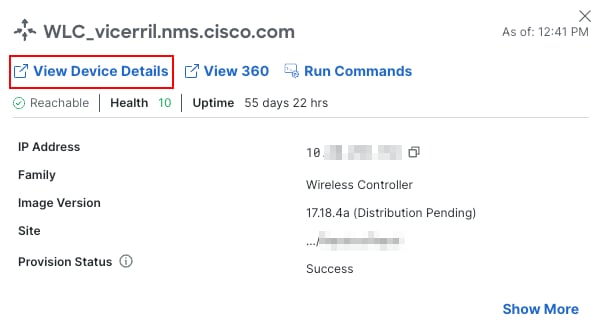
- Click the controller name to open the device details window and selec View Device Details.
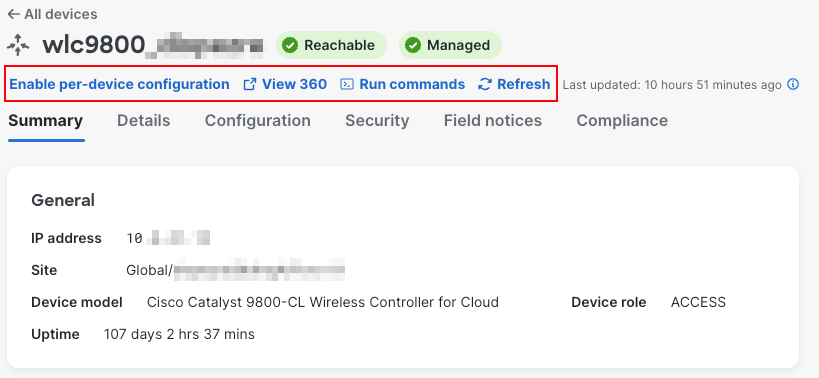
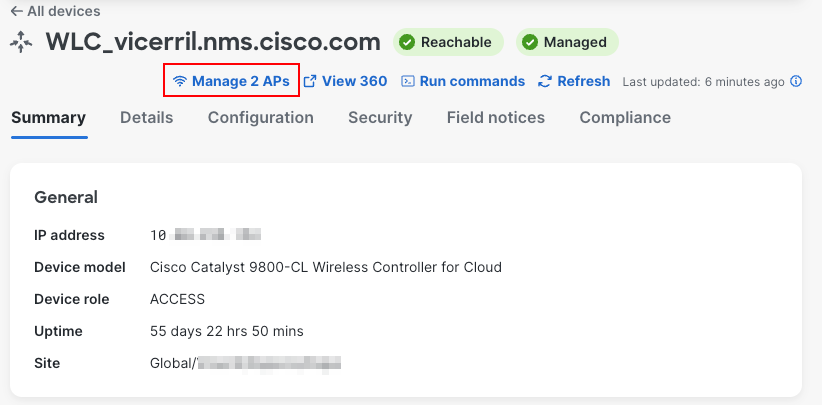
- The device detail page is opened and the menu shows the status of the controller and the Enable per-device configuration, View 360, Run commands, and Refresh options.
Step 3. Enable Per-Device Configuration
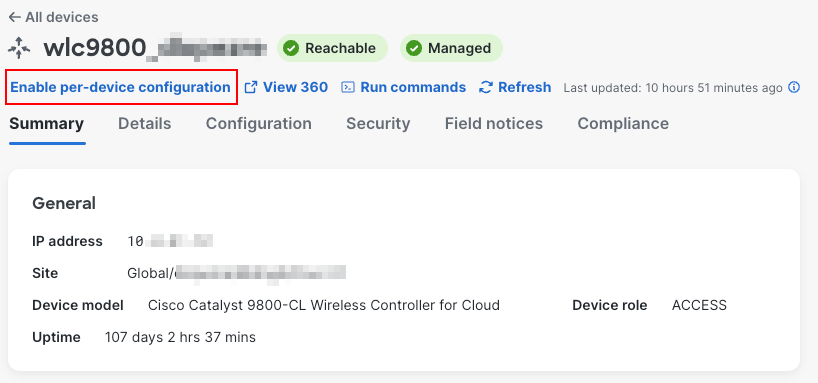
- Enable Per-Device Configuration for the controller and confirm
- Resync the controller (Actions > Inventory > Resync Device) so that Catalyst Center reads the current configuration.
- A new option in the device details shows the number of APs managed and registered by that WLC
- In the device details window of the controller, click the Configuration tab.
After the resync, the Configuration tab shows the label Per-device configuration and lists the existing objects of the controller. The left menu groups the features (SSID, RF, AP, Tag Mapping, Security, Global Wireless, Services, Layer 2, Network Settings, Layer 3, Administration, and Mobility), and each table offers Add and Clone from another WLC.
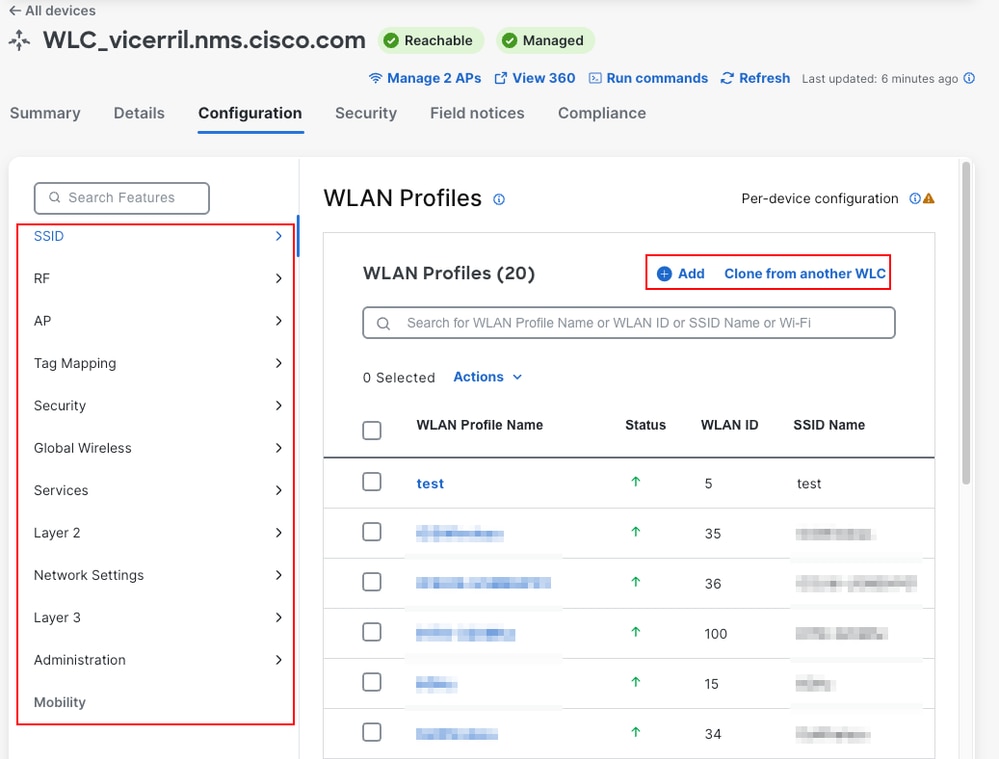
The information icon next to the label displays: Per-device configuration allows changes to be made by editing the configuration directly on this page.
Note: Per-Device Configuration cannot be disabled after it is enabled.
Step 4. Create a WLAN Profile
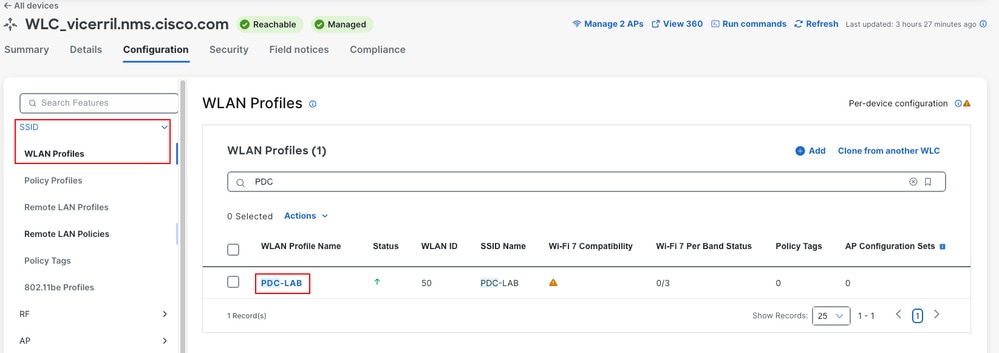
- In the Configuration tab, choose SSID > WLAN Profiles and click Add.
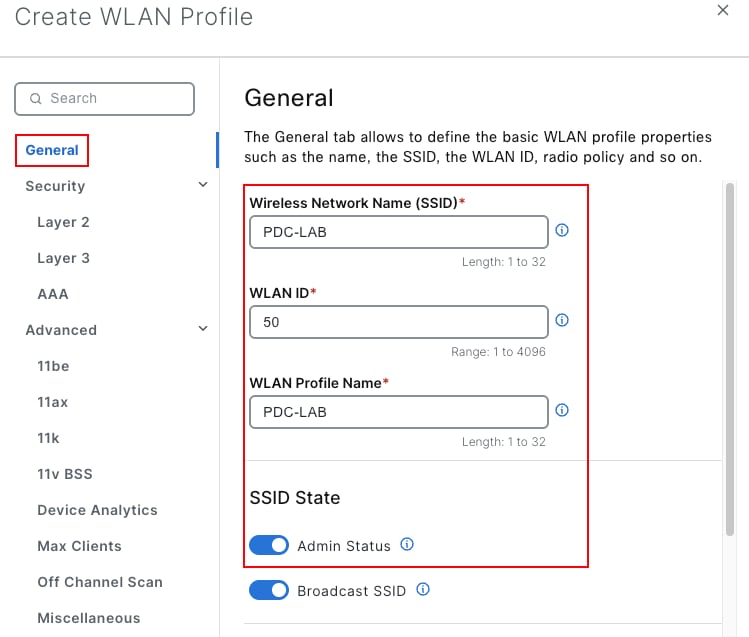
- In General, configure:
- Wireless Network Name (SSID): PDC-LAB
- WLAN ID: 50 (range 1 to 4096; use an ID that is not in use on the controller)
- WLAN Profile Name: PDC-LAB
- SSID State: Admin Status Enabled
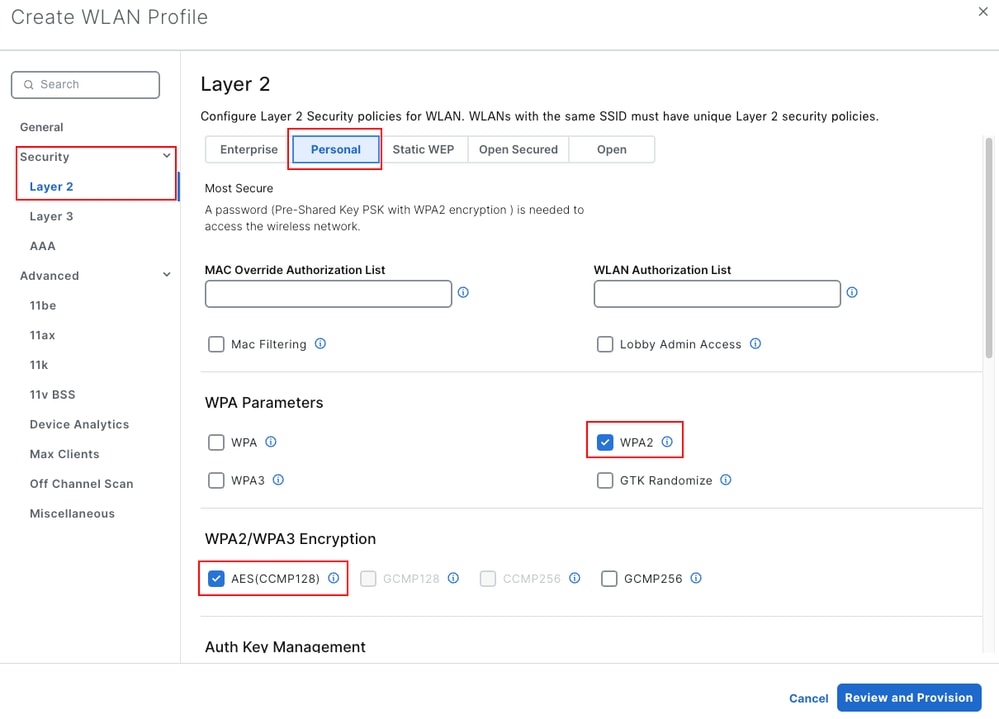
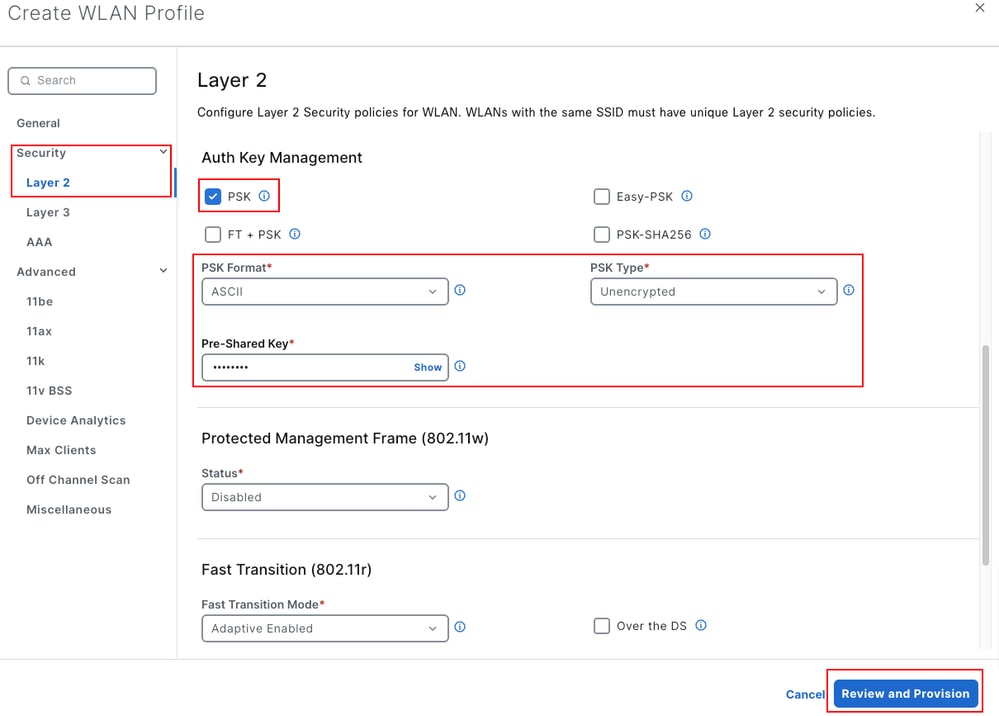
- In Security > Layer 2, choose Personal, and keep WPA2 (Wi-Fi Protected Access 2), AES(CCMP128), and the PSK (pre-shared key) authentication key management (AKM). Set PSK Format to ASCII and enter the Pre-Shared Key. The default Layer 2 option is Enterprise. Advanced contains the 11be, 11ax, 11k, and 11v settings.
- Click Review and Provision.
Step 5. Preview and Deploy the Change
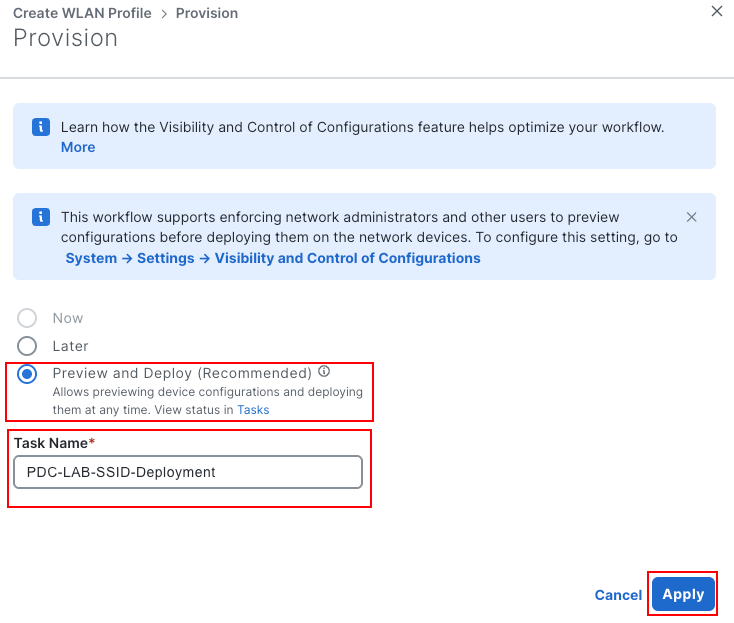
- In the Provision pane, choose how to deploy:
- Now deploys immediately. It is not available when System > Settings > Visibility and Control of Configurations enforces a preview before deployment, as in this lab.
- Later schedules the deployment.
- Preview and Deploy (Recommended) prepares the configuration so you can review it without an impact on the running network, and deploy it later.
- Choose Preview and Deploy, enter a Task Name (this example uses PDC-Create-WLAN-PDC-LAB), and click Apply.
- Catalyst Center shows Step 2 of 3: Preparing Devices and Configuration Models while it calculates the configuration. To review it later, click Exit and Preview Later. The work item stays in Activities > Tasks.
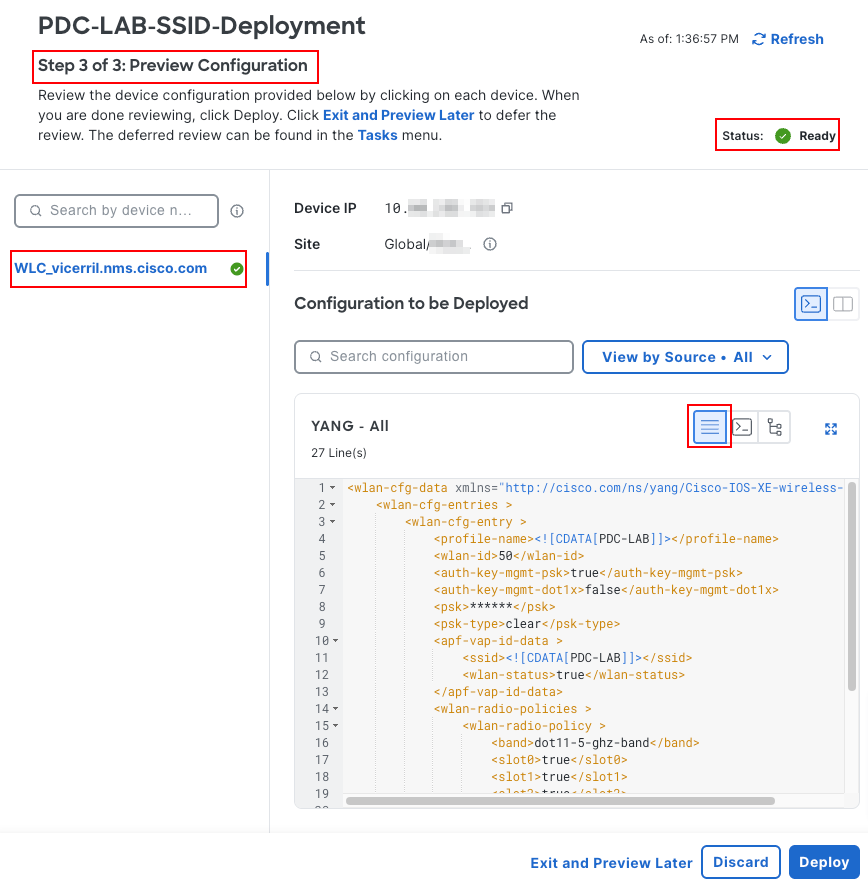
- In Step 3 of 3: Preview Configuration, click the controller name. Configuration to be Deployed shows the NETCONF payload that is based on the YANG (Yet Another Next Generation) data models (DEFAULT view). For a WLAN, the payload uses the Cisco-IOS-XE-wireless-wlan-cfg model.
- Click YANG_TO_CLI to see the Generated CLI, which is the command-line interface (CLI) equivalent of the YANG payload. As the window states, this CLI is a preview only and must not be applied directly on the device.
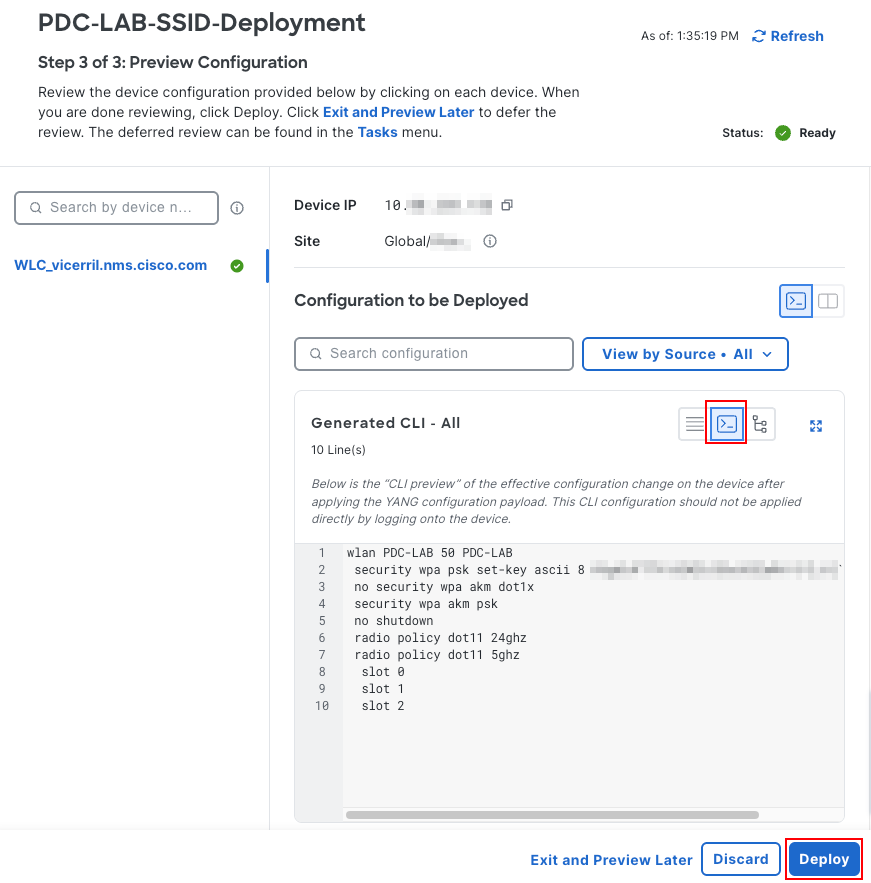
The Generated CLI for this example is:
wlan PDC-LAB 50 PDC-LAB
 security wpa psk set-key ascii 8 <encrypted-key>
 no security wpa akm dot1x
 security wpa akm psk
 radio policy dot11 24ghz
 radio policy dot11 5ghz
  slot 0
  slot 1
  slot 2
- Click Deploy. In the Deploy pane, choose Now (or Later), confirm the Task Name, and click Submit.
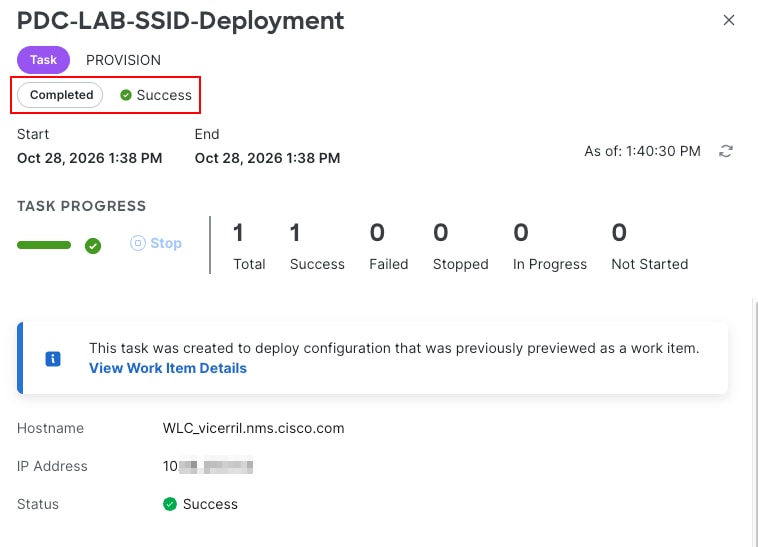
- Navigate to Activities > Tasks and open the task. The task type is PROVISION, and the status changes to Success when the controller accepts the configuration.
Step 6. Map the WLAN to a Policy Profile in a Policy Tag
- If the WLAN needs a dedicated policy profile (for example, with a different VLAN), create it first in SSID > Policy Profiles with Add. This example uses the existing default-policy-profile.
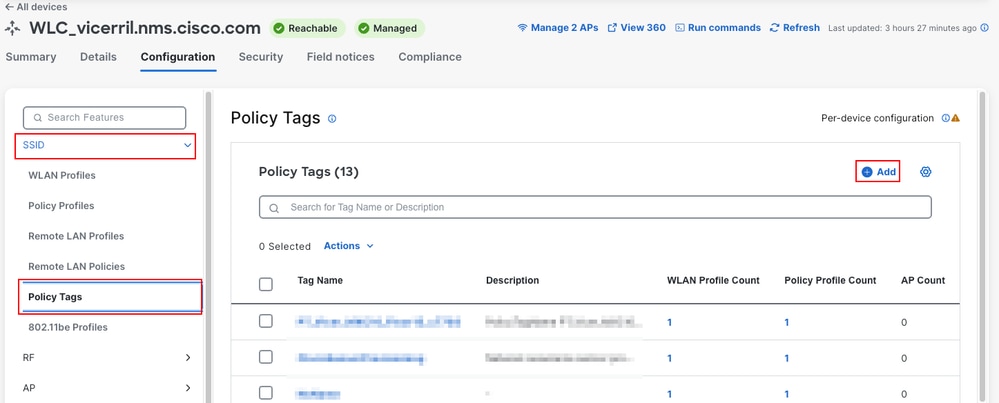
- Choose SSID > Policy Tags and click Add.
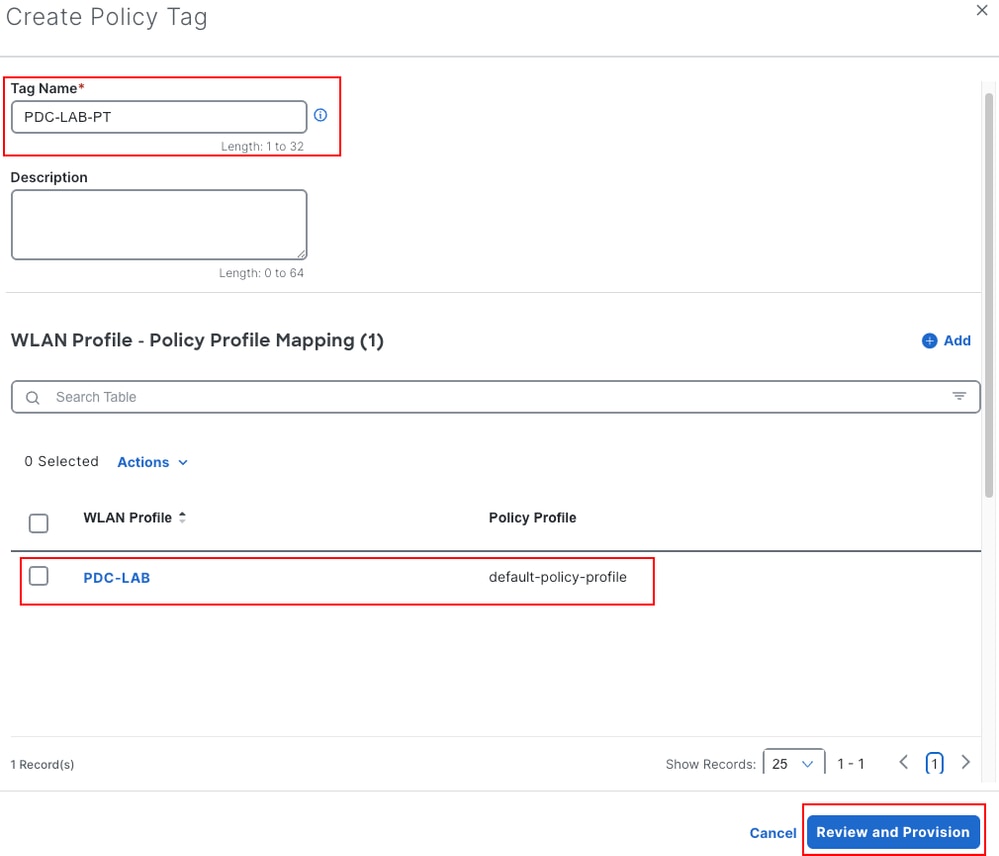
- In Create Policy Tag, enter the name PDC-LAB-PT.
- In WLAN Profile - Policy Profile Mapping, click Add, select the WLAN profile PDC-LAB and the policy profile, and save the mapping.
- Click Review and Provision, and complete the deployment as described in Step 5.
Step 7. Clone an Existing RF Profile
Cloning reuses an existing object of the controller as a starting point.
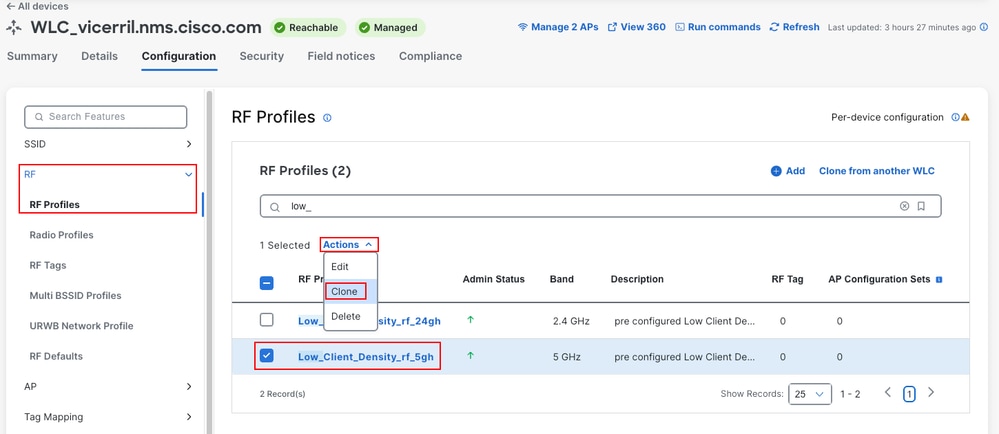
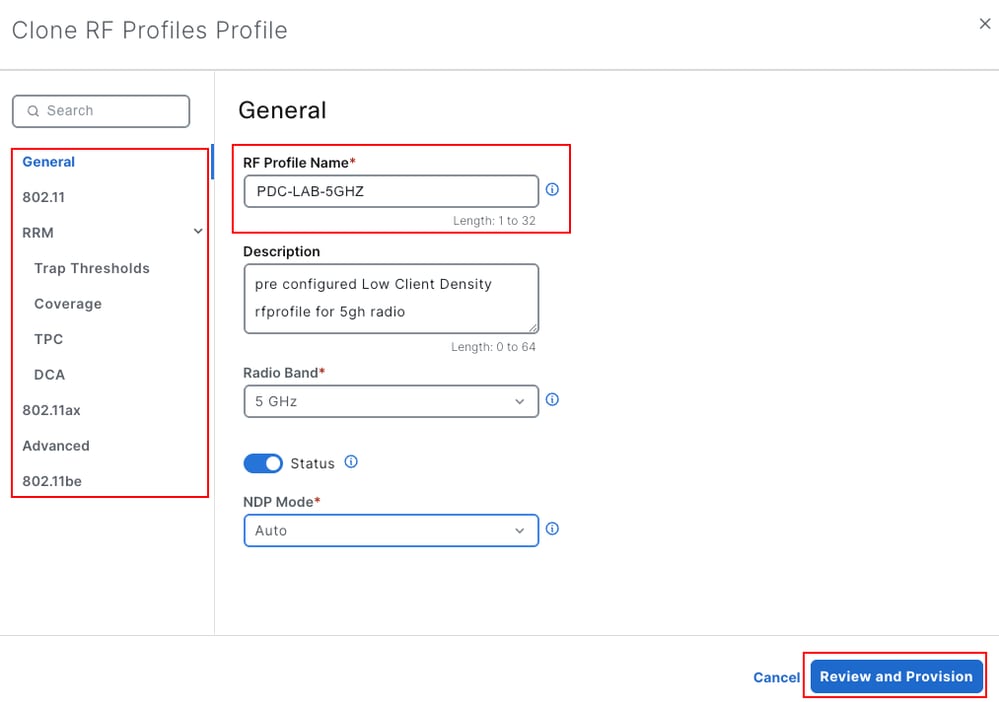
- Choose RF > RF Profiles, select an existing profile (for example, Low_Client_Density_rf_5gh), and choose Actions > Clone.
- In General, enter the RF Profile Name PDC-LAB-5GHZ and adjust the parameters in the 802.11, RRM, 802.11ax, Advanced, and 802.11be sections as needed.
- Click Review and Provision, and complete the deployment as described in Step 5.

Tip: To copy objects from another Catalyst 9800 that is managed by the same Catalyst Center, use Clone from another WLC in the table of the object type.
Step 8. Assign Tags to the Access Points
- In the header of the device details window, click Manage APs. The Operational Access Points table shows the Policy Tag, Site Tag, RF Tag, and Tag Source of each AP. This table shows the state of the network after the last controller resync.
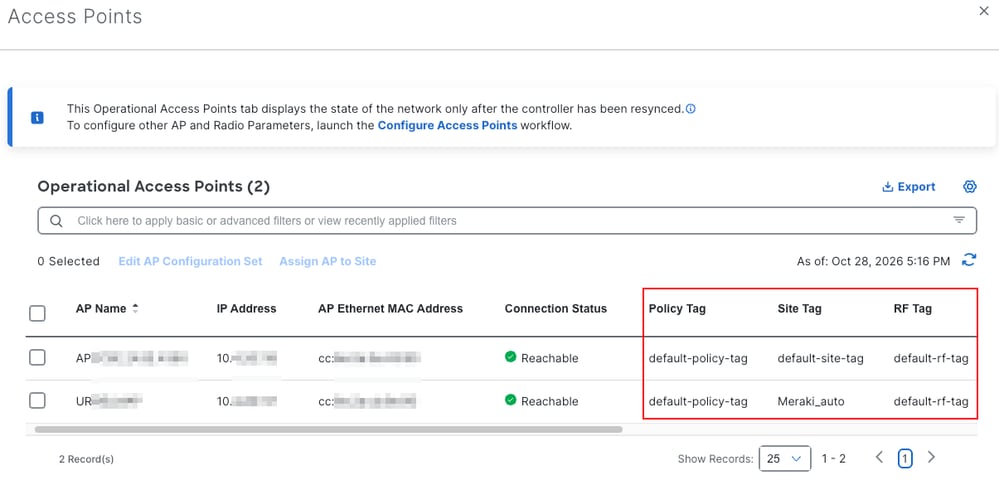
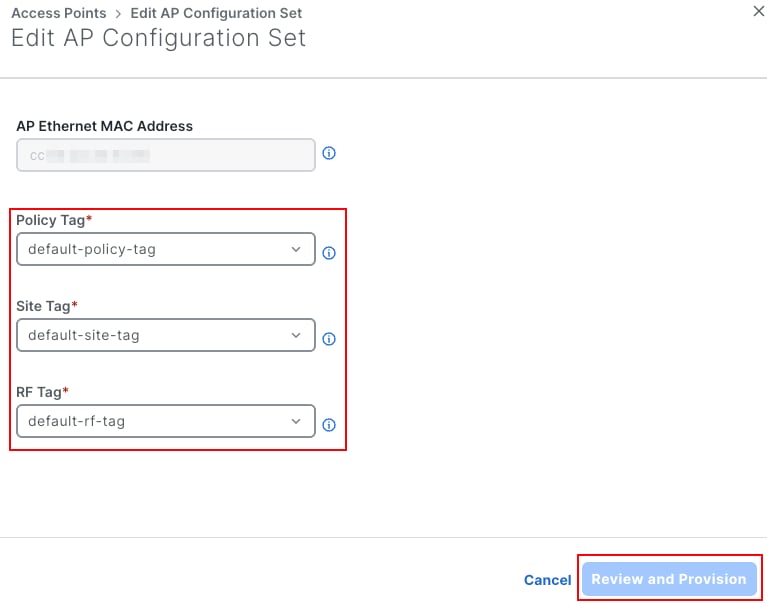
- Select the AP and click Edit AP Configuration Set.
- Select the Policy Tag (for example, PDC-LAB-PT), Site Tag, and RF Tag.
- Click Review and Provision, and complete the deployment as described in Step 5.

Caution: A tag change can make the AP rejoin the controller or reset its radios, which disconnects its clients. Plan tag changes for production APs in a maintenance window. Before you change the tags, record the current tags of the APs so that you can revert them.
Step 9. Delete a Configuration Object
Per-Device Configuration also removes objects from the controller with the same preview and deploy flow. This example deletes the WLAN PDC-LAB:
- Choose SSID > WLAN Profiles, select PDC-LAB, and choose Actions > Delete.
- Confirm the warning Are you sure you want to delete the selected WLAN Profiles? with Yes.
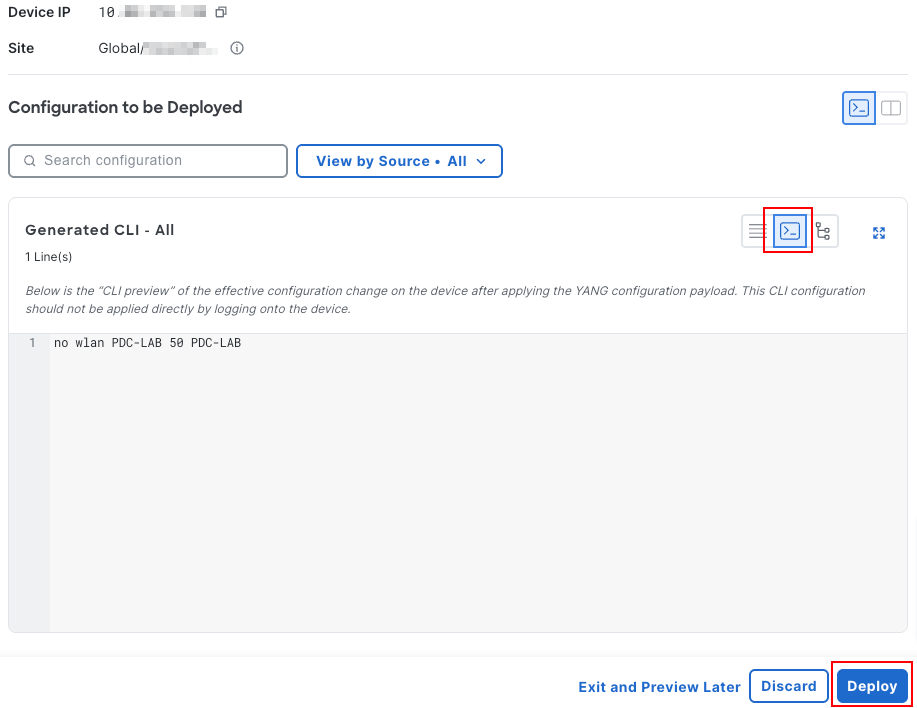
- Complete the deployment as described in Step 5. The YANG payload uses the delete operation on the WLAN entry, and the Generated CLI is:
no wlan PDC-LAB 50 PDC-LAB
Verify
Use this section to confirm that your configuration works properly.
On Catalyst Center
- The provisioning task shows Success in Activities > Tasks (Image 8).
- In the Configuration tab of the controller, the new object is listed. In this example, SSID > WLAN Profiles lists PDC-LAB with WLAN ID 50, as shown in Image 14. The WLAN is not mapped to a policy tag yet, so its Policy Tags count is 0.
- In Manage APs, the Operational Access Points table shows the tags assigned to each AP (Image 11).
On the Catalyst 9800
You can run these commands on the controller CLI, or from Run commands (Command Runner) in the header of the device details window.
- show running-config | section wlan PDC-LAB - Shows the WLAN configuration that Catalyst Center pushed.
- show wlan summary - Lists the WLANs configured on the controller and their status.
- show wireless tag policy detailed PDC-LAB-PT - Shows the WLAN to policy profile mappings of the policy tag.
- show ap tag summary - Shows the policy, site, and RF tags of each AP and the source of the tags.
- show logging | include DMI-5-AUTH_PASSED|NDBMAN-5-CONFIG_I - Shows the NETCONF sessions and configuration changes made by Catalyst Center.
- show wireless client summary - Lists the associated clients and their state.
This is the WLAN configuration on the controller after the deployment:
WLC# show running-config | section wlan PDC-LAB
wlan PDC-LAB 50 PDC-LAB
 radio policy dot11 24ghz
 radio policy dot11 5ghz
  slot 0
  slot 1
  slot 2
 security wpa psk set-key ascii 8 xxxxxxxx
 no security wpa akm dot1x
 security wpa akm psk
The controller logs show that Catalyst Center (10.X.X.X) opened a NETCONF session and configured the wireless feature:
WLC# show logging | include DMI-5-AUTH_PASSED|NDBMAN-5-CONFIG_I
Oct 27 21:22:58.653: %DMI-5-AUTH_PASSED: Chassis 1 R0/0: dmiauthd: User 'USERX'
 authenticated successfully from 192.168.10.10:62453  for netconf over ssh.
 External groups: PRIV15
Oct 27 21:24:13.977: %NDBMAN-5-CONFIG_I: Chassis 1 R0/0: ndbmand: Configured
 feature 'wireless' from 192.168.10.10:62453 via NETCONF user dnac
 session 5311, transaction-id 5924
The %NDBMAN-5-CONFIG_I message shows the feature that was configured, the Catalyst Center address, and the NETCONF username.
After the APs use the policy tag, connect a client to PDC-LAB and confirm with show wireless client summary that the client reaches the Run state.
Out-of-Band Changes
Catalyst Center detects changes that are made outside Catalyst Center, for example from the controller CLI or web interface. As the warning icon next to the Per-device configuration label explains (Image 15), these changes are imported at the next inventory sync and can cause conflicts. To keep the configuration consistent, use Catalyst Center for all the supported configurations.
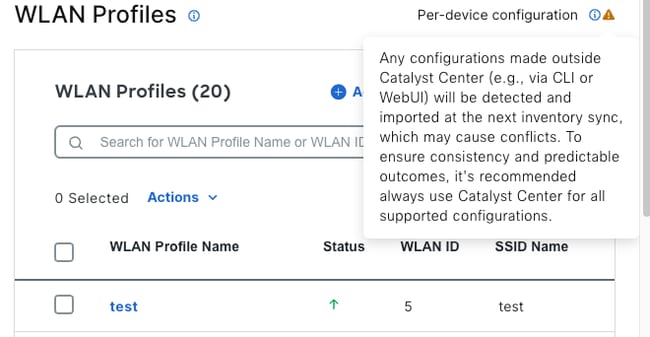 Image 15. Warning about configurations made outside Catalyst Center
From Release 3.1.3, a configuration change event resyncs only the controller. To refresh AP data, run a full resync with Actions > Inventory > Resync Device.
Troubleshoot
This section provides information you can use to troubleshoot your configuration.
The Enable Per-Device Configuration Option Is Not Shown
- Confirm that Catalyst Center runs Release 2.3.7.9 or later.
- Confirm that the controller is a Catalyst 9800 Series controller with Cisco IOS XE Release 17.12 or later.
- Confirm that the controller is Managed and Reachable in the inventory. Resync it if needed.
- Per-Device Configuration is not supported for SD-Access (fabric) wireless.
Per-Device Configuration Opens in Read-Only Mode
This is expected when the controller was already provisioned with intent-based (network profile) provisioning. The two models cannot be combined on the same controller. In the Configuration tab of the device details window, the label Managed via Site-Based Network Profiles is shown, and its information icon displays: This device is managed using site-based Network Profiles. All configurations are in read-only mode. Changes can only be made via the Network Profile.
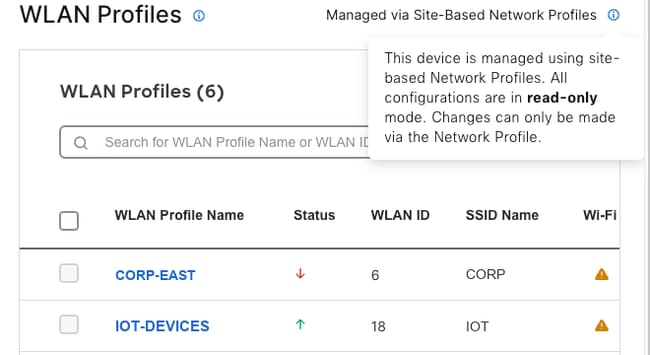 Image 16. Controller managed by site-based network profiles in read-only mode
The Provisioning Task Fails
- Open the failed task in Activities > Tasks and review the error details.
- Resync the controller and try again.
- On the controller, verify NETCONF:
- show platform software yang-management process - All the processes must show Running.
- show netconf-yang sessions - Lists the active NETCONF sessions, including the session from Catalyst Center.
- Confirm that the NETCONF (TCP 830) and Secure Shell (SSH) credentials in Catalyst Center are valid and that no firewall blocks the connection between Catalyst Center and the controller.
Changes Made on the Controller Do Not Appear in Catalyst Center
Resync the controller with Actions > Inventory > Resync Device. From Release 3.1.3, a configuration change event resyncs only the controller, not its APs, so a full resync is required to refresh AP data.
Revision History
| Revision | Publish Date | Comments |
|---|---|---|
1.0 |
29-Oct-2026
|
Initial Release |
 Feedback
Contact Cisco
- Open a Support Case

- (Requires a Cisco Service Contract)