Configure Switched Port Analyzer on ACI
Available Languages
Contents
Introduction
This document describes how to configure Switched Port Analyzer (SPAN) on Cisco Application Centric Infrastructure (ACI) version 5.x and 6.x.
Background Information
In general, there are three types of SPAN. Local SPAN, Remote SPAN (RSPAN) and Encapsulated Remote SPAN (ERSPAN). The differences between these SPANs are mainly the destination of copy packets. Cisco ACI supports Local SPAN and ERSPAN.

Note: This document assumes that readers are already familiar with SPAN and differences between Local SPAN and ERSPAN.
SPAN Type in Cisco ACI
Cisco ACI has three types of SPAN; Fabric SPAN, Tenant SPAN and Access SPAN. The difference between each SPANs is the source of copy packets.
As mentioned previously,
Fabric SPANis to capture packets that come in and go out frominterfaces between Leaf and Spine switches.Access SPANis to capture packets that come in and go out frominterfaces between Leaf switches and external devices.Tenant SPANis to capture packets that come in and go out fromEndPoint Group (EPG) on ACI Leaf switches.
SPAN to CPUis to capture packets that come in and go out frominterfaces between Leaf switches and external devices(Starting in 6.2).
This SPAN name corresponds to where to be configured on Cisco ACI GUI.
- Fabric SPAN is configured under
Fabric > Fabric Policies - Access SPAN is configured under
Fabric > Access Policies - SPAN to CPU is configured under
Fabric > Access Policies - Tenant SPAN is configured under
Tenants > {each tenant}
As for the destination of each SPAN, only Access SPAN is capable of both Local SPAN and ERSPAN. The other two SPAN (Fabric and Tenant) are only capable of ERSPAN.
Limitations and Guidelines
Please review the Limitations & Guidelines from Cisco APIC Troubleshooting Guide. It is mentioned in Troubleshooting Tools and Methodology > Using SPAN.
Configuration
This section introduces brief examples that relate to the configuration for each SPAN Type. There are specific sample cases on how to select the span type in the later section.
SPAN Configuration is also described in Cisco APIC Troubleshooting Guide: Troubleshooting Tools and methodology > Using SPAN.
Access SPAN (ERSPAN)
Sample Topology
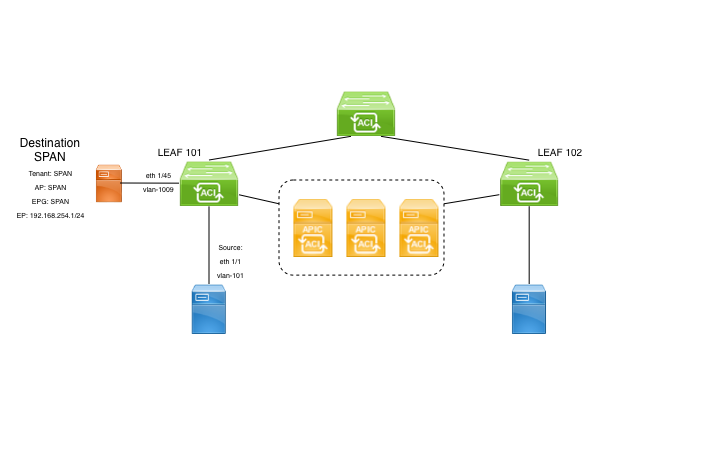 Image 1: Sample topology for access ERSPAN
Configuration Example
Navigate to Fabric > Access Policies > Policies > Troubleshooting > SPAN.
- Right click on 'SPAN Destination Groups' and select option to create
SPAN Destination Group(DST_EPG).
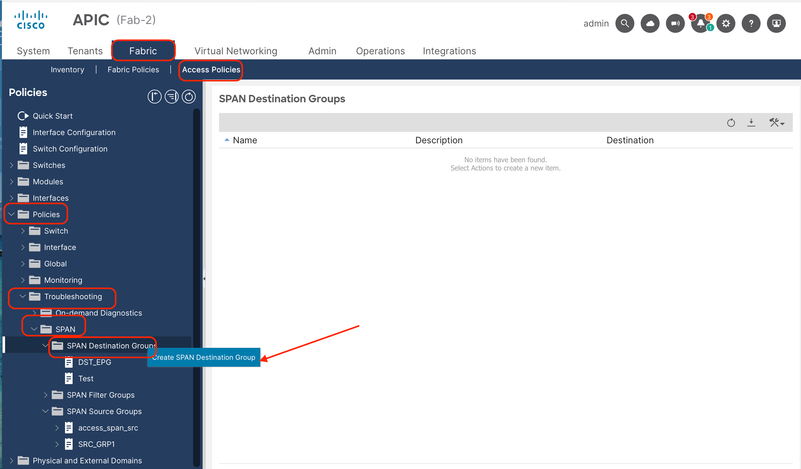 Image 2: Path to create access ERSPAN destination group
Fill in the information:
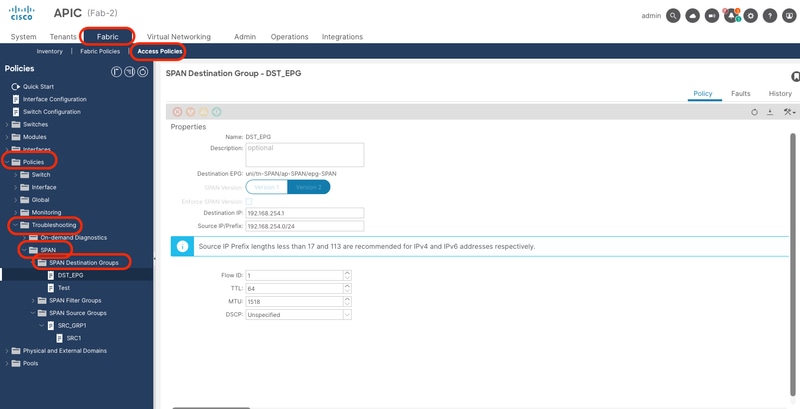 Image 3: Configuration of an access ERSPAN destination group
Where:
Destination Type: EPG (Mandatory to be Access ERSPAN)
Destination EPG: Tenant/AP/EPG where destination endpoint is learned
Destination IP: IP of the destination endpoint
Source IP: This can be any IP. If the prefix is used, node-id of the source node is used for the undefined bits. For example, prefix: 192.168.254.0/24 on node-101 => src IP 192.168.254.101
Flow ID: By default set to 1, useful to identify the packet by flow in the ERSPAN header:
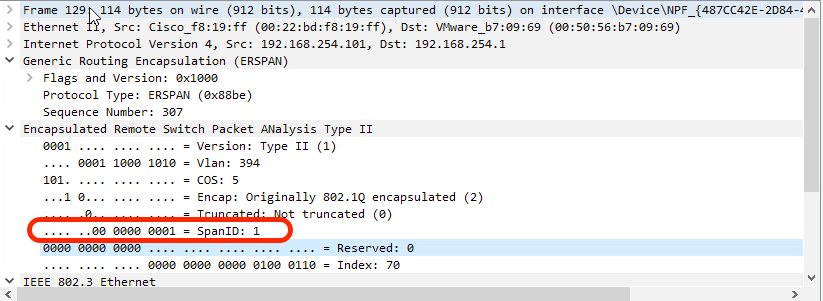 Image 4: Packet in Wireshark to show Flow ID

Tip: To filter the Flow ID, you can use this wireshark filter: erspan.spanid == <Flow ID>
- Create
SPAN Source Group(SRC_GRP1), right click on 'SPAN Source Groups' and select 'Create SPAN Source groups':
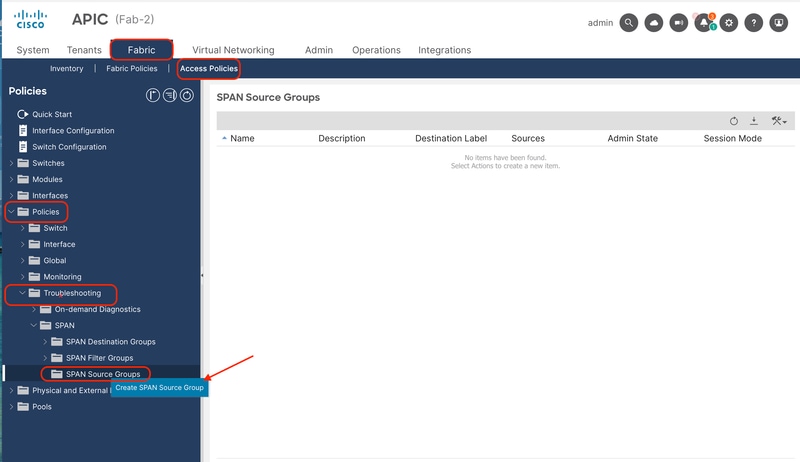 Image 5: Path to create an access ERSPAN source group
Fill in the information:
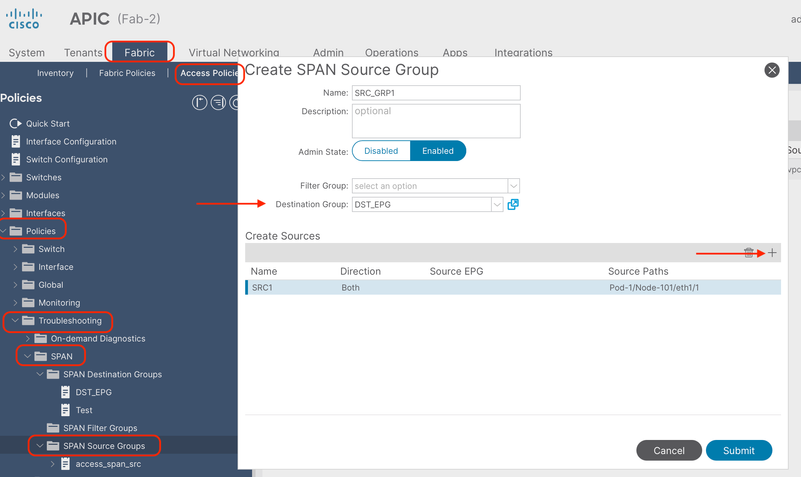 Image 6: Configuration of an access ERSPAN source group
Where:
Admin State: Enabled
Destination Group: Select the previously created Destination Group (DST_EPG)
- In this same box, click in the plus button (+) to add at least one SPAN Source.
- Configure these parameters to create the
SPAN Source(SRC1):
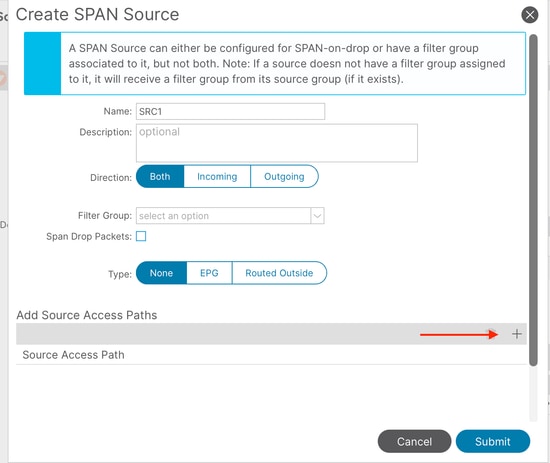 Image 7: Configuration of an access ERSPAN source
Where:
Direction: Could choose between: Incoming, Outgoing or Both directions
Type: Could choose between: None (a regular front-port), EPG (Interface deployed as static binding in an EPG, and only EPG traffic is mirrored) or Routed Outside (Interface used in a L3out).
In this example, a regular front-port is used.
- Click on the plus button (+) to add a Source Access Path. Fill in the information:
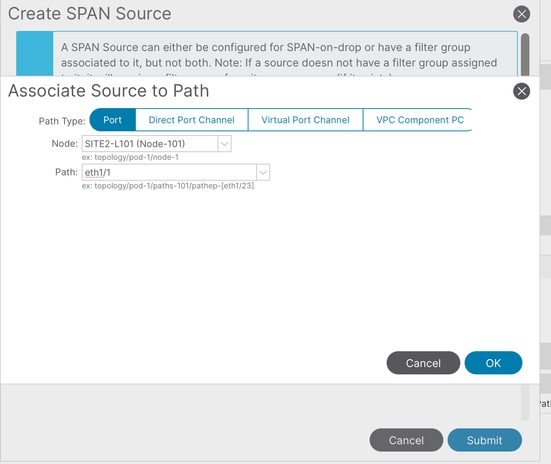 Image 8: Creation of an access ERSPAN Source path
Where:
Path type: Choose between Port (individual), Direct port-channel, Virtual port-channel (When choosing this option, the path shows VPCs already formed) and VPC component PC (only one leg of the VPC, choosing the specific node)
Node: Choose the source node (node 101 as per topology example)
Path: source interface (eth1/1 as per topology example)
Access Local SPAN
Sample Topology
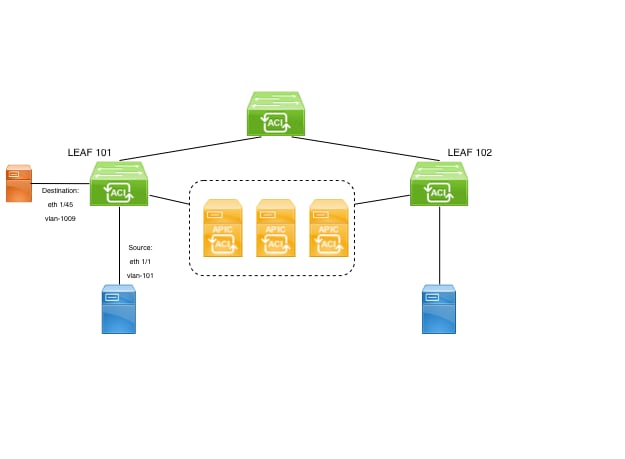 Image 9: Sample topology of a local access SPAN
Configuration Example
Navigate to Fabric > Access Policies > Policies > Troubleshooting > SPAN.
- Right click on 'SPAN Destination Groups' and select option to create
SPAN Destination Group(DST_EPG).
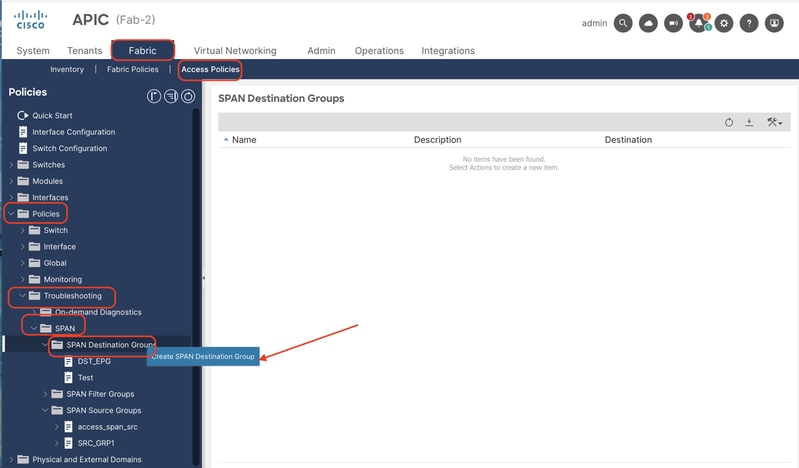 Image 10: Path to create a local access SPAN destination group
Fill in the information:
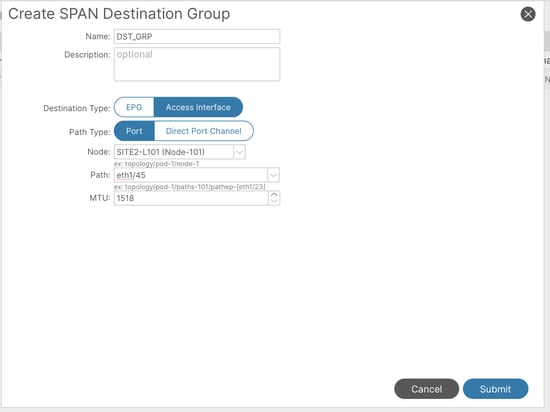 Image 11: Configuration of a local access SPAN destination group
Where:
Destination Type: Access Interface (Mandatory to be local SPAN)
Path type: Port
Node: Node-101 (As per topology)
Path: eth1/45 (As per topology)
Note: Destination port does not need to have any tenant policy applied (eg. EPG, L3out or infra deployment), otherwise, this fault is raised:
Fault: F1559
Description: Fault delegate: Failed to configure SPAN with destination DST_GRP of destination group DST_GRP due to Unsafe Destination Port for SPAN. Port already has an existing Application EPG, L3Out, or Infra VLAN deployment
If the destination port is part of an EPG, the alternative would be switching to Access ERSPAN.
- Create
SPAN Source Group(SRC_GRP1), right click on 'SPAN Source Groups' and select 'Create SPAN Source groups':
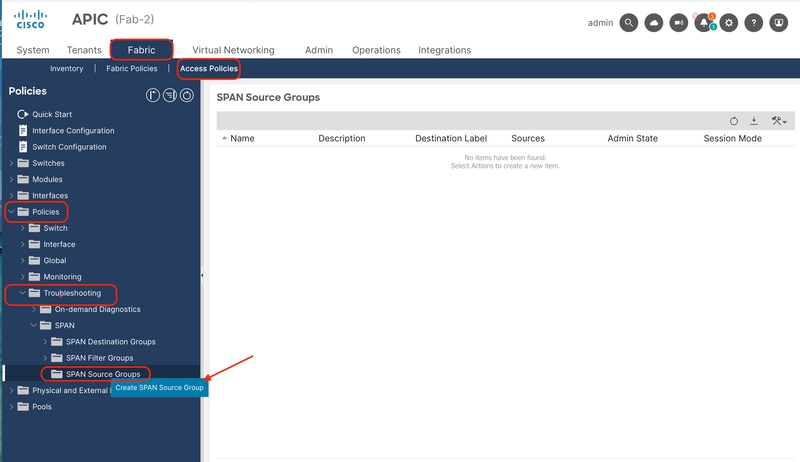 Image 12: Path to create a local access SPAN source group
Fill in the information:
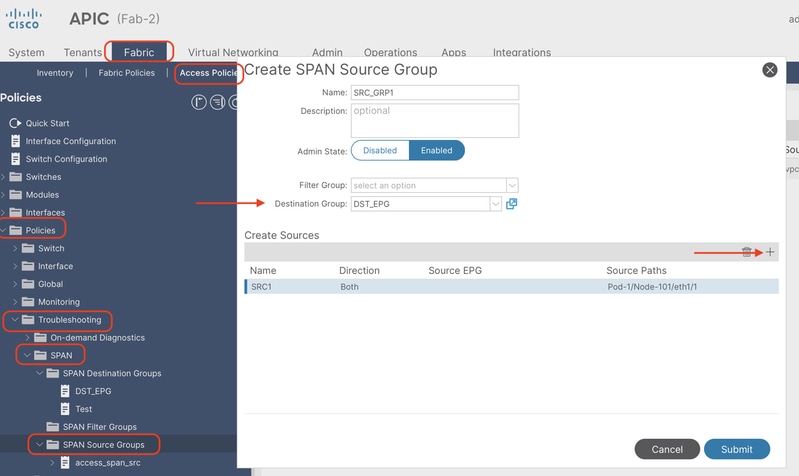 Image 13: Creation of a local access SPAN source group
Where:
Admin State: Enabled
Destination Group: Select the previously created Destination Group (DST_EPG)
- In this same box, click in the plus button (+) to add at least one SPAN Source.
- Configure these parameters to create the
SPAN Source(SRC1):
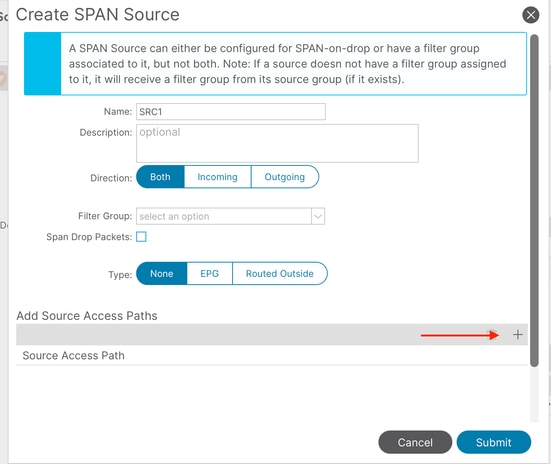 Image 14: steps for the creation of a local access SPAN source
Where:
Direction: Choose between Incoming, Outgoing, or both directions
Type: Could choose between: None (a regular front-port), EPG (Interface deployed as static binding in an EPG, and only EPG traffic is mirrored) or Routed Outside (Interface used in a L3out).
In this example, a regular front-port is used. As long as the Source Access Paths added later are deployed in the same node, the configuration is supported.
- Click on the plus button (+) to add a Source Access Path. Fill in the information:
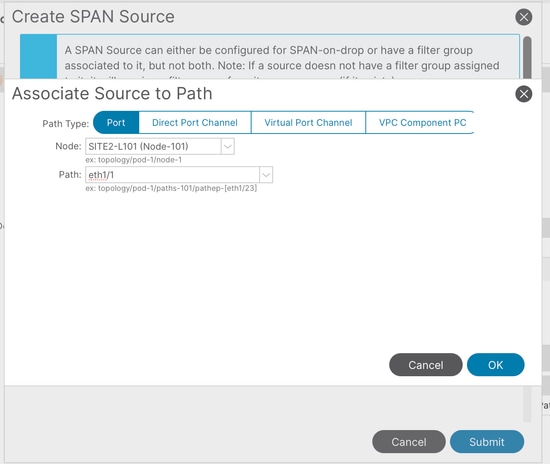 Image 15: Creation of a local access SPAN source path
Where:
Path type: Choose between Port (individual), Direct port-channel, Virtual port-channel (When choosing this option, the path shows VPCs already formed) and VPC component PC (only one leg of the VPC, choosing the specific node)
Note: Virtual Port Channel is not supported in Local Access SPAN
Node: Choose the source node (node 101 as per topology example)
Path: source interface (eth1/1 as per topology example)
Limitations:
Note: For Local SPAN, a destination interface and source interfaces must be configured on the same Leaf.
- The destination interface does not require it to be on an EPG as long as it is UP.
- When the virtual Port-Channel (vPC) interface is specified as a source port, Local SPAN cannot be used
However, there is a workaround. On a first-generation leaf, an individual physical port that is a member of vPC or PC can be configured as a SPAN source. With this Local SPAN can be used for traffic on vPC ports.
This option, however, is not available on a second-generation leaf (Cisco bug ID CSCvc11053). Instead, support for SPAN on "VPC component PC" was added via Cisco bug ID CSCvc44643in 2.1(2e), 2.2(2e) and forward. With this, any generation leaf can configure a port channel, which is a member of vPC, as a SPAN source. This allows any generation leaf to use Local SPAN for traffic on vPC ports. - Specifying the individual ports of a port channel on second-generation leaves cause only a subset of the packets to be spanned (also due to Cisco bug ID CSCvc11053).
- PC and vPC cannot be used as the destination port for Local SPAN. From 4.1(1), the PC can be used as a destination port for Local SPAN.
Tenant SPAN (ERSPAN)
Sample Topology
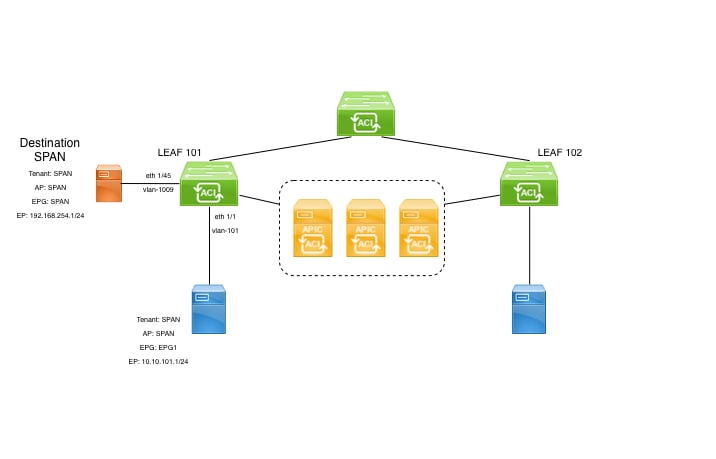 Image 16: Sample topology for Tenant ERSPAN
Configuration Example
Navigate to Tenant > <TENANT> > Policies > Troubleshooting > SPAN.
- Right click on 'SPAN Destination Groups' and select option to create
SPAN Destination Group(DST_EPG).
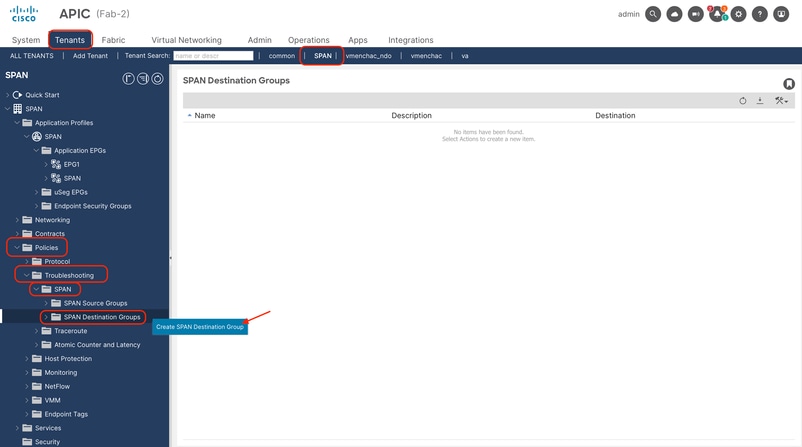 Image 17: path to create tenant ERSPAN destination group
Fill in the information:
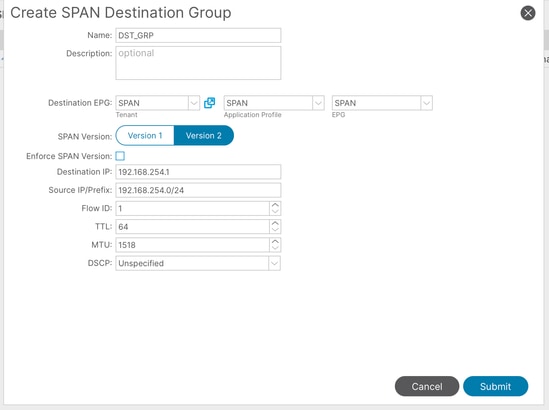 Image 18: Creation of tenant ERSPAN destination group
Where:
Destination EPG: Setup the Tenant (by default, takes the same tenant where the ERSPAN is being configured), AP and EPG where the destination endpoint is learned
Destination IP: IP of the destination endpoint
Source IP: This can be any IP. If the prefix is used, node-id of the source node is used for the undefined bits. For example, prefix: 192.168.254.0/24 on node-101 => src IP 192.168.254.101
Flow ID: By default set to 1, useful to identify the packet by flow in the ERSPAN header. Use the tip shown in Access ERSPAN to filter captures when this flow id is customized.
- Create
SPAN Source Group(SRC_GRP1), right click on 'SPAN Source Groups' and select 'Create SPAN Source groups':
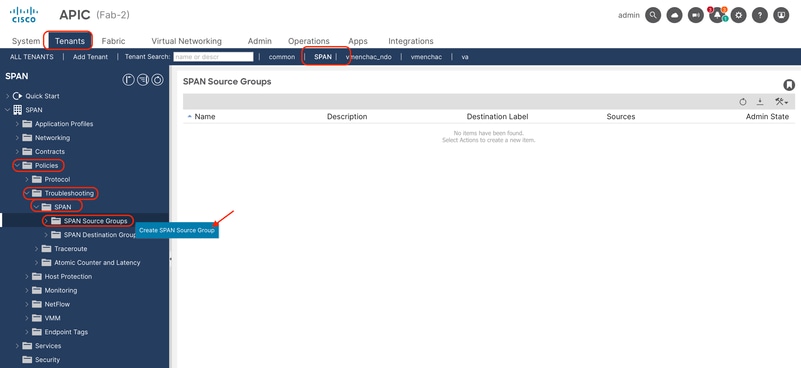 Image 19: path to create tenant ERSPAN source group
Fill in the information:
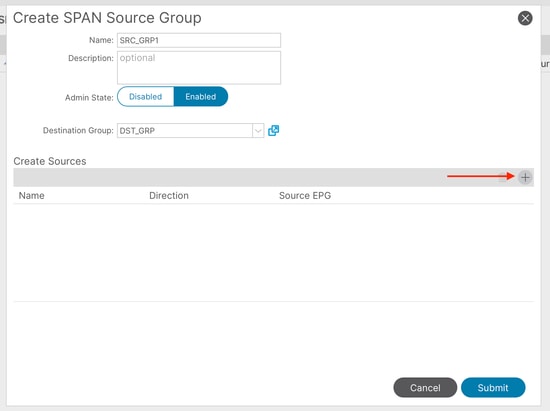 Image 20: Creation of tenant ERSPAN source group
Where:
Admin State: Enabled
Destination Group: Select the previously created Destination Group (DST_EPG)
- In this same box, click in the plus button (+) to add at least one SPAN Source.
- Configure these parameters to create the
SPAN Source(SRC1):
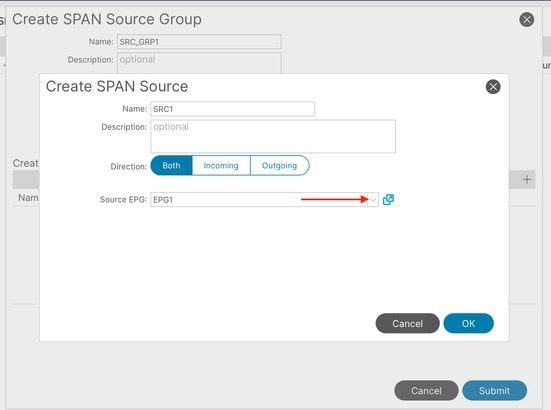 Image 21: creation of tenant ERSPAN source EPG
Where:
Direction: Choose between Incoming, Outgoing, or both directions
Source EPG: Could choose between all EPGs within the same tenant. (EPG1 as per topology example)
Fabric SPAN (ERSPAN)
Sample Topology
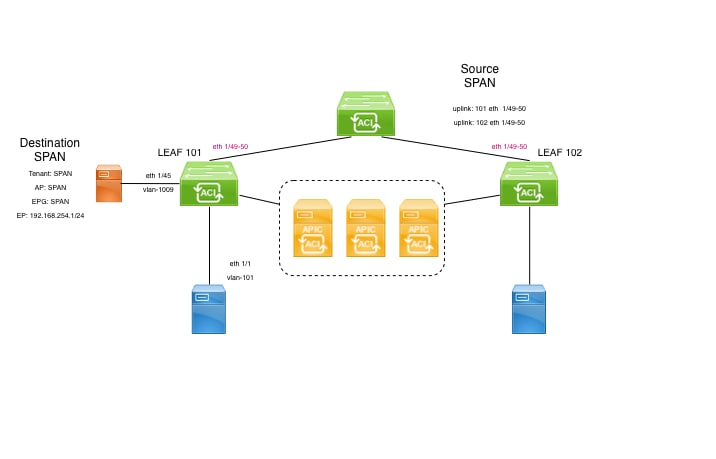 Image 22: Sample topology for Fabric ERSPAN
Configuration Example
Navigate to Fabric > Fabric Policies > Policies > Troubleshooting > SPAN.
- Right click on 'SPAN Destination Groups' and select option to create
SPAN Destination Group(DST_EPG).
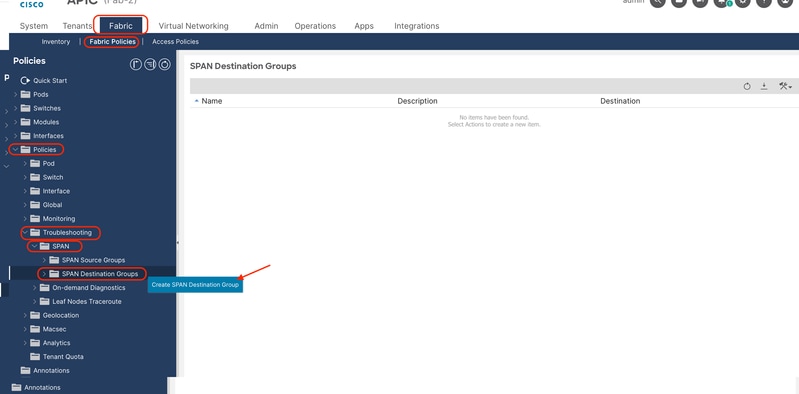 Image 23: Path to create a fabric ERSPAN destination group
Fill in the information:
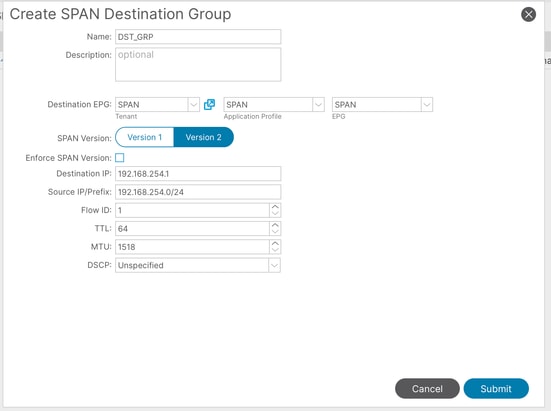 Image 24: Creation of fabric ERSPAN destination group
Where:
Destination EPG: Setup the Tenant, AP and EPG where the destination endpoint is learned
Destination IP: IP of the destination endpoint
Source IP: This can be any IP. If the prefix is used, node-id of the source node is used for the undefined bits. For example, prefix: 192.168.254.0/24 on node-101 => src IP 192.168.254.101
Flow ID: By default set to 1, useful to identify the packet by flow in the ERSPAN header. Use the tip shown in Access ERSPAN to filter captures when this flow id is customized.
- Create
SPAN Source Group(SRC_GRP1), right click on 'SPAN Source Groups' and select 'Create SPAN Source groups':
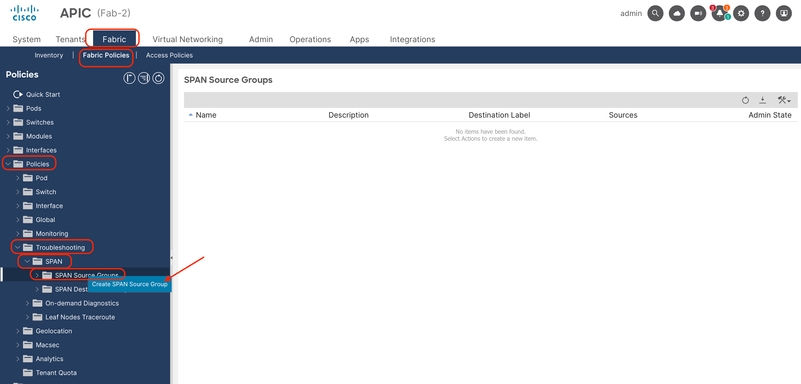 Image 25: path to create fabric ERSPAN source groups
Fill in the information:
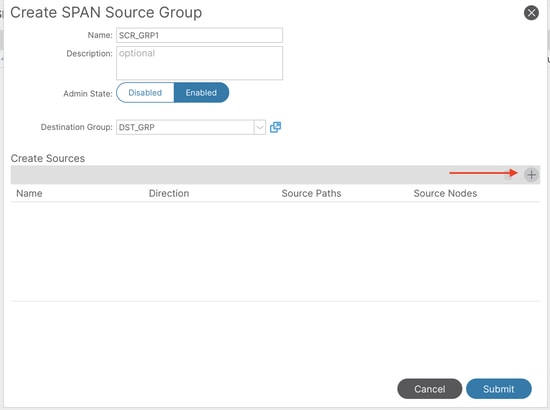 Image 26: Creation of fabric ERSPAN source group
Where:
Admin State: Enabled
Destination Group: Select the previously created Destination Group (DST_EPG)
- In this same box, click in the plus button (+) to add at least on Source.
- Configure these parameters to create th
Source(SRC1):
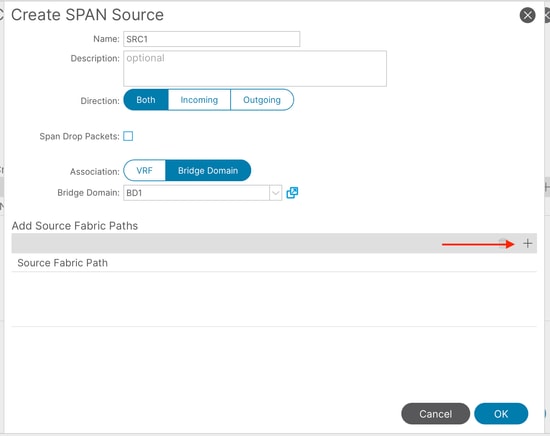 Image 27: creation of tenant ERSPAN fabric path
Where:
Direction: Choose between Incoming, Outgoing, or both directions
Association: Choose between VRF or Bridge Domain (in this example, it was chosen a specific BD to capture)
- Click on the plus button (+) to add a Source Fabric Path. Fill in the information:
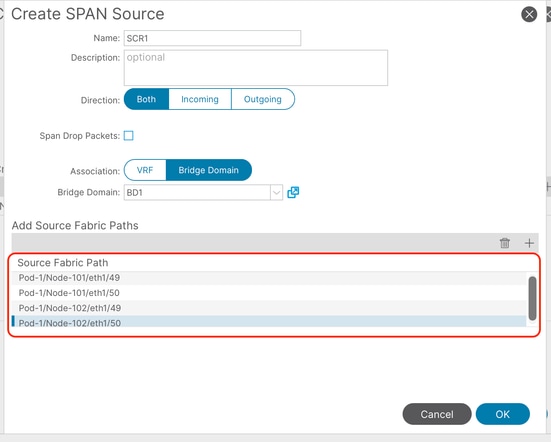 Image 28: Creation of source paths for fabric ERSPAN
Where:
Node: Source node
Interface: Drop-down menu shows only uplinks from selected node (In this example, was shown the 4 uplinks from the topology already added)
Span to CPU
Prior to ACI 6.2.1, ACI leaf switches did not support sending a local SPAN (Switched Port Analyzer) session directly to the switch CPU port (sup-eth0), which made on-box capture and analysis significantly harder.
Sample Topology
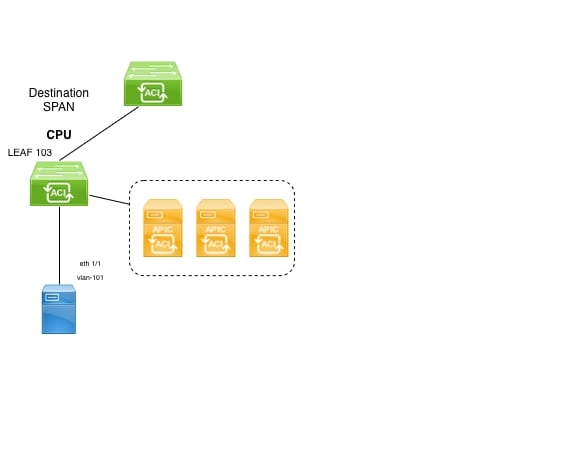 Image 29: Sample topology for SPAN to CPU
Configuration Example
Navigate to Fabric > Access Policies > Policies > Troubleshooting > SPAN.
- Right click on 'SPAN Destination Groups' and select option to create
SPAN Destination Group.
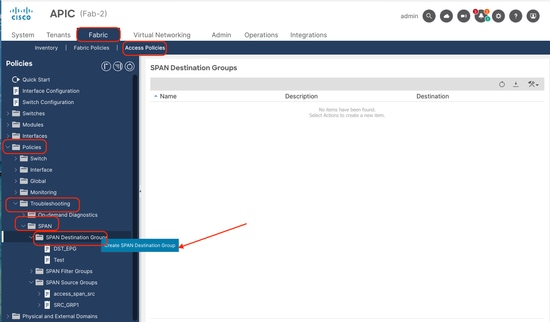 Image 30: Path to create a SPAN to CPU destination group
Fill in the information:
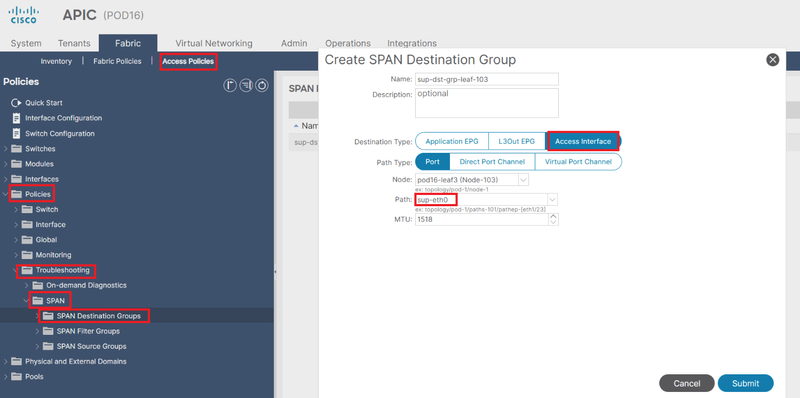 Image 31: creation of SPAN to CPU destination group
Where:
Destination Type: Access interface
Part type: Port
Path: select sup-eth0.
- Continue the configuration as shown in section Access Local SPAN.
The configuration steps are also shown in this video:
https://video.cisco.com/detail/video/6389779606112
Limitations:
SPAN to CPU is only supported on the folowing platforms:
-
FX2 (HEAVENLY)
-
FX3 (Sundown)
-
GX (Wolfridge)
-
GX2 (Quadpeaks)
-
HX (Ararat)
Filters/ACLs
Access SPAN has the capability to use ACL filters on access SPAN sources.
This feature provides the ability to SPAN a particular flow or flow of traffic in/out of a SPAN source.
Users can apply the SPAN Acl(s) to a source when there is a need to SPAN flow specific traffic.
It is not supported in Fabric SPAN and Tenant Span source groups/sources.
A Filter Group can be associated to:
-Span Source: the filter group is used to filter traffic on ALL interfaces defined under this Span Source.
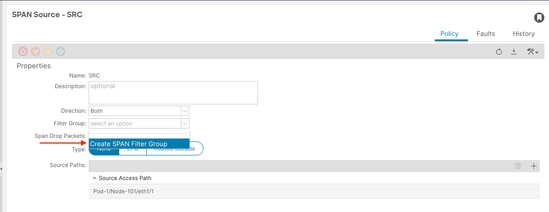 Image 32: Option to add Filter in access source
-Span Source Group: the filter group (say x) is used to filter traffic on ALL interfaces defined under each of the Span Source(s) of this Span Source Group.
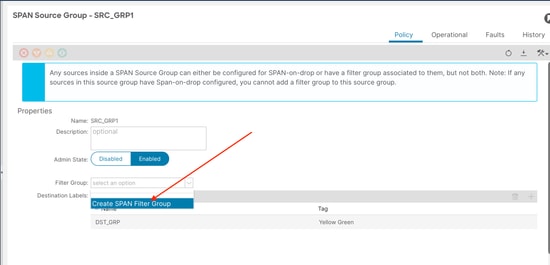 Image 33: Option to add Filter in access source group
In the case where a particular Span Source already associates with a Filter Group (say y), that filter group (y) is used instead to filter group on all interfaces under this specific Span Source
- A Filter group that is applied at a source group automatically applies to all sources in that source group.
- A Filter group that is applied at a source is applicable to that source only.
- A filter group is applied at both the source group and a source in that source group, the filter group applied at the source takes precedence.
- A filter group applied at a source is deleted, filter group applied at the parent source group is automatically applied.
- A filter group applied at a source group is deleted, it is deleted from all sources currently that inherit in that source group.
To create a filter, these options are available:
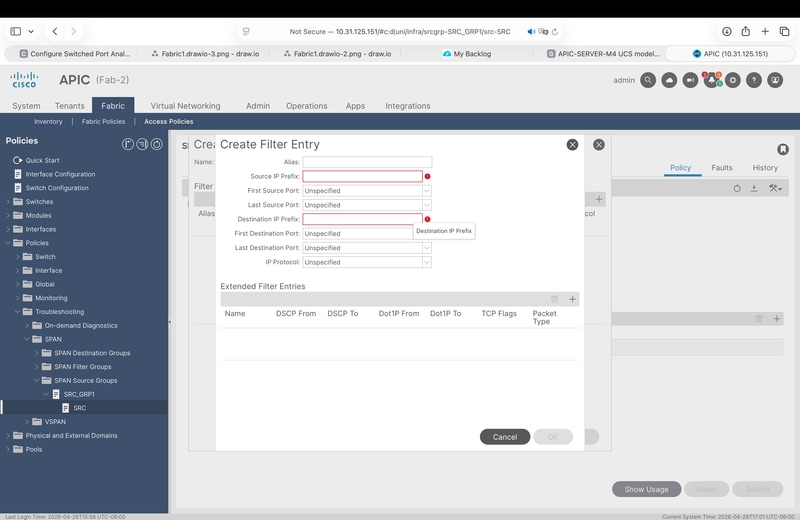 Image 34: filter entry options
- Source andd Destination prefixes.
- Source / Destination port ranges.
- IP protocol.
- Extended filters like: DCSP, Dot1P, TCP flags.
Validation
- In GUI, go to the source group of interest, click on it, and go to the Operational tab:
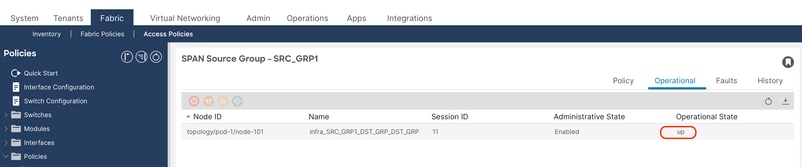 Image 35: Validation of session in GUI
- IN CLI APIC:
Shows all SPAN/Sessions configured in the fabric
show monitor summary
To filter sessions by type:
show monitor access session all

show monitor tenant session all

show monitor fabric session all
- In CLI source switch:
show monitor session all
Example:
SITE2-L101# show monitor session all
session 11
---------------
name : SRC_GRP1
description : Span session 11
type : erspan
scale-mode : filter
version : 2
oper version : 2
state : up (active)
erspan-id : 1
granularity :
vrf-name : SPAN:SPAN
acl-name :
ip-ttl : 64
ip-dscp : ip-dscp not specified
destination-ip : 192.168.254.1/32
origin-ip : 192.168.254.101/24.  >>>> node ID 101
mode : access
Filter Group : None
source intf :
rx : [Eth1/1]
tx : [Eth1/1]
both : [Eth1/1]
source VLANs :
rx :
tx :
both :
filter VLANs : filter not specified
filter L3Outs : filter not specified
This output is useful to confirm if the session is enabled, a well as the source, destination headers, and source interfaces (if is listed in rx and tx, direction was set to both)
To truly confirm this is properly configured, take the span session ID from the description and run the command below:
Example:
SITE2-L101# show system internal span-mgr session 11

SSN id 11 name "infra_SRC_GRP1_DST_GRP_DST_GRP" ptr 0x562a21a24b70 Admin UP nSrcsUP 1 Dst ERSPAN UP
         Scale mode FILTER
         vrfName SPAN:SPAN vnid 2752515 SrcIP 192.168.254.101/24 DstIP 192.168.254.1/32 flowId 1 ttl 64 dscp 64 mtu 1518 ver 2 opst 1(UP) opst_qual 1(Active)
         vrf_id 5 table_id 0x5 vrf_vnid 2752515 (0x2a0003) slot 0 urib_nh_reg 1 epm_registered 1
         Spine Proxy NH: RESOLVED nh_is_fabric 1 nh_dtep_ip 0xa00e042 nh_flag 1 nh_if_idx 0x1a031009 nh_main_if_idx 0x1a031000
         Local NH: NOT Resolved ep_valid 0 ep_mac 00:00:00:00:00:00 ep_vlan 0 ep_if_idx 0x0
                  ep_flags 0 ep_tun_if_idx 0x0 ep_nh_mac 00:00:00:00:00:00 ep_nh_dtep_ip 0x0 ep_nh_ifidx 0x0 ep_nh_vlan 0
         COOP NH: NOT Resolved coop_valid 0 coop_tep_ip 0x0
         Span Offset 255
         Filter Group ID: 0
         (src-name, flt-grp-id) associations:
         Src name: "SRC" Filter Group ID: 0
                SRC: id 17 ptr 0x562a21a22170 ssn_id 11 mode Access type Port dir ING-EGR vlan 0 if_idx 0x1a000000 opst 1(UP) opst_qual 1(Active) dummy_fault 0
                    vlan_type INVALID hw_vlan 0 hw_vlan_up DOWN if_up UP is_fex 0 is_pc 0 slot -1 pc_mbr_up 0x0 l3_if_idx 0x0 l3_if_up DOWN
Per SSN Summary: SSN 11 n_srcs_per_ssn 1 srcs UP 1

Summary: nSSNs: 1 nSSNs UP: 1 nSrcs 1 nSrcs UP 1
How to Read ERSPAN Data
ERSPAN Version (type)
ERSPAN encapsulates copied packets to forward them to the remote destination. GRE is used for this encapsulation. The protocol type for ERSPAN on the GRE header is 0x88be.
In Internet Engineering Task Force (IETF) document, the ERSPAN version is described as type instead of version.
There are three types of ERSPAN. I, II and III. ERSPAN Type is mentioned in this RFC draft. Also, this GRE RFC1701 can be helpful to understand each ERSPAN type as well.
Here is the packet format of each type:
ERSPAN Type I (used by Broadcom Trident 2)
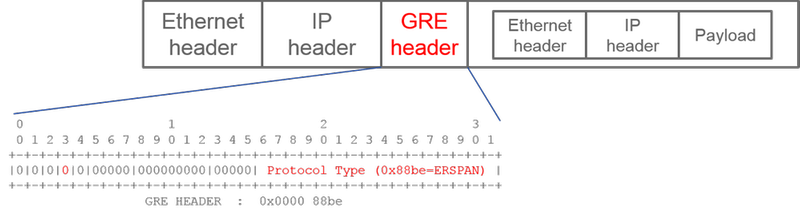 Image 36: GRE header for ERSPAN Version I
To provide an example, wireshark shows this protocol type: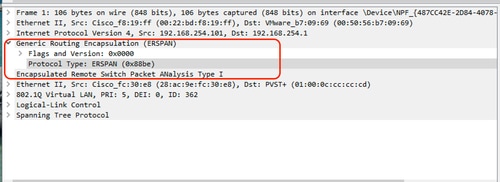 Image 37: version validation in wireshark
Type I does not use the sequence field on the GRE header. It does not even use the ERSPAN header which must succeed the GRE header if it was ERSPAN type II and III. Broadcom Trident 2 only supports this ERSPAN type I.
ERSPAN Type II or III
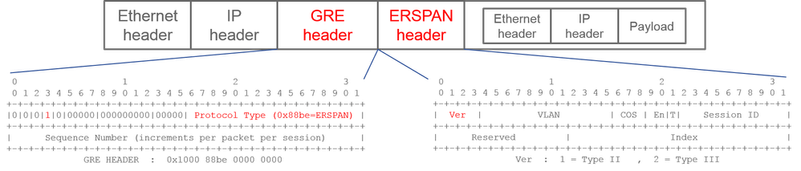 Image 38: GRE header for ERSPAN Version II
Wireshark example is: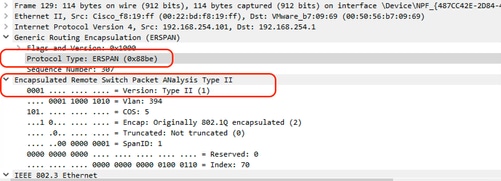 Image 39: version validation in wireshark
If the sequence field is activated by the S bit, this must be ERSPAN type II or III. The version field on the ERSPAN header identifies the ERSPAN type. In ACI, type III is not supported as of 04/30/2026.
ERSPAN Type and ACI SPAN Type
On 1st generation leaf and spine nodes, each ACI SPAN (Fabric, Access, Tenant) is operated in different chips on each node.
- Access SPAN and Tenant SPAN are operated on Broadcom chip(T2:Trident2) on Leaf
- Fabric SPAN is operated either on NS(NorthStar) chip on Leaf or ALP(Alpine) chip on Spine.
Hence, due to Broadcom chip limitations,
- Access SPAN and Tenant SPAN use ERSPAN Type I
On the other hand, NS and ALP chips support type II. So
- Fabric SPAN uses ERSPAN Type II
On 2nd generation or later nodes, all ACI SPAN uses ERSPAN Type II by default.
If a SPAN source group for Access or Tenant SPAN has sources on both 1st-gen and 2nd-gen nodes, the ERSPAN destination receives both ERSPAN Type I and II packets from each generation of nodes. However, Wireshark can decode only one of the ERSPAN Types at a time. By default, it only decodes ERSPAN Type II. If you enable the decode of ERSPAN Type I, Wireshark does not decode ERSPAN Type II. See the later section on how to decode ERSPAN Type I on Wireshark.
To avoid this type of issue, you can configure ERSPAN Type on a SPAN destination group.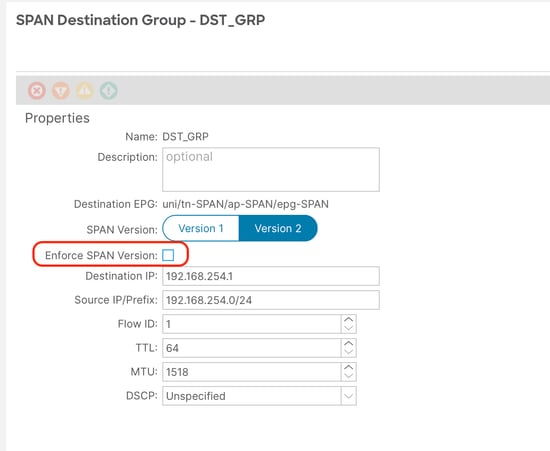 Image 40: Option to Enforce SPAN version
-
SPAN Version (Version 1 or Version 2): This refers to the ERSPAN Type I or II
-
Enforce SPAN Version (checked or unchecked): This decides if the SPAN session must fail in case the configured ERSPAN Type is not supported on the source node hardware.
By default, SPAN Version is Version 2 and Enforce SPAN Version is unchecked. This means that if the source node is 2nd gen or later which supports ERSPAN Type II, it generates ERSPAN with Type II. If the source node is 1st gen which does not support ERSPAN Type II (except for Fabric SPAN), it falls back to Type I since the Enforce SPAN Version is not checked. As a result, the ERSPAN destination receives a mixed type of ERSPAN.
This table explains each combination for Access and Tenant SPAN.
| SPAN Version |
Enforce SPAN Version |
1st gen source node |
2nd gen source node |
| Version 2 |
Unchecked |
Uses Type I |
Uses Type II |
| Version 2 |
Checked |
Fails |
Uses Type II |
| Version 1 |
Unchecked |
Uses Type I |
Uses Type I |
| Version 1 |
Checked |
Uses Type I |
Uses Type I |
How to Decode iVxLAN Header
iVxLAN header uses destination port 48879. So, you can decode iVxLAN header as well as VxLAN if you configure UDP destination port 48879 as VxLAN on Wireshark.
-
Please ensure that you select iVxLAN encapsulated packets first.
-
Navigate to
Edit > Preferences > Protocols > VxLAN. -
Add port 48879 at the end of the ports:
-
And then
Apply.
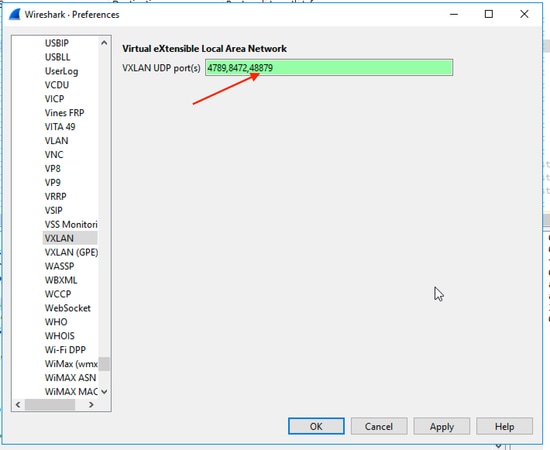 Image 41: How to add custom port to decode iVXLAN header
Note: There are communication packets between APICs on Fabric ports. Those packets are not encapsulated by iVxLAN header.
Revision History
| Revision | Publish Date | Comments |
|---|---|---|
1.0 |
29-Apr-2026
|
Initial Release |

 Feedback
Contact Cisco
- Open a Support Case

- (Requires a Cisco Service Contract)