Performance Tuning for Cisco Unified Edge platform Powered by Intel Xeon 6 SoC processors White Paper
Available Languages
Bias-Free Language
The documentation set for this product strives to use bias-free language. For the purposes of this documentation set, bias-free is defined as language that does not imply discrimination based on age, disability, gender, racial identity, ethnic identity, sexual orientation, socioeconomic status, and intersectionality. Exceptions may be present in the documentation due to language that is hardcoded in the user interfaces of the product software, language used based on RFP documentation, or language that is used by a referenced third-party product. Learn more about how Cisco is using Inclusive Language.
The Basic Input/Output System (BIOS) serves as the foundational interface for hardware initialization and operating system boot. Within the Cisco Unified Edge platform, specific BIOS configurations directly influence system behavior, performance, and operational efficiency.
Purpose: This document provides guidance on configuring BIOS settings for the Cisco Unified Edge platform, specifically utilizing the Cisco UCS® XE130c M8 Compute Node powered by Intel® Xeon® 6 SoC processors. It outlines the recommended adjustments required to achieve an optimal balance of high-performance computing, energy efficiency, and acoustic (noise) management. By understanding these options, administrators can tailor system behavior to meet specific workload requirements.
● Target hardware: This guide is applicable to the Cisco UCS XE130c M8 Compute Node architecture featuring Intel® Xeon® 6 SoC processors with Performance cores (P-cores).
● Generic applicability: The settings detailed in this document are intended as generic best practices. They do not account for variations specific to individual firmware releases. Users should verify compatibility with their specific firmware version before implementing these configurations in a production environment.
Navigating BIOS performance settings can be complex, because many options involve critical tradeoffs between power efficiency and raw computational performance. This document simplifies the configuration process by providing clear guidance and best-practice recommendations for your Cisco UCS XE130c M8 Compute Nodes.
By reading this guide, you will:
● Demystify BIOS configurations: gain a clear understanding of the BIOS settings that most significantly impact system behavior
● Master Performance Trade-offs: learn how to effectively balance power-saving features against the performance requirements of your specific workloads
● Optimize for Intel Xeon 6 SoC processors: apply expert-recommended configurations tailored to the architecture of the Intel Xeon 6 SoC processors with P-cores to maximize system output
● Achieve operational goals: gain the knowledge required to tune your infrastructure for optimal performance, energy efficiency, and acoustic management
Cisco Unified Edge platform
The Cisco Unified Edge platform is a comprehensive, AI-ready solution designed to simplify the deployment, operation, and lifecycle management of edge infrastructure at a global scale. By converging compute, storage, routing, switching, and security into a single, SaaS-managed architecture, Cisco Unified Edge delivers the visibility, consistency, and control required for modern distributed environments.
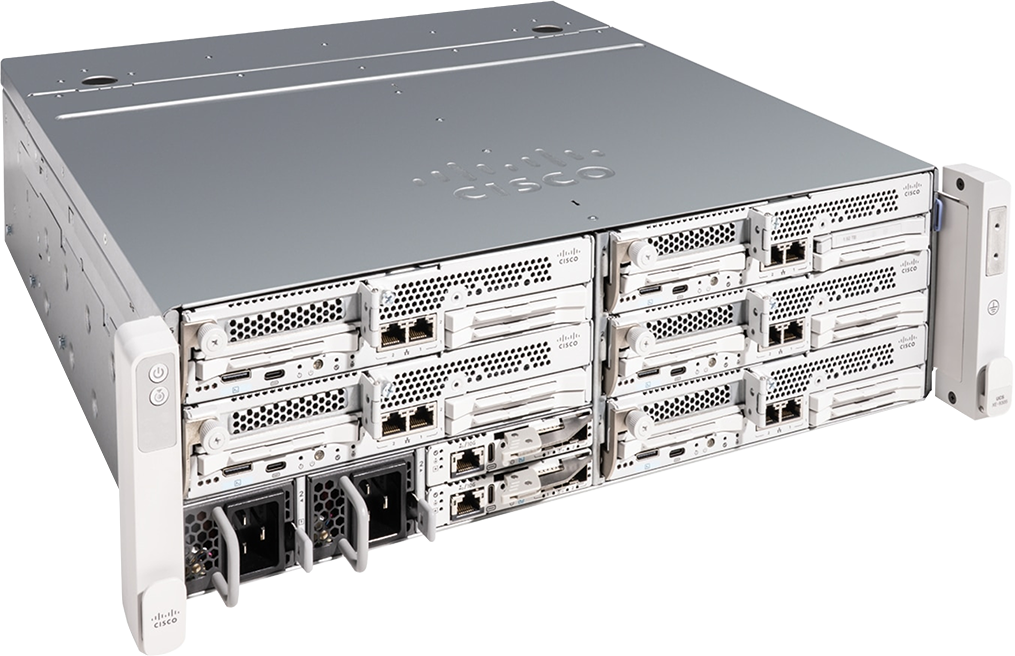
Cisco UCS XE9305 Chassis
Cisco UCS XE9305 Chassis
The foundation of Cisco Unified Edge is the Cisco UCS XE9305 Chassis. A 3 RU, short-depth, multi-mountable chassis, the Cisco UCS XE9305 provides five front-facing slots that can accommodate sled-like nodes that are easy to service and adaptable to deliver a range of capabilities, from computing to storage and networking to security.
High-bandwidth inter-node connectivity is achieved through active/active 25 Gbps switches embedded in the Cisco UCS Edge Chassis Management Controller overcoming the lack of bandwidth common to many edge locations and simplifying a key requirement for distributed computing environments running virtualized, containerized, or AI workloads. Managed by the Cisco Intersight® cloud operations platform, IT teams can scale deployments on Cisco Unified Edge to thousands of locations and shift focus from administrative tasks to business outcomes, leveraging edge-optimized infrastructure management capabilities such as fleet management, full-stack solution blueprints, and zero-touch provisioning.
Key design specifications include:
● Environmental resilience: operational temperature range of 5°C to 45°C
● Acoustic optimization: quiet operation (40s dBA at 25°C at 20% load), suitable for office and retail spaces
● Durability: protection against high-particulate environments, ensuring reliability in diverse physical locations
Compute performance: Cisco UCS XE130c M8 Compute Node
The core of the platform is the Cisco UCS XE130c M8 Compute Node, a 1 RU, half-width compute node. A single Cisco UCS XE9305 Chassis can house up to five of these nodes, providing high-density, enterprise-class performance in a compact form factor.
● Processor architecture: powered by Intel Xeon 6 SoC processors with P-cores.
● Configuration flexibility: available in "storage-optimized" and "I/O-optimized" configurations to meet specific workload requirements
● Connectivity: features integrated dual 25 Gbps connectivity to the in-chassis network midplane
● Expansion: industry-leading adaptability, supporting a wide range of PCIe accelerators, including GPUs and DPUs
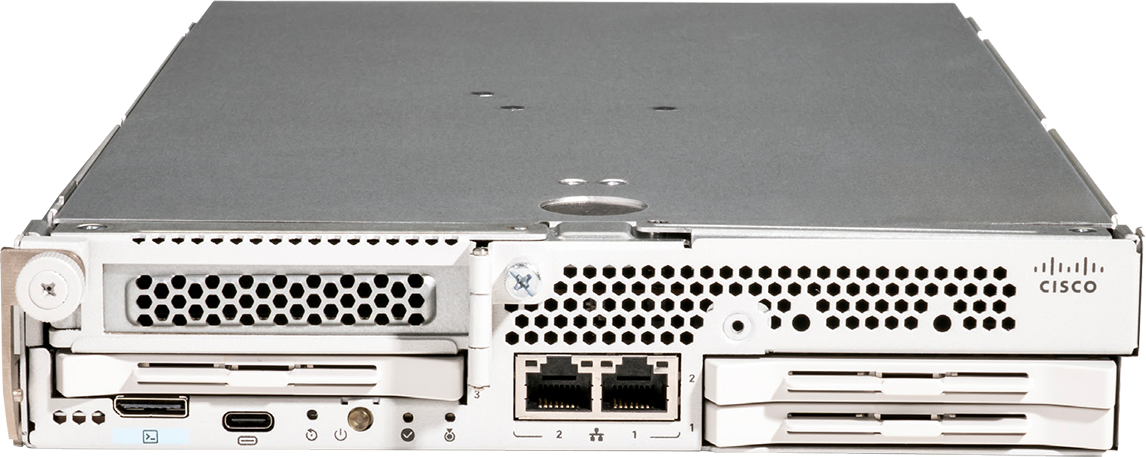
Cisco UCS XE130C M8 Compute Node
The Cisco UCS XE130C M8 Compute Node, which operates within the Cisco UCS XE9305 Chassis, utilizes advanced thermal design and intelligent, acoustics-optimized cooling controls. The system does not have individual fan controls for the node itself; rather, it relies on the chassis-level management of5hot-swappable 80mm dual counter-rotating fan modules.
Supported fan policies and thermal features include:
● Intelligent thermal management: Optimized cooling algorithms adjust fan speeds to match environmental demands and workload, enabling reliable operation up to 35°C (95°F) without throttling.
● Chassis-wide cooling: The fan modules are integrated into the XE9305 chassis, supporting up to five compute nodes with efficient, high-airflow, and acoustically optimized cooling.
● N+1 fan redundancy: The system includes N+1 fan redundancy to ensure continuous, reliable operation.
● Environmental monitoring: The system utilizes the Cisco Edge Chassis Management Controller (eCMC) to manage thermal policies.
Cisco Unified Edge: key use cases
The Cisco Unified Edge platform is designed to provide enterprise-class performance in space-constrained, remote, or harsh environments. Its convergence of compute, storage, networking, and security makes it a versatile foundation for a wide range of edge applications.
1. Distributed virtualization and containerization
● Scenario: hosting localized microservices, Virtual Desktops (VDI), and edge-based cloud-native applications
● Platform value: By consolidating compute, storage, and networking into a single SaaS-managed platform, IT teams can deploy standardized "fleet blueprints" across hundreds of locations. This ensures consistent policy enforcement, security, and lifecycle management at scale.
2. Retail and branch office modernization
● Scenario: running Point-Of-Sale (POS) systems, inventory management, digital signage, and localized customer analytics
● Platform value: The platform’s short-depth, quiet acoustic profile (40s dBA) and environmental resilience (5 to 45°C) allow it to be deployed in non-data-center environments, such as back-offices or retail floors, without requiring specialized cooling or dedicated server rooms.
3. AI-at-the-edge (inference)
● Scenario: real-time computer vision, predictive maintenance, and localized AI model inference
● Platform value: With support for high-performance GPUs and AI accelerators, the Cisco UCS XE130c M8 Compute Node enables low-latency AI processing directly at the source of data. This eliminates the need to backhaul massive datasets to a central data center, reducing bandwidth costs and decision-making latency.
4. Industrial IoT (IIoT) and smart manufacturing
● Scenario: factory automation, robotics control, and high-particulate environment monitoring
● Platform value: Designed for durability, the Cisco UCS XE9305 Chassis features protection against high-particulate environments. Its modularity allows for the integration of specialized I/O and networking cards required to interface with legacy industrial controllers and modern sensors.
Fan policy configuration
The Cisco UCS XE130c M8 Compute Node is managed through Cisco Intersight, which allows for policy-based configuration of the system's operational parameters.
The fan policy feature allows administrators to fine-tune cooling profiles to balance server performance, power consumption, and acoustic output. By moving beyond default thermal thresholds, these policies provide granular control over fan behavior to meet specific environmental and workload requirements.
Historically, fan speeds were governed by automatic thermal thresholds. While effective for general use, this approach lacks the precision required for specialized workloads. Fan policies allow you to override these defaults to optimize for specific scenarios:
● Optimizing for performance: High-performance CPUs and PCIe-heavy configurations often require aggressive cooling to prevent thermal throttling.
● Optimizing for power and acoustics: In environments where energy efficiency or low noise levels are critical, fan policies allow for controlled speed reduction, provided thermal safety limits are maintained.
Available fan policies
Table 1. Fan policies
| Policy |
Primary use case |
Characteristics |
| Balanced |
Default configuration |
Suitable for most standard server deployments. May not provide sufficient cooling for high-heat PCIe cards. |
| Low power |
Minimal configurations |
Ideal for servers without PCIe cards; minimizes power draw by maintaining lower fan speeds |
| High power |
PCIe-intensive workloads |
Maintains fan speeds between 60 and 85% to support components prone to overheating |
| Maximum power |
Extreme thermal loads |
Provides maximum cooling (70–100% speed) for high-density configurations with extreme thermal requirements |
| Acoustic |
Noise-sensitive environments |
Prioritizes low noise levels. Note: May result in short-term performance throttling to maintain lower acoustics. |
| Maximum cooling |
Extreme thermal loads |
Engineered for server configurations that operate under extreme thermal loads, or environments with high ambient temperatures. This policy prioritizes thermal headroom and component longevity by enforcing aggressive cooling profiles. |
The fan policy is configurable based on the management environment:
● Cisco Intersight–managed servers: configure using the dedicated fan policy settings within the Intersight dashboard
BIOS settings for Cisco UCS Unified Edge platform
Table 2 lists the BIOS token names, defaults, and supported values for the Cisco UCS XE130c M8 Compute Node with Intel Xeon 6 SoC processors.
Table 2. BIOS token names and values
| BIOS token name |
Default value |
Supported values |
| Intel Hyper-Threading Tech |
Enabled |
Disabled, enabled |
| CPU Performance |
Custom |
Custom, enterprise |
| Hardware Prefetcher |
Enabled |
Disabled, enabled |
| Adjacent Cache Prefetch |
Enabled |
Disabled, enabled |
| DCU Streamer Prefetcher |
Enabled |
Disabled, enabled |
| DCU IP Prefetcher |
Enabled |
Disabled, enabled |
| LLC Prefetch |
Enabled |
Disabled, enabled |
| Intel Virtualization Technology |
Enabled |
Disabled, enabled |
| XPT Prefetch |
Auto |
Auto, disabled, enabled |
| LLC Dead Line Allocation |
Enabled |
Auto, disabled, enabled |
| Memory RAS Configuration |
Adaptive Double Device Data Correction Sparing (ADDDC-Sparing) |
ADDDC-Sparing, maximum performance, mirror-mode-1lm, mirroring, sparing |
| Intel Turbo Boost Technology |
Enabled |
Disabled, enabled |
| Energy Efficient Turbo |
Disabled |
Disabled, enabled |
| EPP Profile |
Balanced performance |
Balanced performance, balanced power, performance, power |
| Processor C1E |
Enabled |
Disabled, enabled |
| Processor C6 |
Enabled |
Auto, Disabled, Enabled |
| Package C State |
C0/C1 state |
C0/C1 state, C6 non-retention, C6 retention, no limit |
| Energy Perf BIAS |
Balanced performance |
Balanced energy, balanced performance, balanced power, energy-efficient, performance, power |
| Latency Optimized Mode |
Disabled |
Disabled, enabled |
| Power Performance Tuning |
OS |
BIOS, OS, PECI |
| Workload Configuration |
I/O sensitive |
I/O sensitive, balanced, NUMA |
BIOS recommendations for various general-purpose workloads
This section summarizes the BIOS settings recommended to optimize general-purpose workloads:
● Computation-intensive
● Energy efficient
● Acoustics optimization
The following sections describe each workload.
Computation-intensive workloads
The primary objective for computation-intensive workloads is to minimize total execution time by distributing a single job across multiple processing units. To achieve this, tasks are decomposed into parallel threads that execute concurrently. Given that these threads require frequent, high-speed data exchange, the underlying architecture must support low-latency communication between cores.
Computation-intensive workloads derive maximum benefit from processor and memory configurations capable of sustaining high turbo frequencies. To ensure optimal performance, the system must be tuned to prioritize raw computational throughput:
● Turbo frequency optimization: Performance is maximized when processors can reach and maintain peak turbo frequencies across individual cores.
● Power management tuning: Processor power management policies should be configured to eliminate frequency-scaling latency so that the system can immediately transition to peak performance states during demand spikes.
● General-purpose tuning: Because these workloads are typically general-purpose, optimization efforts should focus on maximizing both processor core clock speeds and memory bandwidth to reduce computational bottlenecks.
By prioritizing faster clock cycles and minimizing architectural overhead, organizations can significantly reduce processing latency and achieve superior application throughput.
Energy-efficient workloads
In many edge environments, such as remote branch offices or retail locations, power and cooling resources are constrained. For workloads that do not require constant peak computational throughput — such as data logging, light-duty analytics, or background monitoring — the Cisco Unified Edge platform can be tuned to significantly reduce energy consumption without compromising system stability.
To maximize energy efficiency, administrators should align BIOS and system policies with the workload's performance requirements:
● Processor power management: enable advanced C-states to allow the Intel Xeon 6 SoC processors to enter low-power idle states during periods of reduced activity. This minimizes power draw while maintaining the ability to resume full performance instantly when demand increases.
● Fan-policy optimization: utilize the Low Power fan policy for minimal-configuration servers. By reducing fan speed to the lowest safe threshold, you decrease the overall power footprint and extend the longevity of the cooling infrastructure.
● Workload consolidation: Leverage the modularity of the Cisco UCS XE130c M8 Rack Server to consolidate multiple light-duty workloads onto a single node. This maximizes hardware utilization and reduces the number of active components required to support edge operations.
● Performance-to-power balancing: Where possible, prioritize energy-efficient settings in the BIOS, such as power-capping or frequency-scaling limits so that the system operates within the specific power envelope of the deployment site.
Acoustic environment
In noise-sensitive environments — such as retail spaces, branch offices, or open-office layouts — minimizing the acoustic profile of edge infrastructure is critical. The Cisco Unified Edge platform provides an acoustic fan policy specifically engineered to reduce decibel output by capping maximum fan speeds.
Key technical considerations:
● Prioritizing noise reduction: When the acoustic fan policy is enabled, the system prioritizes a quieter operating environment over maximum thermal headroom.
● Performance trade-offs: Administrators should be aware that by limiting fan speed, the system may initiate transient thermal throttling during peak computational loads to protect hardware integrity.
● Deployment suitability: This policy is recommended for environments where operational noise is a primary constraint and workloads are predictable, allowing for a controlled balance between acoustic comfort and sustained system performance.
Summary of BIOS settings optimized for general-purpose workloads
Table 3 summarizes BIOS settings optimized for general-purpose workloads.
Table 3. BIOS recommendations for computation-intensive, energy-efficient, and acoustics optimization workloads
| BIOS token name |
Platform-default values |
Computation- intensive |
Energy-efficient |
Acoustics optimization |
| Intel Hyper-Threading Tech |
Enabled |
Platform-default |
Platform-default |
Disabled |
| CPU Performance |
Custom |
Platform-default |
Platform-default |
Platform-default |
| Hardware Prefetcher |
Enabled |
Platform-default |
Platform-default |
Platform-default |
| Adjacent Cache Prefetch |
Enabled |
Platform-default |
Platform-default |
Platform-default |
| DCU Streamer Prefetcher |
Enabled |
Platform-default |
Platform-default |
Platform-default |
| DCU IP Prefetcher |
Enabled |
Platform-default |
Platform-default |
Platform-default |
| LLC Prefetch |
Enabled |
Platform-default |
Platform-default |
Platform-default |
| Intel Virtualization Technology |
Enabled |
Platform-default |
Platform-default |
Platform-default |
| XPT Prefetch |
Auto |
Platform-default |
Platform-default |
Platform-default |
| LLC Dead Line Alloc |
Enabled |
Disabled |
Platform-default |
Platform-default |
| Memory RAS Configuration |
ADDDC-Sparing |
Maximum Performance |
Platform-default |
Platform-default |
| Intel Turbo Boost Technology |
Enabled |
Platform-default |
Platform-default |
Disabled |
| Energy Efficient Turbo |
Disabled |
Platform-default |
Enable |
Enabled |
| EPP Profile |
Balanced performance |
Performance |
Balanced Power |
Power |
| Processor C1E |
Enabled |
Disabled |
Platform-default |
Platform-default |
| Processor C6 |
Enabled |
Disabled |
Platform-default |
Platform-default |
| Package C State |
C0/C1 state |
Platform-default |
C6 non-retention |
C6 non-retention |
| Energy Perf BIAS |
Balanced performance |
Platform-default |
Energy-Efficient |
Power |
| Latency Optimized Mode |
Disabled |
Platform-default |
Enable |
Enabled |
| Power Performance Tuning |
OS |
Platform-default |
BIOS |
BIOS |
| Workload Configuration |
I/O sensitive |
Balanced |
Balanced |
Balanced |
Additional BIOS recommendations for Cisco Unified Edge use cases
The Cisco Unified Edge platform serves as a foundational building block for a broad spectrum of edge use cases. Its modularity and high-performance compute capabilities make it an ideal choice for:
● Virtualization and containerization: supporting modern cloud-native application stacks
● Bare-metal deployments: providing high-performance, direct-hardware access
● AI and machine learning: delivering the necessary compute density and accelerator support for AI-at-the-edge applications
By integrating these disparate technologies into a unified, SaaS-managed platform, Cisco Unified Edge enables organizations to maintain a consistent operational model from the data center to the furthest edge.
This section summarizes optimal BIOS settings for Cisco Unified Edge use cases:
BIOS optimization for virtualization and containerization
Virtualization and containerization platforms require a BIOS configuration that prioritizes low-latency execution, efficient context switching, and high memory throughput. The Cisco Unified Edge platform consolidates multiple traditional IT services (including Windows/Linux VMs and containerized applications such as Kubernetes onto a single, high-performance platform.
For the Cisco Unified Edge platform, the following optimizations are recommended to ensure peak performance for cloud-native and virtualized stacks.
Processor power management
● C-state control: For virtualization hosts, it is recommended to limit or disable deep C-states (for example, C6). While deep C-states are excellent for power saving, they introduce "exit latency" when the processor wakes to handle a request. Disabling them ensures that the processor remains in a high-performance state, providing the consistent, low-latency response times required for multi-tenant environments.
● Intel Hyper-Threading (SMT): For containerized workloads where density is a priority, keep Intel Hyper-Threading enabled. This allows the system to handle more concurrent threads, effectively increasing the number of containers that can be deployed on a single Cisco UCS XE130c M8 Compute Node without sacrificing responsiveness.
By tuning the BIOS for these specific parameters, IT teams can achieve a superior balance between high-density workload consolidation and the low-latency performance required by modern applications. These settings ensure that the Cisco Unified Edge platform remains a robust, responsive foundation for both legacy virtual machines and modern microservices architecture.
BIOS optimization for AI and machine-learning workloads
AI/ML workloads are characterized by massive parallel processing and high-bandwidth data requirements. To fully leverage the Cisco Unified Edge platform and the Cisco UCS XE130c M8’s compute capabilities, the BIOS must be configured to prioritize raw performance and data-path efficiency.
Processor performance tuning
● Performance mode: set the system power profile to "Maximum Performance" or "High Performance." This disables aggressive power-saving features that could introduce latency during the frequent, high-intensity compute bursts characteristic of ML Inferencing.
● C-state control: disable deep C-states. AI/ML workloads require the processor to remain in a "ready" state at all times. Eliminating C-state transitions prevents the latency penalties incurred when a processor wakes from a low-power state to handle a compute task.
● Intel Turbo Boost Technology: Ensure that this is enabled to allow the Intel Xeon 6 SoC processors to sustain peak clock speeds during intensive model-training cycles.
By prioritizing these BIOS configurations, the Cisco Unified Edge platform provides the deterministic, high-performance foundation required for AI/ML at the edge. These settings ensure that the hardware is fully "unlocked," allowing data scientists and engineers to achieve the lowest possible training times and the highest inference throughput for their models.
BIOS optimization for real-time data processing and analytics
Cisco Unified Edge enables real-time data processing and analytics at the edge, which is crucial for applications that cannot afford the latency of sending data to a centralized data center.
● Manufacturing: real-time AI for predictive maintenance, machine control, and automated quality assurance
● Retail: in-store analytics, computer vision for inventory management, and personalized customer experiences
● Healthcare: real-time analysis of medical data for patient monitoring and telemedicine
To optimize real-time data processing and analytics at the edge, the focus must be on minimizing jitter, reducing interrupt latency, and ensuring deterministic execution. The following BIOS configurations are recommended to ensure that data processing pipelines remain fluid and responsive, minimizing the time-to-insight.
● Deterministic performance (jitter reduction)
◦ C-state control: disable deep C-states. For real-time processing, the latency penalty incurred when a processor wakes from a deep sleep state is unacceptable. Disabling these states ensures the CPU remains in a high-performance, ready-to-execute state, eliminating "micro-stutters" in data processing.
● Optimized data path and throughput
◦ Interrupt moderation: Disabling or fine-tuning the interrupt saves CPU cycles but it also introduces latency. For real-time analytics, disabling this allows the CPU to process each data packet as it arrives, ensuring the lowest possible end-to-end latency.
● Reliability and consistency
◦ Fan policy: set to "High Power." Real-time analytics often involve sustained high CPU utilization. A proactive fan policy prevents thermal throttling.
◦ Watchdog timers: enable hardware-level watchdog timers. In an edge environment where physical access is limited, these timers ensure that if the analytics service hangs, the system can perform an automated recovery, maintaining high availability for the data pipeline.
By implementing these BIOS-level tuning recommendations, you transform the Cisco Unified Edge platform into a deterministic, high-performance engine for real-time analytics. These settings reduce the "noise" in the system, ensuring that your edge applications can process data with the speed and reliability required for mission-critical automated decision-making.
Summary of BIOS settings recommended for Cisco Unified Edge use cases
Table 4 summarizes the BIOS tokens and settings recommended for various enterprise workloads.
Table 4. BIOS recommendations for virtualization and containerization, AI and machine learning, and real-time data processing and analytics
| BIOS token name |
Default value |
Virtualization and containerization |
AI and machine learning |
Real-time data processing and analytics |
| Intel Hyper-Threading Tech |
Enabled |
Platform-default |
Platform-default |
Platform-default |
| CPU Performance |
Custom |
Platform-default |
Platform-default |
Platform-default |
| Hardware Prefetcher |
Enabled |
Platform-default |
Platform-default |
Platform-default |
| Adjacent Cache Prefetch |
Enabled |
Platform-default |
Platform-default |
Platform-default |
| DCU Streamer Prefetcher |
Enabled |
Platform-default |
Platform-default |
Platform-default |
| DCU IP Prefetcher |
Enabled |
Platform-default |
Platform-default |
Platform-default |
| LLC Prefetch |
Enabled |
Platform-default |
Platform-default |
Platform-default |
| Intel Virtualization Technology |
Enabled |
Platform-default |
Platform-default |
Platform-default |
| XPT Prefetch |
Auto |
Platform-default |
Platform-default |
Platform-default |
| LLC Dead Line Allocation |
Enabled |
Platform-default |
Platform-default |
Platform-default |
| Memory RAS Configuration |
ADDDC-Sparing |
Platform-default |
Platform-default |
Platform-default |
| Intel Turbo Boost Technology |
Enabled |
Platform-default |
Platform-default |
Platform-default |
| Energy Efficient Turbo |
Disabled |
Platform-default |
Platform-default |
Platform-default |
| EPP Profile |
Balanced performance |
Performance |
Performance |
Platform-default |
| Processor C1E |
Enabled |
Disabled |
Disabled |
Disabled |
| Processor C6 |
Enabled |
Platform-default |
Platform-default |
Disabled |
| Package C State |
C0/C1 state |
Platform-default |
Platform-default |
Platform-default |
| Energy Perf BIAS |
Balanced performance |
Platform-default |
Platform-default |
Platform-default |
| Latency Optimized Mode |
Disabled |
Platform-default |
Platform-default |
Platform-default |
| Power Performance Tuning |
OS |
Platform-default |
Platform-default |
Platform-default |
| Workload Configuration |
I/O sensitive |
Balanced |
Balanced |
Platform-default |
Achieving optimal performance through BIOS configuration requires a strategic evaluation of processor and memory parameters. When tuning your system, prioritize performance-centric settings over power-saving features, and leverage advanced configurations such as memory interleaving and CPU hyperthreading to further enhance throughput. Ultimately, the effectiveness of these adjustments must be validated against the specific performance requirements of your production workloads.
By systematically testing and aligning BIOS configurations with your application needs, you can ensure that your Cisco Unified Edge platform delivers the precise balance of efficiency and computational power required for your edge environment.
For more information about the Cisco UCS XE130C Compute Node with Intel Xeon 6 SoC processors, see the following resources:
● IMM BIOS token guide:
https://www.cisco.com/c/en/us/td/docs/unified_computing/ucs/Intersight/IMM_BIOS_Tokens_Guide/b_IMM_Server_BIOS_Tokens_Guide.pdf
● Cisco UCS XE9305 Chassis:
https://www.cisco.com/c/dam/en/us/products/collateral/servers-unified-computing/ucs-c-series-rack-servers/ucs-xe9305-m8-chassis-spec-sheet.pdf
● Cisco UCS XE130c M8 Compute Node:
https://www.cisco.com/c/dam/en/us/products/collateral/servers-unified-computing/ucs-c-series-rack-servers/ucs-xe130c-m8-compute-node-spec-sheet.pdf