Cisco UCS C240 M8 EDSFF E3.S Rack Server NVMe Disk I/O Characterization White Paper
Available Languages
Bias-Free Language
The documentation set for this product strives to use bias-free language. For the purposes of this documentation set, bias-free is defined as language that does not imply discrimination based on age, disability, gender, racial identity, ethnic identity, sexual orientation, socioeconomic status, and intersectionality. Exceptions may be present in the documentation due to language that is hardcoded in the user interfaces of the product software, language used based on RFP documentation, or language that is used by a referenced third-party product. Learn more about how Cisco is using Inclusive Language.
The 2RU, 2-socket Cisco UCS® C240 M8 Rack Server offers I/O flexibility and large storage capacity. It combines the fastest Intel® processors and is a versatile general-purpose application and infrastructure server delivering industry-leading performance and efficiency for a wide range of workloads, including AI, big-data analytics, databases, collaboration, virtualization, and high-performance computing.
You can deploy the Cisco UCS C-Series rack servers as standalone servers or with Cisco Intersight® to simplify administration and management of your server infrastructure, thereby freeing your IT staff to focus on mission-critical and value-added projects. You can decrease server Operating Expenses (OpEx) for power and cooling, management, and maintenance by consolidating older servers onto the latest generation of Cisco UCS C240 M8 Rack Servers.
The Cisco UCS C240 M8 EDSFF E3.S Rack Server extends the capabilities of the Cisco Unified Computing System™ portfolio in a 2U form factor with the Intel Xeon® 6 Scalable Processors, 16 DIMM slots per CPU forDDR5-6400 Memory DIMMs with DIMM capacity points up to 256GB.
This document summarizes the Non-Volatile Memory Express (NVMe) I/O performance characteristics of Cisco UCS C240 M8 EDSFF E3.S Rack Server (UCS C240 M8 E3.S) using E3.S NVMe Solid-State Disks (SSDs). The goal of this document is to help customers make well-informed decisions so that they can choose the right platform with supported NVMe drives to meet their I/O workload needs. Performance data for the UCS C240 M8 E3.S rack server with the supported number of NVMe SSDs was obtained using the Fio measurement tool, with analysis based on the number of I/O Operations Per Second (IOPS) for random I/O workloads and Megabytes-per-second (MBps) throughput for sequential I/O workloads. From this analysis, specific recommendations are made for storage configuration parameters.
The widespread adoption of virtualization and data-center consolidation technologies has profoundly affected the efficiency of the data center. Virtualization brings new challenges for storage technology, requiring the multiplexing of distinct I/O workloads across a single I/O “pipe.” From a storage perspective, this approach results in a sharp increase in random IOPS. For spinning-media disks, random I/O operations are the most difficult to handle, requiring costly seek operations and rotations between microsecond transfers, and they also constitute the critical performance components in the server environment. Therefore, it is important that data centers bundle the performance of these components through intelligent technology so that they do not cause a system bottleneck as well as compensate for any failure of an individual component. RAID technology offers a solution by arranging several hard disks in an array so that any disk failure can be accommodated.
Data-center I/O workloads are either random (many concurrent accesses to relatively small blocks of data) or sequential (a modest number of large sequential data transfers). Currently, data centers are dominated by random and sequential workloads resulting from the scale-out architecture requirements in the data center. Historically, random access has been associated with transactional workloads, which are the most common workload types for an enterprise.
NVMe storage solutions on Cisco® rack platforms offer the following main benefits:
● Strategic partnerships: Cisco tests a broad set of NVMe storage technologies and focuses on major vendors. With each partnership, devices are built exclusively in conjunction with Cisco engineering, so customers have the flexibility of a variety of endurance and capacity levels and the most relevant form factors, as well as the powerful management features and robust quality benefits that are unique to Cisco.
● Reduced TCO: NVMe storage can be used to eliminate the need for SANs and Network-Attached Storage (NAS) or to augment existing shared-array infrastructure. With significant performance improvements available in both cases, Cisco customers can reduce the amount of physical infrastructure they need to deploy, increase the number of virtual machines they can place on a single physical server, and improve overall system efficiency. These improvements provide savings in Capital Expenditures (CapEx) and Operating Expenses (OpEx), including reduced application licensing fees and savings related to space, cooling, and energy use.
The rise of technologies such as virtualization, cloud computing, and data consolidation poses new challenges for the data center and requires enhanced I/O requests. These enhanced requests lead to increased I/O performance requirements. The following two major factors are leading to an I/O crisis:
● Increasing CPU use and I/O operations: Multicore processors with virtualized server and desktop architectures increase processor use, thereby increasing the I/O demand per server. In a virtualized data center, it is the I/O performance that limits the server consolidation ratio, not the CPU or memory size.
● Randomization: Virtualization has the effect of multiplexing multiple logical workloads across a single physical I/O path. The greater the degree of virtualization achieved, the more random the physical I/O requests.
To characterize NVMe I/O performance, we evaluated the Cisco UCS C240 M8 EDSFF E3.S Rack Server, a performance-optimized, all-NVMe server using Kioxia high-performance, high-endurance Gen5 E3.S NVMe SSDs. The testing covered both random and sequential access patterns across the server’s 32 front-facing E3.S slots, which utilize direct, CPU-managed PCIe Gen5 x4 connectivity.
The solution tested used these components:
● Cisco UCS C240 M8 EDSFF E3.S Rack Server with 32 x 3.2 TB E3.S NVMe SSDs.
Cisco UCS C240 M8 EDSFF E3.S Rack Server hardware
The Cisco UCS C240 M8 EDSFF E3.S Rack Server extends the capabilities of Cisco’s Unified Computing System portfolio in a 2RU form factor with the Intel Xeon 6 Scalable Processors and 16 DIMM slots per CPU for DDR5-6400 Memory DIMMs, with DIMM capacity points up to 256GB. The Cisco UCS C240 M8 EDSFF E3.S Rack Server harnesses the power of the latest Intel Xeon® 6 Scalable Processors and offers the following:
● CPU: up to 2x Intel Xeon 6 Scalable Processors with up to 86 cores per processor
● Memory: up to 8 TB with 32 x 256GB DDR5-6400 DIMMs, in a 2-socket configuration with Intel Xeon 6 Scalable Processors
● mLOM: The C240 M8 E3.S server has a single integrated 1GBE management port. A modular LAN on motherboard (mLOM)/OCP 3.0 slot provides various connectivity options from 10GbE to 200GbE.
● Up to 8 PCIe 5.0 slots
● Up to 36 E3.S 1T direct-attach NVMe drives
● Dual M.2 SATA SSDs
● Up to three double-wide or eight single-wide GPUs supported
● Modular LOM / OCP 3.0
◦ One dedicated PCIe Gen5x16 slot that can be used to add an mLOM or OCP 3.0 card for additional rear-panel connectivity
◦ mLOM slot that can flexibly accommodate 10/25/5010/25/40, and 40/100/200 100-Gbps Cisco VIC adapters
◦ OCP 3.0 slot which features full out-of-band manageability that supports Intel X710 OCP Dual 10GBase-T through an mLOM interposer
See the following data sheet (which has links to specification sheets and installation guides) for more information about the UCS C240 M8 E3S:


Front and rear view of Cisco UCS C240 M8 EDSFF E3.S Rack Server
Table 1 provides an overview of the specific access patterns used for industry-standard workloads.
Table 1. Workload types
| Workload type |
RAID type |
Access pattern type |
Read:write (%) |
| Online Transaction Processing (OLTP) |
5 |
Random |
70:30 |
| Decision-Support System (DSS), business intelligence, and Video on Demand (VoD) |
5 |
Sequential |
100:0 |
| Database logging |
10 |
Sequential |
0:100 |
| High-Performance Computing (HPC) |
5 |
Random and sequential |
50:50 |
| Digital video surveillance |
10 |
Sequential |
10:90 |
| Big data: Hadoop |
0 |
Sequential |
90:10 |
| Apache Cassandra |
0 |
Sequential |
60:40 |
| Virtual Desktop Infrastructure (VDI): boot process |
5 |
Random |
80:20 |
| VDI: steady state |
5 |
Random |
20:80 |
Tables 2 and 3 list the I/O mix ratios chosen for sequential-access and random-access patterns, respectively.
Table 2. I/O mix ratio for sequential-access pattern
| I/O mode |
I/O mix ratio (read:write) |
|
| Sequential |
100:0 |
0:100 |
Table 3. I/O mix ratio for random-access pattern
| I/O mode |
I/O mix ratio (read:write) |
||
| Random |
100:0 |
0:100 |
70:30 |
Note: NVMe is configured in JBOD mode.
The test configuration was as follows:
● Thirty-two 3.2 TB E3.S NVMe SFF SSDs on the Cisco UCS C240 M8 EDSFF E3.S Rack Server
32 front-facing 3.2 TB E3.S NVMe PCIe SSDs) with configuration of Gen5 x4 PCIe
● Random workload tests were performed using E3.S NVMe SSDs for
◦ 100-percent random read for 4KB and 8KB block sizes
◦ 100-percent random write for 4KB and 8KB block sizes
◦ 70:30-percent random read:write for 4KB and 8KB block sizes
● Sequential workload tests were performed using E3.S NVMe SSDs for
◦ 100-percent sequential read for 256KB and 1MB block sizes
◦ 100-percent sequential write for 256KB and 1MB block sizes
Table 4 lists the recommended Fio settings.
Table 4. Recommended Fio settings
| Name |
Value |
| Fio version |
Fio 3.36 |
| File name |
Device name on which Fio tests should run |
| Direct |
For direct I/O, page cache is bypassed. |
| Type of test |
Random I/O or sequential I/O, read, write, or mix of read and write |
| Block size |
I/O block size: 4KB, 8KB, or 256KB or 1MB |
| I/O engine |
Fio engine: libaio |
| I/O depth |
Number of outstanding I/O instances |
| Number of jobs |
Number of parallel threads to be run |
| Run time |
Test run time |
| Name |
Name for the test |
| Ramp-up time |
Ramp-up time before the test starts |
| Time based |
To limit the run time of the test |
Note: The NVMe SSDs were tested with various combinations of outstanding I/O and numbers of jobs to get the best performance within an acceptable response time.
E3.S NVMe SSD performance results
Performance data was obtained using the Fio measurement tool, with analysis based on the IOPS rate for random I/O workloads and on MBps throughput for sequential I/O workloads. From this analysis, specific recommendations can be made for storage configuration parameters.
The server specifications and BIOS settings used in these performance characterization tests are detailed in the Appendix: Test environment.
The I/O performance test results capture the maximum-read IOPS rate and bandwidth achieved with the NVMe SSDs within the best possible response time (latency) measured in microseconds.
E3.S NVMe drives on these servers are directly managed by CPUs using PCIe lanes. For the Cisco UCS C240 M8 EDSFF E3.S Rack Server (32 drives), two configurations are supported: one with “Gen5 x4” lanes, which is optimized for performance, and the second one, with “Gen5 x2” lanes, which is optimized for capacity and I/O. Performance testing for the “Gen5 x2” configuration is not covered in this document.
This x4 and x2 lane design of the Cisco UCS C240 M8 EDSFF E3.S Rack Server meets the expected performance of drives (based on the drive specifications). For high-end NVMe drives whose drive specifications exceed the PCIe Gen5 x2 lane maximum, performance will be capped to the PCIe lane limits. For more details on drive cabling options, refer to Table 10 in the server specifications sheet here.
These NVMe drives are directly connected to the CPU, and heavy-I/O operations can consume significant CPU cycles, which may need to be balanced with application demands for CPU cycles.
NVMe performance on the Cisco UCS C240 M8 EDSFF E3.S Rack Server with a 32-disk configuration
Figure 2 shows the performance of the Cisco UCS C240 M8 EDSFF E3.S Rack Server with 32 E3.S NVMe SSDs (3.2TB Kioxia E3.S 1T high-performance, high-endurance Gen5 3x NVMe drives), populated in the front 32 slots for 100-percent random read-and-write operations with a 70:30-percent random read-and-write access pattern. These 32 NVMe drives are connected to Gen5 x4 PCIe lane direct-attach CPU-managed slots. The graph shows that all 32 of the 3.2TB E3.S NVMe drives provide a performance of 60 million IOPS with a latency of 300 microseconds for 100-percent of random read operations, 12.8 million IOPS with a latency of 150 microseconds for 100-percent of random write operations, and 32 million IOPS with a latency of 340 microseconds for a 70:30-percent random read:write pattern with a 4KB block size.
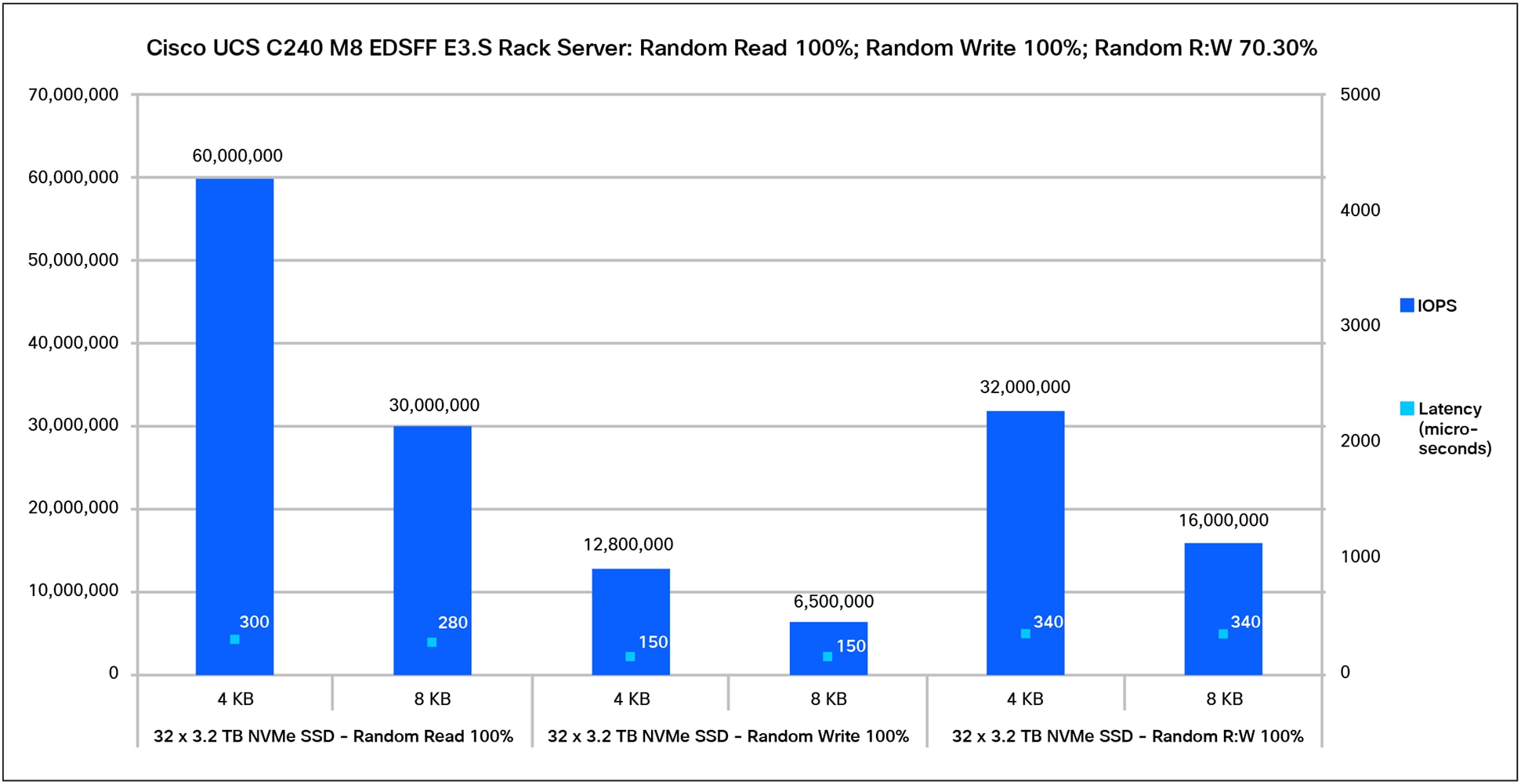
Figure 3 shows the performance of 32 E3.S NVMe SSDs for a 100-percent sequential read-and-write access pattern. The graph shows that the 3.2TB high-performance, high-endurance NVMe drive provides a performance of 380,000 MBps with a latency of 300 microseconds for 100-percent of sequential read operations and a performance of 170,000 MBps with a latency of 340 microseconds for 100-percent of sequential write operations with a 256KB block size. The performance is similar for a 1MB block size with a slightly higher latency.
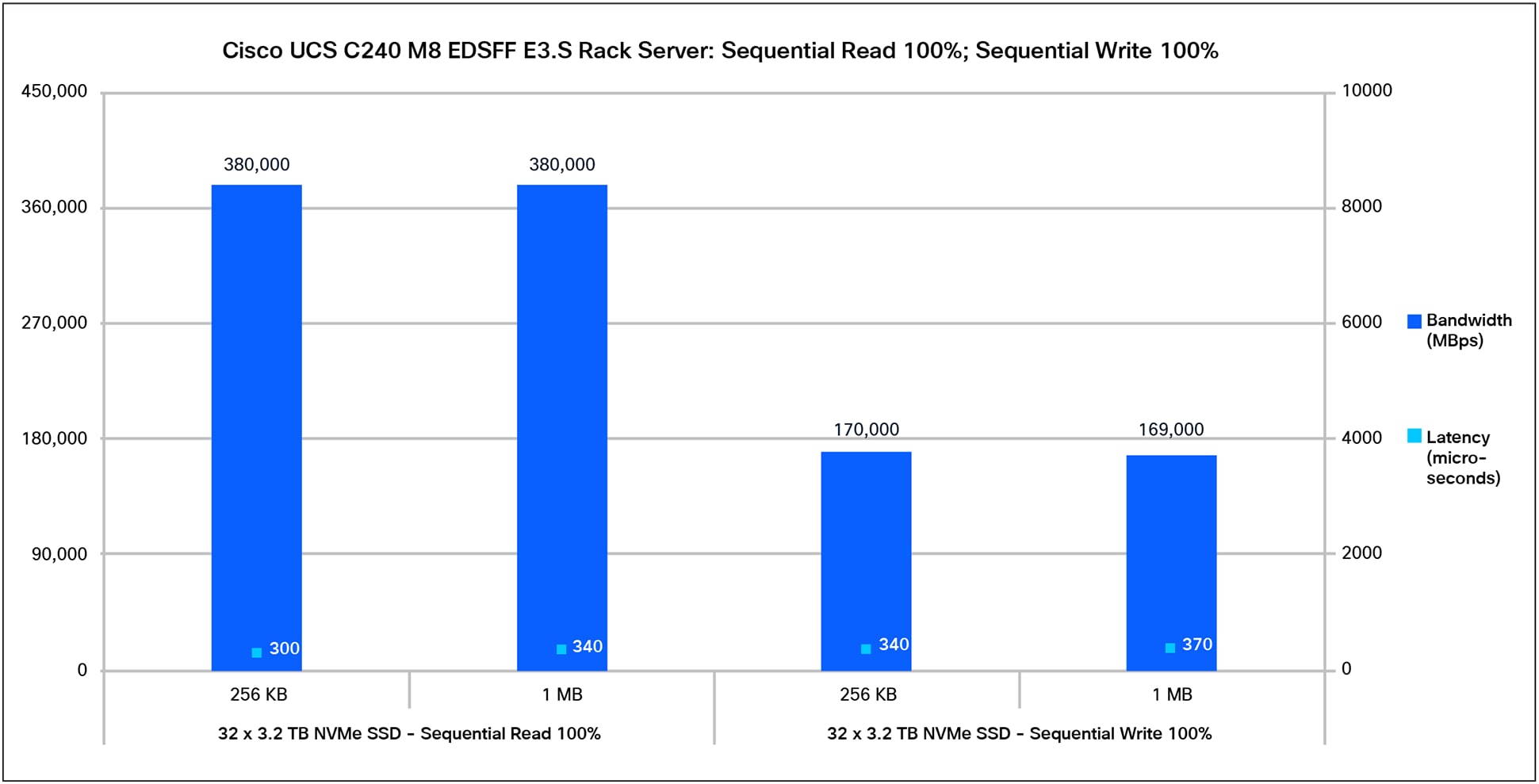
The Cisco UCS C240 M8 EDSFF E3.S Rack Sever is an all-NVMe server designed for workloads that require very high throughput and low latency. With all 32 NVMe drive bays connected through PCIe Gen5 x4 lanes, per-drive performance is primarily determined by the PCIe interface bandwidth and the capabilities of the installed SSDs. Overall system performance will also depend on workload characteristics, CPU/platform topology, and software stack efficiency.
Appendix: Test environment
Table 5 lists the details of the server under test.
Table 5. Server properties
Table 6 lists the recommended server BIOS settings for a standalone Cisco UCS C-Series rack server for NVMe performance tests.
Table 6. BIOS settings for standalone rack server
| Name |
Value |
| BIOS version |
6.0.2a.0.0126261758 |
| Cisco Integrated Management Controller (IMC) version |
Release 6.0 (2.260044) |
| Cores enabled |
All |
| Hyper-threading (All) |
Enable |
| Hardware prefetcher |
Enable |
| Adjacent-cache-line prefetcher |
Enable |
| Data Cache Unit (DCU) streamer |
Enable |
| DCU IP prefetcher |
Enable |
| Non-Uniform Memory Access (NUMA) |
Enable |
| Memory refresh enable |
1x refresh |
| Energy-efficient turbo |
Enable |
| Turbo mode |
Enable |
| Energy Performance Preference (EPP) profile |
Performance |
| CPU C6 report |
Enable |
| Package C-state |
C0/C1 state |
| Power performance tuning |
OS controls EPB |
| Workload configuration |
I/O sensitive |
Note: The rest of the BIOS settings were kept at platform default values. These settings are used for the purposes of testing and may require additional tuning for application workloads. For additional information, refer to the BIOS tuning guide.
For additional information, see: