Cisco Board Pro G3 Datasheet
Available Languages
Bias-Free Language
The documentation set for this product strives to use bias-free language. For the purposes of this documentation set, bias-free is defined as language that does not imply discrimination based on age, disability, gender, racial identity, ethnic identity, sexual orientation, socioeconomic status, and intersectionality. Exceptions may be present in the documentation due to language that is hardcoded in the user interfaces of the product software, language used based on RFP documentation, or language that is used by a referenced third-party product. Learn more about how Cisco is using Inclusive Language.
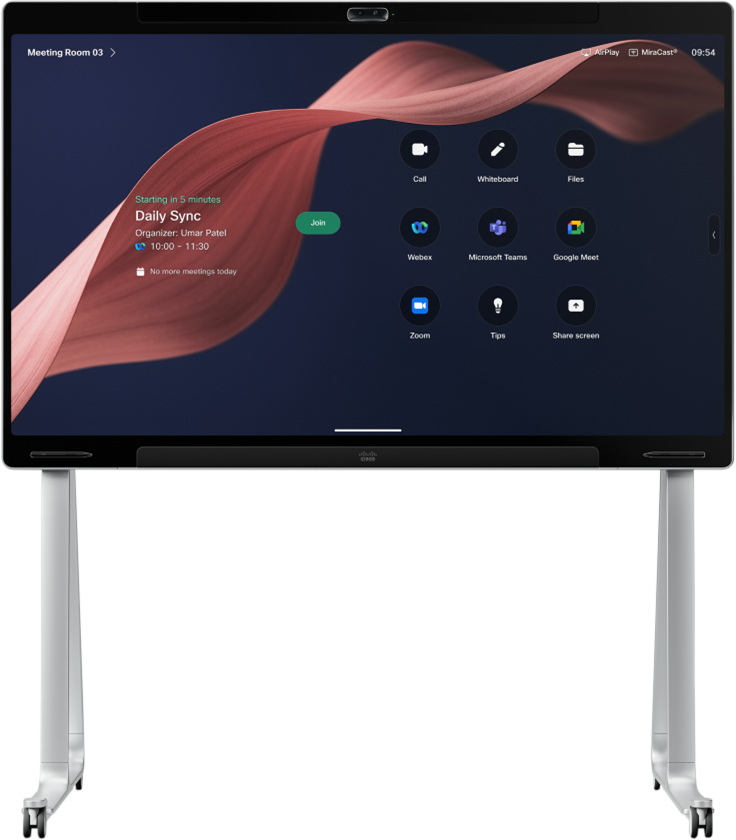
Cisco® Board Pro G3 is an all-in-one, integrated video device and collaboration board that offers a complete hybrid meeting room solution to remove the distance between in-room and remote participants. It is an intelligent video conferencing appliance combining a dual camera system, built-in speakers and microphones, an interactive touch screen, an AI-powered computing engine, and several mounting options to customize the experience.
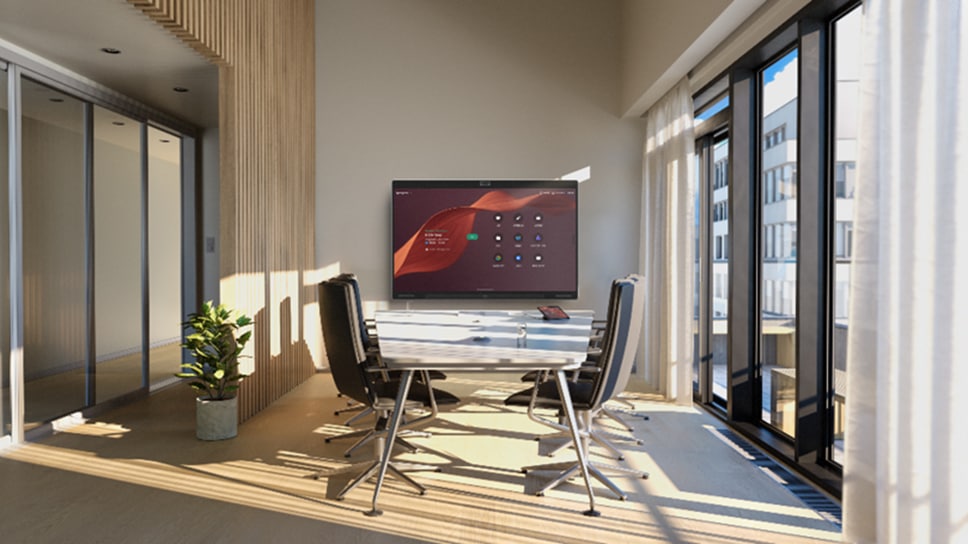
Featuring premium design, it’s the ultimate room device to power AI-enhanced video meetings, touch-enabled collaborative teamwork, streamlined deployment, and scalable cloud management with a single solution.
Running the Cisco Rooms and Microsoft Teams Rooms experiences and powered by the Cisco RoomOS core operating system, the Board Pro G3 is a supreme-quality, interoperable collaboration hardware to support hybrid meetings and teamwork in a variety of small and medium meeting rooms, training rooms, huddle spaces, and flexible room configurations.
What’s more, it features streamlined installation and maintenance with an all-in-one form factor, standardized design, and unified management, enabling you to bring remarkable hybrid collaboration to any small and medium workspaces at scale.


Video meeting with the wall-mount Board Pro 75 G3 running Microsoft Teams Rooms.
AI-enhanced, cinematic views with video over IP
Cisco Board Pro G3 is a meeting and collaboration board offering AI-infused meeting experiences that allow participants to communicate with clarity, feel included, and stay focused in the meeting. Featuring a high-performing computing engine and an NVIDIA AI chipset, it brings sophisticated image, audio, and language processing to everyday meeting spaces to build equity, remove distractions, and create more natural collaboration experiences.
It is the exceptional dual-camera-powered meeting board where a wide-angle lens and a far-reaching tele-lens work seamlessly together and are augmented with software AI to provide high-quality, inclusive camera views, extended camera reach, and impeccable visual clarity for remote participants. The Board Pro G3 supports a variety of camera views, including Frames for multi-participant framing, adaptive speaker view, and optimized group view. Furthermore, it provides the option to extend the camera reach with an AI virtual lens to make sure the active speaker at the far end of a long and narrow conference table is captured at high quality.
Better still, it’s a room device that dynamically tracks and frames presenters and speakers by combining motorized Pan-Tilt-Zoom (PTZ) with embedded AI for more inclusive hybrid training, presentation, and event scenarios when connected with the new Cisco Room Vision PTZ. That configuration radically simplifies installation over a single Ethernet cable (PoE+) for power, video output, camera control, and firmware upgrades—without the cable length and bandwidth limitations of HDMI and USB-based AV deployments. Video over IP removes the need for video extenders, cable clutter, and running electrical wiring closer to the camera.
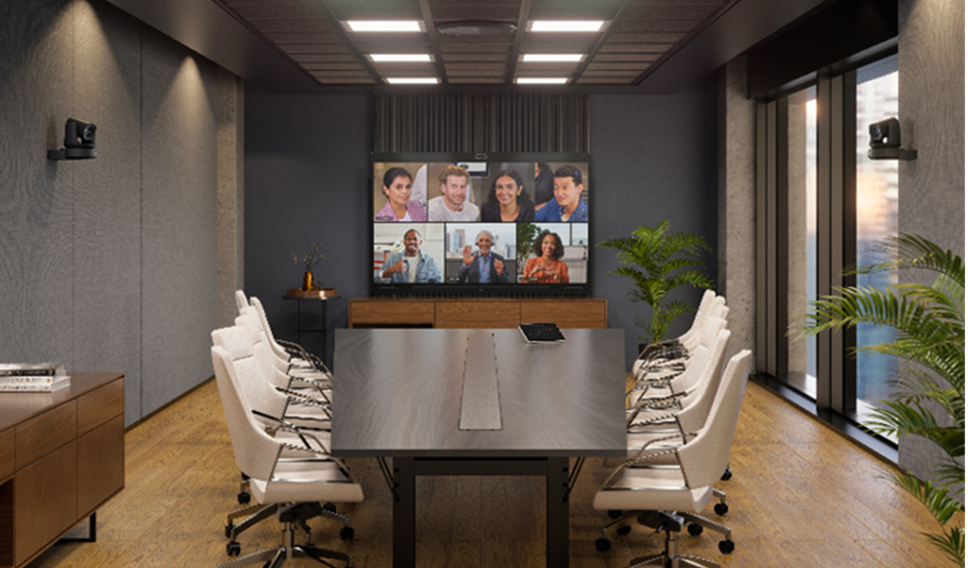
A virtual meeting with the Cisco Board Pro 75 G3 with cross-view set up.
Distraction-free, immersive experiences
Available in 55” and 75” display size models, the Board Pro G3 helps your teams be fully focused on the meeting: it provides rich, spatial sound in the room powered by a multi-channel loudspeaker system and picks up voices with a 14-element, beamforming microphone array while using advanced AI noise removal and supporting microphone extension to support high-quality acoustic experiences.
Featuring embedded device intelligence that works with any end user platform, Board Pro G3 helps users specify and optimize virtual meeting zones to capture and frame only those in the meeting while excluding passers-by in shared open areas or glass-walled spaces.
The device helps your teams enjoy engaging presentation experiences with a variety of content sharing options via cable (HDMI, USB-C) or wirelessly (Webex®, Miracast, Apple AirPlay*, Teams Casting) while enabling users to apply temporary or permanent annotations on any shared content.
Boost collaborative teamwork
Cisco Board Pro G3 also works as a responsive, interactive touch display for collaborative workflows and digital whiteboarding. Supporting a wide range of ideation, whiteboarding, and productivity solutions, it allows teams to brainstorm, collaborate, and share ideas in a connected workflow.
The Board Pro G3 features two active pens with buttons to support seamless annotation and multi-ink experiences with ultra-low latency. Whether it’s an ongoing meeting or a local brainstorming session, users can leverage the stylus, and touch-based pinch and zoom for details and precision.
While the room device supports the Webex Whiteboard and Microsoft Whiteboard (only on Microsoft Teams Room [MTR]) experiences, it provides access to your go-to productivity solutions like Miro, Mural, or Trello running as web apps or embedded apps on the touch device—either in a meeting or locally.
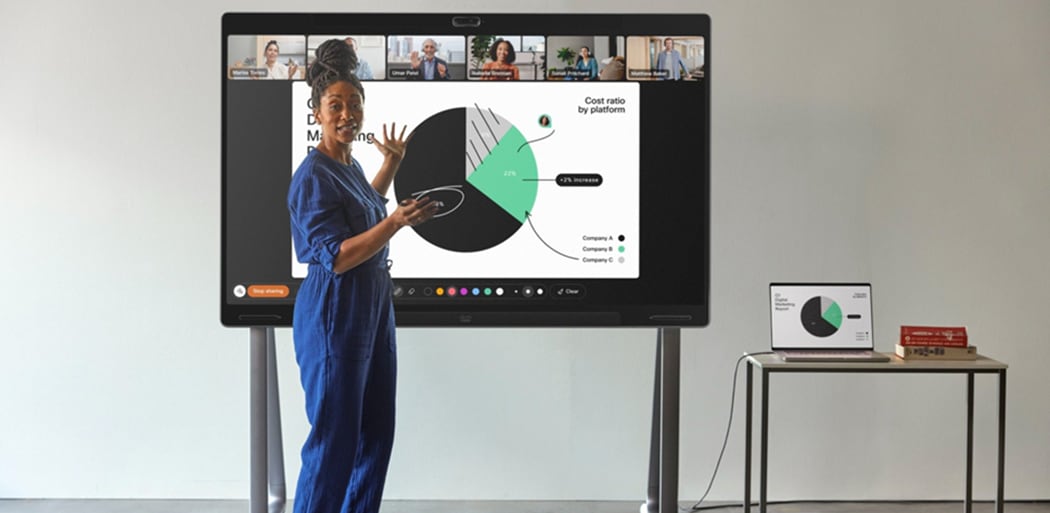
Cisco Board Pro 75 G3 on floor stand with wheel stand upgrade running the Webex Whiteboard experience.
Equip any small and medium room for hybrid work
Cisco Board Pro G3 is a fully self-contained system on a high-resolution 4K LCD screen. It securely connects with up to one external screen, external cameras, conferencing microphones and speakers, room control and scheduling displays, and other room peripherals to help you customize the room experience. Users can leverage two input sources and solve BYOD and touch redirect via a single USB-C cable.
The device seamlessly connects with analog, USB, and IP audio peripherals, including the Cisco Ceiling Microphone Pro or the Cisco Table Microphone Pro to provide directional, intelligent voice capture in longer rooms.
The Board Pro G3 includes a wall mount bracket for an unobtrusive setup, but is also available with an optional wall-stand, floor-stand, or floor-stand with wheel upgrade kit to support mobility in fixed or flexible room configurations. This not only helps you remove the need for overly complex configuration, systems integration, and costly maintenance but also allows users to deploy high-quality, standardized conferencing hardware at scale.
Unrivalled platform interoperability
The Board Pro G3 is a dedicated, flexible room appliance running the Cisco Rooms or the Microsoft Teams Rooms experience with a single solution and powered by a secure platform architecture. When configured for Cisco Rooms, it powers the native Webex Meetings and Events experience for the ultimate meeting and workspace experience combined with advanced third-party interoperability with Microsoft Teams, Zoom, and Google Meet.
When configured to run Microsoft Teams Rooms natively, it offers a set of differentiated camera and audio intelligence capabilities, advanced collaboration AI, and rich wired and wireless content sharing. It is unique in extending device management with advanced monitoring, troubleshooting, and analytics in Control Hub and provides the option to combine Microsoft Teams with the power of full-featured Webex Meetings and Events.
Streamline cloud device management
With Control Hub, your IT team can fully manage, monitor, troubleshoot, and analyze your deployment using a single, intuitive admin dashboard. It offers an at-a-glance visual inventory of video devices and Cisco or third-party peripherals, usage and occupancy metrics, device health, integrations, and workspace conditions.
Bulk configurations, automatic software upgrades, multi-tenant management, and device sensor-driven insights are all centrally accessible and can be augmented with the broader Cisco ecosystem via integration APIs to support your workspace management (Cisco Spaces) and end-to-end network monitoring (Cisco ThousandEyes) efforts.
The solution can be connected with the intuitive Cisco Room Navigator touch device so that your users can easily access conference controls, device settings, room booking, and third-party workspace experience apps from an accessible control panel. Both the video device and Room Navigator include rich built-in sensors for presence detection and environmental monitoring to enable augmented intelligence in Control Hub around real-time and historic device usage, room occupancy, and environmental conditions.
Last but not least, the device can be used as an interactive touch screen displaying interactive 3D floor maps via Cisco Spaces that leverages data sources from across multiple technology platforms to provide a single view of workspace availability and readiness while streamlining the in-office journey. The device can be also used for digital signage to display custom content for safety, branding, and internal communication purposes.
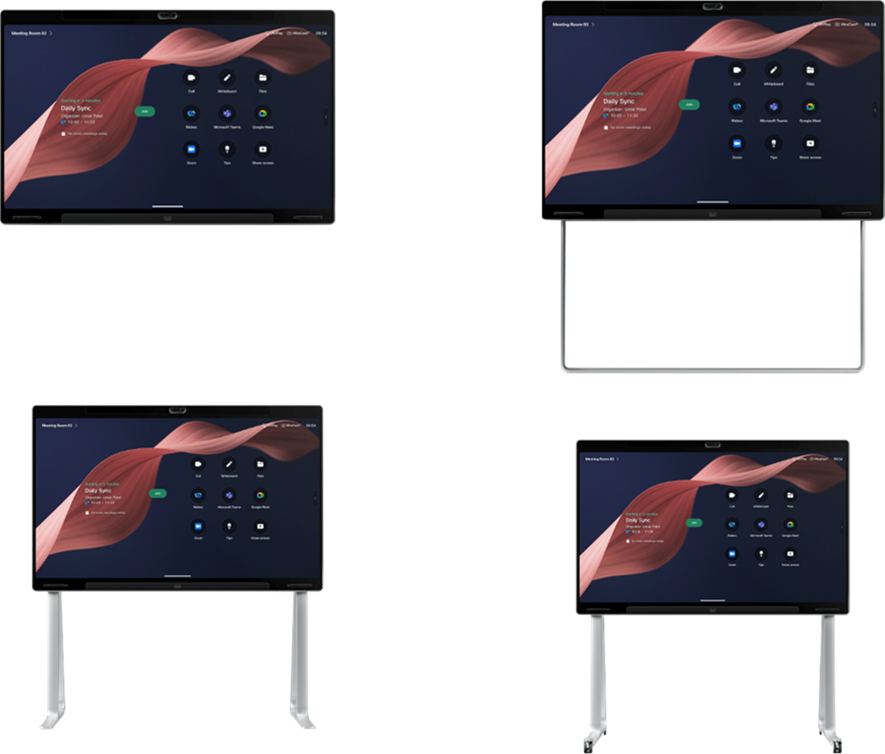
The wall-mount, wall-stand, floor-stand, and floor-stand with wheel upgrade model of the Board Pro 75 G3
Table 1. Cisco Board Pro G3 features and benefits
| Feature |
Benefits |
| Intelligent video meetings |
● Dual 4K camera featuring two 48 MP image sensors with 112- and 70-degree horizontal field of view allows for close and distant participants to be captured and framed with clarity.
● Optimal framing at 1080p resolution up to 7 meters from the device
● Computing engine features an NVIDIA AI chipset for advanced image, audio, and language processing
● Simple meeting-join experience on Cisco Rooms offering Webex Meetings and advanced third-party interoperability with Microsoft Teams (Cloud Video Interop [CVI], WebRTC), Zoom (for Cisco Rooms, Conference Room Connector [CRC], Session Initiation Protocol [SIP]), and Google Meet (Web Real-Time Communication [WebRTC])
● Native support for the Microsoft Teams Rooms experience with the option to join full-featured Webex meetings and events
● AI noise removal helps to keep the meeting attention on the active speaker by eliminating background noise
● Provides AI camera views: Frames for multi-participant framing, intelligent speaker view, optimized group view, and advanced manual camera controls
● Supports meeting zone to define virtual meeting perimeters in order to capture and frame only meeting participants in open spaces and glass-walled rooms
● AI virtual lens extension allows to extend the camera reach and frame the active speaker at high quality at the end of a long, narrow table
● A beamforming microphone array automatically detects the active speaker and ensures that high-quality audio is delivered to the far end
● Extension with IP, USB, and analog microphones and audio systems
● USB-C passthrough allows for computers to use the Cisco Board Pro G3 with any video client installed on the computer
● Enjoy crystal-clear, spatial audio experience from the integrated speakers
|
| Premium presentations |
● Direct wireless sharing through Webex, Miracast, Apple AirPlay
* (only in native Webex Meetings), and Microsoft Teams Cast (only in MTR mode)
● HDMI and USB-C input for 4K presentations (HDMI input supports HDCP
*)
● HDMI output to extend or duplicate content on external displays
● Connection with an external PTZ camera to solve intelligent presenter tracking
● Touch-redirect with Board Pro transforms your PC into a board-sized tablet
● Pointing and live annotation on shared content in Webex Meetings elevates presentations
|
| Digital whiteboarding |
● Support for the native Webex Whiteboard and Microsoft Whiteboard (only in MTR) experiences, and secure web apps to run directly on Board Pro G3, like Office 365, Trello, Miro, and Mural with the option to share and annotate on the content during meetings or local brainstorming
● Write and draw with two board pens, use fingers to pinch and swipe
● Access and interact with Embedded Apps, like Mural, Miro, and Slido (available in Webex Meetings)
|
| Smart integrations |
● Presence detection and People count via smart sensors, enabling analytics for better resource planning
● Tracks temperature, humidity, noise, and air quality in the rooms when paired with Cisco Room Navigator. Access the information through full stack APIs.
● Easily control room peripherals such as lights, room dividers, and curtains directly from the Room Navigator control unit through customizable APIs
● Automatic power save allows Board Pro to enter a low-power standby state upon inactivity
● Board Pro can be easily controlled using the touch screen or with the Cisco Room Navigator
● Cisco AI Assistant: for Cisco devices and Control Hub unlocks intelligent generative AI for device users
● Advanced device management, troubleshooting, monitoring, configurations, and workspace analytics in Control Hub
● A powerful web engine provides the ability to connect to a web-based backend to automatically display information when Board Pro is not in use.
● Content displayed in signage mode can be either static or interactive, giving users the option to interact with the content displayed.
● Integration with Cisco Spaces allows to display interactive 3D floor maps
|
| Performance features |
● Native screen resolution up to 4kp60
● Main video resolution up to 1080p30 (supports 60 fps when a second camera is connected)
● Content sharing resolution up to 4kp15
● Up to 20 Mbps bandwidth rate for video content
● Full Application Programming Interfaces (APIs)
● Cisco Media Assure packet loss protection
● Flexibility to register on-premises or to the cloud through Webex
● Hardware is optimized to run on a cloud platform for great experiences in shared rooms and spaces, with easy access to hosted conferences
● Supports Wi-Fi 6E for increased bandwidth and performance
|
| Design features |
● Combines sleek form factor, durable materials, and human-centric design for ease of use and longevity
● Flexible mounting options (included wall mount or add the optional wall stand, floor stand, or floor stand with wheel-stand upgrade kit)
● Two active pens with magnetic attachment to the touch screen
|
Table 2. Platform support
| Product family |
Platform supported |
| Cisco Board Pro G3 |
● Webex
● Microsoft Teams Rooms
● Zoom for Cisco Rooms
● H.323
● Session Initiation Protocol (SIP)
● Web Real-Time Communication (WebRTC)
● BYOD using USB-C Passthrough
● Native registration with Cisco Expressway
● Native registration on Cisco Unified Communications Manager (CUCM)
● Requires CUCM version 15 SU5 or later with device pack for Board Pro G3
|
Table 3. Product specifications for Cisco Board Pro G3
| Specification |
Description |
| Software compatibility |
● RoomOS June or RoomOS 26.7.2 or later
● Microsoft Teams Rooms on Android
|
| Default components of the Cisco Board Pro G3 |
● Fully integrated main unit is delivered with:
◦ Multi-touch 55- or 75-inch 4K LCD display ◦ 2 x 48 MP cameras – wide and main field of view ◦ 14-element beamforming microphone array ◦ Integrated multi-channel speakers and woofer
● 2 active pens
● Wall mount kit (when wall stand or floor stand is selected, the wall mount kit is no longer included)
● Power cord according to country specified in order
● Lifting handles
|
| Optional hardware components |
● Cisco Table Microphone Pro
● Cisco Table Microphone (3.5mm mini jack)
● Cisco Ceiling Microphone Pro
● Cisco Ceiling Microphone (3.5mm mini jack)
● Cisco Room Navigator for Table
● Cisco Room Navigator for Wall
● Network, HDMI, and presentation cables
● Cisco Active Optical USB-C Cable, 9m
● Wall stand, 55-inch version
● Wall stand, 75-inch version
● Floor stand, 55-inch version
● Floor stand, 75-inch version
● Wheel kit for floor stand, 55-inch version
● Wheel kit for floor stand, 75-inch version
● Cisco Room Vision PTZ Camera
● Cisco PTZ 4K Camera
|
| Display |
55-inch/75-inch LCD monitor
● Resolution: 4k UHD (3840x2160 /16:9)
● Display type: ADS (Advanced Super Dimension Switch) LCD (IPS-level)
● Display size in inches: 55 or 75 in.
● Luminance: Typ 350 cd/m2
● Viewing angle: ± 88 degrees (all directions)
● Number of colors: 1.07 billion
● Contrast ratio: 1:1200
● Response Time: 8 ms
|
| User interface |
● Projected capacitive touch
● Optically bonded cover glass
● Anti-Glare (AG) and Anti-Fingerprint (AF) coating
● Active stylus-enabled (support 2 simultaneous styluses) with 2 physical buttons for quick actions
● Multi-touch (10 fingers + 2 styluses)
● Stylus-finger differentiation
● Palm rejection
|
| Bandwidth |
● Up to 20 Mbps bandwidth rate for video content
● 720p30 from 768 kbps
● 720p60 from 1152 kbps
● 1080p30 from 1472 kbps
● 1080p60 from 2560 kbps
|
| Firewall traversal |
● Cisco Expressway technology
● H.460.18, H.460.19 firewall traversal
|
| Video standards |
● H.264 AVC, H.265 HEVC, H.263, AV1
|
| Encode and decode / Supported resolution |
● Screen: 4kp60
● Main video: Full HD 1080p30 and encoding 60 fps when a secondary camera is connected
● Main video in Webex meetings (when bandwidth is set at 20 Mbps): rendering up to 4x 1080p video streams decoding a total of 4K pixels
● Content sharing: 4kp15
|
| Cameras |
Dual 4k integrated camera system with two 48 MP image sensors
● Automatic best view and speaker tracking
● Automatic brightness and white balance
● Frames multi-participant framing
● Meeting zone support
● 5x digital zoom
● AI virtual lens extension uses software intelligence to extend camera reach in longer rooms while preserving quality
Main camera lens:
● 70° horizontal field of view, 55° vertical field of view
● f/1.85 fixed aperture
● 48 MP image sensor, 30 fps
● Focus distance: 0.8m to infinity
● 1/1.3” CMOS, Quad Bayer
● Auto focus lens (VCM)
Wide-angle camera lens:
● 112° horizontal field of view, 94° vertical field of view
● f/2.8 fixed aperture
● 48 MP image sensor, 30 fps
● 1/1.3” CMOS, Quad Bayer
● Fixed-focus lens
|
| Video inputs |
● USB-C DisplayPort Alternate Mode up to 3840 x 2160p60 (4kp60)
● HDMI 2.0 type A input supports formats up to 3840 x 2160p30 (4kp60 coming soon
*)
● HDMI input is compatible with HDCP
*
● Video over IP
● Real-Time Streaming Protocol (RTSP) streaming
|
| Video outputs |
● 1x HDMI 2.0 type A up to 3840 x 2160p60 (4kp60) for screen mirroring or extension on external displays
|
| Wireless sharing |
● Webex app (up to 3840 x 2160 at 7.5 fps, including up to 1920 x 1080 at 30 fps)
● Miracast (up to 1920 x 1080 at 60 fps) – Not available on Non radio version and requires Board Pro G3 to be on Ethernet network connection
● Apple AirPlay
*:
◦ Bluetooth® discovery (not on non-radio version) and Bonjour service discovery ◦ Screen mirroring up to 1920 x 1080 at 60 fps ◦ Extended desktop (Mac only) - up to 1920 x 1080 at 60 fps ◦ Video streaming up to 3840 x 2160 at 30 fps
● Microsoft Teams Cast (up to 1920 x 1080 at 15 fps) - Available only on Microsoft Teams Rooms
|
| Network |
● 1x Ethernet (RJ-45) 10/100/1000 Mbps for LAN (external network)
● 1x Ethernet (RJ-45) 10/100/1000 Mbps PoE (802.3af) port with a power budget of 15.4W enabled for Cisco Room Navigator direct pairing
● 1x Ethernet (RJ-45) 10/100/1000 Mbps for external camera control
● Wi-Fi 6/6E support. Wi-Fi 802.11a/b/g/n/ac/ax (2.4, 5 and 6 GHz) - not available in non-radio versions
● 2x2 Multiple Input Multiple Output (MIMO)
Note: Due to compliance regulations, it is required to enable 802.11d in the access point for the product to operate properly within 5725 MHz – 5875 MHz. A Wi-Fi connection can be used as a flexible option. Ethernet connection is always preferred for high performance.
● IPv4 Dynamic Host Configuration Protocol (DHCP)/static
● IPv6 (both static and stateless address auto-configuration)
● Network Time Protocol (NTP)
● HTTP(S) proxy support (for signaling, not media)
● Inspecting Transport Layer Security (TLS) proxy supported
● Cisco Discovery Protocol (CDP)
● 802.1X network authentication (passphrase or X.509 client certificate)
● 802.1Q virtual LAN
● 802.1p (Quality of Service [QoS] and Class of Service [CoS])
|
| Sensors |
● Presence detection powered by ultrasound technology embedded into the video device. Support for people count to track real-time occupancy and support space allocation
● General noise, ambient noise, and room acoustics (RT60) tracking with built-in sensors
● Environmental sensors measuring temperature, humidity, and air quality included in the Room Navigator control panel (please consult the Cisco Room Navigator datasheet for more information)
|
| Audio standards |
● Audio codecs: G.711, G.722, G.722.1, G.729, AAC-LD, and Opus
● Audio interop: AES67
|
| Audio features |
● Acoustic Echo Cancellation (AEC)
● Active Lip Synchronization
● AI-Powered Noise Removal
● Automatic Gain Control (AGC)
● Beamforming Microphones
● De-Reverberation
● Full Duplex
● Full-Band Audio
● Noise Reduction
● Spatial Audio
● Ultrasound Technology
● Test microphone feature available in the RoomOS device settings allows users to record a sound sample and play it back to test speech pickup quality and noise removal settings
|
| Audio inputs |
● 2x analog microphone inputs
● 1x HDMI input
● 1x USB-C
● 1x USB-A
● 1x Ethernet for audio over IP - default connectivity with up to 8x Cisco IP conferencing microphones and support for third-party networked microphone streams via AES67. Please note that connecting multiple IP microphones over Ethernet requires a PoE compatible switch, e.g., CBS250, CBS350 and C1200.
● Bluetooth - Not available on No-Radio model
**
|
| Audio outputs |
● 1x analog line out (stereo 3.5mm minijack)
● 1x USB-C output
● 1x USB-A output
● 1x Ethernet for audio over IP and AES67 audio streams
● Bluetooth - Not available on No-Radio model
**
|
| Microphone and loudspeaker system |
● 14-element beamforming microphone array for crystal clear speech pickup and speaker tracking.
Note: The internal microphone array is optimized for up to 4 meters (13 ft) from the device in small and medium-sized meeting rooms and collaboration spaces. In meeting rooms where the furthest participants are seated more than 4 meters from the device, we recommend extending audio pickup by adding external table or ceiling microphones to ensure the best audio experience. Note that room acoustics and background noise level also impact the speech pickup distance and quality in the meeting space. Consult Cisco Workspaces for guidance on best practices.
● Multi-channel loudspeaker system with high-quality full-range drivers and separate force-cancelling woofers
● Loudspeaker system frequency response: 75 Hz to 20 kHz [+/- 3dB]
● Max Output Sound Pressure Level: 94dB
|
| Speaker tracking |
● Built-in microphone array and cameras work together for intelligent framing and speaker tracking.
● Multiple camera modes adapt to different meeting scenarios: Best Overview frames the full group, Speaker mode follows the active speaker, and Frames gives each participant an equal share of the screen.
● For optimal speaker tracking and framing at 1080p resolution, it is recommended that the furthest in-room participant is located within 7 meters of the video device.
|
| Presenter tracking and video over IP |
● Requires connecting the Board Pro G3 with the Cisco Room Vision PTZ
● Cisco Room Vision PTZ can be connected either via Ethernet only (control and video over IP) or via Ethernet and HDMI. Over IP will require a PoE+ power injector if the camera is not connected via a PoE+ compatible Ethernet switch. Camera dynamically follows the local presenter within a defined zone and helps ensure an optimized view.
● AI-powered face detection
|
| USB Passthrough / BYOD |
Ability to provide the following over one USB-C cable to a connected computer:
● USB 2.0 type C connectivity
● Extension of display (3840x2160 @60fps) - computer must support DisplayPort Alternate Mode
● Touch forwarding capabilities on supported operating systems
● Use Cisco Board Pro G3 camera, microphone, and speakers with any software client
● Laptop charging (60W maximum)
● Power output: 20V@3A (60W), 15V@3A (45W), 12V@3A (36W), 9V@3A (27W), 5V@3A (15W)
|
| Video stream layouts |
● Supporting available Webex video stream layouts and meeting features, including focus, grid, prominent, stack and overlay. For more information, please consult the Webex Help Center.
● Available in Webex Meetings, People Focus provides an intelligent video layout option that removes excess floor and ceiling space, while optimizing the layout based on where people are sitting in the room, for a more equitable view of every participant in the meeting.
|
| Web engine |
● The device is powered by RoomOS that features a Chromium-based web engine to support digital signage, WebRTC, interactive or non-interactive web-based applications added to the home screen/ touch controller user interface, embedded apps in Webex Meetings, embedded web views, enterprise content management tools, and more.
● The web engine supports most features expected from modern desktop browser engines, including HTML5, EcmaScript 6, CSS3, web fonts, multi-touch, SVG, canvas, iFrames, web sockets, web assembly, standard video codecs, and more.
|
| Language support |
● Arabic, Czech, Danish, German, US English, UK English, Catalonian, Spanish, Latin-American Spanish, Finnish, French, Canadian French, Greek, Hebrew, Hungarian, Italian, Japanese, Korean, Dutch, Norwegian, Polish, Brazilian Portuguese, Portuguese, Russian, Swedish, Turkish, Ukrainian, Chinese (Simplified), Traditional Chinese
|
| System management |
● For cloud deployments, the device is managed in the Control Hub, providing a single pane of glass of system status, activation, configuration, metrics, workspace insights, and troubleshooting.
● For on-premises deployments, management via Cisco Unified Communications Manager (CUCM) or Expressway supported
◦ Registration on Cisco Unified Communications Manager requires CUCM version 15SU5 or later with device pack for Board Pro G3 ◦ Native registration with Cisco Expressway ◦ Webex ◦ Third-party H.323 gatekeepers and standards-based SIP proxies |
| Protocols |
● H.323
● SIP
● Webex
● WebRTC
|
| Embedded encryption |
● H.323 and SIP point to point
● Standards-based: H.235 v3 and Advanced Encryption Standard (AES- 128 or 256)
● Automatic key generation and exchange
● Support for end-to-end encryption in Webex meetings and calls
|
| IPv6 network support |
● Single-call stack support for both H.323 and SIP
● Dual-stack IPv4 and IPv6 for DHCP, Secure Shell (SSH), HTTP, HTTPS, DNS, DiffServ
● Support for both static and automatic IP configuration, stateless address auto configuration, and DHCPv6
|
| Security features |
● Secure management using HTTPS and SSH protocols
● End-to-end encryption for calls and meetings on Webex
● Standards-based media encryption on all back-ends (Secure Real-time Transport Protocol [SRTP], using AES-128-GCM or AES-256-GCM)
● WPA3 and WPA3-Enterprise with CCMP128 Wi-Fi security
● Password protection to access administration available on Room Navigator controller
● Network settings protection
|
| Certificate management |
● Secure Unique Device Identifier (SUDI) and Manufacturer Installed Certificate (MIC). Both are installed during manufacturing and cannot be removed
● MIC signed by Cisco Manufacturing CA; supports Certificate Authority Proxy Function (CAPF) for secure onboarding to Cisco Unified Communications Manager (UCM)
● Locally Significant Certificates (LSC)
● X.509 digital certificates for client and server authentication; supported key sizes are 2048, 3072, and 4096 bits
● Customer-installed certificates with matching private keys for services such as IEEE 802.1X/Wi-Fi, HTTPS, SIP-TLS, pairing, audit logging, and HTTP client/mTLS. Supported input formats include Privacy-Enhanced Mail (PEM) and Base64-encoded Distinguished Encoding Rules (DER).
● Cisco-vetted bundled Certificate Authority (CA) certificate list, updated regularly. Administrators can add customer CA certificates and enable/disable bundled CAs; CA certificates are used for outbound HTTPS and other TLS connections.
|
| Power |
● Electrical rating:
◦ Cisco Board Pro 55 G3: 3.0-1.5 A 100-240 V 50/60 Hz, Class I ◦ Cisco Board Pro 75 G3: 4.0-2.0 A 100-240 V 50/60 Hz, Class I
● Networked standby power consumption: 12 W typical
● Deep sleep power consumption: 1 W typical
● Setting up Office Hours on the device allows to switch off features like signage outside of ordinary office hours, to optimize power consumption and extend screen lifetime. Outside office hours the device won’t wake up even if it detects motion in the room.
|
| Other ports and connectivity |
● USB 3.2 Gen 2 type A port with 1.5A charging capability - for external USB microphones, Digital Signal Processor (DSP), keyboard, or headset
● MicroUSB port
● Factory reset pinhole
● Bluetooth 5.2 and Bluetooth Low Energy
**
|
| Operating, storage and transport temperature and humidity |
● Operating temperature: 32°F to 95°F (0°C to 35°C) ambient temperature
● Operating humidity: 20% to 90% Relative Humidity (RH non-condensing)
● Storage and transportation temperature –4° to 140°F (-20° to 60°C)
● Storage and transportation humidity (10% - 90% RH non-condensing)
|
| Multipoint support |
● 5-way embedded SIP/H.323 conferencing capability with MultiSite option
|
| MultiSite features |
● Adaptive SIP/H.323 MultiSite:
◦ 3-way resolution up to 1080 at 30 fps plus content up to 4K at 15 fps ◦ 4-way resolution up to 720 at 30 fps plus content up to 4K at 15 fps ◦ 5-way resolution up to 720 at 30 fps plus content up to 4K at 10 fps
● Full individual audio and video transcoding
● H.323, SIP, and VoIP in the same conference
● Support for presentation (H.239, Binary Floor Control Protocol [BFCP]) from any participant at resolutions up to 4kp15
● Best impression (automatic continuous presence layouts)
● Encryption and dual stream from any situation
|
| Approvals and regulatory compliance |
● Directive 2014/30/EU (EMC Directive) - Class A - for non-radio
● Directive 2014/53/EU (Radio Equipment Directive) - for radio
● Directive 2014/35/EU (Low Voltage Directive) - for non-radio
● Directive 2011/65/EU (Restriction of Hazardous Substances [RoHS])
● Directive 2012/19/EU (WEEE)
● Nationally Recognized Testing Laboratory (NRTL) approved (product safety)
● FCC listed (radio equipment)
● FCC CFR 47 Part 15B (EMC) - Class A
● FCC CFR 47 Part 15C (RF)
● FCC CFR 47 Part 15E (RF)
The list above reflects the regulations applicable at the time of publishing this document. For an updated list of regulations applicable, see the Product Approval Status Database for approval documents per country. |
| Sustainability |
● Circular design principles applied for product architecture, materials, and packaging
● Reduced amount of foam, single-use plastics, and non-recyclable materials in the boxes
● Removal of paper copy of the installation guide from the package (except for wall-stand model)
● 65% Post-Consumer Recycled (PCR) plastic used in the mechanical parts originating from end-of-life devices and old electronics
● The video system is modular and upgradeable. It’s manufactured with more sustainable, consciously chosen materials and is designed for easy repair, refurbishing, and recycling to extend the lifecycle of the product.
● Smart energy consumption and option to enable Office Hours to optimize energy usage and extend the lifecycle of the touch screen.
● Carbon Emission Insights widget in Control Hub allows to track and optimize the carbon footprint of your deployment.
● Cisco’s takeback and reuse program enables you to return your end-of-use devices for free, via a simple, secure, and sustainable process.
|
Table 4. Feature availability matrix on Cisco Board Pro G3
| Feature |
Cisco Rooms |
Microsoft Teams Rooms (with Control Hub registration) |
Microsoft Teams Rooms (without Control Hub registration) |
| Native support for Microsoft Teams Rooms meetings experience |
No |
Yes |
Yes |
| Native support for the Webex Meeting experience |
Yes |
Yes, via One- Button-to-Push meeting join |
No |
| Microsoft Teams Meetings with VIMT (CVI) or WebRTC / Direct Guest Join |
Yes |
N/A |
N/A |
| Google Meet interop (WebRTC) |
Yes |
No |
No |
| Zoom Meetings interop |
Yes, Zoom for Cisco Rooms or Zoom CRC SIP |
Yes, Zoom CRC or WebRTC |
Yes, WebRTC- based meetings |
| Standards-based video interop (SIP/H.323 dialing) |
Yes |
Yes |
No |
| Content sharing resolution |
In active meeting: up to 3840 x 2160 at 15 fps Out of active meeting: up to 3840 x 2160 at 60 fps |
In active meeting: up to 1920 x 1080 at 15 fps Out of active meeting: up to 3840 x 2160 at 60 fps |
In active meeting: up to 1920 x 1080 at 15 fps Out of active meeting: up to 3840 x 2160 at 60 fps |
| Simultaneous content sources for local sharing (out of active video meeting) |
2 |
2 |
2 |
| Wireless sharing options |
Webex App, Miracast, Apple Airplay* |
Microsoft Teams Sharing, Miracast |
Microsoft Teams Sharing, Miracast |
| HDCP support* |
Yes, via HDMI input |
Not supported in MTR calls. Only with local sharing and in native Webex Meetings |
Not supported in MTR calls. Only with local sharing |
| USB passthrough |
Yes |
Yes |
Yes |
| Touch redirect via USB-C |
Yes, when sharing locally and in a call |
Yes, when sharing locally |
Yes, when sharing locally |
| External PTZ camera connection for presenter tracking |
Yes |
Yes |
Yes |
| Additional external screen connectivity (via 1x HDMI out) |
Yes |
No |
No |
| People Focus intelligent layout composition |
Yes, in Webex meetings |
In native Webex meetings only |
No |
| Frames camera mode for multi- participant framing |
Yes |
Yes |
Yes |
| AI noise removal |
Yes |
Yes |
Yes |
| Meeting zone |
Yes |
Yes |
Yes |
| Deployment options |
On premises, cloud, hybrid |
Cloud only |
Cloud only |
| Enterprise calling |
Webex Calling / UCM |
Teams Calling |
Teams Calling |
| Cloud device management |
Control Hub |
Teams Admin Center and Control Hub |
Teams Admin Center |
| Whiteboarding |
Webex Whiteboard, with the option for third-party whiteboarding web apps |
Microsoft Whiteboard (Webex Whiteboard in native Webex meetings) |
Microsoft Whiteboard |
| Room booking |
Hybrid Calendar + Room Navigator touch panel |
Microsoft Teams Calendar + Room Navigator touch panel as Teams Panel |
Microsoft Teams Calendar+ Room Navigator touch panel as Teams Panel |
| Conference controls |
Hybrid Calendar + Room Navigator touch panel |
Microsoft Teams Calendar + Room Navigator touch panel as Microsoft Teams Rooms Touch Console |
Microsoft Teams Calendar + Room Navigator touch panel as Microsoft Teams Rooms Touch Console |
| Multi-inking in whiteboarding session |
Yes |
Not available on Microsoft Whiteboard. Supported on the Webex Whiteboard in native Webex Meetings. |
Not available on Microsoft Whiteboard. |
| Whiteboard storage/sharing |
Webex App, OneDrive, email |
Storage target is dependent on Microsoft setup |
Storage target in MTR based on Microsoft setup |
| Live annotation on content |
Yes |
Yes, with local sharing and in native Webex Meetings on MTR |
Yes, with local sharing on MTR |
| Third-party apps |
Yes, native web apps and embedded apps |
Yes, via webviews |
No |
| Digital signage |
Yes |
Yes |
No |
| Custom controls with Macros and User Interface extensions |
Yes |
Yes |
No |
| Customized branding (logos, wallpaper) |
Yes |
No |
No |
| Workplace analytics in Control Hub with APIs |
Yes |
Yes |
No |
| Multi-tenant device management and bulk configuration |
Yes |
Yes |
No |
| Network monitoring and troubleshooting |
Yes, via ThousandEyes integration in Control Hub |
Yes, via ThousandEyes integration in Control Hub |
No |
Table 5. Hardware specifications for Cisco Board Pro G3
| Type |
Cisco Board Pro 55 G3 |
Cisco Board Pro 75 G3 |
| Product weight: |
||
| Board only |
40.5 kg |
64.5 kg |
| Floor stand |
27 kg |
32.5 kg |
| 5 kg |
5.5 kg |
|
| Wall stand adapter kit |
5.0 kg |
10 kg |
| Wall mount |
4.5 kg |
5.8 kg |
| Assembled dimensions (mm [inch]) |
||
| Board Pro G3 main unit |
|
|
| With floor stand |
|
|
| With wheel upgrade kit |
|
|
| With wall mount |
|
|
| With wall-stand kit - including wall-stand adapter and the wall-stand of Cisco Board 55S/70S |
|
|
| Main unit (spare) |
Package size:
● 60 x 9.5 x 39.4 in.
(1508 x 242 x 1000 mm) |
Package size:
● 77.7 x 9.5 x 51.3 in.
(1974 x 242 x 1303 mm) |
| Wall-mount kit |
Package size:
● Wall Mount Kit 55”: 50.5 x 9.2 x 4.6 in.(1282 x 233 x 117 mm)
● Spare Wall Mount Kit 55”: 50.5 x 35.6 x 10.3 in. (1282 x 904 x 261 mm)
|
Package size:
● Wall Mount Kit 75”: 65.3 x 8.8 x 4.6 in. (1658 x 223 x 117mm)
● Spare Wall Mount Kit 75”: 65.3 x 35.6 x 10.3 in. (1658 x 904 x 261 mm)
|
| Floor stand |
Package size:
● Floor Stand Kit 55”: 61.8 x 45.3 x 7.4 in.
(1569 x 1151 x 189 mm)
● Spare Floor Stand Kit 55”: 61.2 x 45.3 x 13.1 in.) (1569 x 1151 x 333 mm)
|
Package size:
● Floor Stand Kit 75”: 59.3 x 41.9 x 7.8 in. (1505 x 1064 x 199 mm)
● Spare Floor Stand Kit 75”: 59.3 x 41.9 x 13.5 in. (1505 x 1064 x 343 mm)
|
| Wheel upgrade kit |
Package size:
● 33.8 x12.9 x 3.9 in. (858 x 328 x 99 mm)
|
Package size:
● 33.8 x 12.9 x 3.9 in. (858 x 328 x 99 mm )
|
| Wall-stand kit |
● Wall-stand adapter package: 2.8 x 33.2 x 9.1 in. (72 x 842 x 230 mm)
● Wall-stand package for Cisco Board 55S: 36.8 x 51.6 x 4.7 in. (934 x 1311 x 119 mm)
|
● Wall-stand adapter package: 2.8 x 41.9 x 9.1 in. (72 x 1063 x 230 mm)
● Wall-stand package for Cisco Board 70S: 64.7 x 45.8 x 4.6 in. (1643 x 1164 x 116 mm)
|
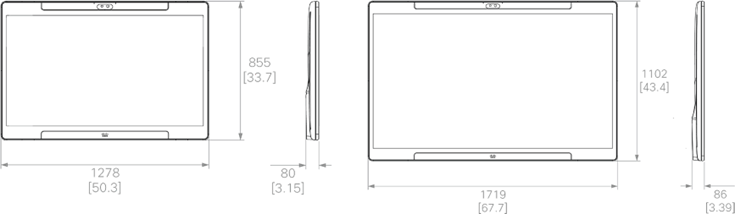
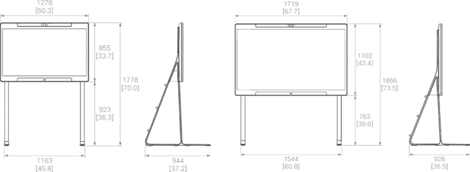
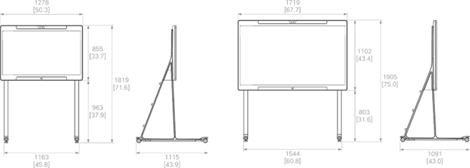

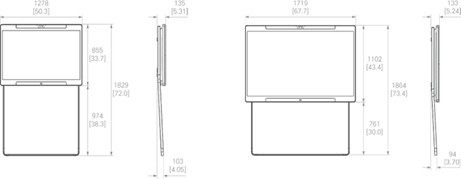
For further information about product dimensions, please consult the Cisco Board Pro G3 CAD Drawings.
To order, contact your local Cisco representative and refer to Tables 6-8.
Table 6. Ordering information for Cisco Board Pro 55 G3
| Product name |
Part number |
Compliance model number |
| Cisco Board Pro 55 G3 - Primary Models |
||
| Cisco Board Pro 55 G3 |
CS-BRDP55-G3-K9 |
TTC60-35 |
| Cisco Board Pro 55 G3 - No-Radio |
CS-BRDP55-G3-NRK9 |
TTC60-35 |
| Cisco Board Pro 55 G - Regional Models (Select markets) |
||
| Cisco Board Pro 55 G3 - TAA |
CS-BRDP55-G3-K9++ |
TTC60-35 |
| Cisco Board Pro 55 G3 - TAA - No-Radio |
CS-BRDP55-G3NRK9++ |
TTC60-35 |
| Cisco Board Pro 55 G3 - Customized Model |
CS-BRDP55-G3-K9-- |
TTC60-35 |
| Cisco Board Pro 55 G3 - Customized Model - No-Radio |
CS-BRDP55-G3NRK9-- |
TTC60-35 |
| Cisco Board Pro 55 G3 - No-Radar |
CS-BRDP55-G3-NDK9 |
TTC60-35 |
| Cisco Board Pro 55 G3 - Default Box Components |
||
| Cisco Board Pro 55 Wall Mount Kit (if floor-stand or wall- stand option is selected, the wall mount kit is not included) |
CS-BRD55P-WMK |
|
| 2x Cisco Active Stylus Pen (1 Stylus) - Only for use with Desk Pro G2, Board Pro G3, Board Pro G2 and Board Pro G1 |
CS-ACTSTYL= |
|
| Cisco Board Pro Lifting Handles (set of two used during installation) |
CS-BRDP-LFTHNDL- |
|
| Power cord (country-specific) |
Part number varies by region |
|
| Cisco Board Pro 55 G3 - Optional Configuration Components (Priced Options) |
||
| Stand Options (if floor-stand or wall-stand option is selected, the wall mount is no longer included): |
||
| Cisco Board Pro 55 Wall Stand (includes Wall Stand Adapter) |
CS-BRD55P-WS |
|
| Cisco Board Pro 55 Floor Stand |
CS-BRD55P-FS |
|
| Cisco Board Pro 55 Wheel Upgrade Kit |
CS-BRD55P-WUK |
|
| Cisco Board Pro Cable Management Kit |
CS-BRDP-CBLMGMT-L |
|
| Cisco Board Pro 55 G3 - Optional Configuration Components (Priced Options) |
||
| Standard Cable Options: |
||
| Cisco USB-C 3.2 Gen 2X2 Active Cable, 4M length |
CAB-USBC-AC-4M |
|
| Cisco Active Optical USB-C Cable, USB 3.1, DP 1.4, 9m |
CAB-USBC-AC-9M |
|
| Cisco HDMI to HDMI 2.1b directional (AOC) active optical cable 9m |
CAB-UHS-8K-9M |
|
| Cisco HDMI to HDMI 8K directional (AOC) active optical cable - 20M |
CAB-UHS-8K-20M |
|
| Cisco Multi-head Cable (4K, USB-C, HDMI, miniDP), 9m |
CAB-HDMI-MUL4K-9M |
|
| Ethernet CAT5E Cable - 5m - Gray |
CAB-ETH-5M-GR |
|
| Ethernet CAT5E Round Cable - 4m - Gray |
CAB-CAT5E-4M |
|
| Ethernet CAT5E Round Cable - 8m - Gray |
CAB-CAT5E-8M |
|
| Ethernet CAT5E Round Cable - 12m - Gray |
CAB-CAT5E-12M |
|
| Optional Control Device (Ethernet Cable Ordered Separately): |
||
| Cisco Room Navigator-Table Stand, First Light (White) |
CS-T10-TS-L-K9 |
TTC5-15 |
| Cisco Room Navigator-Wall Mount, First Light (White) |
CS-T10-WM-L-K9 |
TTC5-15 |
| Microphone Options: |
||
| Cisco Table Microphone Pro (w/attached 11m cable) |
CS-MIC-ARRAY-T |
TTC5-17 |
| Cisco Table Microphone with 3.5mm Jack Plug |
CS-MIC-TABLE-J |
TTC5-14 |
| Extension Cable 9m for Table Mic w/3.5mm Jack Plug |
CAB-MIC-EXT-J |
|
| Active Stylus Pen (Extra): |
||
| Cisco Active Stylus Pen (1 Stylus) - Only for use with Desk Pro G2, Board Pro G3, Board Pro G2 and Board Pro G1 |
CS-ACTSTYL= |
|
| Cisco Board Pro 55 G3 - Spares (Ordered Separately) |
||
| Cisco Board Pro 55 Wall Mount Kit - SPARE |
CS-BRD55P-WMK= |
|
| Cisco Board Pro 55 Wall Stand (inc. Wall Stand Adapter) - SPARE |
CS-BRD55P-WS= |
|
| Cisco Board Pro 55 Wall Stand Adapter Only - SPARE |
CS-BRD55P-WSA= |
|
| Cisco Board Pro 55 Floor Stand - SPARE |
CS-BRD55P-FS= |
|
| Cisco Board Pro 55 Floor Stand w/Safety Kit for Australia and New Zealand-SPARE |
CS-BRDP55-FSK-AUS= |
|
| Cisco Board Pro 55 Wheel Upgrade Kit - SPARE |
CS-BRD55P-WUK= |
|
| Replacement Safety Kit for Board Pro 55 Floor Stand - Australia and New Zealand-SPARE |
CS-BRDP55-SK-AUS= |
|
| Cisco Board Pro Cable Management Kit |
CS-BRDP-CBLMGMT-L= |
|
Table 7. Ordering information for Cisco Board Pro 75 G3
| Product name |
Part number |
Compliance model number |
| Cisco Board Pro 75 G3 - Primary Models |
||
| Cisco Board Pro 75 G3 |
CS-BRDP75-G3-K9 |
TTC60-36 |
| Cisco Board Pro 75 G3 - No-Radio |
CS-BRDP75-G3-NRK9 |
TTC60-36 |
| Cisco Board Pro 75 G3 - Regional Models (Select markets) |
||
| Cisco Board Pro 75 G3 - TAA |
CS-BRDP75-G3-K9++ |
TTC60-36 |
| Cisco Board Pro 75 G3 - TAA - No-Radio |
CS-BRDP75-G3NRK9++ |
TTC60-36 |
| Cisco Board Pro 75 G3 - Customized Model |
CS-BRDP75-G3-K9-- |
TTC60-36 |
| Cisco Board Pro 75 G3 - Customized Model - No-Radio |
CS-BRDP75-G3NRK9-- |
TTC60-36 |
| Cisco Board Pro 75 G3, No Radar |
CS-BRDP75-G3-NDK9 |
TTC60-35 |
| Cisco Board Pro 75 G3 - Default Box Components |
||
| Cisco Board Pro 75 Wall Mount Kit (if floor-stand or wall- stand option is selected, the wall mount kit is not included) |
CS-BRD75P-WMK |
|
| 2x Cisco Active Stylus Pen (1 Stylus) - Only for use with Desk Pro G2, Board Pro G3, Board Pro G2 and Board Pro G1 |
CS-ACTSTYL= |
|
| Cisco Board Pro Lifting Handles (set of two used during installation) |
CS-BRDP-LFTHNDL- |
|
| Power cord (country-specific) |
Part number varies by region |
|
| Cisco Board Pro 75 G3 - Optional Configuration Components (Priced Options) |
||
| Stand Options (if floor-stand or wall-stand option is selected, the wall mount is no longer included): |
||
| Cisco Board Pro 75 Wall Stand (includes Wall Stand Adapter) |
CS-BRD75P-WS |
|
| Cisco Board Pro 75 Floor Stand |
CS-BRD75P-FS |
|
| Cisco Board Pro 75 Wheel Upgrade Kit |
CS-BRD75P-WUK |
|
| Cisco Board Pro Cable Management Kit |
CS-BRDP-CBLMGMT-L |
|
| Standard Cable Options: |
||
| Cisco USB-C 3.2 Gen 2X2 Active Cable, 4M length |
CAB-USBC-AC-4M |
|
| Cisco Active Optical USB-C Cable, USB 3.1, DP 1.4, 9m |
CAB-USBC-AC-9M |
|
| Cisco HDMI to HDMI 2.1b directional (AOC) active optical cable -9m |
CAB-UHS-8K-9M |
|
| Cisco HDMI to HDMI 8K directional (AOC) active optical cable - 20M |
CAB-UHS-8K-20M |
|
| Cisco Multi-head Cable (4K, USB-C, HDMI, miniDP), 9m |
CAB-HDMI-MUL4K-9M |
|
| Ethernet CAT5E Cable - 5m - Gray |
CAB-ETH-5M-GR |
|
| Ethernet CAT5E Round Cable - 4m - Gray |
CAB-CAT5E-4M |
|
| Ethernet CAT5E Round Cable - 8m - Gray |
CAB-CAT5E-8M |
|
| Ethernet CAT5E Round Cable - 12m - Gray |
CAB-CAT5E-12M |
|
| Optional Control Device (Ethernet Cable Ordered Separately): |
||
| Cisco Room Navigator-Table Stand, First Light (White) |
CS-T10-TS-L-K9 |
TTC5-15 |
| Cisco Room Navigator-Wall Mount, First Light (White) |
CS-T10-WM-L-K9 |
TTC5-15 |
| Cisco Board Pro 75 G3 - Optional Configuration Components (Priced Options) |
||
| Microphone Options: |
||
| Cisco Table Microphone Pro (w/attached 11m cable) |
CS-MIC-ARRAY-T |
TTC5-17 |
| Cisco Table Microphone with 3.5mm Jack Plug |
CS-MIC-TABLE-J |
TTC5-14 |
| Extension Cable 9m for Table Mic w/3.5mm Jack Plug |
CAB-MIC-EXT-J |
|
| Active Stylus Pen (Extra): |
||
| Cisco Active Stylus Pen (1 Stylus) - Only for use with Desk Pro G2, Board Pro G3, Board Pro G2 and Board Pro G1 |
CS-ACTSTYL= |
|
| Cisco Board Pro 75 G3 - Spares (Ordered Separately) |
|
|
| Cisco Board Pro 75 Wall Mount Kit - SPARE |
CS-BRD75P-WMK= |
|
| Cisco Board Pro 75 Wall Stand (inc. Wall Stand Adapter) - SPARE |
CS-BRD75P-WS= |
|
| Cisco Board Pro 75 Wall Stand Adapter Only - SPARE |
CS-BRD75P-WSA= |
|
| Cisco Board Pro 75 Floor Stand - SPARE |
CS-BRD75P-FS= |
|
| Cisco Board Pro 75 Floor Stand w/Safety Kit for Australia and New Zealand-SPARE |
CS-BRDP75-FSK-AUS= |
|
| Cisco Board Pro 75 Wheel Upgrade Kit - SPARE |
CS-BRD75P-WUK= |
|
| Replacement Safety Kit for Board Pro 75 Floor Stand - Australia and New Zealand-SPARE |
CS-BRDP75-SK-AUS= |
|
| Cisco Board Pro Cable Management Kit |
CS-BRDP-CBLMGMT-L= |
|
Table 8. Common Ordering Information for Cisco Board Pro 55 G3 and Board Pro 75 G3 software options and shared components
| Product name |
Part number |
Compliance model number |
| Cisco Board Pro 55/75 G3 - Software Options (Ordered Separately) |
||
| Remote Monitoring option for Board/Board Pro |
L-BOARD-RM (L-TP-RM) |
|
| Multisite software option (embedded) for Board/Board Pro |
L-BOARD-MS (L-ROOM-PAK) |
|
| Cisco Board Pro 55/75 G3 - Common Replacement Parts (Spares) |
||
| Active Stylus Pen (SPARE/Replacement): |
||
| Cisco Active Stylus Pen (1 Stylus) - Only for use with Desk Pro G2, Board Pro G3, Board Pro G2 and Board Pro G1 |
CS-ACTSTYL= |
|
| Mounting Option Parts (SPARE/Replacement): |
||
| Cisco Board Pro Wall Mount Kit Screws - Spare |
CS-BRDP-WMK- SCRW= |
|
| Cisco Board Pro Floor Stand Screws - SPARE |
CS-BRDP-FS-SCRW= |
|
| Cisco Board Pro Wheel Upgrade Kit Screws - SPARE |
CS-BRDP-WUK-SCRW= |
|
| Cisco Board Pro 55/75 G3 - Common Components (Spares) |
||
| Room Vision PTZ Camera: |
||
| Cisco Room Vision PTZ Camera, Arctic White - Bundle |
CS-CAM-RVPTZ-LBUN |
|
| Cisco Room Vision PTZ Camera, Carbon Black - Bundle |
CS-CAM-RVPTZ-CBUN |
|
| PTZ 4K Camera and Components: |
||
| Cisco PTZ 4K Camera - SPARE |
CS-CAM-PTZ4K= or CS-CAM-PTZ4K-IND= |
EVI-X200C |
| Cisco PTZ 4K Camera Mounting Bracket - SPARE |
CS-PTZ4K-BRKT= |
|
| Cisco PTZ 4K Camera Ceiling Mount - SPARE |
CS-PTZ4K-CLNGMNT= |
|
| Cisco PTZ 4K Camera Power Supply (12VDC 40W) - SPARE |
PSU-12VDC-40W2= (optional if PoE+ not used) |
|
| Power supply power cord (country-specific) |
Part number varies by region |
|
| Control Devices (Ethernet cable ordered separately): |
||
| Cisco Room Navigator - Table Stand, First Light (White) SPARE |
CS-T10-TS-L-K9= |
TTC5-15 |
| Cisco Room Navigator - Wall Mount, First Light (White) SPARE |
CS-T10-WM-L-K9= |
TTC5-15 |
| Cisco Room Navigator-Table Stand, Carbon Black - SPARE |
CS-T10-TS-C-K9= |
TTC5-15 |
| Cisco Room Navigator-Wall Mount, Carbon Black - SPARE |
CS-T10-WM-C-K9= |
TTC5-15 |
| Microphones: |
||
| Cisco Table Microphone Pro (w/attached 11m cable) – First Light (White) – SPARE |
CS-MIC-ARRAY-T= |
TTC5-17 |
| Cisco Table Microphone Pro (w/attached 11m cable) – Carbon Black - SPARE |
CS-MIC-ARRAY-T-C= |
TTC5-17 |
| Cisco Ceiling Microphone Pro, Arctic White - SPARE |
CS-MIC-CLGPRO= |
TTC5-19 |
| Cisco Ceiling Microphone Pro, Carbon Black - SPARE |
CS-MIC-CLGPRO-C= |
TTC5-19 |
| Wire Hanging Ceiling Mounting Kit Ceiling Mic Pro - SPARE |
CS-MIC-CLGP-WHK= |
|
| Ceiling Bracket Mounting Kit for Ceiling Mic Pro - SPARE |
CS-MIC-CLGP-CBK= |
|
| Drop Ceiling Grid Mounting Kit Ceiling Mic Pro - SPARE |
CS-MIC-CLGP-DMK= |
|
| Cisco Table Microphone with 3.5mm Jack Plug – SPARE |
CS-MIC-TABLE-J= |
TTC5-14 |
| Extension Cable 9m for Table Mic w/3.5mm Jack Plug - SPARE |
CAB-MIC-EXT-J= |
|
| Presentation Cables: |
||
| Cisco USB-C 3.2 Gen 2X2 Active Cable, 4M length |
CAB-USBC-AC-4M |
|
| Cisco Active Optical USB-C Cable, USB 3.1, DP 1.4, 9m |
CAB-USBC-AC-9M |
|
| Cisco HDMI to HDMI 2.1b directional (AOC) active optical cable -9m |
CAB-UHS-8K-9M |
|
| Cisco HDMI to HDMI 8K directional (AOC)active optical cable - 20M |
CAB-UHS-8K-20M |
|
| Cisco Multi-head Cable (4K, USB-C, HDMI, miniDP), 9m |
CAB-HDMI-MUL4K-9M |
|
| Ethernet Cables: |
||
| Ethernet CAT5E Cable - 5m - Gray - SPARE |
CAB-ETH-5M-GR= |
|
| Ethernet CAT5E Round Cable - 4m - Gray - SPARE |
CAB-CAT5E-4M= |
|
| Ethernet CAT5E Round Cable - 8m - Gray -SPARE |
CAB-CAT5E-8M= |
|
| Ethernet CAT5E Round Cable - 12m - Gray -SPARE |
CAB-CAT5E-12M= |
|
| Shielded Ethernet Cable, not plenum rated, 10m - SPARE |
CAB-ETHRSHLD-10M= |
|
Table 9. Board Pro G3 packaging details
| Packaging |
Unit package dimensions |
Units per pallet |
Pallet dimensions |
| BOARD PRO 55 G3 - 3 PACK - BULK STANDALONE |
59.37 x 9.528 x 37.76 in |
3 |
60.24 x 29.53 x 43.07 in |
| BOARD PRO 55 G3 + FLOOR STAND KIT |
59.37 x 9.528 x 37.76 in |
1 |
63.66 x 24.57 x 50.91 in |
| BOARD PRO 55 G3 + WALL MOUNT KIT |
59.37 x 9.528 x 37.76 in |
1 |
63.66x24.57 x 44.96 in |
| BOARD PRO 55 G3 + WALL STAND KIT |
59.37 x 9.528 x 37.76 in |
1 |
63.66 x 24.57 x 44.96 in |
| BOARD PRO 75 G3 - 3 PACK - BULK STANDALONE |
77.72 x 10.83 x 53.11 in |
3 |
78.35 × 29,53 x 56.42 in |
| BOARD PRO 75 G3 + FLOOR STAND KIT |
77.72 x 10.83 x 53.11 in |
1 |
80.16 x 24.57 x 56.89 in |
| BOARD PRO 75 G3 + WALL MOUNT KIT |
77.72 x 10.83 x 53.11 in |
1 |
80.16 x 24.57 x 56.89 in |
| BOARD PRO 75 G3 + WALL STAND KIT |
77.72 x 10.83 x 53.11 in |
1 |
80.16 x 24.57 x 56.89 in |
Warranty information
Cisco Board Pro G3 has a 1-year limited liability warranty, learn more on Product Warranties page.
Information about Cisco’s environmental sustainability policies and initiatives for our products, solutions, operations, and extended operations or supply chain is provided in the “Environment Sustainability” section of Cisco’s Corporate Social Responsibility (CSR) Report.
Reference links to information about key environmental sustainability topics (mentioned in the “Environment Sustainability” section of the CSR Report) are provided in the following table:
| Sustainability topic |
Reference |
| Information on product material content laws and regulations |
|
| Information on electronic waste laws and regulations, including products, batteries, and packaging |
Cisco makes the packaging data available for informational purposes only. It may not reflect the most current legal developments, and Cisco does not represent, warrant, or guarantee that it is complete, accurate, or up to date. This information is subject to change without notice.
Cisco and our partners provide a broad portfolio of smart, personalized services and support that can help you realize the full business value of your Cisco collaboration investment by increasing business agility and network availability. This portfolio of services accelerates business innovation by harnessing the network as a powerful business platform.
For more information about these services, visit: https://www.cisco.com/go/collaborationservices.
Cisco Capital® financing makes it easier to get the right technology to achieve your objectives, enable business transformation, and help you stay competitive. We can help you reduce the total cost of ownership, conserve capital, and accelerate growth. In more than 100 countries, our flexible payment solutions can help you acquire hardware, software, services, and complementary third-party equipment in easy, predictable payments. Learn more.
Learn more about the Cisco Board Pro G3
Visit Cisco Workspaces