AI Troubleshooting for Industrial Networks Data Sheet
Available Languages
Bias-Free Language
The documentation set for this product strives to use bias-free language. For the purposes of this documentation set, bias-free is defined as language that does not imply discrimination based on age, disability, gender, racial identity, ethnic identity, sexual orientation, socioeconomic status, and intersectionality. Exceptions may be present in the documentation due to language that is hardcoded in the user interfaces of the product software, language used based on RFP documentation, or language that is used by a referenced third-party product. Learn more about how Cisco is using Inclusive Language.
Help Operational Technology (OT) teams maximize production uptime with an on-premises AI agent that detects network issues, diagnoses root causes, and provides clear remediation guidance for OT teams to resolve network issues quickly and efficiently.
In industrial environments, production depends on sustained network connectivity. Every connected device on the plant floor, from robots, sensors, and controllers, to HMIs and safety systems, relies on that network to function to keep operations running. When connectivity fails, OT teams need to identify the source of the problem quickly, but troubleshooting often requires escalation to network specialists who are not always available on site.
AI Troubleshooting for Industrial Networks is an ambient AI agent purpose-built for industrial operations. Part of Cisco AgenticOps (soon to be available through Cisco Cloud Control), it continuously monitors the OT environment, detects network issues, gathers evidence from Cisco industrial switches, diagnoses the most probable cause, and delivers step-by-step guidance that any frontline OT team member can act on immediately without networking expertise.
Designed to run on-premises, AI Troubleshooting for Industrial Networks keeps sensitive operational data within the facility. It draws on switch syslog messages, show command output, configurations, and LLDP topology to build context and provide grounded recommendations.
The result is accelerated time to resolution and achieving peak production uptime. Frontline OT teams, like maintenance technicians, are equipped to resolve common network issues independently and reduce escalations to network specialists, effectively closing the gaps that made network-related downtime more costly and prolonged than necessary.
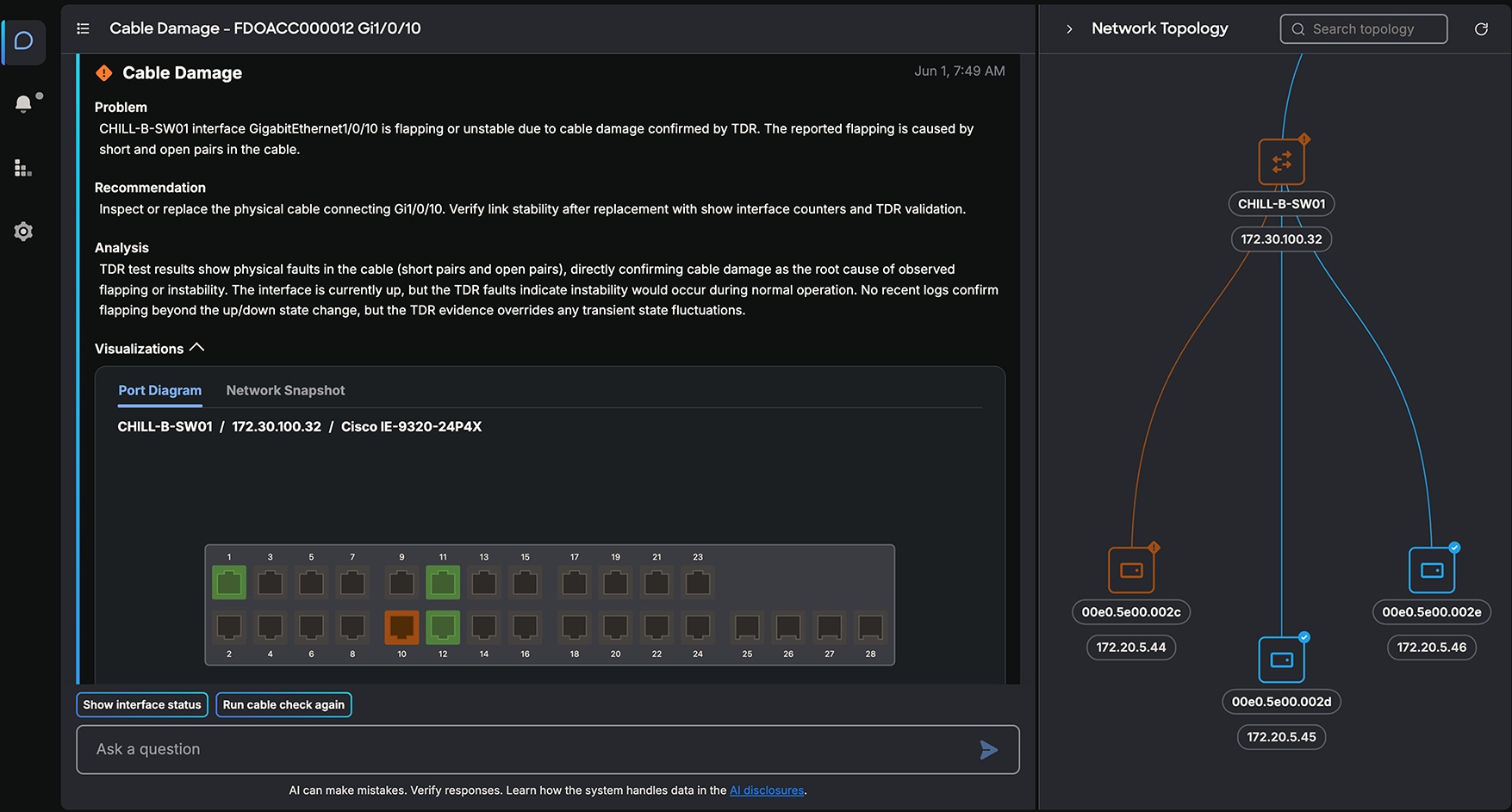
Alert with guided remediation
Table 1. Features and benefits
| Feature |
Benefit |
| Ambient monitoring |
● Alerts users before issues escalate into longer outages by continuously monitoring industrial network signals.
|
| Root-cause diagnosis with step-by-step remediation guidance |
● Identifies likely causes faster than manual investigation by correlating topology, device state, syslog, and configuration evidence.
● Helps frontline teams understand what happened and what to do next by using plain-language guidance, topology views, asset names, and operational context.
● Helps users validate findings before acting by showing how conclusions were determined from verified network data.
|
| Natural-language conversational interface |
● Lets users ask natural-language questions about devices, connections, VLANs, and network state without logging into switches.
|
| Interactive network topology |
● Helps teams identify affected switches, interfaces, endpoints, and locations by showing searchable topology maps.
|
Troubleshooting OT network issues
AI Troubleshooting for Industrial Networks focuses on common access-layer and industrial network issues that slow down industrial production. Instead of presenting technicians/OT teams with a long list of raw alarms, the agent groups related evidence, identifies the likely fault domain, and explains what to check next.
Table 2. Issue coverage
| Issue detected |
Examples |
| Endpoint offline or degraded |
Port down, err-disabled port, endpoint moved, VLAN mismatch, device unreachable, duplex or error issues. |
| Link, cable, and media faults |
Link down or flapping, copper cable faults, fiber/SFP issues, unsupported or degraded transceivers. |
| Power over Ethernet (PoE) and endpoint power |
PoE disabled, power budget exhausted, port power limit issue, powered device not detected. |
| Switch power and health |
Power supply issue, input power loss, redundancy degraded, voltage warning, CPU or memory pressure. |
| Power-loss events |
Dying gasp, input-power fault, device dark after power loss or unplugging. |
Proactive troubleshooting for common OT network issues
AI Troubleshooting for Industrial Networks detects common access-layer and industrial network issues, gathering evidence necessary to determine the most likely root cause. Initial troubleshooting detection capabilities include offline assets, damaged cable or SFP issues, VLAN mismatch, duplex mismatch, Layer 2 NAT misconfiguration, PoE failures, switch health, and switch power supply issues.
When an issue is detected, the agent immediately alerts users with detailed diagnosis, root cause analysis, and guided steps to resolve the issue within an intuitive, natural-language spoken interface. For physical-layer issues, the guidance can help a floor technician act directly. For configuration or network operations issues, it gives network experts above the escalation chain the evidence they need to respond quickly instead of diagnosing the issue from scratch. Industrial context that maps the network to the factory floor.
The agent was purpose-built for the factory floor, extracting network data and presenting insights in simple language that OT teams can easily understand and take action, regardless of their level of networking expertise. It uses topology, connected assets, customizable asset names, and switch faceplate visualizations to help users move from a production symptom to the relevant switch, port, endpoint, or network path.
Network experts can tag devices with familiar names, locations, and production areas, such as line names or machine names. OT users can then ask questions using operational language instead of IP addresses or hostnames.
Grounded AI with deterministic troubleshooting logic
AI Troubleshooting for Industrial Networks is designed to constrain AI reasoning to verified facts from the industrial network. It retrieves live and historical evidence from switch command output, syslog messages, topology, and configurations, then uses validated troubleshooting workflows based on Cisco industrial networking expertise.
Every conclusion is traceable to the steps and evidence used to determine it, so users can see the raw output and diagnostic path behind a recommendation.
On-premises operation for industrial data control
The tool is installed as a virtual machine at the customer site. Customer network credentials, topology, logs, configurations, and sensitive operational data stay on-premises. Quality metrics generated by the agent are sent to Cisco to support performance and quality tracking.
Platform Support/Compatibility
AI Troubleshooting for Industrial Networks can help monitor and solve network issues related to the following Cisco Industrial Ethernet switches:
● Cisco Catalyst IE3100 Rugged Series switches
● Cisco Catalyst IE3100 Heavy Duty Series switches
● Cisco Catalyst IE3200 Rugged Series switches
● Cisco Catalyst IE3300 Rugged Series switches
● Cisco Catalyst IE3400 Rugged Series switches
● Cisco Catalyst IE3400 Heavy Duty Series switches
● Cisco IE3500 Rugged Series switches
● Cisco IE3500 Heavy Duty Series switches
● Cisco Catalyst IE9300 Rugged Series switches
Table 3. Product specifications
| Category |
Specification |
| Deployment model |
On-premises virtual machine deployed at the customer site |
| Deployment location |
Industrial zone (level 3 of Purdue model) and Area Zone (level 2 of Purdue model) |
| Network access model |
Local network device access; there is no external access to network devices |
| Data collection |
Show commands, syslog messages, configurations, and LLDP |
| Security controls |
Role-based access control with administrator and regular user roles |
| Cloud tethering |
Uses Cisco Cloud for agent software updates and to send agent operational telemetry |
AI Troubleshooting for Industrial Networks is deployed as a virtual image that runs on supported customer-managed data center at the industrial site.
Virtual appliance specifications
Table 4. Virtual appliance specifications
| Characteristic |
Minimum requirements |
| CPU |
x86 server CPU with 32 cores |
| Memory |
48 GB RAM |
| Storage |
70 GB disk space |
| Virtualization software |
● VMware ESXi (8.0 Update 3 and above)
● Nutanix (Prism Central pc.2024.3.1 and above)
|
System scale
Table 5. System scale
| Item |
Supported scale |
| Maximum number of switches per agent instance |
50 |
| Maximum number of endpoints per agent instance |
600 |
Operational requirements
Table 6. Operational requirements
| Requirement |
Description |
| Deployment package |
Virtual machine images provided by Cisco |
| Monitored Switch firmware |
Cisco IOS® XE |
| Application domain |
Requires an application Fully Qualified Domain Name (FQDN). If DNS is not available, |
| Industrial network connectivity |
The agent requires SSH connectivity to supported local switches and an account authorized to execute the required show commands (Cisco IOS privilege level 7 or higher, or equivalent command authorization). |
| Cloud tether access |
Cloud software updates and system performance monitoring require outbound access to Cisco cloud services on secure port 443 and an API key provided by Cisco. The agent must be connected to the cloud tether. If tether connection lost, |
| Syslog |
Switches can forward syslog messages directly to the agent or through a syslog server. |
| Topology discovery |
LLDP must be enabled; it is used to build network topology and connected asset context. |
| Operational data residency |
Customer credentials, topology, logs, configurations, and sensitive operational |
Licensing, ordering, and warranty
Licensing
AI Troubleshooting for Industrial Networks is currently offered at no charge for a 3-year term. Refer to Cisco General Terms and Offer Supplemental Terms for more details.
Ordering Information
To download AI Troubleshooting for Industrial Networks visit https://www.software.cisco.com.
Services from Cisco and our certified partners can help industrial organizations assess, deploy, and operationalize AI Troubleshooting for Industrial Networks. Cisco and partner experts can support planning, integration, enablement, and ongoing optimization so teams can improve network operations while aligning with industrial requirements.
For more information, visit https://www.cisco.com/go/services.
Flexible payment options make it easier than ever to get the Cisco technology you need.
Cisco Capital® delivers leading-edge payment solutions, allowing you to stay focused on what is most important: your business. We can help you drive business outcomes, accelerate innovation and digital transformation, and adapt to market dynamics faster with flexible payment options tailored to your specific business needs. Reduce the total cost of ownership, conserve capital and accelerate growth. We help you realize the full benefits of Cisco technology, today and in the future, and pay for it in the way that best suits your business requirements. Whether you are looking for a pay-as-you-consume model, or need to bundle Cisco hardware, software, services, subscriptions, and third-party solutions, learn more about how Cisco Capital can help.
Learn how AI Troubleshooting for Industrial Networks can help your team maximize industrial network uptime and reduce escalations with AI-guided troubleshooting.
Contact your Cisco account team or email askiot@cisco.com.
● Video: Maximize production uptime with AI Troubleshooting for Industrial Networks.
● Blog: Maximizing Uptime: The Power of AI Troubleshooting for Industrial Networks.
● Industrial IoT network management and automation.