SD-WAN IKEv2 and Post-Quantum Encryption

Objective

This reference provides information about configuring and verifying SD-WAN IKEv2 and post-quantum encryption.

Feature history: SD-WAN IKEv2 and Post-Quantum Encryption

Objective

This reference provides information about the features and enhancements that have been introduced for SD-WAN IKEv2 and Post-Quantum Encryption across different software releases.

Feature name

Release information

Description

SD-WAN IKEv2 and post-quantum encryption

Cisco IOS XE Catalyst SD-WAN Release 26.2.1

Cisco Catalyst SD-WAN Manager Release 26.2.1

Enables Cisco IOS XE Catalyst SD-WAN devices to use Internet Key Exchange Version 2 (IKEv2) to establish and refresh encryption keys directly with each other for IPsec data-plane tunnels.

The feature also supports two post-quantum encryption options: post-quantum cryptography (PQC) and post-quantum preshared keys (PPK).

About SD-WAN IKEv2 and post-quantum encryption

The feature introduces Internet Key Exchange Version 2 (IKEv2) key management for Cisco Catalyst SD-WAN IPsec data-plane tunnels. Instead of relying on the SD-WAN controllers to establish and refresh the data-plane keys, the Cisco IOS XE Catalyst SD-WAN devices negotiate and refresh the keys directly with each other. If the devices lose controller connectivity after they learn the required routing and peer information, they can continue to refresh the IPsec keys directly.

Post-quantum encryption options

When you select PQC, the IKEv2 proposal uses ML-KEM-768 or ML-KEM-1024. ML-KEM-768 is the default. You can allow fallback to a classical algorithm or require PQC.

PPK can be dynamic or manual. With dynamic PPK, each edge device retrieves post-quantum preshared keys from an external SKIP or quantum-key-distribution key source. With manual PPK, you configure the same PPK locally on both peers and an external key source is not required. IKEv2 mixes the PPK with the normal key derivation result.

For information about manual and dynamic PPK, see https://www.cisco.com/c/en/us/td/docs/routers/ios-xe/security-vpn/security-vpn/m-sec-cfg-quantum-encryption-ppk.html

Benefits

  • Uses standards-based IKEv2 to establish and rekey IPsec Security Associations between Cisco IOS XE Catalyst SD-WAN devices.

  • Supports direct key refresh during an extended loss of controller connectivity.

  • Provides post-quantum readiness through ML-KEM-based PQC or post-quantum preshared keys.

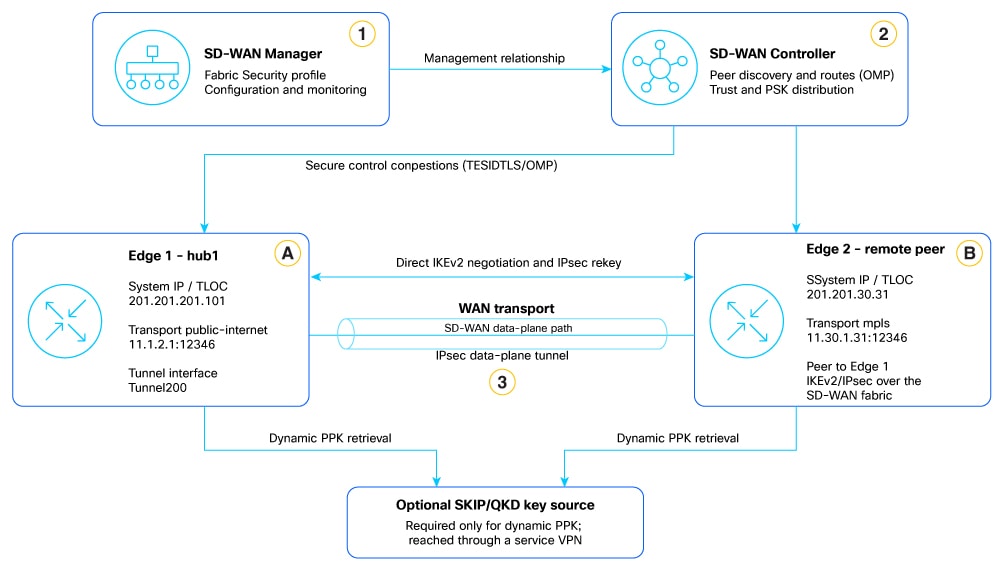
SD-WAN IKEv2 Topology

This example shows two Cisco IOS XE Catalyst SD-WAN devices connected across the WAN. Cisco SD-WAN Manager provides centralized configuration, and the Cisco Catalyst SD-WAN Controller establishes trust and supplies the preshared key used to authenticate the peers. The Cisco IOS XE Catalyst SD-WAN devices then negotiate IKEv2/IPsec security associations directly to protect data-plane traffic between the sites.

Apply the IKEv2 and IPsec configuration to both Cisco IOS XE Catalyst SD-WAN devices. For more details, see Configure SD-WAN IKEv2 and post-quantum encryption using Cisco SD-WAN Manager.

Prerequisites

Permit the SD-WAN custom UDP port range 12346-12445 for IKEv2 negotiation and IPsec data-plane traffic through intermediate firewalls, NAT devices, cloud security controls, and ISP policies.

  • For ML-KEM-based PQC, use a supported Cisco 8000 Series Secure Router.

  • For manual PPK, configure the same PPK ID and secret on both peers. An external SKIP or quantum-key-distribution key source is not required.

Restrictions

The initial release supports dynamic preshared-key authentication for device-to-device IKEv2 tunnel establishment.

  • The SD-WAN IKEv2 data plane primarily uses UDP ports 12346-12445 rather than the traditional IKE/IPsec UDP port 4500.

  • Switching the IPsec keying method requires a router reload for the change to take effect.

  • ML-KEM-based PQC is supported only on Cisco 8000 Series secure routers.

Configure SD-WAN IKEv2 and post-quantum encryption using Cisco Catalyst SD-WAN Manager

Select IKEv2 as the data-plane IPsec keying method and optionally enable PQC or PPK.

Follow these steps to configure SD-WAN IKEv2 and post-quantum encryption using Cisco SD-WAN Manager.

Procedure


Step 1

From Cisco SD-WAN Manager, choose Configuration > Configuration Groups.

Step 2

Edit the configuration group, and open System Profile.

Step 3

Select Add New Feature, select Fabric Security, and select Add New.

Step 4

Set IPSec Keying Method to IKEv2.

When you switch from Pairwise Keying or Non-Pairwise Keying to IKEv2, Cisco SD-WAN Manager displays the following warning:

Switching the IPsec keying method requires a router reload for the change to take effect

Step 5

Configure the settings described in the following table.

Field

Description

IPSec Keying Method

Select IKEv2 to use IKEv2 to manage encryption keys for IPsec data-plane tunnels.

Rekey Time (seconds)

Enter the IPsec Security Association lifetime, in seconds. The supported range is 3,600 seconds (1 hour) through 86,400 seconds (24 hours). The default is 43,200 seconds (12 hours).

Post quantum encryption

Select the post-quantum encryption option to use: None, PQC, or PPK. A change to this field takes effect during the next IKEv2 authentication. To trigger IKEv2 authentication, disable and reenable the tunnel interface or enter the clear crypto session command.

  • None: Select None to use IKEv2 without enabling PQC or PPK.

  • PQC: Select PQC to use an ML-KEM algorithm during IKEv2 key negotiation.

    • Fallback to non pqc: Enable this field to allow the devices to use a classical algorithm if they cannot negotiate PQC. Disable it to require PQC.

    • Algorithm: Select the ML-KEM algorithm to use: ML-KEM-768 or ML-KEM-1024. ML-KEM-768 is the default.

  • PPK: Select PPK to configure dynamic PPK retrieval from an external SKIP or quantum-key-distribution key server. For manual PPK, select None and use the CLI add-on described in this topic.

    • Service VPN: Enter the service VPN identifier that provides connectivity to the external key server.

    • IP Address: Enter the IPv4 address of the external SKIP or quantum-key-distribution key server.

    • TCP Port: Enter the TCP port used to establish the secure SKIP connection to the external key server.

    • TLS PSK ID: Enter the identifier used for TLS preshared-key authentication between the device and the SKIP server.

    • TLS PSK Key: Enter the preshared key used to authenticate the device and encrypt the secure connection for retrieving and managing PPKs.

Step 6

Save the Fabric Security configuration, and deploy the configuration group.


Cisco SD-WAN Manager deploys the IKEv2 and IPsec configuration, and the device running configuration contains security ipsec ikev2 and the predefined SD-WAN IKEv2 objects.

What to do next

If you changed the keying method from PWK or NPWK, reboot each affected Cisco IOS XE Catalyst SD-WAN device. Then verify the BFD, SD-WAN, IKEv2, and IPsec sessions.

Configure SD-WAN IKEv2 and post-quantum encryption using the CLI

Configure IKEv2 as the SD-WAN IPsec key-management method and configure the IKEv2 and IPsec objects supplied for the SD-WAN data plane.

Follow these steps to configure SD-WAN IKEv2 and post-quantum encryption using the CLI.

Before you begin

  • Obtain privileged CLI access to the Cisco IOS XE Catalyst SD-WAN device.

  • Confirm that the device runs a release and platform that support SD-WAN IKEv2.

  • Plan a maintenance window. You must reload the device after you enable IKEv2 for the SD-WAN IPsec data plane.

Procedure


Step 1

Enter global configuration mode.

Device# config-transaction
Device(config)#

Step 2

Configure ESP integrity handling and enable IKEv2 as the SD-WAN IPsec key-management method.

Device(config)# security ipsec
Device(config-ipsec)# integrity-type esp
Device(config-ipsec)# ikev2

Step 3

Configure the SD-WAN IKEv2 proposal.

Device(config)# crypto ikev2 proposal ikev2_proposal_sdwan
Device(config-ikev2-proposal)# encryption aes-gcm-256
Device(config-ikev2-proposal)# pqc mlkem768 optional
Device(config-ikev2-proposal)# group 19
Device(config-ikev2-proposal)# prf sha256

Step 4

Configure the SD-WAN IKEv2 policy.

Device(config)# crypto ikev2 policy ikev2_policy_sdwan
Device(config-ikev2-policy)# match application sdwan
Device(config-ikev2-policy)# proposal ikev2_proposal_sdwan

Step 5

Configure the SD-WAN IKEv2 profile.

Device(config)# crypto ikev2 profile ikev2_profile_sdwan
Device(config-ikev2-profile)# authentication local pre-share
Device(config-ikev2-profile)# authentication remote pre-share
Device(config-ikev2-profile)# lifetime 86400
Device(config-ikev2-profile)# match identity remote any
Device(config-ikev2-profile)# match application sdwan
Device(config-ikev2-profile)# nat force-encap

Step 6

Configure the IKEv2 cookie-challenge threshold and fragmentation MTU.

Device(config)# crypto ikev2 cookie-challenge 100
Device(config)# crypto ikev2 fragmentation mtu 1400

Step 7

Configure the SD-WAN IPsec transform set.

Device(config)# crypto ipsec transform-set ipsec_ts_sdwan esp-gcm 256
Device(cfg-crypto-trans)# esn
Device(cfg-crypto-trans)# mode transport

Step 8

Configure the SD-WAN IPsec profile.

Device(config)# crypto ipsec profile ipsec_profile_sdwan
Device(ipsec-profile)# set security-association lifetime kilobytes disable
Device(ipsec-profile)# set security-association lifetime seconds 43200
Device(ipsec-profile)# set security-association replay window-size 512
Device(ipsec-profile)# set transform-set ipsec_ts_sdwan
Device(ipsec-profile)# set pfs
Device(ipsec-profile)# set ikev2-profile ikev2_profile_sdwan

Step 9

Commit the configuration. If you changed the IPsec keying method, reload the device.

Device(config)# commit
Device(config)# end
Device# reload

After the reload, the running configuration contains the SD-WAN IKEv2 proposal, policy, profile, transform set, and IPsec profile. The IPsec Security Association lifetime is 43,200 seconds.

Configure dynamic PPK

If the deployment uses an external SKIP or QKD source, add the dynamic PPK keyring and SKIP client configuration from the Beta Guide.

Procedure


Configure the dynamic PPK keyring and SKIP client.

crypto ikev2 keyring sdwan-ppk-keyring
peer ipv4
   address 0.0.0.0 0.0.0.0
ppk dynamic skip-client-cfg
!
peer ipv6
   address ::/0
ppk dynamic skip-client-
cfg!
!
crypto ikev2 profile ikev2_profile_sdwan
  keyring ppk sdwan-ppk-keyring
!
crypto skip-client skip-client-cfg
  vrf <service-vpn-id>
  server ipv4 <server-ip-address> port <tcp-port>
psk id <tls-psk-id> key 0 <tls-psk>
!

Replace the service VPN, server address, port, TLS PSK ID, and TLS PSK placeholders with deployment-specific values.

Configure manual PPK using a CLI add-on

For manual PPK, select None for the Manager PPK option and add the following CLI add-on to both peers. Use the same PPK ID and secret on both devices.

Procedure


Configure the manual PPK CLI add-on on both peers.

crypto ikev2 keyring IPSEC-PPK
peer IPSEC-PPK
    address <peer-address>
ppk manual id IPSEC-PPK key <manual-
ppk>!
!
crypto ikev2 profile ikev2_profile_sdwan
keyring ppk IPSEC-PPK
!

Deploy and validate manual PPK using a CLI add-on

In the Fabric Security parcel, select IKEv2 and set Post quantum encryption to None. Create the CLI add-on shown on the preceding page, use the same PPK ID and secret on both peers, attach it to both target routers, and deploy the configuration.

Procedure


Validate the CLI add-on and the IKEv2 session.

Device# show sdwan running-config crypto
crypto ikev2 keyring IPSEC-PPK
 peer IPSEC-PPK
  address <peer-address>
  ppk manual id IPSEC-PPK key 6 <encrypted-manual-ppk>
crypto ikev2 profile ikev2_profile_sdwan
 keyring ppk IPSEC-PPK

Configure SD-WAN control-plane encryption with PQC ML-KEM

In Cisco Catalyst SD-WAN Manager, choose Configuration > Control Components > Common Control Component Settings > Security . Change Control Connection Protocol from DTLS to TLS, save the change, and deploy the control-component configuration. TLS 1.3 selects the supported key-exchange group during negotiation.

Procedure


Validate PQC ML-KEM on the router and controller.

Router# show sdwan control connections detail
protocol                                tls
protocol-version                        TLS1_3
cipher-name                             TLS_AES_256_GCM_SHA384
state                                   up [Local Err: NO_ERROR]
SSL handshake ephemeral group           N/A
SSL handshake negotiated group          p521_mlkem1024
Controller# show control connections detail | include group
SSL handshake ephemeral group           N/A
SSL handshake negotiated group          p521_mlkem1024

A negotiated group containing mlkem confirms post-quantum key exchange on the TLS control connection.


Verify PQC or PPK negotiation

Objective

This reference provides commands and sample output for verifying PQC or PPK negotiation and SD-WAN IKEv2 sessions.

Sample output for ML-KEM-based PQC

Device# show crypto ikev2 sa detailed
IPv4 Crypto IKEv2 SA
Tunnel-id Local                  Remote                       fvrf/ivrf   Status
1          50.50.50.2/12346      51.51.51.2/12346             none/none   READY
  Encr: AES-GCM, keysize: 256, PRF: SHA256, DH Grp:19
  Auth sign: PSK, Auth verify: PSK
  PQC Key Exchange: ML-KEM-768
  Status Description: Negotiation done
  Quantum-safe Encryption using PQC: ML-KEM-768
  PEER TYPE: IOS-XE

Confirm READY, PQC Key Exchange, and Quantum-safe Encryption using PQC.

Sample output for dynamic PPK

Device# show crypto ikev2 sa detailed
IPv4 Crypto IKEv2 SA
Tunnel-id Local                  Remote                       fvrf/ivrf   Status
3          10.1.30.30/12346      10.1.31.31/12346             none/none   READY
  Encr: AES-GCM, keysize: 256, PRF: SHA256, DH Grp:19
  Auth sign: PSK, Auth verify: PSK, QR
  Status Description: Negotiation done
  Quantum-safe Encryption using Dynamic PPK
  Local Sys Id: sks2 Remote Sys Id: sks1
  PEER TYPE: IOS-XE

Confirm READY, QR, Dynamic PPK, and the local and remote key-source IDs.

Sample output for manual PPK

Device# show crypto ikev2 sa detailed
IPv4 Crypto IKEv2 SA
Tunnel-id Local                  Remote                       fvrf/ivrf   Status
2          52.52.52.2/12346      53.53.53.2/12346             none/none   READY
  Encr: AES-GCM, keysize: 256, PRF: SHA256, DH Grp:19
  Auth sign: PSK, Auth verify: PSK, QR
  Status Description: Negotiation done
  Quantum-safe Encryption using Manual PPK
  PEER TYPE: IOS-XE

Confirm READY, QR, and Quantum-safe Encryption using Manual PPK.

Verify the SD-WAN IKEv2 session counters

Device# show crypto ikev2 sdwan stats
Total SDWAN IKEv2 sessions                      : 48
Total SDWAN IKEv2 active sessions               : 48
Total SDWAN IKEv2 inactive sessions             : 0
Total session create requests received          : 48
Total session create requests succeeded         : 48
Total session update requests received          : 10
Total session update requests succeeded         : 10
Total session updates - no change               : 10
Total BFD down notifications received           : 18
Total BFD down notifications skipped            : 18
Total create IPSec SA success notify sent       : 1123

Total delete IPSec SA notify sent               : 546
Total delete IPSec SA notify drops              : 10
Total remote behind SYMNAT detected             : 10
Total remote behind SYMNAT notification sent    : 10
Total remote behind SYMNAT processing done      : 10

Error Statistics:
  Sessions flapped due to DPD timeout           : 18

Display the available SD-WAN IKEv2 session filters

Device# show crypto ikev2 sdwan session ?
  detail        Show detailed session information
  flap-history Show session flap history
  remote-sysip Filter by remote system-ip
  tloc-pair     Filter by tloc-pair
  |             Output modifiers
  <cr>          <cr>

List the SD-WAN IKEv2 sessions

Device# show crypto ikev2 sdwan session
TLOC Pair                                              Local address:port
Remote address:port       WAN If   Tunnel If   SA Flow ID
mpls.172.16.255.15#mpls.10.1.1.1                      10.1.15.15:12346
192.161.1.1:12346         Gi1      Tu1         0x24000868
mpls.172.16.255.15#private1.10.1.1.1                   10.1.15.15:12346
192.161.1.3:12346         Gi1      Tu1         0x240008AE
biz-internet.172.16.255.15#biz-internet.10.1.1.1       15.20.100.1:12346
192.161.1.4:12346         Lo200    Tu14095200    0x24000870
biz-internet.172.16.255.15#public-internet.10.1.1.1    15.20.100.1:12346
192.161.1.2:12346         Lo200    Tu14095200    0x2400087E
biz-internet.172.16.255.15#silver.10.1.1.1             15.20.100.1:12346
192.161.1.5:12346         Lo200    Tu14095200    0x2400088C
public-internet.172.16.255.15#biz-internet.10.1.1.1    10.0.20.15:12346
192.161.1.4:12346         Gi2      Tu2         0x24000878

Display detailed SD-WAN IKEv2 session information

The following command displays detailed information for all SD-WAN IKEv2 sessions:

hub1# show crypto ikev2 sdwan session detail
TLOC Info:
  Remote TLOC            : mpls:201.201.30.31
  Local TLOC             : public-internet:201.201.201.101
IPSec Proxy :
  Remote address         : 11.30.1.31:12346
  Local address          : 11.1.2.1:12346
Route Info:
  Peer private address   : 11.30.1.31:12346
  Peer NAT address       : 11.30.1.31:12346
  Peer SYMNAT address    : 0.0.0.0:0
  My private address     : 11.1.2.1:12346
  My NAT address         : 11.1.2.1:12346
  My SYMNAT address      : 0.0.0.0:0
  SYMNAT Type            : no symnat
  SYMNAT Notify Pending  : FALSE
  Use private local      : FALSE
  Loopback               : FALSE
  Loopback bind          : FALSE
  Loopback bind i/f      : N/A
  Route via interface    : TenGigabitEthernet0/1/1
  WAN interface          : TenGigabitEthernet0/1/1
  Tunnel interface       : Tunnel200
Crypto map tag           : Tunnel200-sdwan-head-IPv4 66263
Crypto session handle    : 0x40001637
Outbound SA Flow ID      : 0x24010446
  BFD local discriminator: 23633
Local PSK tag            : CD935EDD
Local next PSK tag       : 376F50C5
Remote PSK tag           : 2CC3B04A
Remote next PSK tag      : 2CC3B04A
Remote PSK expire        : FALSE
Session Events:
Jul 27 12:21:36.053 UTC: [RP -> SDWAN IKEv2] session create request received
Jul 27 12:21:36.053 UTC: Crypto map head exists
Jul 27 12:21:36.053 UTC: Crypto map create succeeded
Jul 27 12:22:06.188 UTC: Notify IPSec SA create success
TLOC Info:
  Remote TLOC            : biz-internet:201.201.30.31
  Local TLOC             : public-internet:201.201.201.101
IPSec Proxy :
  Remote address         : 11.30.12.31:12346
  Local address          : 11.1.2.1:12346
Route Info:
  Peer private address   : 11.30.12.31:12346
  Peer NAT address       : 11.30.12.31:12346
  Peer SYMNAT address    : 0.0.0.0:0
  My private address     : 11.1.2.1:12346
  My NAT address         : 11.1.2.1:12346
  My SYMNAT address      : 0.0.0.0:0
  SYMNAT Type            : no symnat
  SYMNAT Notify Pending  : FALSE
  Use private local      : FALSE
  Loopback               : FALSE
  Loopback bind          : FALSE
  Loopback bind i/f      : N/A
  Route via interface    : TenGigabitEthernet0/1/1
  WAN interface          : TenGigabitEthernet0/1/1
  Tunnel interface       : Tunnel200
Crypto map tag           : Tunnel200-sdwan-head-IPv4 66265
Crypto session handle    : 0x40001E41
Outbound SA Flow ID      : 0x2400FAE0
  BFD local discriminator: 23643
Local PSK tag            : CD935EDD
Local next PSK tag       : 376F50C5
Remote PSK tag           : 2CC3B04A
Remote next PSK tag      : 2CC3B04A
Remote PSK expire        : FALSE
Session Events:
Jul 27 12:21:36.053 UTC: [RP -> SDWAN IKEv2] session create request received
Jul 27 12:21:36.053 UTC: Crypto map head exists
Jul 27 12:21:36.053 UTC: Crypto map create succeeded
Jul 27 12:22:06.188 UTC: Notify IPSec SA create success

Filter sessions by remote system IP

Use this command to inspect detailed session state for remote system IP 201.201.30.31:

hub1# show crypto ikev2 sdwan session remote-sysip 201.201.30.31 detail
TLOC Info:
  Remote TLOC            : mpls:201.201.30.31
  Local TLOC             : public-internet:201.201.201.101
IPSec Proxy :
  Remote address         : 11.30.1.31:12346
  Local address          : 11.1.2.1:12346
Route Info:
  Peer private address   : 11.30.1.31:12346
  Peer NAT address       : 11.30.1.31:12346
  Peer SYMNAT address    : 0.0.0.0:0
  My private address     : 11.1.2.1:12346
  My NAT address         : 11.1.2.1:12346
  My SYMNAT address      : 0.0.0.0:0
  SYMNAT Type            : no symnat
  SYMNAT Notify Pending  : FALSE
  Use private local      : FALSE
  Loopback               : FALSE
  Loopback bind          : FALSE
  Loopback bind i/f      : N/A
  Route via interface    : TenGigabitEthernet0/1/1
  WAN interface          : TenGigabitEthernet0/1/1
  Tunnel interface       : Tunnel200
Crypto map tag           : Tunnel200-sdwan-head-IPv4 66263
Crypto session handle    : 0x40001637
Outbound SA Flow ID      : 0x24010446
  BFD local discriminator: 23633
Local PSK tag            : CD935EDD
Local next PSK tag       : 376F50C5
Remote PSK tag           : 2CC3B04A
Remote next PSK tag      : 2CC3B04A
Remote PSK expire        : FALSE
Session Events:
Jul 27 12:21:36.053 UTC: [RP -> SDWAN IKEv2] session create request received
Jul 27 12:21:36.053 UTC: Crypto map head exists
Jul 27 12:21:36.053 UTC: Crypto map create succeeded
Jul 27 12:22:06.188 UTC: Notify IPSec SA create success

Filter sessions by TLOC pair

Use this command to inspect detailed session state for the specified local and remote TLOC pair:

hub1# show crypto ikev2 sdwan session tloc-pair public-internet.201.201.201.101#green.201.201.30.31 detail
TLOC Info:
  Remote TLOC            : green:201.201.30.31
  Local TLOC             : public-internet:201.201.201.101
IPSec Proxy :
  Remote address         : 11.30.15.31:12346
  Local address          : 11.1.2.1:12346
Route Info:
  Peer private address   : 11.30.15.31:12346
  Peer NAT address       : 11.30.15.31:12346
  Peer SYMNAT address    : 0.0.0.0:0
  My private address     : 11.1.2.1:12346
  My NAT address         : 11.1.2.1:12346
  My SYMNAT address      : 0.0.0.0:0
  SYMNAT Type            : no symnat
  SYMNAT Notify Pending  : FALSE
  Use private local      : FALSE
  Loopback               : FALSE
  Loopback bind          : FALSE
  Loopback bind i/f      : N/A
  Route via interface    : TenGigabitEthernet0/1/1
  WAN interface          : TenGigabitEthernet0/1/1
  Tunnel interface       : Tunnel200
Crypto map tag           : Tunnel200-sdwan-head-IPv4 66268
Crypto session handle    : 0x40001650
Outbound SA Flow ID      : 0x240111CE
  BFD local discriminator: 23658
Local PSK tag            : CD935EDD
Local next PSK tag       : 376F50C5
Remote PSK tag           : 2CC3B04A
Remote next PSK tag      : 2CC3B04A
Remote PSK expire        : FALSE
Session Events:
Jul 27 12:21:36.053 UTC: [RP -> SDWAN IKEv2] session create request received
Jul 27 12:21:36.053 UTC: Crypto map head exists
Jul 27 12:21:36.053 UTC: Crypto map create succeeded
Jul 27 12:22:06.188 UTC: Notify IPSec SA create success