Troubleshoot "Duplicate IP Address 0.0.0.0" Error Messages
Available Languages
Introduction
This document describes the "Duplicate IP Address 0.0.0.0" error message received by Microsoft Windows Vista and later version users and its resolution.
Prerequisites
Requirements
There are no specific requirements for this document.
Components Used
This document is not restricted to specific software and hardware versions.
The information in this document was created from the devices in a specific lab environment. All of the devices used in this document started with a cleared (default) configuration. If your network is live, ensure that you understand the potential impact of any command.
Problem
With Microsoft Windows Vista and later versions, Microsoft introduced a new mechanism used to detect duplicate addresses on the network when the Dynamic Host Configuration Protocol (DHCP) process occurs. This new detection flow is described in RFC 5227.
One of the triggers for this detection flow is defined in section 2.1.1.Here is the definition:
In addition, if during this period the host receives any Address Resolution Protocol (ARP) Probe where the packet target IP address is the address being probed for, and the packet sender hardware address is not the hardware address of any of the host interfaces, then the host similarly needs to treat this as an address conflict and signal an error to the configuring agent as above. This can occur if two (or more) hosts have, for whatever reason, been inadvertently configured with the same address, and both are simultaneously in the process of probing that address to see if it can safely be used.
Cisco IOS® uses the Address Resolution Protocol (ARP) Probe sourced from an address of 0.0.0.0 to maintain the IP device-tracking cache when the IP device track occurs, and a feature that uses it is enabled (such as 802.1x) on a Cisco IOS switch. The purpose of the IP device track is for the switch to obtain and maintain a list of devices connected to the switch by an IP address. The probe does not populate the track entry. It is used to activate and maintain the entry in the table after it is learned. This IP address is then used when an Access Control List (ACL) is applied to the interface to substitute the source address in the ACL with the client IP address. This function is critical when access lists are used with 802.1x or any other Flex-Auth function on Cisco switches.
Duplicate IP Address Cause
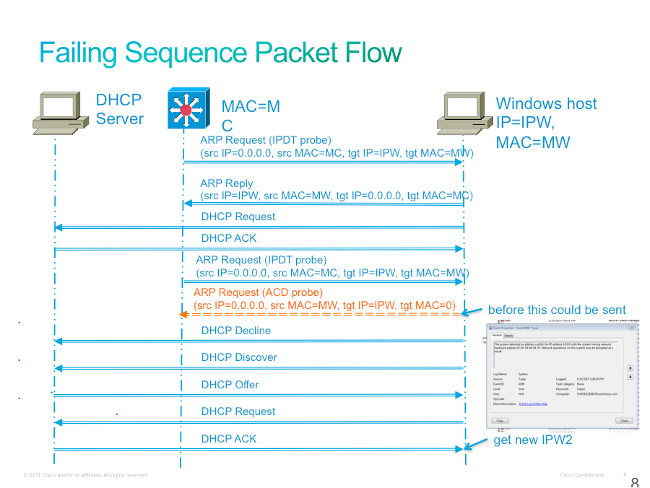
If the switch sends out an ARP Probe for the client while the Microsoft Windows PC is in its duplicate-address detection phase, then Microsoft Windows detects the probe as a duplicate IP address and presents a message that a duplicate IP address was found on the network for 0.0.0.0. The PC does not obtain an IP address, and the user must either manually release/renew the address, disconnect and reconnect to the network, or reboot the PC to gain network access.
This is an example of the failed packet sequence:
Solution
There are multiple methods that can be used to work around this issue. This a list of possible workarounds:
- The most effective method used to prevent this issue is to configure the switch so it sends a non-RFC compliant ARP Probe to source the probe from the Switch Virtual Interface (SVI) in the VLAN where the PC resides. If an SVI is configured for the Virtual Local Area Network (VLAN) and either of the two commands that are next are used, the sender IP address in the IP Device Tracking (IPDT) probes is never 0.0.0.0. Thus, it is certain the duplicate IP address error does not occur.
This command format is for older code versions:
ip device tracking probe use-svi
This configuration currently does not trigger the duplicate address detection error message in Microsoft Windows. The caveat to this method is that an SVI must exist on every switch in every VLAN where Microsoft Windows clients who run DHCP reside. This method is difficult to scale, so Cisco recommends to use the IP device-tracking probe delay as the primary method. SVI is not currently available on the 6500 Series Switch platform. This command was implemented in Cisco IOS Version 12.2(55)SE on 2900, 3500, and 3700 Series Switch platforms, and in Version 15.1(1)SG on the 4500 Series Switch platform.
This command format is for newer code versions:
ip device tracking probe auto-source fallback <host-ip> <mask> [override]
This latest Command Line Interface (CLI) command was introduced through Cisco bug ID CSCtn27420 in Cisco IOS Version 15.2(2)E. It was added to allow a user-defined ARP request source IP address instead of the requirement to use the default source IP address of 0.0.0.0. The new global command ip device tracking probe auto-source fallback 0.0.0.x 255.255.255.0 override allows the user to use the host address of 0.0.0.x in the subnet to avoid any duplicate IP address problems. If there is no SVI for a particular VLAN, the fallback host-ip is used to source the probe instead. - The primary non-SVI alternative used to work around the issue is to delay the probe from the switch so Microsoft Windows has time to finish the duplicate IP address detection. This is effective only on access ports and link-up scenarios. Enter this command to delay the probe:
ip device tracking probe delay 10
The RFC specifies a ten-second window for duplicate address detection. If you delay the device-tracking probe, it resolves the issue in nearly all cases. In addition to probe delay, the delay also resets when the switch detects a probe from the PC. For example, if the probe timer has counted down to five seconds and detects an ARP Probe from the PC, the timer resets to ten seconds. This window can be further reduced if you enable DHCP snoop as well, as this similarly resets the timer. In rare circumstances, the PC sends an ARP Probe milliseconds before the switch sends its probe, which still triggers a duplicate address message to the end user. This command was introduced in Cisco IOS Version 15.0(1)SE on 2900, 3500, and 3700 Series Switch platforms, Version 15.0(2)SG on the 4500 Series Switch platform, and Version 12.2(33)SXI7 on the 6500 Series Switch platform. - Another method used to resolve this issue involves a troubleshoot of the client to determine the reason duplicate address detection occurs so late after the link comes online. The switch has no way to determine the time this process occurs, so estimate the time set for the probe delay to prevent the conflict. To effectively troubleshoot the reason duplicate address detection occurs so late, further information on the behavior of the IP device-tracking probe is useful.
The ARP probe is sent under two circumstances:
- A link that is associated with a current entry in the IPDT database moves from a DOWN to an UP state.
- A link already in the UP state associated with an entry in the IPDT database has an expired probe interval.
ip device tracking probe interval <seconds>
The default interval is thirty seconds. To view this information, enter this command:
show ip device tracking all
After the initial entry moves from a DOWN to an UP state, no further probes are sent, unless the switch does not see traffic from that device for the probe-delay interval. Also, as stated earlier, the conflict only occurs if the PC sends out the ARP Probe milliseconds before the switch sends the ARP Probe (simultaneously).
IP Device Tracking = Enabled
IP Device Tracking Probe Count = 3
IP Device Tracking Probe Interval = 30
IP Device Tracking Probe Delay Interval = 0
------------------------------------------------------------
IP Address MAC Address Vlan Interface STATE
------------------------------------------------------------
10.0.0.1 a820.661b.b384 301 GigabitEthernet0/1 INACTIVE
Total number interfaces enabled: 1
Enabled interfaces:
Gi0/1
Related Information
Revision History
| Revision | Publish Date | Comments |
|---|---|---|
6.0 |
08-Jun-2026
|
Updated Title, Introduction, and Formatting. |
5.0 |
03-Dec-2024
|
Recertification, Formatting, SEO and machine translation |
4.0 |
21-Aug-2023
|
Recertification |
3.0 |
21-Jul-2022
|
Revised to improve readability and compliance with Cisco publishing requirements. |
1.0 |
18-Sep-2013
|
Initial Release |

 Feedback
Contact Cisco
- Open a Support Case

- (Requires a Cisco Service Contract)