Release Notes for UCC 5G UPF, Release 2026.01.h1
Available Languages
Bias-Free Language
The documentation set for this product strives to use bias-free language. For the purposes of this documentation set, bias-free is defined as language that does not imply discrimination based on age, disability, gender, racial identity, ethnic identity, sexual orientation, socioeconomic status, and intersectionality. Exceptions may be present in the documentation due to language that is hardcoded in the user interfaces of the product software, language used based on RFP documentation, or language that is used by a referenced third-party product. Learn more about how Cisco is using Inclusive Language.
- US/Canada 800-553-2447
- Worldwide Support Phone Numbers
- All Tools
 Feedback
 Feedback
Ultra Cloud Core - User Plane Function, Release 2026.01.h1
Ultra Cloud Core - User Plane Function, Release 2026.01.h1
This Release Notes identifies changes and issues related to the release of 5G User Plane Function (UPF).
The key highlights of this release include:
● Improved user experience and network cleanliness:Improved user experience and network cleanliness: Introduces support for Redirect Rewrite and TCP FIN/RST-Redirect URL using the ADC dynamic rule on the N7 interface.
● Enhanced 3GPP Lawful Interception:Enhanced 3GPP Lawful Interception: Introduces 3GPP LI and Cisco encoded LI support on combo UPF to comply with 3GPP standards for lawful interception.
For more information on UPF, see the Related resources section.
The following table provides EoL milestones for Cisco UCC UPF software:
Table 1. EoL milestone information for UCC UPF, Release 2026.01.h1
| Milestone |
Date |
| First Customer Ship (FCS) |
30-Jan-2026 |
| End of Life (EoL) |
30-Jan-2026 |
| End of Software Maintenance (EoSM) |
31-July-2027 |
| End of Vulnerability and Security Support (EoVSS) |
31-July-2027 |
| Last Date of Support (LDoS) |
31-July-2028 |
These milestones and the intervals between them are defined in the Cisco Ultra Cloud Core (UCC) Software Release Lifecycle Product Bulletin available on cisco.com.
This section provides a brief description of the new software features introduced in this release.
Table 2. New software features for UCC UPF, Release 2026.01.h1
| Product impact |
Feature |
Description |
| Software Reliability |
Redirect Rewrite and TCP FIN/RST |
The redirect URL Support is performed using the ADC dynamic rule on the N7 interface. This functionality is supported only for AES encryption. |
| Software Reliability |
3GPP LI for combo UPF |
The 3GPP LI and Cisco encoded LI support on combo UPF is introduced to adhere to the 3GPP standards for lawful interception. |
Changes in behavior
There are no behavior changes in this release.
This table lists the resolved issues in this specific software release.
Note: This software release may contain resolved bugs first identified in other releases. To see additional information, click the bug ID to access the Cisco Bug Search Tool. To search for a documented Cisco product issue, type in the browser: <bug_number> site:cisco.com
Table 3. Resolved issues for UCC UPF, Release 2026.01.h1
| Description |
|
| v21.28.mhx build is failing after fetching IPsec submodule repo. |
|
| BGP issue due to memory cache alloc. |
This table lists the open issues in this specific software release.
Note: This software release may contain open bugs first identified in other releases. To see additional information, click the bug ID to access the Cisco Bug Search Tool. To search for a documented Cisco product issue, type in the browser: <bug_number> site:cisco.com
Table 4. Open issues for UCC UPF, Release 2026.01.h1
| Bug ID |
Description |
| HTTP.URL Dynamic field macro not substituted when ruledef does not contain http URL clause. |
|
| Show CLI output representation change leading to validation failures. |
|
| UPF Sends HTTP 302 Redirect After QER Gate Status Set to CLOSED. |
This section lists compatibility information of the Cisco UCC software products that are verified to work with this version of the UCC UPF software.
Table 5. Compatibility information for UCC UPF, Release 2026.01.h1
| Product |
Supported Release |
| ADC Plugin |
2.74.gh1.2763 |
| RCM |
2026.01.0 |
| Ultra Cloud Core SMI |
2026.01.1.08 |
| Ultra Cloud SMF and cnSGWc |
2026.01.2 |
This section provides information about the release packages associated with UCC UPF software.
Table 6. Software packages for UCC UPF, Release 2026.01.h1
| Software Package |
Description |
Release |
| companion-vpc-2026.01.h1.zip.SPA.tar.gz |
Contains files pertaining to VPC, including SNMP MIBs, RADIUS dictionaries, ORBEM clients, etc. These files pertain to both trusted and non-trusted build variants. The VPC companion package also includes the release signature file, a verification script, the x.509 certificate, and a README file containing information on how to use the script to validate the certificate. |
2026.01.h1 (21.28.mh37.100214) |
| qvpc-si-2026.01.h1.bin.SPA.tar.gz |
The UPF release signature package. This package contains the VPC-SI deployment software for the UPF as well as the release signature, certificate, and verification information. Files within this package are nested under a top-level folder pertaining to the corresponding StarOS build. |
2026.01.h1 (21.28.mh37.100214) |
| qvpc-si-2026.01.h1.qcow2.zip.SPA.tar.gz |
The UPF release signature package. This package contains the VPC-SI deployment software for the UPF as well as the release signature, certificate, and verification information. Files within this package are nested under a top-level folder pertaining to the corresponding StarOS build. |
2026.01.h1 (21.28.mh37.100214) |
| NED Package |
The NETCONF NED package. This package includes all the yang files that are used for NF configuration. Note that NSO is used for the NED file creation. |
ncs-6.4.8.2-cisco-staros-cli-5.58 |
| NSO |
6.4.8 |
Use this link to download the NED package associated with the software.
StarOS version numbering system
The output of the show version command displays detailed information about the version of StarOS currently running on the ASR 5500 or Cisco Virtualized Packet Core platform.
Note: Starting 2024.01.0 release (January 2024), Cisco is transitioning to a new release versioning scheme. The release version is based on the current year and product. Refer to the figure for more details.
During the transition phase, some file names will reflect the new versioning whereas others will refer to the 21.28.x- based naming convention. With the next release, StarOS-related packages will be completely migrated to the new versioning scheme.
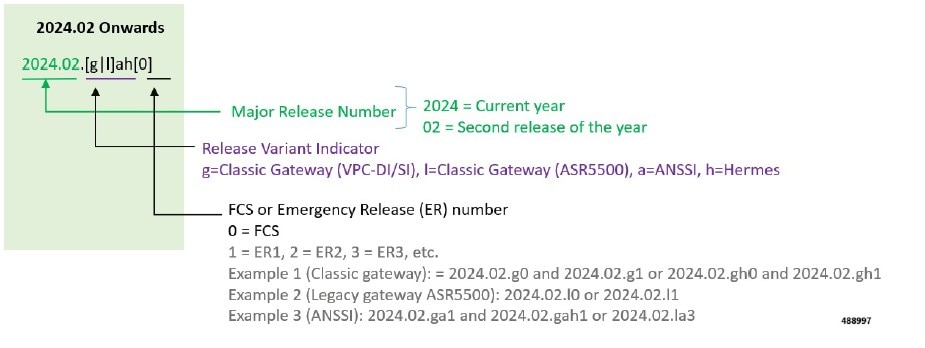
For any clarification, contact your Cisco account representative.
Cloud native product version numbering system
The show helm list command displays detailed information about the version of the cloud native product currently deployed.
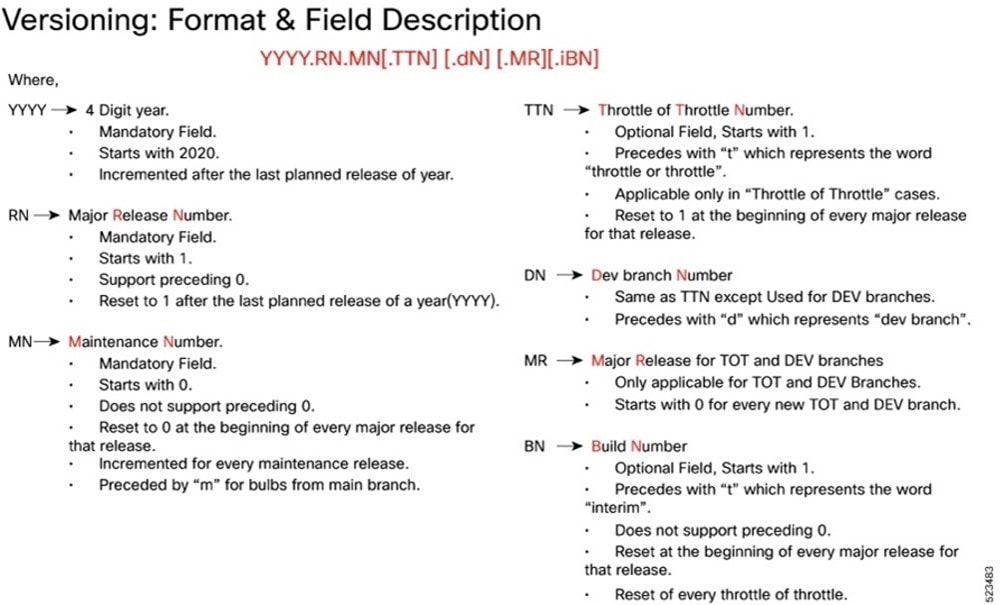
The appropriate version number field increments after a version has been released. The new version numbering format is a contiguous sequential number that represents incremental changes between releases. This format facilitates identifying the changes between releases when using Bug Search Tool to research software releases.
Software integrity version
To verify the integrity of the software image you have from Cisco, you can validate the SHA512 checksum information against the checksum identified by Cisco for the software.
Image checksum information is available through Cisco.com Software Download Details. To find the checksum, hover the mouse pointer over the software image you have downloaded.
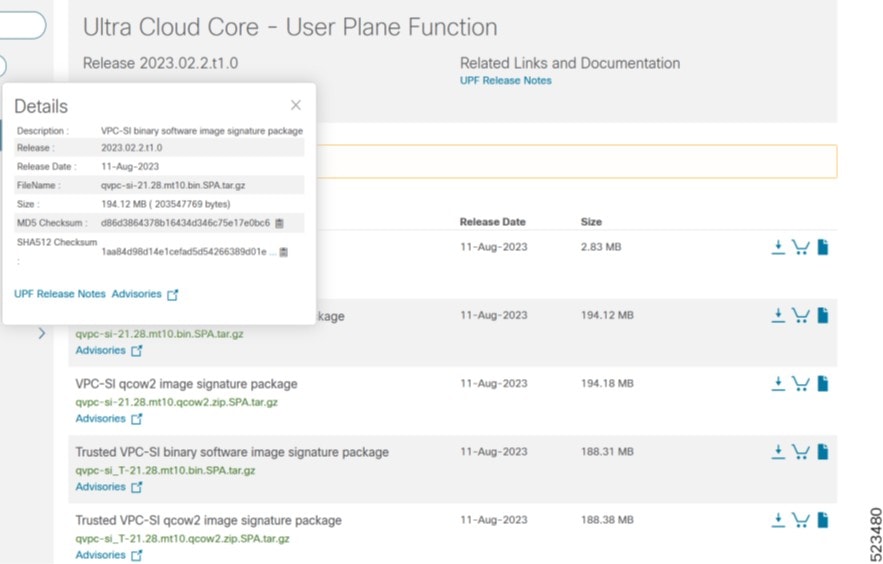
At the bottom you find the SHA512 checksum, if you do not see the whole checksum you can expand it by pressing the "..." at the end.
To validate the information, calculate a SHA512 checksum using the information in the following table and verify that it matches the one provided on the software download page.
To calculate a SHA512 checksum on your local desktop, see this table.
Table 7. SHA512 checksum calculation commands by operating system
| Operating System |
SHA512 checksum calculation command examples |
| Microsoft Windows |
Open a command line window and type the following command: > certutil.exe -hashfile <filename.extension> SHA512 |
| Apple MAC |
Open a terminal window and type the following command: $ shasum -a 512 <filename.extension> |
| Linux |
Open a terminal window and type the following command: $ sha512sum <filename.extension> OR $ shasum -a 512 <filename.extension> |
| Note: <filename> is the name of the file. <extension> is the file type extension (for example, .zip or .tgz). |
|
If the SHA512 checksum matches, you can be sure that no one has tampered with the software image or the image has not been corrupted during download.
If the SHA512 checksum does not match, we advise you not to attempt upgrading any systems with the corrupted software image. Download the software again and verify the SHA512 checksum again. If there is a constant mismatch, please open a case with the Cisco Technical Assistance Center.
Certificate validation
UPF software images are signed via x509 certificates. Please view the .README file packaged with the software for information and instructions on how to validate the certificates.
Table 8. Related resources and additional information
| Resources |
Link |
| UPF documentation |
|
| Ultra Cloud Core Subscriber Microservices Infrastructure |
|
| Ultra Cloud Core Session Management Function |
|
| Ultra Cloud Core Serving Gateway Function |
|
| Service Request and Additional information |
Cisco and the Cisco logo are trademarks or registered trademarks of Cisco and/or its affiliates in the U.S. and other countries. To view a list of Cisco trademarks, go to this URL: www.cisco.com/go/trademarks. Third-party trademarks mentioned are the property of their respective owners. The use of the word partner does not imply a partnership relationship between Cisco and any other company. (1110R)
Any Internet Protocol (IP) addresses and phone numbers used in this document are not intended to be actual addresses and phone numbers. Any examples, command display output, network topology diagrams, and other figures included in the document are shown for illustrative purposes only. Any use of actual IP addresses or phone numbers in illustrative content is unintentional and coincidental.
© 2026 Cisco Systems, Inc. All rights reserved.