UCC SMI Release Notes, Release 2026.03.1.08
Available Languages
Bias-Free Language
The documentation set for this product strives to use bias-free language. For the purposes of this documentation set, bias-free is defined as language that does not imply discrimination based on age, disability, gender, racial identity, ethnic identity, sexual orientation, socioeconomic status, and intersectionality. Exceptions may be present in the documentation due to language that is hardcoded in the user interfaces of the product software, language used based on RFP documentation, or language that is used by a referenced third-party product. Learn more about how Cisco is using Inclusive Language.
- US/Canada 800-553-2447
- Worldwide Support Phone Numbers
- All Tools
 Feedback
 Feedback
Ultra Cloud Core - Subscriber Microservices Infrastructure, Release 2026.03.1.08
Ultra Cloud Core - Subscriber Microservices Infrastructure, Release 2026.03.1.08
This Release Notes identifies changes and issues related to the release of Ultra Cloud Clore (UCC) Subscriber Management Infrastructure (SMI).
The key highlights of this release include:
· Hardware and resource optimization: Enhanced control over system performance through UPF deployment resource assignment (CPU, NUMA, memory, and network interfaces) and advanced firmware tuning for Mellanox 200G NICs.
· Observability and monitoring: Improved real-time insights into application health and performance via OpenTelemetry integration and the ability to stream CEE data directly to Kafka clusters for external operational integration. Grafana is upgraded to v12.
· Software reliability and security: Upgraded the container OS to Ubuntu 24.04, enforced strict password policies across the Host OS and Ops Center, and upgraded Docker to version 29.x.
· Unified observability and automated incident response: Deployment of the Cloud Shield event-based framework, which provides unified visibility and automated responses across CNDP layers.
· Deployment flexibility: Support for dynamic product identity via the MSG SMI Smart Agent, enhanced networking via ULB 5G control-plane IPAM integration, and more granular control over rolling upgrade configurations for multi-server environments.
· Power saving: Enables coordinated power management policies on Kubernetes control-plane nodes, allowing CPUs and network interfaces to enter energy-saving states during idle periods without impacting critical workloads.
For more information on SMI, see the Related resources section.
Release lifecycle milestones
This table provides EoL milestones for Cisco UCC SMI software:
Table 1. EoL milestone information for UCC SMI, Release 2026.03.1.08
| Milestone |
Date |
| First Customer Ship (FCS) |
23-July-2026 |
| End of Life (EoL) |
23-July-2026 |
| End of Software Maintenance (EoSM) |
21-Jan-2028 |
| End of Vulnerability and Security Support (EoVSS) |
21-Jan-2028 |
| Last Date of Support (LDoS) |
31-Jan-2029 |
These milestones and the intervals between them are defined in the Cisco Ultra Cloud Core (UCC) Software Release Lifecycle Product Bulletin available on cisco.com.
This section provides a brief description of the new software features introduced in this release.
Table 2. New software features for UCC SMI, Release 2026.03.1.08
| Product impact |
Feature |
Description |
| Hardware reliability |
UPF deployment resource assignment |
You can assign CPU cores, NUMA nodes, memory, and network interfaces to each UPF VM, allowing you to optimize performance and resource utilization for your workloads. All VMs on a node must use custom resource assignment when this option is enabled. |
| API experience |
OpenTelemetry integration for observability |
You can gain real-time insight into CNDP application health and performance by integrating OpenTelemetry, allowing collection of metrics and logs for unified monitoring and faster troubleshooting across CNDP-based deployments. Grafana is upgraded to v12. |
| Software reliability |
Upgrade of OS to Ubuntu 24 |
This release recommends upgrading the SMI base image and Cluster Manager to Ubuntu 24. Additionally, it is recommended to update the Inception Server to the latest SMI disk ISO and refresh the container images in smi-app, smi-library, smi-build, smi-shared, smi-incubator, and related components. You must upgrade the CEE to 2026.03.1.08 release along with base image upgrade and Docker to 29.x. |
| API experience |
Kafka output integration for CEE |
You can stream alert, performance, and health data directly from CEE to your Kafka clusters, enabling real-time integration with external operational systems. This feature allows you to map data streams to Kafka topics in JSON format and configure secure connectivity, operating alongside existing northbound methods. |
| Licensing process |
MSG SMI Smart Agent dynamic product identity support |
You can now enable smart licensing activation only after the MSG SMI Smart Agent retrieves and validates the product identity from a remote endpoint. This feature improves deployment flexibility and reliability when product identity is not available at installation. |
| Ease of setup |
ULB 5G control-plane IPAM integration |
You can select host interfaces for pod and service traffic with Cilium and enable IPAM to assign additional IP addresses to secondary pod network interfaces, supporting workloads that require multiple network connections in complex Kubernetes deployments. |
| Software reliability |
Rust-based CDL deployment |
You benefit from improved CPU and memory efficiency by enabling the CDL Rust implementation. The Rust-based CDL container delivers the same APIs and workflows as the Go-based version and can be activated with a configuration flag, allowing seamless upgrades and uninterrupted operations. |
| Software reliability |
Cloud Shield event-based rule framework for CNDP |
You gain unified event visibility and automated incident response across all CNDP layers, enabling faster troubleshooting and root cause analysis. This feature ingests, correlates, and acts on events from multiple sources, with system insights displayed in a centralized web dashboard. |
| Upgrade |
Optimized SMI rolling upgrade configuration for multi-server deployments |
You can customize rolling upgrade timeouts, including post-uncordon wait, drain grace period, and drain timeout, to match your cluster workloads. This feature gives you more flexibility and control, helping upgrades proceed reliably and according to your operational requirements. |
| Software reliability |
Strict password policy for host OS and Ops Center |
You can enhance password security across Host OS and ops-center by enabling a strict password policy. Once enabled for a cluster, you must use passwords that meet strengthened requirements, ensuring only compliant passwords are accepted during deployment and for any subsequent changes. |
| Hardware reliability |
Mellanox 200G NIC firmware tuning enhancement |
This feature allows you to flexibly adjust Mellanox 200G NIC firmware parameters by using a generic key/value model that enables advanced NIC optimization and supports high-scale deployments. You can specify settings at the node or resource level, and the system automatically validates and applies them during cluster synchronization. The existing configurations remain unchanged unless you add new parameters. |
| Hardware reliability |
IPM control-plane power saving |
You can reduce idle power usage on Kubernetes control-plane nodes by enabling coordinated power management policies that allow CPUs and network interfaces to enter deeper energy-saving states, while your critical workloads remain unaffected. |
| Software reliability |
Thanos Query frontend ingress for external metrics access |
You can securely access complete and deduplicated CNDP cluster metrics from external clients through the Thanos Query Frontend. Each external metrics query is authenticated and aggregated across all Prometheus replicas, resolving data gaps and providing consistent results. |
| Ease of setup |
Central CEE observability stack |
This feature lets you centrally collect, store, and visualize KPI and telemetry metrics from your network, using a unified observability stack. You gain accessible, historical metric data with integration to your dashboards, making network performance monitoring and validation simpler and more comprehensive. NOTE: This feature is a custom development available exclusively to specific customer environments. Please contact your Cisco account representative for further details regarding your specific deployment. |
| Ease of setup |
Support for separate installation of Longhorn and custom addons |
CNDP now supports separate installation of Longhorn and custom addons outside the cluster manager package. This reduces package size, shortens offline image loading time, and helps avoid unused addon images consuming cluster resources. You can deploy only the addons you need, making cluster setup faster, more flexible, and easier to manage across addon lifecycles. |
| Ease of setup |
Data Layer Manager |
This release introduces Data Layer Manager (DLM), a unified data services package for cloud-native Network Functions. DLM bundles key data services, including Vault, Redis/Valkey, MinIO, Postgres/pgEdge, Kafka, and CDL, into a single independently managed package with dedicated Ops-Center configuration and lifecycle management. You can simplify deployment, versioning, scaling, and upgrades of data layer services while supporting isolated, multi-instance, and geo-redundant deployments for 5G core Network Functions. |
This section provides a brief description of the behavior changes introduced in this release.
Table 3. Behavior changes for UCC SMI, Release 2026.03.1.08
| Description |
Behavior changes |
| Improved progress reporting for ordered deployment |
Previous behavior: When ordered Helm deployment was enabled, the deployment progress in the SMF shell/session only showed 0% at the start and 100% at completion. Intermediate progress updates were not displayed, making it difficult to monitor deployment status or troubleshoot during long-running operations. New behavior: With this update, ordered deployment now explicitly manages progress reporting. The CLI displays incremental, readiness-based progress updates throughout the ordered deployment flow, similar to standard deployments. Users can now see real-time progress (e.g., 0% → 10% → 40% → ... → 100%) during ordered deployment. Customer impact: This change improves visibility into deployment status, making it easier to monitor and troubleshoot long-running deployments in real time. |
| Improved system shutdown handling during ordered deployment |
Previous behavior: With ordered deployment enabled, issuing a system mode shutdown command during the deployment process did not take effect until all charts were fully deployed and the process reached 100%. Users could not stop the system or interrupt the deployment mid-way, which caused delays—especially when pods failed to come up or deployments stalled. New behavior: Cancellation checks have been added to the ordered deployment feature. Now, a system mode shutdown command is observed immediately, even while the ordered deployment flow is waiting between priority groups or during resource readiness polling. This allows users to stop the system ops-center at any point in the deployment process. Customer impact: Users can now promptly interrupt and shut down the system during ordered deployment, enabling faster troubleshooting and recovery in case of deployment issues or stalled pods. |
| Extended SW-RAID support for extra-storage volumes |
Previous behavior: The Software RAID (SW-RAID) implementation only supported the configuration of boot and data RAID arrays. It did not provide a mechanism to provision and mount multiple standalone (non-RAID) extra storage volumes on bare-metal nodes. New behavior: The SW-RAID implementation has been extended to support multiple extra-storage volumes. Operators can now define standalone disks (raid-level none) to be formatted and mounted automatically at boot. This is particularly useful for applications like MinIO that manage their own data redundancy and require direct access to multiple NVMe drives. Customer impact: Customers can now leverage additional NVMe storage capacity for applications that do not require RAID-level redundancy. Planning requirement: Disk allocation follows a strict order: Boot RAID (2 drives) is allocated first, followed by RAID volumes, and finally direct-disk (standalone) volumes. Deployment constraint: Extra-storage volumes must be configured before the initial bare-metal installation. These volumes are provisioned during OS initialization; therefore, adding or modifying extra-storage configurations requires a full node re-installation (re-deployment). Configuration rule: All mount-path configurations must start with /mnt/. |
| CPU isolation for topology-aware NRI policy |
Previous behavior: The topology-aware NRI policy did not explicitly configure availableResources. As a result, logical CPU 0 could be included in the CPUs available for NRI-managed Kubernetes workloads. On K8sKVM nodes, the policy could also consider CPUs outside the Kubernetes NUMA domain. New behavior: The topology-aware NRI policy now explicitly configures availableResources. Logical CPU 0 is excluded from the NRI-managed CPU set and remains available for base operating system and host housekeeping activities, similar to the BalloonsPolicy. On K8sKVM nodes, availableResources is further restricted to CPUs in the Kubernetes NUMA domain.
Customer impact: One fewer logical CPU is available to NRI-managed workloads on each node that uses the topology-aware NRI policy. No configuration change is normally required; however, customers with tightly sized CPU reservations should ensure that capacity calculations do not include CPU 0. On K8sKVM nodes, sufficient CPUs must be available in the Kubernetes NUMA domain because NRI will not allocate CPUs from the KVM NUMA domain. |
This table lists the resolved issues in this specific software release.
Note: This software release may contain resolved bugs first identified in other releases. To see additional information, click the bug ID to access the Cisco Bug Search Tool. To search for a documented Cisco product issue, type in the browser: <bug_number> site:cisco.com
Table 4. Resolved issues for UCC SMI, Release 2026.03.1.08
| Bug ID |
Description |
| Support abort functionality for tac-debug-pkg collection |
This table lists the open issues in this specific software release.
Note: This software release may contain bug fixes first introduced in other releases. To see additional information, click the bug ID to access the Cisco Bug Search Tool. To search for a documented Cisco product issue, type in the browser: <bug_number> site:cisco.com
Table 5. Open issues for UCC SMI, Release 2026.03.1.08
| Bug ID |
Description |
| NSS Pods Running as Root User Violates Least Privilege Principle |
|
| Invalid request: Admin action make-unconfigured-good is not supported on pass through controllers. |
|
| VM Pods move to pending state |
This section lists compatibility information of the Cisco UCC software products that are verified to work with this version of the UCC SMI software.
Table 6. Compatibility information for UCC SMI, Release 2026.03.1.08
| Product |
Supported Release |
| Cisco UCS C220 M8 |
4.3(6.260017) 6.0(2.260044) |
| Cisco UCS C220 M7 |
4.3(6.260017) 6.0(2.260044) |
| Cisco UCS C220 M6 |
4.3(6.260017) 6.0(2.260044) |
| Cisco UCS C220 M5 |
4.3(2.260007) |
This section provides information about the release packages associated with SMI.
Table 7. Software packages for UCC SMI, Release 2026.03.1.08
| Software Package |
Description |
Release |
| smi-install-disk.24.04.0-20260707.qcow2.SPA.tgz |
The application-level POD ISO image signature package for use with bare metal deployments. This package contains the base ISO image as well as the release signature, certificate, and verification information. |
24.04.0-20260707 |
| smi-install-disk.24.04.0-20260707.iso.SPA.tgz |
The application-level POD QCOW image signature package for use with bare metal deployments. This package contains the QCOW image as well as the release signature, certificate, and verification information. |
24.04.0-20260707 |
| cee-2026.03.1.08.SPA.tgz
|
The SMI Common Execution Environment (CEE) offline release signature package. This package contains the CEE deployment package as well as the release signature, certificate, and verification information. |
2026.03.1.08 |
| cluster-deployer-2026.03.1.08.SPA.tgz
|
The SMI Deployer image signature package for use with bare metal deployments. This package contains the Deployer image as well as the release signature, certificate, and verification information. |
2026.03.1.08 |
| dlm-1.1.12.4.SPA.tgz |
The Data Layer Manager (DLM) offline release signature package. This package contains the data store deployment files, including the release signatures, security certificates, and relevant verification information. |
1.1.12.4 |
| longhorn-2026.03.1.08.SPA.tgz |
The Longhorn add-on offline release signature package. |
2026.03.1.08 |
| NED package |
The NETCONF NED package. This package includes all the yang files that are used for configuration. |
ncs-6.4.8.3-cisco-smi-nc-1.1.2026.03.1.08.tar.SPA.tgz ncs-6.4.8.3-cisco-cee-nc-1.1.2026.03.1.08.tar.SPA.tgz
ncs-6.1.14-cisco-smi-nc-1.1.2026.03.1.08.tar.SPA.tgz ncs-6.1.14-cisco-cee-nc-1.1.2026.03.1.08.tar.SPA.tgz |
| NSO |
|
6.4.8.3 6.1.14 |
Cloud native product version numbering system
The show helm list command displays detailed information about the version of the cloud native product currently deployed.
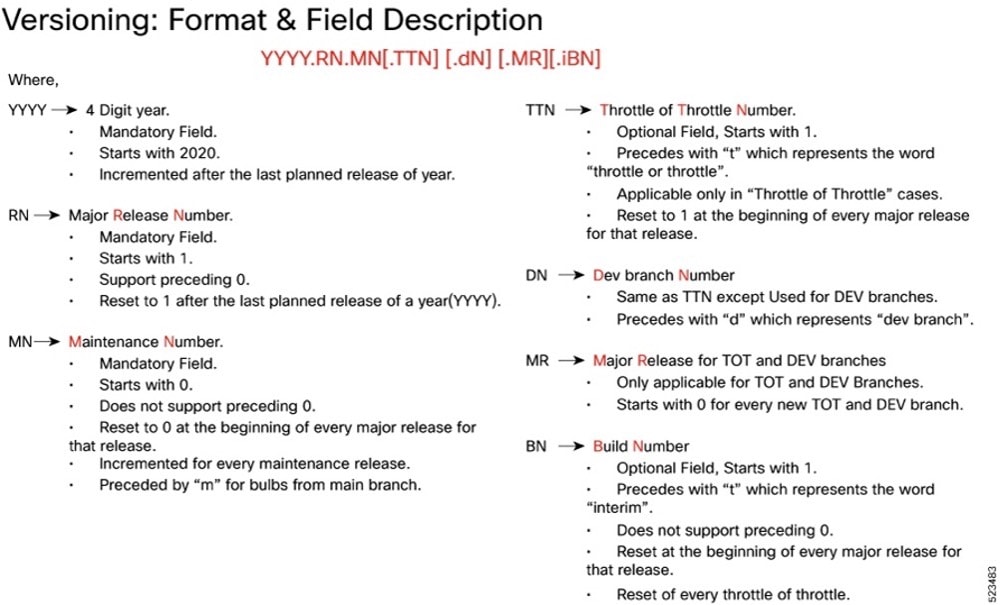
The appropriate version number field increments after a version has been released. The new version numbering format is a contiguous sequential number that represents incremental changes between releases. This format facilitates identifying the changes between releases when using Bug Search Tool to research software releases.
Software integrity version
To verify the integrity of the software image you have from Cisco, you can validate the SHA512 checksum information against the checksum identified by Cisco for the software.
Image checksum information is available through Cisco.com Software Download Details. To find the checksum, hover the mouse pointer over the software image you have downloaded.
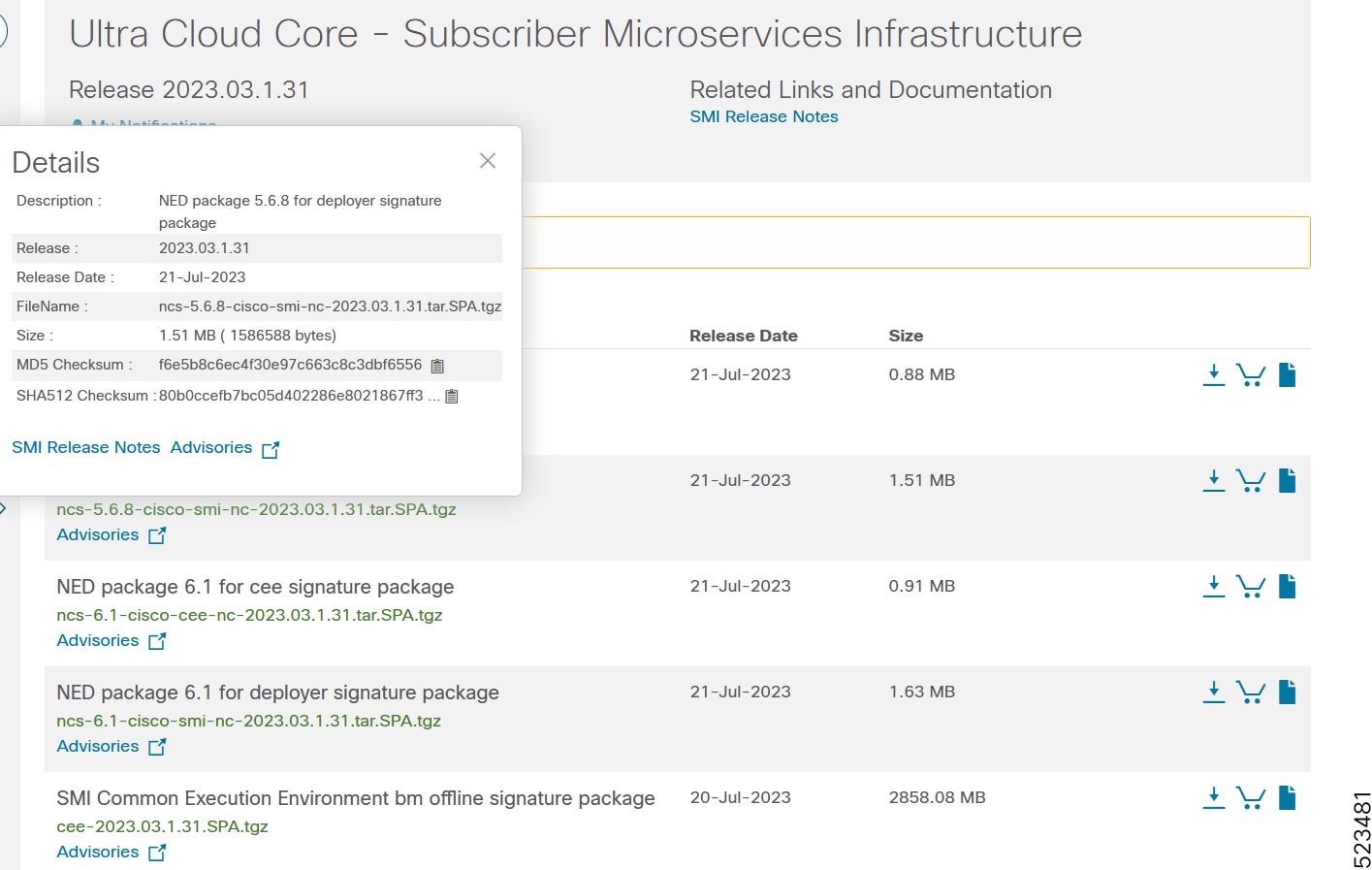
At the bottom you find the SHA512 checksum, if you do not see the whole checksum you can expand it by pressing the "..." at the end.
To validate the information, calculate a SHA512 checksum using the information in the following table and verify that it matches the one provided on the software download page.
To calculate a SHA512 checksum on your local desktop, see this table.
Table 8. Checksum calculations per operating system
| Operating System |
SHA512 checksum calculation command examples |
| Microsoft Windows |
Open a command line window and type the following command: > certutil.exe -hashfile <filename.extension> SHA512 |
| Apple MAC |
Open a terminal window and type the following command: $ shasum -a 512 <filename.extension> |
| Linux |
Open a terminal window and type the following command: $ sha512sum <filename.extension> OR $ shasum -a 512 <filename.extension> |
| Note: <filename> is the name of the file. <extension> is the file type extension (for example, .zip or .tgz). |
|
If the SHA512 checksum matches, you can be sure that no one has tampered with the software image or the image has not been corrupted during download.
If the SHA512 checksum does not match, we advise you to not attempt upgrading any systems with the corrupted software image. Download the software again and verify the SHA512 checksum again. If there is a constant mismatch, please open a case with the Cisco Technical Assistance Center.
Certificate validation
SMI software images are signed via x509 certificates. Please view the .README file packaged with the software for information and instructions on how to validate the certificates.
This table provides key resources and links to the support information and essential documentation for SMI.
Table 9. Related resources and additional information
| Resource |
Link |
| SMI documentation |
|
| Service request and additional information |
Cisco and the Cisco logo are trademarks or registered trademarks of Cisco and/or its affiliates in the U.S. and other countries. To view a list of Cisco trademarks, go to this URL: www.cisco.com/go/trademarks. Third-party trademarks mentioned are the property of their respective owners. The use of the word partner does not imply a partnership relationship between Cisco and any other company. (1110R)
Any Internet Protocol (IP) addresses and phone numbers used in this document are not intended to be actual addresses and phone numbers. Any examples, command display output, network topology diagrams, and other figures in the document are shown for illustrative purposes only. Any use of actual IP addresses or phone numbers in illustrative content is unintentional and coincidental.
© 2026 Cisco Systems, Inc. All rights reserved.